YOLO-World 模型#
YOLO-World 模型引入了一种先进的实时Ultralytics YOLOv8 方法,用于开放词汇检测任务。这项创新能够根据描述性文本检测图像中的任意目标。在保持竞争力的同时大幅降低计算需求,使 YOLO-World 成为众多视觉应用中的多用途工具。
观看: YOLO World 在自定义数据集上的训练工作流
概述#
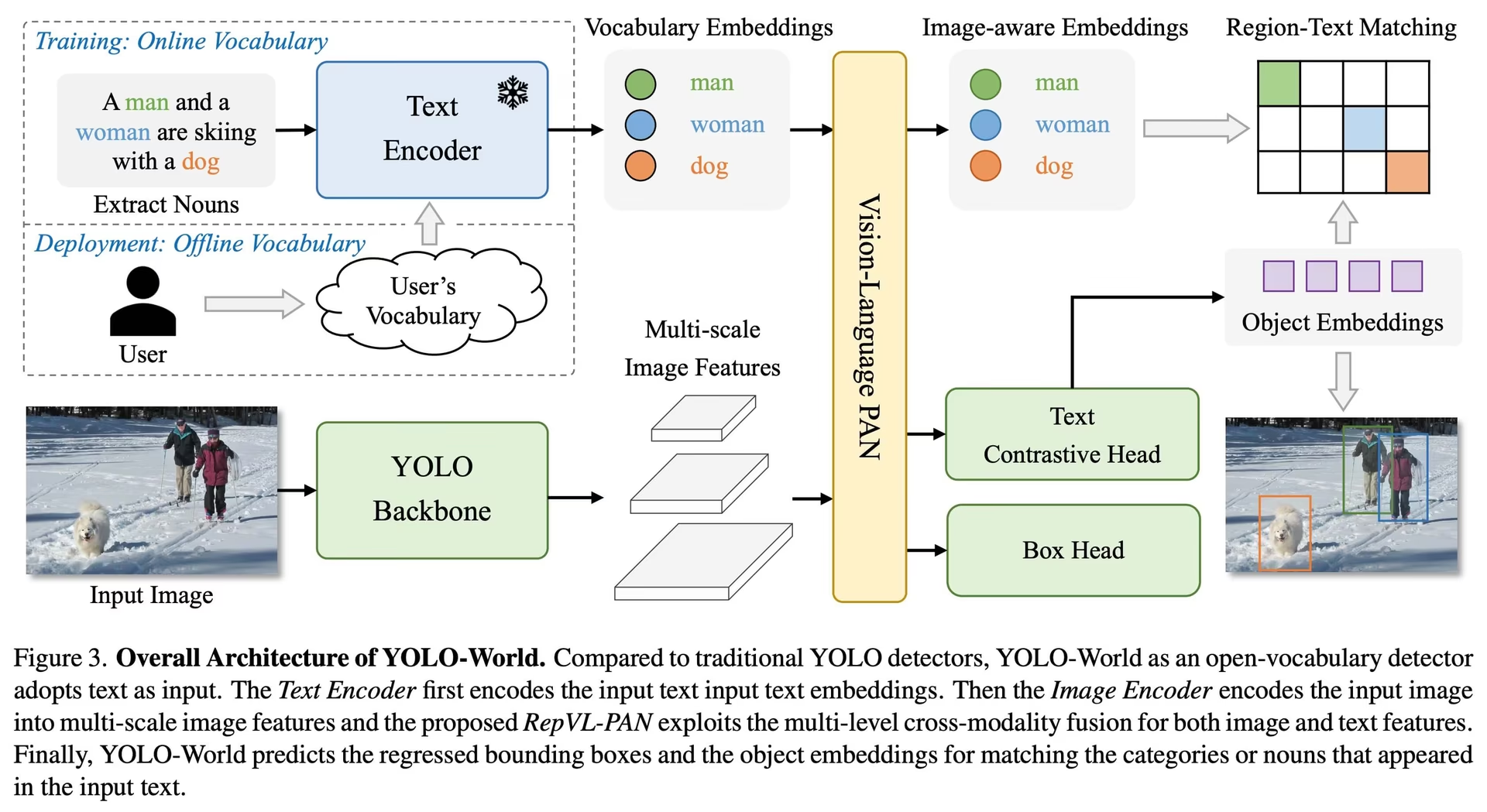
YOLO-World 解决了传统开放词汇检测模型面临的挑战:这类模型通常依赖计算开销巨大的 Transformer 模型,需要大量计算资源。这些模型还依赖预定义的目标类别,限制了它们在动态场景中的实用性。YOLO-World 为 YOLOv8 框架加入开放词汇检测能力,采用视觉语言建模,并在大规模数据集上进行预训练,从而以无与伦比的效率,在零样本场景中出色地识别多种目标。
对于还需要实例掩码、视觉提示或无提示模式的开放词汇任务,请参阅 YOLOE,它使用相同的 set_classes() API。
主要功能#
-
实时解决方案: YOLO-World 利用 CNN 的计算速度,提供快速的开放词汇检测解决方案,满足需要即时结果的行业需求。
-
效率与性能: YOLO-World 在不牺牲性能的前提下,大幅降低计算和资源需求。它是 SAM 等模型的有力替代方案,计算成本仅为其一小部分,足以支持实时应用。
-
使用离线词汇表进行推理: YOLO-World 引入了“先提示、后检测”策略,利用离线词汇表进一步提高效率。该方法支持使用预先计算的自定义提示(包括描述文本或类别),将其编码并存储为离线词汇表嵌入,从而简化检测流程。
-
由 YOLOv8 提供支持: YOLO-World 基于 Ultralytics YOLOv8 构建,利用实时目标检测的最新进展,以出色的精度和速度支持开放词汇检测。
-
基准测试表现出色: 在标准基准测试中,YOLO-World 在速度和效率方面超越了包括 MDETR 和 GLIP 系列在内的现有开放词汇检测器,展现了 YOLOv8 在单张 NVIDIA V100 GPU 上的卓越能力。
-
应用广泛: YOLO-World 的创新方法为众多视觉任务带来了新的可能性,相较于现有方法,速度提升了数个数量级。
可用模型、支持的任务和运行模式#
本节详细介绍了可用模型及其对应的预训练权重、支持的任务,以及与各种运行模式的兼容性,包括推理、验证、训练和导出;✅ 表示支持,❌ 表示不支持。
所有 YOLOv8-World 权重都直接从官方 YOLO-World 仓库迁移而来,体现了该仓库的卓越贡献。
| 模型类型 | 预训练权重 | 支持的任务 | 训练 | 验证 | 推理 | 导出 |
|---|---|---|---|---|---|---|
| YOLOv8s-world | yolov8s-world.pt | 目标检测 | ✅ | ✅ | ✅ | ❌ |
| YOLOv8s-worldv2 | yolov8s-worldv2.pt | 目标检测 | ✅ | ✅ | ✅ | ✅ |
| YOLOv8m-world | yolov8m-world.pt | 目标检测 | ✅ | ✅ | ✅ | ❌ |
| YOLOv8m-worldv2 | yolov8m-worldv2.pt | 目标检测 | ✅ | ✅ | ✅ | ✅ |
| YOLOv8l-world | yolov8l-world.pt | 目标检测 | ✅ | ✅ | ✅ | ❌ |
| YOLOv8l-worldv2 | yolov8l-worldv2.pt | 目标检测 | ✅ | ✅ | ✅ | ✅ |
| YOLOv8x-world | yolov8x-world.pt | 目标检测 | ✅ | ✅ | ✅ | ❌ |
| YOLOv8x-worldv2 | yolov8x-worldv2.pt | 目标检测 | ✅ | ✅ | ✅ | ✅ |
COCO 数据集上的零样本迁移#
| 模型类型 | mAP | mAP50 | mAP75 |
|---|---|---|---|
| yolov8s-world | 37.4 | 52.0 | 40.6 |
| yolov8s-worldv2 | 37.7 | 52.2 | 41.0 |
| yolov8m-world | 42.0 | 57.0 | 45.6 |
| yolov8m-worldv2 | 43.0 | 58.4 | 46.8 |
| yolov8l-world | 45.7 | 61.3 | 49.8 |
| yolov8l-worldv2 | 45.8 | 61.3 | 49.8 |
| yolov8x-world | 47.0 | 63.0 | 51.2 |
| yolov8x-worldv2 | 47.1 | 62.8 | 51.4 |
使用示例#
YOLO-World 模型可以轻松集成到你的 Python 应用中。Ultralytics 提供易于使用的 Python API 和 CLI 命令,帮助你简化开发流程。
观看: 使用 Ultralytics 的 YOLO-World 模型示例 | 开放词汇、无需提示等 🚀
训练用法#
我们强烈建议使用 yolov8-worldv2 进行自定义训练,因为它支持确定性训练,并且更容易导出为 ONNX 和 TensorRT 等格式。
使用 train 方法进行目标检测非常简单,如下所示:
PyTorch 预训练的 *.pt 模型以及配置 *.yaml 文件都可以传递给 YOLOWorld() 类,从而在 Python 中创建模型实例:
from ultralytics import YOLOWorld

# 加载预训练的 YOLOv8s-worldv2 模型
model = YOLOWorld("yolov8s-worldv2.pt")

# 使用 COCO8 示例数据集训练模型 100 个 epoch
results = model.train(data="coco8.yaml", epochs=100, imgsz=640)

# 使用 YOLO-World 模型对“bus.jpg”图像进行推理
results = model("path/to/bus.jpg")预测用法#
使用 predict 方法进行目标检测非常简单,如下所示:
from ultralytics import YOLOWorld

# 初始化 YOLO-World 模型
model = YOLOWorld("yolov8s-world.pt")  # 也可以选择 yolov8m/l-world.pt 来使用不同的尺寸

# 使用 YOLOv8s-world 模型对指定图像进行推理
results = model.predict("path/to/image.jpg")

# 显示结果
results[0].show()
此代码片段展示了如何轻松加载预训练模型并对图像进行预测。
验证用法#
在数据集上验证模型的流程如下,非常简单:
from ultralytics import YOLO

# 创建 YOLO-World 模型
model = YOLO("yolov8s-world.pt")  # 也可以选择 yolov8m/l-world.pt 来使用不同的尺寸

# 在 COCO8 示例数据集上进行模型验证
metrics = model.val(data="coco8.yaml")跟踪用法#
使用 YOLO-World 模型对视频/图像进行目标跟踪的流程如下,非常简单:
from ultralytics import YOLO

# 创建 YOLO-World 模型
model = YOLO("yolov8s-world.pt")  # 也可以选择 yolov8m/l-world.pt 来使用不同的尺寸

# 使用 YOLO-World 模型跟踪视频中的目标
results = model.track(source="path/to/video.mp4")Ultralytics 提供的 YOLO-World 模型已预先配置了 COCO 数据集类别,并将其作为离线词汇的一部分,从而提升了开箱即用的效率。借助这项集成,YOLOv8-World 模型无需额外设置或自定义,即可直接识别并预测 COCO 数据集中定义的 80 个标准类别。
设置提示词#
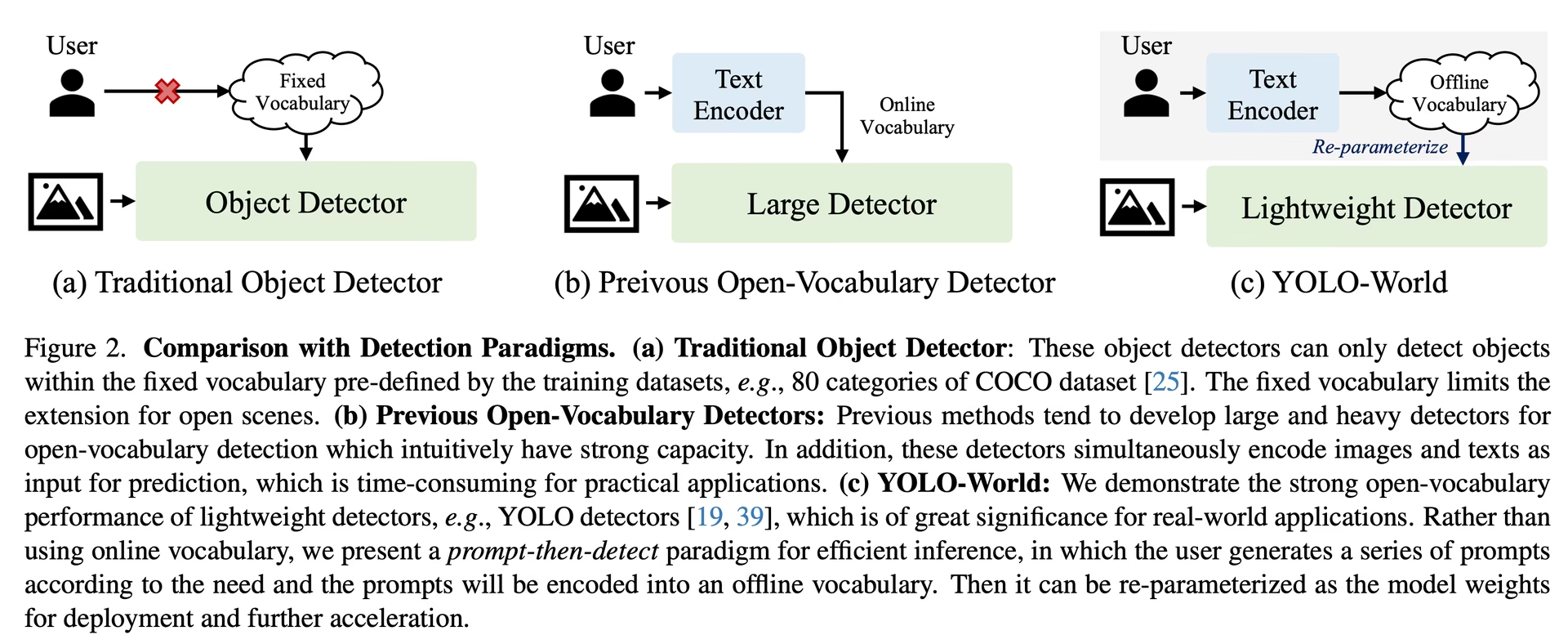
YOLO-World 框架支持通过自定义提示词动态指定类别,让用户能够根据自身需求调整模型,而无需重新训练。这项功能对于将模型适配到新领域或特定任务尤其有用,这些领域或任务可能原本并不包含在训练数据中。通过设置自定义提示词,用户可以引导模型重点关注感兴趣的对象,从而提升检测结果的相关性和准确率。
例如,如果你的应用只需要检测“person”和“bus”对象,就可以直接指定这些类别:
from ultralytics import YOLO

# 初始化 YOLO-World 模型
model = YOLO("yolov8s-world.pt")  # 也可以选择 yolov8m/l-world.pt

# 定义自定义类别
model.set_classes(["person", "bus"])

# 对图像中的指定类别执行预测
results = model.predict("path/to/image.jpg")

# 显示结果
results[0].show()一些用户发现,在背景类别中添加一个空字符串 "",可以在某些场景下提升检测性能。这种效果似乎取决于具体场景,其确切机制尚未完全明确:
model.set_classes(["person", "bus", ""])空字符串会在 model.names 中保留为独立类别,包括在你保存的任何模型中,因此对应的检测结果会返回空标签。在预测时传入 classes=[0, 1],即可只保留实际类别。
设置自定义类别后,你也可以保存模型。这样可以创建一个专门针对特定用例的 YOLO-World 模型版本。此过程会将自定义类别定义直接嵌入模型文件,使模型无需进一步调整即可使用指定类别。按照以下步骤保存并加载自定义 YOLO-World 模型:
首先,加载 YOLO-World 模型,为其设置自定义类别并保存:
from ultralytics import YOLO

# 初始化 YOLO-World 模型
model = YOLO("yolov8s-world.pt")  # 也可以选择 yolov8m/l-world.pt

# 定义自定义类别
model.set_classes(["person", "bus"])

# 保存带有已定义离线词汇的模型
model.save("custom_yolov8s.pt")
保存后,custom_yolov8s.pt 模型的表现与其他预训练 YOLOv8 模型相同,但有一个关键区别:它现在经过优化,只检测你定义的类别。这种自定义可以显著提升模型在特定应用场景中的检测性能和效率。
from ultralytics import YOLO

# 加载你的自定义模型
model = YOLO("custom_yolov8s.pt")

# 运行推理以检测你的自定义类别
results = model.predict("path/to/image.jpg")

# 显示结果
results[0].show()保存自定义词汇的优势#
- 效率:通过聚焦相关对象简化检测流程,减少计算开销并加快推理速度。
- 灵活性:无需大量重新训练或收集数据,即可轻松将模型适配到新的或小众的检测任务。
- 简便性:无需在运行时反复指定自定义类别,从而简化部署;模型可以直接使用其内嵌词汇。
- 性能:通过让模型将注意力和资源集中于识别已定义的对象,提升指定类别的检测准确率。
这种方法为针对特定任务定制先进的目标检测模型提供了强大途径,让先进 AI 更易于使用,并适用于更广泛的实际应用。
从头开始复现官方结果(实验性)#
准备数据集#
- 训练数据
| 数据集 | 类型 | 样本 | 框 | 标注文件 |
|---|---|---|---|---|
| Objects365v1 | 检测 | 609k | 9621k | objects365_train.json |
| GQA | Grounding | 621k | 3681k | final_mixed_train_no_coco.json |
| Flickr30k | Grounding | 149k | 641k | final_flickr_separateGT_train.json |
- 验证数据
| 数据集 | 类型 | 标注文件 |
|---|---|---|
| LVIS minival | 检测 | minival.txt |
从头开始启动训练#
WorldTrainerFromScratch 经过高度定制,可同时使用检测数据集和 grounding 数据集训练 yolo-world 模型。更多详情请参阅 ultralytics.models.yolo.world.train_world.py。
from ultralytics import YOLOWorld
from ultralytics.models.yolo.world.train_world import WorldTrainerFromScratch

# 选项 1:使用 Python 字典
data = {
    "train": {
        "yolo_data": ["Objects365.yaml"],
        "grounding_data": [
            {
                "img_path": "flickr30k/images",
                "json_file": "flickr30k/final_flickr_separateGT_train.json",
            },
            {
                "img_path": "GQA/images",
                "json_file": "GQA/final_mixed_train_no_coco.json",
            },
        ],
    },
    "val": {"yolo_data": ["lvis.yaml"]},
}

# 选项 2:使用 YAML 文件 (yolo_world_data.yaml)
# train:
#   yolo_data:
#     - Objects365.yaml
#   grounding_data:
#     - img_path: flickr/full_images/
# json_file: flickr/annotations/final_flickr_separateGT_train_segm.json
# - img_path: mixed_grounding/gqa/images
# json_file: mixed_grounding/annotations/final_mixed_train_no_coco_segm.json
# val:
#   yolo_data:
# - lvis.yaml

model = YOLOWorld("yolov8s-worldv2.yaml")
model.train(
    data=data,  # 如果使用 YAML 文件,则设置 data="yolo_world_data.yaml"
    batch=128,
    epochs=100,
    trainer=WorldTrainerFromScratch,
)引用与致谢#
我们衷心感谢 Tencent AILab Computer Vision Center 在基于 YOLO-World 的实时开放词汇目标检测领域所做的开创性工作:
@article{cheng2024yolow,
title={YOLO-World: Real-Time Open-Vocabulary Object Detection},
author={Cheng, Tianheng and Song, Lin and Ge, Yixiao and Liu, Wenyu and Wang, Xinggang and Shan, Ying},
journal={arXiv preprint arXiv:2401.17270},
year={2024}
}
如需进一步了解,YOLO-World 原始论文可在 arXiv 上查阅。你可以通过他们的 GitHub 代码库访问项目源代码和其他资源。我们感谢他们致力于推动该领域的发展,并与社区分享宝贵见解。
常见问题#
YOLO-World 模型是一种基于 Ultralytics YOLOv8 框架的先进实时目标检测方法。它擅长开放词汇检测任务,可以根据描述性文本识别图像中的对象。YOLO-World 运用视觉语言建模,并在大型数据集上进行预训练,以显著降低的计算需求实现高效率和高性能,因此非常适合各行各业的实时应用。
YOLO-World 支持“先提示、后检测”策略,利用离线词汇提升效率。诸如说明文字或特定对象类别之类的自定义提示词会预先编码,并存储为离线词汇嵌入。这种方法无需重新训练即可简化检测流程。你可以在模型中动态设置这些提示词,使模型适配特定检测任务,如下所示:
from ultralytics import YOLOWorld # 初始化 YOLO-World 模型 model = YOLOWorld("yolov8s-world.pt") # 定义自定义类别 model.set_classes(["person", "bus"]) # 对图像执行预测 results = model.predict("path/to/image.jpg") # 显示结果 results[0].show()与传统的开放词汇检测模型相比,YOLO-World 具有以下优势:
- 实时性能:它利用 CNN 的计算速度,实现快速、高效的检测。
- 高效率和低资源需求:YOLO-World 在保持高性能的同时,大幅降低计算和资源需求。
- 可自定义提示词:该模型支持动态设置提示词,用户无需重新训练即可指定自定义检测类别。
- 基准测试表现出色:在标准基准测试中,无论速度还是效率,它都优于 MDETR 和 GLIP 等其他开放词汇检测器。
通过提供的 Python API 或 CLI 命令,使用自己的数据集训练 YOLO-World 模型非常简单。下面介绍如何使用 Python 开始训练:
from ultralytics import YOLOWorld

# 加载预训练的 YOLOv8s-worldv2 模型
model = YOLOWorld("yolov8s-worldv2.pt")

# 在 COCO8 数据集上训练模型 100 个 epoch
results = model.train(data="coco8.yaml", epochs=100, imgsz=640)
或者使用 CLI:
yolo train model=yolov8s-worldv2.pt data=coco8.yaml epochs=100 imgsz=640Ultralytics 提供多个预训练 YOLO-World 模型,支持各种任务和运行模式:
模型类型 预训练权重 支持的任务 训练 验证 推理 导出 YOLOv8s-world yolov8s-world.pt 目标检测 ✅ ✅ ✅ ❌ YOLOv8s-worldv2 yolov8s-worldv2.pt 目标检测 ✅ ✅ ✅ ✅ YOLOv8m-world yolov8m-world.pt 目标检测 ✅ ✅ ✅ ❌ YOLOv8m-worldv2 yolov8m-worldv2.pt 目标检测 ✅ ✅ ✅ ✅ YOLOv8l-world yolov8l-world.pt 目标检测 ✅ ✅ ✅ ❌ YOLOv8l-worldv2 yolov8l-worldv2.pt 目标检测 ✅ ✅ ✅ ✅ YOLOv8x-world yolov8x-world.pt 目标检测 ✅ ✅ ✅ ❌ YOLOv8x-worldv2 yolov8x-worldv2.pt 目标检测 ✅ ✅ ✅ ✅ 要从头复现官方结果,你需要准备数据集,并使用提供的代码启动训练。训练过程包括创建数据字典,并使用自定义训练器运行
train方法:from ultralytics import YOLOWorld from ultralytics.models.yolo.world.train_world import WorldTrainerFromScratch data = { "train": { "yolo_data": ["Objects365.yaml"], "grounding_data": [ { "img_path": "flickr30k/images", "json_file": "flickr30k/final_flickr_separateGT_train.json", }, { "img_path": "GQA/images", "json_file": "GQA/final_mixed_train_no_coco.json", }, ], }, "val": {"yolo_data": ["lvis.yaml"]}, } model = YOLOWorld("yolov8s-worldv2.yaml") model.train(data=data, batch=128, epochs=100, trainer=WorldTrainerFromScratch)