YOLOv7:可训练的免费优势组合#
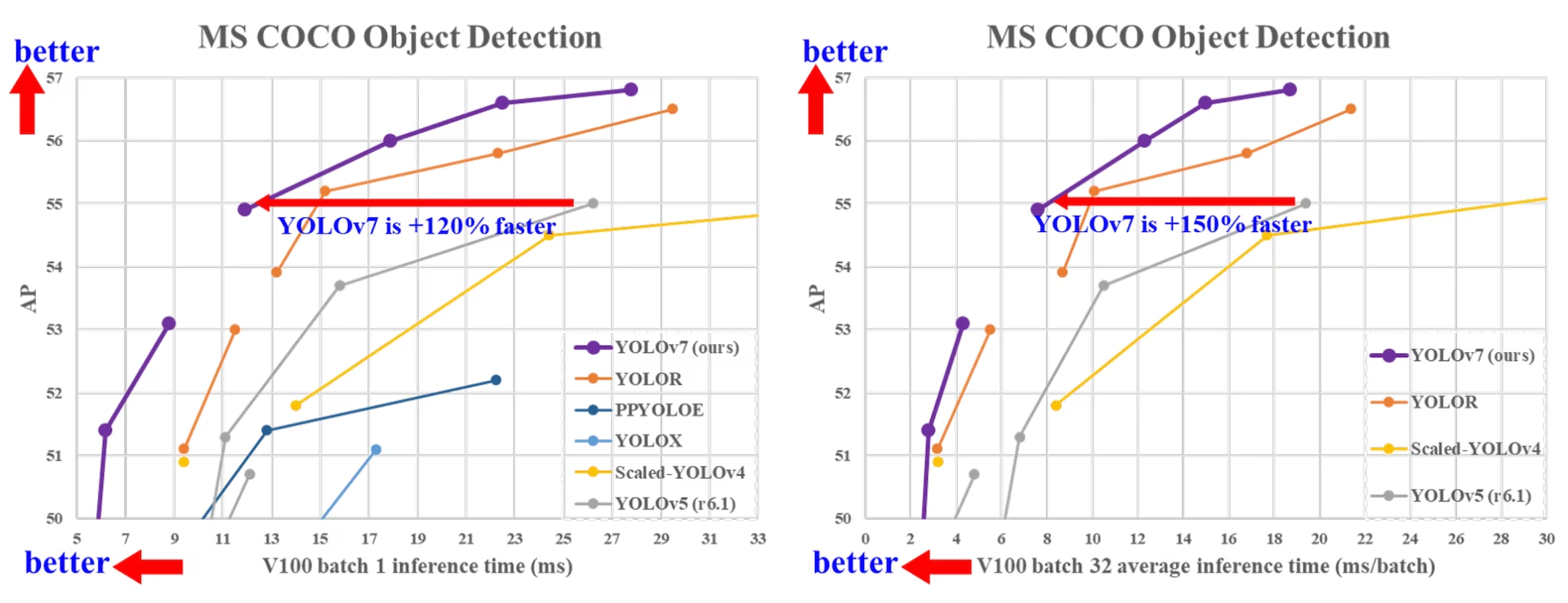
YOLOv7 于 2022 年 7 月发布,在发布当时是实时目标检测领域的一项重大进步。它在 V100 GPU 上达到 56.8% AP,发布时创下了新的基准。YOLOv7 在速度和准确率方面优于同期目标检测器,例如 YOLOR、YOLOX、Scaled-YOLOv4 和 YOLOv5。该模型从头开始使用 MS COCO 数据集训练,未使用任何其他数据集或预训练权重。YOLOv7 的源代码可在 GitHub 上获取。请注意,后续推出的 YOLO11 和 YOLO26 等模型已实现更高准确率和更优效率。
先进目标检测器对比#
从 YOLO 对比表中的结果可以看出,所提出的方法在综合速度与准确率的权衡方面表现最佳。将 YOLOv7-tiny-SiLU 与 YOLOv5-N (r6.1) 相比,我们的方法快 127 fps,AP 准确率高 10.7%。此外,YOLOv7 的 AP 为 51.4%,帧率为 161 fps;而 AP 相同的 PPYOLOE-L 帧率仅为 78 fps。在参数使用量方面,YOLOv7 比 PPYOLOE-L 少 41%。
将推理速度为 114 fps 的 YOLOv7-X 与推理速度为 99 fps 的 YOLOv5-L (r6.1) 相比,YOLOv7-X 的 AP 可提升 3.9%。如果将 YOLOv7-X 与规模相近的 YOLOv5-X (r6.1) 相比,YOLOv7-X 的推理速度快 31 fps。此外,在参数量和计算量方面,YOLOv7-X 比 YOLOv5-X (r6.1) 减少了 22% 的参数和 8% 的计算量,同时 AP 提高了 2.2%(来源)。
| 模型 | 参数 (M) | FLOPs (G) | 尺寸 (像素) | FPS | AP测试 / 验证 50-95 | AP测试 50 | AP测试 75 | AP测试 S | AP测试 M | AP测试 L |
|---|---|---|---|---|---|---|---|---|---|---|
| YOLOX-S | 9.0 | 26.8 | 640 | 102 | 40.5% / 40.5% | - | - | - | - | - |
| YOLOX-M | 25.3 | 73.8 | 640 | 81 | 47.2% / 46.9% | - | - | - | - | - |
| YOLOX-L | 54.2 | 155.6 | 640 | 69 | 50.1% / 49.7% | - | - | - | - | - |
| YOLOX-X | 99.1 | 281.9 | 640 | 58 | 51.5% / 51.1% | - | - | - | - | - |
| PPYOLOE-S | 7.9 | 17.4 | 640 | 208 | 43.1% / 42.7% | 60.5% | 46.6% | 23.2% | 46.4% | 56.9% |
| PPYOLOE-M | 23.4 | 49.9 | 640 | 123 | 48.9% / 48.6% | 66.5% | 53.0% | 28.6% | 52.9% | 63.8% |
| PPYOLOE-L | 52.2 | 110.1 | 640 | 78 | 51.4% / 50.9% | 68.9% | 55.6% | 31.4% | 55.3% | 66.1% |
| PPYOLOE-X | 98.4 | 206.6 | 640 | 45 | 52.2% / 51.9% | 69.9% | 56.5% | 33.3% | 56.3% | 66.4% |
| YOLOv5-N (r6.1) | 1.9 | 4.5 | 640 | 159 | - / 28.0% | - | - | - | - | - |
| YOLOv5-S (r6.1) | 7.2 | 16.5 | 640 | 156 | - / 37.4% | - | - | - | - | - |
| YOLOv5-M (r6.1) | 21.2 | 49.0 | 640 | 122 | - / 45.4% | - | - | - | - | - |
| YOLOv5-L (r6.1) | 46.5 | 109.1 | 640 | 99 | - / 49.0% | - | - | - | - | - |
| YOLOv5-X (r6.1) | 86.7 | 205.7 | 640 | 83 | - / 50.7% | - | - | - | - | - |
| YOLOR-CSP | 52.9 | 120.4 | 640 | 106 | 51.1% / 50.8% | 69.6% | 55.7% | 31.7% | 55.3% | 64.7% |
| YOLOR-CSP-X | 96.9 | 226.8 | 640 | 87 | 53.0% / 52.7% | 71.4% | 57.9% | 33.7% | 57.1% | 66.8% |
| YOLOv7-tiny-SiLU | 6.2 | 13.8 | 640 | 286 | 38.7% / 38.7% | 56.7% | 41.7% | 18.8% | 42.4% | 51.9% |
| YOLOv7 | 36.9 | 104.7 | 640 | 161 | 51.4% / 51.2% | 69.7% | 55.9% | 31.8% | 55.5% | 65.0% |
| YOLOv7-X | 71.3 | 189.9 | 640 | 114 | 53.1% / 52.9% | 71.2% | 57.8% | 33.8% | 57.1% | 67.4% |
| YOLOv5-N6 (r6.1) | 3.2 | 18.4 | 1280 | 123 | - / 36.0% | - | - | - | - | - |
| YOLOv5-S6 (r6.1) | 12.6 | 67.2 | 1280 | 122 | - / 44.8% | - | - | - | - | - |
| YOLOv5-M6 (r6.1) | 35.7 | 200.0 | 1280 | 90 | - / 51.3% | - | - | - | - | - |
| YOLOv5-L6 (r6.1) | 76.8 | 445.6 | 1280 | 63 | - / 53.7% | - | - | - | - | - |
| YOLOv5-X6 (r6.1) | 140.7 | 839.2 | 1280 | 38 | - / 55.0% | - | - | - | - | - |
| YOLOR-P6 | 37.2 | 325.6 | 1280 | 76 | 53.9% / 53.5% | 71.4% | 58.9% | 36.1% | 57.7% | 65.6% |
| YOLOR-W6 | 79.8 | 453.2 | 1280 | 66 | 55.2% / 54.8% | 72.7% | 60.5% | 37.7% | 59.1% | 67.1% |
| YOLOR-E6 | 115.8 | 683.2 | 1280 | 45 | 55.8% / 55.7% | 73.4% | 61.1% | 38.4% | 59.7% | 67.7% |
| YOLOR-D6 | 151.7 | 935.6 | 1280 | 34 | 56.5% / 56.1% | 74.1% | 61.9% | 38.9% | 60.4% | 68.7% |
| YOLOv7-W6 | 70.4 | 360.0 | 1280 | 84 | 54.9% / 54.6% | 72.6% | 60.1% | 37.3% | 58.7% | 67.1% |
| YOLOv7-E6 | 97.2 | 515.2 | 1280 | 56 | 56.0% / 55.9% | 73.5% | 61.2% | 38.0% | 59.9% | 68.4% |
| YOLOv7-D6 | 154.7 | 806.8 | 1280 | 44 | 56.6% / 56.3% | 74.0% | 61.8% | 38.8% | 60.1% | 69.5% |
| YOLOv7-E6E | 151.7 | 843.2 | 1280 | 36 | 56.8% / 56.8% | 74.4% | 62.1% | 39.3% | 60.5% | 69.0% |
概述#
实时目标检测是许多计算机视觉系统的重要组成部分,包括多目标跟踪、自动驾驶、机器人技术和医学图像分析。近年来,实时目标检测的发展主要聚焦于设计高效架构,以及提升各类 CPU、GPU 和神经处理单元 (NPUs) 的推理速度。YOLOv7 同时支持移动 GPU 和 GPU 设备,适用于从边缘端到云端的场景。
与侧重架构优化的传统实时目标检测器不同,YOLOv7 将重点放在训练过程的优化上。这包括旨在提升目标检测准确率、同时不增加推理开销的模块和优化方法,这一概念称为“可训练的免费午餐袋”。
主要功能#
YOLOv7 引入了几项关键特性:
-
模型重参数化:YOLOv7 提出了一种规划式重参数化模型策略,该策略可应用于不同网络中的层,并基于梯度传播路径这一概念。
-
动态标签分配:使用多个输出层训练模型会带来一个新问题:“如何为不同分支的输出分配动态目标?”为了解决这个问题,YOLOv7 引入了一种新的标签分配方法,称为由粗到细的引导式标签分配。
-
扩展与复合缩放:YOLOv7 为实时目标检测器提出了“扩展”和“复合缩放”方法,可有效利用参数和计算资源。
-
效率:YOLOv7 提出的方法可有效减少当前最先进实时目标检测器约 40% 的参数量和 50% 的计算量,同时实现更快的推理速度和更高的检测准确率。
使用示例#
Ultralytics 不会发布 yolov7.pt 预训练权重或 ultralytics/cfg/models/v7/ YAML 文件,Ultralytics Python 包不支持 YOLOv7 的原生 PyTorch 训练和推理。不过,你可以将通过上游 YOLOv7 仓库训练的 YOLOv7 检查点导出为 ONNX 或 TensorRT 格式,再导入 Ultralytics,如下所示。
ONNX 导出#
若要在 Ultralytics 中使用 YOLOv7 ONNX 模型:
-
(可选)安装 Ultralytics 并导出 ONNX 模型,以自动安装所需依赖项:
pip install ultralytics yolo export model=yolo26n.pt format=onnx -
使用 YOLOv7 仓库中的导出器导出所需的 YOLOv7 模型:
git clone https://github.com/WongKinYiu/yolov7 cd yolov7 python export.py --weights yolov7-tiny.pt --grid --end2end --simplify --topk-all 100 --iou-thres 0.65 --conf-thres 0.35 --img-size 640 640 --max-wh 640 -
使用以下脚本修改 ONNX 模型图,使其与 Ultralytics 兼容:
import numpy as np import onnx from onnx import helper, numpy_helper # Load the ONNX model model_path = "yolov7/yolov7-tiny.onnx" # Replace with your model path model = onnx.load(model_path) graph = model.graph # Fix input shape to batch size 1 input_shape = graph.input[0].type.tensor_type.shape input_shape.dim[0].dim_value = 1 # Define the output of the original model original_output_name = graph.output[0].name # Create slicing nodes sliced_output_name = f"{original_output_name}_sliced" # Define initializers for slicing (remove the first value) start = numpy_helper.from_array(np.array([1], dtype=np.int64), name="slice_start") end = numpy_helper.from_array(np.array([7], dtype=np.int64), name="slice_end") axes = numpy_helper.from_array(np.array([1], dtype=np.int64), name="slice_axes") steps = numpy_helper.from_array(np.array([1], dtype=np.int64), name="slice_steps") graph.initializer.extend([start, end, axes, steps]) slice_node = helper.make_node( "Slice", inputs=[original_output_name, "slice_start", "slice_end", "slice_axes", "slice_steps"], outputs=[sliced_output_name], name="SliceNode", ) graph.node.append(slice_node) # Define segment slicing seg1_start = numpy_helper.from_array(np.array([0], dtype=np.int64), name="seg1_start") seg1_end = numpy_helper.from_array(np.array([4], dtype=np.int64), name="seg1_end") seg2_start = numpy_helper.from_array(np.array([4], dtype=np.int64), name="seg2_start") seg2_end = numpy_helper.from_array(np.array([5], dtype=np.int64), name="seg2_end") seg3_start = numpy_helper.from_array(np.array([5], dtype=np.int64), name="seg3_start") seg3_end = numpy_helper.from_array(np.array([6], dtype=np.int64), name="seg3_end") graph.initializer.extend([seg1_start, seg1_end, seg2_start, seg2_end, seg3_start, seg3_end]) # Create intermediate tensors for segments segment_1_name = f"{sliced_output_name}_segment1" segment_2_name = f"{sliced_output_name}_segment2" segment_3_name = f"{sliced_output_name}_segment3" # Add segment slicing nodes graph.node.extend( [ helper.make_node( "Slice", inputs=[sliced_output_name, "seg1_start", "seg1_end", "slice_axes", "slice_steps"], outputs=[segment_1_name], name="SliceSegment1", ), helper.make_node( "Slice", inputs=[sliced_output_name, "seg2_start", "seg2_end", "slice_axes", "slice_steps"], outputs=[segment_2_name], name="SliceSegment2", ), helper.make_node( "Slice", inputs=[sliced_output_name, "seg3_start", "seg3_end", "slice_axes", "slice_steps"], outputs=[segment_3_name], name="SliceSegment3", ), ] ) # Concatenate the segments concat_output_name = f"{sliced_output_name}_concat" concat_node = helper.make_node( "Concat", inputs=[segment_1_name, segment_3_name, segment_2_name], outputs=[concat_output_name], axis=1, name="ConcatSwapped", ) graph.node.append(concat_node) # Reshape to [1, -1, 6] reshape_shape = numpy_helper.from_array(np.array([1, -1, 6], dtype=np.int64), name="reshape_shape") graph.initializer.append(reshape_shape) final_output_name = f"{concat_output_name}_batched" reshape_node = helper.make_node( "Reshape", inputs=[concat_output_name, "reshape_shape"], outputs=[final_output_name], name="AddBatchDimension", ) graph.node.append(reshape_node) # Get the shape of the reshaped tensor shape_node_name = f"{final_output_name}_shape" shape_node = helper.make_node( "Shape", inputs=[final_output_name], outputs=[shape_node_name], name="GetShapeDim", ) graph.node.append(shape_node) # Extract the second dimension dim_1_index = numpy_helper.from_array(np.array([1], dtype=np.int64), name="dim_1_index") graph.initializer.append(dim_1_index) second_dim_name = f"{final_output_name}_dim1" gather_node = helper.make_node( "Gather", inputs=[shape_node_name, "dim_1_index"], outputs=[second_dim_name], name="GatherSecondDim", ) graph.node.append(gather_node) # Subtract from 100 to determine how many values to pad target_size = numpy_helper.from_array(np.array([100], dtype=np.int64), name="target_size") graph.initializer.append(target_size) pad_size_name = f"{second_dim_name}_padsize" sub_node = helper.make_node( "Sub", inputs=["target_size", second_dim_name], outputs=[pad_size_name], name="CalculatePadSize", ) graph.node.append(sub_node) # Build the [2, 3] pad array: # 1st row -> [0, 0, 0] (no padding at the start of any dim) # 2nd row -> [0, pad_size, 0] (pad only at the end of the second dim) pad_starts = numpy_helper.from_array(np.array([0, 0, 0], dtype=np.int64), name="pad_starts") graph.initializer.append(pad_starts) zero_scalar = numpy_helper.from_array(np.array([0], dtype=np.int64), name="zero_scalar") graph.initializer.append(zero_scalar) pad_ends_name = "pad_ends" concat_pad_ends_node = helper.make_node( "Concat", inputs=["zero_scalar", pad_size_name, "zero_scalar"], outputs=[pad_ends_name], axis=0, name="ConcatPadEnds", ) graph.node.append(concat_pad_ends_node) pad_values_name = "pad_values" concat_pad_node = helper.make_node( "Concat", inputs=["pad_starts", pad_ends_name], outputs=[pad_values_name], axis=0, name="ConcatPadStartsEnds", ) graph.node.append(concat_pad_node) # Create Pad operator to pad with zeros pad_output_name = f"{final_output_name}_padded" pad_constant_value = numpy_helper.from_array( np.array([0.0], dtype=np.float32), name="pad_constant_value", ) graph.initializer.append(pad_constant_value) pad_node = helper.make_node( "Pad", inputs=[final_output_name, pad_values_name, "pad_constant_value"], outputs=[pad_output_name], mode="constant", name="PadToFixedSize", ) graph.node.append(pad_node) # Update the graph's final output to [1, 100, 6] new_output_type = onnx.helper.make_tensor_type_proto( elem_type=graph.output[0].type.tensor_type.elem_type, shape=[1, 100, 6] ) new_output = onnx.helper.make_value_info(name=pad_output_name, type_proto=new_output_type) # Replace the old output with the new one graph.output.pop() graph.output.extend([new_output]) # Save the modified model onnx.save(model, "yolov7-ultralytics.onnx") -
然后,你就可以加载修改后的 ONNX 模型,并像往常一样在 Ultralytics 中运行推理:
from ultralytics import ASSETS, YOLO

model = YOLO("yolov7-ultralytics.onnx", task="detect")

results = model(ASSETS / "bus.jpg")
TensorRT 导出#
-
按照 ONNX 导出部分中的第 1-2 步操作。
-
安装
TensorRTPython 包:pip install tensorrt -
运行以下脚本,将修改后的 ONNX 模型转换为 TensorRT 引擎:
from ultralytics.utils.export import onnx2engine onnx2engine("yolov7-ultralytics.onnx", quantize=16) -
在 Ultralytics 中加载并运行模型:
from ultralytics import ASSETS, YOLO

model = YOLO("yolov7-ultralytics.engine", task="detect")

results = model(ASSETS / "bus.jpg")
引用与致谢#
我们谨此感谢 YOLOv7 作者在实时目标检测领域做出的重要贡献:
@inproceedings{wang2023yolov7,
  title={YOLOv7: Trainable Bag-of-Freebies Sets New State-of-the-Art for Real-Time Object Detectors},
  author={Wang, Chien-Yao and Bochkovskiy, Alexey and Liao, Hong-Yuan Mark},
  booktitle={Proceedings of the IEEE/CVF conference on Computer Vision and Pattern Recognition (CVPR)},
  pages={7464--7475},
  year={2023}
}
YOLOv7 官方论文发表于 CVF 2023 开放获取,预印本发布于 arXiv。作者公开了他们的研究成果,代码库可在 GitHub 上访问。我们感谢他们为推动该领域发展所付出的努力,以及让更广泛的社区能够使用其成果。
常见问题#
YOLOv7 于 2022 年 7 月发布,是一款重要的实时目标检测模型,在发布时实现了出色的速度和准确率。在参数使用量和推理速度方面,它都超越了 YOLOX、YOLOv5 和 PPYOLOE 等同期模型。YOLOv7 的独特特性包括模型重参数化和动态标签分配,可在不增加推理开销的情况下优化性能。如需了解有关其架构以及与其他先进目标检测器的指标比较的更多技术细节,请参阅 YOLOv7 论文。
YOLOv7 引入了多项创新,包括模型重参数化和动态标签分配,这些创新改进了训练过程并提高了推理准确率。与 YOLOv5 相比,YOLOv7 显著提升了速度和准确率。例如,与 YOLOv5-X 相比,YOLOv7-X 的准确率提高了 2.2%,参数量减少了 22%。详细比较可参阅性能表 YOLOv7 与先进目标检测器的比较。
目前,Ultralytics 仅支持 YOLOv7 ONNX 和 TensorRT 推理。若要在 Ultralytics 中运行导出为 ONNX 和 TensorRT 格式的 YOLOv7 版本,请查看使用示例部分。
YOLOv7 提供了多项推动实时目标检测发展的关键特性:
- 模型重参数化:通过优化梯度传播路径来提升模型性能。
- 动态标签分配:使用由粗到细的引导方法,为不同分支的输出分配动态目标,从而提高准确率。
- 扩展与复合缩放:高效利用参数和计算资源,为各种实时应用扩展模型规模。
- 效率:与其他先进模型相比,参数量减少 40%,计算量减少 50%,同时实现更快的推理速度。
如需进一步了解这些特性,请参阅 YOLOv7 概览部分。