使用 Ultralytics YOLO 进行多目标跟踪#
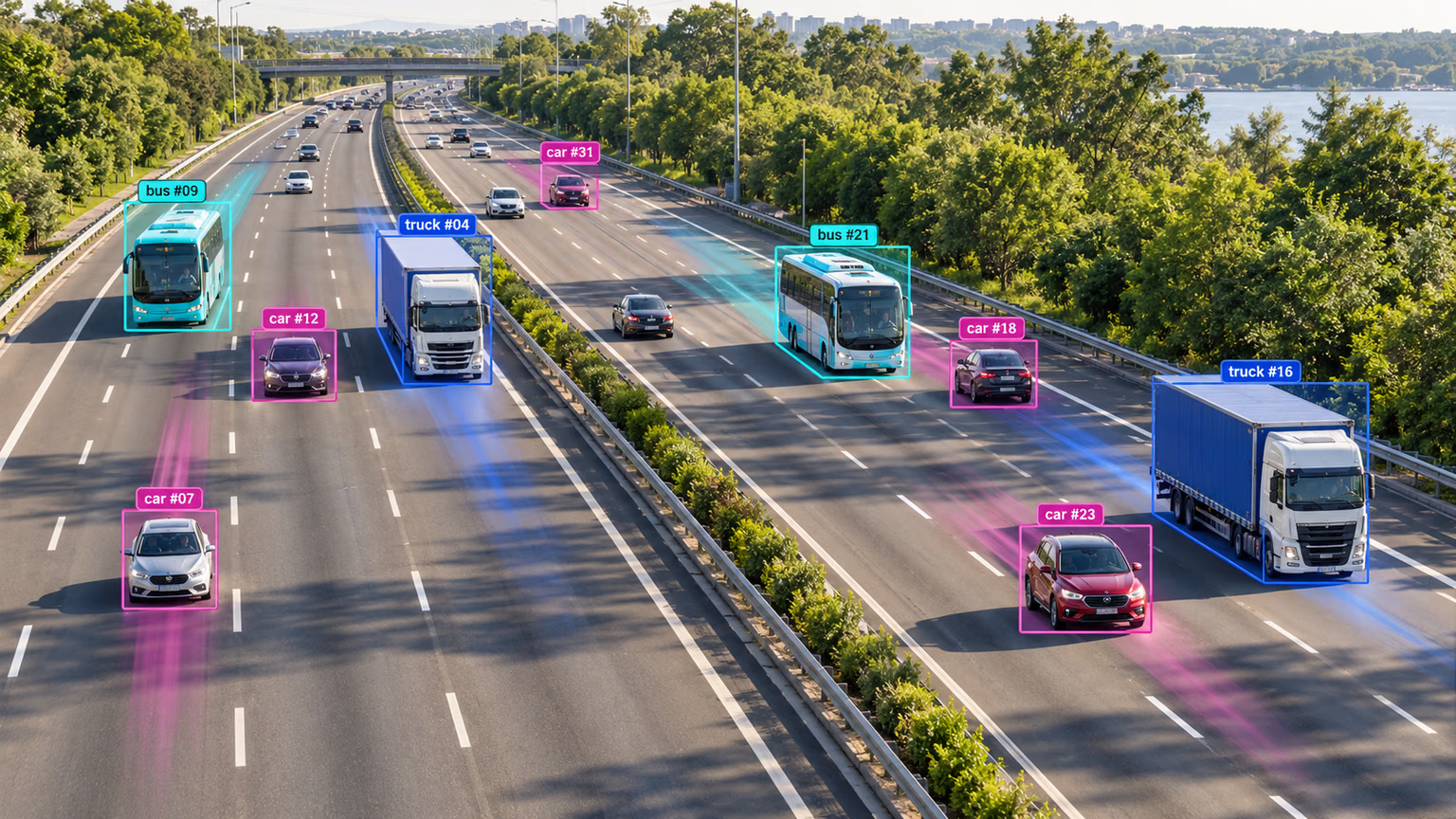
在视频分析领域,目标跟踪是一项关键任务:它不仅要识别画面中目标的位置和类别,还要在视频播放过程中为每个检测到的目标保持唯一 ID。其应用范围广泛,涵盖监控安防、实时体育分析等领域。
查看尚未发布的 YOLO27 预览版,了解计划中的跟踪支持。
从 ultralytics 8.4.63 开始,除了 BoT-SORT 和 ByteTrack 外,还支持 OC-SORT、Deep OC-SORT、FastTracker 和 TrackTrack。
为什么选择 Ultralytics YOLO 进行目标跟踪?#
Ultralytics 跟踪器的输出与标准目标检测一致,但还额外包含目标 ID。这样便于跟踪视频流中的目标并开展后续分析。以下是你可以考虑使用 Ultralytics YOLO 进行目标跟踪的原因:
- 高效: 实时处理视频流,同时不影响准确率。
- 灵活: 支持多种跟踪算法和配置。
- 易于使用: 简洁的 Python API 和 CLI 选项,便于快速集成和部署。
- 可定制: 易于与自定义训练的 YOLO 模型配合使用,可集成到特定领域的应用中。
观看: 如何使用 Ultralytics YOLO26 进行多目标跟踪 | BoT-SORT 和 ByteTrack | VisionAI 🚀
实际应用#
| 交通运输 | 零售 | 水产养殖 |
|---|---|---|
| 车辆跟踪 | 行人跟踪 | 鱼类跟踪 |
快速入门#
使用默认的 TrackTrack 跟踪器对视频进行跟踪。更改 tracker 参数即可切换到其他跟踪器。
from ultralytics import YOLO

model = YOLO("yolo26n.pt")

# 默认跟踪器(TrackTrack)
results = model.track(source="https://youtu.be/LNwODJXcvt4", show=True)

# 切换到 ByteTrack
results = model.track(source="https://youtu.be/LNwODJXcvt4", show=True, tracker="bytetrack.yaml")
要在视频流上运行跟踪器,请使用训练好的 Detect、Segment、Pose 或 OBB 模型,例如 YOLO26n、YOLO26n-seg、YOLO26n-pose 或 YOLO26n-obb。你可以在本地训练自定义模型,也可以使用 Ultralytics Platform 云训练。
from ultralytics import YOLO

# 加载官方模型或自定义模型
model = YOLO("yolo26n.pt")  # 加载官方 Detect 模型
model = YOLO("yolo26n-seg.pt")  # 加载官方 Segment 模型
model = YOLO("yolo26n-pose.pt")  # 加载官方 Pose 模型
model = YOLO("path/to/best.pt")  # 加载自定义训练的模型

# 使用模型执行跟踪
results = model.track("https://youtu.be/LNwODJXcvt4", show=True)  # 使用默认跟踪器进行跟踪
results = model.track("https://youtu.be/LNwODJXcvt4", show=True, tracker="bytetrack.yaml") # 使用 ByteTrack支持的跟踪器#
Ultralytics YOLO 内置六种跟踪器。将跟踪器的 YAML 配置文件传入 tracker 参数即可启用。
| 跟踪器 | 配置文件 | 运动模型 | 外观 / ReID | 相机运动补偿 | 遮挡处理 |
|---|---|---|---|---|---|
| BoT-SORT | botsort.yaml | 线性 Kalman | 可选(with_reid) | 可配置(gmc_method) | 跟踪缓存 + ReID 重新关联 |
| ByteTrack | bytetrack.yaml | 线性 Kalman | 无 | 否 | 两阶段低置信度补救 |
| OC-SORT | ocsort.yaml | 以观测为中心的 Kalman | 无 | 否 | 基于上次观测进行 ORU、OCM、OCR 重新更新 |
| Deep OC-SORT | deepocsort.yaml | 以观测为中心的 Kalman | 可选(with_reid) | 可配置(gmc_method) | OC-SORT + 可选的自适应外观 EMA |
| FastTracker | fasttrack.yaml | 线性 Kalman + 回滚 | 无 | 否 | Kalman 回滚 + 遮挡时扩大 bbox |
| TrackTrack | tracktrack.yaml | 线性 Kalman (NSA) | 可选(with_reid) | 可配置(gmc_method) | 迭代式多线索关联 + TAI |
我该使用哪种跟踪器?#
使用以下流程选择起点;如果不传入 tracker,则会使用 tracktrack.yaml:
- 需要最快、最简单的基线方案? → ByteTrack(不使用 ReID、不进行相机运动补偿、开销最低)。
- 手持拍摄、无人机拍摄或移动相机拍摄的视频? → BoT-SORT(支持相机运动补偿和可选的 ReID)。
- 非线性运动(体育运动、舞蹈、急转弯)且不需要 ReID? → OC-SORT(以观测为中心进行修正,无需外观匹配开销)。
- 移动相机拍摄的拥挤场景中,ID 切换是主要问题? → Deep OC-SORT 或 TrackTrack(两者都支持可选的外观匹配;TrackTrack 还增加了多线索关联和重复 ID 抑制)。
- 实时场景中经常出现局部重叠,且没有 ReID 预算? → FastTracker(具备遮挡感知能力并采用 Kalman 回滚的 ByteTrack 变体)。
切换跟踪器#
将跟踪器配置文件名传入 tracker=。其他代码保持不变。
from ultralytics import YOLO

model = YOLO("yolo26n.pt")

results = model.track(source="path/to/video.mp4", tracker="bytetrack.yaml")
results = model.track(source="path/to/video.mp4", tracker="ocsort.yaml")
results = model.track(source="path/to/video.mp4", tracker="tracktrack.yaml")配置#
跟踪参数#
跟踪配置与 Predict 模式共享一些属性,例如 conf、iou 和 show。如需进一步了解配置,请参阅模型的 Predict 页面。
from ultralytics import YOLO

# 配置跟踪参数并运行跟踪器
model = YOLO("yolo26n.pt")
results = model.track(source="https://youtu.be/LNwODJXcvt4", conf=0.1, iou=0.7, show=True)自定义跟踪器配置#
Ultralytics 还支持使用修改过的跟踪器配置文件。为此,只需从 ultralytics/cfg/trackers 复制一份跟踪器配置文件(例如 custom_tracker.yaml),然后根据需要修改配置(tracker_type 除外)。
from ultralytics import YOLO

# 加载模型,并使用自定义配置文件运行跟踪器
model = YOLO("yolo26n.pt")
results = model.track(source="https://youtu.be/LNwODJXcvt4", tracker="custom_tracker.yaml")跟踪器通用参数#
以下参数在大多数跟踪器 YAML 文件中通用;并非每个配置文件都包含所有参数:
分数大于或等于 track_high_thresh 的检测结果会进入第一个关联阶段。当所选跟踪器启用低置信度关联时,分数介于 track_low_thresh 和 track_high_thresh 之间的检测结果可用于恢复现有跟踪,但不会启动新跟踪。分数小于或等于 track_low_thresh 的检测结果会被忽略。
| 参数 | 有效值或范围 | 说明 |
|---|---|---|
tracker_type | botsort, bytetrack, ocsort, deepocsort, fasttrack, tracktrack | 指定跟踪器类型。 |
track_high_thresh | 0.0-1.0 | 首次关联的阈值。影响检测结果与现有轨迹匹配的置信程度。 |
track_low_thresh | 0.0-1.0 | 低置信度恢复检测的下限。OC-SORT 和 Deep OC-SORT 仅在 use_byte: True 时使用这些检测结果;TrackTrack 则会将它们纳入带惩罚的关联候选集。 |
new_track_thresh | 0.0-1.0 | 如果检测结果与任何现有轨迹都不匹配,则初始化新轨迹的阈值。 |
track_buffer | >=0 | 丢失的轨迹在移除前保留的帧数。数值越大,对遮挡的容忍度越高。 |
match_thresh | 0.0-1.0 | 轨迹匹配阈值。数值越大,匹配条件越宽松。 |
fuse_score | True, False | 是否在匹配前将置信度分数与 IoU 距离融合。 |
gmc_method | sparseOptFlow, orb, sift, ecc, none | 全局运动补偿方法。用于补偿相机移动的影响。 |
proximity_thresh | 0.0-1.0 | 有效 ReID 匹配所需的最小 IoU。确保空间距离足够近后,才使用外观特征。 |
appearance_thresh | 0.0-1.0 | ReID 所需的最小归一化外观相似度。 |
with_reid | True, False | 启用基于外观的匹配,以提升遮挡情况下的跟踪效果。BoT-SORT、Deep OC-SORT 和 TrackTrack 支持此功能。 |
model | auto 或兼容的 ReID 模型路径 | ReID 模型。auto 在可用时使用原生 YOLO 骨干网络特征;否则回退到 yolo26n-cls.pt。自定义编码器可以是 .pt 检查点,也可以是导出的模型,例如 .torchscript、.onnx、.engine,或 OpenVINO 模型目录。 |
跟踪器专用参数#
每种算法都在通用参数的基础上提供了额外的可调参数。参数说明和调优建议请参阅下方各跟踪器章节,也可以直接查看配置文件:
启用重新识别(ReID)#
默认情况下,ReID 处于禁用状态,以尽量减少开销。在跟踪器配置文件中设置 with_reid: True 即可启用 ReID。
ReID 模型选项:
model: auto— 使用原生 YOLO 检测器特征,额外开销极小。适合需要一定 ReID 能力、又不希望性能受到明显影响的场景。如果检测器不提供兼容特征,则回退到yolo26n-cls.pt。- 自定义 ReID 模型 — 将
model:指向.pt检查点或兼容的导出嵌入模型,例如.torchscript、.onnx、.engine,或 OpenVINO 模型目录。导出的模型通过AutoBackend加载,并且必须直接输出嵌入张量。
每种模型尺寸都提供了可直接使用的 ONNX 编码器。将 model: 设为以下名称之一后,跟踪器首次运行时会自动下载对应文件(与获取 YOLO 权重的方式相同),无需手动导出或下载:
# In your tracker config (e.g. tracktrack.yaml)
with_reid: True
model: yolo26n-reid.onnx # downloaded on first use; swap n→s/m/l/x for a larger encoder| 模型 | 尺寸 (像素) | 参数 (M) | FLOPs (B) |
|---|---|---|---|
| YOLO26n-reid.onnx | 448 | 2.8 | 2.0 |
| YOLO26s-reid.onnx | 448 | 7.5 | 6.6 |
| YOLO26m-reid.onnx | 448 | 12.4 | 20.1 |
| YOLO26l-reid.onnx | 448 | 15.3 | 25.2 |
| YOLO26x-reid.onnx | 448 | 32.7 | 55.9 |
目前仅提供跟踪器外观分支使用的 ONNX ReID 编码器。ReID 的 train、val 和 predict 模式,以及专用的 ReID 导出方案仍在开发中。
若要使用独立分类模型获得更好的性能,请将其导出到 TensorRT 等速度更快的后端:
from torch import nn

from ultralytics import YOLO

# 加载分类模型
model = YOLO("yolo26n-cls.pt")

# 添加平均池化层
head = model.model.model[-1]
pool = nn.Sequential(nn.AdaptiveAvgPool2d((1, 1)), nn.Flatten(start_dim=1))
pool.f, pool.i = head.f, head.i
model.model.model[-1] = pool

# 导出为 TensorRT
model.export(format="engine", quantize=16, dynamic=True, batch=32)
导出后,在跟踪器配置中指定 TensorRT 模型路径。
跟踪器详情#
以下章节介绍各跟踪器的设计、专用参数和调优技巧。
观看: 哪种目标跟踪器表现更好?| 速度、FPS 和 ID 稳定性 | Ultralytics YOLO26 📊
BoT-SORT#
BoT-SORT(Aharon 等人,2022)在 ByteTrack 的基础上加入了相机运动补偿和可选的 ReID:
- 相机运动补偿(CMC): 每帧估计一个仿射变换(默认使用稀疏光流;也可使用 ORB / ECC),并在 IoU 匹配前将其应用于卡尔曼状态。
- 可选 ReID: 可将外观嵌入特征融合到代价矩阵中。默认禁用;设置
with_reid: True即可启用。
适用场景: 通用跟踪,尤其适合移动相机。只有在外观相似的人群导致 ID 切换时,才需要添加 ReID。
BoT-SORT 专用参数:
| 参数 | 有效值或范围 | 说明 |
|---|---|---|
gmc_method | sparseOptFlow, orb, sift, ecc, none | 相机运动补偿后端。sparseOptFlow 为默认值。none 会禁用 CMC。 |
with_reid | True, False | 启用基于外观的匹配。默认关闭。 |
model | auto 或兼容的 ReID 模型路径 | auto 在可用时使用原生 YOLO 特征;自定义模型可以是 .pt 检查点或兼容的导出模型。 |
proximity_thresh | 0.0-1.0 | 考虑使用外观特征前所需的最小 IoU。 |
appearance_thresh | 0.0-1.0 | ReID 匹配所需的最小归一化外观相似度。提高此值可收紧匹配条件。 |
调优建议:
- 固定相机: 设置
gmc_method: none,每帧可节省几毫秒。 - 相机运动剧烈: 保持
sparseOptFlow;ecc精度更高,但速度更慢。 - 外观相似的人群: 启用
with_reid: True,并提高appearance_thresh(例如0.85+)。
ByteTrack#
ByteTrack(Zhang 等人,ECCV 2022)是轻量级基线算法。它使用线性卡尔曼滤波 + IoU,并分两阶段进行关联:
- 阶段 1: 将高分检测结果与活跃轨迹匹配。
- 阶段 2: 将未匹配的轨迹与低分检测结果再次匹配,以便从短暂的部分遮挡中恢复。
它不使用外观模型,也不进行相机运动补偿。
适用场景: 固定或近乎固定的相机,且检测器开销占主导、你希望尽可能降低跟踪器开销时。
ByteTrack 专用参数: 除了通用跟踪器参数外,没有其他参数。
调优建议:
- 检测器噪声较大: 降低
track_low_thresh,让第二阶段有更多候选项。 - 高召回率检测器: 提高
track_high_thresh,减少 ID 碎片化。 - ID 频繁闪变: 提高
track_buffer,让短暂漏检的轨迹得以保留。
OC-SORT#
OC-SORT(Cao 等人,CVPR 2023)是以观测为中心的 SORT 扩展。它保留了 SORT 的轻量设计(不使用外观特征),并增加了三项修正:
- 以观测为中心的重新更新(ORU): 在上一次观测与当前检测之间重放一条虚拟轨迹,重新执行卡尔曼更新以修正偏移的速度估计。
- 以观测为中心的动量(OCM): 通过速度一致性项,对移动方向错误的检测结果施加惩罚。
- 以观测为中心的恢复(OCR): 使用最近丢失轨迹的最后一次观测(而非预测状态),重新检查未匹配的检测结果。
适用场景: 需要处理非线性运动,但不想承担 ReID 模型开销时。
OC-SORT 专用参数:
| 参数 | 有效值或范围 | 说明 |
|---|---|---|
delta_t | >=1 | OCM 中用于计算速度方向的时间窗口(帧数)。数值越大,平滑效果越强。 |
inertia | 0.0-1.0 | 速度一致性代价的权重。数值越大,对突然改变方向的惩罚越重。 |
use_byte | True, False | 启用类似 ByteTrack 的第二轮关联,处理低置信度检测结果。 |
调优建议:
- 非线性运动: 提高
inertia(例如0.3-0.4)。 - 检测结果稀疏: 启用
use_byte: True。 - 长时间遮挡: 提高
track_buffer,让 OCR 有更多丢失轨迹可供重新关联。
对于 OBB 模型,由于不会保留方向框的最后观测历史,OCR 会使用卡尔曼滤波预测的方向框。
Deep OC-SORT#
Deep OC-SORT 为 OC-SORT 添加了外观信息和相机运动补偿:
- 外观匹配: 余弦嵌入距离受重叠度限制,并与运动代价融合。
- 动态外观 EMA: 使用 EMA 更新轨迹嵌入,平滑因子会根据检测置信度自适应调整。
- 相机运动补偿: 通过稀疏光流、ORB 或 ECC,在相邻帧之间变换卡尔曼状态。
适用场景: 拥挤场景或移动相机拍摄的场景,其中外观差异明显但空间距离很近的物体经常发生 ID 切换。
Deep OC-SORT 专用参数:
| 参数 | 有效值或范围 | 说明 |
|---|---|---|
with_reid | True, False | 启用基于外观的匹配。默认关闭。 |
model | auto 或兼容的 ReID 模型路径 | auto 在可用时使用原生 YOLO 特征;自定义模型可以是 .pt 检查点或兼容的导出模型。 |
proximity_thresh | 0.0-1.0 | 考虑使用外观特征前所需的最小 IoU。 |
appearance_thresh | 0.0-1.0 | ReID 匹配所需的最小归一化外观相似度。 |
alpha_fixed_emb | 0.0-1.0 | 轨迹嵌入更新的基础 EMA 因子。数值越大,旧嵌入保留的时间越长。 |
gmc_method | sparseOptFlow, orb, sift, ecc, none | 全局运动补偿方法。 |
delta_t | >=1 | OCM 中用于计算速度方向的时间窗口(帧数)(继承自 OC-SORT)。 |
inertia | 0.0-1.0 | 速度一致性代价的权重(继承自 OC-SORT)。 |
use_byte | True, False | 启用类似 ByteTrack 的第二轮关联,处理低置信度检测结果(继承自 OC-SORT)。 |
调优建议:
- 人群中出现身份切换: 提高
appearance_thresh(例如0.92-0.95),并提高alpha_fixed_emb,让嵌入特征适应得更慢。 - 移动相机: 设置
gmc_method: sparseOptFlow(Deep OC-SORT 默认使用none)。 - 降低延迟: 保持
with_reid: False(默认值),仅使用运动信息 + CMC;只有 ID 切换成为主要错误来源时才启用 ReID。
FastTracker#
FastTracker 是一种具备遮挡感知能力的 ByteTrack 变体,不使用外观模型:
- 遮挡检测: 当其他活跃轨迹的覆盖率超过
occ_cover_thresh时,将轨迹标记为被遮挡。 - 遮挡时回滚卡尔曼状态: 使用环形缓冲区保存的历史记录,将卡尔曼状态回滚到遮挡发生前的帧。
- 运动衰减与搜索范围扩展: 遮挡期间降低速度,并扩大预测的 bbox。
- 初始化 IoU 抑制: 防止在活跃轨迹上方生成新轨迹。
适用场景: 实时、仅检测的管线,且目标之间经常相互重叠(人群、队列、体育运动)。
FastTracker 专属参数:
| 参数 | 有效值或范围 | 说明 |
|---|---|---|
reset_velocity_offset_occ | >=0 | 遮挡开始时,向前回溯的历史帧数,用于恢复 Kalman 速度。 |
reset_pos_offset_occ | >=0 | 遮挡开始时,向前回溯的历史帧数,用于恢复 Kalman 位置。 |
enlarge_bbox_occ | >=1.0 | 遮挡期间应用于预测 bbox 的高度缩放(宽度通过 XYAH 宽高比进行缩放)。 |
dampen_motion_occ | 0.0-1.0 | 遮挡期间的速度乘数。值越低,目标在遮挡期间“减速”越明显。 |
active_occ_to_lost_thresh | >=1 | 将活动轨迹移入 lost 状态前允许连续遮挡的最大帧数。 |
occ_cover_thresh | 0.0-1.0 | 另一条活动轨迹覆盖的轨迹区域比例,达到该比例时判定为遮挡。 |
occ_reappear_window | >=0 | 最近发生遮挡的 lost 轨迹保持优先重新识别状态的帧数。 |
init_iou_suppress | 0.0-1.0 | 如果新轨迹与任意活动轨迹的 IoU 超过此值,则不初始化该新轨迹。设置为 1.0 可禁用此功能。 |
调优建议:
- 频繁发生部分遮挡:降低
occ_cover_thresh(例如0.5-0.6)。 - 重叠区域附近出现重复 ID:降低
init_iou_suppress(例如0.5)。 - 长时间遮挡:同时提高
occ_reappear_window和track_buffer。 - 快速移动的目标:提高
dampen_motion_occ(使其更接近1.0);只有在扩大搜索区域能改善恢复效果时,才提高enlarge_bbox_occ。
TrackTrack#
TrackTrack(Shim 等人,CVPR 2025)是默认跟踪器。它从每条轨迹的视角进行推理,并通过多线索迭代关联:
- 基于轨迹视角的关联(TPA):结合 HMIoU、可选的余弦 ReID 距离、置信度投影距离和角点角度距离。通过逐步放宽阈值进行迭代求解匹配。
- 轨迹感知初始化(TAI):在创建新 ID 前抑制重复生成。
适用场景:拥挤且频繁发生遮挡、容易出现重复 ID 的场景。
TrackTrack 专属参数:
| 参数 | 有效值或范围 | 说明 |
|---|---|---|
iou_weight | 0.0-1.0 | 启用 ReID 时,HMIoU 距离的权重;否则直接使用 HMIoU。 |
reid_weight | 0.0-1.0 | 启用 ReID 时,余弦 ReID 距离的权重;否则忽略该距离。 |
conf_weight | 0.0-1.0 | 置信度投影距离的权重。 |
angle_weight | 0.0-1.0 | 角点角度距离的权重。 |
penalty_p | 0.0-1.0 | 低置信度检测结果的代价惩罚。 |
penalty_q | 0.0-1.0 | 通过次级 NMS 恢复的检测结果的代价惩罚。 |
reduce_step | 0.0-1.0 | 每次迭代的匹配阈值放宽幅度。 |
tai_thr | 0.0-1.0 | 轨迹感知初始化 NMS 的 IoU 阈值。 |
min_track_len | >=0 | 确认新轨迹前所需的最小历史长度。 |
lost_match_thr | 0.0-1.0 | 用于放宽丢失轨迹重新关联流程的较宽松代价门限;0 可禁用此功能。 |
with_reid | True, False | 启用余弦 ReID 外观匹配(使用原生 YOLO 特征)。默认关闭。 |
model | auto 或兼容的 ReID 模型路径 | auto 在可用时使用原生 YOLO 特征;自定义模型可以是 .pt 检查点或兼容的导出模型。 |
gmc_method | sparseOptFlow, orb, sift, ecc, none | 全局运动补偿方法。 |
调优建议:
- 拥挤场景中的行人:降低
tai_thr(例如0.45)以抑制更多重复生成;提高track_buffer以处理更长时间的遮挡。 - 摄像机快速移动:保持
gmc_method: sparseOptFlow启用。 - 小型/快速移动的目标:略微提高
angle_weight并降低min_track_len。 - 仅在需要时启用 ReID:它会增加推理开销;对于短时间遮挡,默认的多线索代价通常已足够。
对于 Segment 和 Pose 模型,TrackTrack 会跳过宽松 NMS 检测恢复,以确保掩码和关键点与检测结果保持对齐。
Python 示例#
观看:如何使用 Ultralytics YOLO26 构建交互式目标跟踪:几分钟内即可完成 | Python!
持久化轨迹循环#
以下 Python 脚本使用 OpenCV(cv2)和 YOLO26 对视频帧执行目标跟踪。此脚本假设所需的软件包(opencv-python 和 ultralytics)已安装。persist=True 参数会告知跟踪器:当前图像或帧是序列中的下一帧,并且当前图像中可能存在上一张图像中的轨迹。
只有在将同一视频流中的连续帧传递给 model.track() 时,才使用 persist=True。这样,跟踪器就能复用先前帧的状态,并随时间保持轨迹 ID 一致。请勿对互不相关的图像或不同的视频流使用 persist=True,因为先前的轨迹状态可能会延续到后续处理。
你也可以通过传入跟踪器配置文件来选择跟踪器后端,例如 tracker="botsort.yaml"、tracker="bytetrack.yaml" 或 tracker="tracktrack.yaml"。
import cv2

from ultralytics import YOLO

# 加载 YOLO26 模型
model = YOLO("yolo26n.pt")

# 打开视频文件
video_path = "path/to/video.mp4"
cap = cv2.VideoCapture(video_path)

# 遍历视频帧
while cap.isOpened():
    # 读取视频帧
    success, frame = cap.read()

    if success:
        # 在帧上运行 YOLO26 跟踪,并在帧之间持久化轨迹
        # 并使用 BoT-SORT 跟踪器后端
        results = model.track(frame, persist=True, tracker="botsort.yaml")

        # 可视化该帧上的结果
        annotated_frame = results[0].plot()

        # 显示带标注的帧
        cv2.imshow("YOLO26 Tracking", annotated_frame)

        # 如果按下 'q',则退出循环
        if cv2.waitKey(1) & 0xFF == ord("q"):
            break
    else:
        # 如果到达视频末尾,则退出循环
        break

# 释放视频捕获对象并关闭显示窗口
cap.release()
cv2.destroyAllWindows()请注意,model(frame) 已更改为 model.track(frame),这会启用目标跟踪,而不是简单检测。修改后的脚本会对视频的每一帧运行跟踪器、可视化结果并在窗口中显示。按“q”可退出循环。
绘制随时间变化的轨迹#
可视化连续帧中的目标轨迹,有助于深入了解视频中检测到的目标的运动模式和行为。使用 Ultralytics YOLO26,绘制这些轨迹既简单又高效。
在以下示例中,我们将演示如何利用 YOLO26 的跟踪功能,绘制检测到的目标在多个视频帧中的移动轨迹。此脚本会打开视频文件,逐帧读取,并使用 YOLO 模型识别和跟踪各类目标。保留检测到的边界框中心点并将这些点连接起来,就能绘制出代表被跟踪目标移动路径的线条。
from collections import defaultdict

import cv2
import numpy as np

from ultralytics import YOLO

# 加载 YOLO26 模型
model = YOLO("yolo26n.pt")

# 打开视频文件
video_path = "path/to/video.mp4"
cap = cv2.VideoCapture(video_path)

# 存储轨迹历史记录
track_history = defaultdict(list)

# 遍历视频帧
while cap.isOpened():
    # 读取视频帧
    success, frame = cap.read()

    if success:
        # 在帧上运行 YOLO26 跟踪,并在帧之间持久化轨迹
        result = model.track(frame, persist=True)[0]

        # 获取边界框和轨迹 ID
        if result.boxes and result.boxes.is_track:
            boxes = result.boxes.xywh.cpu()
            track_ids = result.boxes.id.int().cpu().tolist()

            # 在帧上可视化结果
            frame = result.plot()

            # 绘制轨迹
            for box, track_id in zip(boxes, track_ids):
                x, y, w, h = box
                track = track_history[track_id]
                track.append((float(x), float(y)))  # x、y 中心点
                if len(track) > 30:  # 保留 30 条轨迹,持续 30 帧
                    track.pop(0)

                # 绘制跟踪线条
                points = np.hstack(track).astype(np.int32).reshape((-1, 1, 2))
                cv2.polylines(frame, [points], isClosed=False, color=(230, 230, 230), thickness=10)

        # 显示带标注的帧
        cv2.imshow("YOLO26 Tracking", frame)

        # 如果按下 'q',则退出循环
        if cv2.waitKey(1) & 0xFF == ord("q"):
            break
    else:
        # 如果到达视频末尾,则退出循环
        break

# 释放视频捕获对象并关闭显示窗口
cap.release()
cv2.destroyAllWindows()多线程跟踪#
多线程跟踪支持同时对多个视频流运行目标跟踪。在处理多个视频输入时,这项功能尤其有用,例如来自多个监控摄像头的视频;并行处理可以显著提升效率和性能。
在提供的 Python 脚本中,我们使用 Python 的 threading 模块并发运行多个跟踪器实例。每个线程负责对一个视频文件运行跟踪器,所有线程都在后台同时运行。
为确保每个线程都能收到正确的参数(视频文件、要使用的模型和文件索引),我们定义了函数 run_tracker_in_thread,用于接收这些参数并包含主要跟踪循环。此函数逐帧读取视频、运行跟踪器并保存带注释的结果。
此示例使用两个不同的模型:yolo26n.pt 和 yolo26n-seg.pt,分别跟踪不同视频文件中的目标。视频文件在 SOURCES 中指定。
threading.Thread 中的 daemon=True 参数表示主程序结束时这些线程将立即关闭。随后,我们使用 start() 启动线程,并使用 join() 让主线程等待,直到两个跟踪器线程都运行完毕。
最后,所有线程完成任务后,使用 cv2.destroyAllWindows() 关闭显示结果的窗口。
import threading

import cv2

from ultralytics import YOLO

# 定义模型名称和视频源
MODEL_NAMES = ["yolo26n.pt", "yolo26n-seg.pt"]
SOURCES = ["path/to/video.mp4", "0"]  # 本地视频,0 表示网络摄像头

def run_tracker_in_thread(model_name, filename):
    """Run YOLO tracker in its own thread for concurrent processing.

    Args:
        model_name (str): Model checkpoint name or path loaded inside the thread.
        filename (str): The path to the video file or the identifier for the webcam/external camera source.
    """
    model = YOLO(model_name)
    results = model.track(filename, save=True, stream=True)
    for r in results:
        pass

# 使用 for 循环创建并启动跟踪器线程
tracker_threads = []
for video_file, model_name in zip(SOURCES, MODEL_NAMES):
    thread = threading.Thread(target=run_tracker_in_thread, args=(model_name, video_file), daemon=True)
    tracker_threads.append(thread)
    thread.start()

# 等待所有跟踪器线程完成
for thread in tracker_threads:
    thread.join()

# 清理并关闭窗口
cv2.destroyAllWindows()
通过创建更多线程并采用相同的方法,可以轻松扩展此示例,以处理更多视频文件和模型。
贡献新的跟踪器#
你是否精通多目标跟踪,并已使用 Ultralytics YOLO 成功实现或改编跟踪算法?欢迎为我们的跟踪器部分贡献内容:ultralytics/cfg/trackers!你的实际应用和解决方案对从事跟踪任务的用户会很有帮助。
为此部分贡献内容,有助于扩展 Ultralytics YOLO 框架中可用的跟踪解决方案,为社区增添更多功能和实用性。
如需开始贡献,请参阅我们的贡献指南,了解提交拉取请求(PR)的完整说明 🛠️。期待看到你的贡献!
让我们携手提升 Ultralytics YOLO 生态系统的跟踪能力 🙏!
常见问题#
不可以。标准 Ultralytics
.pt文件存储 YOLO 模型权重,而跟踪器是在推理时由model.track()创建的。轨迹 ID 取决于连续帧之间的跟踪器状态,因此,单张独立图像可以返回边界框、类别和置信度等检测结果,但无法单独生成有意义的持久跟踪 ID。部署时,请在应用中一并打包检测器和跟踪器;对于来自同一视频流的帧,逐帧调用
model.track(),并设置persist=True。对于互不相关的视频流,请使用单独的模型或跟踪器实例,避免状态在不同视频之间延续。你可以复制现有跟踪器配置文件(例如
custom_tracker.yaml),该文件位于Ultralytics 跟踪器配置目录中,然后按需修改参数,但tracker_type除外。按如下方式在跟踪模型中使用此文件:示例from ultralytics import YOLO model = YOLO("yolo26n.pt") results = model.track(source="https://youtu.be/LNwODJXcvt4", tracker="custom_tracker.yaml")要同时对多个视频流运行目标跟踪,你可以使用 Python 的
threading模块。每个线程会处理一个单独的视频流。下面是设置示例:多线程跟踪import threading import cv2 from ultralytics import YOLO # 定义模型名称和视频源 MODEL_NAMES = ["yolo26n.pt", "yolo26n-seg.pt"] SOURCES = ["path/to/video.mp4", "0"] # 本地视频,0 表示网络摄像头 def run_tracker_in_thread(model_name, filename): """Run YOLO tracker in its own thread for concurrent processing. Args: model_name (str): Model checkpoint name or path loaded inside the thread. filename (str): The path to the video file or the identifier for the webcam/external camera source. """ model = YOLO(model_name) results = model.track(filename, save=True, stream=True) for r in results: pass # 使用 for 循环创建并启动跟踪器线程 tracker_threads = [] for video_file, model_name in zip(SOURCES, MODEL_NAMES): thread = threading.Thread(target=run_tracker_in_thread, args=(model_name, video_file), daemon=True) tracker_threads.append(thread) thread.start() # 等待所有跟踪器线程完成 for thread in tracker_threads: thread.join() # 清理并关闭窗口 cv2.destroyAllWindows()要可视化多个视频帧中的目标轨迹,你可以结合使用 YOLO 模型的跟踪功能和 OpenCV,绘制检测到的目标的移动路径。下面的示例脚本演示了具体做法:
绘制多个视频帧中的轨迹from collections import defaultdict import cv2 import numpy as np from ultralytics import YOLO model = YOLO("yolo26n.pt") video_path = "path/to/video.mp4" cap = cv2.VideoCapture(video_path) track_history = defaultdict(list) while cap.isOpened(): success, frame = cap.read() if success: result = model.track(frame, persist=True)[0] annotated_frame = result.plot() if result.boxes and result.boxes.is_track: boxes = result.boxes.xywh.cpu() track_ids = result.boxes.id.int().cpu().tolist() for box, track_id in zip(boxes, track_ids): x, y, w, h = box track = track_history[track_id] track.append((float(x), float(y))) if len(track) > 30: track.pop(0) points = np.hstack(track).astype(np.int32).reshape((-1, 1, 2)) cv2.polylines(annotated_frame, [points], isClosed=False, color=(230, 230, 230), thickness=10) cv2.imshow("YOLO26 Tracking", annotated_frame) if cv2.waitKey(1) & 0xFF == ord("q"): break else: break cap.release() cv2.destroyAllWindows()此脚本会绘制跟踪线条,显示被跟踪目标随时间变化的移动路径,帮助深入了解目标行为和模式。