Meituan YOLOv6
Übersicht#
Meituan YOLOv6, 2022 veröffentlicht, ist ein Modell zur Objekterkennung, das ein ausgewogenes Verhältnis zwischen Geschwindigkeit und Genauigkeit bietet und daher eine beliebte Wahl für Echtzeitanwendungen ist. Das Modell führt mehrere bemerkenswerte Verbesserungen an seiner Architektur und Trainingsmethode ein, darunter die Implementierung eines Bi-directional-Concatenation-Moduls (BiC), einer anchor-gestützten Trainingsstrategie (AAT) sowie eines verbesserten Backbones und Neck-Designs für hohe Genauigkeit auf dem COCO-Datensatz.
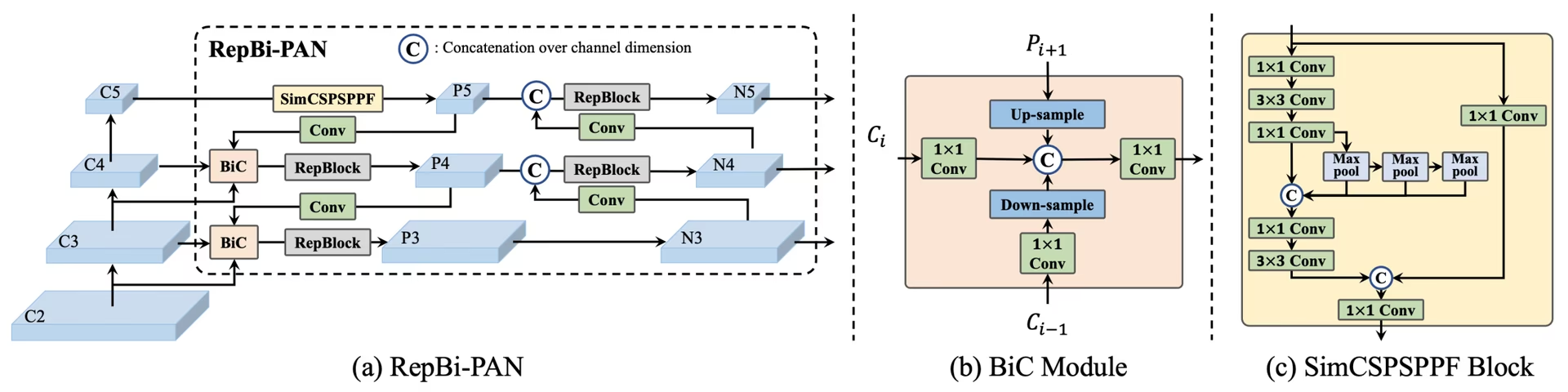 Überblick über YOLOv6. Architekturdiagramm des Modells mit den neu gestalteten Netzwerkkomponenten und Trainingsstrategien, die zu deutlichen Leistungsverbesserungen geführt haben. (a) Der Neck von YOLOv6 (N und S sind abgebildet). Hinweis: Bei M/L wird RepBlocks durch CSPStackRep ersetzt. (b) Die Struktur eines BiC-Moduls. (c) Ein SimCSPSPPF-Block. (Quelle.)
Wichtige Funktionen#
- Zweirichtungsverkettungsmodul (BiC): YOLOv6 führt im Neck des Detektors ein BiC-Modul ein, das Lokalisierungssignale verstärkt und die Leistung verbessert, ohne die Geschwindigkeit nennenswert zu beeinträchtigen.
- Anchor-gestützte Trainingsstrategie (AAT): AAT vereint die Vorteile von anchorbasierten und anchorfreien Ansätzen, ohne die Inferenzleistung zu beeinträchtigen.
- Verbessertes Backbone- und Neck-Design: Durch eine zusätzliche Stufe im Backbone und Neck von YOLOv6 erzielte das Modell bei seiner Veröffentlichung starke Ergebnisse auf dem COCO-Datensatz mit Eingaben hoher Auflösung.
- Selbstdestillationsstrategie: Eine neue Selbstdestillationsstrategie verbessert die Leistung kleinerer YOLOv6-Modelle. Dazu wird der Hilfsregressionszweig während des Trainings verstärkt und bei der Inferenz entfernt, um einen deutlichen Geschwindigkeitsverlust zu vermeiden.
Leistungskennzahlen#
YOLOv6 bietet verschiedene vortrainierte Modelle in unterschiedlichen Größen:
- YOLOv6-N: 37,5 % AP auf COCO val2017 bei 1187 FPS mit einer NVIDIA T4 GPU.
- YOLOv6-S: 45,0 % AP bei 484 FPS.
- YOLOv6-M: 50,0 % AP bei 226 FPS.
- YOLOv6-L: 52,8 % AP bei 116 FPS.
- YOLOv6-L6: Höchste Genauigkeit in Echtzeit.
YOLOv6 bietet außerdem quantisierte Modelle mit verschiedenen numerischen Genauigkeiten sowie für Mobilgeräte optimierte Modelle.
Anwendungsbeispiele#
Dieses Beispiel zeigt einfache Beispiele für das Training und die Inferenz mit YOLOv6.
YOLOv6-Dateien *.yaml können an die Klasse YOLO() übergeben werden, um das entsprechende Modell in Python zu erstellen:
from ultralytics import YOLO

# Ein YOLOv6n-Modell von Grund auf erstellen
model = YOLO("yolov6n.yaml")

# Modellinformationen anzeigen (optional)
model.info()

# Das Modell 100 Epochen lang mit dem COCO8-Beispieldatensatz trainieren
results = model.train(data="coco8.yaml", epochs=100, imgsz=640)

# Mit dem YOLOv6n-Modell eine Inferenz auf dem Bild „bus.jpg“ ausführen
results = model("path/to/bus.jpg")
Unterstützte Aufgaben und Modi#
Die YOLOv6-Reihe bietet verschiedene Modelle, die jeweils für die Objekterkennung optimiert sind und unterschiedliche Rechenbudgets sowie Anforderungen an die Genauigkeit abdecken.
| Modell | Dateinamen | Aufgaben | Training | Validierung | Inferenz | Exportieren |
|---|---|---|---|---|---|---|
| YOLOv6-N | yolov6n.yaml | Objekterkennung | ✅ | ✅ | ✅ | ✅ |
| YOLOv6-S | yolov6s.yaml | Objekterkennung | ✅ | ✅ | ✅ | ✅ |
| YOLOv6-M | yolov6m.yaml | Objekterkennung | ✅ | ✅ | ✅ | ✅ |
| YOLOv6-L | yolov6l.yaml | Objekterkennung | ✅ | ✅ | ✅ | ✅ |
| YOLOv6-X | yolov6x.yaml | Objekterkennung | ✅ | ✅ | ✅ | ✅ |
Diese Tabelle fasst die YOLOv6-Modellvarianten und ihre Unterstützung der Modi Training, Validierung, Inferenz und Export zusammen. Ultralytics stellt ausschließlich YAML-Dateien für YOLOv6-Modelle bereit; die Modelle werden daher von Grund auf trainiert.
Zitate und Danksagungen#
Wir möchten den Autoren für ihre bedeutenden Beiträge im Bereich der Echtzeit-Objekterkennung danken:
@misc{li2023yolov6,
      title={YOLOv6 v3.0: A Full-Scale Reloading},
      author={Chuyi Li and Lulu Li and Yifei Geng and Hongliang Jiang and Meng Cheng and Bo Zhang and Zaidan Ke and Xiaoming Xu and Xiangxiang Chu},
      year={2023},
      eprint={2301.05586},
      archivePrefix={arXiv},
      primaryClass={cs.CV}
}
Die ursprüngliche YOLOv6-Arbeit ist auf arXiv verfügbar. Die Autoren haben ihre Arbeit öffentlich zugänglich gemacht, und der Quellcode ist auf GitHub verfügbar. Wir schätzen ihre Bemühungen, das Fachgebiet voranzubringen und ihre Arbeit einer breiteren Gemeinschaft zugänglich zu machen.
Häufig gestellte Fragen#
Meituan YOLOv6, das 2022 veröffentlicht wurde, ist ein für Echtzeitanwendungen entwickelter Objektdetektor, der Geschwindigkeit und Genauigkeit ausgewogen kombiniert. Zu den bemerkenswerten Verbesserungen der Architektur gehören das Zweirichtungsverkettungsmodul (BiC) und eine Strategie für ankerunterstütztes Training (AAT). Diese Neuerungen sorgen für deutliche Leistungssteigerungen bei minimalen Geschwindigkeitseinbußen und machen YOLOv6 zu einer leistungsfähigen Option für Aufgaben der Objekterkennung.
Das Zweirichtungsverkettungsmodul (BiC) in YOLOv6 verstärkt die Lokalisierungssignale im Neck des Detektors und verbessert so die Leistung, ohne die Geschwindigkeit nennenswert zu beeinträchtigen. Das Modul kombiniert verschiedene Merkmalskarten effektiv und verbessert dadurch die Fähigkeit des Modells, Objekte genau zu erkennen. Weitere Einzelheiten zu den Funktionen von YOLOv6 findest du im Abschnitt Wichtige Funktionen.
Mit einfachen Python- oder CLI-Befehlen kannst du YOLOv6 mit Ultralytics trainieren. Zum Beispiel:
Beispielfrom ultralytics import YOLO # Ein YOLOv6n-Modell von Grund auf erstellen model = YOLO("yolov6n.yaml") # Das Modell 100 Epochen lang mit dem COCO8-Beispieldatensatz trainieren results = model.train(data="coco8.yaml", epochs=100, imgsz=640)Weitere Informationen findest du auf der Seite Training.
YOLOv6 bietet mehrere Versionen, die jeweils für unterschiedliche Leistungsanforderungen optimiert sind:
- YOLOv6-N: 37,5 % AP bei 1187 FPS
- YOLOv6-S: 45,0 % AP bei 484 FPS
- YOLOv6-M: 50,0 % AP bei 226 FPS
- YOLOv6-L: 52,8 % AP bei 116 FPS
- YOLOv6-L6: Höchste Genauigkeit in Echtzeitszenarien
Diese Modelle werden auf dem COCO-Datensatz mit einer NVIDIA T4 GPU ausgewertet. Weitere Informationen zu den Leistungskennzahlen findest du im Abschnitt Leistungskennzahlen.
Das ankerunterstützte Training (AAT) in YOLOv6 kombiniert Elemente ankerbasierter und ankerfreier Ansätze. So werden die Erkennungsfähigkeiten des Modells verbessert, ohne die Inferenzleistung zu beeinträchtigen. Bei diesem Verfahren werden während des Trainings Anker genutzt, um die Vorhersagen von Begrenzungsrahmen zu verbessern. Dadurch eignet sich YOLOv6 für vielfältige Aufgaben der Objekterkennung.
YOLOv6 unterstützt die Modi Training, Validierung, Inferenz und Export.


Kommentare14
Stell eine Frage, teile deine Ergebnisse oder hilf jemand anderem.
AkaashSamson
Hey, So I have actually trained my YOLOv6 model with the original repo, now I have a .pt file. using this file is there any way of getting my model in ultralytics format. mainly I want to run the ultralytics validation on my model as the original repo eval.py doesn't provide sufficient metrics.
 Glenn JocherUltralytics
Direct conversion of Meituan YOLOv6 .pt checkpoints to Ultralytics format isn’t supported; to use Ultralytics metrics, either train/fine-tune the matching yolov6*.yaml in Ultralytics and run validation, or export your Meituan model’s detections to COCO JSON and compute P/R via the COCO API; the metrics Ultralytics reports are outlined in the Val mode docs at Ultralytics validation.
tino926(bearbeitet)
I want to replicate your training accuracy of the YOLOv6-N model. Is this the correct command:
yolo train model=yolov6n.yaml data=coco.yaml epochs=400 optimizer=SGD cos_lr=True lr0=0.02? According to YOLOv6's repo https://github.com/meituan/YOLOv6/blob/main/docs/Train_coco_data.md, they have to use anchor-aid and distilling techniques to achieve this accuracy. But I can't find the corresponding parameters in ultralytics'.- Glenn JocherUltralytics
@tino926 to achieve the training accuracy of the YOLOv6-N model as described in the YOLOv6 repository, you would indeed use the anchor-aided training (AAT) and self-distillation strategies, which are not explicitly parameterized in the Ultralytics YOLO interface. Ensure you are using the latest version and check the YOLOv6 documentation for any updates on incorporating these strategies. For precise replication, consider following the original YOLOv6 GitHub instructions alongside Ultralytics for any additional settings or configurations.
@glenn-jocher, thanks for your response.
I apologize if I misunderstood your explanation, as I am not a native English speaker. Could you please clarify if the phrase "which are not explicitly parameterized in the Ultralytics YOLO interface" means that AAT and self-distillation cannot currently be implemented solely through the Ultralytics YOLO interface? Therefore I should manually add anchor branches and implement distillation with additional code?
- Glenn JocherUltralytics
Thank you for your question. Yes, that's correct. The current Ultralytics YOLO interface does not explicitly support anchor-aided training (AAT) and self-distillation, so you would need to implement these strategies manually by modifying the code to include anchor branches and self-distillation techniques. If you need further guidance on implementing these, referring to the original YOLOv6 repository might be helpful.
kadirnar
Does ultralytics library support yolov6 model?
ModuleNotFoundError: No module named 'yolov6'
 Paula DerrengerUltralytics(bearbeitet)
@kadirnar hi there!
Yes, the Ultralytics library does support YOLOv6 models. It seems like you might be encountering a
ModuleNotFoundErrorbecause the YOLOv6 model isn't being recognized. Let's ensure you're using the latest versions oftorchandultralytics. Please update your packages and try again:pip install --upgrade torch ultralyticsHere's a quick example to get you started with YOLOv6 using the Ultralytics library:
Python
from ultralytics import YOLO

# Load a YOLOv6n model
model = YOLO("yolov6n.yaml")

# Train the model on the COCO8 example dataset for 100 epochs
results = model.train(data="coco8.yaml", epochs=100, imgsz=640)

# Run inference with the trained model on an image
results = model("path/to/bus.jpg")
CLI
# Train YOLOv6n model
yolo train model=yolov6n.yaml data=coco8.yaml epochs=100 imgsz=640

# Run inference with your trained weights
yolo predict model=path/to/best.pt source=path/to/bus.jpg
If you continue to face issues, please provide a minimum reproducible example so we can better assist you. You can refer to our guide on creating a minimum reproducible example here: Minimum Reproducible Example.
Feel free to reach out if you have any more questions! 😊
akhilesh99sharma
There are AP and AR values for results but not precision and recall. I need to compare precision and recall values for different YOLO versions (v5,v6,v7 etc.) on my custom dataset. How to get precision and recall values for YOLOv6 evaluation?
- Paula DerrengerUltralytics(bearbeitet)
Hey there! 👋
You don't need to compute precision and recall by hand: validation already reports them. After
model.val(), the results object holds them directly:from ultralytics import YOLO # Load your trained model model = YOLO("path/to/your/custom-yolov6-model.pt") # Run validation results = model.val(data="path/to/your/dataset.yaml") print(f"Precision: {results.box.mp}, Recall: {results.box.mr}") # mean over all classes print(results.box.p, results.box.r) # per-class precision and recallHope this helps, and happy comparing across YOLO versions! 🚀
Hello , I tried but was still not able to get these values, could you please help me with that?
- Paula DerrengerUltralytics(bearbeitet)
Hey there! 😊
Precision and recall are reported by Ultralytics validation, so you don't need to count TP/FP/FN yourself. After
results = model.val(data="path/to/dataset.yaml"), useresults.box.mp(mean precision),results.box.mr(mean recall), andresults.box.p/results.box.rfor per-class values.If you need them computed from raw counts, precision = TP / (TP + FP) and recall = TP / (TP + FN), where the counts come from matching predictions to ground-truth boxes at an IoU threshold.
Hope this helps! Let me know if there's anything else I can do for you. Happy modeling! 🚀
Hello, I tried doing it but was not able to do so. I get the predictions json file in the val folder but don't know how to compare it with the labels to get TP, FP etc. Can you please help me with that? I need to compare results of YOLOv6 with v8, v9 but I am not getting precision and recall values in v6 , I get average precision and average recall
- Paula DerrengerUltralytics(bearbeitet)
@akhilesh99sharma hey there! 🌞
You can get precision and recall directly from validation without processing the predictions JSON yourself. After
results = model.val(data="path/to/dataset.yaml"), useresults.box.mp(mean precision),results.box.mr(mean recall), andresults.box.p/results.box.rfor per-class values.If you still need TP, FP and FN counts from the saved predictions JSON, you will have to match predicted boxes to ground-truth boxes per image using an IoU threshold. The confusion matrix saved in the run folder (
confusion_matrix.png, ormodel.val(plots=True)) also shows these counts per class.For comparing across YOLO versions, run each model with consistent settings on your custom dataset and read the same metrics from each.
I hope this simplifies the process for you! 🚀 Let me know if you need further assistance.