Modello Segment Anything (SAM)

Segment Anything Model (SAM) di Meta ha introdotto la segmentazione delle immagini guidata da prompt: dato un prompt costituito da un punto, un riquadro o una maschera, restituisce una maschera per l'oggetto indicato, con un decoder leggero abbastanza veloce da consentire un utilizzo interattivo.
Introduzione a SAM: il Modello Segment Anything#
Segment Anything Model, o SAM, è un modello di segmentazione delle immagini progettato per segmentare immagini tramite prompt in un'ampia gamma di attività di analisi delle immagini. SAM è il nucleo del progetto Segment Anything di Meta, che ha introdotto un nuovo modello, una nuova attività e un nuovo dataset per la segmentazione delle immagini.
Il design di SAM gli consente di adattarsi a nuove distribuzioni di immagini e attività senza conoscenze pregresse, una capacità nota come trasferimento zero-shot. Addestrato sul dataset SA-1B, che contiene oltre 1 miliardo di maschere in 11 milioni di immagini selezionate, SAM mostra ottime prestazioni zero-shot, spesso competitive o superiori ai precedenti risultati ottenuti con supervisione completa.
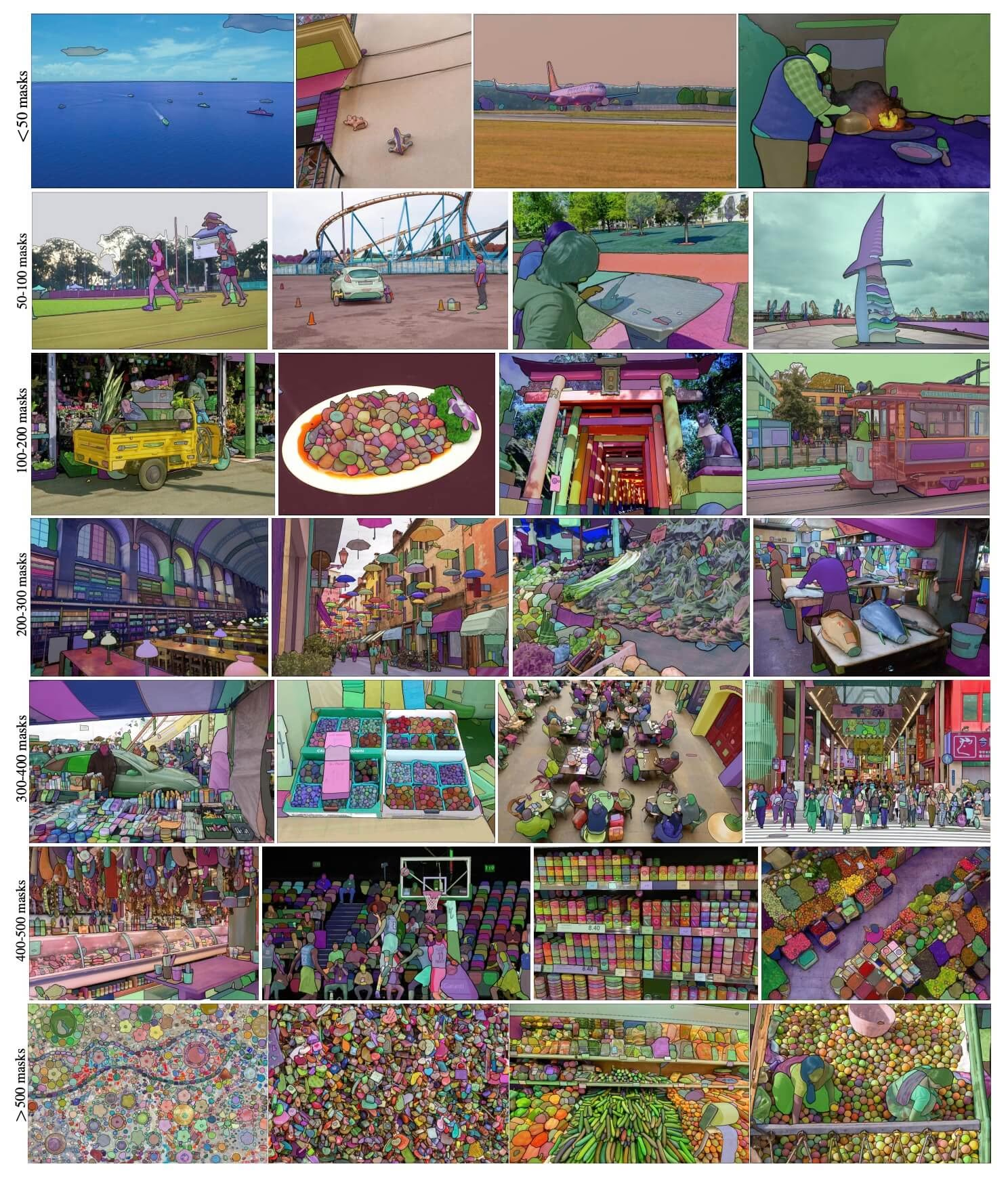 Immagini di esempio SA-1B. Immagini del dataset SA-1B con maschere sovrapposte. SA-1B contiene 11M di immagini diverse, ad alta risoluzione, con licenza e rispettose della privacy, e 1,1B di maschere di segmentazione di alta qualità. SAM ha annotato queste maschere in modo completamente automatico e, come confermato dalle valutazioni umane e da numerosi esperimenti, sono di alta qualità e diversificate. Per la visualizzazione, le immagini sono raggruppate in base al numero di maschere per immagine (in media circa 100 maschere per immagine).
Caratteristiche principali del Modello Segment Anything (SAM)#
- Attività di segmentazione basata su prompt: SAM è stato progettato per un'attività di segmentazione basata su prompt e può generare maschere di segmentazione valide a partire da qualsiasi prompt, ad esempio indizi spaziali o testuali che identificano un oggetto.
- Architettura avanzata: Segment Anything Model utilizza un encoder di immagini pesante, un encoder dei prompt e un decoder delle maschere leggero. Questa architettura consente di usare prompt flessibili, calcolare maschere in tempo reale e gestire l'ambiguità nelle attività di segmentazione.
- Il dataset SA-1B: introdotto dal progetto Segment Anything, il dataset SA-1B contiene oltre 1 miliardo di maschere in 11 milioni di immagini. Al momento del rilascio era il più grande dataset di segmentazione e fornisce a SAM una fonte di dati di addestramento ampia e diversificata.
- Prestazioni zero-shot: SAM mostra ottime prestazioni zero-shot in diverse attività di segmentazione e costituisce uno strumento pronto all'uso per applicazioni diversificate, con un ricorso minimo alla progettazione dei prompt.
Per un approfondimento sul Modello Segment Anything e sul dataset SA-1B, visita Segment Anything su GitHub e leggi l'articolo di ricerca Segment Anything.
I modelli della famiglia SAM (SAM 2.1, SAM 3 e SAM 3.1) alimentano la funzionalità di annotazione intelligente sulla Ultralytics Platform, consentendo di creare maschere con un clic per etichettare rapidamente i dataset.
Modelli disponibili, attività supportate e modalità operative#
Questa tabella presenta i modelli disponibili, i relativi pesi preaddestrati, le attività supportate e la compatibilità con diverse modalità operative, come Addestramento, Validazione, Inferenza ed Esportazione. Le modalità supportate sono indicate con ✅ e quelle non supportate con ❌.
| Tipo di modello | Pesi preaddestrati | Attività supportate | Addestramento | Validazione | Inferenza | Esporta |
|---|---|---|---|---|---|---|
| SAM base | sam_b.pt | Segmentazione di istanze | ❌ | ❌ | ✅ | ❌ |
| SAM large | sam_l.pt | Segmentazione di istanze | ❌ | ❌ | ✅ | ❌ |
Come usare SAM: versatilità e potenza nella segmentazione delle immagini#
Segment Anything Model può essere utilizzato per molte attività a valle che vanno oltre i dati di addestramento, tra cui il rilevamento dei bordi, la generazione di proposte di oggetti, la segmentazione di istanze e la previsione preliminare da testo a maschera. Con la progettazione dei prompt, SAM può adattarsi a nuove attività e distribuzioni di dati in modalità zero-shot.
Esempio di predizione con SAM#
Segmenta l'immagine usando i prompt forniti.
from ultralytics import SAM

# Carica un modello
model = SAM("sam_b.pt")

# Visualizza le informazioni sul modello (facoltativo)
model.info()

# Esegui l'inferenza con il prompt dei riquadri di delimitazione
results = model("ultralytics/assets/zidane.jpg", bboxes=[439, 437, 524, 709])

# Esegui l'inferenza con un singolo punto
results = model(points=[900, 370], labels=[1])

# Esegui l'inferenza con più punti
results = model(points=[[400, 370], [900, 370]], labels=[1, 1])

# Esegui l'inferenza con il prompt a più punti per oggetto
results = model(points=[[[400, 370], [900, 370]]], labels=[[1, 1]])

# Esegui l'inferenza con il prompt dei punti negativi
results = model(points=[[[400, 370], [900, 370]]], labels=[[1, 0]])
Segmenta l'intera immagine.
from ultralytics import SAM

# Carica un modello
model = SAM("sam_b.pt")

# Visualizza le informazioni sul modello (facoltativo)
model.info()

# Esegui l'inferenza
model("path/to/image.jpg")- SAM segmenta l'intera immagine quando non fornisci prompt (bboxes/punti/maschere).
Imposta l'immagine una sola volta, quindi esegui l'inferenza con i prompt più volte senza eseguire nuovamente l'encoder delle immagini.
import cv2

from ultralytics.models.sam import Predictor as SAMPredictor

# Crea SAMPredictor
overrides = {"conf": 0.25, "task": "segment", "mode": "predict", "imgsz": 1024, "model": "mobile_sam.pt"}
predictor = SAMPredictor(overrides=overrides)

# Imposta l'immagine
predictor.set_image("ultralytics/assets/zidane.jpg")  # imposta con un file immagine
predictor.set_image(cv2.imread("ultralytics/assets/zidane.jpg"))  # imposta con np.ndarray
results = predictor(bboxes=[439, 437, 524, 709])

# Esegui l'inferenza con un prompt a punto singolo
results = predictor(points=[900, 370], labels=[1])

# Esegui l'inferenza con un prompt a più punti
results = predictor(points=[[400, 370], [900, 370]], labels=[1, 1])

# Esegui l'inferenza con il prompt dei punti negativi
results = predictor(points=[[[400, 370], [900, 370]]], labels=[[1, 0]])

# Reimposta l'immagine
predictor.reset_image()
Segmenta tutto con argomenti aggiuntivi.
from ultralytics.models.sam import Predictor as SAMPredictor

# Crea SAMPredictor
overrides = {"conf": 0.25, "task": "segment", "mode": "predict", "imgsz": 1024, "model": "mobile_sam.pt"}
predictor = SAMPredictor(overrides=overrides)

# Segmenta con argomenti aggiuntivi
results = predictor(source="ultralytics/assets/zidane.jpg", crop_n_layers=1, points_stride=64, min_mask_region_area=100)Tutti gli oggetti results restituiti negli esempi precedenti sono oggetti Results che consentono di accedere alle maschere previste e all'immagine sorgente.
- Per altri argomenti
Segment everything, consulta il riferimentoPredictor/generate.
Confronto tra SAM e YOLO#
Qui confrontiamo il modello SAM-b di Meta con i modelli di segmentazione Ultralytics, incluso YOLO26:
| Modello | Dimensione (MB) | Parametri (M) | Velocità (CPU) (ms/im) |
|---|---|---|---|
| Meta SAM-b | 375 | 93.7 | 41703 |
| MobileSAM | 40.7 | 10.1 | 23802 |
| FastSAM-s con backbone YOLOv8 | 23.9 | 11.8 | 58.0 |
| Ultralytics YOLOv8n-seg | 7.1 (52.8x più piccolo) | 3.4 (27.6x in meno) | 24.8 (1682x più veloce) |
| Ultralytics YOLO11n-seg | 6.2 (60.5x più piccolo) | 2.9 (32.3x in meno) | 24.3 (1716x più veloce) |
| Ultralytics YOLO26n-seg | 6.7 (56.0x più piccolo) | 2.7 (34.7x in meno) | 25.2 (1655x più veloce) |
Questo confronto evidenzia le notevoli differenze nelle dimensioni e nella velocità dei modelli tra le varianti SAM e i modelli di segmentazione YOLO. Sebbene SAM offra capacità uniche di segmentazione automatica, i modelli YOLO, in particolare YOLOv8n-seg, YOLO11n-seg e YOLO26n-seg, sono significativamente più piccoli, più veloci e più efficienti dal punto di vista computazionale.
Le velocità di SAM sono state misurate con PyTorch, quelle di YOLO con ONNX Runtime. I test sono stati eseguiti su un Apple M4 Air del 2025 con 16 GB di RAM usando torch==2.10.0, ultralytics==8.4.31 e onnxruntime==1.24.4. Per riprodurre questo test:
from ultralytics import ASSETS, SAM, YOLO, FastSAM

# Confronta le prestazioni di SAM-b e MobileSAM
for file in ["sam_b.pt", "mobile_sam.pt"]:
    model = SAM(file)
    model.info()
    model(ASSETS)

# Profilo FastSAM-s
model = FastSAM("FastSAM-s.pt")
model.info()
model(ASSETS)

# Profila i modelli YOLO (ONNX)
for file_name in ["yolov8n-seg.pt", "yolo11n-seg.pt", "yolo26n-seg.pt"]:
    model = YOLO(file_name)
    model.info()
    onnx_path = model.export(format="onnx", dynamic=True, nms=False)  # Head senza NMS di YOLO26; non fa nulla per YOLOv8/YOLO11
    model = YOLO(onnx_path)
    model(ASSETS)
Annotazione automatica: un percorso rapido verso i dataset di segmentazione#
L'annotazione automatica è una funzionalità chiave di SAM, che consente agli utenti di generare un dataset di segmentazione usando un modello di rilevamento preaddestrato. Questa funzionalità permette di annotare rapidamente un gran numero di immagini, evitando la laboriosa etichettatura manuale.
Genera il tuo dataset di segmentazione usando un modello di rilevamento#
Per annotare automaticamente il tuo dataset con il framework Ultralytics, usa la funzione auto_annotate, che abbina un rilevatore come YOLO26x a SAM:
from ultralytics.data.annotator import auto_annotate

auto_annotate(data="path/to/images", det_model="yolo26x.pt", sam_model="sam_b.pt")| Argomento | Tipo | Predefinito | Descrizione |
|---|---|---|---|
data | str | obbligatorio | Percorso della directory contenente le immagini di destinazione da annotare o segmentare. |
det_model | str | 'yolo26x.pt' | Percorso del modello di rilevamento YOLO per il rilevamento iniziale degli oggetti. |
sam_model | str | 'sam_b.pt' | Percorso del modello SAM per la segmentazione (supporta i pesi di SAM, SAM 2, MobileSAM e SAM 3). |
device | str | '' | Dispositivo di calcolo (ad es. 'cuda:0', 'cpu' o '' per il rilevamento automatico del dispositivo). |
conf | float | 0.25 | Soglia di confidenza del rilevamento YOLO per filtrare i rilevamenti deboli. |
iou | float | 0.5 | Soglia IoU per la soppressione non massima, usata per filtrare i riquadri sovrapposti. |
imgsz | int | 640 | Dimensione di input per ridimensionare le immagini (arrotondata al multiplo di 32 più vicino per eccesso, se necessario). |
max_det | int | 300 | Numero massimo di rilevamenti per immagine per ottimizzare l'uso della memoria. |
classes | list[int] | None | Elenco degli indici delle classi da rilevare (ad es. [0, 1] per persona e bicicletta). |
output_dir | str | None | Directory in cui salvare le annotazioni (per impostazione predefinita: directory sorella di <data>_auto_annotate_labels). |
La funzione auto_annotate accetta il percorso delle immagini e argomenti facoltativi per specificare i modelli di rilevamento preaddestrato e di segmentazione SAM, il dispositivo su cui eseguirli e la directory di output in cui salvare i risultati annotati.
L'annotazione automatica con modelli preaddestrati riduce notevolmente il tempo e l'impegno necessari per creare dataset di segmentazione, permettendo ai team con grandi raccolte di immagini di concentrarsi sullo sviluppo e sulla valutazione dei modelli invece che sull'annotazione manuale.
Citazioni e ringraziamenti#
Se SAM ti è utile nel tuo lavoro di ricerca o sviluppo, valuta la possibilità di citare l'articolo:
@misc{kirillov2023segment,
      title={Segment Anything},
      author={Alexander Kirillov and Eric Mintun and Nikhila Ravi and Hanzi Mao and Chloe Rolland and Laura Gustafson and Tete Xiao and Spencer Whitehead and Alexander C. Berg and Wan-Yen Lo and Piotr Dollár and Ross Girshick},
      year={2023},
      eprint={2304.02643},
      archivePrefix={arXiv},
      primaryClass={cs.CV}
}
Desideriamo ringraziare Meta AI per aver creato e mantenuto questa preziosa risorsa per la comunità della visione artificiale.
Domande frequenti#
Segment Anything Model (SAM) di Meta è un modello di segmentazione delle immagini progettato per attività di segmentazione guidate da prompt. Combina encoder di immagini e prompt con un decoder delle maschere leggero per generare maschere di segmentazione a partire da prompt come punti, riquadri o maschere. Addestrato sul dataset SA-1B, SAM offre buone prestazioni zero-shot e si adatta a nuove distribuzioni di immagini e attività senza conoscenze pregresse.
Puoi usare il Modello Segment Anything (SAM) per segmentare le immagini eseguendo l'inferenza con vari prompt, come riquadri di delimitazione o punti. Ecco un esempio con Python:
from ultralytics import SAM

# Carica un modello
model = SAM("sam_b.pt")

# Segmenta con un prompt di riquadro di delimitazione
model("ultralytics/assets/zidane.jpg", bboxes=[439, 437, 524, 709])

# Segmenta con un prompt a punti
model("ultralytics/assets/zidane.jpg", points=[900, 370], labels=[1])

# Segmenta con un prompt a più punti
model("ultralytics/assets/zidane.jpg", points=[[400, 370], [900, 370]], labels=[1, 1])

# Segmenta con un prompt a più punti per oggetto
model("ultralytics/assets/zidane.jpg", points=[[[400, 370], [900, 370]]], labels=[[1, 1]])

# Segmenta con un prompt a punti negativi.
model("ultralytics/assets/zidane.jpg", points=[[[400, 370], [900, 370]]], labels=[[1, 0]])
In alternativa, puoi eseguire l'inferenza con SAM tramite l'interfaccia a riga di comando (CLI):
yolo predict model=sam_b.pt source=path/to/image.jpgRispetto ai modelli YOLO, le varianti di SAM come SAM-b, MobileSAM e FastSAM-s sono generalmente più grandi e lente, ma offrono funzionalità esclusive di segmentazione zero-shot. Ad esempio, YOLO26n-seg è 56x più piccolo e oltre 1650x più veloce del modello SAM-b originale di Meta su CPU. Per questo i modelli YOLO sono ideali per applicazioni che richiedono una segmentazione rapida, leggera ed efficiente dal punto di vista computazionale, mentre i modelli SAM eccellono nelle attività di segmentazione flessibili, basate su prompt e zero-shot.
SAM di Ultralytics offre una funzionalità di annotazione automatica che consente di generare dataset di segmentazione usando un modello di rilevamento preaddestrato. Ecco un esempio in Python:
from ultralytics.data.annotator import auto_annotate

auto_annotate(data="path/to/images", det_model="yolo26x.pt", sam_model="sam_b.pt")
Questa funzione accetta il percorso delle immagini e argomenti facoltativi per i modelli di rilevamento preaddestrato e di segmentazione SAM, oltre alle specifiche del dispositivo e della directory di output. Per una guida completa, consulta Annotazione automatica.
SAM viene addestrato sul dataset SA-1B, che comprende oltre 1 miliardo di maschere distribuite su 11 milioni di immagini. Al momento della sua pubblicazione, SA-1B era il più grande dataset di segmentazione e offriva dati di addestramento di alta qualità e diversificati, alla base delle prestazioni zero-shot di SAM nelle attività di segmentazione.


Commenti27
Fai una domanda, condividi i tuoi risultati o aiuta qualcun altro.
kh-diab
can we use SAM to process labeled images with bounding box to segment the object inside the box and generate new labels files like yolo or coco format if yes how please
1 Paula DerrengerUltralytics
Yes, you can use SAM to process labeled images with bounding boxes to segment the objects inside and generate new label files in formats like YOLO or COCO. You can achieve this by using the
auto_annotatefunction in the Ultralytics framework. This function allows you to auto-annotate your dataset using a pre-trained detection model and SAM for segmentation. For more details, you can refer to the Segment Anything Model documentation. If you need further assistance, feel free to ask!Hello @pderrenger
Thanks I tried to run the below but I face error all the time
import os import cv2 import numpy as np from ultralytics import SAM
Load the SAM model
model = SAM("sam_b.pt") # Update the model path if needed
Function to load YOLO annotations
def load_yolo_annotations(annotation_path, image_width, image_height): bboxes = [] try: with open(annotation_path, 'r') as file: lines = file.readlines() for line in lines: parts = line.strip().split() class_id = int(parts[0]) x_center = float(parts[1]) * image_width y_center = float(parts[2]) * image_height width = float(parts[3]) * image_width height = float(parts[4]) * image_height x = x_center - width / 2 y = y_center - height / 2 bboxes.append((x, y, x + width, y + height)) # Update to [x1, y1, x2, y2] except Exception as e: print(f"Error reading annotation file {annotation_path}: {e}") return bboxes
Paths
images_folder = r'E:\MSc\tesi\20210901_Herrenpuent_Taenikon_Matrice_300_15m_1.6m_s\500 D' annotations_folder = r'C:\Users\Khaled\OneDrive - OST\Study Material\Msc Thesis\dataset\Group D yolo format\obj_train_data' output_folder = r'C:\Users\Khaled\OneDrive - OST\Study Material\Msc Thesis\dataset\test output sam'
if not os.path.exists(output_folder): os.makedirs(output_folder)
Process each image and its corresponding annotation
total_images = len(os.listdir(images_folder)) processed_images = 0
for image_filename in os.listdir(images_folder): if image_filename.endswith(('.JPG', '.jpg', '.png')): image_path = os.path.join(images_folder, image_filename) annotation_path = os.path.join(annotations_folder, image_filename.replace('.JPG', '.txt').replace('.jpg', '.txt').replace('.png', '.txt'))
    print(f"Processing {image_filename}...")

    # Check if annotation file exists
    if not os.path.exists(annotation_path):
        print(f"Annotation file not found for {image_filename}")
        continue

    # Load the image
    image = cv2.imread(image_path)
    if image is None:
        print(f"Failed to load image {image_path}")
        continue

    image_rgb = cv2.cvtColor(image, cv2.COLOR_BGR2RGB)
    height, width, _ = image.shape

    # Load YOLO annotations
    bboxes = load_yolo_annotations(annotation_path, width, height)
    if not bboxes:
        print(f"No bounding boxes found in {annotation_path}")
        continue

    # Perform segmentation using SAM model
    results = model(image_rgb, bboxes=bboxes)

    for idx, result in enumerate(results):
        if hasattr(result, 'masks') and result.masks is not None:
            masks = result.masks.cpu().numpy()  # Convert to numpy array
            for m_idx, mask in enumerate(masks):
                chw_mask = mask.astype(np.uint8)  # Ensure mask is in uint8 format
                hwc_mask = np.transpose(chw_mask, (1, 2, 0))  # Convert CHW to HWC
                contours, _ = cv2.findContours(hwc_mask, cv2.RETR_EXTERNAL, cv2.CHAIN_APPROX_SIMPLE)

                segmented_image = cv2.bitwise_and(image, image, mask=hwc_mask)

                # Save the segmented image
                output_path = os.path.join(output_folder, image_filename.replace('.JPG', f'_segmented_{idx}_{m_idx}.jpg').replace('.jpg', f'_segmented_{idx}_{m_idx}.jpg').replace('.png', f'_segmented_{idx}_{m_idx}.png'))
                cv2.imwrite(output_path, segmented_image)
                print(f"Saved segmented image to {output_path}")

    processed_images += 1
    print(f"Processed {processed_images}/{total_images} images.")
print("Processing completed.")
error is
AttributeError: 'Masks' object has no attribute 'astype'. See valid attributes below.
A class for storing and manipulating detection masks.

    xy (list): A list of segments in pixel coordinates.
    xyn (list): A list of normalized segments.

Methods:
    cpu(): Returns the masks tensor on CPU memory.
    numpy(): Returns the masks tensor as a numpy array.
    cuda(): Returns the masks tensor on GPU memory.
    to(device, dtype): Returns the masks tensor with the specified device and dtype.
PS C:\Users\Khaled> & C:/MSc_Workspace/anaconda3/envs/GenEnv/python.exe "c:/Users/Khaled/OneDrive - OST/Study Material/Msc Thesis/coding/sam segment.py" Processing DJI_20210901122818_0695.JPG...
0: 1024x1024 67330.4ms Speed: 48.0ms preprocess, 67330.4ms inference, 8095.5ms postprocess per image at shape (1, 3, 1024, 1024) Traceback (most recent call last): File "c:\Users\Khaled\OneDrive - OST\Study Material\Msc Thesis\coding\sam segment.py", line 75, in chw_mask = mask.astype(np.uint8) # Ensure mask is in uint8 format File "C:\MSc_Workspace\anaconda3\envs\GenEnv\lib\site-packages\ultralytics\utils_init_.py", line 162, in getattr raise AttributeError(f"'{name}' object has no attribute '{attr}'. See valid attributes below.\n{self.doc}") AttributeError: 'Masks' object has no attribute 'astype'. See valid attributes below.
A class for storing and manipulating detection masks.

Attributes:
    xy (list): A list of segments in pixel coordinates.
    xyn (list): A list of normalized segments.

Methods:
    cpu(): Returns the masks tensor on CPU memory.
    numpy(): Returns the masks tensor as a numpy array.
    cuda(): Returns the masks tensor on GPU memory.
    to(device, dtype): Returns the masks tensor with the specified device and dtype.
do you have idea how to solve it thanks
evans rojas
Hola me gustaría usar SAM para clasificar vegetación a partir de una imagen. ¿Qué recomendaciones me sugieren?
- Paula DerrengerUltralytics
Hola, Evans. SAM puede ayudarte a delimitar la vegetación, pero el SAM original no identifica por sí solo especies ni tipos de cobertura. Te sugiero comenzar con puntos positivos sobre la vegetación y negativos sobre el fondo, revisar las máscaras y asignarles tus clases manualmente. Si buscas automatizar la clasificación en más imágenes, puedes usar esas anotaciones para entrenar un modelo de segmentación por instancias para plantas individuales o de segmentación semántica para coberturas del terreno. ¿Quieres separar vegetación del fondo o distinguir especies, y trabajas con fotografías terrestres, de dron o satelitales?
meenakshi71
I've been trying to export the SAM model (which i had trained on my custom dataset) into ONNX but the output is always wrong. It is just generating a grid instead of a proper segmentation mask every time even after providing multiple kinds of prompts.
 Glenn JocherUltralytics
@meenakshi71 it seems the issue may stem from the export process or configuration. Ensure you are using the correct export parameters and supported formats. SAM models are primarily designed for real-time inference and not all functionalities may transfer seamlessly to ONNX. Refer to the SAM export documentation for guidance. If the problem persists, consider testing the ONNX model with simpler prompts to isolate the issue.
MeenakshiKK236
Why are my segmentation results being automatically saved into this directory while using the SAM model to perform segmentation on my custom dataset? "Results saved to runs/segment/predict4"
- Glenn JocherUltralytics
@MeenakshiKK236 the results are saved to the
runs/segment/predict4directory by default. You can change the save directory by specifying theprojectandnamearguments in your command. For more details, please refer to the SAM documentation.
NasserAlqeifi
Correct me if I'm wrong, when I use the auto_annotate function I will only get labels for my dataset with the classes in Yolo pre-trained? What if I need classes that are not available within Yolo? For example, I want to get a label for the road, and this is not available in any version of Yolo, but it is available in SAM?
- Glenn JocherUltralytics
@NasserAlqeifi you are correct. The
auto_annotatefunction uses YOLO's pre-trained classes for labeling. If you need classes not available in YOLO, like "road," you can use SAM directly for segmentation. For more details, please refer to the Segment Anything Model documentation. - Glenn JocherUltralytics
@NasserAlqeifi but also remember SAM identifies segments but not classes, so it may find a sign or a road, but it won't be able to assign a class to them by itself.
Thank you for your quick response. Indeed, I tried to use SAM directly and found that it does not save the class names in the name, but the class number.
from ultralytics import SAM
Load a model
model = SAM("sam2_l.pt")
Predict results
results = model.predict(source=r"/testSAM/image.png", stream=True, bboxes=None, points=None, labels=None, show=False)
Iterate over results, print names, and save each result to a file
for i, result in enumerate(results): # Print the names detected in the result print(f"Result {i}: Detected Names - {result.names}")
# Save the result as an image file
result.save(f"output_{i}.jpg")
------------- output ---------
image 1/1 /testSAM/image.png: 1024x1024 1 0, 1 1, 1 2, 1 3, 1 4, 1 5, 1 6, 1 7, 1 8, 1 9, 1 10, 1 11, 1 12, 1 13, 1 14, 1 15, 1 16, 1 17, 1 18, 1 19, 1 20, 1 21, 1 22, 1 23, 1 24, 1 25, 1 26, 1 27, 1 28, 1 29, 1 30, 1 31, 1 32, 23758.2ms Result 0: Detected Names - {0: '0', 1: '1', 2: '2', 3: '3', 4: '4', 5: '5', 6: '6', 7: '7', 8: '8', 9: '9', 10: '10', 11: '11', 12: '12', 13: '13', 14: '14', 15: '15', 16: '16', 17: '17', 18: '18', 19: '19', 20: '20', 21: '21', 22: '22', 23: '23', 24: '24', 25: '25', 26: '26', 27: '27', 28: '28', 29: '29', 30: '30', 31: '31', 32: '32'} Speed: 20.3ms preprocess, 23758.2ms inference, 7.1ms postprocess per image at shape (1, 3, 1024, 1024)
- Glenn JocherUltralytics
Thank you for your feedback. Currently, SAM does not assign class names, only class numbers. If you need specific class names, you may need to implement a custom mapping or post-processing step to assign the desired class names based on your requirements.
dreambit
I have images where a single object (such as a car) is partially covered by small trees, resulting in the object being divided into multiple visible fragments. In coco it could look like { "id": 1, "image_id": 1, "category_id": 1, "bbox": [x, y, width, height], "segmentation": [ [polygon1_x1, polygon1_y1, polygon1_x2, polygon1_y2, ...], [polygon2_x1, polygon2_y1, polygon2_x2, polygon2_y2, ...] ], "area": 500, "iscrowd": 0 } Each polygon is an array of coordinates defining a closed shape
Is it possible with auto_annotate and yolo format?
- Glenn JocherUltralytics(modificato)
@dreambit hi there!
Thank you for your detailed question. Yes, you can use the
auto_annotatefunction in the Ultralytics framework to handle images where objects are partially occluded and appear as multiple fragments. This function can generate segmentation masks for such complex scenarios.Here's how you can achieve this:
- Prepare Your Dataset: Ensure your images are organized in a directory.
- Use the
auto_annotateFunction: This function will use a pre-trained YOLO detection model and the SAM segmentation model to annotate your images.
Here's a code example to get you started:
from ultralytics.data.annotator import auto_annotate

# Path to your images
data_path = "path/to/your/images"

# Auto-annotate using YOLO26 and SAM models
auto_annotate(data=data_path, det_model="yolo26x.pt", sam_model="sam_b.pt")
Explanation:
data: Path to the folder containing your images.det_model: The pre-trained YOLO detection model, which defaults toyolo26x.pt.sam_model: The pre-trained SAM segmentation model, which defaults tosam_b.pt.
This setup will generate segmentation masks for your images, even if the objects are partially occluded.
For more detailed information on using SAM and its capabilities, you can refer to the Segment Anything Model (SAM) documentation.
If you encounter any issues or need further assistance, please provide a reproducible example so we can better understand and address your specific scenario. You can find more information on creating a minimum reproducible example here.
Feel free to update to the latest versions of the packages to ensure you have the latest features and fixes.
Best of luck with your project! 🚀
Glenn thanks, but as I see in docs https://docs.ultralytics.com/datasets/segment/#ultralytics-yolo-format ... In this format, is the index of the class for the object, and ... are the bounding coordinates of the object's segmentation mask. The coordinates are separated by spaces.
So it means that I could have only one segmentation mask?
0 0.681 0.485 0.670 0.487 0.676 0.487 1 0.504 0.000 0.501 0.004 0.498 0.004 0.493 0.010 0.492 0.0104
Glen, i ran the command you specified, and used an image from coco data set to test, as you can see segmentations are not correct, only half of the objects are segmented:
Here is original image from coco with car mask https://ibb.co/RjYyRdk
- Glenn JocherUltralytics(modificato)
Hi @dreambit,
Thank you for sharing the images and details. I understand the challenge you're facing with partial segmentations. The
auto_annotatefunction should ideally handle such cases, but it seems like the segmentation results are not as expected.Steps to Troubleshoot and Improve Segmentation:
-
Verify Latest Versions: Ensure you are using the latest versions of the Ultralytics and SAM models. This can help avoid any bugs that might have been fixed in recent updates.
-
Reproducible Example: If the issue persists, providing a minimum reproducible example would be very helpful. This allows us to better understand and diagnose the problem. You can find guidance on creating a reproducible example here.
-
Adjusting Prompts: Sometimes, adjusting the prompts (bounding boxes or points) can improve segmentation results. Here’s an example of how you can use different prompts:
from ultralytics import SAM # Load a model model = SAM("sam_b.pt") # Run inference with bounding boxes prompt results = model("path/to/image.jpg", bboxes=[[x1, y1, x2, y2], [x3, y3, x4, y4]]) # Run inference with points prompt results = model("path/to/image.jpg", points=[[x1, y1], [x2, y2]], labels=[1, 1]) -
Segment Everything: If specific prompts are not yielding the desired results, you can try segmenting the entire image without prompts:
from ultralytics import SAM # Load a model model = SAM("sam_b.pt") # Segment the whole image results = model("path/to/image.jpg") -
Multiple Masks Handling: If your object is divided into multiple fragments, ensure that the segmentation model is capable of handling multiple masks per object. The YOLO format typically supports one segmentation mask per object, but you can adapt the output to handle multiple masks by combining them post-processing.
Example of Handling Multiple Masks:
If you need to combine multiple masks into a single annotation, you can do this post-processing:
# `results[0].masks.data` holds all masks of the image, shape (N, H, W)
combined_mask = results[0].masks.data.cpu().numpy().max(axis=0)

# Save or use the combined mask
Documentation and Resources:
For more detailed information on using SAM and its capabilities, please refer to the Segment Anything Model (SAM) documentation.
If you continue to face issues, please share a reproducible example, and we’ll be happy to assist further. Your feedback is valuable, and we aim to provide the best support possible.
-
kshweikeh
is there anyway where I can train YOLO SAM on a custom dataset?
- Paula DerrengerUltralytics(modificato)
@kshweikeh hi there!
Currently, the Segment Anything Model (SAM) from Ultralytics is designed primarily for inference and does not support training on custom datasets. However, you can leverage SAM's powerful zero-shot capabilities for various segmentation tasks without the need for additional training.
If you're looking to create a segmentation dataset using SAM, you can use the auto-annotation feature. This allows you to generate segmentation masks using a pre-trained detection model. Here's a quick example:
from ultralytics.data.annotator import auto_annotate

auto_annotate(data="path/to/images", det_model="yolo26x.pt", sam_model="sam_b.pt")
This function will help you annotate your images quickly and efficiently, bypassing the need for manual labeling.
For more detailed information on using SAM, you can visit our Segment Anything Model (SAM) documentation.
If you have any further questions or need additional assistance, feel free to ask! 😊
Blessing988
@pderrenger It looks like auto_annotate for SAM only gives out the segmentation masks. What if you want to generate the bounding boxes in additionto the masks to verify if the results are right. Thanks.
Also, how will one visualise the segmentation masks after the auto_annotate which have been saved in a directory of txt files.
- Paula DerrengerUltralytics(modificato)
Hi @Blessing988,
auto_annotatewrites one YOLO segmentation polygon per line (class_id x1 y1 x2 y2 ..., normalized) to its output folder (output_dir, by default<images folder>_auto_annotate_labels). Here is a script to draw those polygons on the images:from pathlib import Path import cv2 import numpy as np def visualize_annotations(image_dir, label_dir, output_dir): Path(output_dir).mkdir(parents=True, exist_ok=True) for image_path in Path(image_dir).glob("*.jpg"): image = cv2.imread(str(image_path)) h, w = image.shape[:2] label_path = Path(label_dir) / f"{image_path.stem}.txt" if not label_path.exists(): continue for line in label_path.read_text().splitlines(): values = line.split() polygon = (np.array(values[1:], dtype=float).reshape(-1, 2) * [w, h]).astype(np.int32) cv2.polylines(image, [polygon], isClosed=True, color=(0, 255, 0), thickness=2) cv2.imwrite(str(Path(output_dir) / image_path.name), image) visualize_annotations("path/to/images", "path/to/labels", "path/to/output")For more detailed information on using SAM and its features, you can refer to the Segment Anything Model (SAM) documentation.
Feel free to reach out if you have any further questions or need additional assistance! 😊
pabentse
Would be fantastic with support for the "H" size as well!
- Paula DerrengerUltralytics
@pabentse absolutely, the addition of an "H" size model would be a great enhancement to the range of model sizes we offer, catering to different computational needs and use cases. The YOLO community's feedback is invaluable, and suggestions like yours help guide future developments. Keep an eye on our updates! 👀🚀