Ultralytics YOLO26
Panoramica#
Ultralytics YOLO26 è una famiglia unificata di modelli di visione in tempo reale descritta nell'articolo Ultralytics YOLO26. Introduce l'inferenza end-to-end nativa, una testa di rilevamento più leggera, una ricetta di addestramento aggiornata e teste specifiche per attività di rilevamento, segmentazione, classificazione, stima della posa e rilevamento orientato.
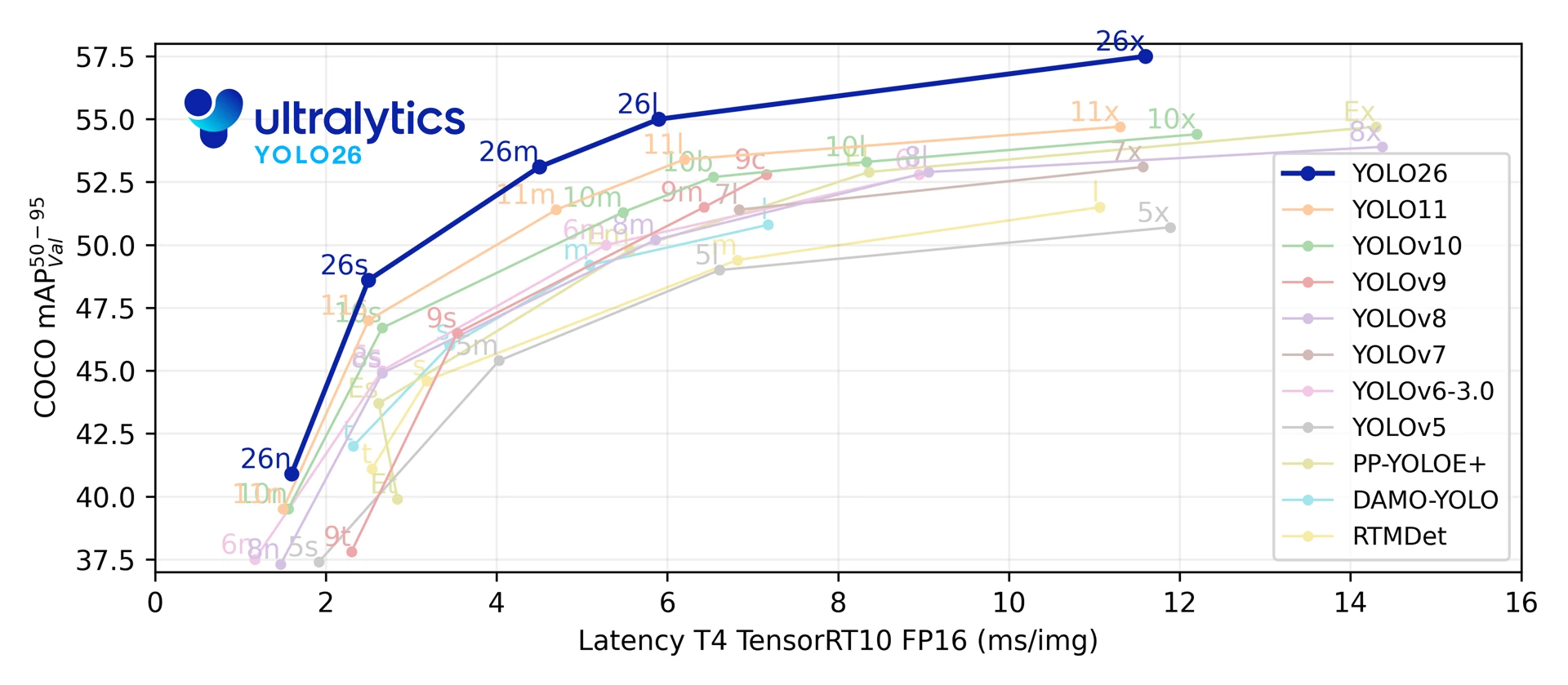
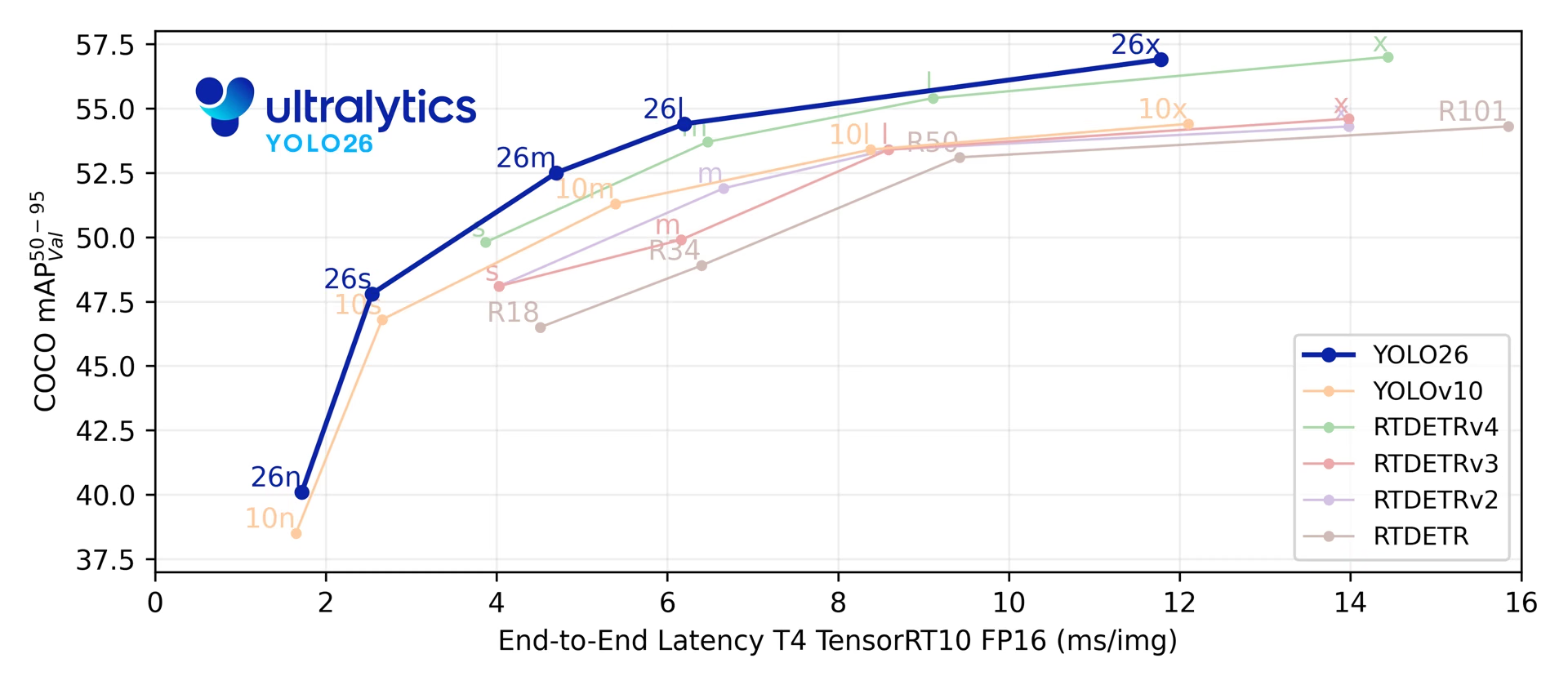
Sulle sue cinque scale di rilevamento, YOLO26 raggiunge 40.9-57.5 mAP su COCO con una latenza T4 TensorRT di 1.7-11.8 ms. L'articolo riporta anche un'inferenza CPU ONNX fino al 43% più veloce per YOLO26n rispetto a YOLO11n su una CPU Intel Xeon a 2.00 GHz.
Consulta l'anteprima di YOLO27 non ancora rilasciato per informazioni sull'architettura prevista, le attività e i benchmark preliminari.
from ultralytics import YOLO

model = YOLO("yolo26n.pt")  # carica un modello YOLO26n preaddestrato
results = model("path/to/bus.jpg") # esegui l'inferenzaEsplora ed esegui direttamente i modelli YOLO26 sulla Ultralytics Platform.
La famiglia di modelli YOLO26 si basa su quattro aree di progettazione:
- Inferenza end-to-end nativa: la testa di rilevamento opzionale one-to-one genera previsioni senza soppressione dei massimi non locali (NMS), semplificando la distribuzione e riducendo la post-elaborazione.
- Regressione dei box più leggera: YOLO26 rimuove Distribution Focal Loss (DFL), riducendo la complessità della head di rilevamento e mantenendo un intervallo di regressione non vincolato.
- Aggiornamenti della ricetta di addestramento: la pipeline di addestramento combina MuSGD (un ottimizzatore ibrido Muon + SGD), Progressive Loss e STAL (assegnazione di etichette consapevole degli oggetti piccoli) per migliorare l'ottimizzazione, spostare la supervisione verso la testa usata in inferenza e mantenere una copertura positiva delle etichette per gli oggetti piccoli. Gli iperparametri completi dei checkpoint rilasciati sono documentati nella guida alla ricetta di addestramento di YOLO26.
- Head e loss specifiche per attività: YOLO26 introduce soluzioni mirate per la segmentazione di istanze, le varianti di segmentazione semantica, la stima della posa e il rilevamento orientato, mantenendo un'unica pipeline di modello per tutte le attività.
Nel complesso, questi aggiornamenti migliorano il compromesso tra accuratezza e latenza per le diverse scale dei modelli e i vari target di deployment.
Funzionalità principali#
-
Regressione senza DFL YOLO26 rimuove Distribution Focal Loss (DFL), riducendo la complessità della head di rilevamento e semplificando l'esportazione.
-
Inferenza end-to-end senza NMS YOLO26 supporta l'inferenza end-to-end nativa con
nms=False, generando predizioni senza un passaggio NMS separato. Il percorso predefinito one-to-many usa NMS per garantire l'accuratezza. -
Progressive Loss + STAL Progressive Loss sposta l'enfasi del training verso la head usata in inferenza, mentre STAL migliora la copertura positiva delle etichette per gli oggetti piccoli.
-
Ottimizzatore MuSGD Un ottimizzatore ibrido che combina SGD con Muon, adattando alla visione artificiale idee di ottimizzazione provenienti dal training di modelli linguistici di grandi dimensioni.
-
Deployment efficiente La head semplificata e il percorso opzionale senza NMS riducono il sovraccarico dell'inferenza per i target di esportazione e i profili hardware, incluso il miglioramento di velocità CPU ONNX riportato nell'articolo per YOLO26n rispetto a YOLO11n.
-
Miglioramenti della segmentazione di istanze Introduce la loss di segmentazione semantica per migliorare la convergenza del modello e un modulo proto aggiornato che usa informazioni multiscala per ottenere maschere di qualità superiore. L'articolo riporta miglioramenti rispetto a YOLO11 fino a +2.5 box AP e +3.7 mask AP sulla segmentazione di istanze COCO.
-
Stima precisa della posa Integra Residual Log-Likelihood Estimation (RLE) per localizzare i keypoint con maggiore precisione e ottimizza il processo di decodifica per aumentare la velocità di inferenza. L'articolo riporta un miglioramento fino a +7.2 AP rispetto a YOLO11 nella stima della posa su COCO.
-
Decodifica OBB perfezionata Introduce una loss angolare specializzata per migliorare l'accuratezza del rilevamento di oggetti di forma quadrata e ottimizza la decodifica OBB per risolvere i problemi di discontinuità ai bordi. L'articolo riporta un miglioramento fino a +3.4 mAP rispetto a YOLO11 nel rilevamento orientato su DOTA-v1.0.
Attività e modalità supportate#
YOLO26 supporta il set standard di attività Ultralytics su cinque scale del modello:
| Modello | Nomi dei file | Attività | Addestramento | Validazione | Inferenza | Esporta |
|---|---|---|---|---|---|---|
| YOLO26 | yolo26n.pt yolo26s.pt yolo26m.pt yolo26l.pt yolo26x.pt | Rilevamento | ✅ | ✅ | ✅ | ✅ |
| YOLO26-seg | yolo26n-seg.pt yolo26s-seg.pt yolo26m-seg.pt yolo26l-seg.pt yolo26x-seg.pt | Segmentazione di istanze | ✅ | ✅ | ✅ | ✅ |
| YOLO26-sem | yolo26n-sem.pt yolo26s-sem.pt yolo26m-sem.pt yolo26l-sem.pt yolo26x-sem.pt | Segmentazione semantica | ✅ | ✅ | ✅ | ✅ |
| YOLO26-depth | yolo26n-depth.pt yolo26s-depth.pt yolo26m-depth.pt yolo26l-depth.pt yolo26x-depth.pt | Stima della profondità | ✅ | ✅ | ✅ | ✅ |
| YOLO26-cls | yolo26n-cls.pt yolo26s-cls.pt yolo26m-cls.pt yolo26l-cls.pt yolo26x-cls.pt | Classificazione | ✅ | ✅ | ✅ | ✅ |
| YOLO26-pose | yolo26n-pose.pt yolo26s-pose.pt yolo26m-pose.pt yolo26l-pose.pt yolo26x-pose.pt | Pose/Keypoint | ✅ | ✅ | ✅ | ✅ |
| YOLO26-obb | yolo26n-obb.pt yolo26s-obb.pt yolo26m-obb.pt yolo26l-obb.pt yolo26x-obb.pt | Rilevamento orientato | ✅ | ✅ | ✅ | ✅ |
Questo framework unificato supporta il rilevamento in tempo reale, la segmentazione di istanze, la segmentazione semantica, la stima monoculare della profondità, la classificazione, la stima della posa e il rilevamento di oggetti orientati, con supporto per training, validazione, inferenza ed esportazione.
yolo26-p2.yaml e yolo26-p6.yaml aggiungono una head di rilevamento P2 (oggetti piccoli) o P6 (input di grandi dimensioni) e vengono distribuiti solo come architetture YAML. Non vengono rilasciati pesi yolo26*-p2.pt o yolo26*-p6.pt specifici per scala. Crea un'istanza di una configurazione scalata da YAML (ad esempio, YOLO("yolo26n-p6.yaml")) e addestrala o ottimizzala, secondo necessità.
Metriche di prestazione#
Consulta la documentazione sul rilevamento per esempi d'uso di questi modelli addestrati su COCO, che includono 80 classi preaddestrate.
| Modello | dimensione (pixel) | mAPval50-95 | mAPval50-95 (e2e) | Velocità CPU ONNX (ms) | Velocità T4 TensorRT10 (ms) | parametri (M) | FLOPs (B) |
|---|---|---|---|---|---|---|---|
| YOLO26n | 640 | 40.9 | 40.1 | 38.9 ± 0.7 | 1.7 ± 0.0 | 2.4 | 5.5 |
| YOLO26s | 640 | 48.6 | 47.8 | 87.2 ± 0.9 | 2.5 ± 0.0 | 9.5 | 20.9 |
| YOLO26m | 640 | 53.1 | 52.5 | 220.0 ± 1.4 | 4.7 ± 0.1 | 20.4 | 68.4 |
| YOLO26l | 640 | 55.0 | 54.4 | 286.2 ± 2.0 | 6.2 ± 0.2 | 24.8 | 86.8 |
| YOLO26x | 640 | 57.5 | 56.9 | 525.8 ± 4.0 | 11.8 ± 0.2 | 55.7 | 194.4 |
I valori di Params e FLOPs si riferiscono al modello fuso dopo l'accorpamento di Conv/BatchNorm e la rimozione del ramo di rilevamento inutilizzato. Le misurazioni della velocità selezionano la testa senza NMS con nms=False. I checkpoint preaddestrati mantengono l'architettura di addestramento completa e possono mostrare valori più alti.
Esempi d'uso#
Questa sezione offre semplici esempi di addestramento e inferenza con YOLO26.
L'esempio seguente addestra un modello YOLO26 Detect per il rilevamento degli oggetti sul dataset di esempio COCO8.
I modelli *.pt preaddestrati con PyTorch e i file di configurazione *.yaml possono essere passati alla classe YOLO() per creare un'istanza del modello in Python:
from ultralytics import YOLO

# Carica un modello YOLO26n preaddestrato su COCO
model = YOLO("yolo26n.pt")

# Esegui l'inferenza con il modello YOLO26n sull'immagine 'bus.jpg'
results = model("path/to/bus.jpg")

# Addestra il modello sul dataset di esempio COCO8 per 100 epoche
results = model.train(data="coco8.yaml", epochs=100, imgsz=640)I modelli di rilevamento YOLO26 utilizzano un'architettura a doppia head che offre flessibilità per diversi scenari di deployment:
- Head One-to-Many (predefinita): genera output YOLO tradizionali che richiedono il post-processing NMS e produce
(N, nc + 4, 8400), dovencè il numero di classi. Questa head raggiunge in genere un'accuratezza leggermente superiore, a costo di un'elaborazione aggiuntiva. - Head One-to-One (
nms=False): produce predizioni end-to-end senza NMS e restituisce(N, 300, 6), con un massimo di 300 rilevamenti per immagine. Questa head è ottimizzata per un'inferenza rapida e un deployment semplificato.
Puoi passare da una head all'altra durante l'esportazione, la predizione o la validazione:
from ultralytics import YOLO

model = YOLO("yolo26n.pt")

# Usa la head one-to-many (predefinita, Ultralytics applica NMS)
results = model.predict("image.jpg")  # inference
metrics = model.val(data="coco.yaml")  # validation
model.export(format="onnx")  # export

# Attiva la head one-to-one senza NMS
results = model.predict("image.jpg", nms=False)  # inference
metrics = model.val(data="coco.yaml", nms=False)  # validation
model.export(format="onnx", nms=False)  # export
Per impostazione predefinita, la predizione e la validazione utilizzano la head one-to-many per garantire l'accuratezza. Usa nms=False per l'inferenza senza NMS oppure nms=True per incorporare NMS in un'esportazione supportata. Entrambe le head vengono addestrate, indipendentemente da questa scelta. Consulta la guida al rilevamento end-to-end per i formati di output e la compatibilità delle esportazioni.
YOLOE-26: rilevamento e segmentazione a vocabolario aperto#
YOLO26 è anche alla base di YOLOE-26, una variante open-vocabulary che rileva e segmenta categorie di oggetti a partire da prompt testuali, prompt visivi o una modalità senza prompt, anziché da un elenco fisso di classi appreso durante l'addestramento. YOLOE-26 mantiene la testa end-to-end (e2e) opzionale senza NMS di YOLO26, perciò l'inferenza open-vocabulary rimane sufficientemente veloce per gli ambienti dinamici in cui le categorie di destinazione cambiano nel tempo. YOLOE-26x raggiunge 40.6 AP sul minival di LVIS con prompt testuali, 38.5 AP con prompt visivi e 31.1 AP senza prompt: sono i valori Non-E2E dell'articolo, superati dalla testa end-to-end rispettivamente di 1.1, 2.3 e 1.2 AP.
Consulta la documentazione di YOLOE per le tabelle delle prestazioni per scala, le varianti senza prompt e gli esempi d'uso completi.
Citazioni e ringraziamenti#
Per una descrizione tecnica completa dell'architettura YOLO26, della procedura di training, delle head specifiche per attività e dell'estensione a vocabolario aperto YOLOE-26, leggi Ultralytics YOLO26: modelli di visione end-to-end unificati in tempo reale. Se usi YOLO26 nella tua ricerca, cita:
@misc{jocher2026ultralyticsyolo26unifiedrealtime,
  title = {Ultralytics YOLO26: Unified Real-Time End-to-End Vision Models},
  author = {Glenn Jocher and Jing Qiu and Mengyu Liu and Shuai Lyu and Fatih Cagatay Akyon and Muhammet Esat Kalfaoglu},
  year = {2026},
  eprint = {2606.03748},
  archivePrefix = {arXiv},
  primaryClass = {cs.CV},
  doi = {10.48550/arXiv.2606.03748},
  url = {https://arxiv.org/abs/2606.03748},
}
Il codice, i modelli e la documentazione di YOLO26 sono disponibili nel repository GitHub di Ultralytics e nella documentazione di Ultralytics, con licenze AGPL-3.0 ed Enterprise.
Domande frequenti#
- Regressione senza DFL: semplifica la head di rilevamento e il processo di esportazione
- Inferenza end-to-end senza NMS: supporta l'inferenza senza NMS con
nms=False - Progressive Loss + STAL: migliora l'allineamento del training e la copertura delle etichette per gli oggetti piccoli
- Ottimizzatore MuSGD: combina SGD con un'ottimizzazione ispirata a Muon per un training stabile
- Head e funzioni di loss specifiche per attività: migliora il supporto per la segmentazione, la stima della posa e il rilevamento orientato
YOLO26 è una famiglia di modelli unificata che offre supporto end-to-end per diverse attività di computer vision:
- Rilevamento di oggetti
- Segmentazione di istanze
- Segmentazione semantica
- Stima della profondità monoculare
- Classificazione delle immagini
- Stima della posa
- Rilevamento di oggetti orientati (OBB)
Ogni variante dimensionale (n, s, m, l, x) supporta tutte le attività, oltre alle versioni a vocabolario aperto tramite YOLOE-26.
YOLO26 migliora l'efficienza del deployment grazie a:
- Inferenza end-to-end nativa opzionale senza NMS (
nms=False) - Regressione senza DFL e una head di rilevamento più leggera
- Esportazione del modello fuso, che rimuove i componenti ausiliari usati solo durante il training
- Inferenza ONNX su CPU fino al 43% più veloce con YOLO26n rispetto a YOLO11n su una CPU Intel Xeon @ 2.00 GHz
- Formati di esportazione flessibili, tra cui TensorRT, ONNX, CoreML, LiteRT e OpenVINO
- Inferenza end-to-end nativa opzionale senza NMS (
I modelli YOLO26 sono disponibili per il download tramite il pacchetto
ultralytics. Installa o aggiorna il pacchetto e carica un modello:from ultralytics import YOLO # Carica un modello YOLO26 nano preaddestrato model = YOLO("yolo26n.pt") # Esegui l'inferenza su un'immagine results = model("image.jpg")Consulta la sezione Esempi d'uso per le istruzioni di training, validazione ed esportazione.


Commenti117
Fai una domanda, condividi i tuoi risultati o aiuta qualcun altro.
hongzhuoxx
除了监督模型,我还期待着ultralytics可以推出高效准确易用的非监督瑕疵检测模型!
4Syedshajib55
How do I modify the architectural components (Head and Neck) of YOLOv26?
What is the process for inserting a Dropout layer at the end of the backbone in the YOLOv26 configuration?
2 Glenn JocherUltralytics
YOLO26 (no “v”) architecture edits are done in the model YAML, so start by copying
ultralytics/cfg/models/26/yolo26.yamlinto your project, modify thebackbone:/head:layer lists (the “neck” is part ofhead:), and train from that YAML following the Model YAML Configuration Guide.# yolo26_custom.yaml backbone: # ... existing backbone layers ... - [-1, 1, nn.Dropout, [0.2]] # add dropout at end of backbone (train-time only) head: # ... existing head/neck layers ...yolo train model=yolo26_custom.yaml data=your_dataset.yaml imgsz=640If you share which task model you’re editing (
detect/seg/pose/obb) and which variant (n/s/m/l/x), we can point you to the exact YAML to start from and where to insert the change in that graph.1Hi Glenn,
Thank you for the quick response and guidance! To answer your question: I am focusing on the detect task, and I will be experimenting with both the s (small) and m (medium) variants.
For context, I am working on a paper targeting a Q1 journal. My project focuses on Emotion Detection (5 classes: Angry, Happy, Sad, Neutral, Surprised) using the RAVDESS dataset. I have extracted peak emotion frames from the videos and augmented the dataset to roughly 21k images (640x640 resolution). My core research objective is to demonstrate that a customized YOLO26 architecture can outperform the standard baseline for detecting subtle facial micro-expressions. To achieve this, I want to modify the backbone—specifically by adding Batch Normalization and Dropout layers (potentially after the C2f blocks or may be after c3k2 blocks of that yolo26 architechtural images) to improve regularization and prevent overfitting on facial features.
Could you help me with the following?
-
Could you point me to the exact base YAML files for the yolo26s and yolo26m detection models to use as my starting point?
-
From an architectural standpoint, where exactly in the backbone would you theoretically recommend inserting these Dropout/BN layers? (e.g., after which specific layer index or block) to maximize accuracy without degrading the spatial feature maps necessary for facial detection?
Any insights on how to best structure this custom YAML would be incredibly helpful. Thanks again for your time!
-
- Baseline Reference: Finally, could you share the raw YAML configuration code that details the standard YOLO26 backbone and head? I would like to include this exact baseline structure in my paper’s methodology section to clearly contrast it with my proposed modifications.
hbzylilin
延迟了10天了,还没动静
1lwplw
真不错,期待开源
1- Glenn JocherUltralytics(modificato)
@etemical 感谢建议!目前未原生支持行为识别/多目标行为检测;建议先用 YOLO26 组合
detect+track多目标跟踪与可选pose关键点作为上游信号,并在 GitHub 提交详细需求(数据标注格式与评测指标)为 Feature Request 模板 便于评估;参考 Track 模式文档 与 Pose 任务文档。yolo track model=yolo26n.pt source=your_video.mp4 tracker=bytetrack.yaml show=True yolo pose predict model=yolo26n-pose.pt source=your_video.mp4 show=True@lwplw 谢谢关注!YOLO26 现已发布,可阅读我们的 YOLO26 介绍博客 了解功能。
Jiahao Chen
请问如果我想要引用本页面的YOLO26和其他模型的对比曲线图,已经在文中索引了来源。但是期刊要求需要拿到作者的授权,请问如何申请授权呢?
 Paula DerrengerUltralytics
您好,针对期刊要求的图片书面授权,建议联系 Ultralytics 法务团队,说明申请转载 YOLO26 对比曲线图,并附上页面链接、具体图片、论文题目、期刊名称、是否修改图片,以及期刊的授权模板(如有),请求确认版权归属并提供书面许可。目前未找到该图专门的公开授权流程,因此这里不能代为授予许可;请以收到的正式书面回复为准。
cyberpunk-edgerunner
maybe
CIFAR-10-LTdataset can help. you do not need background images because our initial conversation started without that, for an image, there can be one to 15 object in one image The cause of the shared-memory increase will remain unconfirmed unless you runpython train.pyin your computer with an rtx gpuOn Sat, Oct 10, 2026 at 6:15 AM Paula Derrenger @.***> wrote:
Understood—you don’t need to interrupt your work for the batch=16 comparison. Could you name a public long-tailed dataset you consider representative and share your approximate class counts, background-image proportion, and typical/maximum objects per image? That would help define a reproduction using the configuration you already shared, without requiring your company’s data or another production run. The cause of the shared-memory increase remains unconfirmed.
— Reply to this email directly, view it on GitHub https://github.com/orgs/ultralytics/discussions/26446?email_source=notifications&email_token=BSIM7DUZ6A5KFG7YKF2H6KT5TGBBRA5CNFSNUABIM5UWIORPF5TWS5BNNB2WEL2ENFZWG5LTONUW63SDN5WW2ZLOOQXTCOBYGQ2DONBZUZZGKYLTN5XKOY3PNVWWK3TUUVSXMZLOOSWGM33PORSXEX3DNRUWG2Y#discussioncomment-18844749, or unsubscribe https://github.com/notifications/unsubscribe-auth/BSIM7DTBK4XV3HXIPMFHVXT5TGBBRAVCNFSNUABIKJSXA33TNF2G64TZHM2TGNJTGYYDINBVHNCGS43DOVZXG2LPNY5TCMBZGE3TMNRUUF3AE . Triage notifications, keep track of coding agent tasks and review pull requests on the go with GitHub Mobile for iOS https://github.com/notifications/mobile/ios/BSIM7DST66YNYHAKPWPY3PT5TGBBRA5CNFSNUABIM5UWIORPF5TWS5BNNB2WEL2ENFZWG5LTONUW63SDN5WW2ZLOOQXTCOBYGQ2DONBZUZZGKYLTN5XKOY3PNVWWK3TUUVSXMZLOOSVGM33PORSXEX3JN5ZQ and Android https://github.com/notifications/mobile/android/BSIM7DRDX2BJPHP7PHHKRG35TGBBRA5CNFSNUABIM5UWIORPF5TWS5BNNB2WEL2ENFZWG5LTONUW63SDN5WW2ZLOOQXTCOBYGQ2DONBZUZZGKYLTN5XKOY3PNVWWK3TUUVSXMZLOOSXGM33PORSXEX3BNZSHE33JMQ. Download it today! You are receiving this because you commented.Message ID: @.*** com>
- Paula DerrengerUltralytics
Thanks for clarifying the 1–15 objects per image; we can keep background-only images out of the reproduction.
CIFAR-10-LTis a long-tailed classification benchmark, so it would not directly reproduce your multi-object detection setup. I can’t executepython train.pyon an RTX GPU here, and I haven’t reproduced the shared-memory increase. Could you share a public-data version of the script, including dataset preparation, so someone with suitable hardware can run the same test without your company’s data?
I cannot run the same code with batch=16, reasons:
- I work in a company and have my own KPI to meet and improve
- I have added background image data in the dataset so it is no longer same.
- I am planning to add more images in future.
I suggest you download a long tailed distributed dataset to mimic my experiment.
thank you
On Fri, Oct 9, 2026 at 5:15 AM Paula Derrenger @.***> wrote:
Thanks for clarifying that it was 15 GB of shared GPU memory and sharing the configuration; sorry for requesting the script again. To test whether batch-related memory pressure contributes, could you compare your batch=64 run with batch=16, keeping all other settings unchanged? See the batch-size guidance https://docs.ultralytics.com/guides/model-training-tips#batch-size-and-gpu-utilization. Please share epoch 2–3 text logs and dedicated/shared GPU memory readings from the comparison; this will help narrow down the cause without assuming the memory change is a bug.
— Reply to this email directly, view it on GitHub https://github.com/orgs/ultralytics/discussions/26446?email_source=notifications&email_token=BSIM7DWLJ3KRNTXM7Y6Q4O35TARKLA5CNFSNUABIM5UWIORPF5TWS5BNNB2WEL2ENFZWG5LTONUW63SDN5WW2ZLOOQXTCOBYGI2TINRTUZZGKYLTN5XKOY3PNVWWK3TUUVSXMZLOOSWGM33PORSXEX3DNRUWG2Y#discussioncomment-18825463, or unsubscribe https://github.com/notifications/unsubscribe-auth/BSIM7DQLZ4KWCGA6TEUDIS35TARKLAVCNFSNUABIKJSXA33TNF2G64TZHM2TGNJTGYYDINBVHNCGS43DOVZXG2LPNY5TCMBZGE3TMNRUUF3AE . Triage notifications, keep track of coding agent tasks and review pull requests on the go with GitHub Mobile for iOS https://github.com/notifications/mobile/ios/BSIM7DV53PCZWPENVMYYNYT5TARKLA5CNFSNUABIM5UWIORPF5TWS5BNNB2WEL2ENFZWG5LTONUW63SDN5WW2ZLOOQXTCOBYGI2TINRTUZZGKYLTN5XKOY3PNVWWK3TUUVSXMZLOOSVGM33PORSXEX3JN5ZQ and Android https://github.com/notifications/mobile/android/BSIM7DX2XUXERTKYLIDJ2C35TARKLA5CNFSNUABIM5UWIORPF5TWS5BNNB2WEL2ENFZWG5LTONUW63SDN5WW2ZLOOQXTCOBYGI2TINRTUZZGKYLTN5XKOY3PNVWWK3TUUVSXMZLOOSXGM33PORSXEX3BNZSHE33JMQ. Download it today! You are receiving this because you commented.Message ID: @.*** com>
- Paula DerrengerUltralytics
Understood—you don’t need to interrupt your work for the
batch=16comparison. Could you name a public long-tailed dataset you consider representative and share your approximate class counts, background-image proportion, and typical/maximum objects per image? That would help define a reproduction using the configuration you already shared, without requiring your company’s data or another production run. The cause of the shared-memory increase remains unconfirmed.
- I have shared you exact code in this email thread(check my second reply) and the command to run it was `python .\det_yoloM_5-10.py' .
- yes, it was 15GB of shared GPU
- sorry, I do not have
separate dedicated/shared memory readings at comparable batch positions in each epoch, but there was a steady consumption of about 15GB of shared memory throughout the training. however I can provide you argos.yaml
task: detect mode: train model: yolo26m.pt data: yoloDet_clsAgnostic_split/data.yaml epochs: 200 time: null patience: 20 batch: 64 imgsz: 640 save: true save_period: -1 cache: false device: '0' workers: 6 project: null name: train-2 exist_ok: false pretrained: true cls_remap: true optimizer: auto verbose: false seed: 0 deterministic: true single_cls: false rect: false cos_lr: false close_mosaic: 10 resume: false amp: true fraction: 1.0 profile: false freeze: null multi_scale: 0.0 compile: false channels_last: null overlap_mask: true mask_ratio: 4 dropout: 0.0 val: true split: val save_json: false conf: null iou: 0.7 max_det: 300 quantize: null dnn: false plots: true nms: null source: null vid_stride: 1 stream_buffer: false visualize: false augment: false agnostic_nms: false classes: null retina_masks: false embed: null show: false save_frames: false save_txt: false save_conf: false save_crop: false show_labels: true show_conf: true show_boxes: true line_width: null format: torchscript keras: false optimize: false dynamic: false simplify: true opset: null workspace: null lr0: 0.01 lrf: 0.01 momentum: 0.937 weight_decay: 0.0005 warmup_epochs: 3.0 warmup_momentum: 0.8 warmup_bias_lr: 0.1 distill_model: null dis: 6.0 box: 7.5 cls: 0.5 cls_pw: 0.0 dfl: 1.5 pose: 12.0 kobj: 1.0 rle: 1.0 angle: 1.0 dlog: 1.0 dgrad: 0.5 dlam: 1.0 nbs: 64 hsv_h: 0.015 hsv_s: 0.7 hsv_v: 0.4 degrees: 0.0 translate: 0.1 scale: 0.5 shear: 0.0 perspective: 0.0 flipud: 0.0 fliplr: 0.5 bgr: 0.0 mosaic: 1.0 mixup: 0.0 cutmix: 0.0 copy_paste: 0.0 copy_paste_mode: flip auto_augment: randaugment erasing: 0.4 cfg: null tracker: tracktrack.yaml save_dir: C:\Training9\runs\detect\train-2On Thu, Oct 8, 2026 at 6:07 AM Paula Derrenger @.***> wrote:
Thanks for the complete checks and text logs. Epoch 2 is faster (14:27 versus 1:02:39), despite GPU_mem dropping from 28.6G to 17.4G, so these readings alone don’t establish GPU underutilization. Could you paste your exact training command or script, including the model and training settings? Also, does “around 15 epoch” mean 15 GB of shared GPU memory in both epochs? Please provide separate dedicated/shared memory readings at comparable batch positions in each epoch so we can investigate the discrepancy.
— Reply to this email directly, view it on GitHub https://github.com/orgs/ultralytics/discussions/26446?email_source=notifications&email_token=BSIM7DQKA3GIYQSCDVEWEJ35S3OWHA5CNFSNUABIM5UWIORPF5TWS5BNNB2WEL2ENFZWG5LTONUW63SDN5WW2ZLOOQXTCOBYGAZTKNJWUZZGKYLTN5XKOY3PNVWWK3TUUVSXMZLOOSWGM33PORSXEX3DNRUWG2Y#discussioncomment-18803556, or unsubscribe https://github.com/notifications/unsubscribe-auth/BSIM7DX34MSUWFFX5WDRXW35S3OWHAVCNFSNUABIKJSXA33TNF2G64TZHM2TGNJTGYYDINBVHNCGS43DOVZXG2LPNY5TCMBZGE3TMNRUUF3AE . Triage notifications, keep track of coding agent tasks and review pull requests on the go with GitHub Mobile for iOS https://github.com/notifications/mobile/ios/BSIM7DSVPQ3LAONGDZOZWWD5S3OWHA5CNFSNUABIM5UWIORPF5TWS5BNNB2WEL2ENFZWG5LTONUW63SDN5WW2ZLOOQXTCOBYGAZTKNJWUZZGKYLTN5XKOY3PNVWWK3TUUVSXMZLOOSVGM33PORSXEX3JN5ZQ and Android https://github.com/notifications/mobile/android/BSIM7DQHEDECXNLNQEWJLC35S3OWHA5CNFSNUABIM5UWIORPF5TWS5BNNB2WEL2ENFZWG5LTONUW63SDN5WW2ZLOOQXTCOBYGAZTKNJWUZZGKYLTN5XKOY3PNVWWK3TUUVSXMZLOOSXGM33PORSXEX3BNZSHE33JMQ. Download it today! You are receiving this because you commented.Message ID: @.*** com>
- Paula DerrengerUltralytics
Thanks for clarifying that it was 15 GB of shared GPU memory and sharing the configuration; sorry for requesting the script again. To test whether batch-related memory pressure contributes, could you compare your
batch=64run withbatch=16, keeping all other settings unchanged? See the batch-size guidance. Please share epoch 2–3 text logs and dedicated/shared GPU memory readings from the comparison; this will help narrow down the cause without assuming the memory change is a bug.
here are my yolo checks yolo checks Ultralytics 8.4.155 Python-3.13.12 torch-2.12.0.dev20260408+cu128 CUDA:0 (NVIDIA GeForce RTX 5090, 32607MiB) Setup complete (24 CPUs, 63.5 GB RAM, 1738.9/1881.5 GB disk)
OS Windows-11-10.0.26200-SP0 Environment Windows Python 3.13.12 Install pip Path C:\Users\devth\miniconda3\Lib\site-packages\ultralytics RAM 63.46 GB Disk 1738.9/1881.5 GB CPU Intel Core Ultra 9 285K CPU count 24 GPU NVIDIA GeForce RTX 5090, 32607MiB GPU count 1 CUDA 12.8
cloudpickle 3.1.2>=3.1.1 filelock 3.29.0>=3.16.1 numpy 2.4.4>=1.23.0; platform_system != "Darwin" numpy 2.4.4!=2.0.,!=2.1.,!=2.2.*,!=2.3.0,!=2.3.1,!=2.3.2,!=2.3.3,!=2.3.4,>=1.23.0; platform_system == "Darwin" matplotlib 3.10.8>=3.3.0 opencv-python 4.13.0.92!=4.13.0.90,>=4.7.0 pillow 12.2.0>=7.1.2 pyyaml 6.0.3>=5.3.1 requests 2.32.5>=2.23.0 torch 2.12.0.dev20260408+cu128>=1.8.0 torch 2.12.0.dev20260408+cu128!=2.4.0,>=1.8.0; sys_platform == "win32" torchvision 0.27.0.dev20260407+cu128>=0.9.0 psutil 7.2.2>=5.8.0 polars 1.40.1>=0.20.0 nvidia-ml-py 13.610.43>=12.0.0 ultralytics-thop 2.1.6>=2.1.6 ultralytics-platform 0.1.48>=0.1.45; python_version >= "3.11"
(shared memory used in first and second epoch was around 15 epoch) these are the first two epoch details in Text
 Epoch    GPU_mem   box_loss   cls_loss    l1_loss  Instances       Size
  1/200      28.6G      1.174      1.891    0.01363         90
640: 33% ━━━╸──────── 1561/4702 1.1it/s 23:55<49:25libpng warning: iCCP: known incorrect sRGB profile 1/200 28.6G 1.15 1.582 0.01327 91 640: 56% ━━━━━━╸───── 2674/4702 1.3it/s 40:45<26:43libpng warning: iCCP: known incorrect sRGB profile 1/200 28.6G 1.144 1.475 0.01325 77 640: 72% ━━━━━━━━╸─── 3419/4702 1.3it/s 49:44<16:45libpng warning: iCCP: known incorrect sRGB profile 1/200 28.6G 1.144 1.471 0.01325 84 640: 73% ━━━━━━━━╸─── 3451/4702 1.4it/s 50:07<14:41libpng warning: iCCP: known incorrect sRGB profile 1/200 28.6G 1.146 1.395 0.01332 84 640: 92% ━━━━━━━━━━━─ 4370/4702 5.0it/s 1:01:16<1:07libpng warning: iCCP: known incorrect sRGB profile 1/200 28.6G 1.146 1.373 0.01335 74 640: 100% ━━━━━━━━━━━━ 4702/4702 1.3it/s 1:02:39 Class Images Instances Box(P R mAP50 mAP50-95): 22% ━━╸───────── 57/256 2.5it/s 26.7s<1:19libpng warning: iCCP: known incorrect sRGB profile Class Images Instances Box(P R mAP50 mAP50-95): 47% ━━━━━╸────── 122/256 2.3it/s 1:10<59.4slibpng warning: iCCP: known incorrect sRGB profile Class Images Instances Box(P R mAP50 mAP50-95): 100% ━━━━━━━━━━━━ 256/256 1.9it/s 2:17 all 32677 47931 0.863 0.726 0.818 0.584
Epoch GPU_mem box_loss cls_loss l1_loss InstancesSize 2/200 17.4G 1.183 1.123 0.01413 74 640: 29% ━━━╸──────── 1380/4702 5.1it/s 4:16<10:45libpng warning: iCCP: known incorrect sRGB profile 2/200 17.4G 1.196 1.133 0.01441 107 640: 55% ━━━━━━╸───── 2615/4702 5.8it/s 8:09<6:02libpng warning: iCCP: known incorrect sRGB profile 2/200 17.4G 1.193 1.126 0.01434 99 640: 64% ━━━━━━━╸──── 3020/4702 5.5it/s 9:20<5:06libpng warning: iCCP: known incorrect sRGB profile 2/200 17.4G 1.193 1.125 0.01435 106 640: 67% ━━━━━━━━──── 3179/4702 5.6it/s 9:50<4:33libpng warning: iCCP: known incorrect sRGB profile 2/200 17.4G 1.192 1.121 0.01434 109 640: 81% ━━━━━━━━━╸── 3847/4702 5.5it/s 11:52<2:36libpng warning: iCCP: known incorrect sRGB profile 2/200 17.4G 1.195 1.12 0.01437 86 640: 100% ━━━━━━━━━━━━ 4702/4702 5.4it/s 14:27 Class Images Instances Box(P R mAP50 mAP50-95): 22% ━━╸───────── 57/256 2.5it/s 20.6s<1:21libpng warning: iCCP: known incorrect sRGB profile Class Images Instances Box(P R mAP50 mAP50-95): 47% ━━━━━╸────── 122/256 2.1it/s 50.3s<1:04libpng warning: iCCP: known incorrect sRGB profile Class Images Instances Box(P R mAP50 mAP50-95): 100% ━━━━━━━━━━━━ 256/256 2.3it/s 1:51 all 32677 47931 0.889 0.778 0.87 0.638
On Tue, Oct 6, 2026 at 10:29 AM Paula Derrenger @.***> wrote:
No—by “yolo checks output,” I mean the terminal’s software/hardware summary, not results.csv. Please activate the same Python environment used for training, run yolo checks in PowerShell, and paste its complete text output; it reports your Ultralytics, Python, PyTorch, and GPU details (environment checks reference https://docs.ultralytics.com/reference/utils/checks#ultralytics.utils.checks.check_yolo). (docs.ultralytics.com https://docs.ultralytics.com/reference/utils/checks) Thanks for sharing the driver information. Please also provide separate dedicated/shared GPU-memory readings at matching points in epochs 1 and 2, plus your training command or configuration, so we can investigate without assuming the memory drop indicates hardware underutilization.
— Reply to this email directly, view it on GitHub https://github.com/orgs/ultralytics/discussions/26446?email_source=notifications&email_token=BSIM7DSK7MKPVE56RJJGI435SR33BA5CNFSNUABIM5UWIORPF5TWS5BNNB2WEL2ENFZWG5LTONUW63SDN5WW2ZLOOQXTCOBXG4YDKNJSUZZGKYLTN5XKOY3PNVWWK3TUUVSXMZLOOSWGM33PORSXEX3DNRUWG2Y#discussioncomment-18770552, or unsubscribe https://github.com/notifications/unsubscribe-auth/BSIM7DRBVYTDNBPWAZRUQXL5SR33BAVCNFSNUABIKJSXA33TNF2G64TZHM2TGNJTGYYDINBVHNCGS43DOVZXG2LPNY5TCMBZGE3TMNRUUF3AE . Triage notifications, keep track of coding agent tasks and review pull requests on the go with GitHub Mobile for iOS https://github.com/notifications/mobile/ios/BSIM7DXMRZI3YZR75VFDAGT5SR33BA5CNFSNUABIM5UWIORPF5TWS5BNNB2WEL2ENFZWG5LTONUW63SDN5WW2ZLOOQXTCOBXG4YDKNJSUZZGKYLTN5XKOY3PNVWWK3TUUVSXMZLOOSVGM33PORSXEX3JN5ZQ and Android https://github.com/notifications/mobile/android/BSIM7DRXQCNW5JUZNGVDHU35SR33BA5CNFSNUABIM5UWIORPF5TWS5BNNB2WEL2ENFZWG5LTONUW63SDN5WW2ZLOOQXTCOBXG4YDKNJSUZZGKYLTN5XKOY3PNVWWK3TUUVSXMZLOOSXGM33PORSXEX3BNZSHE33JMQ. Download it today! You are receiving this because you commented.Message ID: @.*** com>
- Paula DerrengerUltralytics
Thanks for the complete checks and text logs. Epoch 2 is faster (14:27 versus 1:02:39), despite
GPU_memdropping from 28.6G to 17.4G, so these readings alone don’t establish GPU underutilization. Could you paste your exact training command or script, including the model and training settings? Also, does “around 15 epoch” mean 15 GB of shared GPU memory in both epochs? Please provide separate dedicated/shared memory readings at comparable batch positions in each epoch so we can investigate the discrepancy.
pls explain what is yolo checks output? what do you mean by that ? are you referring to results.csv from runs folder??
here is my driver detail PS C:\Training9> nvidia-smi Tue Oct 6 09:22:05 2026 +-----------------------------------------------------------------------------------------+ | NVIDIA-SMI 610.60 KMD Version: 610.60 CUDA UMD Version: 13.3 | +-----------------------------------------+------------------------+----------------------+ | GPU Name Driver-Model | Bus-Id Disp.A | Volatile Uncorr. ECC | | Fan Temp Perf Pwr:Usage/Cap | Memory-Usage | GPU-Util Compute M. | | | | MIG M. | |=========================================+========================+======================| | 0 NVIDIA GeForce RTX 5090 WDDM | 00000000:01:00.0 On | N/A | | 57% 73C P1 479W / 575W | 19362MiB / 32607MiB | 80% Default | | | | N/A | +-----------------------------------------+------------------------+----------------------+
PS C:\Training9> nvcc --version nvcc: NVIDIA (R) Cuda compiler driver Copyright (c) 2005-2025 NVIDIA Corporation Built on Wed_Jan_15_19:38:46_Pacific_Standard_Time_2025 Cuda compilation tools, release 12.8, V12.8.61 Build cuda_12.8.r12.8/compiler.35404655_0
epoch 1 vram usage(in terminal) = 28.6 GB and in task manager ~29.1 GB epoch 2 to epoch 73 vram usage (in terminal) = 17.4 GB and in task manager vram usage is 18.1 GB
73rd epoch
Epoch GPU_mem box_loss cls_loss l1_loss InstancesSize 73/200 17.4G 0.9935 0.7903 0.01002 86 640: 0% ──────────── 4/4702 4.4it/s 1.0s<17:51libpng warning: iCCP: known incorrect sRGB profile 73/200 17.4G 1.023 0.7368 0.01159 84 640: 9% ━─────────── 446/4702 5.8it/s 1:17<12:17libpng warning: iCCP: known incorrect sRGB profile 73/200 17.4G 1.024 0.7397 0.01152 93 640: 63% ━━━━━━━╸──── 2990/4702 5.6it/s 8:41<5:06libpng warning: iCCP: known incorrect sRGB profile 73/200 17.4G 1.024 0.7402 0.01151 119 640: 65% ━━━━━━━╸──── 3080/4702 5.3it/s 8:57<5:06libpng warning: iCCP: known incorrect sRGB profile 73/200 17.4G 1.026 0.7422 0.01152 113 640: 76% ━━━━━━━━━─── 3586/4702 5.6it/s 10:28<3:20libpng warning: iCCP: known incorrect sRGB profile 73/200 17.4G 1.029 0.7459 0.01156 78 640: 100% ━━━━━━━━━━━━ 4702/4702 5.7it/s 13:46 Class Images Instances Box(P R mAP50 mAP50-95): 22% ━━╸───────── 57/256 2.7it/s 20.9s<1:13libpng warning: iCCP: known incorrect sRGB profile Class Images Instances Box(P R mAP50 mAP50-95): 47% ━━━━━╸────── 122/256 2.1it/s 48.9s<1:02libpng warning: iCCP: known incorrect sRGB profile Class Images Instances Box(P R mAP50 mAP50-95): 100% ━━━━━━━━━━━━ 256/256 2.4it/s 1:47 all 32677 47931 0.927 0.855 0.93 0.724
since you are trying to replicate my detection code , I must tell you in my train folder I have around 150000 images with txt files, 32000 in val and 31000 in test
while you are at it, I need a change in the ultralytics package, since it can detect and restore corrupt JPG(and many more errors), would it possible for you to make this change permanent? since it a type of fix and everyone wants that and no one wants to ultralytics package to just internally fix the images i know it won't be implemented by of security reasons by just keep in future todo list
to be honest , in my view, the ultralytics package does not fully utilise the hardware. I have run barebone code that using just the pytorch and few more basic codes and they utilise
thank you in advance
On Mon, Oct 5, 2026 at 10:42 PM Paula Derrenger @.***> wrote:
Thanks for sharing the script. A plausible explanation for the drop from 28.6G to 17.4G is cache cleanup between epochs: the training loop https://docs.ultralytics.com/reference/engine/trainer#ultralytics.engine.trainer.BaseTrainer._do_train conditionally clears reserved memory before validation and at epoch end when usage exceeds 50% of device capacity. This could explain the drop, but does not establish why Windows reports shared-memory usage. ( docs.ultralytics.com https://docs.ultralytics.com/reference/engine/trainer) Please share yolo checks output, your NVIDIA driver version, and dedicated/shared GPU-memory readings as text at matching points in both epochs so we can check your installed version and distinguish the two observations.
— Reply to this email directly, view it on GitHub https://github.com/orgs/ultralytics/discussions/26446?email_source=notifications&email_token=BSIM7DSOVWTY24AP4M6GU5D5SPI7FA5CNFSNUABIM5UWIORPF5TWS5BNNB2WEL2ENFZWG5LTONUW63SDN5WW2ZLOOQXTCOBXGYZTCOJVUZZGKYLTN5XKOY3PNVWWK3TUUVSXMZLOOSWGM33PORSXEX3DNRUWG2Y#discussioncomment-18763195, or unsubscribe https://github.com/notifications/unsubscribe-auth/BSIM7DUUEOVQC4A4Q7SCGUL5SPI7FAVCNFSNUABIKJSXA33TNF2G64TZHM2TGNJTGYYDINBVHNCGS43DOVZXG2LPNY5TCMBZGE3TMNRUUF3AE . Triage notifications, keep track of coding agent tasks and review pull requests on the go with GitHub Mobile for iOS https://github.com/notifications/mobile/ios/BSIM7DVWK73UY4PTSMIRTTL5SPI7FA5CNFSNUABIM5UWIORPF5TWS5BNNB2WEL2ENFZWG5LTONUW63SDN5WW2ZLOOQXTCOBXGYZTCOJVUZZGKYLTN5XKOY3PNVWWK3TUUVSXMZLOOSVGM33PORSXEX3JN5ZQ and Android https://github.com/notifications/mobile/android/BSIM7DW6Q4F7VJMCOTRDMPD5SPI7FA5CNFSNUABIM5UWIORPF5TWS5BNNB2WEL2ENFZWG5LTONUW63SDN5WW2ZLOOQXTCOBXGYZTCOJVUZZGKYLTN5XKOY3PNVWWK3TUUVSXMZLOOSXGM33PORSXEX3BNZSHE33JMQ. Download it today! You are receiving this because you commented.Message ID: @.*** com>
- Paula DerrengerUltralytics
No—by “
yolo checksoutput,” I mean the terminal’s software/hardware summary, notresults.csv. Please activate the same Python environment used for training, runyolo checksin PowerShell, and paste its complete text output; it reports your Ultralytics, Python, PyTorch, and GPU details (environment checks reference). (docs.ultralytics.com) Thanks for sharing the driver information. Please also provide separate dedicated/shared GPU-memory readings at matching points in epochs 1 and 2, plus your training command or configuration, so we can investigate without assuming the memory drop indicates hardware underutilization.