Meituan YOLOv6
概要#
2022年にリリースされたMeituan YOLOv6は、速度と精度のバランスに優れた物体検出モデルで、リアルタイムアプリケーションで人気の選択肢です。このモデルでは、Bi-directional Concatenation(BiC)モジュール、アンカー支援学習(AAT)戦略、高精度を実現するための改良されたバックボーンおよびネックの設計など、アーキテクチャと学習方式にいくつかの注目すべき改良が導入されています。COCOデータセットで高い精度を実現します。
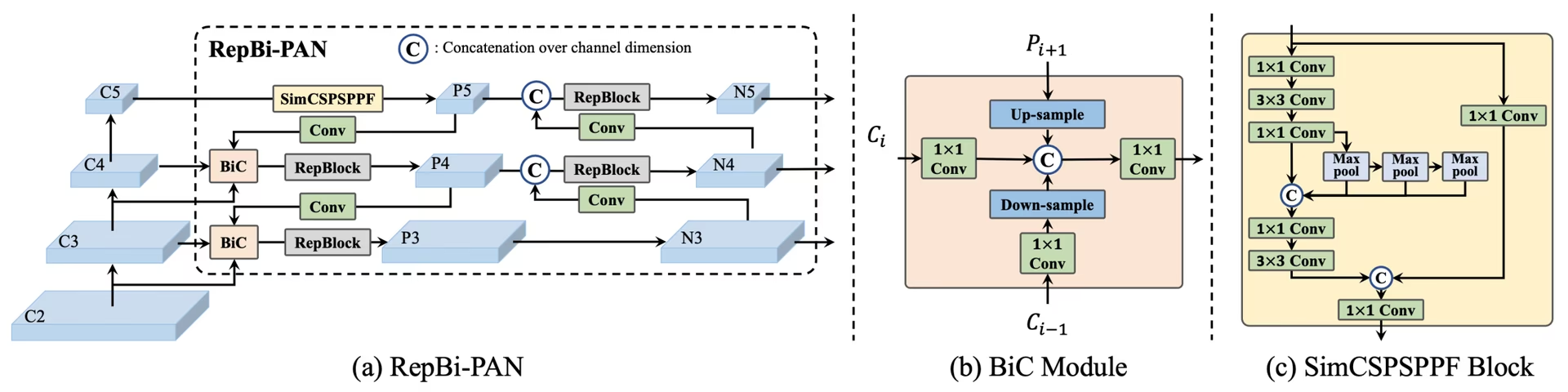 YOLOv6の概要。 大幅な性能向上につながったネットワークコンポーネントの再設計と学習戦略を示すモデルアーキテクチャ図です。(a) YOLOv6のネック(NとSを表示)。M/LではRepBlocksがCSPStackRepに置き換えられる点に注意してください。(b) BiCモジュールの構造。(c) SimCSPSPPFブロック。(出典。)
主な機能#
- 双方向連結(BiC)モジュール: YOLOv6は検出器のネックにBiCモジュールを導入し、位置特定シグナルを強化するとともに、速度の低下をほとんど伴わずに性能を向上させます。
- アンカー支援学習(AAT)戦略: AATは、推論効率を損なうことなく、アンカーベースとアンカーフリーの両方の方式の利点を組み合わせます。
- バックボーンとネックの設計強化: YOLOv6のバックボーンとネックにステージを追加して深くすることで、リリース当時、高解像度入力でCOCOデータセットにおいて優れた性能を達成しました。
- 自己蒸留戦略: YOLOv6の小型モデルの性能を向上させるため、新しい自己蒸留戦略が実装されています。学習時には補助回帰ブランチを強化し、推論時にはこれを削除することで、速度の大幅な低下を防ぎます。
性能指標#
YOLOv6には、さまざまなスケールの学習済みモデルが用意されています。
- YOLOv6-N:NVIDIA T4 GPUで、COCO val2017においてAP 37.5%、1187 FPS。
- YOLOv6-S:AP 45.0%、484 FPS。
- YOLOv6-M:AP 50.0%、226 FPS。
- YOLOv6-L:AP 52.8%、116 FPS。
- YOLOv6-L6:リアルタイム処理で最先端の精度を実現。
YOLOv6では、さまざまな数値精度の量子化モデルと、モバイルプラットフォーム向けに最適化されたモデルも提供しています。
使用例#
この例では、YOLOv6のシンプルな学習と推論の例を紹介します。
YOLOv6の*.yamlファイルをYOLO()クラスに渡すと、Pythonで対応するモデルを構築できます。
from ultralytics import YOLO

# YOLOv6nモデルをスクラッチから構築する
model = YOLO("yolov6n.yaml")

# モデル情報を表示(任意)
model.info()

# COCO8サンプルデータセットでモデルを100エポック学習する
results = model.train(data="coco8.yaml", epochs=100, imgsz=640)

# 'bus.jpg'画像でYOLOv6nモデルによる推論を実行する
results = model("path/to/bus.jpg")サポート対象のタスクとモード#
YOLOv6シリーズでは、さまざまな計算予算と精度要件に対応する、物体検出向けに最適化された各種モデルを提供しています。
| モデル | ファイル名 | タスク | トレーニング | 検証 | 推論 | エクスポート |
|---|---|---|---|---|---|---|
| YOLOv6-N | yolov6n.yaml | 物体検出 | ✅ | ✅ | ✅ | ✅ |
| YOLOv6-S | yolov6s.yaml | 物体検出 | ✅ | ✅ | ✅ | ✅ |
| YOLOv6-M | yolov6m.yaml | 物体検出 | ✅ | ✅ | ✅ | ✅ |
| YOLOv6-L | yolov6l.yaml | 物体検出 | ✅ | ✅ | ✅ | ✅ |
| YOLOv6-X | yolov6x.yaml | 物体検出 | ✅ | ✅ | ✅ | ✅ |
この表では、YOLOv6のモデルバリエーションと、学習、検証、推論、エクスポートの各モードへの対応状況をまとめています。Ultralyticsが提供するのはYOLOv6のモデルYAMLのみであるため、モデルはスクラッチから学習されます。
引用と謝辞#
リアルタイム物体検出分野への多大な貢献に対し、著者に謝意を表します。
@misc{li2023yolov6,
      title={YOLOv6 v3.0: A Full-Scale Reloading},
      author={Chuyi Li and Lulu Li and Yifei Geng and Hongliang Jiang and Meng Cheng and Bo Zhang and Zaidan Ke and Xiaoming Xu and Xiangxiang Chu},
      year={2023},
      eprint={2301.05586},
      archivePrefix={arXiv},
      primaryClass={cs.CV}
}YOLOv6の原著論文はarXivでご覧いただけます。著者は研究成果を一般公開しており、コードベースはGitHubからアクセスできます。分野の発展に尽力し、幅広いコミュニティが研究成果を利用できるようにしたことに感謝します。
よくある質問#
2022年にリリースされたMeituan YOLOv6は、リアルタイムアプリケーション向けに設計された、速度と精度のバランスに優れた物体検出器です。双方向連結(BiC)モジュールやアンカー支援学習(AAT)戦略など、注目すべきアーキテクチャ上の改良を備えています。これらの技術革新により、速度の低下を最小限に抑えながら大幅な性能向上を実現し、YOLOv6は物体検出タスクにおいて有力な選択肢となっています。
簡単なPythonコマンドまたはCLIコマンドで、Ultralyticsを使ってYOLOv6モデルを学習できます。例:
例from ultralytics import YOLO # YOLOv6nモデルをスクラッチから構築する model = YOLO("yolov6n.yaml") # COCO8サンプルデータセットでモデルを100エポック学習する results = model.train(data="coco8.yaml", epochs=100, imgsz=640)詳細については、Trainページをご覧ください。
YOLOv6には、異なる性能要件に合わせて最適化された複数のバージョンがあります。
- YOLOv6-N:AP 37.5%、1187 FPS
- YOLOv6-S:AP 45.0%、484 FPS
- YOLOv6-M:AP 50.0%、226 FPS
- YOLOv6-L:AP 52.8%、116 FPS
- YOLOv6-L6:リアルタイムシナリオで最先端の精度を実現
これらのモデルは、NVIDIA T4 GPUを使用してCOCOデータセットで評価されています。性能指標の詳細については、性能指標のセクションをご覧ください。
YOLOv6のアンカー支援学習(AAT)は、アンカーベースとアンカーフリーの手法を組み合わせ、推論効率を損なわずにモデルの検出能力を高めます。この戦略では学習中にアンカーを活用してバウンディングボックスの予測精度を向上させるため、YOLOv6は多様な物体検出タスクで効果を発揮します。
YOLOv6は、トレーニング、検証、推論、エクスポートのモードに対応しています。


コメント14
質問したり、結果を共有したり、ほかの人をサポートしたりできます。
AkaashSamson
Hey, So I have actually trained my YOLOv6 model with the original repo, now I have a .pt file. using this file is there any way of getting my model in ultralytics format. mainly I want to run the ultralytics validation on my model as the original repo eval.py doesn't provide sufficient metrics.
 Glenn JocherUltralytics
Direct conversion of Meituan YOLOv6 .pt checkpoints to Ultralytics format isn’t supported; to use Ultralytics metrics, either train/fine-tune the matching yolov6*.yaml in Ultralytics and run validation, or export your Meituan model’s detections to COCO JSON and compute P/R via the COCO API; the metrics Ultralytics reports are outlined in the Val mode docs at Ultralytics validation.
tino926(編集済み)
I want to replicate your training accuracy of the YOLOv6-N model. Is this the correct command:
yolo train model=yolov6n.yaml data=coco.yaml epochs=400 optimizer=SGD cos_lr=True lr0=0.02? According to YOLOv6's repo https://github.com/meituan/YOLOv6/blob/main/docs/Train_coco_data.md, they have to use anchor-aid and distilling techniques to achieve this accuracy. But I can't find the corresponding parameters in ultralytics'.- Glenn JocherUltralytics
@tino926 to achieve the training accuracy of the YOLOv6-N model as described in the YOLOv6 repository, you would indeed use the anchor-aided training (AAT) and self-distillation strategies, which are not explicitly parameterized in the Ultralytics YOLO interface. Ensure you are using the latest version and check the YOLOv6 documentation for any updates on incorporating these strategies. For precise replication, consider following the original YOLOv6 GitHub instructions alongside Ultralytics for any additional settings or configurations.
@glenn-jocher, thanks for your response.
I apologize if I misunderstood your explanation, as I am not a native English speaker. Could you please clarify if the phrase "which are not explicitly parameterized in the Ultralytics YOLO interface" means that AAT and self-distillation cannot currently be implemented solely through the Ultralytics YOLO interface? Therefore I should manually add anchor branches and implement distillation with additional code?
- Glenn JocherUltralytics
Thank you for your question. Yes, that's correct. The current Ultralytics YOLO interface does not explicitly support anchor-aided training (AAT) and self-distillation, so you would need to implement these strategies manually by modifying the code to include anchor branches and self-distillation techniques. If you need further guidance on implementing these, referring to the original YOLOv6 repository might be helpful.
kadirnar
Does ultralytics library support yolov6 model?
ModuleNotFoundError: No module named 'yolov6'
 Paula DerrengerUltralytics(編集済み)
@kadirnar hi there!
Yes, the Ultralytics library does support YOLOv6 models. It seems like you might be encountering a
ModuleNotFoundErrorbecause the YOLOv6 model isn't being recognized. Let's ensure you're using the latest versions oftorchandultralytics. Please update your packages and try again:pip install --upgrade torch ultralyticsHere's a quick example to get you started with YOLOv6 using the Ultralytics library:
Python
from ultralytics import YOLO

# Load a YOLOv6n model
model = YOLO("yolov6n.yaml")

# Train the model on the COCO8 example dataset for 100 epochs
results = model.train(data="coco8.yaml", epochs=100, imgsz=640)

# Run inference with the trained model on an image
results = model("path/to/bus.jpg")
CLI
# Train YOLOv6n model
yolo train model=yolov6n.yaml data=coco8.yaml epochs=100 imgsz=640

# Run inference with your trained weights
yolo predict model=path/to/best.pt source=path/to/bus.jpg
If you continue to face issues, please provide a minimum reproducible example so we can better assist you. You can refer to our guide on creating a minimum reproducible example here: Minimum Reproducible Example.
Feel free to reach out if you have any more questions! 😊
akhilesh99sharma
There are AP and AR values for results but not precision and recall. I need to compare precision and recall values for different YOLO versions (v5,v6,v7 etc.) on my custom dataset. How to get precision and recall values for YOLOv6 evaluation?
- Paula DerrengerUltralytics(編集済み)
Hey there! 👋
You don't need to compute precision and recall by hand: validation already reports them. After
model.val(), the results object holds them directly:from ultralytics import YOLO # Load your trained model model = YOLO("path/to/your/custom-yolov6-model.pt") # Run validation results = model.val(data="path/to/your/dataset.yaml") print(f"Precision: {results.box.mp}, Recall: {results.box.mr}") # mean over all classes print(results.box.p, results.box.r) # per-class precision and recallHope this helps, and happy comparing across YOLO versions! 🚀
Hello , I tried but was still not able to get these values, could you please help me with that?
- Paula DerrengerUltralytics(編集済み)
Hey there! 😊
Precision and recall are reported by Ultralytics validation, so you don't need to count TP/FP/FN yourself. After
results = model.val(data="path/to/dataset.yaml"), useresults.box.mp(mean precision),results.box.mr(mean recall), andresults.box.p/results.box.rfor per-class values.If you need them computed from raw counts, precision = TP / (TP + FP) and recall = TP / (TP + FN), where the counts come from matching predictions to ground-truth boxes at an IoU threshold.
Hope this helps! Let me know if there's anything else I can do for you. Happy modeling! 🚀
Hello, I tried doing it but was not able to do so. I get the predictions json file in the val folder but don't know how to compare it with the labels to get TP, FP etc. Can you please help me with that? I need to compare results of YOLOv6 with v8, v9 but I am not getting precision and recall values in v6 , I get average precision and average recall
- Paula DerrengerUltralytics(編集済み)
@akhilesh99sharma hey there! 🌞
You can get precision and recall directly from validation without processing the predictions JSON yourself. After
results = model.val(data="path/to/dataset.yaml"), useresults.box.mp(mean precision),results.box.mr(mean recall), andresults.box.p/results.box.rfor per-class values.If you still need TP, FP and FN counts from the saved predictions JSON, you will have to match predicted boxes to ground-truth boxes per image using an IoU threshold. The confusion matrix saved in the run folder (
confusion_matrix.png, ormodel.val(plots=True)) also shows these counts per class.For comparing across YOLO versions, run each model with consistent settings on your custom dataset and read the same metrics from each.
I hope this simplifies the process for you! 🚀 Let me know if you need further assistance.