YOLO-World Modeli
YOLO-World Modeli, Açık Kelime Dağarcıklı Algılama için gerçek zamanlı, Ultralytics YOLOv8 tabanlı bir yaklaşımdır. Görüntüdeki nesneleri açıklayıcı metinlerden hareketle algılar. Rekabetçi doğruluğu korurken hesaplama gereksinimlerini azaltan YOLO-World, çok çeşitli görüntü işleme uygulamaları için uygundur.
İzle: Özel Veri Kümesinde YOLO World Eğitim İş Akışı
Genel Bakış#
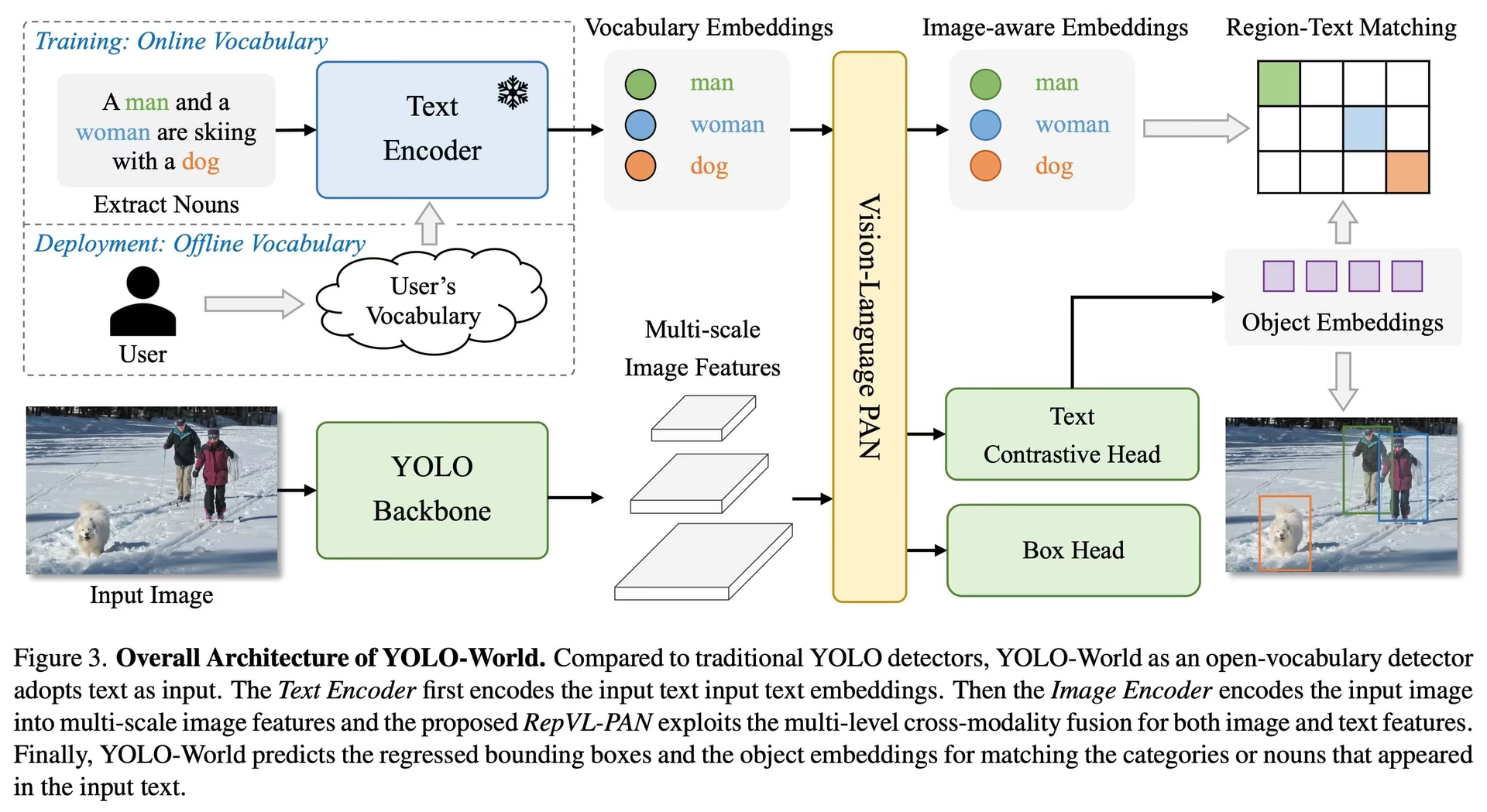
YOLO-World, genellikle kapsamlı hesaplama kaynakları gerektiren ağır Transformer modellerine dayanan geleneksel Açık Kelime Dağarcıklı algılama modellerinin zorluklarını ele alır. Kapalı küme algılayıcıları ise önceden tanımlanmış nesne kategorilerine bağlıdır; bu da dinamik senaryolardaki kullanımlarını sınırlar. YOLO-World, açık kelime dağarcıklı algılama için görsel-dil modellemesini ve büyük veri kümeleri üzerinde ön eğitimi kullanarak, sıfır atışlı senaryolarda çok çeşitli nesneleri verimli bir şekilde tanımlamak üzere YOLOv8 çerçevesini genişletir.
Örnek maskelerine, görsel istemlere veya istem gerektirmeyen bir moda da ihtiyaç duyan açık kelime dağarcıklı çalışmalar için aynı set_classes() API'sini kullanan YOLOE modeline bak.
Temel Özellikler#
-
Gerçek Zamanlı Çözüm: Hızlı CNN'ler üzerine kurulu YOLO-World, açık kelime dağarcıklı algılamayı anında sonuç gerektiren uygulamalara yetecek hızda gerçekleştirir.
-
Verimlilik ve Performans: YOLO-World, doğruluğu korurken hesaplama ve kaynak gereksinimlerini azaltır; daha ağır Transformer tabanlı açık kelime dağarcıklı algılayıcılara verimli bir alternatif sunar ve gerçek zamanlı uygulamaları mümkün kılar.
-
Çevrimdışı Kelime Dağarcığıyla Çıkarım: YOLO-World, verimliliği daha da artırmak için çevrimdışı bir kelime dağarcığı kullanan "önce istem, sonra algıla" stratejisini sunar. Bu yaklaşım, açıklamalar veya kategoriler gibi önceden hesaplanan özel istemlerin kodlanıp çevrimdışı kelime dağarcığı gömmeleri olarak saklanmasını sağlayarak algılama sürecini kolaylaştırır.
-
YOLOv8 ile Güçlendirildi: Ultralytics YOLOv8 üzerine kurulu YOLO-World, gerçek zamanlı algılama mimarisini hızlı ve doğru açık kelime dağarcıklı algılama için uyarlar.
-
Başarılı Kıyaslama Sonuçları: YOLO-World, tek bir NVIDIA V100 GPU üzerinde ölçülen standart kıyaslamalarda hız ve verimlilik açısından MDETR ve GLIP serisi dahil mevcut açık kelime dağarcıklı algılayıcılardan daha iyi performans gösterir.
-
Çok Yönlü Uygulamalar: YOLO-World'ün verimliliği, açık kelime dağarcıklı algılamayı çok sayıda görüntü işleme görevi için kullanışlı hâle getirir ve önceki açık kelime dağarcıklı yöntemlerden çok daha hızlı çalışır.
Kullanılabilir Modeller, Desteklenen Görevler ve Çalışma Modları#
Bu bölümde, desteklenen modlar ✅, desteklenmeyen modlar ❌ ile gösterilerek belirli önceden eğitilmiş ağırlıklarıyla sunulan modeller, destekledikleri görevler ve Eğitim, Doğrulama, Çıkarım ve Dışa Aktarma gibi çeşitli çalışma modlarıyla uyumlulukları ayrıntılı olarak açıklanır.
Tüm YOLOv8-World ağırlıkları doğrudan resmî YOLO-World deposundan aktarılmıştır; bu ağırlıklar için yazarlara teşekkür ederiz.
| Model Türü | Önceden Eğitilmiş Ağırlıklar | Desteklenen Görevler | Eğitim | Doğrulama | Çıkarım | Dışa aktar |
|---|---|---|---|---|---|---|
| YOLOv8s-world | yolov8s-world.pt | Nesne Algılama | ✅ | ✅ | ✅ | ❌ |
| YOLOv8s-worldv2 | yolov8s-worldv2.pt | Nesne Algılama | ✅ | ✅ | ✅ | ✅ |
| YOLOv8m-world | yolov8m-world.pt | Nesne Algılama | ✅ | ✅ | ✅ | ❌ |
| YOLOv8m-worldv2 | yolov8m-worldv2.pt | Nesne Algılama | ✅ | ✅ | ✅ | ✅ |
| YOLOv8l-world | yolov8l-world.pt | Nesne Algılama | ✅ | ✅ | ✅ | ❌ |
| YOLOv8l-worldv2 | yolov8l-worldv2.pt | Nesne Algılama | ✅ | ✅ | ✅ | ✅ |
| YOLOv8x-world | yolov8x-world.pt | Nesne Algılama | ✅ | ✅ | ✅ | ❌ |
| YOLOv8x-worldv2 | yolov8x-worldv2.pt | Nesne Algılama | ✅ | ✅ | ✅ | ✅ |
COCO veri kümesinde sıfır örnekli aktarım#
| Model Türü | mAP50-95 | mAP50 | mAP75 |
|---|---|---|---|
| yolov8s-world | 37.4 | 52.0 | 40.6 |
| yolov8s-worldv2 | 37.7 | 52.2 | 41.0 |
| yolov8m-world | 42.0 | 57.0 | 45.6 |
| yolov8m-worldv2 | 43.0 | 58.4 | 46.8 |
| yolov8l-world | 45.7 | 61.3 | 49.8 |
| yolov8l-worldv2 | 45.8 | 61.3 | 49.8 |
| yolov8x-world | 47.0 | 63.0 | 51.2 |
| yolov8x-worldv2 | 47.1 | 62.8 | 51.4 |
Kullanım Örnekleri#
Ultralytics, YOLO-World modelleri için bir Python API'si ve CLI komutları sunar.
İzle: Ultralytics ile YOLO-World Modeli Kullanım Örnekleri | Açık Kelime Dağarcığı, İstemsiz ve Diğerleri
Eğitim Kullanımı#
Deterministik eğitimi desteklediği ve ONNX ile TensorRT gibi biçimlere daha kolay dışa aktarım sağladığı için özel eğitimde yolov8-worldv2 kullanmanı önemle tavsiye ederiz.
Aşağıda COCO8 örnek veri kümesinde gösterildiği gibi, train yöntemiyle bir YOLO-World nesne algılama modeli eğit:
PyTorch önceden eğitilmiş *.pt modelleri ve yapılandırma *.yaml dosyaları, Python'da bir model örneği oluşturmak için YOLOWorld() sınıfına aktarılabilir:
from ultralytics import YOLOWorld

# Önceden eğitilmiş bir YOLOv8s-worldv2 modeli yükle
model = YOLOWorld("yolov8s-worldv2.pt")

# Modeli COCO8 örnek veri kümesinde 100 dönem boyunca eğit
results = model.train(data="coco8.yaml", epochs=100, imgsz=640)

# 'bus.jpg' görüntüsünde YOLO-World modeliyle çıkarım yap
results = model("path/to/bus.jpg")
Tahmin Kullanımı#
Aşağıda gösterildiği gibi, predict yöntemiyle nesne algılama çalıştır:
from ultralytics import YOLOWorld

# Bir YOLO-World modelini başlat
model = YOLOWorld("yolov8s-world.pt")  # veya farklı boyutlar için yolov8m/l-world.pt dosyasını seç

# Belirtilen görüntüde YOLOv8s-world modeliyle çıkarım yap
results = model.predict("path/to/image.jpg")

# Sonuçları göster
results[0].show()
Bu kod parçası, önceden eğitilmiş bir modeli yükler ve bir görüntü üzerinde tahmin yürütür.
Doğrulama Kullanımı#
Modeli bir veri kümesinde şu şekilde doğrula:
from ultralytics import YOLO

# Bir YOLO-World modeli oluştur
model = YOLO("yolov8s-world.pt")  # veya farklı boyutlar için yolov8m/l-world.pt dosyasını seç

# COCO8 örnek veri kümesinde model doğrulaması yap
metrics = model.val(data="coco8.yaml")
Takip Kullanımı#
Bir YOLO-World modeliyle videolar veya görüntüler üzerinde nesne takibi şu şekilde çalıştırılır:
from ultralytics import YOLO

# Bir YOLO-World modeli oluştur
model = YOLO("yolov8s-world.pt")  # veya farklı boyutlar için yolov8m/l-world.pt dosyasını seç

# Bir videoda YOLO-World modeliyle takip yap
results = model.track(source="path/to/video.mp4")Ultralytics tarafından sunulan YOLO-World modelleri, çevrimdışı kelime dağarcıklarının parçası olarak COCO veri kümesi kategorileriyle önceden yapılandırılmıştır; bu nedenle hemen kullanıma hazırdır. Böylece YOLOv8-World modelleri, ek kurulum veya özelleştirme gerektirmeden COCO veri kümesinde tanımlanan 80 standart kategoriyi doğrudan tanıyıp tahmin edebilir.
İstemleri ayarla#
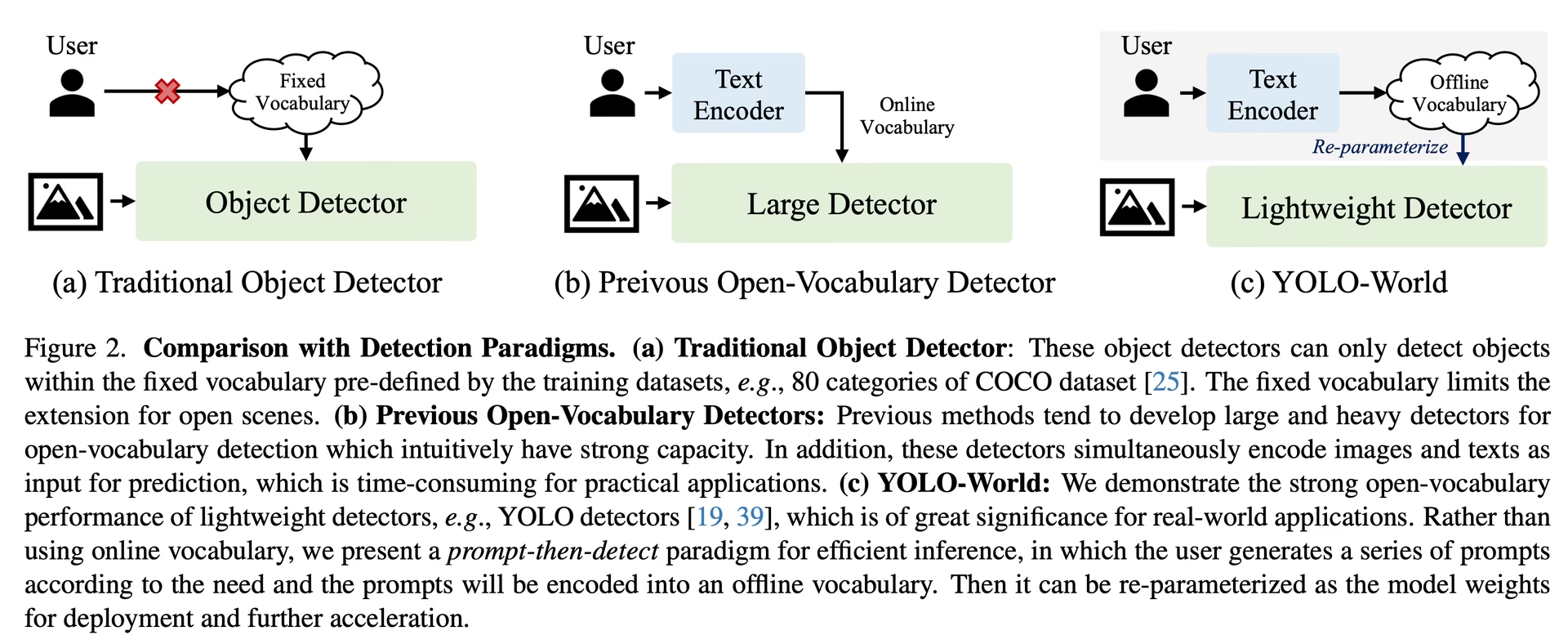
YOLO-World çerçevesi, özel istemler aracılığıyla sınıfların dinamik olarak belirlenmesine olanak tanır ve kullanıcıların modeli yeniden eğitmeden kendi ihtiyaçlarına göre uyarlamasını sağlar. Bu özellik, modeli yeni alanlara veya başlangıçta eğitim verilerinin parçası olmayan belirli görevlere uyarlamak için özellikle kullanışlıdır. Kullanıcılar özel istemler ayarlayarak modeli ilgilendikleri nesnelere yönlendirir, algılama sonuçlarının alaka düzeyini ve doğruluğunu artırır.
Örneğin uygulaman yalnızca 'person' ve 'bus' nesnelerini algılamayı gerektiriyorsa bu sınıfları doğrudan belirtebilirsin:
from ultralytics import YOLO

# Bir YOLO-World modelini başlat
model = YOLO("yolov8s-world.pt")  # veya yolov8m/l-world.pt dosyasını seç

# Özel sınıfları tanımla
model.set_classes(["person", "bus"])

# Bir görüntüde belirtilen kategoriler için tahmin yürüt
results = model.predict("path/to/image.jpg")

# Sonuçları göster
results[0].show()Bazı kullanıcılar, arka plan sınıfı olarak boş bir "" dizgesi eklemenin belirli senaryolarda algılama performansını artırabildiğini fark etti. Bu davranış senaryoya bağlı görünüyor ve kesin mekanizması tam olarak anlaşılmış değil:
model.set_classes(["person", "bus", ""])Boş dizge, kaydettiğin modeller de dahil olmak üzere model.names içinde kendi başına bir sınıf olarak kalır; dolayısıyla bu sınıfa ait algılamalar boş bir etiketle döner. Yalnızca gerçek sınıflarını tutmak için tahmin sırasında classes=[0, 1] değerini ilet.
Özel sınıfları ayarladıktan sonra modeli de kaydedebilirsin. Böylece YOLO-World modelinin özel kullanım durumuna göre uyarlanmış bir sürümünü oluşturursun. Bu işlem, özel sınıf tanımlarını doğrudan model dosyasına ekleyerek modeli başka bir ayarlama yapmadan belirttiğin sınıflarla kullanıma hazır hâle getirir. Özel YOLO-World modelini kaydetmek ve yüklemek için şu adımları izle:
Önce bir YOLO-World modeli yükle, özel sınıfları ayarla ve modeli kaydet:
from ultralytics import YOLO

# Bir YOLO-World modelini başlat
model = YOLO("yolov8s-world.pt")  # veya yolov8m/l-world.pt dosyasını seç

# Özel sınıfları tanımla
model.set_classes(["person", "bus"])

# Modeli tanımlanan çevrimdışı sözcük dağarcığıyla kaydet
model.save("custom_yolov8s.pt")
Kaydedildikten sonra custom_yolov8s.pt modeli, önemli bir fark dışında diğer tüm önceden eğitilmiş YOLOv8 modelleri gibi davranır: model artık yalnızca tanımladığın sınıfları algılayacak şekilde optimize edilmiştir. Bu özelleştirme, belirli uygulama senaryolarındaki algılama performansını ve verimliliğini önemli ölçüde artırabilir.
from ultralytics import YOLO

# Özel modelini yükle
model = YOLO("custom_yolov8s.pt")

# Özel sınıflarını algılamak için çıkarım yap
results = model.predict("path/to/image.jpg")

# Sonuçları göster
results[0].show()
Özel Sözcük Dağarcığıyla Kaydetmenin Avantajları#
- Verimlilik: İlgili nesnelere odaklanıp hesaplama yükünü azaltarak ve çıkarımı hızlandırarak algılama sürecini kolaylaştırır.
- Esneklik: Kapsamlı bir yeniden eğitim veya veri toplama ihtiyacı olmadan modelin yeni ya da niş algılama görevlerine kolayca uyarlanmasını sağlar.
- Basitlik: Çalışma zamanında özel sınıfları tekrar tekrar belirtme ihtiyacını ortadan kaldırarak dağıtımı kolaylaştırır ve modeli içine gömülü sözcük dağarcığıyla doğrudan kullanılabilir hâle getirir.
- Performans: Modelin dikkatini ve kaynaklarını tanımlanan nesneleri tanımaya yönlendirerek belirtilen sınıflar için algılama doğruluğunu artırır.
Bu yaklaşım, nesne algılama modellerini yeniden eğitim gerektirmeden belirli görevlere uyarlar ve açık kelime dağarcıklı algılamayı daha geniş bir uygulama yelpazesi için kullanışlı hâle getirir.
Resmî sonuçları sıfırdan yeniden üret (Deneysel)#
Veri kümelerini hazırla#
- Eğitim verileri
| Veri kümesi | Tür | Örnekler | Kutular | Ek açıklama dosyaları |
|---|---|---|---|---|
| Objects365v1 | Algılama | 609k | 9621k | objects365_train.json |
| GQA | Grounding | 621k | 3681k | final_mixed_train_no_coco.json |
| Flickr30k | Grounding | 149k | 641k | final_flickr_separateGT_train.json |
- Doğrulama verileri
| Veri kümesi | Tür | Ek açıklama dosyaları |
|---|---|---|
| LVIS minival | Algılama | minival.txt |
Eğitimi sıfırdan başlat#
WorldTrainerFromScratch, YOLO-World modellerinin hem algılama veri kümelerinde hem de grounding veri kümelerinde aynı anda eğitilmesine olanak tanıyacak şekilde büyük ölçüde özelleştirilmiştir.
from ultralytics import YOLOWorld
from ultralytics.models.yolo.world.train_world import WorldTrainerFromScratch

# Seçenek 1: Python sözlüğü kullan
data = {
    "train": {
        "yolo_data": ["Objects365.yaml"],
        "grounding_data": [
            {
                "img_path": "flickr30k/images",
                "json_file": "flickr30k/final_flickr_separateGT_train.json",
            },
            {
                "img_path": "GQA/images",
                "json_file": "GQA/final_mixed_train_no_coco.json",
            },
        ],
    },
    "val": {"yolo_data": ["lvis.yaml"]},
}

# Seçenek 2: YAML dosyası kullan (yolo_world_data.yaml)
# train:
#   yolo_data:
#     - Objects365.yaml
#   grounding_data:
#     - img_path: flickr/full_images/
# json_file: flickr/annotations/final_flickr_separateGT_train_segm.json
# - img_path: mixed_grounding/gqa/images
# json_file: mixed_grounding/annotations/final_mixed_train_no_coco_segm.json
# val:
#   yolo_data:
# - lvis.yaml

model = YOLOWorld("yolov8s-worldv2.yaml")
model.train(
    data=data,  # YAML dosyası kullanıyorsan data="yolo_world_data.yaml" kullan
    batch=128,
    epochs=100,
    trainer=WorldTrainerFromScratch,
)
Atıflar ve Teşekkürler#
YOLO-World ile gerçek zamanlı, açık sözcük dağarcıklı nesne algılama alanındaki öncü çalışmaları için Tencent AILab Bilgisayarlı Görü Merkezi ekibine teşekkür ederiz:
@article{cheng2024yolow,
title={YOLO-World: Real-Time Open-Vocabulary Object Detection},
author={Cheng, Tianheng and Song, Lin and Ge, Yixiao and Liu, Wenyu and Wang, Xinggang and Shan, Ying},
journal={arXiv preprint arXiv:2401.17270},
year={2024}
}
Daha fazla bilgi için özgün YOLO-World makalesine arXiv üzerinden ulaşabilirsin. Projenin kaynak koduna ve ek kaynaklara GitHub deposu üzerinden erişebilirsin. Alanı ilerletmeye ve değerli görüşlerini toplulukla paylaşmaya yönelik kararlılıklarını takdir ediyoruz.
Sık Sorulan Sorular#
YOLO-World modeli, Ultralytics YOLOv8 çerçevesini temel alan gerçek zamanlı bir nesne algılama yaklaşımıdır. Görüntüdeki nesneleri açıklayıcı metne göre tanımlayarak açık kelime dağarcıklı algılama gerçekleştirir. Görsel-dil modellemesini ve büyük veri kümeleri üzerinde ön eğitimi kullanan YOLO-World, daha az hesaplama gereksinimiyle yüksek verimlilik sunar ve gerçek zamanlı uygulamalar için oldukça uygundur.
YOLO-World, verimliliği artırmak için çevrimdışı kelime dağarcığı kullanan "önce istem, sonra algıla" stratejisini destekler. Açıklamalar veya belirli nesne kategorileri gibi özel istemler önceden kodlanıp çevrimdışı kelime dağarcığı gömmeleri olarak saklanır. Bu yaklaşım, yeniden eğitim gerektirmeden algılama sürecini kolaylaştırır. Aşağıda gösterildiği gibi, modeli belirli algılama görevlerine uyarlamak için istemleri dinamik olarak ayarlayabilirsin:
from ultralytics import YOLOWorld # Bir YOLO-World modelini başlat model = YOLOWorld("yolov8s-world.pt") # Özel sınıfları tanımla model.set_classes(["person", "bus"]) # Bir görüntü üzerinde tahmin yürüt results = model.predict("path/to/image.jpg") # Sonuçları göster results[0].show()YOLO-World, geleneksel açık sözcük dağarcıklı algılama modellerine kıyasla çeşitli avantajlar sunar:
- Gerçek Zamanlı Performans: Hızlı ve verimli algılama için hızlı CNN'ler kullanır.
- Verimlilik ve Düşük Kaynak Gereksinimi: YOLO-World, hesaplama ve kaynak gereksinimlerini önemli ölçüde azaltırken yüksek performansını korur.
- Özelleştirilebilir İstemler: Model, dinamik istem ayarını destekler ve kullanıcıların yeniden eğitim yapmadan özel algılama sınıfları belirtmesine olanak tanır.
- Karşılaştırmalı Değerlendirmelerde Üstünlük: Standart karşılaştırmalı değerlendirmelerde hız ve verimlilik açısından MDETR ve GLIP gibi diğer açık sözcük dağarcıklı algılayıcılardan daha iyi performans gösterir.
Python API'si veya CLI ile veri kümen üzerinde bir YOLO-World modeli eğit. Python kullanarak eğitime şöyle başlayabilirsin:
from ultralytics import YOLOWorld

# Önceden eğitilmiş bir YOLOv8s-worldv2 modeli yükle
model = YOLOWorld("yolov8s-worldv2.pt")

# Modeli COCO8 veri kümesinde 100 epoch boyunca eğit
results = model.train(data="coco8.yaml", epochs=100, imgsz=640)
Ya da CLI ile:
yolo train model=yolov8s-worldv2.pt data=coco8.yaml epochs=100 imgsz=640Ultralytics, çeşitli görevleri ve çalışma modlarını destekleyen birden fazla önceden eğitilmiş YOLO-World modeli sunar:
Model Türü Önceden Eğitilmiş Ağırlıklar Desteklenen Görevler Eğitim Doğrulama Çıkarım Dışa aktar YOLOv8s-world yolov8s-world.pt Nesne Algılama ✅ ✅ ✅ ❌ YOLOv8s-worldv2 yolov8s-worldv2.pt Nesne Algılama ✅ ✅ ✅ ✅ YOLOv8m-world yolov8m-world.pt Nesne Algılama ✅ ✅ ✅ ❌ YOLOv8m-worldv2 yolov8m-worldv2.pt Nesne Algılama ✅ ✅ ✅ ✅ YOLOv8l-world yolov8l-world.pt Nesne Algılama ✅ ✅ ✅ ❌ YOLOv8l-worldv2 yolov8l-worldv2.pt Nesne Algılama ✅ ✅ ✅ ✅ YOLOv8x-world yolov8x-world.pt Nesne Algılama ✅ ✅ ✅ ❌ YOLOv8x-worldv2 yolov8x-worldv2.pt Nesne Algılama ✅ ✅ ✅ ✅ Resmi sonuçları sıfırdan yeniden üretmek için veri kümelerini hazırlaman ve sağlanan kodla eğitimi başlatman gerekir. Eğitim süreci, bir veri sözlüğü oluşturmayı ve özel bir eğiticiyle
trainyöntemini çalıştırmayı içerir:from ultralytics import YOLOWorld from ultralytics.models.yolo.world.train_world import WorldTrainerFromScratch data = { "train": { "yolo_data": ["Objects365.yaml"], "grounding_data": [ { "img_path": "flickr30k/images", "json_file": "flickr30k/final_flickr_separateGT_train.json", }, { "img_path": "GQA/images", "json_file": "GQA/final_mixed_train_no_coco.json", }, ], }, "val": {"yolo_data": ["lvis.yaml"]}, } model = YOLOWorld("yolov8s-worldv2.yaml") model.train(data=data, batch=128, epochs=100, trainer=WorldTrainerFromScratch)


Yorumlar244
Bir soru sor, sonuçlarını paylaş veya başka birine yardım et.
IamShubhamGupto
Authors of yolo world released instructions to fine tune their models, would that be supported by ultralytics? if so id like to contribute - https://github.com/AILab-CVC/YOLO-World/blob/master/docs/finetuning.md
5 Paula DerrengerUltralytics(düzenlendi)
@IamShubhamGupto hey there! 👋
Absolutely, we're all for community contributions. Training is supported for YOLO-World models in Ultralytics (we recommend
yolov8*-worldv2.ptfor custom training), see the Train Usage section of the YOLO-World docs:from ultralytics import YOLOWorld model = YOLOWorld("yolov8s-worldv2.pt") model.train(data="coco8.yaml", epochs=100, imgsz=640)If you'd like to add parts of the authors' fine-tuning workflow that aren't covered yet, fork the repo, make your changes, and submit a pull request. Happy coding! 😊👨💻
2woerstcase
If I get you right you thinking in a use like this? https://supervision.roboflow.com/develop/notebooks/zero-shot-object-detection-with-yolo-world/#filtering-detectuions-by-area
- Paula DerrengerUltralytics(düzenlendi)
Hey there! 👋
Yes, you're on the right track! The example you've linked from Roboflow demonstrates filtering detections by area, which is indeed supported by Ultralytics YOLO models. You can achieve similar functionality by manipulating the
resultsobject after prediction to filter out detections based on their bounding box area or any other criteria you prefer.Here's a quick example of how you might do that:
from ultralytics import YOLO

# Load a pretrained YOLO26 model
model = YOLO('yolo26n.pt')

# Perform object detection on an image
results = model('path/to/image.jpg')

# Filter detections by bounding box area (e.g., area > 1000 pixels)
filtered_results = [det for det in results[0].boxes.xyxy if (det[2] - det[0]) * (det[3] - det[1]) > 1000]

# Do something with filtered_results
Hope this helps! If you have more questions or need further assistance, feel free to ask. Happy coding! 😊🚀
2 sbsbsbsbcccc
@IamShubhamGupto嗨呀!👋
当然,我们全力支持社区贡献和对 YOLO-World 等微调模型的支持。如果你有兴趣做出贡献,那就太好了!🌟
请注意,虽然我们支持各种 YOLOv8 任务和模式,但
yolov8*-world.pt目前不支持 YOLO-World 模型 ( ) 的训练模式。不过,您仍然可以使用预先训练的权重进行推理和验证。如果您有与我们现有框架兼容的特定微调流程,我们很乐意看到您的成果!请随意分叉存储库,进行更改,然后提交拉取请求。如果您需要任何帮助或在此过程中有疑问,请随时提出。
祝你编码愉快!😊👨💻
你好,大佬,我想使用mixgrouding数据集和我自己定义的封闭数据集交叉训练,你有具体的mixgrouding数据集配置教程吗data = { "train": { "yolo_data": ["Objects365.yaml"], "grounding_data": [ { "img_path": "../datasets/GQA/images", "json_file": "../datasets/GQA/final_mixed_train_no_coco.json", }, ], }, }
model = YOLOWorld("yolov8s-worldv2.yaml")这几个yaml文件哪里可以找到?
meidachen
Thanks for the great work! I'm wondering which training data has been used for yolov8x-worldv2 model? The model on the official site has "YOLO-Worldv2-X" trained on O365+GoldG+CC3M-Lite, are the training data the same as from here?
2 Glenn JocherUltralytics
@meidachen thank you for your kind words! 😊
The YOLOv8x-worldv2 model has indeed been trained on a combination of datasets, specifically Objects365, GoldG, and CC3M-Lite. This diverse training data helps the model excel in open-vocabulary detection tasks by leveraging a wide variety of object categories and contexts.
If you have any further questions or need additional details, feel free to ask. For more information on the YOLO-World model, you can also visit our YOLO-World documentation.
Happy experimenting! 🚀
Dragosjosan
The model performance of the Yolo World Hugging Face model (https://huggingface.co/spaces/stevengrove/YOLO-World) is better for my purpose than the standard inference one "YOLOv8x-worldv2" for example.
Because my lack of domain knowledge regarding this topics I can't make the HF model work on my Mac (not an M processor) so I would like to be able to use the model weights with the abstraction from the ultralytics library.
Is there any way to use the author's provided weights together with the inference library? For example: model = YOLOWorld('yolow-v8_l_clipv2_frozen_t2iv2_bn_o365_goldg_pretrain.pth')
From the author's instruction on how to run the model on an image one needs the configuration file and the weights: https://github.com/AILab-CVC/YOLO-World
The conf file I want to use and the weights are available here: https://huggingface.co/spaces/stevengrove/YOLO-World/blob/main/configs/pretrain/yolo_world_l_t2i_bn_2e-4_100e_4x8gpus_obj365v1_goldg_train_lvis_minival.py https://huggingface.co/spaces/stevengrove/YOLO-World/blob/main/yolow-v8_l_clipv2_frozen_t2iv2_bn_o365_goldg_pretrain.pth
Thank you in advance :)
1- Paula DerrengerUltralytics(düzenlendi)
Hey there! 😊 Thanks for reaching out with your query.
Loading the original authors'
.pthweights and.pyconfig file into Ultralytics isn't supported:YOLOWorld()accepts Ultralytics.ptweights or.yamlmodel files only, and the architectures and weight names differ. Use the weights provided by Ultralytics instead, for exampleyolov8x-worldv2.pt:from ultralytics import YOLOWorld model = YOLOWorld("yolov8x-worldv2.pt") results = model.predict("path/to/image.jpg")Results can differ from the Hugging Face demo because of different weights, preprocessing and settings such as
confandimgsz. If you got any more questions, feel free to ask. 🚀 Hey @pderrenger,
Thanks your for answering my request! :)
The "8.1.42" ultralytics Version doesn't have an 'config' instance attribute, so I the provided code snippet raises an error.
YOLOWorld.__init__() got an unexpected keyword argument 'config'Do you suppose I'm doing something wrong?
Thanks again 👍
- Paula DerrengerUltralytics
@Dragosjosan hey there! 😊 It looks like there was a slight misunderstanding regarding model initialization with a 'config' attribute. The
YOLOWorldclass and the way to load pre-trained models or weights with a specific configuration don't directly support an 'config' attribute as part of the initialization process in the Ultralytics YOLOv8's current implementation.For using a model with specific weights, here's the correct approach:
from ultralytics import YOLO

# Load the model using pre-trained weights
model = YOLO('path/to/your/yolov8s-worldv2.pt')  # Example model

# Now, you can use this model for inference, training, etc.
# Example for inference
results = model.predict('path/to/image.jpg')
results[0].show()
If you're trying to integrate configurations that don't directly map to the pre-trained models provided by Ultralytics, it would usually involve modifying the model's architecture or training process, which is a bit more involved and typically done within the Python scripts or notebooks rather than through the CLI.
I hope this clears things up! If you have any more questions or need further help, feel free to ask. 👍
@pderrenger thank you again for your answer.
Since we don't have the expected
model.ptexpected by the YOLO class, is there any way to convert the Hugging Facehf_model.pth?- Paula DerrengerUltralytics(düzenlendi)
Hey @Dragosjosan! 😊
Directly loading or converting external
.pthweights (such as the Hugging Face ones) into the Ultralytics framework isn't supported, since the model architectures and weight naming conventions differ. Please use the weights provided by Ultralytics, for exampleyolov8x-worldv2.pt.Hope this helps! 🚀
Hey @pderrenger,
Thank you!
- Paula DerrengerUltralytics
Hey there! 🌟
Thank you for sharing your interest and enthusiasm! 🚀 To directly address your query, here's a concise example showing how to perform inferential tasks using the pre-trained YOLO-World models with our Python API:
from ultralytics import YOLO

# Load a pre-trained YOLO-World model (e.g., yolov8s-worldv2.pt for object detection)
model = YOLO('yolov8s-worldv2.pt')

# Run inference on an image
results = model.predict('path/to/image.jpg')

# Visualize and/or process the inference results
results[0].show()  # Displays the image with detections
This snippet loads a YOLO-World model, performs object detection on a specified image, and then visualizes the results. For different tasks or models, simply change the model filename (e.g.,
yolov8m-worldv2.pt).If you're keen on training or further customizing the model, remember that the v2 models (
yolov8*-worldv2.pt) support export for deployment. Just ensure you follow the documentation closely for the best outcomes!Feel free to reach out for more help or share your progress! Happy coding! 😊
tpsvoets
Hey @Dragosjosan, did you have any success getting the .pth file to work? I am not sure why it is suggested to use a config, while that is currently not supported. And I also don't understand the latest reply by @pderrenger?
Hi @tpsvoets ,
not with the ultralytics library, no.
Some of the answers might be auto-generated I guess. Long story short: they don't support it. If you want to convert it to .pt you need to figure it out on your own with pytorch and then also adapt this .pt to the ultralytics configuration.
Are you also interested in the topic?
junnnnchi
Hey @Dragosjosan I am also interested in this topic, did you figure out how to convert .pth to .pt?
Hey @junnnnchi,
no, sorry. How do you plan on tackling this problem? Maybe we can figure it out together.
@Dragosjosan ah too bad, it's a shame we cannot get any network file to work with the code. Right now it remains unknown for me how the two demos can differ quite so much. Do we know if the architecture is the same, so if the .pth to .pt conversion works that it will result in something that actually works?
@Dragosjosan I used the roboflow's implementation for YOLO-World. This version gives better results for my project. You might consider this.
@junnnnchi for my application the model from Hugging Face works best... But good that you found something that works. May I ask what your App do? :)
mustfkeskin
Has anyone solved this problem? 🤗
How can I integrate the above mentioned files into the ultralytics library. I liked the model results better when working on Huggingface. I noticed that the model size used on Huggingface is a bit bigger size
The conf file I want to use and the weights are available here: https://huggingface.co/spaces/stevengrove/YOLO-World/blob/main/configs/pretrain/yolo_world_l_t2i_bn_2e-4_100e_4x8gpus_obj365v1_goldg_train_lvis_minival.py https://huggingface.co/spaces/stevengrove/YOLO-World/blob/main/yolow-v8_l_clipv2_frozen_t2iv2_bn_o365_goldg_pretrain.pth
- Glenn JocherUltralytics
@mustfkeskin unfortunately, integrating the specific .pth weights with the Ultralytics library isn't directly supported. You might need to convert the weights to a compatible format like .pt and adjust configurations manually. For further guidance, consider exploring PyTorch documentation or community forums.
-1
venuss920
Hi, guys, if we set and fine-tune our own dataset to fine-tune the model, then while fine-tuning the YOLO-World model, it will also learn text prompts while learning object detection as well?
- Paula DerrengerUltralytics
Fine-tuning on a standard detection dataset trains YOLO-World to associate visual features with your dataset’s class-name text embeddings; it does not learn arbitrary new prompts as separate annotations or generally train the text encoder. For richer phrase grounding, training requires paired grounding data rather than only YOLO detection labels; see the YOLO-World training reference.
feekyzz
为什么会出现单卡训练跑通train 但是多卡会出现类别和grounding之间不匹配的现象? Why does training run normally on a single GPU, but when using multiple GPUs, there is a mismatch between the nc and the grounding annotations?
- Glenn JocherUltralytics
多卡下这类
nc与 grounding 标注不匹配通常更像是 DDP 进程读到了不一致的data配置、*.cache或混合安装环境,而不是单纯类别数设置问题;请先确认你是按 YOLO-World 训练示例 使用yolov8*-worldv2和WorldTrainerFromScratch,然后把完整 traceback、你的多卡启动命令,以及ultralytics.utils.checks.collect_system_info()的输出贴在这里,如果最近改过标签或数据集结构,也请先删除labels目录下的*.cache后再试。 感谢您的答复,我按照你的建议,删除了*.cache,确认了完全按照示例使用。
这是我的train.py
from ultralytics import YOLOWorld
from ultralytics.models.yolo.world.train_world import WorldTrainerFromScratch

# Option 1: Use Python dictionary
data = dict(
    train=dict(
        yolo_data=["/home/qh1/Qwen/Yw/ultralytics-Yw/datasets/Objects365.yaml"],
        grounding_data=[
            dict(
                img_path="/home/qh1/Qwen/Yw/ultralytics-Yw/datasets/flickr30k/images",
                json_file="/home/qh1/Qwen/Yw/ultralytics-Yw/datasets/flickr30k/final_flickr_separateGT_train.json",
            ),
            dict(
                img_path="/home/qh1/Qwen/Yw/ultralytics-Yw/datasets/gqa/images",
                json_file="/home/qh1/Qwen/Yw/ultralytics-Yw/datasets/gqa/final_mixed_train_no_coco.json",
            ),
        ],
    ),
    val=dict(yolo_data=["/home/qh1/Qwen/Yw/ultralytics-Yw/datasets/lvis.yaml"]),
)
model = YOLOWorld("yolov8-worldv2.yaml")
model.train(
    data=data,
    batch=256,
    epochs=10,
    trainer=WorldTrainerFromScratch,
    workers=16,
    device=[0,2],
    name="Base-v8-worldv2",
)
这是我的训练脚本.sh
#!/bin/bash
# Stable RTDETR multi-GPU training script

# 设置使用的物理 GPU
export CUDA_VISIBLE_DEVICES=0,2

# NCCL / DDP 稳定性环境变量
export NCCL_DEBUG=INFO
export NCCL_IB_DISABLE=1
export NCCL_P2P_DISABLE=1
export TORCH_NCCL_BLOCKING_WAIT=1
export TORCH_NCCL_ASYNC_ERROR_HANDLING=1

# 设置随机 master port 避免冲突
PORT=$(shuf -i 25000-30000 -n 1)
echo "Using master port: $PORT"

# 创建日志文件
LOG_FILE="z-train2-02.log"
touch $LOG_FILE

# 后台运行训练
nohup python -u z-train2.py \
    --device 0 2 \
    --master_port $PORT \
    > $LOG_FILE 2>&1 &

echo "Training started, logging to $LOG_FILE"
echo "Use 'tail -f $LOG_FILE' to watch progress"
这是我的collect_system_info()输出
Ultralytics 8.3.229 🚀 Python-3.8.20 torch-2.1.0 CUDA:0 (NVIDIA H100 PCIe, 81089MiB)
Setup complete ✅ (128 CPUs, 503.5 GB RAM, 3277.3/24934.1 GB disk)

OS                     Linux-6.8.0-101-generic-x86_64-with-glibc2.17
Environment            Linux
Python                 3.8.20
Install                pip
Path                   /home/qh1/Qwen/Yw/ultralytics-Yw/ultralytics
RAM                    503.51 GB
Disk                   3277.3/24934.1 GB
CPU                    INTEL XEON GOLD 6530
CPU count              128
GPU                    NVIDIA H100 PCIe, 81089MiB
GPU count              8
CUDA                   12.1

numpy                  ✅ 1.24.3>=1.23.0
matplotlib             ✅ 3.7.5>=3.3.0
opencv-python          ✅ 4.13.0.92>=4.6.0
pillow                 ✅ 10.4.0>=7.1.2
pyyaml                 ✅ 6.0.2>=5.3.1
requests               ✅ 2.28.2>=2.23.0
scipy                  ✅ 1.10.1>=1.4.1
torch                  ✅ 2.1.0>=1.8.0
torch                  ✅ 2.1.0!=2.4.0,>=1.8.0; sys_platform == "win32"
torchvision            ✅ 0.16.0>=0.9.0
psutil                 ✅ 7.2.2>=5.8.0
polars                 ✅ 1.8.2>=0.20.0
ultralytics-thop       ✅ 2.0.18>=2.0.18
{'OS': 'Linux-6.8.0-101-generic-x86_64-with-glibc2.17', 'Environment': 'Linux', 'Python': '3.8.20', 'Install': 'pip', 'Path': '/home/qh1/Qwen/Yw/ultralytics-Yw/ultralytics', 'RAM': '503.51 GB', 'Disk': '3277.3/24934.1 GB', 'CPU': 'INTEL XEON GOLD 6530', 'CPU count': 128, 'GPU': 'NVIDIA H100 PCIe, 81089MiB', 'GPU count': 8, 'CUDA': '12.1', 'Package Info': {'numpy': '✅ 1.24.3>=1.23.0', 'matplotlib': '✅ 3.7.5>=3.3.0', 'opencv-python': '✅ 4.13.0.92>=4.6.0', 'pillow': '✅ 10.4.0>=7.1.2', 'pyyaml': '✅ 6.0.2>=5.3.1', 'requests': '✅ 2.28.2>=2.23.0', 'scipy': '✅ 1.10.1>=1.4.1', 'torch': '✅ 2.1.0!=2.4.0,>=1.8.0; sys_platform == "win32"', 'torchvision': '✅ 0.16.0>=0.9.0', 'psutil': '✅ 7.2.2>=5.8.0', 'polars': '✅ 1.8.2>=0.20.0', 'ultralytics-thop': '✅ 2.0.18>=2.0.18'}}
这是我的报错日志
Traceback (most recent call last): File "/home/qh1/Qwen/Yw/yw_env/lib/python3.8/site-packages/ultralytics/engine/validator.py", line 227, in __call__ self.loss += model.loss(batch, preds)[1] File "/home/qh1/Qwen/Yw/yw_env/lib/python3.8/site-packages/ultralytics/nn/tasks.py", line 977, in loss return self.criterion(preds, batch) File "/home/qh1/Qwen/Yw/yw_env/lib/python3.8/site-packages/ultralytics/utils/loss.py", line 463, in __call__ return self.loss(self.parse_output(preds), batch) File "/home/qh1/Qwen/Yw/yw_env/lib/python3.8/site-packages/ultralytics/utils/loss.py", line 468, in loss loss, loss_detach = self.get_assigned_targets_and_loss(preds, batch)[1:] File "/home/qh1/Qwen/Yw/yw_env/lib/python3.8/site-packages/ultralytics/utils/loss.py", line 414, in get_assigned_targets_and_loss _, target_bboxes, target_scores, fg_mask, target_gt_idx = self.assigner( File "/home/qh1/Qwen/Yw/yw_env/lib/python3.8/site-packages/torch/nn/modules/module.py", line 1518, in _wrapped_call_impl return self._call_impl(*args, **kwargs) File "/home/qh1/Qwen/Yw/yw_env/lib/python3.8/site-packages/torch/nn/modules/module.py", line 1527, in _call_impl return forward_call(*args, **kwargs) File "/home/qh1/Qwen/Yw/yw_env/lib/python3.8/site-packages/torch/utils/_contextlib.py", line 115, in decorate_context return func(*args, **kwargs) File "/home/qh1/Qwen/Yw/yw_env/lib/python3.8/site-packages/ultralytics/utils/tal.py", line 98, in forward return self._forward(pd_scores, pd_bboxes, anc_points, gt_labels, gt_bboxes, mask_gt) File "/home/qh1/Qwen/Yw/yw_env/lib/python3.8/site-packages/ultralytics/utils/tal.py", line 126, in _forward mask_pos, align_metric, overlaps = self.get_pos_mask( File "/home/qh1/Qwen/Yw/yw_env/lib/python3.8/site-packages/ultralytics/utils/tal.py", line 164, in get_pos_mask align_metric, overlaps = self.get_box_metrics(pd_scores, pd_bboxes, gt_labels, gt_bboxes, mask_in_gts * mask_gt) File "/home/qh1/Qwen/Yw/yw_env/lib/python3.8/site-packages/ultralytics/utils/tal.py", line 195, in get_box_metrics bbox_scores[mask_gt] = pd_scores[ind[0], :, ind[1]][mask_gt] # b, max_num_obj, h*w RuntimeError: CUDA error: device-side assert triggered CUDA kernel errors might be asynchronously reported at some other API call, so the stacktrace below might be incorrect. For debugging consider passing CUDA_LAUNCH_BLOCKING=1. Compile with `TORCH_USE_CUDA_DSA` to enable device-side assertions. During handling of the above exception, another exception occurred: Traceback (most recent call last): File "/home/qh1/.config/Ultralytics/DDP/_temp_jzzt2g3g140562231208544.py", line 13, in <module> results = trainer.train() File "/home/qh1/Qwen/Yw/ultralytics-Yw/ultralytics/engine/trainer.py", line 246, in train self._do_train() File "/home/qh1/Qwen/Yw/ultralytics-Yw/ultralytics/engine/trainer.py", line 520, in _do_train self.metrics, self.fitness = self.validate() File "/home/qh1/Qwen/Yw/ultralytics-Yw/ultralytics/engine/trainer.py", line 752, in validate metrics = self.validator(self) File "/home/qh1/Qwen/Yw/yw_env/lib/python3.8/site-packages/torch/utils/_contextlib.py", line 115, in decorate_context return func(*args, **kwargs) File "/home/qh1/Qwen/Yw/yw_env/lib/python3.8/site-packages/ultralytics/engine/validator.py", line 227, in __call__ self.loss += model.loss(batch, preds)[1] File "/home/qh1/Qwen/Yw/yw_env/lib/python3.8/site-packages/ultralytics/utils/ops.py", line 59, in __exit__ self.dt = self.time() - self.start # delta-time File "/home/qh1/Qwen/Yw/yw_env/lib/python3.8/site-packages/ultralytics/utils/ops.py", line 69, in time torch.cuda.synchronize(self.device) File "/home/qh1/Qwen/Yw/yw_env/lib/python3.8/site-packages/torch/cuda/__init__.py", line 783, in synchronize return torch._C._cuda_synchronize() RuntimeError: CUDA error: device-side assert triggered CUDA kernel errors might be asynchronously reported at some other API call, so the stacktrace below might be incorrect. For debugging consider passing CUDA_LAUNCH_BLOCKING=1. Compile with `TORCH_USE_CUDA_DSA` to enable device-side assertions. [E ProcessGroupNCCL.cpp:915] [Rank 1] NCCL watchdog thread terminated with exception: CUDA error: device-side assert triggered CUDA kernel errors might be asynchronously reported at some other API call, so the stacktrace below might be incorrect. For debugging consider passing CUDA_LAUNCH_BLOCKING=1. Compile with `TORCH_USE_CUDA_DSA` to enable device-side assertions. Exception raised from c10_cuda_check_implementation at /opt/conda/conda-bld/pytorch_1695392036766/work/c10/cuda/CUDAException.cpp:44 (most recent call first): frame #0: c10::Error::Error(c10::SourceLocation, std::string) + 0x57 (0x7a2ad6d91617 in /home/qh1/Qwen/Yw/yw_env/lib/python3.8/site-packages/torch/lib/libc10.so) frame #1: c10::detail::torchCheckFail(char const*, char const*, unsigned int, std::string const&) + 0x64 (0x7a2ad6d4c98d in /home/qh1/Qwen/Yw/yw_env/lib/python3.8/site-packages/torch/lib/libc10.so) frame #2: c10::cuda::c10_cuda_check_implementation(int, char const*, char const*, int, bool) + 0x118 (0x7a2ada9939f8 in /home/qh1/Qwen/Yw/yw_env/lib/python3.8/site-packages/torch/lib/libc10_cuda.so) frame #3: c10d::ProcessGroupNCCL::WorkNCCL::finishedGPUExecutionInternal() const + 0x80 (0x7a2a41b46790 in /home/qh1/Qwen/Yw/yw_env/lib/python3.8/site-packages/torch/lib/libtorch_cuda.so) frame #4: c10d::ProcessGroupNCCL::WorkNCCL::isCompleted() + 0x58 (0x7a2a41b4a5b8 in /home/qh1/Qwen/Yw/yw_env/lib/python3.8/site-packages/torch/lib/libtorch_cuda.so) frame #5: c10d::ProcessGroupNCCL::workCleanupLoop() + 0x24b (0x7a2a41b60dfb in /home/qh1/Qwen/Yw/yw_env/lib/python3.8/site-packages/torch/lib/libtorch_cuda.so) frame #6: c10d::ProcessGroupNCCL::ncclCommWatchdog() + 0x78 (0x7a2a41b61108 in /home/qh1/Qwen/Yw/yw_env/lib/python3.8/site-packages/torch/lib/libtorch_cuda.so) frame #7: <unknown function> + 0xdf0e6 (0x7a2ad7c0a0e6 in /home/qh1/Qwen/Yw/yw_env/bin/../lib/libstdc++.so.6) frame #8: <unknown function> + 0x94ac3 (0x7a2af4294ac3 in /lib/x86_64-linux-gnu/libc.so.6) frame #9: <unknown function> + 0x1268d0 (0x7a2af43268d0 in /lib/x86_64-linux-gnu/libc.so.6) terminate called after throwing an instance of 'std::runtime_error' what(): [Rank 1] NCCL watchdog thread terminated with exception: CUDA error: device-side assert triggered CUDA kernel errors might be asynchronously reported at some other API call, so the stacktrace below might be incorrect. For debugging consider passing CUDA_LAUNCH_BLOCKING=1. Compile with `TORCH_USE_CUDA_DSA` to enable device-side assertions. Exception raised from c10_cuda_check_implementation at /opt/conda/conda-bld/pytorch_1695392036766/work/c10/cuda/CUDAException.cpp:44 (most recent call first): frame #0: c10::Error::Error(c10::SourceLocation, std::string) + 0x57 (0x7a2ad6d91617 in /home/qh1/Qwen/Yw/yw_env/lib/python3.8/site-packages/torch/lib/libc10.so) frame #1: c10::detail::torchCheckFail(char const*, char const*, unsigned int, std::string const&) + 0x64 (0x7a2ad6d4c98d in /home/qh1/Qwen/Yw/yw_env/lib/python3.8/site-packages/torch/lib/libc10.so) frame #2: c10::cuda::c10_cuda_check_implementation(int, char const*, char const*, int, bool) + 0x118 (0x7a2ada9939f8 in /home/qh1/Qwen/Yw/yw_env/lib/python3.8/site-packages/torch/lib/libc10_cuda.so) frame #3: c10d::ProcessGroupNCCL::WorkNCCL::finishedGPUExecutionInternal() const + 0x80 (0x7a2a41b46790 in /home/qh1/Qwen/Yw/yw_env/lib/python3.8/site-packages/torch/lib/libtorch_cuda.so) frame #4: c10d::ProcessGroupNCCL::WorkNCCL::isCompleted() + 0x58 (0x7a2a41b4a5b8 in /home/qh1/Qwen/Yw/yw_env/lib/python3.8/site-packages/torch/lib/libtorch_cuda.so) frame #5: c10d::ProcessGroupNCCL::workCleanupLoop() + 0x24b (0x7a2a41b60dfb in /home/qh1/Qwen/Yw/yw_env/lib/python3.8/site-packages/torch/lib/libtorch_cuda.so) frame #6: c10d::ProcessGroupNCCL::ncclCommWatchdog() + 0x78 (0x7a2a41b61108 in /home/qh1/Qwen/Yw/yw_env/lib/python3.8/site-packages/torch/lib/libtorch_cuda.so) frame #7: <unknown function> + 0xdf0e6 (0x7a2ad7c0a0e6 in /home/qh1/Qwen/Yw/yw_env/bin/../lib/libstdc++.so.6) frame #8: <unknown function> + 0x94ac3 (0x7a2af4294ac3 in /lib/x86_64-linux-gnu/libc.so.6) frame #9: <unknown function> + 0x1268d0 (0x7a2af43268d0 in /lib/x86_64-linux-gnu/libc.so.6) WARNING ⚠️ CUDA OutOfMemoryError in TaskAlignedAssigner, using CPU [2026-04-21 22:14:56,796] torch.distributed.elastic.multiprocessing.api: [WARNING] Sending process 2677721 closing signal SIGTERM [2026-04-21 22:15:02,669] torch.distributed.elastic.multiprocessing.api: [ERROR] failed (exitcode: -6) local_rank: 1 (pid: 2677722) of binary: /home/qh1/Qwen/Yw/yw_env/bin/python Traceback (most recent call last): File "/home/qh1/Qwen/Yw/yw_env/lib/python3.8/runpy.py", line 194, in _run_module_as_main return _run_code(code, main_globals, None, File "/home/qh1/Qwen/Yw/yw_env/lib/python3.8/runpy.py", line 87, in _run_code exec(code, run_globals) File "/home/qh1/Qwen/Yw/yw_env/lib/python3.8/site-packages/torch/distributed/run.py", line 810, in <module> main() File "/home/qh1/Qwen/Yw/yw_env/lib/python3.8/site-packages/torch/distributed/elastic/multiprocessing/errors/__init__.py", line 346, in wrapper return f(*args, **kwargs) File "/home/qh1/Qwen/Yw/yw_env/lib/python3.8/site-packages/torch/distributed/run.py", line 806, in main run(args) File "/home/qh1/Qwen/Yw/yw_env/lib/python3.8/site-packages/torch/distributed/run.py", line 797, in run elastic_launch( File "/home/qh1/Qwen/Yw/yw_env/lib/python3.8/site-packages/torch/distributed/launcher/api.py", line 134, in __call__ return launch_agent(self._config, self._entrypoint, list(args)) File "/home/qh1/Qwen/Yw/yw_env/lib/python3.8/site-packages/torch/distributed/launcher/api.py", line 264, in launch_agent raise ChildFailedError( torch.distributed.elastic.multiprocessing.errors.ChildFailedError: ============================================================ /home/qh1/.config/Ultralytics/DDP/_temp_jzzt2g3g140562231208544.py FAILED ------------------------------------------------------------ Failures: <NO_OTHER_FAILURES> ------------------------------------------------------------ Root Cause (first observed failure): [0]: time : 2026-04-21_22:14:56 host : fusion-G5500-V7 rank : 1 (local_rank: 1) exitcode : -6 (pid: 2677722) error_file: <N/A> traceback : Signal 6 (SIGABRT) received by PID 2677722 ============================================================ Traceback (most recent call last): File "z-train2.py", line 24, in <module> model.train( File "/home/qh1/Qwen/Yw/ultralytics-Yw/ultralytics/engine/model.py", line 778, in train self.trainer.train() File "/home/qh1/Qwen/Yw/ultralytics-Yw/ultralytics/engine/trainer.py", line 238, in train raise e File "/home/qh1/Qwen/Yw/ultralytics-Yw/ultralytics/engine/trainer.py", line 236, in train subprocess.run(cmd, check=True) File "/home/qh1/Qwen/Yw/yw_env/lib/python3.8/subprocess.py", line 516, in run raise CalledProcessError(retcode, process.args, subprocess.CalledProcessError: Command '['/home/qh1/Qwen/Yw/yw_env/bin/python', '-m', 'torch.distributed.run', '--nproc_per_node', '2', '--master_port', '44421', '/home/qh1/.config/Ultralytics/DDP/_temp_jzzt2g3g140562231208544.py']' returned non-zero exit status 1.- Glenn JocherUltralytics
从这份 traceback 看,问题更像是 DDP 子进程混用了本地仓库和
site-packages的ultralytics(trainer.py走的是/ultralytics-Yw/,但validator.py、loss.py、tal.py来自site-packages),再叠加WorldTrainerFromScratch这类自定义组件不适合通过device=[0,2]触发自动 DDP;请按 multi-GPU custom code 说明 直接用torch.distributed.run启动训练脚本、去掉model.train()里的多卡device参数,并先统一成单一安装路径(建议只保留一个环境并用pip install -e .),另外日志里已经出现TaskAlignedAssignerOOM,先把batch=256降下来再复现,这个 OOM 也会连带触发后面的CUDA device-side assert。 感谢您的回复,我按照您的设置已经完全解决了训练的问题。 现在有一个小小的问题,batch不能设置太大,不然仍会在val的过程中触发索引不匹配,这个应该就是你说的问题吧“先把 batch=256 降下来再复现,这个 OOM 也会连带触发后面的 CUDA device-side assert”。
- Glenn JocherUltralytics
是的,这基本就是同一个问题:
val阶段的TaskAlignedAssigner对显存更敏感,大batch先触发 OOM 后,后面的“索引不匹配”或device-side assert通常只是连锁报错;建议把验证批次设得比训练更小,必要时参考 多卡自定义代码训练说明 先训练、再单独用更小batch做val。 你好,为什么在训练了30轮左右,val仍停留在0.019左右
- Glenn JocherUltralytics
如果你现在是用
WorldTrainerFromScratch从头训练,这种情况下 30 个 epoch 左右val还停在较低水平通常并不异常,尤其是用 LVISminival验证时;YOLO-World 从头训练参考 的官方配方本身就是epochs=100,而 训练常见问题 里也提到从头训练会比加载预训练权重收敛更慢。若到 100 个 epoch 后precision、recall和mAP50-95仍几乎不变,再把results.csv、训练曲线和一小份可复现数据贴出来,我们再继续看是否是数据质量或类映射问题。
wcymbnl
你好,我在训练自己的数据集的过程中,采用除了yoloworld以外的模型,精度都非常好。可是,一旦利用预训练权重是yolo-worldv2的模型后,一模一样的数据集,map一直为0。训练的代码也是你们提供的,请问如何解决。
mengdxiran
我也遇到了同样的问题,请问解决了吗?
- Glenn JocherUltralytics
@faesray Currently the YOLO-World integration only supports the built‑in CLIP text encoder (
ViT-B/32) viabuild_text_model, so swapping in a custom text encoder is not exposed as a config option—you’d need to modifyultralytics.nn.text_model.build_text_modeland retrain, which is a research-level change; for better accuracy with the existing pipeline, use the largeryolov8m/l/x-worldv2backbones rather than relying onsalone, see the model table in the YOLOWorld reference.@yizhihuo99 训练自己数据集时,普通“闭集”微调不需要在
.txt标签或yaml里写整句描述,只要在data.yaml里正确填写names,或在推理时用model.set_classes([...]),训练器会自动根据类别名生成文本特征;只有像文档示例那样用WorldTrainerFromScratch做“检测 + grounding”联合训练时,描述性语言才写在 grounding 的 JSON 里(例如 Flickr30k/GQA 的caption字段),并通过grounding_data传入,而不是放在 YOLO 的txt标签中,具体结构可以参考 WorldTrainerFromScratch 示例.@mgh-man 这里的
nc被硬编码为 80 是刻意设计,它表示“单张图像中最多使用的文本提示数”,而不是数据集的总类别数,所以即使 Objects365 有 365 类,只要一张图里实际出现的不同类别数 ≤ 80,就可以正常训练,不会因为类别 ID > 80 而“无法训练”;目前这个上限只能通过修改WorldTrainer.get_model中的nc=min(self.data["nc"], 80)以及相应模型代码来变更,暂时不支持通过yaml直接把它安全地提高到 365。@wcymbnl @mengdxiran 如果同一数据集在其它模型上 mAP 很高,而换成
yolov8*-worldv2后 mAP 始终为 0,请先确认您是用YOLOWorld类在训练,例如:from ultralytics import YOLOWorld model = YOLOWorld("yolov8s-worldv2.pt") model.train(data="your_dataset.yaml", epochs=100, imgsz=640)然后请检查
your_dataset.yaml中nc是否与names长度一致、标注类别索引是否从 0 连续编号,并在修正后删除标签目录下的*.cache文件再重新训练;如果问题仍在,烦请贴出完整的训练命令、model.train(...)调用和一次完整的日志,以及yolo checks的输出,方便我们进一步定位原因。
mgh-man
Hello, I reproduced the official results from scratch according to the example and found that objects365 has 365 categories, but I cannot set nc to 365. Model. yaml is set to nc=80 during runtime (model. yaml nc=365 with nc=80), which results in images corresponding to categories with indexes exceeding 80 being unable to be trained. I noticed the following explanation in the code:
NOTE: This
nchere is the max number of different text samples in one image, rather than the actualnc.NOTE: Following the official config, nc hard-coded to 80 for now.
So how can I customize the number of nc?
Yangyang875
参考:YOLO-World 模型 - Ultralytics YOLO 文档
Mr.Y @.***
------------------ 原始邮件 ------------------ 发件人: "ultralytics/ultralytics" @.>; 发送时间: 2025年9月6日(星期六) 晚上11:04 @.>; @.@.>; 主题: Re: [ultralytics/ultralytics] zh/models/yolo-world/ (Discussion #8458)
我想问一下,在训练自己的数据集的时候,在哪里添加具有文本描述性的语言,在txt标签文件还是训练时使用的yaml文件
— Reply to this email directly, view it on GitHub, or unsubscribe. You are receiving this because you commented.Message ID: @.***>
yizhihuo99
我想问一下,在训练自己的数据集的时候,在哪里添加具有文本描述性的语言,在txt标签文件还是训练时使用的yaml文件
BorhanPetgar
Hi, thanks for integrating YOLO-World. Is it possible to get the embedding for each bounding box?