Ultralytics YOLO26
Genel Bakış#
Ultralytics YOLO26, Ultralytics YOLO26 makalesinde açıklanan, gerçek zamanlı görüntü modellerinden oluşan birleşik bir ailedir. Yerel uçtan uca çıkarım, daha hafif bir algılama başlığı, güncellenmiş bir eğitim tarifi ve algılama, segmentasyon, sınıflandırma, poz tahmini ve yönlendirilmiş algılama için göreve özel başlıklar sunar.
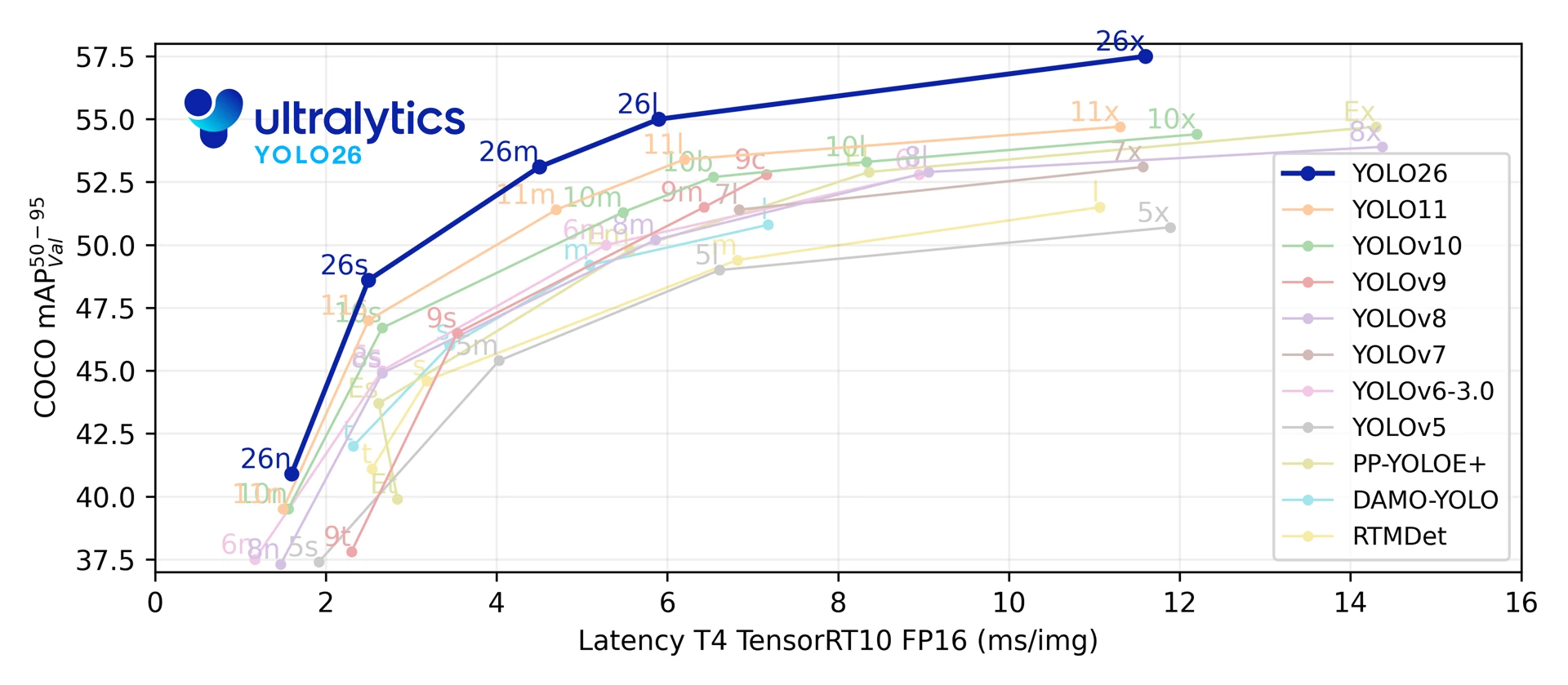
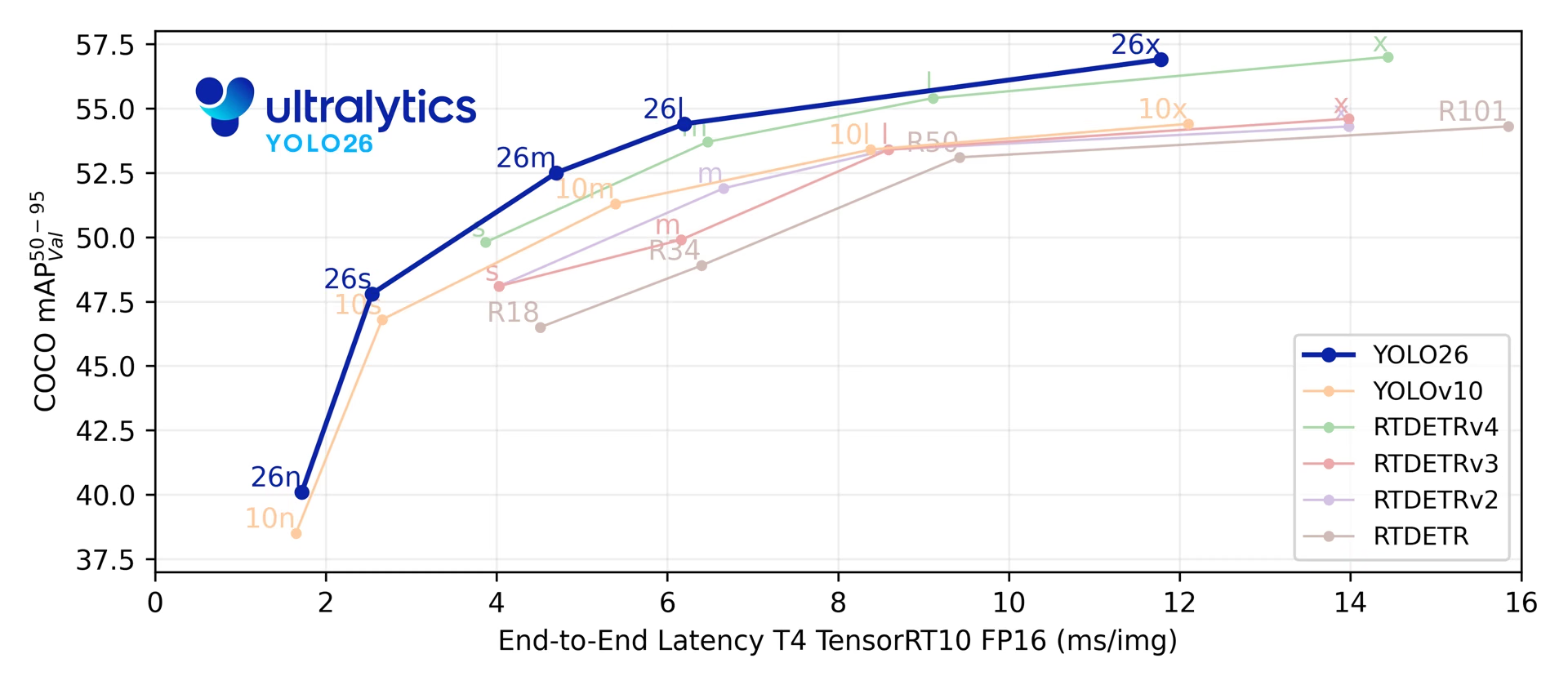
YOLO26, beş algılama ölçeğinde COCO'da 40.9-57.5 mAP değerlerine ve 1.7-11.8 ms T4 TensorRT gecikmesine ulaşır. Makalede ayrıca YOLO26n'nin, Intel Xeon CPU @ 2.00 GHz üzerinde YOLO11n'ye kıyasla CPU'da ONNX çıkarımını %43'e kadar daha hızlı gerçekleştirdiği bildiriliyor.
Planlanan mimari, görevler ve ilk kıyaslama sonuçları için yayımlanmamış YOLO27 önizlemesine bak.
from ultralytics import YOLO

model = YOLO("yolo26n.pt")  # önceden eğitilmiş bir YOLO26n modeli yükle
results = model("path/to/bus.jpg") # çıkarım çalıştırYOLO26 modellerini doğrudan Ultralytics Platform üzerinde keşfet ve çalıştır.
YOLO26 model ailesi dört tasarım alanı temel alınarak oluşturulmuştur:
- Yerel uçtan uca çıkarım: İsteğe bağlı bire bir algılama başlığı, maksimum olmayan bastırma (NMS) olmadan tahminler üretir; dağıtımı basitleştirir ve son işlemeyi azaltır.
- Daha hafif kutu regresyonu: YOLO26, Dağılımsal Odak Kaybı'nı (DFL) kaldırarak kısıtlanmamış regresyon aralığını korurken algılama başlığının karmaşıklığını azaltır.
- Eğitim tarifi güncellemeleri: Eğitim hattı, optimizasyonu iyileştirmek, denetimi çıkarım zamanı başlığına kaydırmak ve küçük nesneler için pozitif etiket kapsamını korumak amacıyla MuSGD (hibrit Muon + SGD iyileştiricisi), Progressive Loss ve STAL (Küçük Hedef Duyarlı Etiket Ataması) bileşenlerini bir araya getirir. Yayınlanan kontrol noktalarının ardındaki tüm hiperparametreler YOLO26 Eğitim Tarifi kılavuzunda belgelenmiştir.
- Göreve özgü başlıklar ve kayıplar: YOLO26, görevler arasında tek bir model işlem hattını korurken örnek segmentasyonu, anlamsal segmentasyon türleri, poz tahmini ve yönelimli algılama için özel tasarımlar sunar.
Bu güncellemeler bir araya gelerek farklı model ölçeklerinde ve dağıtım hedeflerinde doğruluk-gecikme dengesini iyileştirir.
Temel Özellikler#
-
DFL'siz Regresyon YOLO26, Dağılımsal Odak Kaybı'nı (DFL) kaldırarak algılama başlığının karmaşıklığını azaltır ve dışa aktarmayı basitleştirir.
-
Uçtan Uca, NMS Gerektirmeyen Çıkarım YOLO26,
nms=Falseile yerel uçtan uca çıkarımı destekleyerek ayrı bir NMS aşamasına gerek kalmadan tahminler üretir. Varsayılan bire-çok yolu, doğruluk için NMS kullanır. -
Aşamalı Kayıp + STAL Aşamalı Kayıp, eğitim odağını çıkarım zamanındaki başlığa kaydırırken STAL, küçük nesneler için pozitif etiket kapsamını iyileştirir.
-
MuSGD Optimizatörü Büyük dil modeli eğitimindeki optimizasyon fikirlerini bilgisayarlı görüye uyarlayan, SGD ile Muon'u birleştiren hibrit bir optimizatör.
-
Verimli Dağıtım Basitleştirilmiş başlık ve isteğe bağlı NMS'siz yol, YOLO26n'nin YOLO11n'ye kıyasla makalede bildirilen CPU ONNX hız artışı da dahil olmak üzere, dışa aktarma hedefleri ve donanım profilleri genelinde çıkarım yükünü azaltır.
-
Örnek Segmentasyonu İyileştirmeleri Model yakınsamasını iyileştirmek için anlamsal segmentasyon kaybı ve daha iyi maske kalitesi için çok ölçekli bilgiler kullanan yükseltilmiş bir proto modülü sunar. Makale, COCO örnek segmentasyonu üzerinde YOLO11'e kıyasla kutu AP'de +2,5'e ve maske AP'de +3,7'ye kadar artış bildiriyor.
-
Hassas Poz Tahmini Daha doğru anahtar nokta konumlandırması için Artık Log-Olabilirlik Tahmini (RLE) kullanır ve çıkarım hızını artırmak için kod çözme sürecini optimize eder. Makalede, COCO poz tahmininde YOLO11'e kıyasla +7.2 AP'ye varan artış bildiriliyor.
-
Geliştirilmiş OBB Kod Çözme Kare biçimli nesnelerin algılama doğruluğunu iyileştirmek için özel bir açı kaybı sunar ve sınır süreksizliği sorunlarını çözmek için OBB kod çözmeyi optimize eder. Makalede, DOTA-v1.0 yönelimli algılamada YOLO11'e kıyasla +3.4 mAP'ye varan artış bildiriliyor.
Desteklenen Görevler ve Modlar#
YOLO26, beş model ölçeğinde standart Ultralytics görev kümesini destekler:
| Model | Dosya adları | Görev | Eğitim | Doğrulama | Çıkarım | Dışa aktar |
|---|---|---|---|---|---|---|
| YOLO26 | yolo26n.pt yolo26s.pt yolo26m.pt yolo26l.pt yolo26x.pt | Algılama | ✅ | ✅ | ✅ | ✅ |
| YOLO26-seg | yolo26n-seg.pt yolo26s-seg.pt yolo26m-seg.pt yolo26l-seg.pt yolo26x-seg.pt | Örnek Segmentasyonu | ✅ | ✅ | ✅ | ✅ |
| YOLO26-sem | yolo26n-sem.pt yolo26s-sem.pt yolo26m-sem.pt yolo26l-sem.pt yolo26x-sem.pt | Anlamsal Segmentasyon | ✅ | ✅ | ✅ | ✅ |
| YOLO26-depth | yolo26n-depth.pt yolo26s-depth.pt yolo26m-depth.pt yolo26l-depth.pt yolo26x-depth.pt | Derinlik Tahmini | ✅ | ✅ | ✅ | ✅ |
| YOLO26-cls | yolo26n-cls.pt yolo26s-cls.pt yolo26m-cls.pt yolo26l-cls.pt yolo26x-cls.pt | Sınıflandırma | ✅ | ✅ | ✅ | ✅ |
| YOLO26-pose | yolo26n-pose.pt yolo26s-pose.pt yolo26m-pose.pt yolo26l-pose.pt yolo26x-pose.pt | Poz/Anahtar Noktalar | ✅ | ✅ | ✅ | ✅ |
| YOLO26-obb | yolo26n-obb.pt yolo26s-obb.pt yolo26m-obb.pt yolo26l-obb.pt yolo26x-obb.pt | Yönelimli Algılama | ✅ | ✅ | ✅ | ✅ |
Bu birleşik çerçeve; eğitim, doğrulama, çıkarım ve dışa aktarma desteğiyle gerçek zamanlı algılama, örnek segmentasyonu, anlamsal segmentasyon, tek görüntülü derinlik tahmini, sınıflandırma, poz tahmini ve yönelimli nesne algılamayı kapsar.
yolo26-p2.yaml ve yolo26-p6.yaml, P2 (küçük nesneler) veya P6 (büyük giriş) algılama başlığı ekler ve yalnızca YAML mimarileri olarak sunulur. Ölçeğe özel yolo26*-p2.pt veya yolo26*-p6.pt ağırlıkları yayımlanmamıştır. YAML'dan ölçeklendirilmiş bir yapılandırma oluştur (örneğin, YOLO("yolo26n-p6.yaml")) ve gerektiğinde eğit veya ince ayar yap; Önceden Eğitilmiş Ağırlıklardan YOLO26 P2 Modeli Eğit, yolo26n.pt ile nasıl başlayacağını ve P2 çıktısının mevcut olduğunu nasıl kontrol edeceğini gösterir.
Performans Metrikleri#
80 önceden eğitilmiş sınıf içeren ve COCO üzerinde eğitilmiş bu modellerin kullanım örnekleri için Algılama Belgeleri sayfasına bak.
| Model | boyut (piksel) | mAPval50-95 | mAPdoğr50-95 (e2e) | Hız CPU ONNX (ms) | Hız T4 TensorRT10 (ms) | parametre (M) | FLOPs (B) |
|---|---|---|---|---|---|---|---|
| YOLO26n | 640 | 40.9 | 40.1 | 38.9 ± 0.7 | 1.7 ± 0.0 | 2.4 | 5.5 |
| YOLO26s | 640 | 48.6 | 47.8 | 87.2 ± 0.9 | 2.5 ± 0.0 | 9.5 | 20.9 |
| YOLO26m | 640 | 53.1 | 52.5 | 220.0 ± 1.4 | 4.7 ± 0.1 | 20.4 | 68.4 |
| YOLO26l | 640 | 55.0 | 54.4 | 286.2 ± 2.0 | 6.2 ± 0.2 | 24.8 | 86.8 |
| YOLO26x | 640 | 57.5 | 56.9 | 525.8 ± 4.0 | 11.8 ± 0.2 | 55.7 | 194.4 |
Parametre ve FLOP değerleri, Conv/BatchNorm birleştirmesi ve kullanılmayan algılama dalının kaldırılmasının ardından birleştirilmiş model içindir. Hız ölçümleri, nms=False ile NMS gerektirmeyen başlığı seçer. Önceden eğitilmiş kontrol noktaları eğitim mimarisinin tamamını korur ve daha yüksek sayılar gösterebilir.
Kullanım Örnekleri#
Bu bölümde basit YOLO26 eğitim ve çıkarım örnekleri sunulmaktadır.
Aşağıdaki örnek, COCO8 örnek veri kümesinde nesne algılama için bir YOLO26 Detect modelini eğitir.
PyTorch önceden eğitilmiş *.pt modelleri ve yapılandırma *.yaml dosyaları, Python'da bir model örneği oluşturmak için YOLO() sınıfına aktarılabilir:
from ultralytics import YOLO

# COCO üzerinde önceden eğitilmiş bir YOLO26n modelini yükle
model = YOLO("yolo26n.pt")

# 'bus.jpg' görüntüsünde YOLO26n modeliyle çıkarım yap
results = model("path/to/bus.jpg")

# Modeli COCO8 örnek veri kümesinde 100 dönem boyunca eğit
results = model.train(data="coco8.yaml", epochs=100, imgsz=640)YOLO26 algılama modelleri, farklı dağıtım senaryolarında esneklik sağlayan çift başlıklı bir mimari kullanır:
- Bire Çok Başlık (Varsayılan): NMS son işlemesi gerektiren geleneksel YOLO çıktıları üretir ve
(N, nc + 4, 8400)çıktısını verir; buradancsınıf sayısıdır. Bu başlık, genellikle ek işlem maliyeti karşılığında biraz daha yüksek doğruluk sağlar. - Bire Bir Başlık (
nms=False): NMS olmadan uçtan uca tahminler üretir ve her görüntüde en fazla 300 algılama içeren(N, 300, 6)çıktısını verir. Bu başlık, hızlı çıkarım ve basitleştirilmiş dağıtım için optimize edilmiştir.
Dışa aktarma, tahmin veya doğrulama sırasında başlıklar arasında geçiş yapabilirsin:
from ultralytics import YOLO

model = YOLO("yolo26n.pt")

# Bire çok başlığı kullan (varsayılan; Ultralytics NMS uygular)
results = model.predict("image.jpg")  # inference
metrics = model.val(data="coco.yaml")  # validation
model.export(format="onnx")  # export

# NMS'siz bire bir başlığı etkinleştir
results = model.predict("image.jpg", nms=False)  # inference
metrics = model.val(data="coco.yaml", nms=False)  # validation
model.export(format="onnx", nms=False)  # export
Tahmin ve doğrulama, doğruluk için varsayılan olarak bire çok başlığını kullanır. NMS'siz çıkarım için nms=False, NMS'yi desteklenen bir dışa aktarmaya eklemek içinse nms=True kullan. Bu seçimden bağımsız olarak her iki başlık da eğitilir. Çıktı biçimleri ve dışa aktarma uyumluluğu için Uçtan Uca Algılama kılavuzuna bak.
YOLOE-26: Açık Kelime Dağarcıklı Algılama ve Segmentasyon#
YOLO26, eğitim sırasında öğrenilen sabit bir sınıf listesi yerine metin istemleri, görsel istemler veya istem içermeyen bir mod kullanarak nesne kategorilerini algılayıp segmentlere ayıran açık söz dağarcıklı bir varyant olan YOLOE-26'ya da güç verir. YOLOE-26, YOLO26'nın isteğe bağlı NMS içermeyen uçtan uca (e2e) başlığını korur; böylece açık söz dağarcıklı çıkarım, hedef kategorilerin zaman içinde değiştiği dinamik ortamlarda yeterince hızlı kalır. YOLOE-26x, metin istemleriyle LVIS minival kümesinde 40.6 AP, görsel istemlerle 38.5 AP ve istem kullanılmayan modda 31.1 AP değerlerine ulaşır — bunlar makaledeki Non-E2E değerleridir ve YOLOE-26x'in uçtan uca başlığı bu değerlerin sırasıyla 1.1, 2.3 ve 1.2 AP gerisinde kalır.
Ölçek bazında performans tabloları, istemsiz varyantlar ve kapsamlı kullanım örnekleri için YOLOE belgelerine bak.
Atıflar ve Teşekkürler#
YOLO26 mimarisi, eğitim tarifi, görev başlıkları ve YOLOE-26 açık kelime dağarcığı uzantısının eksiksiz teknik açıklaması için Ultralytics YOLO26: Birleşik Gerçek Zamanlı Uçtan Uca Görüntü Modelleri makalesini oku. Araştırmanda YOLO26 kullanıyorsan lütfen şu kaynağa atıfta bulun:
@misc{jocher2026ultralyticsyolo26unifiedrealtime,
  title = {Ultralytics YOLO26: Unified Real-Time End-to-End Vision Models},
  author = {Glenn Jocher and Jing Qiu and Mengyu Liu and Shuai Lyu and Fatih Cagatay Akyon and Muhammet Esat Kalfaoglu},
  year = {2026},
  eprint = {2606.03748},
  archivePrefix = {arXiv},
  primaryClass = {cs.CV},
  doi = {10.48550/arXiv.2606.03748},
  url = {https://arxiv.org/abs/2606.03748},
}
YOLO26 kodu, modelleri ve belgeleri AGPL-3.0 ve Kurumsal lisansları kapsamında Ultralytics GitHub deposunda ve Ultralytics Docs üzerinde bulunur.
Sık Sorulan Sorular#
- DFL'siz regresyon: Algılama başlığını ve dışa aktarma yolunu basitleştirir
- Uçtan uca NMS'siz çıkarım:
nms=Falseile NMS'siz çıkarımı destekler - Aşamalı Kayıp + STAL: Eğitim uyumunu ve küçük nesneler için etiket kapsamını iyileştirir
- MuSGD iyileştiricisi: Kararlı eğitim için SGD'yi Muon'dan esinlenen optimizasyonla birleştirir
- Göreve özgü başlıklar ve kayıplar: Segmentasyon, poz ve yönelimli algılama desteğini iyileştirir
YOLO26, birden fazla bilgisayarlı görü görevini uçtan uca destekleyen birleşik bir model ailesidir:
- Nesne Algılama
- Örnek Segmentasyonu
- Anlamsal Segmentasyon
- Tek Görüntüden Derinlik Tahmini
- Görüntü Sınıflandırma
- Poz Tahmini
- Yönelimli Nesne Algılama (OBB)
Her boyut varyantı (n, s, m, l, x) tüm görevleri destekler; ayrıca YOLOE-26 aracılığıyla açık kelime dağarcıklı sürümleri de destekler.
YOLO26, dağıtım verimliliğini şu özelliklerle artırır:
- NMS olmadan isteğe bağlı yerel uçtan uca çıkarım (
nms=False) - DFL'siz regresyon ve daha hafif algılama başlığı
- Yalnızca eğitimde kullanılan yardımcı bileşenleri kaldıran birleştirilmiş model dışa aktarımı
- Intel Xeon CPU @ 2.00 GHz üzerinde YOLO26n, YOLO11n'ye kıyasla CPU ONNX çıkarımında %43'e kadar daha hızlıdır
- TensorRT, ONNX, CoreML, LiteRT ve OpenVINO dahil esnek dışa aktarma biçimleri
- NMS olmadan isteğe bağlı yerel uçtan uca çıkarım (
YOLO26 modelleri
ultralyticspaketi üzerinden indirilebilir. Paketi kur veya güncelle ve bir model yükle:from ultralytics import YOLO # Önceden eğitilmiş bir YOLO26 nano modelini yükle model = YOLO("yolo26n.pt") # Bir görüntü üzerinde çıkarım yap results = model("image.jpg")Eğitim, doğrulama ve dışa aktarma talimatları için Kullanım Örnekleri bölümüne bak.


Yorumlar117
Bir soru sor, sonuçlarını paylaş veya başka birine yardım et.
hongzhuoxx
除了监督模型,我还期待着ultralytics可以推出高效准确易用的非监督瑕疵检测模型!
4Syedshajib55
How do I modify the architectural components (Head and Neck) of YOLOv26?
What is the process for inserting a Dropout layer at the end of the backbone in the YOLOv26 configuration?
2 Glenn JocherUltralytics
YOLO26 (no “v”) architecture edits are done in the model YAML, so start by copying
ultralytics/cfg/models/26/yolo26.yamlinto your project, modify thebackbone:/head:layer lists (the “neck” is part ofhead:), and train from that YAML following the Model YAML Configuration Guide.# yolo26_custom.yaml backbone: # ... existing backbone layers ... - [-1, 1, nn.Dropout, [0.2]] # add dropout at end of backbone (train-time only) head: # ... existing head/neck layers ...yolo train model=yolo26_custom.yaml data=your_dataset.yaml imgsz=640If you share which task model you’re editing (
detect/seg/pose/obb) and which variant (n/s/m/l/x), we can point you to the exact YAML to start from and where to insert the change in that graph.1Hi Glenn,
Thank you for the quick response and guidance! To answer your question: I am focusing on the detect task, and I will be experimenting with both the s (small) and m (medium) variants.
For context, I am working on a paper targeting a Q1 journal. My project focuses on Emotion Detection (5 classes: Angry, Happy, Sad, Neutral, Surprised) using the RAVDESS dataset. I have extracted peak emotion frames from the videos and augmented the dataset to roughly 21k images (640x640 resolution). My core research objective is to demonstrate that a customized YOLO26 architecture can outperform the standard baseline for detecting subtle facial micro-expressions. To achieve this, I want to modify the backbone—specifically by adding Batch Normalization and Dropout layers (potentially after the C2f blocks or may be after c3k2 blocks of that yolo26 architechtural images) to improve regularization and prevent overfitting on facial features.
Could you help me with the following?
-
Could you point me to the exact base YAML files for the yolo26s and yolo26m detection models to use as my starting point?
-
From an architectural standpoint, where exactly in the backbone would you theoretically recommend inserting these Dropout/BN layers? (e.g., after which specific layer index or block) to maximize accuracy without degrading the spatial feature maps necessary for facial detection?
Any insights on how to best structure this custom YAML would be incredibly helpful. Thanks again for your time!
-
- Baseline Reference: Finally, could you share the raw YAML configuration code that details the standard YOLO26 backbone and head? I would like to include this exact baseline structure in my paper’s methodology section to clearly contrast it with my proposed modifications.
hbzylilin
延迟了10天了,还没动静
1lwplw
真不错,期待开源
1- Glenn JocherUltralytics(düzenlendi)
@etemical 感谢建议!目前未原生支持行为识别/多目标行为检测;建议先用 YOLO26 组合
detect+track多目标跟踪与可选pose关键点作为上游信号,并在 GitHub 提交详细需求(数据标注格式与评测指标)为 Feature Request 模板 便于评估;参考 Track 模式文档 与 Pose 任务文档。yolo track model=yolo26n.pt source=your_video.mp4 tracker=bytetrack.yaml show=True yolo pose predict model=yolo26n-pose.pt source=your_video.mp4 show=True@lwplw 谢谢关注!YOLO26 现已发布,可阅读我们的 YOLO26 介绍博客 了解功能。
Jiahao Chen
请问如果我想要引用本页面的YOLO26和其他模型的对比曲线图,已经在文中索引了来源。但是期刊要求需要拿到作者的授权,请问如何申请授权呢?
 Paula DerrengerUltralytics
您好,针对期刊要求的图片书面授权,建议联系 Ultralytics 法务团队,说明申请转载 YOLO26 对比曲线图,并附上页面链接、具体图片、论文题目、期刊名称、是否修改图片,以及期刊的授权模板(如有),请求确认版权归属并提供书面许可。目前未找到该图专门的公开授权流程,因此这里不能代为授予许可;请以收到的正式书面回复为准。
cyberpunk-edgerunner
maybe
CIFAR-10-LTdataset can help. you do not need background images because our initial conversation started without that, for an image, there can be one to 15 object in one image The cause of the shared-memory increase will remain unconfirmed unless you runpython train.pyin your computer with an rtx gpuOn Sat, Oct 10, 2026 at 6:15 AM Paula Derrenger @.***> wrote:
Understood—you don’t need to interrupt your work for the batch=16 comparison. Could you name a public long-tailed dataset you consider representative and share your approximate class counts, background-image proportion, and typical/maximum objects per image? That would help define a reproduction using the configuration you already shared, without requiring your company’s data or another production run. The cause of the shared-memory increase remains unconfirmed.
— Reply to this email directly, view it on GitHub https://github.com/orgs/ultralytics/discussions/26446?email_source=notifications&email_token=BSIM7DUZ6A5KFG7YKF2H6KT5TGBBRA5CNFSNUABIM5UWIORPF5TWS5BNNB2WEL2ENFZWG5LTONUW63SDN5WW2ZLOOQXTCOBYGQ2DONBZUZZGKYLTN5XKOY3PNVWWK3TUUVSXMZLOOSWGM33PORSXEX3DNRUWG2Y#discussioncomment-18844749, or unsubscribe https://github.com/notifications/unsubscribe-auth/BSIM7DTBK4XV3HXIPMFHVXT5TGBBRAVCNFSNUABIKJSXA33TNF2G64TZHM2TGNJTGYYDINBVHNCGS43DOVZXG2LPNY5TCMBZGE3TMNRUUF3AE . Triage notifications, keep track of coding agent tasks and review pull requests on the go with GitHub Mobile for iOS https://github.com/notifications/mobile/ios/BSIM7DST66YNYHAKPWPY3PT5TGBBRA5CNFSNUABIM5UWIORPF5TWS5BNNB2WEL2ENFZWG5LTONUW63SDN5WW2ZLOOQXTCOBYGQ2DONBZUZZGKYLTN5XKOY3PNVWWK3TUUVSXMZLOOSVGM33PORSXEX3JN5ZQ and Android https://github.com/notifications/mobile/android/BSIM7DRDX2BJPHP7PHHKRG35TGBBRA5CNFSNUABIM5UWIORPF5TWS5BNNB2WEL2ENFZWG5LTONUW63SDN5WW2ZLOOQXTCOBYGQ2DONBZUZZGKYLTN5XKOY3PNVWWK3TUUVSXMZLOOSXGM33PORSXEX3BNZSHE33JMQ. Download it today! You are receiving this because you commented.Message ID: @.*** com>
- Paula DerrengerUltralytics
Thanks for clarifying the 1–15 objects per image; we can keep background-only images out of the reproduction.
CIFAR-10-LTis a long-tailed classification benchmark, so it would not directly reproduce your multi-object detection setup. I can’t executepython train.pyon an RTX GPU here, and I haven’t reproduced the shared-memory increase. Could you share a public-data version of the script, including dataset preparation, so someone with suitable hardware can run the same test without your company’s data?
I cannot run the same code with batch=16, reasons:
- I work in a company and have my own KPI to meet and improve
- I have added background image data in the dataset so it is no longer same.
- I am planning to add more images in future.
I suggest you download a long tailed distributed dataset to mimic my experiment.
thank you
On Fri, Oct 9, 2026 at 5:15 AM Paula Derrenger @.***> wrote:
Thanks for clarifying that it was 15 GB of shared GPU memory and sharing the configuration; sorry for requesting the script again. To test whether batch-related memory pressure contributes, could you compare your batch=64 run with batch=16, keeping all other settings unchanged? See the batch-size guidance https://docs.ultralytics.com/guides/model-training-tips#batch-size-and-gpu-utilization. Please share epoch 2–3 text logs and dedicated/shared GPU memory readings from the comparison; this will help narrow down the cause without assuming the memory change is a bug.
— Reply to this email directly, view it on GitHub https://github.com/orgs/ultralytics/discussions/26446?email_source=notifications&email_token=BSIM7DWLJ3KRNTXM7Y6Q4O35TARKLA5CNFSNUABIM5UWIORPF5TWS5BNNB2WEL2ENFZWG5LTONUW63SDN5WW2ZLOOQXTCOBYGI2TINRTUZZGKYLTN5XKOY3PNVWWK3TUUVSXMZLOOSWGM33PORSXEX3DNRUWG2Y#discussioncomment-18825463, or unsubscribe https://github.com/notifications/unsubscribe-auth/BSIM7DQLZ4KWCGA6TEUDIS35TARKLAVCNFSNUABIKJSXA33TNF2G64TZHM2TGNJTGYYDINBVHNCGS43DOVZXG2LPNY5TCMBZGE3TMNRUUF3AE . Triage notifications, keep track of coding agent tasks and review pull requests on the go with GitHub Mobile for iOS https://github.com/notifications/mobile/ios/BSIM7DV53PCZWPENVMYYNYT5TARKLA5CNFSNUABIM5UWIORPF5TWS5BNNB2WEL2ENFZWG5LTONUW63SDN5WW2ZLOOQXTCOBYGI2TINRTUZZGKYLTN5XKOY3PNVWWK3TUUVSXMZLOOSVGM33PORSXEX3JN5ZQ and Android https://github.com/notifications/mobile/android/BSIM7DX2XUXERTKYLIDJ2C35TARKLA5CNFSNUABIM5UWIORPF5TWS5BNNB2WEL2ENFZWG5LTONUW63SDN5WW2ZLOOQXTCOBYGI2TINRTUZZGKYLTN5XKOY3PNVWWK3TUUVSXMZLOOSXGM33PORSXEX3BNZSHE33JMQ. Download it today! You are receiving this because you commented.Message ID: @.*** com>
- Paula DerrengerUltralytics
Understood—you don’t need to interrupt your work for the
batch=16comparison. Could you name a public long-tailed dataset you consider representative and share your approximate class counts, background-image proportion, and typical/maximum objects per image? That would help define a reproduction using the configuration you already shared, without requiring your company’s data or another production run. The cause of the shared-memory increase remains unconfirmed.
- I have shared you exact code in this email thread(check my second reply) and the command to run it was `python .\det_yoloM_5-10.py' .
- yes, it was 15GB of shared GPU
- sorry, I do not have
separate dedicated/shared memory readings at comparable batch positions in each epoch, but there was a steady consumption of about 15GB of shared memory throughout the training. however I can provide you argos.yaml
task: detect mode: train model: yolo26m.pt data: yoloDet_clsAgnostic_split/data.yaml epochs: 200 time: null patience: 20 batch: 64 imgsz: 640 save: true save_period: -1 cache: false device: '0' workers: 6 project: null name: train-2 exist_ok: false pretrained: true cls_remap: true optimizer: auto verbose: false seed: 0 deterministic: true single_cls: false rect: false cos_lr: false close_mosaic: 10 resume: false amp: true fraction: 1.0 profile: false freeze: null multi_scale: 0.0 compile: false channels_last: null overlap_mask: true mask_ratio: 4 dropout: 0.0 val: true split: val save_json: false conf: null iou: 0.7 max_det: 300 quantize: null dnn: false plots: true nms: null source: null vid_stride: 1 stream_buffer: false visualize: false augment: false agnostic_nms: false classes: null retina_masks: false embed: null show: false save_frames: false save_txt: false save_conf: false save_crop: false show_labels: true show_conf: true show_boxes: true line_width: null format: torchscript keras: false optimize: false dynamic: false simplify: true opset: null workspace: null lr0: 0.01 lrf: 0.01 momentum: 0.937 weight_decay: 0.0005 warmup_epochs: 3.0 warmup_momentum: 0.8 warmup_bias_lr: 0.1 distill_model: null dis: 6.0 box: 7.5 cls: 0.5 cls_pw: 0.0 dfl: 1.5 pose: 12.0 kobj: 1.0 rle: 1.0 angle: 1.0 dlog: 1.0 dgrad: 0.5 dlam: 1.0 nbs: 64 hsv_h: 0.015 hsv_s: 0.7 hsv_v: 0.4 degrees: 0.0 translate: 0.1 scale: 0.5 shear: 0.0 perspective: 0.0 flipud: 0.0 fliplr: 0.5 bgr: 0.0 mosaic: 1.0 mixup: 0.0 cutmix: 0.0 copy_paste: 0.0 copy_paste_mode: flip auto_augment: randaugment erasing: 0.4 cfg: null tracker: tracktrack.yaml save_dir: C:\Training9\runs\detect\train-2On Thu, Oct 8, 2026 at 6:07 AM Paula Derrenger @.***> wrote:
Thanks for the complete checks and text logs. Epoch 2 is faster (14:27 versus 1:02:39), despite GPU_mem dropping from 28.6G to 17.4G, so these readings alone don’t establish GPU underutilization. Could you paste your exact training command or script, including the model and training settings? Also, does “around 15 epoch” mean 15 GB of shared GPU memory in both epochs? Please provide separate dedicated/shared memory readings at comparable batch positions in each epoch so we can investigate the discrepancy.
— Reply to this email directly, view it on GitHub https://github.com/orgs/ultralytics/discussions/26446?email_source=notifications&email_token=BSIM7DQKA3GIYQSCDVEWEJ35S3OWHA5CNFSNUABIM5UWIORPF5TWS5BNNB2WEL2ENFZWG5LTONUW63SDN5WW2ZLOOQXTCOBYGAZTKNJWUZZGKYLTN5XKOY3PNVWWK3TUUVSXMZLOOSWGM33PORSXEX3DNRUWG2Y#discussioncomment-18803556, or unsubscribe https://github.com/notifications/unsubscribe-auth/BSIM7DX34MSUWFFX5WDRXW35S3OWHAVCNFSNUABIKJSXA33TNF2G64TZHM2TGNJTGYYDINBVHNCGS43DOVZXG2LPNY5TCMBZGE3TMNRUUF3AE . Triage notifications, keep track of coding agent tasks and review pull requests on the go with GitHub Mobile for iOS https://github.com/notifications/mobile/ios/BSIM7DSVPQ3LAONGDZOZWWD5S3OWHA5CNFSNUABIM5UWIORPF5TWS5BNNB2WEL2ENFZWG5LTONUW63SDN5WW2ZLOOQXTCOBYGAZTKNJWUZZGKYLTN5XKOY3PNVWWK3TUUVSXMZLOOSVGM33PORSXEX3JN5ZQ and Android https://github.com/notifications/mobile/android/BSIM7DQHEDECXNLNQEWJLC35S3OWHA5CNFSNUABIM5UWIORPF5TWS5BNNB2WEL2ENFZWG5LTONUW63SDN5WW2ZLOOQXTCOBYGAZTKNJWUZZGKYLTN5XKOY3PNVWWK3TUUVSXMZLOOSXGM33PORSXEX3BNZSHE33JMQ. Download it today! You are receiving this because you commented.Message ID: @.*** com>
- Paula DerrengerUltralytics
Thanks for clarifying that it was 15 GB of shared GPU memory and sharing the configuration; sorry for requesting the script again. To test whether batch-related memory pressure contributes, could you compare your
batch=64run withbatch=16, keeping all other settings unchanged? See the batch-size guidance. Please share epoch 2–3 text logs and dedicated/shared GPU memory readings from the comparison; this will help narrow down the cause without assuming the memory change is a bug.
here are my yolo checks yolo checks Ultralytics 8.4.155 Python-3.13.12 torch-2.12.0.dev20260408+cu128 CUDA:0 (NVIDIA GeForce RTX 5090, 32607MiB) Setup complete (24 CPUs, 63.5 GB RAM, 1738.9/1881.5 GB disk)
OS Windows-11-10.0.26200-SP0 Environment Windows Python 3.13.12 Install pip Path C:\Users\devth\miniconda3\Lib\site-packages\ultralytics RAM 63.46 GB Disk 1738.9/1881.5 GB CPU Intel Core Ultra 9 285K CPU count 24 GPU NVIDIA GeForce RTX 5090, 32607MiB GPU count 1 CUDA 12.8
cloudpickle 3.1.2>=3.1.1 filelock 3.29.0>=3.16.1 numpy 2.4.4>=1.23.0; platform_system != "Darwin" numpy 2.4.4!=2.0.,!=2.1.,!=2.2.*,!=2.3.0,!=2.3.1,!=2.3.2,!=2.3.3,!=2.3.4,>=1.23.0; platform_system == "Darwin" matplotlib 3.10.8>=3.3.0 opencv-python 4.13.0.92!=4.13.0.90,>=4.7.0 pillow 12.2.0>=7.1.2 pyyaml 6.0.3>=5.3.1 requests 2.32.5>=2.23.0 torch 2.12.0.dev20260408+cu128>=1.8.0 torch 2.12.0.dev20260408+cu128!=2.4.0,>=1.8.0; sys_platform == "win32" torchvision 0.27.0.dev20260407+cu128>=0.9.0 psutil 7.2.2>=5.8.0 polars 1.40.1>=0.20.0 nvidia-ml-py 13.610.43>=12.0.0 ultralytics-thop 2.1.6>=2.1.6 ultralytics-platform 0.1.48>=0.1.45; python_version >= "3.11"
(shared memory used in first and second epoch was around 15 epoch) these are the first two epoch details in Text
 Epoch    GPU_mem   box_loss   cls_loss    l1_loss  Instances       Size
  1/200      28.6G      1.174      1.891    0.01363         90
640: 33% ━━━╸──────── 1561/4702 1.1it/s 23:55<49:25libpng warning: iCCP: known incorrect sRGB profile 1/200 28.6G 1.15 1.582 0.01327 91 640: 56% ━━━━━━╸───── 2674/4702 1.3it/s 40:45<26:43libpng warning: iCCP: known incorrect sRGB profile 1/200 28.6G 1.144 1.475 0.01325 77 640: 72% ━━━━━━━━╸─── 3419/4702 1.3it/s 49:44<16:45libpng warning: iCCP: known incorrect sRGB profile 1/200 28.6G 1.144 1.471 0.01325 84 640: 73% ━━━━━━━━╸─── 3451/4702 1.4it/s 50:07<14:41libpng warning: iCCP: known incorrect sRGB profile 1/200 28.6G 1.146 1.395 0.01332 84 640: 92% ━━━━━━━━━━━─ 4370/4702 5.0it/s 1:01:16<1:07libpng warning: iCCP: known incorrect sRGB profile 1/200 28.6G 1.146 1.373 0.01335 74 640: 100% ━━━━━━━━━━━━ 4702/4702 1.3it/s 1:02:39 Class Images Instances Box(P R mAP50 mAP50-95): 22% ━━╸───────── 57/256 2.5it/s 26.7s<1:19libpng warning: iCCP: known incorrect sRGB profile Class Images Instances Box(P R mAP50 mAP50-95): 47% ━━━━━╸────── 122/256 2.3it/s 1:10<59.4slibpng warning: iCCP: known incorrect sRGB profile Class Images Instances Box(P R mAP50 mAP50-95): 100% ━━━━━━━━━━━━ 256/256 1.9it/s 2:17 all 32677 47931 0.863 0.726 0.818 0.584
Epoch GPU_mem box_loss cls_loss l1_loss InstancesSize 2/200 17.4G 1.183 1.123 0.01413 74 640: 29% ━━━╸──────── 1380/4702 5.1it/s 4:16<10:45libpng warning: iCCP: known incorrect sRGB profile 2/200 17.4G 1.196 1.133 0.01441 107 640: 55% ━━━━━━╸───── 2615/4702 5.8it/s 8:09<6:02libpng warning: iCCP: known incorrect sRGB profile 2/200 17.4G 1.193 1.126 0.01434 99 640: 64% ━━━━━━━╸──── 3020/4702 5.5it/s 9:20<5:06libpng warning: iCCP: known incorrect sRGB profile 2/200 17.4G 1.193 1.125 0.01435 106 640: 67% ━━━━━━━━──── 3179/4702 5.6it/s 9:50<4:33libpng warning: iCCP: known incorrect sRGB profile 2/200 17.4G 1.192 1.121 0.01434 109 640: 81% ━━━━━━━━━╸── 3847/4702 5.5it/s 11:52<2:36libpng warning: iCCP: known incorrect sRGB profile 2/200 17.4G 1.195 1.12 0.01437 86 640: 100% ━━━━━━━━━━━━ 4702/4702 5.4it/s 14:27 Class Images Instances Box(P R mAP50 mAP50-95): 22% ━━╸───────── 57/256 2.5it/s 20.6s<1:21libpng warning: iCCP: known incorrect sRGB profile Class Images Instances Box(P R mAP50 mAP50-95): 47% ━━━━━╸────── 122/256 2.1it/s 50.3s<1:04libpng warning: iCCP: known incorrect sRGB profile Class Images Instances Box(P R mAP50 mAP50-95): 100% ━━━━━━━━━━━━ 256/256 2.3it/s 1:51 all 32677 47931 0.889 0.778 0.87 0.638
On Tue, Oct 6, 2026 at 10:29 AM Paula Derrenger @.***> wrote:
No—by “yolo checks output,” I mean the terminal’s software/hardware summary, not results.csv. Please activate the same Python environment used for training, run yolo checks in PowerShell, and paste its complete text output; it reports your Ultralytics, Python, PyTorch, and GPU details (environment checks reference https://docs.ultralytics.com/reference/utils/checks#ultralytics.utils.checks.check_yolo). (docs.ultralytics.com https://docs.ultralytics.com/reference/utils/checks) Thanks for sharing the driver information. Please also provide separate dedicated/shared GPU-memory readings at matching points in epochs 1 and 2, plus your training command or configuration, so we can investigate without assuming the memory drop indicates hardware underutilization.
— Reply to this email directly, view it on GitHub https://github.com/orgs/ultralytics/discussions/26446?email_source=notifications&email_token=BSIM7DSK7MKPVE56RJJGI435SR33BA5CNFSNUABIM5UWIORPF5TWS5BNNB2WEL2ENFZWG5LTONUW63SDN5WW2ZLOOQXTCOBXG4YDKNJSUZZGKYLTN5XKOY3PNVWWK3TUUVSXMZLOOSWGM33PORSXEX3DNRUWG2Y#discussioncomment-18770552, or unsubscribe https://github.com/notifications/unsubscribe-auth/BSIM7DRBVYTDNBPWAZRUQXL5SR33BAVCNFSNUABIKJSXA33TNF2G64TZHM2TGNJTGYYDINBVHNCGS43DOVZXG2LPNY5TCMBZGE3TMNRUUF3AE . Triage notifications, keep track of coding agent tasks and review pull requests on the go with GitHub Mobile for iOS https://github.com/notifications/mobile/ios/BSIM7DXMRZI3YZR75VFDAGT5SR33BA5CNFSNUABIM5UWIORPF5TWS5BNNB2WEL2ENFZWG5LTONUW63SDN5WW2ZLOOQXTCOBXG4YDKNJSUZZGKYLTN5XKOY3PNVWWK3TUUVSXMZLOOSVGM33PORSXEX3JN5ZQ and Android https://github.com/notifications/mobile/android/BSIM7DRXQCNW5JUZNGVDHU35SR33BA5CNFSNUABIM5UWIORPF5TWS5BNNB2WEL2ENFZWG5LTONUW63SDN5WW2ZLOOQXTCOBXG4YDKNJSUZZGKYLTN5XKOY3PNVWWK3TUUVSXMZLOOSXGM33PORSXEX3BNZSHE33JMQ. Download it today! You are receiving this because you commented.Message ID: @.*** com>
- Paula DerrengerUltralytics
Thanks for the complete checks and text logs. Epoch 2 is faster (14:27 versus 1:02:39), despite
GPU_memdropping from 28.6G to 17.4G, so these readings alone don’t establish GPU underutilization. Could you paste your exact training command or script, including the model and training settings? Also, does “around 15 epoch” mean 15 GB of shared GPU memory in both epochs? Please provide separate dedicated/shared memory readings at comparable batch positions in each epoch so we can investigate the discrepancy.
pls explain what is yolo checks output? what do you mean by that ? are you referring to results.csv from runs folder??
here is my driver detail PS C:\Training9> nvidia-smi Tue Oct 6 09:22:05 2026 +-----------------------------------------------------------------------------------------+ | NVIDIA-SMI 610.60 KMD Version: 610.60 CUDA UMD Version: 13.3 | +-----------------------------------------+------------------------+----------------------+ | GPU Name Driver-Model | Bus-Id Disp.A | Volatile Uncorr. ECC | | Fan Temp Perf Pwr:Usage/Cap | Memory-Usage | GPU-Util Compute M. | | | | MIG M. | |=========================================+========================+======================| | 0 NVIDIA GeForce RTX 5090 WDDM | 00000000:01:00.0 On | N/A | | 57% 73C P1 479W / 575W | 19362MiB / 32607MiB | 80% Default | | | | N/A | +-----------------------------------------+------------------------+----------------------+
PS C:\Training9> nvcc --version nvcc: NVIDIA (R) Cuda compiler driver Copyright (c) 2005-2025 NVIDIA Corporation Built on Wed_Jan_15_19:38:46_Pacific_Standard_Time_2025 Cuda compilation tools, release 12.8, V12.8.61 Build cuda_12.8.r12.8/compiler.35404655_0
epoch 1 vram usage(in terminal) = 28.6 GB and in task manager ~29.1 GB epoch 2 to epoch 73 vram usage (in terminal) = 17.4 GB and in task manager vram usage is 18.1 GB
73rd epoch
Epoch GPU_mem box_loss cls_loss l1_loss InstancesSize 73/200 17.4G 0.9935 0.7903 0.01002 86 640: 0% ──────────── 4/4702 4.4it/s 1.0s<17:51libpng warning: iCCP: known incorrect sRGB profile 73/200 17.4G 1.023 0.7368 0.01159 84 640: 9% ━─────────── 446/4702 5.8it/s 1:17<12:17libpng warning: iCCP: known incorrect sRGB profile 73/200 17.4G 1.024 0.7397 0.01152 93 640: 63% ━━━━━━━╸──── 2990/4702 5.6it/s 8:41<5:06libpng warning: iCCP: known incorrect sRGB profile 73/200 17.4G 1.024 0.7402 0.01151 119 640: 65% ━━━━━━━╸──── 3080/4702 5.3it/s 8:57<5:06libpng warning: iCCP: known incorrect sRGB profile 73/200 17.4G 1.026 0.7422 0.01152 113 640: 76% ━━━━━━━━━─── 3586/4702 5.6it/s 10:28<3:20libpng warning: iCCP: known incorrect sRGB profile 73/200 17.4G 1.029 0.7459 0.01156 78 640: 100% ━━━━━━━━━━━━ 4702/4702 5.7it/s 13:46 Class Images Instances Box(P R mAP50 mAP50-95): 22% ━━╸───────── 57/256 2.7it/s 20.9s<1:13libpng warning: iCCP: known incorrect sRGB profile Class Images Instances Box(P R mAP50 mAP50-95): 47% ━━━━━╸────── 122/256 2.1it/s 48.9s<1:02libpng warning: iCCP: known incorrect sRGB profile Class Images Instances Box(P R mAP50 mAP50-95): 100% ━━━━━━━━━━━━ 256/256 2.4it/s 1:47 all 32677 47931 0.927 0.855 0.93 0.724
since you are trying to replicate my detection code , I must tell you in my train folder I have around 150000 images with txt files, 32000 in val and 31000 in test
while you are at it, I need a change in the ultralytics package, since it can detect and restore corrupt JPG(and many more errors), would it possible for you to make this change permanent? since it a type of fix and everyone wants that and no one wants to ultralytics package to just internally fix the images i know it won't be implemented by of security reasons by just keep in future todo list
to be honest , in my view, the ultralytics package does not fully utilise the hardware. I have run barebone code that using just the pytorch and few more basic codes and they utilise
thank you in advance
On Mon, Oct 5, 2026 at 10:42 PM Paula Derrenger @.***> wrote:
Thanks for sharing the script. A plausible explanation for the drop from 28.6G to 17.4G is cache cleanup between epochs: the training loop https://docs.ultralytics.com/reference/engine/trainer#ultralytics.engine.trainer.BaseTrainer._do_train conditionally clears reserved memory before validation and at epoch end when usage exceeds 50% of device capacity. This could explain the drop, but does not establish why Windows reports shared-memory usage. ( docs.ultralytics.com https://docs.ultralytics.com/reference/engine/trainer) Please share yolo checks output, your NVIDIA driver version, and dedicated/shared GPU-memory readings as text at matching points in both epochs so we can check your installed version and distinguish the two observations.
— Reply to this email directly, view it on GitHub https://github.com/orgs/ultralytics/discussions/26446?email_source=notifications&email_token=BSIM7DSOVWTY24AP4M6GU5D5SPI7FA5CNFSNUABIM5UWIORPF5TWS5BNNB2WEL2ENFZWG5LTONUW63SDN5WW2ZLOOQXTCOBXGYZTCOJVUZZGKYLTN5XKOY3PNVWWK3TUUVSXMZLOOSWGM33PORSXEX3DNRUWG2Y#discussioncomment-18763195, or unsubscribe https://github.com/notifications/unsubscribe-auth/BSIM7DUUEOVQC4A4Q7SCGUL5SPI7FAVCNFSNUABIKJSXA33TNF2G64TZHM2TGNJTGYYDINBVHNCGS43DOVZXG2LPNY5TCMBZGE3TMNRUUF3AE . Triage notifications, keep track of coding agent tasks and review pull requests on the go with GitHub Mobile for iOS https://github.com/notifications/mobile/ios/BSIM7DVWK73UY4PTSMIRTTL5SPI7FA5CNFSNUABIM5UWIORPF5TWS5BNNB2WEL2ENFZWG5LTONUW63SDN5WW2ZLOOQXTCOBXGYZTCOJVUZZGKYLTN5XKOY3PNVWWK3TUUVSXMZLOOSVGM33PORSXEX3JN5ZQ and Android https://github.com/notifications/mobile/android/BSIM7DW6Q4F7VJMCOTRDMPD5SPI7FA5CNFSNUABIM5UWIORPF5TWS5BNNB2WEL2ENFZWG5LTONUW63SDN5WW2ZLOOQXTCOBXGYZTCOJVUZZGKYLTN5XKOY3PNVWWK3TUUVSXMZLOOSXGM33PORSXEX3BNZSHE33JMQ. Download it today! You are receiving this because you commented.Message ID: @.*** com>
- Paula DerrengerUltralytics
No—by “
yolo checksoutput,” I mean the terminal’s software/hardware summary, notresults.csv. Please activate the same Python environment used for training, runyolo checksin PowerShell, and paste its complete text output; it reports your Ultralytics, Python, PyTorch, and GPU details (environment checks reference). (docs.ultralytics.com) Thanks for sharing the driver information. Please also provide separate dedicated/shared GPU-memory readings at matching points in epochs 1 and 2, plus your training command or configuration, so we can investigate without assuming the memory drop indicates hardware underutilization.