Meituan YOLOv6
Genel Bakış#
2022'de yayımlanan Meituan YOLOv6, hız ve doğruluk arasında güçlü bir denge sunan bir nesne tespiti modelidir ve bu özelliğiyle gerçek zamanlı uygulamalarda popüler bir seçenektir. Model, Bi-directional Concatenation (BiC) modülünün uygulanması, anchor-aided training (AAT) stratejisi ve COCO veri kümesinde yüksek doğruluk sağlayan iyileştirilmiş bir omurga ve boyun tasarımı dahil olmak üzere mimarisinde ve eğitim şemasında dikkat çekici çeşitli geliştirmeler sunar.
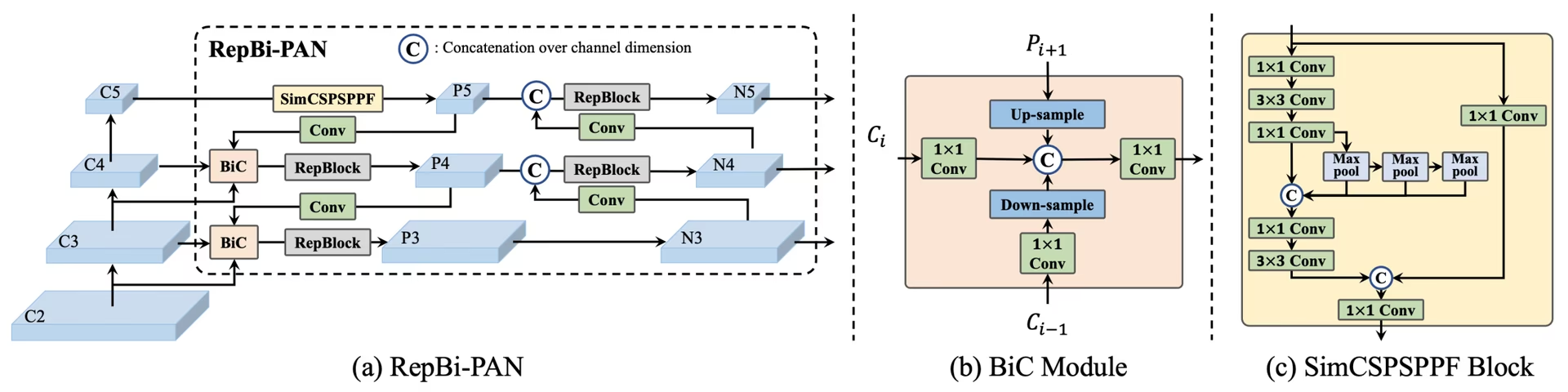 YOLOv6'ya genel bakış. Yeniden tasarlanan ağ bileşenlerini ve önemli performans iyileştirmeleri sağlayan eğitim stratejilerini gösteren model mimarisi şeması. (a) YOLOv6'nın boyun kısmı (N ve S gösterilmiştir). M/L için RepBlocks'un CSPStackRep ile değiştirildiğini unutma. (b) BiC modülünün yapısı. (c) Bir SimCSPSPPF bloğu. (kaynak.
Temel Özellikler#
- Çift Yönlü Birleştirme (BiC) Modülü: YOLOv6, algılayıcının boyun kısmına bir BiC modülü ekleyerek konum belirleme sinyallerini güçlendirir ve hızda göz ardı edilebilir bir düşüşle performans kazanımı sağlar.
- Anchor-Aided Training (AAT) Stratejisi: AAT, çıkarım verimliliğinden ödün vermeden hem anchor tabanlı hem de anchor içermeyen yaklaşımların avantajlarını bir araya getirir.
- Geliştirilmiş Omurga ve Boyun Tasarımı: YOLOv6'nın omurga ve boyun kısmına bir aşama daha ekleyerek derinleştirilmesiyle bu model, yayımlandığında yüksek çözünürlüklü girişlerde COCO veri kümesinde güçlü bir performans elde etti.
- Kendinden Damıtma Stratejisi: YOLOv6'nın daha küçük modellerinin performansını artırmak için yeni bir kendinden damıtma stratejisi uygulanır; bu strateji, eğitim sırasında yardımcı regresyon dalını geliştirir ve belirgin bir hız düşüşünü önlemek için çıkarım sırasında bu dalı kaldırır.
Performans Metrikleri#
YOLOv6, farklı ölçeklerde çeşitli önceden eğitilmiş modeller sunar:
- YOLOv6-N: COCO val2017'de NVIDIA T4 GPU ile 1187 FPS hızında %37,5 AP.
- YOLOv6-S: 484 FPS hızında %45,0 AP.
- YOLOv6-M: 226 FPS hızında %50,0 AP.
- YOLOv6-L: 116 FPS hızında %52,8 AP.
- YOLOv6-L6: Gerçek zamanlı kullanımda son teknoloji doğruluk.
YOLOv6 ayrıca farklı sayısal hassasiyetlerde nicemlenmiş modeller ve mobil platformlar için optimize edilmiş modeller sunar.
Kullanım Örnekleri#
Bu örnek, YOLOv6 için basit eğitim ve çıkarım örnekleri sunar.
YOLOv6 *.yaml dosyaları, Python'da karşılık gelen modeli oluşturmak için YOLO() sınıfına aktarılabilir:
from ultralytics import YOLO

# Sıfırdan bir YOLOv6n modeli oluştur
model = YOLO("yolov6n.yaml")

# Model bilgilerini görüntüle (isteğe bağlı)
model.info()

# Modeli COCO8 örnek veri kümesinde 100 dönem boyunca eğit
results = model.train(data="coco8.yaml", epochs=100, imgsz=640)

# 'bus.jpg' görüntüsünde YOLOv6n modeliyle çıkarım yap
results = model("path/to/bus.jpg")
Desteklenen Görevler ve Modlar#
YOLOv6 serisi, farklı hesaplama bütçelerini ve doğruluk gereksinimlerini karşılayan, nesne tespiti için optimize edilmiş çeşitli modeller sunar.
| Model | Dosya adları | Görevler | Eğitim | Doğrulama | Çıkarım | Dışa aktar |
|---|---|---|---|---|---|---|
| YOLOv6-N | yolov6n.yaml | Nesne Algılama | ✅ | ✅ | ✅ | ✅ |
| YOLOv6-S | yolov6s.yaml | Nesne Algılama | ✅ | ✅ | ✅ | ✅ |
| YOLOv6-M | yolov6m.yaml | Nesne Algılama | ✅ | ✅ | ✅ | ✅ |
| YOLOv6-L | yolov6l.yaml | Nesne Algılama | ✅ | ✅ | ✅ | ✅ |
| YOLOv6-X | yolov6x.yaml | Nesne Algılama | ✅ | ✅ | ✅ | ✅ |
Bu tablo, YOLOv6 model varyantlarını ve Eğitim, Doğrulama, Çıkarım ve Dışa Aktarma modları için destek durumlarını özetler. Ultralytics yalnızca YOLOv6 model YAML dosyalarını sağlar; bu nedenle modeller sıfırdan eğitilir.
Atıflar ve Teşekkürler#
Gerçek zamanlı nesne algılama alanına önemli katkılarından dolayı yazarlara teşekkür ederiz:
@misc{li2023yolov6,
      title={YOLOv6 v3.0: A Full-Scale Reloading},
      author={Chuyi Li and Lulu Li and Yifei Geng and Hongliang Jiang and Meng Cheng and Bo Zhang and Zaidan Ke and Xiaoming Xu and Xiangxiang Chu},
      year={2023},
      eprint={2301.05586},
      archivePrefix={arXiv},
      primaryClass={cs.CV}
}
YOLOv6'nın özgün makalesini arXiv üzerinde bulabilirsin. Yazarlar çalışmalarını herkese açık hâle getirdi ve kod tabanına GitHub üzerinden erişilebilir. Alanı ileriye taşımak ve çalışmalarını daha geniş topluluğun erişimine sunmak için gösterdikleri çabaları takdir ediyoruz.
Sık Sorulan Sorular#
2022'de yayımlanan Meituan YOLOv6, hız ve doğruluk arasında denge kuran ve gerçek zamanlı uygulamalar için tasarlanmış bir nesne algılayıcıdır. Çift Yönlü Birleştirme (BiC) modülü ve Çapa Destekli Eğitim (AAT) stratejisi gibi dikkat çekici mimari iyileştirmeler içerir. Bu yenilikler, hızda en az düzeyde kayıpla önemli performans kazanımları sağlayarak YOLOv6'yı nesne algılama görevleri için rekabetçi bir seçenek hâline getirir.
YOLOv6'daki Çift Yönlü Birleştirme (BiC) modülü, algılayıcının boyun kısmındaki konum belirleme sinyallerini güçlendirerek hız üzerinde ihmal edilebilir bir etkiyle performans iyileştirmeleri sağlar. Bu modül, farklı özellik haritalarını etkili biçimde birleştirerek modelin nesneleri doğru algılama yeteneğini artırır. YOLOv6'nın özellikleri hakkında daha fazla bilgi için Temel Özellikler bölümüne bak.
Ultralytics kullanarak basit Python veya CLI komutlarıyla bir YOLOv6 modelini eğitebilirsin. Örneğin:
Örnekfrom ultralytics import YOLO # Sıfırdan bir YOLOv6n modeli oluştur model = YOLO("yolov6n.yaml") # Modeli COCO8 örnek veri kümesinde 100 dönem boyunca eğit results = model.train(data="coco8.yaml", epochs=100, imgsz=640)Daha fazla bilgi için Eğitim sayfasını ziyaret et.
YOLOv6, her biri farklı performans gereksinimleri için optimize edilmiş çeşitli sürümler sunar:
- YOLOv6-N: 1187 FPS hızında %37,5 AP
- YOLOv6-S: 484 FPS hızında %45,0 AP
- YOLOv6-M: 226 FPS hızında %50,0 AP
- YOLOv6-L: 116 FPS hızında %52,8 AP
- YOLOv6-L6: Gerçek zamanlı senaryolarda son teknoloji doğruluk
Bu modeller COCO veri kümesinde NVIDIA T4 GPU kullanılarak değerlendirilir. Performans ölçütleri hakkında daha fazla bilgi için Performans Ölçütleri bölümüne bak.
YOLOv6'daki Çapa Destekli Eğitim (AAT), çapa tabanlı ve çapasız yaklaşımların unsurlarını bir araya getirerek çıkarım verimliliğinden ödün vermeden modelin algılama yeteneklerini geliştirir. Bu strateji, sınırlayıcı kutu tahminlerini iyileştirmek için eğitim sırasında çapaları kullanır ve YOLOv6'yı çeşitli nesne algılama görevlerinde etkili hâle getirir.
YOLOv6, Eğitim, Doğrulama, Çıkarım ve Dışa Aktarma modlarını destekler.


Yorumlar14
Bir soru sor, sonuçlarını paylaş veya başka birine yardım et.
AkaashSamson
Hey, So I have actually trained my YOLOv6 model with the original repo, now I have a .pt file. using this file is there any way of getting my model in ultralytics format. mainly I want to run the ultralytics validation on my model as the original repo eval.py doesn't provide sufficient metrics.
 Glenn JocherUltralytics
Direct conversion of Meituan YOLOv6 .pt checkpoints to Ultralytics format isn’t supported; to use Ultralytics metrics, either train/fine-tune the matching yolov6*.yaml in Ultralytics and run validation, or export your Meituan model’s detections to COCO JSON and compute P/R via the COCO API; the metrics Ultralytics reports are outlined in the Val mode docs at Ultralytics validation.
tino926(düzenlendi)
I want to replicate your training accuracy of the YOLOv6-N model. Is this the correct command:
yolo train model=yolov6n.yaml data=coco.yaml epochs=400 optimizer=SGD cos_lr=True lr0=0.02? According to YOLOv6's repo https://github.com/meituan/YOLOv6/blob/main/docs/Train_coco_data.md, they have to use anchor-aid and distilling techniques to achieve this accuracy. But I can't find the corresponding parameters in ultralytics'.- Glenn JocherUltralytics
@tino926 to achieve the training accuracy of the YOLOv6-N model as described in the YOLOv6 repository, you would indeed use the anchor-aided training (AAT) and self-distillation strategies, which are not explicitly parameterized in the Ultralytics YOLO interface. Ensure you are using the latest version and check the YOLOv6 documentation for any updates on incorporating these strategies. For precise replication, consider following the original YOLOv6 GitHub instructions alongside Ultralytics for any additional settings or configurations.
@glenn-jocher, thanks for your response.
I apologize if I misunderstood your explanation, as I am not a native English speaker. Could you please clarify if the phrase "which are not explicitly parameterized in the Ultralytics YOLO interface" means that AAT and self-distillation cannot currently be implemented solely through the Ultralytics YOLO interface? Therefore I should manually add anchor branches and implement distillation with additional code?
- Glenn JocherUltralytics
Thank you for your question. Yes, that's correct. The current Ultralytics YOLO interface does not explicitly support anchor-aided training (AAT) and self-distillation, so you would need to implement these strategies manually by modifying the code to include anchor branches and self-distillation techniques. If you need further guidance on implementing these, referring to the original YOLOv6 repository might be helpful.
kadirnar
Does ultralytics library support yolov6 model?
ModuleNotFoundError: No module named 'yolov6'
 Paula DerrengerUltralytics(düzenlendi)
@kadirnar hi there!
Yes, the Ultralytics library does support YOLOv6 models. It seems like you might be encountering a
ModuleNotFoundErrorbecause the YOLOv6 model isn't being recognized. Let's ensure you're using the latest versions oftorchandultralytics. Please update your packages and try again:pip install --upgrade torch ultralyticsHere's a quick example to get you started with YOLOv6 using the Ultralytics library:
Python
from ultralytics import YOLO

# Load a YOLOv6n model
model = YOLO("yolov6n.yaml")

# Train the model on the COCO8 example dataset for 100 epochs
results = model.train(data="coco8.yaml", epochs=100, imgsz=640)

# Run inference with the trained model on an image
results = model("path/to/bus.jpg")
CLI
# Train YOLOv6n model
yolo train model=yolov6n.yaml data=coco8.yaml epochs=100 imgsz=640

# Run inference with your trained weights
yolo predict model=path/to/best.pt source=path/to/bus.jpg
If you continue to face issues, please provide a minimum reproducible example so we can better assist you. You can refer to our guide on creating a minimum reproducible example here: Minimum Reproducible Example.
Feel free to reach out if you have any more questions! 😊
akhilesh99sharma
There are AP and AR values for results but not precision and recall. I need to compare precision and recall values for different YOLO versions (v5,v6,v7 etc.) on my custom dataset. How to get precision and recall values for YOLOv6 evaluation?
- Paula DerrengerUltralytics(düzenlendi)
Hey there! 👋
You don't need to compute precision and recall by hand: validation already reports them. After
model.val(), the results object holds them directly:from ultralytics import YOLO # Load your trained model model = YOLO("path/to/your/custom-yolov6-model.pt") # Run validation results = model.val(data="path/to/your/dataset.yaml") print(f"Precision: {results.box.mp}, Recall: {results.box.mr}") # mean over all classes print(results.box.p, results.box.r) # per-class precision and recallHope this helps, and happy comparing across YOLO versions! 🚀
Hello , I tried but was still not able to get these values, could you please help me with that?
- Paula DerrengerUltralytics(düzenlendi)
Hey there! 😊
Precision and recall are reported by Ultralytics validation, so you don't need to count TP/FP/FN yourself. After
results = model.val(data="path/to/dataset.yaml"), useresults.box.mp(mean precision),results.box.mr(mean recall), andresults.box.p/results.box.rfor per-class values.If you need them computed from raw counts, precision = TP / (TP + FP) and recall = TP / (TP + FN), where the counts come from matching predictions to ground-truth boxes at an IoU threshold.
Hope this helps! Let me know if there's anything else I can do for you. Happy modeling! 🚀
Hello, I tried doing it but was not able to do so. I get the predictions json file in the val folder but don't know how to compare it with the labels to get TP, FP etc. Can you please help me with that? I need to compare results of YOLOv6 with v8, v9 but I am not getting precision and recall values in v6 , I get average precision and average recall
- Paula DerrengerUltralytics(düzenlendi)
@akhilesh99sharma hey there! 🌞
You can get precision and recall directly from validation without processing the predictions JSON yourself. After
results = model.val(data="path/to/dataset.yaml"), useresults.box.mp(mean precision),results.box.mr(mean recall), andresults.box.p/results.box.rfor per-class values.If you still need TP, FP and FN counts from the saved predictions JSON, you will have to match predicted boxes to ground-truth boxes per image using an IoU threshold. The confusion matrix saved in the run folder (
confusion_matrix.png, ormodel.val(plots=True)) also shows these counts per class.For comparing across YOLO versions, run each model with consistent settings on your custom dataset and read the same metrics from each.
I hope this simplifies the process for you! 🚀 Let me know if you need further assistance.