
Segment Anything cho thiết bị di động (MobileSAM)
MobileSAM là model phân đoạn ảnh nhỏ gọn, hiệu quả, được xây dựng cho thiết bị di động và thiết bị biên. Model đưa Mô hình Segment Anything (SAM) của Meta đến các môi trường có tài nguyên tính toán hạn chế, phân đoạn một ảnh trong khoảng 12 ms trên GPU mà vẫn tương thích với pipeline SAM gốc. Kích thước nhỏ gọn của model phù hợp với các ứng dụng thời gian thực và triển khai nhẹ.
Xem: Cách chạy suy luận với MobileSAM bằng Ultralytics | Hướng dẫn từng bước
MobileSAM đã được ứng dụng trong nhiều dự án, bao gồm Grounding-SAM, AnyLabeling và Segment Anything in 3D.
MobileSAM được huấn luyện trên một GPU với dataset gồm 100k ảnh (1% số ảnh SA-1B ban đầu) trong chưa đầy một ngày.
Các model hiện có, tác vụ được hỗ trợ và chế độ hoạt động#
Bảng dưới đây trình bày model MobileSAM hiện có, trọng số pretrained, các tác vụ được hỗ trợ và khả năng tương thích với những chế độ hoạt động khác nhau như Huấn luyện, Đánh giá, Suy luận và Xuất. Các chế độ được hỗ trợ được đánh dấu ✅, còn chế độ không được hỗ trợ được đánh dấu ❌.
| Loại model | Weights pretrained | Các tác vụ được hỗ trợ | Huấn luyện | Validation | Suy luận | Export |
|---|---|---|---|---|---|---|
| MobileSAM | mobile_sam.pt | Phân đoạn đối tượng | ❌ | ❌ | ✅ | ❌ |
So sánh MobileSAM với YOLO#
Phần so sánh sau đây nêu bật những khác biệt giữa các biến thể SAM của Meta, MobileSAM và các model phân đoạn của Ultralytics, bao gồm YOLO26:
| Model | Kích thước (MB) | Tham số (M) | Tốc độ (CPU) (ms/ảnh) |
|---|---|---|---|
| Meta SAM-b | 375 | 93.7 | 41703 |
| Meta SAM2-b | 162 | 80.8 | 28867 |
| Meta SAM2-t | 78.1 | 38.9 | 23430 |
| MobileSAM | 40.7 | 10.1 | 23802 |
| FastSAM-s với backbone YOLOv8 | 23.9 | 11.8 | 58.0 |
| Ultralytics YOLOv8n-seg | 7.1 (nhỏ hơn 11.0 lần) | 3.4 (ít hơn 11.4 lần) | 24.8 (nhanh hơn 945 lần) |
| Ultralytics YOLO11n-seg | 6.2 (nhỏ hơn 12.6 lần) | 2.9 (ít hơn 13.4 lần) | 24.3 (nhanh hơn 964 lần) |
| Ultralytics YOLO26n-seg | 6.7 (nhỏ hơn 11.7 lần) | 2.7 (ít hơn 14.4 lần) | 25.2 (nhanh hơn 930 lần) |
Phép so sánh này cho thấy sự khác biệt đáng kể về kích thước và tốc độ giữa các biến thể SAM và model phân đoạn YOLO. Các model SAM có khả năng phân đoạn tự động độc đáo, nhưng các model YOLO—đặc biệt là YOLOv8n-seg, YOLO11n-seg và YOLO26n-seg—nhỏ hơn, nhanh hơn và tiết kiệm tài nguyên tính toán hơn đáng kể.
Tốc độ SAM được đo bằng PyTorch, còn tốc độ YOLO được đo bằng ONNX Runtime. Các thử nghiệm được chạy trên Apple M4 Air 2025 với RAM 16 GB bằng torch==2.10.0, ultralytics==8.4.31 và onnxruntime==1.24.4. Để tái tạo các kết quả này:
from ultralytics import ASSETS, SAM, YOLO, FastSAM

# Đo hiệu năng SAM2-t, SAM2-b, SAM-b, MobileSAM
for file in ["sam_b.pt", "sam2_b.pt", "sam2_t.pt", "mobile_sam.pt"]:
    model = SAM(file)
    model.info()
    model(ASSETS)

# Lập hồ sơ FastSAM-s
model = FastSAM("FastSAM-s.pt")
model.info()
model(ASSETS)

# Đo hiệu năng các model YOLO (ONNX)
for file_name in ["yolov8n-seg.pt", "yolo11n-seg.pt", "yolo26n-seg.pt"]:
    model = YOLO(file_name)
    model.info()
    onnx_path = model.export(format="onnx", dynamic=True, nms=False)  # Đầu NMS-free của YOLO26; không có tác dụng với YOLOv8/YOLO11
    model = YOLO(onnx_path)
    model(ASSETS)
Chuyển đổi từ SAM sang MobileSAM#
MobileSAM giữ nguyên pipeline của SAM gốc, bao gồm tiền xử lý, hậu xử lý và tất cả giao diện. Điều này có nghĩa là bạn có thể chuyển từ SAM sang MobileSAM với những thay đổi tối thiểu đối với quy trình làm việc.
Điểm khác biệt chính là image encoder: MobileSAM thay encoder ViT-H ban đầu (637M tham số) bằng encoder Tiny-ViT nhỏ hơn nhiều (5M tham số). Trên một GPU, MobileSAM xử lý một ảnh trong khoảng 12ms (8ms cho encoder, 4ms cho mask decoder).
So sánh Image Encoder dựa trên ViT#
| Image Encoder | SAM ban đầu | MobileSAM |
|---|---|---|
| Tham số | 637M | 5M |
| Tốc độ | 452ms | 8ms |
Mask Decoder được điều khiển bằng prompt#
| Mask Decoder | SAM ban đầu | MobileSAM |
|---|---|---|
| Tham số | 3.876M | 3.876M |
| Tốc độ | 4ms | 4ms |
So sánh toàn bộ pipeline#
| Toàn bộ pipeline (Enc+Dec) | SAM ban đầu | MobileSAM |
|---|---|---|
| Tham số | 641M | 9.66M |
| Tốc độ | 456ms | 12ms |
Hiệu năng của MobileSAM và SAM ban đầu được minh họa bên dưới bằng prompt điểm và prompt hộp.

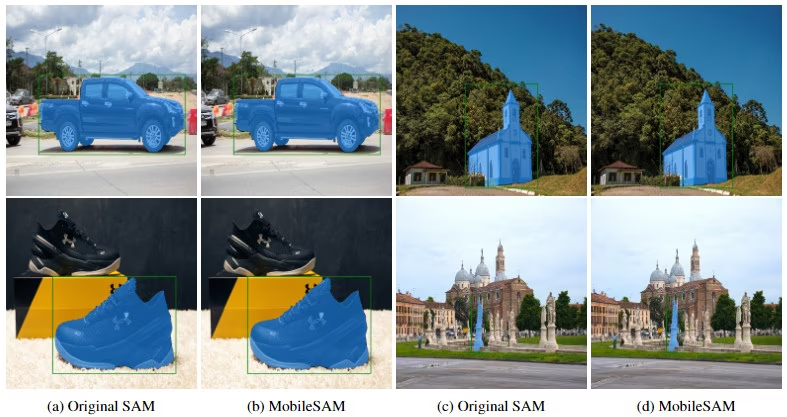
Trong các benchmark GPU của bài báo MobileSAM, MobileSAM nhỏ hơn khoảng 7 lần và nhanh hơn 5 lần so với FastSAM.
Kiểm thử MobileSAM trong Ultralytics#
Tương tự SAM gốc, Ultralytics cung cấp giao diện đơn giản để thử nghiệm MobileSAM với prompt điểm và hộp.
Tải model#
Tải pretrained weights của MobileSAM từ tài nguyên Ultralytics.
Prompt điểm#
from ultralytics import SAM

# Tải model
model = SAM("mobile_sam.pt")

# Dự đoán một phân đoạn dựa trên một prompt điểm
model.predict("ultralytics/assets/zidane.jpg", points=[900, 370], labels=[1])

# Dự đoán nhiều phân đoạn dựa trên nhiều prompt điểm
model.predict("ultralytics/assets/zidane.jpg", points=[[400, 370], [900, 370]], labels=[1, 1])

# Dự đoán một phân đoạn cho mỗi đối tượng dựa trên nhiều prompt điểm
model.predict("ultralytics/assets/zidane.jpg", points=[[[400, 370], [900, 370]]], labels=[[1, 1]])

# Dự đoán một phân đoạn bằng cả prompt dương và prompt âm.
model.predict("ultralytics/assets/zidane.jpg", points=[[[400, 370], [900, 370]]], labels=[[1, 0]])
Prompt hộp#
from ultralytics import SAM

# Tải model
model = SAM("mobile_sam.pt")

# Dự đoán một phân đoạn dựa trên một prompt hộp
model.predict("ultralytics/assets/zidane.jpg", bboxes=[439, 437, 524, 709])

# Dự đoán nhiều phân đoạn dựa trên nhiều prompt hộp
model.predict("ultralytics/assets/zidane.jpg", bboxes=[[439, 437, 524, 709], [114, 196, 313, 708]])
Cả MobileSAM và SAM đều có cùng API. Để biết thêm chi tiết về cách sử dụng, hãy xem tài liệu SAM.
Tự động tạo dataset phân đoạn bằng model phát hiện#
Để tự động gán nhãn dataset bằng framework Ultralytics, hãy sử dụng hàm auto_annotate, kết hợp model phát hiện như YOLO26x với MobileSAM:
from ultralytics.data.annotator import auto_annotate

auto_annotate(data="path/to/images", det_model="yolo26x.pt", sam_model="mobile_sam.pt")| Đối số | Kiểu | Mặc định | Mô tả |
|---|---|---|---|
data | str | bắt buộc | Đường dẫn đến thư mục chứa ảnh mục tiêu cần chú thích hoặc phân đoạn. |
det_model | str | 'yolo26x.pt' | Đường dẫn đến model phát hiện YOLO để phát hiện đối tượng ban đầu. |
sam_model | str | 'sam_b.pt' | Đường dẫn đến model SAM để phân đoạn (hỗ trợ các weight của SAM, SAM 2, MobileSAM và SAM 3). |
device | str | '' | Thiết bị tính toán (ví dụ: 'cuda:0', 'cpu' hoặc '' để tự động phát hiện thiết bị). |
conf | float | 0.25 | Ngưỡng confidence của model phát hiện YOLO để lọc các kết quả phát hiện yếu. |
iou | float | 0.5 | Ngưỡng IoU cho Non-Maximum Suppression để lọc các hộp chồng lấn. |
imgsz | int | 640 | Kích thước đầu vào để thay đổi kích thước ảnh (nếu cần, làm tròn lên bội số của 32). |
max_det | int | 300 | Số lượng kết quả phát hiện tối đa trên mỗi ảnh để tiết kiệm bộ nhớ. |
classes | list[int] | None | Danh sách chỉ số class cần phát hiện (ví dụ: [0, 1] cho người và xe đạp). |
output_dir | str | None | Thư mục lưu chú thích (mặc định: thư mục cùng cấp với <data>_auto_annotate_labels). |
Trích dẫn và lời cảm ơn#
Nếu MobileSAM hữu ích cho nghiên cứu hoặc phát triển của bạn, hãy cân nhắc trích dẫn bài báo sau:
@article{mobile_sam,
  title={Faster Segment Anything: Towards Lightweight SAM for Mobile Applications},
  author={Zhang, Chaoning and Han, Dongshen and Qiao, Yu and Kim, Jung Uk and Bae, Sung Ho and Lee, Seungkyu and Hong, Choong Seon},
  journal={arXiv preprint arXiv:2306.14289},
  year={2023}
}
Đọc toàn bộ bài báo MobileSAM trên arXiv.
Câu hỏi thường gặp#
MobileSAM là model phân đoạn ảnh nhẹ, nhanh, được tối ưu hóa cho ứng dụng di động và edge. Model duy trì pipeline như SAM gốc nhưng thay encoder ViT-H lớn (637M tham số) bằng encoder Tiny-ViT nhỏ gọn (5M tham số). Nhờ đó, toàn bộ pipeline MobileSAM nhỏ hơn khoảng 66 lần so với SAM gốc (9.66M so với 641M tham số) và nhanh hơn khoảng 38 lần, xử lý mỗi ảnh trong khoảng 12 ms so với 456 ms của SAM.
Kiểm thử MobileSAM trong Ultralytics rất đơn giản. Bạn có thể dùng prompt điểm và hộp để dự đoán phân đoạn. Ví dụ, với prompt điểm:
from ultralytics import SAM

# Tải model
model = SAM("mobile_sam.pt")

# Dự đoán một phân đoạn dựa trên prompt điểm
model.predict("ultralytics/assets/zidane.jpg", points=[900, 370], labels=[1])
Để biết thêm chi tiết, hãy xem mục Kiểm thử MobileSAM trong Ultralytics.
MobileSAM lý tưởng cho ứng dụng di động và thiết bị biên nhờ thiết kế nhẹ và tốc độ suy luận nhanh. So với SAM gốc, MobileSAM có số lượng tham số ít hơn khoảng 66 lần và chạy nhanh hơn khoảng 38 lần, phù hợp cho phân đoạn thời gian thực trên thiết bị có tài nguyên tính toán hạn chế. Hiệu quả của model cho phép thiết bị di động thực hiện phân đoạn ảnh theo thời gian thực mà không có độ trễ đáng kể. Trong Ultralytics, MobileSAM chỉ hỗ trợ suy luận; không hỗ trợ huấn luyện, đánh giá và xuất.
MobileSAM được huấn luyện trên một GPU với dataset 100k ảnh (1% số ảnh SA-1B ban đầu) trong chưa đầy một ngày, chưng cất image encoder ViT-H của SAM thành encoder Tiny-ViT. Trọng số pretrained và thông tin triển khai có trong repository GitHub của MobileSAM.
MobileSAM được thiết kế để phân đoạn ảnh nhanh và hiệu quả trong môi trường di động và edge. Các trường hợp sử dụng chính bao gồm:
- Phân đoạn tương tác thời gian thực cho ứng dụng di động
- Xử lý ảnh độ trễ thấp trên thiết bị có tài nguyên tính toán hạn chế
- Tích hợp vào ứng dụng di động tích hợp AI cho thực tế tăng cường (AR), phân tích và nhiều mục đích khác


Bình luận27
Đặt câu hỏi, chia sẻ kết quả hoặc giúp đỡ người khác.
czbphoto
请问是否有遇到多线程情况下使用同一个sam实例推理分割时,出现显存占用持续增长,直到报错:显存无法分配问题?
 Glenn JocherUltralytics
@czbphoto 会的;请勿在多线程中共享同一个
SAM/SAMPredictor实例——为每个线程各自创建预测器或改为单线程队列;每张图像后调用predictor.reset_image()释放编码特征;若使用 SAM 2,其跨帧 memory bank 也会累积,需在批次结束后reset_image()清空,见SAM 2 内存机制说明。# 每线程各自持有预测器,避免共享 from threading import Thread import cv2 from ultralytics.models.sam import Predictor as SAMPredictor def worker(device, paths, boxes): pred = SAMPredictor(overrides=dict(model="mobile_sam.pt", device=device, imgsz=1024, task="segment", mode="predict")) for p, bb in zip(paths, boxes): im = cv2.imread(p) pred.set_image(im) _ = pred(bboxes=[bb]) # 推理 pred.reset_image() # 立即释放图像特征 # 示例:将不同样本分配到不同线程 Thread(target=worker, args=("cuda:0", ["a.jpg","b.jpg"], [[100,100,200,200]]*2)).start()若仍出现显存持续增长,请附上最小可复现脚本、完整文本日志与系统信息,便于我们复现与定位:
yolo checks非常感谢,问题已经解决
nowander(đã chỉnh sửa)
inference time cost too much here is my inference code:
from ultralytics import SAM
model = SAM("/mnt/pt/mobile_sam.pt")
model.info() source = "/home/sf/Pictures/images/"
results = model.predict(source,imgsz=640, save=True,project="mobile_sam",device="cuda",bboxes=[100, 100, 200, 200])#,points=[[600,600],[700,1000]])
------- log image 198/200 /home/sf/Pictures/images/camera_307_preposition_20240307_094542.jpg: 640x640 1 0, 1 1, 1 2, 1 3, 1 4, 1 5, 1 6, 1 7, 1 8, 1 9, 1 10, 1 11, 1 12, 1 13, 522.9ms image 199/200 /home/sf/Pictures/images/camera_307_preposition_20240307_095714.jpg: 640x640 1 0, 1 1, 1 2, 1 3, 1 4, 1 5, 1 6, 1 7, 1 8, 1 9, 1 10, 519.0ms image 200/200 /home/sf/Pictures/images/camera_307_preposition_20240307_100339.jpg: 640x640 1 0, 1 1, 1 2, 1 3, 1 4, 1 5, 1 6, 1 7, 1 8, 1 9, 1 10, 1 11, 572.9ms Speed: 0.8ms preprocess, 516.1ms inference, 0.5ms postprocess per image at shape (1, 3, 640, 640) Results saved to mobile_sam/predict3
my gpu is RTX5080.why it cost so much
RizwanMunawar(đã chỉnh sửa)
@nowander, could you please share the complete logs? In my testing, the performance is slightly slower than FastSAM, but still noticeably faster than the SAM models. What’s the size of your original image? Larger images can naturally affect speed. You might also want to try FastSAM, as it’s typically very quick in most cases. Thanks.
my code: from ultralytics import SAM model = SAM("/mnt/pt/mobile_sam.pt") model.info() results = model("/home/sf/Pictures/one_image/car.jpg", bboxes=[226, 278, 683, 499],imgsz=640)
the log : Model summary: 246 layers, 10,130,092 parameters, 10,130,092 gradients
image 1/1 /home/sf/Pictures/one_image/car.jpg: 640x640 1 0, 272.1ms Speed: 16.0ms preprocess, 272.1ms inference, 28.9ms postprocess per image at shape (1, 3, 640, 640)
i only test one image(car.jpg) this time ,the size of image is 870*573,it cost 272.1ms inference
but when i use this code(write myself):
""" yolo_sam2_annotate_with_time.py 基于 ultralytics.data.annotator.auto_annotate
- 检测 + 分割
- 掩膜着色 + 类别文字
- 实时显示耗时 """
from pathlib import Path import time import cv2 import numpy as np from ultralytics.data.annotator import auto_annotate from ultralytics import YOLO, SAM, FastSAM
"""---------------- 参数 ----------------""" IMAGE_DIR = Path("/home/sf/Pictures/one_image") # 输入图片 """ 结果保存""" DET_MODEL = "/mnt/pt/yolov5x.pt" SAM_MODEL = ("/mnt/pt/mobile_sam.pt") label_dir =Path("/home/sf/Pictures/images_auto_annotate_labels") save_di1 = DET_MODEL.split("/")[-1].split(".pt",1)[0] save_di2 = SAM_MODEL.split("/")[-1].split(".pt",1)[0] OUT_DIR = Path(f"runs/{save_di1}{save_di2}/seg_vis") # 或 sam2_t.pt / sam2_l.pt """ -------------------------------------"""
OUT_DIR.mkdir(parents=True, exist_ok=True)
"""1. 先运行 auto_annotate,让它在 images/labels 下生成 .txt""" t0 = time.perf_counter() auto_annotate( data=str(IMAGE_DIR), det_model=DET_MODEL, sam_model=SAM_MODEL, output_dir=str(label_dir) """标签输出到 images/labels/*.txt""" ) anno_time = (time.perf_counter() - t0) * 1000 """ anno_time1 = (time.time() - t0)""" print(f"auto_annotate 总耗时: {anno_time:.1f} ms") """ print(f"auto_annotate1 总耗时: {anno_time1:.1f} ms")"""
""" 2. 加载模型(用于计时)""" yolo = YOLO(DET_MODEL) if Path(SAM_MODEL).stem.startswith("Fast"): """ sam_model = FastSAM(sam_model)""" sam = FastSAM(SAM_MODEL) else: """ sam_model = SAM(sam_model)""" sam = SAM(SAM_MODEL) """ sam = SAM(SAM_MODEL)""" """sam=FastSAM(SAM_MODEL)""" sum_time=0 num = 0 """ 3. 可视化:逐张读取原图 + 标签,叠加掩膜和类别"""
label_dir =Path("/home/sf/Pictures/images")
class_names = yolo.names
for img_path in IMAGE_DIR.glob("*"): if img_path.suffix.lower() not in {".jpg", ".png", ".jpeg", ".bmp"}: continue """print("aaaaaaa")""" img = cv2.imread(str(img_path)) h, w = img.shape[:2] label_path = label_dir / f"{img_path.stem}.txt" if not label_path.exists(): # print("bbbbb") continue
""" 3-1 读取 YOLO-seg 标签"""
bboxes, masks_raw, cls_ids = [], [], []
with open(label_path, "r") as f:
    for row in f:
        parts = row.strip().split()
        cls_id = int(parts[0])
        poly = list(map(float, parts[1:]))
        """ 还原成像素坐标(x,y)"""
        polygon = [(poly[i] * w, poly[i + 1] * h)
                   for i in range(0, len(poly), 2)]
        polygon = np.array(polygon, np.int32)
        """ 简易 bbox"""
        x1, y1, x2, y2 = polygon[:, 0].min(), polygon[:, 1].min(), \
                         polygon[:, 0].max(), polygon[:, 1].max()
        bboxes.append([x1, y1, x2, y2])
        cls_ids.append(cls_id)

""" 3-2 用 SAM 生成掩膜(用于计时)"""
t0 = time.perf_counter()
""" print("img[..., ::-1]",img[..., ::-1].shape)#(573, 860, 3)"""
results = sam(img[..., ::-1], bboxes=bboxes)   # RGB
""" print("bboxes",bboxes)""" seg_time = (time.perf_counter() - t0) * 1000 sum_time += seg_time num += 1 """ print("num",num)""" masks = results[0].masks # list[np.ndarray(H,W)] colors = [np.random.randint(0, 255, 3).tolist() for _ in cls_ids]
vis = img.copy()


###################     FASTSAM   ####################
if save_di2.startswith("Fast"):

    h_orig, w_orig = img.shape[:2]

    """ 掩膜 tensor: [N, H_sam, W_sam]"""
    masks_tensor = results[0].masks.data  # torch.Tensor
    h_sam, w_sam = masks_tensor.shape[1:]

    """ 逐张处理"""
    for mask_t, cls_id, color in zip(masks_tensor, cls_ids, colors):
        """ 1) 先变成 numpy"""
        mask_np = mask_t.cpu().numpy()  # [H_sam, W_sam]  float/uint8
        """ 2) resize 回原图尺寸"""
        mask_resized = cv2.resize(mask_np, (w_orig, h_orig),
                                  interpolation=cv2.INTER_NEAREST)
        mask_bool = mask_resized.astype(bool)

        """3) 上色"""
        vis[mask_bool] = (vis[mask_bool] * 0.5 + np.array(color, dtype=np.uint8) * 0.5)

        """ 4) 画轮廓"""
        contours, _ = cv2.findContours(mask_bool.astype(np.uint8),
                                       cv2.RETR_EXTERNAL,
                                       cv2.CHAIN_APPROX_SIMPLE)
        cv2.drawContours(vis, contours, -1, color, 2)

        x, y, w, h = cv2.boundingRect(contours[0])
        cv2.putText(vis, class_names[cls_id], (x, max(y - 5, 15)),
                    cv2.FONT_HERSHEY_SIMPLEX, 0.8, color, 2)


"""           SAM2    """
else:

    for mask, cls_id, color in zip(masks, cls_ids, colors):
        """ 原来的报错两行"""
        """vis[mask] = (vis[mask] * 0.5 + np.array(color, dtype=np.uint8) * 0.5)"""
""" 假设 results = sam(img[..., ::-1], bboxes=bboxes)""" masks_tensor = results[0].masks.data # torch.Tensor [N, H, W] masks_np = masks_tensor.cpu().numpy() # ndarray [N, H, W]
        colors = [np.random.randint(0, 255, 3, dtype=np.uint8).tolist() for _ in cls_ids]

        for mask_2d, cls_id, color in zip(masks_np, cls_ids, colors):
            mask_2d = mask_2d.astype(bool)           # 转成布尔
            vis[mask_2d] = (vis[mask_2d] * 0.5 + np.array(color, dtype=np.uint8) * 0.5)

           """画轮廓"""
            contours, _ = cv2.findContours(mask_2d.astype(np.uint8),
                                           cv2.RETR_EXTERNAL,
                                           cv2.CHAIN_APPROX_SIMPLE)
            cv2.drawContours(vis, contours, -1, color, 2)

            x, y, w, h = cv2.boundingRect(contours[0])
            cv2.putText(vis, class_names[cls_id], (x, max(y - 5, 15)),
                        cv2.FONT_HERSHEY_SIMPLEX, 0.8, color, 2)
##########################################################################################
""" 3-3 在左上角叠加耗时""" cv2.putText(vis, f"Detect: {anno_time/len(list(IMAGE_DIR.glob('*'))):.1f} ms", (10, 30), cv2.FONT_HERSHEY_SIMPLEX, 0.8, (0, 255, 0), 2) cv2.putText(vis, f"Segment: {seg_time:.1f} ms", (10, 60), cv2.FONT_HERSHEY_SIMPLEX, 0.8, (0, 255, 0), 2)
""" 3-4 弹窗 + 保存"""
win_name = f"YOLO+SAM-2  {img_path.name}"
"""cv2.imshow(win_name, vis)""" save_path = OUT_DIR / f"{img_path.stem}_vis.jpg" cv2.imwrite(str(save_path), vis) """ print(f"[Done] {img_path.name} Segment={seg_time:.1f}ms")""" """cv2.waitKey(0)""" """ cv2.destroyWindow(win_name)""" """ print("nummm",num)""" print(f"avg segment inferenct time {sum_time/num:.1f} ms") """cv2.destroyAllWindows()"""
the log as follow: PRO TIP 💡 Replace 'model=/mnt/pt/yolov5x.pt' with new 'model=/mnt/pt/yolov5xu.pt'. YOLOv5 'u' models are trained with https://github.com/ultralytics/ultralytics and feature improved performance vs standard YOLOv5 models trained with https://github.com/ultralytics/yolov5.
image 1/1 /home/sf/Pictures/one_image/car.jpg: 448x640 1 car, 13.9ms Speed: 1.7ms preprocess, 13.9ms inference, 91.0ms postprocess per image at shape (1, 3, 448, 640) auto_annotate 总耗时: 1614.3 ms PRO TIP 💡 Replace 'model=/mnt/pt/yolov5x.pt' with new 'model=/mnt/pt/yolov5xu.pt'. YOLOv5 'u' models are trained with https://github.com/ultralytics/ultralytics and feature improved performance vs standard YOLOv5 models trained with https://github.com/ultralytics/yolov5.
0: 1024x1024 1 0, 15.6ms Speed: 3.0ms preprocess, 15.6ms inference, 0.3ms postprocess per image at shape (1, 3, 1024, 1024) avg segment inferenct time 28.7 ms
it only cost 15.6ms inference. looking forward for your reply and thx.
i found when i run auto_annotates function,it call sam_model(line 64 annotator.py),and it cost 117ms,when i run sam() again,it Loaded intoGPU in advance,so it only cost 15.6 ms inference.. is it true. and if that is the true,the mobile_sam will cost about 500ms with RTX5080(use demo code)
To test my conjecture, I did the following experiment:
from pathlib import Path import time import cv2 import numpy as np from ultralytics.data.annotator import auto_annotate from ultralytics import YOLO, SAM, FastSAM from ultralytics import SAM SAM_MODEL = ("/mnt/pt/mobile_sam.pt") sam = SAM(SAM_MODEL)
import time img_path = "/home/sf/Pictures/one_image/car.jpg" img = cv2.imread(str(img_path)) t0 = time.perf_counter() ”“”print("img[..., ::-1]",img[..., ::-1].shape)#(573, 860, 3)”“” bboxes = [[np.int32(226), np.int32(278), np.int32(683), np.int32(499)]] results = sam(img[..., ::-1], bboxes=bboxes) # RGB ”“”print("bboxes",bboxes)”“” seg_time = (time.perf_counter() - t0) * 1000 print("11111---ssssseg_time",seg_time) t0 = time.perf_counter() “”“ print("img[..., ::-1]",img[..., ::-1].shape)#(573, 860, 3) bboxes = [[np.int32(226), np.int32(278), np.int32(683), np.int32(499)]] results = sam(img[..., ::-1], bboxes=bboxes) # RGB ”“” print("bboxes",bboxes)”“” seg_time = (time.perf_counter() - t0) * 1000 print("22222--ssssseg_time",seg_time)
and log: Segment: 256.2 ms 0: 1024x1024 1 0, 256.3ms Speed: 26.1ms preprocess, 256.3ms inference, 27.3ms postprocess per image at shape (1, 3, 1024, 1024) 11111---ssssseg_time 544.9139869888313
Segment: 15.3 ms 0: 1024x1024 1 0, 15.4ms Speed: 5.1ms preprocess, 15.4ms inference, 0.2ms postprocess per image at shape (1, 3, 1024, 1024) 22222--ssssseg_time 21.185592049732804
- Glenn JocherUltralytics
@nowander Your analysis is right: the first SAM call includes one‑time GPU setup (CUDA context, weights transfer, cuDNN autotune), so it’s much slower; subsequent calls are the steady‑state (~15–30 ms on your RTX). Also note that when you pass a folder plus
bboxesonce, the prompt is consumed on the first image and the rest fall back to “segment everything” (hence many masks and slower runs). Use per‑image prompts orSAMPredictorand warm up before timing:from pathlib import Path import cv2, time, torch from ultralytics.models.sam import Predictor as SAMPredictor overrides = dict(model="mobile_sam.pt", device="cuda", imgsz=1024, task="segment", mode="predict", conf=0.25) pred = SAMPredictor(overrides=overrides) # warmup im = cv2.imread("path/to/one.jpg") pred.set_image(im) pred(bboxes=[100, 100, 200, 200]) pred.reset_image() # per-image prompts (avoid segment-everything) src = Path("/path/to/images") for p in src.glob("*.jpg"): im = cv2.imread(str(p)) pred.set_image(im) torch.cuda.synchronize(); t0 = time.perf_counter() r = pred(bboxes=[[x1, y1, x2, y2]]) # supply bbox for this image torch.cuda.synchronize(); print(f"{(time.perf_counter()-t0)*1000:.1f} ms") pred.reset_image()See the SAMPredictor example in the SAM docs and the
auto_annotateAPI here for reference on how prompts are used per image: auto_annotate reference. If you still see >200 ms after warmup and per‑image prompts, please shareyolo checksoutput and the full text logs so we can dig deeper:yolo checks Thank you very much for your reply, you are right, when set a folde as source r, finally call self.generate (models/sam/predict.py) on lines 202 and 203, when set source as an image, the parameter takes effect, call line 205 self.prompt_inference (models/sam/predict.py).when i use this: src = Path("/path/to/images") for p in src.glob("*.jpg"): im = cv2.imread(str(p)) pred.set_image(im) torch.cuda.synchronize(); t0 = time.perf_counter() r = pred(bboxes=[[x1, y1, x2, y2]]) # supply bbox for this image torch.cuda.synchronize(); print(f"{(time.perf_counter()-t0)*1000:.1f} ms") pred.reset_image() it only cost about 20ms in my GPU,and thx again for your reply.
- Glenn JocherUltralytics
Great to hear your timings are down to ~20 ms; for even higher throughput across multiple prompts on the same image, reuse encoder features by calling
SAMPredictor.set_image()once and issuing additional prompt calls beforereset_image()—see the SAMPredictor reference for details: ultralytics.models.sam.predict.Predictor.
 User
good
tunahsu
Hi! Is it possible to filter out low-quality masks during inference using confidence/score?
- Glenn JocherUltralytics
@tunahsu yes, you can filter out low-quality masks during inference by adjusting the confidence threshold using the
confparameter when running the model. For more details on setting this parameter, you can refer to the MobileSAM documentation. Let us know if you have further questions!
ismailwale
How can I make an inference of a video using frame by frame in loop using Mobilesam ?because I tried multiple times making inference directly with video predictor I constantly running out of memory despite setting stream =True since SAM is trying to keep the memory of 2000 frames of the video at ones . I will appreciate any ideal on how to predict and segment the video as a single frame image at every instance and put everything in a loop.
- Glenn JocherUltralytics
@ismailwale to process video frame-by-frame with MobileSAM and avoid memory overflow, load the video using OpenCV, iterate through each frame in a loop, perform inference using
MobileSAMon individual frames, and release unused memory after each iteration. Make sure not to enable streaming mode. Here is a basic example structure:import cv2 from ultralytics import SAM # Initialize the VideoCapture and load the model cap = cv2.VideoCapture("path/to/video.mp4") model = SAM("mobile_sam.pt") while cap.isOpened(): ret, frame = cap.read() if not ret: break # Perform inference on the current frame results = model.predict(frame) # Process results or save outputs # ... cap.release() # Release the videoThis approach minimizes memory usage by processing frames sequentially. Let us know if you need further clarification!
Thanks so much , your lines of code really jump-start my thinking. I sincerely appreciate. Please keep on with your good work . Be blessed
gopalkatushar
This is great. Is there a way to segment everything like we have in fastsam, without prompting?
- Glenn JocherUltralytics(đã chỉnh sửa)
@gopalkatushar yes, MobileSAM can segment everything without prompts, like FastSAM. Call it without
bboxesorpoints, e.g.SAM("mobile_sam.pt")("path/to/image.jpg"). For more details, please refer to the SAM documentation.
Kunal8020
How can I use this for multi class segmentation. I am detecting the multiple objects using YOLO-World. I want to use the bounding box results from YOLO-World as prompt to MobileSAM. How can I use to segment different objects in the same image??
 Paula DerrengerUltralytics
Hello!
To use MobileSAM for segmenting multiple objects in the same image using bounding box results from YOLO-World, you can follow these steps:
-
Run YOLO-World Detection: First, use YOLO-World to detect objects in your image. This will provide you with bounding boxes for each detected object.
-
Prepare Bounding Box Inputs: Extract the bounding box coordinates from the YOLO-World output. These coordinates will be used as prompts for MobileSAM.
-
Segment with MobileSAM: For each bounding box, use the MobileSAM model to segment the object within that box. You can do this by passing the bounding box coordinates to MobileSAM's predict function, similar to the box prompt example:
from ultralytics import SAM

# Load the model
model = SAM("mobile_sam.pt")

# Predict a segment based on a box prompt
model.predict("path/to/image.jpg", bboxes=[x1, y1, x2, y2])
Repeat this for each bounding box provided by YOLO-World.
This approach allows you to segment each detected object individually. If you need further assistance or have more specific requirements, feel free to ask!
1-
FlySka
Hi, Do you have any notebook or repository for fine-tuning mobileSAM? Could it be done in the same way as with the regular SAM?
- Paula DerrengerUltralytics
Hi there,
Yes, fine-tuning MobileSAM can generally be approached in the same manner as with the regular SAM. Since MobileSAM retains the same pipeline, including pre-processing, post-processing, and interfaces, adaptations for MobileSAM from SAM should be minimal.
Here's a quick Python snippet that illustrates how you could load and use MobileSAM for predictions, which mirrors the usage for SAM:
from ultralytics import SAM

# Load the MobileSAM model
model = SAM('mobile_sam.pt')

# Predict a segment based on a point prompt
result = model.predict('path/to/your/image.jpg', points=[x, y], labels=[label_id])
You can apply any fine-tuning procedures used for SAM in a similar fashion for MobileSAM. If you need more detailed steps or specific adjustments for fine-tuning, feel free to ask!
Best regards!
AnandSingh-0619
Hey! How can I run batch inference with multiple images and bounding boxes on the Mobile SAM model?
- Glenn JocherUltralytics
Hey there! 👋
Running batch inference with multiple images and bounding boxes on MobileSAM is quite straightforward. Here’s a quick example of how you could do that:
from ultralytics import SAM

# Load the MobileSAM model
model = SAM('mobile_sam.pt')

# List of images and their corresponding boxes
images = ['path/to/image1.jpg', 'path/to/image2.jpg']
boxes = [[439, 437, 524, 709], [500, 400, 550, 720]]  # Example boxes for each image

# Predict segments based on box prompts for each image
for image, box in zip(images, boxes):
    result = model.predict(image, bboxes=[box])
    # You can now process the result as needed
This code loads the model, iterates over your images and boxes, and then performs prediction for each image using the specified boxes. Don't forget to adjust the image paths and box coordinates according to your data. 😊
Let us know if you need more help!
I'm working with the Ultralytics Mobile SAM model and need to perform batch inference for multiple images, each with its own set of bounding boxes, without using a for loop to iterate over each image. How can I efficiently run batch inference on the Mobile SAM model with this setup?
- Glenn JocherUltralytics(đã chỉnh sửa)
Hi there!
predictdoes not take animages=tensor, so for several images with their own boxes loop over them and pass each image's boxes (XYXY):from ultralytics import SAM model = SAM("mobile_sam.pt") for image, box in zip(images, boxes): results = model.predict(image, bboxes=[box])Each call can take several boxes for the same image, e.g.
bboxes=[[x1, y1, x2, y2], [x3, y3, x4, y4]]. 😊-1