YOLO-NAS
Deci 是 YOLO-NAS 的原始创建者,现已被 NVIDIA 收购,Deci 不再积极维护这些模型。Ultralytics 仍支持使用这些模型,但预计原团队不会再发布更新。
概述#
YOLO-NAS 由 Deci AI 开发,是通过神经架构搜索生成的对象检测模型,旨在解决早期 YOLO 模型的局限。它改进了量化支持和准确率与延迟之间的权衡。
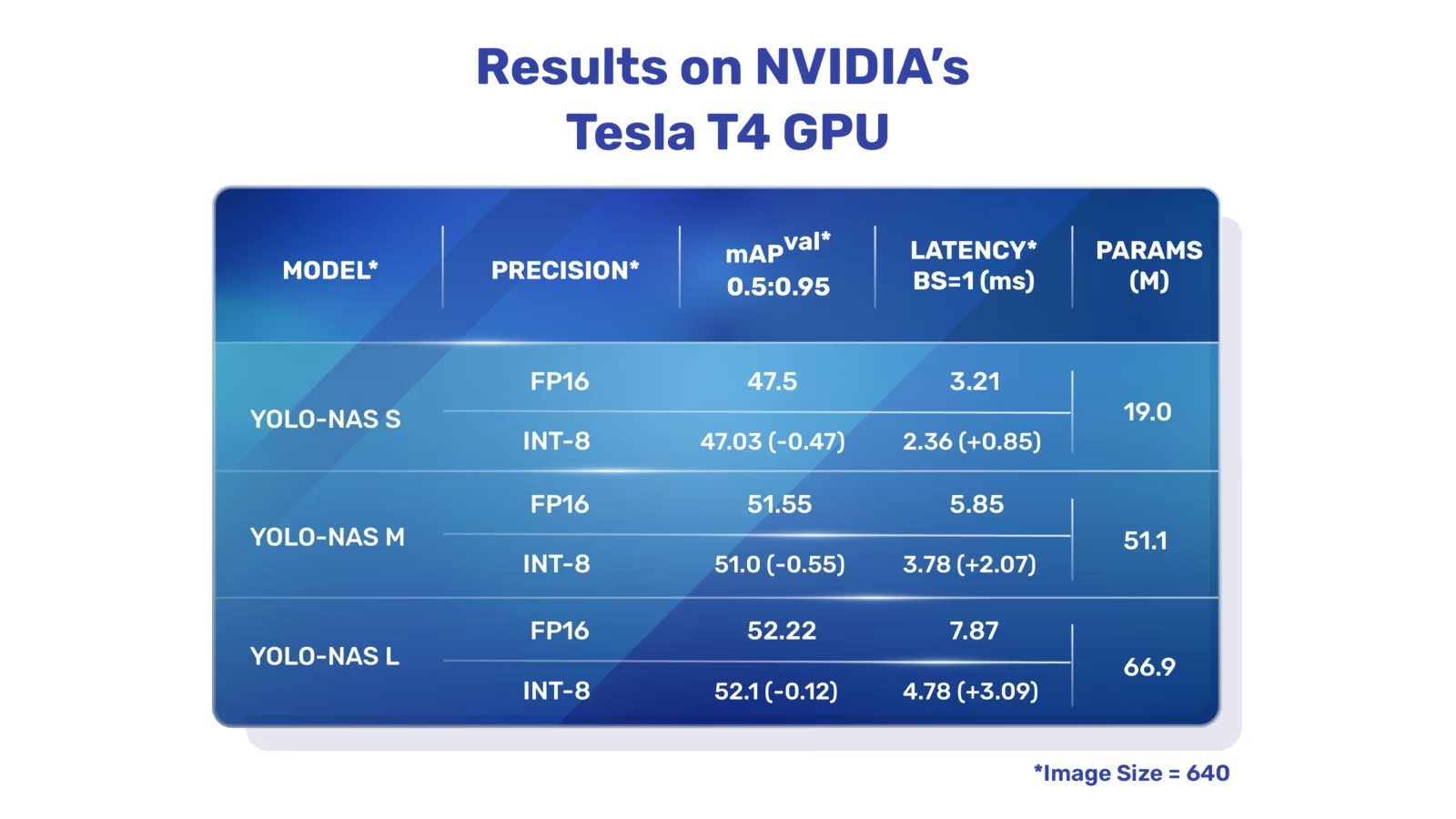 YOLO-NAS 概述。YOLO-NAS 使用量化感知模块和选择性量化,在量化后保持准确率。转换为 INT8 量化版本后,模型的准确率损失很小,相较早期 YOLO 模型有所改进。
主要功能#
- 量化友好型基础模块: YOLO-NAS 引入了一种新的量化友好型基础模块,解决了先前 YOLO 模型的一项重要局限性。
- 高级训练与量化:YOLO-NAS 使用先进的训练方案和训练后量化来提升性能。
- AutoNAC 优化与预训练:YOLO-NAS 使用 AutoNAC 优化,并在 COCO、Objects365 和 Roboflow 100 等数据集上进行预训练。这种预训练使其非常适合生产环境中的下游对象检测任务。
预训练模型#
Ultralytics 提供三种尺寸的预训练 YOLO-NAS 模型,每种尺寸在速度和准确率之间各有取舍:
| 模型 | mAP50-95 | 延迟 (ms) |
|---|---|---|
| YOLO-NAS S | 47.5 | 3.21 |
| YOLO-NAS M | 51.55 | 5.85 |
| YOLO-NAS L | 52.22 | 7.87 |
| YOLO-NAS S INT-8 | 47.03 | 2.36 |
| YOLO-NAS M INT-8 | 51.0 | 3.78 |
| YOLO-NAS L INT-8 | 52.1 | 4.78 |
每种模型变体都旨在平衡平均精度均值(mAP)与延迟,帮助你兼顾性能和速度,优化目标检测任务。
使用示例#
ultralytics Python 包提供用于运行 YOLO-NAS 模型的 Python API 和 CLI。
YOLO-NAS 模型需要 super-gradients 包,该包需要 Python 3.10 环境:
pip install ultralytics super-gradients "setuptools<81"以下示例展示如何使用 ultralytics 软件包中的 YOLO-NAS 模型进行推理和验证:
推理和验证示例#
在此示例中,我们使用 COCO8 数据集验证 YOLO-NAS-s。
此示例提供了 YOLO-NAS 的简单推理和验证代码。YOLO-NAS 也支持导出,但 ultralytics 包不支持对其进行训练。
可以将 PyTorch 预训练的 *.pt 模型文件传递给 NAS() 类,以便在 Python 中创建模型实例:
from ultralytics import NAS

# 加载经过 COCO 预训练的 YOLO-NAS-s 模型
model = NAS("yolo_nas_s.pt")

# 显示模型信息(可选)
model.info()

# 在 COCO8 示例数据集上验证模型
results = model.val(data="coco8.yaml")

# 使用 YOLO-NAS-s 模型对图像 'bus.jpg' 执行推理
results = model("path/to/bus.jpg")支持的任务和模式#
YOLO-NAS 有三种变体:小型(s)、中型(m)和大型(l)。每种变体都针对不同的计算资源和性能需求而设计:
- YOLO-NAS-s:针对计算资源有限但效率至关重要的环境进行了优化。
- YOLO-NAS-m:兼顾各方面表现,适用于对准确率要求更高的通用对象检测。
- YOLO-NAS-l:专为要求最高准确率且计算资源限制较少的场景设计。
下面详细介绍每个模型,包括其预训练权重链接、支持的任务,以及与不同运行模式的兼容性。
| 模型类型 | 预训练权重 | 支持的任务 | 训练 | 验证 | 推理 | 导出 |
|---|---|---|---|---|---|---|
| YOLO-NAS-s | yolo_nas_s.pt | 目标检测 | ❌ | ✅ | ✅ | ✅ |
| YOLO-NAS-m | yolo_nas_m.pt | 目标检测 | ❌ | ✅ | ✅ | ✅ |
| YOLO-NAS-l | yolo_nas_l.pt | 目标检测 | ❌ | ✅ | ✅ | ✅ |
引用与致谢#
如果你在研究或开发工作中使用 YOLO-NAS,请引用 SuperGradients:
@misc{supergradients,
      doi = {10.5281/ZENODO.7789328},
      url = {https://zenodo.org/records/7789328},
      author = {Aharon,  Shay and {Louis-Dupont} and {Ofri Masad} and Yurkova,  Kate and {Lotem Fridman} and {Lkdci} and Khvedchenya,  Eugene and Rubin,  Ran and Bagrov,  Natan and Tymchenko,  Borys and Keren,  Tomer and Zhilko,  Alexander and {Eran-Deci}},
      title = {Super-Gradients},
      publisher = {GitHub},
      journal = {GitHub repository},
      year = {2021},
}
我们感谢 Deci AI 的 SuperGradients 团队为创建和维护这项宝贵资源所付出的努力,惠及了计算机视觉社区。
常见问题#
由 Deci AI 开发的 YOLO-NAS 是一款使用神经架构搜索(NAS)设计的目标检测模型。它通过引入特性,例如量化友好的基本模块和先进的训练方案,解决了以往 YOLO 模型的局限性,尤其提升了计算资源有限环境中的性能。YOLO-NAS 还支持量化,转换为 INT8 版本后仍能保持较高准确率,因此更适用于生产环境。
你可以使用
ultralytics包将 YOLO-NAS 模型集成到 Python 应用中。下面是加载预训练 YOLO-NAS 模型并执行推理的简单示例:from ultralytics import NAS # 加载经过 COCO 预训练的 YOLO-NAS-s 模型 model = NAS("yolo_nas_s.pt") # 在 COCO8 示例数据集上验证模型 results = model.val(data="coco8.yaml") # 使用 YOLO-NAS-s 模型对图像 'bus.jpg' 执行推理 results = model("path/to/bus.jpg")更多信息请参阅推理和验证示例。
YOLO-NAS 引入了多项关键特性,使其成为量化对象检测的理想选择:
- 量化友好型基本模块:增强型架构,可在量化后保持准确率。
- 高级训练与量化:采用先进的训练方案和训练后量化技术。
- AutoNAC 优化与预训练:使用 AutoNAC 优化,并在 COCO、Objects365 和 Roboflow 100 等数据集上进行预训练。
这些功能提升了模型的准确率和运行效率,使其适合部署在生产环境中。请在主要功能部分了解更多信息。
YOLO-NAS 模型支持在验证、推理和导出模式下进行目标检测,但不支持训练。支持的模型包括 YOLO-NAS-s、YOLO-NAS-m 和 YOLO-NAS-l,分别适用于不同的计算能力和性能需求。
是的,Ultralytics 提供可直接访问的预训练 YOLO-NAS 模型。这些模型在 COCO 等数据集上进行了预训练。你可以通过支持的任务和模式一节中的链接下载模型。以下是一些示例:


评论21
提出问题、分享结果,或帮助其他人。
riobastian09
Hi. i want to know is there any pre-configured of YOLO-NAS model? i want to use this to my experiment using the custom architecture YOLO-NAS model. Thank you!
 Glenn JocherUltralytics
@riobastian09 thank you for your question! Yes, pre-configured YOLO-NAS models, such as YOLO-NAS-s, YOLO-NAS-m, and YOLO-NAS-l, are available and optimized for inference, validation, and export. You can access these pre-trained models and easily integrate them into your experiments using the Ultralytics Python package. Unfortunately, custom architecture modifications or training directly with YOLO-NAS are not supported. For more, refer to the YOLO-NAS documentation: https://docs.ultralytics.com/models/yolo-nas/
 User
您好,我使用如下脚本将torch模型转成onnx模型时,出现如下错误: raise AttributeError(f"'{type(self).name}' object has no attribute '{name}'") AttributeError: 'YoloNAS_S' object has no attribute 'args'我该如何解决?
- User
from ultralytics import NAS model = NAS('yolo_nas_s') model.export( imgsz = [480,640], format = "onnx", simplify = True, opset = 17 )
- Glenn JocherUltralytics
@Stephen-Hao it seems like the error you're encountering is due to the 'args' attribute not being present in the 'YoloNAS_S' object. This might be related to the specific version of the model or the Ultralytics package you are using. Please ensure you have the latest version of the Ultralytics package installed. If the issue persists, consider checking the model's documentation or reaching out to the community for further assistance.
NoviceAlchemist
我训练使用的代码是:import torch import warnings from ultralytics import YOLO
忽略与“deterministic”和“non-deterministic”相关的所有警告
warnings.filterwarnings("ignore", category=UserWarning, message=".deterministic.")
if name == 'main': # 关闭PyTorch的确定性算法 torch.use_deterministic_algorithms(False)
# 初始化YOLO模型
# model_path = r'D:\ultralytics-main\ultralytics\cfg\models\v8\yolov8_attiton.yaml'
model_path = r'D:\ultralytics-main\model train\model\yolo_nas_s.pt'
model = YOLO(model_path)

# 设置正确的数据集路径
data_path = r"C:\Users\13579\Downloads\etiketlenmis_3.v6i.yolov8\data.yaml"

# 训练模型配置信息
model.train(data=data_path,
            imgsz=640,
            batch=32,
            epochs=200,
            name='NAS_S',
            )

# 设置验证集验证效果
# model.val()
但是会出现D:\Anaconda3\envs\yolov8\python.exe "D:\ultralytics-main\model train\My train\yolo nas.py" The console stream is logged into C:\Users\13579\sg_logs\console.log [2024-09-06 10:23:49] INFO - crash_tips_setup.py - Crash tips is enabled. You can set your environment variable to CRASH_HANDLER=FALSE to disable it [2024-09-06 10:23:49,572] torch.distributed.elastic.multiprocessing.redirects: [WARNING] NOTE: Redirects are currently not supported in Windows or MacOs. [WARNING]No module named 'pycocotools' [2024-09-06 10:23:51] WARNING - env_sanity_check.py - Failed to verify operating system: Deci officially supports only Linux kernels. Some features may not work as expected. WARNING ⚠️ The file 'D:\ultralytics-main\model train\model\yolo_nas_s.pt' appears to be improperly saved or formatted. For optimal results, use model.save('filename.pt') to correctly save YOLO models. Traceback (most recent call last): File "D:\ultralytics-main\model train\My train\yolo nas.py", line 15, in model = YOLO(model_path) File "D:\ultralytics-main\ultralytics\models\yolo\model.py", line 23, in init super().init(model=model, task=task, verbose=verbose) File "D:\ultralytics-main\ultralytics\engine\model.py", line 149, in init self._load(model, task=task) File "D:\ultralytics-main\ultralytics\engine\model.py", line 230, in _load self.model, self.ckpt = attempt_load_one_weight(weights) File "D:\ultralytics-main\ultralytics\nn\tasks.py", line 855, in attempt_load_one_weight ckpt, weight = torch_safe_load(weight) # load ckpt File "D:\ultralytics-main\ultralytics\nn\tasks.py", line 809, in torch_safe_load ckpt = {"model": ckpt.model} File "D:\Anaconda3\envs\yolov8\lib\site-packages\torch\nn\modules\module.py", line 1695, in getattr raise AttributeError(f"'{type(self).name}' object has no attribute '{name}'") AttributeError: 'YoloNAS_S' object has no attribute 'model'
进程已结束,退出代码为 1
这个怎么解决呀
- Glenn JocherUltralytics(已编辑)
@NoviceAlchemist YOLO-NAS models in Ultralytics are pretrained and support only validation, inference and export, not training (see the Training column in the YOLO-NAS docs), so
model.train()isn't available foryolo_nas_s.pt. To train on your own dataset, use a model with training support such as YOLO26 (e.g.yolo26s.pt). If you hit model-loading errors, verify thatpycocotoolsis installed and try the latest version of the Ultralytics package.
dota2015
from ultralytics import NAS import cv2
Load a COCO-pretrained YOLO-NAS-s model
model = NAS('yolo_nas_s.pt')
Display model information (optional)
model.info() results = model.predict('000000000009.jpg')
run reslult:
C:\Users\makef.conda\envs\yolov8\python.exe -X pycache_prefix=C:\Users\makef\AppData\Local\JetBrains\PyCharm2023.3\cpython-cache "C:/Program Files/JetBrains/PyCharm 2023.3.4/plugins/python/helpers/pydev/pydevd.py" --multiprocess --qt-support=auto --client 127.0.0.1 --port 62105 --file D:\02Code\code\yolov8\v8_2\yolo_nas.py Connected to pydev debugger (build 233.15026.15) The console stream is logged into C:\Users\makef\sg_logs\console.log [2024-04-28 16:29:38] INFO - crash_tips_setup.py - Crash tips is enabled. You can set your environment variable to CRASH_HANDLER=FALSE to disable it [2024-04-28 16:29:39] WARNING - redirects.py - NOTE: Redirects are currently not supported in Windows or MacOs. [WARNING]No module named 'pycocotools' [2024-04-28 16:29:45] WARNING - env_sanity_check.py - Failed to verify operating system: Deci officially supports only Linux kernels. Some features may not work as expected. Model summary: 685 layers, 19053888 parameters, 19053888 gradients
Traceback (most recent call last): File "C:\Users\makef.conda\envs\yolov8\lib\site-packages\torch\autograd\grad_mode.py", line 43, in generator_context response = gen.send(None) File "C:\Users\makef.conda\envs\yolov8\lib\site-packages\ultralytics\engine\predictor.py", line 228, in stream_inference self.model.warmup(imgsz=(1 if self.model.pt or self.model.triton else self.dataset.bs, 3, *self.imgsz)) File "C:\Users\makef.conda\envs\yolov8\lib\site-packages\ultralytics\nn\autobackend.py", line 624, in warmup self.forward(im) # warmup File "C:\Users\makef.conda\envs\yolov8\lib\site-packages\ultralytics\nn\autobackend.py", line 450, in forward y = self.model(im, augment=augment, visualize=visualize, embed=embed) File "C:\Users\makef.conda\envs\yolov8\lib\site-packages\torch\nn\modules\module.py", line 1194, in _call_impl return forward_call(*input, **kwargs) TypeError: forward() got an unexpected keyword argument 'augment' python-BaseException
Process finished with exit code 1
 Paula DerrengerUltralytics
Hey there! 👋 It looks like you're encountering a
TypeErrorrelated to theaugmentkeyword argument when running inference with the YOLO-NAS model. The error suggests that theforward()method in the model doesn't recognize theaugmentargument. This could be due to an oversight in the code or an issue with the model's compatibility with the Ultralytics framework.Let's try running the model without any additional arguments that aren't expected. Here's how you can do it:
from ultralytics import NAS

# Load a COCO-pretrained YOLO-NAS-s model
model = NAS('yolo_nas_s.pt')

# Run inference with the YOLO-NAS-s model on the 'bus.jpg' image
results = model('path/to/bus.jpg')
This simplifies the call to the model's inference method by removing the
augmentargument, which seems to be causing the issue.If you continue to face problems or if the issue is due to something else, it might be a good idea to check the Ultralytics documentation for YOLO-NAS compatibility or raise an issue on the GitHub repository for more specific help! Hope this sorts it out for you! 😊
Hey there! So, I've decked out my project with all the latest packages, but guess what? The issue is still lurking like it's on a vacation!
Here's the riveting tale of the pip upgrade:
Downloading ultralytics-8.2.4-py3-none-any.whl (752 kB) ━━━━━━━━━━━━━━━━━━━━━━━━━━━━━━━━━━━━━━━━ 752.1/752.1 kB 28.1 kB/s eta 0:00:00 Installing collected packages: ultralytics Attempting uninstall: ultralytics Found existing installation: ultralytics 8.2.1 Uninstalling ultralytics-8.2.1: Successfully uninstalled ultralytics-8.2.1 Successfully installed ultralytics-8.2.4
Behold, the saga of the runtime logs unfolds below:
C:\Users\makef.conda\envs\yolov8\python.exe D:\02Code\code\yolov8\v8_2\yolo_nas.py The console stream is logged into C:\Users\makef\sg_logs\console.log [2024-04-29 10:42:17] INFO - crash_tips_setup.py - Crash tips is enabled. You can set your environment variable to CRASH_HANDLER=FALSE to disable it [2024-04-29 10:42:18] WARNING - redirects.py - NOTE: Redirects are currently not supported in Windows or MacOs. [WARNING]No module named 'pycocotools' [2024-04-29 10:42:21] WARNING - env_sanity_check.py - Failed to verify operating system: Deci officially supports only Linux kernels. Some features may not work as expected. Model summary: 685 layers, 19053888 parameters, 19053888 gradients
Behold, the saga of the runtime logs unfolds below: Traceback (most recent call last): File "D:\02Code\code\yolov8\v8_2\yolo_nas.py", line 10, in results = model.predict('000000000009.jpg') File "C:\Users\makef.conda\envs\yolov8\lib\site-packages\ultralytics\engine\model.py", line 452, in predict return self.predictor.predict_cli(source=source) if is_cli else self.predictor(source=source, stream=stream) File "C:\Users\makef.conda\envs\yolov8\lib\site-packages\ultralytics\engine\predictor.py", line 168, in call return list(self.stream_inference(source, model, *args, **kwargs)) # merge list of Result into one File "C:\Users\makef.conda\envs\yolov8\lib\site-packages\torch\autograd\grad_mode.py", line 43, in generator_context response = gen.send(None) File "C:\Users\makef.conda\envs\yolov8\lib\site-packages\ultralytics\engine\predictor.py", line 228, in stream_inference self.model.warmup(imgsz=(1 if self.model.pt or self.model.triton else self.dataset.bs, 3, *self.imgsz)) File "C:\Users\makef.conda\envs\yolov8\lib\site-packages\ultralytics\nn\autobackend.py", line 627, in warmup self.forward(im) # warmup File "C:\Users\makef.conda\envs\yolov8\lib\site-packages\ultralytics\nn\autobackend.py", line 453, in forward y = self.model(im, augment=augment, visualize=visualize, embed=embed) File "C:\Users\makef.conda\envs\yolov8\lib\site-packages\torch\nn\modules\module.py", line 1194, in _call_impl return forward_call(*input, **kwargs) TypeError: forward() got an unexpected keyword argument 'augment'
Process finished with exit code 1
- Paula DerrengerUltralytics(已编辑)
Hey there! 😄 It looks like you're having a bit of a rough ride with the
augmentargument not being recognized during prediction. No worries, let's tidy this up!The error message you're seeing is due to the
augmentargument being passed where it was not expected. It's a simple fix; you just need to ensure you're using the prediction functionality without this argument, like so:from ultralytics import NAS # Load the COCO-pretrained YOLO-NAS-s model model = NAS('yolo_nas_s.pt') # Run inference on an image results = model('path/to/000000000009.jpg') # To visualize the results, you can do: results[0].show()This should run smoothly and get your project back on track! If issues persist or you have further questions, feel free to reach out. And remember, for the latest and greatest on usage, our docs page is always there to help you out. Happy coding! 🚀
I used your code, but the problem still persists, like a mischievous little gremlin playing hide and seek.
- Paula DerrengerUltralytics(已编辑)
Hey there! 🌟 It looks like that mischievous gremlin of an issue is quite stubborn. Not to worry, let's tackle it together.
Based on your feedback and the details from the YOLO-NAS docs, it seems like you're on the right track. However, if you're still encountering issues with predictions or validation, it's possible there might be a version mismatch or a missing dependency, especially
pycocotoolswhich is crucial for dataset operations and was flagged in your logs.Firstly, please ensure you've installed
pycocotoolsby running:pip install pycocotools-windowsIf you're not on Windows, just
pycocotoolsshould work.Moreover, the error regarding the
augmentargument not being expected might suggest an incompatibility issue or an outdated piece of code. Let's try simplifying the inference code snippet to not use this argument, as shown in the Ultralytics YOLO-NAS docs:from ultralytics import NAS # Load the COCO-pretrained YOLO-NAS-s model model = NAS('yolo_nas_s.pt') # Run inference with the YOLO-NAS-s model on a local image file results = model('path/to/bus.jpg') # Visualize the results results[0].show()This code directly uses the model without additional settings that may not be supported, like
augment.If the problem continues, it could be helpful to check for updates to the Ultralytics package or consider reaching out on the GitHub issues page for more targeted support. Sometimes, issues like these have been encountered and solved by others in the community!
Don't let those gremlins get you down; you're closer to a solution than you think! 🚀
C:\Users\makef.conda\envs\yolov8\python.exe D:\02Code\code\yolov8\v8_2\yolo_nas.py The console stream is logged into C:\Users\makef\sg_logs\console.log [2024-04-28 16:27:19] INFO - crash_tips_setup.py - Crash tips is enabled. You can set your environment variable to CRASH_HANDLER=FALSE to disable it [2024-04-28 16:27:20] WARNING - redirects.py - NOTE: Redirects are currently not supported in Windows or MacOs. [WARNING]No module named 'pycocotools' [2024-04-28 16:27:23] WARNING - env_sanity_check.py - Failed to verify operating system: Deci officially supports only Linux kernels. Some features may not work as expected. Model summary: 685 layers, 19053888 parameters, 19053888 gradients Traceback (most recent call last): File "D:\02Code\code\yolov8\v8_2\yolo_nas.py", line 10, in results = model.predict('000000000009.jpg') File "C:\Users\makef.conda\envs\yolov8\lib\site-packages\ultralytics\engine\model.py", line 452, in predict return self.predictor.predict_cli(source=source) if is_cli else self.predictor(source=source, stream=stream) File "C:\Users\makef.conda\envs\yolov8\lib\site-packages\ultralytics\engine\predictor.py", line 168, in call return list(self.stream_inference(source, model, *args, **kwargs)) # merge list of Result into one File "C:\Users\makef.conda\envs\yolov8\lib\site-packages\torch\autograd\grad_mode.py", line 43, in generator_context response = gen.send(None) File "C:\Users\makef.conda\envs\yolov8\lib\site-packages\ultralytics\engine\predictor.py", line 228, in stream_inference self.model.warmup(imgsz=(1 if self.model.pt or self.model.triton else self.dataset.bs, 3, *self.imgsz)) File "C:\Users\makef.conda\envs\yolov8\lib\site-packages\ultralytics\nn\autobackend.py", line 624, in warmup self.forward(im) # warmup File "C:\Users\makef.conda\envs\yolov8\lib\site-packages\ultralytics\nn\autobackend.py", line 450, in forward y = self.model(im, augment=augment, visualize=visualize, embed=embed) File "C:\Users\makef.conda\envs\yolov8\lib\site-packages\torch\nn\modules\module.py", line 1194, in _call_impl return forward_call(*input, **kwargs) TypeError: forward() got an unexpected keyword argument 'augment'
Process finished with exit code 1
from ultralytics import NAS import cv2
Load a COCO-pretrained YOLO-NAS-s model
model = NAS('yolo_nas_s.pt')
Display model information (optional)
model.info()
results = model.predict('000000000009.jpg')
- Paula DerrengerUltralytics
Hey there! 👋 It looks like you're trying to run predictions with the YOLO-NAS model and encountered an issue regarding the
augmentargument in theforward()method. This error typically occurs if there's a version mismatch or if the model and method usage doesn't align with the expected input parameters.Based on your usage:
from ultralytics import NAS
import cv2

# Load a COCO-pretrained YOLO-NAS-s model
model = NAS('yolo_nas_s.pt')

# Display model information (optional)
model.info()

results = model.predict('000000000009.jpg')
It seems correct on the surface, suggesting it might be related to the version of Ultralytics library you're using or specific to the model's implementation.
Here are a couple of steps you might want to try:
- Ensure you have the latest version of the Ultralytics package by running:
pip install --upgrade ultralytics - Check if the YOLO-NAS model you are using is compatible with the predict function in terms of its expected arguments. You can refer to the official Ultralytics documentation for the YOLO-NAS model and verify the correct method usage.
If you're still facing issues, feel free to share more details, such as the specific error messages and your environment setup. Hopefully, this helps you move forward! 🚀
- Ensure you have the latest version of the Ultralytics package by running:
Pragyy-G
How to train out this Yolo-nas model? like fine tune it on custom dataset?
- Glenn JocherUltralytics(已编辑)
@Pragyy-G hey there! 🙌 YOLO-NAS in Ultralytics is limited to pretrained weights for inference, validation and export; training and fine-tuning aren't supported (see the Training column in the YOLO-NAS docs), and there is no
Datasetclass to import.To train on a custom dataset, use a model with full training support such as YOLO26:
from ultralytics import YOLO

model = YOLO("yolo26n.pt")
model.train(data="path/to/data.yaml", epochs=100, imgsz=640)
Your dataset should follow the expected format, with a YAML file defining the train/val paths and classes.
Tottowich
@Pragyy-G Any results on this?
ashish-reddy26
Hi Glenn,
I tried training with the provided information, but I am getting the error that says 'Dataset' cannot be imported from ultralytics. Is Ultralytics not providing the resources to Dataset?
Can you clarify this and also please provide your inputs for training yolo-nas for object detection tasks (I am using yolov8 & yolov9, but I also want to try with yolo-nas as well).
Thank you, Ashish
- Glenn JocherUltralytics(已编辑)
Hi Ashish,
Datasetisn't a directly importable class from theultralyticspackage. For custom training datasets, you structure your data in the expected format and use a YAML file to define paths and classes.YOLO-NAS in Ultralytics supports inference, validation and export only, not training, so to train on a custom dataset use a model like YOLO26. To validate YOLO-NAS:
from ultralytics import NAS

# Load the model
model = NAS("yolo_nas_s.pt")

# Validate the model
results = model.val(data="path/to/your/data.yaml")
Please ensure your dataset follows the structure expected by the Ultralytics framework and that the YAML file correctly points to your train and validation images and labels.