تصدير نماذج Ultralytics YOLO26 إلى Rockchip RKNN
عند نشر نماذج الرؤية الحاسوبية على الأجهزة المضمنة، ولا سيما تلك المزودة بمعالجات Rockchip، يكون توفر تنسيق نموذج متوافق أمرًا أساسيًا. يوفر تصدير نماذج Ultralytics YOLO26 إلى تنسيق RKNN أداءً محسنًا وتوافقًا مع عتاد Rockchip. يرشدك هذا الدليل خلال تحويل نماذج YOLO26 إلى تنسيق RKNN، بما في ذلك عمليات التصدير بالفاصلة العائمة والتصدير المكمّم إلى INT8، لضمان النشر بكفاءة على منصات Rockchip.
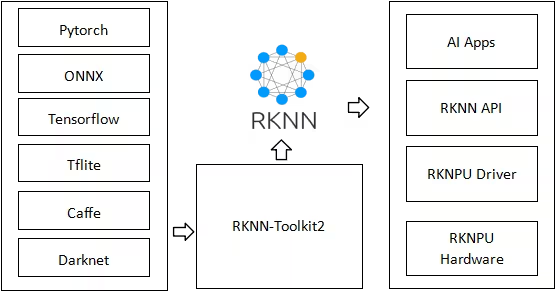
اختُبر هذا الدليل باستخدام Radxa Rock 5B المعتمد على Rockchip RK3588 وRadxa Zero 3W المعتمد على Rockchip RK3566. ومن المتوقع أن يعمل على أجهزة أخرى تعتمد على Rockchip وتدعم rknn-toolkit2، مثل RK3576 وRK3568 وRK3562 وRK2118 وRV1126B وRV1103 وRV1106 وRV1103B وRV1106B. تتطلب الأجهزة التي لا تدعم سوى INT8، مثل RV1103 وRV1106، استخدام quantize=8.
ما هو Rockchip؟#
تصمّم Rockchip أنظمة على رقائق (SoCs) موفّرة للطاقة تُستخدم في مجموعة واسعة من الإلكترونيات الاستهلاكية والتطبيقات الصناعية ومنتجات AI. وبفضل بنيتها القائمة على ARM، ووحدات المعالجة العصبية (NPUs) المدمجة، ودعم الوسائط المتعددة عالية الدقة، تشغّل أنظمة Rockchip على رقائق أجهزة مثل الأجهزة اللوحية وأجهزة التلفاز الذكية وأنظمة IoT وتطبيقات AI الطرفية. وتقدم شركات مثل Radxa وASUS وPine64 وOrange Pi وOdroid وKhadas وBanana Pi مجموعة متنوعة من المنتجات القائمة على أنظمة Rockchip على رقائق.
مجموعة أدوات RKNN#
إن مجموعة أدوات RKNN هي مجموعة من الأدوات والمكتبات التي تقدمها Rockchip لتسهيل نشر نماذج التعلم العميق على منصاتها العتادية. ويُعد RKNN، أو الشبكة العصبية من Rockchip، التنسيق الخاص الذي تستخدمه هذه الأدوات. صُممت نماذج RKNN للاستفادة الكاملة من تسريع الأجهزة الذي توفره وحدة المعالجة العصبية (NPU) من Rockchip، بما يضمن أداءً عاليًا في مهام الذكاء الاصطناعي على أجهزة مثل RK3588 وRK3566 وRV1103 وRV1106 وغيرها من الأنظمة المدعومة من Rockchip.
الميزات الرئيسية لنماذج RKNN#
توفر نماذج RKNN عدة مزايا للنشر على منصات Rockchip:
- محسّنة لوحدة NPU: تُحسّن نماذج RKNN خصيصًا لتعمل على وحدات NPU من Rockchip، ما يضمن أقصى أداء وكفاءة.
- زمن استجابة منخفض: يقلل تنسيق RKNN من زمن استجابة الاستدلال، وهو أمر بالغ الأهمية للتطبيقات الآنية على الأجهزة الطرفية.
- تخصيص خاص بالمنصة: يمكن تكييف نماذج RKNN مع منصات Rockchip محددة، ما يتيح استخدام موارد الأجهزة على نحو أفضل.
- كفاءة استهلاك الطاقة: تستفيد نماذج RKNN من عتاد NPU المخصص، فتستهلك طاقة أقل من المعالجة المعتمدة على CPU أو GPU، ما يطيل عمر بطارية الأجهزة المحمولة.
تثبيت نظام التشغيل على أجهزة Rockchip#
تتمثل الخطوة الأولى بعد الحصول على جهاز قائم على Rockchip في تثبيت نظام تشغيل ليتمكن العتاد من الإقلاع إلى بيئة عمل. أُدرج أدناه رابطا دليلَي البدء السريع للجهازين اللذين خضعا للاختبار، Radxa Rock 5B وRadxa Zero 3W.
المهام المدعومة#
يدعم تصدير RKNN مهام Ultralytics السبع جميعها. ولا يتوفر التقسيم الدلالي وتقدير العمق إلا مع YOLO26، وهي العائلة الوحيدة التي تتضمن رأسي المهام هذين.
التصدير إلى RKNN: تحويل نموذج YOLO26#
صدّر نموذج Ultralytics YOLO26 إلى تنسيق RKNN وشغّل الاستدلال باستخدام النموذج المُصدّر.
احرص على استخدام حاسوب Linux قائم على X86 لتصدير النموذج إلى RKNN، لأن التصدير على الأجهزة القائمة على Rockchip (ARM64) غير مدعوم.
التثبيت#
لتثبيت الحزم المطلوبة، شغّل:
# Install the required package for YOLO26
pip install ultralytics
للاطلاع على التعليمات التفصيلية وأفضل الممارسات المتعلقة بعملية التثبيت، راجع دليل تثبيت Ultralytics. إذا واجهت أي صعوبات أثناء تثبيت الحزم المطلوبة لـ YOLO26، فراجع دليل المشكلات الشائعة للاطلاع على الحلول والنصائح.
الاستخدام#
يدعم التصدير بدقتَي FP16 وINT8 جميع المهام. تحتفظ إصدارات INT8 للأهداف المتوافقة مع FP16 بالطبقات ذات الخطأ المرتفع بدقة FP16 (مجموعة أدوات RKNN auto_hybrid)؛ أما الأهداف التي تدعم INT8 فقط، مثل RV1103 وRV1106، فتتجاوز هذه الخطوة. بالنسبة إلى نماذج الكشف والتجزئة وتقدير الوضع وOBB، ينتهي ملف INT8 .rknn عند طبقات الالتفاف الإخراجية للرأس، ويُخرج موترات خامًا للرأس على مستوى كل طبقة، ويُنفّذ فك ترميز الصناديق على وحدة المعالجة المركزية المضيفة بدقة الفاصلة العائمة، استنادًا إلى الملف tail.onnx في الدليل المُصدَّر. تشغّل Ultralytics tail.onnx باستخدام بيئة تشغيل ONNX (تُثبَّت تلقائيًا عند عدم توفرها)؛ ويجب على بيئات التشغيل المخصصة تشغيل tail.onnx أو تنفيذ فك الترميز نفسه. أعد تصدير نماذج الكشف والتجزئة وتقدير الوضع وOBB بدقة INT8 التي صُدّرت باستخدام إصدارات Ultralytics السابقة، لأن مخرجاتها تتضمن إحداثيات مُطبَّعة نسبةً إلى الإدخال، ولا تعيد الإصدارات الحالية قياسها. جرى التحقق من دقة INT8 لجميع المهام باستخدام محاكي rknn-toolkit2، لكن لم يُتحقق منها بعد على أجهزة Rockchip. تُعاير إصدارات INT8 للعمق باستخدام صور مجموعة بيانات العمق المقترنة بخرائط عمق. اختر صور معايرة تغطي نطاق العمق القريب والبعيد في مشهد النشر، إذ تفقد الأعماق التي تتجاوز النطاق المُعايَر دقتها.
يدعم تنسيق RKNN أوضاع التصدير والتنبؤ والتحقق. ويُجرى الاستدلال والتحقق على عتاد NPU من Rockchip. صدّر نموذجك، ثم حمّل النموذج المُصدّر لإجراء الاستدلال أو التحقق من دقته. يستخدم تصدير RKNN افتراضيًا مسار البناء بالفاصلة العائمة (quantize=16) للأهداف المدعومة بـ FP16 من Rockchip. استخدم quantize=8 لبناء نموذج RKNN مكمّم إلى INT8 باستخدام بيانات المعايرة. لا يتيح تصدير RKNN وضع FP32 منفصلًا؛ فالإعداد الافتراضي FP16 لا يطلب FP32.
from ultralytics import YOLO
# حمّل نموذج YOLO26 (استبدله بأي نموذج لمهمة مدعومة)
model = YOLO("yolo26n-obb.pt")
# صدّر النموذج إلى تنسيق RKNN
model.export(format="rknn", name="rk3588") # creates 'yolo26n-obb_rknn_model'
# تصدير نموذج RKNN مكمَّم بدقة INT8 باستخدام بيانات المعايرة
model = YOLO("yolo26n.pt")
model.export(format="rknn", name="rk3588", quantize=8, data="coco8.yaml") # creates 'yolo26n_rknn_model'from ultralytics import YOLO
# حمّل نموذج RKNN المُصدّر
model = YOLO("./yolo26n-obb_rknn_model")
# تنفيذ الاستدلال
results = model("https://ultralytics.com/images/boats.jpg")from ultralytics import YOLO
# حمّل نموذج RKNN المُصدّر
model = YOLO("./yolo26n-obb_rknn_model")
# تحقق من الدقة باستخدام مجموعة بيانات DOTA8
metrics = model.val(data="dota8.yaml")وسيطات التصدير#
| المعامل | النوع | الافتراضي | الوصف |
|---|---|---|---|
format | str | 'rknn' | تنسيق الهدف للنموذج المُصدّر، ويحدد التوافق مع بيئات النشر على Rockchip. |
imgsz | int أو tuple | 640 | حجم الصورة المطلوب كمدخل للنموذج. يمكن تحديده كعدد صحيح للصور المربعة أو كصف (height, width) للأبعاد المحددة. |
batch | int | 1 | يحدد حجم الدفعة للاستدلال بنموذج التصدير، أو الحد الأقصى لعدد الصور التي سيعالجها النموذج المُصدّر بالتزامن في وضع predict. |
name | str | 'rk3588' | يحدد هدف Rockchip. تدعم rk3588 وrk3576 وrk3566 وrk3568 وrk3562 وrk2118 وrv1126b صيغة FP16 (quantize=16 أو غير المحدد) وصيغة INT8 (quantize=8)؛ أما rv1103 وrv1106 وrv1103b وrv1106b فلا تدعم إلا INT8 (quantize=8 أو غير المحدد). |
quantize | int أو str | None | دقة التكميم: عند عدم التعيين أو استخدام 16، تُنشأ إصدارات FP16 للأهداف المتوافقة مع FP16؛ وعند عدم التعيين، يُفعَّل INT8 تلقائيًا للأهداف التي تدعم INT8 فقط؛ أما 8 فينشئ إصدارًا بدقة INT8. لا يتضمن تصدير RKNN وضعًا منفصلًا بدقة FP32. يحل هذا الخيار محل العَلَمين المتقادمَين half/int8. |
simplify | bool | True | يبسّط رسم ONNX الوسيط باستخدام onnxslim. |
opset | int | None | يحدد إصدار ONNX opset للرسم البياني الوسيط في ONNX. القيمة الافتراضية هي 19 إذا لم يُحدّد الخيار، وتُخفّض القيم التي تتجاوز 19 إلى 19. |
data | str | None | ملف YAML لمجموعة البيانات المستخدم لمعايرة INT8. إذا لم يُحدَّد مع quantize=8، يستخدم Ultralytics مجموعة البيانات الافتراضية للمهمة (مثل coco8.yaml للاكتشاف وdepth8.yaml للعمق). |
fraction | float أو int أو list | 1.0 | مجموعة فرعية للمعايرة محددة كنسبة أو عدد صور أو نسب/أعداد [train, val, test]. تترك القوائم المكوّنة من عنصرين test كاملة، بينما تتجاوزها 0. |
device | str | None | يحدد الجهاز المستخدم للتصدير: GPU (device=0)، أو CPU (device=cpu). |
استخدم جهاز Linux بمعمارية x86 عند التصدير إلى RKNN.
لمزيد من التفاصيل حول عملية التصدير، تفضّل بزيارة صفحة وثائق Ultralytics حول التصدير.
نشر نماذج YOLO26 RKNN المُصدّرة#
بعد تصدير نماذج Ultralytics YOLO26 بنجاح إلى تنسيق RKNN، تتمثل الخطوة التالية في نشر هذه النماذج على الأجهزة القائمة على Rockchip.
التثبيت#
لتثبيت الحزم المطلوبة، شغّل:
# Install the required package for YOLO26
pip install ultralytics
بعد التثبيت، نفّذ الاستدلال والتحقق على جهاز Rockchip لديك تمامًا كما هو موضح في قسم الاستخدام أعلاه؛ إذ يُحمّل _rknn_model المُصدّر مباشرةً باستخدام YOLO(...).
إذا ظهرت رسالة في السجل تفيد بأن إصدار وقت تشغيل RKNN لا يتوافق مع إصدار مجموعة أدوات RKNN وفشل الاستدلال، فيرجى استبدال /usr/lib/librknnrt.so بالملف الرسمي librknnrt.so.

تطبيقات واقعية#
يمكن استخدام الأجهزة المدعومة من Rockchip والمزوّدة بنماذج YOLO26 RKNN في تطبيقات متنوعة:
- المراقبة الذكية: انشر أنظمة فعالة لكشف الأجسام لمراقبة الأمن مع استهلاك منخفض للطاقة.
- الأتمتة الصناعية: نفّذ مراقبة الجودة وكشف العيوب مباشرةً على الأجهزة المضمّنة.
- تحليلات قطاع التجزئة: تتبّع سلوك العملاء وأدر المخزون في الوقت الفعلي دون الاعتماد على السحابة.
- الزراعة الذكية: راقب صحة المحاصيل واكشف الآفات باستخدام الرؤية الحاسوبية في الزراعة.
- الروبوتات ذاتية التشغيل: أتح الملاحة القائمة على الرؤية وكشف العوائق على المنصات محدودة الموارد.
المعايير المرجعية#
أجرى فريق Ultralytics الاختبارات المعيارية لـ YOLO26 الواردة أدناه على Radxa Rock 5B القائم على Rockchip RK3588، باستخدام تنسيق النموذج rknn لقياس السرعة والدقة.
| النموذج | التنسيق | الدقة | الحالة | الحجم (MB) | mAP50-95(B) | وقت الاستدلال (ms/im) |
|---|---|---|---|---|---|---|
| YOLO26n | rknn | FP16 | ✅ | 7.2 | 0.477 | 58.5 |
| YOLO26n | rknn | INT8 | ✅ | 4.1 | 0.463 | 41.2 |
| YOLO26s | rknn | FP16 | ✅ | 21.0 | 0.569 | 93.8 |
| YOLO26s | rknn | INT8 | ✅ | 12.0 | 0.554 | 61.9 |
| YOLO26m | rknn | FP16 | ✅ | 43.0 | 0.608 | 226.3 |
| YOLO26m | rknn | INT8 | ✅ | 22.0 | 0.603 | 122.0 |
| YOLO26l | rknn | FP16 | ✅ | 53.0 | 0.628 | 264.7 |
| YOLO26l | rknn | INT8 | ✅ | 28.0 | 0.617 | 145.3 |
| YOLO26x | rknn | FP16 | ✅ | 113.0 | 0.664 | 655.4 |
| YOLO26x | rknn | INT8 | ✅ | 58.0 | 0.649 | 287.4 |
أُجري الاختبار المعياري باستخدام ultralytics 8.4.60
أُجري التحقق من معايير الأداء أعلاه باستخدام مجموعة بيانات COCO128. ولا يشمل زمن الاستدلال المعالجة المسبقة أو اللاحقة. وسيُحدّث صفا INT8 بعد التحقق من مسار التصدير الحالي لـ INT8 (فك الترميز على المضيف وauto_hybrid) على عتاد Rockchip.
الملخص#
تعلمت في هذا الدليل كيفية تصدير نماذج Ultralytics YOLO26 إلى تنسيق RKNN لنشرها على منصات Rockchip. كما تعرفت إلى RKNN Toolkit والمزايا المحددة لاستخدام نماذج RKNN في تطبيقات الذكاء الاصطناعي الطرفي.
يوفر الجمع بين Ultralytics YOLO26 وتقنية NPU من Rockchip حلًا فعالًا لتشغيل مهام الرؤية الحاسوبية على الأجهزة المضمنة. ويتيح هذا النهج اكتشاف الكائنات في الوقت الفعلي وتطبيقات ذكاء اصطناعي بصرية أخرى مع استهلاك منخفض للطاقة.
لمزيد من التفاصيل حول الاستخدام، راجع الوثائق الرسمية لـ RKNN.
الأسئلة الشائعة#
يمكنك تصدير نموذج Ultralytics YOLO إلى تنسيق RKNN باستخدام الطريقة
export()في حزمة Ultralytics Python أو عبر واجهة سطر الأوامر (CLI). تأكد من استخدام حاسوب Linux بمعمارية x86 لعملية التصدير، إذ لا تُدعم أجهزة ARM64 مثل Rockchip لهذه العملية. ويمكنك تحديد منصة Rockchip المستهدفة باستخدام الوسيطةname، مثلrk3588أوrk3566أو غيرهما. تنشئ هذه العملية نموذج RKNN محسّنًا وجاهزًا للنشر على جهاز Rockchip، مستفيدًا من وحدة المعالجة العصبية (NPU) لتسريع الاستدلال.مثالfrom ultralytics import YOLO # حمّل نموذج YOLO الخاص بك model = YOLO("yolo26n.pt") # صدّر النموذج إلى تنسيق RKNN لمنصة Rockchip محددة model.export(format="rknn", name="rk3588")صُممت نماذج RKNN خصيصًا للاستفادة من إمكانات تسريع العتاد في وحدات المعالجة العصبية (NPUs) من Rockchip. وينتج عن هذا التحسين استدلال أسرع وزمن استجابة أقل مقارنةً بتشغيل تنسيقات نماذج عامة مثل ONNX أو LiteRT على العتاد نفسه. ويسمح استخدام نماذج RKNN باستغلال موارد الجهاز بكفاءة أكبر، ما يؤدي إلى استهلاك طاقة أقل وأداء إجمالي أفضل، وهو أمر بالغ الأهمية خصوصًا للتطبيقات الآنية على الأجهزة الطرفية. ومن خلال تحويل نماذج Ultralytics YOLO إلى RKNN، يمكنك تحقيق الأداء الأمثل على الأجهزة المزودة بأنظمة Rockchip على رقاقة مثل RK3588 وRK3566 وغيرها.
تُحسّن نماذج RKNN خصيصًا لمنصات Rockchip ووحدات NPU المدمجة فيها. ولتحقيق أفضل أداء على المنصات الأخرى، يُوصى بتصدير نماذج Ultralytics YOLO إلى تنسيقات مصممة خصيصًا لتلك المنصات، مثل TensorRT لوحدات GPU من NVIDIA أو Edge TPU لأجهزة Coral من Google. تدعم Ultralytics التصدير إلى مجموعة واسعة من التنسيقات، ما يضمن التوافق مع مسرّعات الأجهزة المتنوعة.
يدعم تصدير Ultralytics YOLO إلى تنسيق RKNN منصات Rockchip التي تستخدم إصدارات RKNN ذات الفاصلة العائمة، بما فيها RK3588 وRK3576 وRK3566 وRK3568 وRK3562 وRK2118 وRV1126B. كما يدعم تصدير RKNN المكمّم بصيغة INT8 باستخدام
quantize=8، وهو مطلوب للأهداف التي لا تدعم إلا INT8، مثل RV1103 وRV1106 وRV1103B وRV1106B. وتتوفر هذه المنصات على نطاق واسع في أجهزة من شركات مصنّعة مثل Radxa وASUS وPine64 وOrange Pi وOdroid وKhadas وBanana Pi، ما يتيح نشر نماذج RKNN المحسّنة على مجموعة من الأجهزة المدعومة من Rockchip، بدءًا من الحواسيب أحادية اللوحة وصولًا إلى الأنظمة الصناعية.تتفوق نماذج RKNN عمومًا على التنسيقات الأخرى مثل ONNX أو LiteRT على أجهزة Rockchip، بفضل تحسينها لوحدات NPU من Rockchip. فعلى سبيل المثال، تُظهر معايير الأداء على Radxa Rock 5B (RK3588) أن YOLO26n بتنسيق RKNN يحقق زمن استدلال يبلغ 58.5 مللي ثانية/صورة بدقة FP16 و41.2 مللي ثانية/صورة بدقة INT8. وتُدرج نتائج جميع أحجام نماذج YOLO26 في قسم معايير الأداء. ومن خلال التشغيل على عتاد NPU المخصص، تقلل نماذج RKNN زمن الاستجابة إلى أدنى حد وتزيد الإنتاجية إلى أقصى حد للتطبيقات الآنية على الأجهزة الطرفية القائمة على Rockchip.


التعليقات45
اطرح سؤالًا، وشارك نتائجك، أو ساعد شخصًا آخر.
as-jackson
We are pleased to confirm that the following ArmSoM boards based on Rockchip RK3576 have been successfully tested with Ultralytics projects (e.g., YOLO11n):
Validation Scope:
Model training/inference pipeline
1yizi72
I tried to convert the yolo11n.pt into a rknn model through codes below: from ultralytics import YOLO model = YOLO("yolo11n.pt") model.export(format="rknn", name="rk3588") and everything went correct. A rknn model named yolo11n-rk3588.rknn was build and used to infer a very traditional yolo demo image "bus"(a blue bus with several people in front of it), but no detection result was obtained.
I tried to convert the yolol11n.pt into onnx model through above codes firstly, and then used a convert.py offered by rknn_model_zoo/examples/yolo11/python,
import sys from rknn.api import RKNN
DATASET_PATH = '../../../datasets/COCO/coco_subset_20.txt' DEFAULT_RKNN_PATH = '/home/yizi/model/yolo11/yolodet.rknn' DEFAULT_QUANT = False
def parse_arg(): if len(sys.argv) < 3: print("Usage: python3 {} onnx_model_path [platform] [dtype(optional)] [output_rknn_path(optional)]".format(sys.argv[0])) print(" platform choose from [rk3562,rk3566,rk3568,rk3588,rk3576,rk1808,rv1109,rv1126]") print(" dtype choose from [i8, fp] for [rk3562,rk3566,rk3568,rk3588,rk3576]") print(" dtype choose from [u8, fp] for [rk1808,rv1109,rv1126]") exit(1)
model_path = sys.argv[1]
platform = sys.argv[2]

do_quant = DEFAULT_QUANT
if len(sys.argv) > 3:
    model_type = sys.argv[3]
    if model_type not in ['i8', 'u8', 'fp']:
        print("ERROR: Invalid model type: {}".format(model_type))
        exit(1)
    elif model_type in ['i8', 'u8']:
        do_quant = True
    else:
        do_quant = False

if len(sys.argv) > 4:
    output_path = sys.argv[4]
else:
    output_path = DEFAULT_RKNN_PATH

return model_path, platform, do_quant, output_path
if name == 'main': model_path, platform, do_quant, output_path = parse_arg()
# Create RKNN object
rknn = RKNN(verbose=False)

# Pre-process config
print('--> Config model')
rknn.config(mean_values=[[0, 0, 0]], std_values=[[255, 255, 255]], target_platform=platform)
print('done')

# Load model
print('--> Loading model')
ret = rknn.load_onnx(model=model_path)
if ret != 0:
    print('Load model failed!')
    exit(ret)
print('done')

# Build model
print('--> Building model')
ret = rknn.build(do_quantization=do_quant, dataset=DATASET_PATH)
if ret != 0:
    print('Build model failed!')
    exit(ret)
print('done')

# Export rknn model
print('--> Export rknn model')
ret = rknn.export_rknn(output_path)
if ret != 0:
    print('Export rknn model failed!')
    exit(ret)
print('done')

# Release
rknn.release()
Still everything went correct. A rknn model was created and applied to "bus.jpg", and there was no detection at all. I wonder what's wrong in the whole process?
1 Glenn JocherUltralytics
@yizi72 thanks for the detailed report. For RKNN inference issues with YOLO11, please ensure:
- You're using matching RKNN Toolkit and runtime versions (update both if needed)
- Input images are 640x640 with pixel values normalized 0-255
- You load models via
YOLO('./yolo11n_rknn_model')as shown in our RKNN deployment docs
If issues persist, please share your full environment details and validation results from both export methods.
1、I used rknn-toolkit2-2.3.0 which is the latest version ,bu I still did "pip install rknn-toolkit2 --upgrade" again. 2、The input image is 640*640, uchar, 0-255. 3. I used the following setting to transfer yolo11n.pt to onnx, from ultralytics import YOLO
加载一个模型,路径为 YOLO 模型的 .pt 文件
model = YOLO("yolo11n.pt")
导出模型,设置多种参数
model.export( format="onnx", imgsz=(640, 640),
keras=False,
optimize=True,
half=False,
int8=False,
dynamic=False,
simplify=True,
opset=12,
#workspace=4.0,
nms=False,
batch=1
) and applied the following codes to verify yolo11n.onnx model:from ultralytics import YOLO from PIL import Image
Load a model
model = YOLO("/home/yizi/models/yolo11/yolo11n.onnx") # load an official model
Predict with the model
results = model("bus.jpg") # predict on an image #results = rknn_model("bus.jpg")
Access the results
for result in results: xywh = result.boxes.xywh # center-x, center-y, width, height xywhn = result.boxes.xywhn # normalized xyxy = result.boxes.xyxy # top-left-x, top-left-y, bottom-right-x, bottom-right-y xyxyn = result.boxes.xyxyn # normalized names = [result.names[cls.item()] for cls in result.boxes.cls.int()] # class name of each box confs = result.boxes.conf # confidence score of each box
The results are good. All objects in bus.jpg were detected. Then I run the following code to transfer onnx to rknn:
from rknn.api import RKNN import cv2 import numpy as np
if name == 'main': rknn = RKNN(verbose=True,verbose_file="log.txt") rknn.config( mean_values=[[0, 0, 0]], std_values=[[255, 255, 255]], target_platform="rk3588", optimization_level=3 )
rknn.load_onnx(
    model="/home/yizi/models/yolo11/yolo11n.onnx",
    input_size_list=[[1,3,640,640]],
)
rknn.build(
    do_quantization=False
)

rknn.export_rknn(
    export_path="/home/yizi/models/yolo11/yolo11n.rknn"
)

rknn.release()
The transferring process went smooth, two problems appeared.
Firstly,when this rknn model was pushed into a rk3588 tablet, and run with a binary executable file generated by cross-compilation, no result was detected.
Secondly, I tried to run the following codes:
from ultralytics import YOLO from PIL import Image
rknn_model = YOLO("/home/yizi/models/yolo11/yolo11n.rknn", task=detect)
results = model("bus.jpg")
An error message, "model='/home/yizi/models/yolo11/yolo11n.rknn' is not a supported model format. Ultralytics supports: ('PyTorch', 'TorchScript', 'ONNX', 'OpenVINO', 'TensorRT', 'CoreML', 'TensorFlow SavedModel', 'TensorFlow GraphDef', 'TensorFlow Lite', 'TensorFlow Edge TPU', 'TensorFlow.js', 'PaddlePaddle', 'MNN', 'NCNN', 'IMX', 'RKNN') See https://docs.ultralytics.com/modes/predict for help. " appeared.
Last question, how many outputs does yolo11 yield? one or six?
- Glenn JocherUltralytics
@yizi72 thank you for the detailed report. For RKNN deployment issues:
- When using Ultralytics RKNN export, load models via the exported directory (not .rknn file), as shown in our RKNN deployment docs:
model = YOLO('./yolo11n_rknn_model') # directory path-
Ensure your RK3588 runtime uses matching librknnrt.so versions with your RKNN Toolkit 2.3.0 installation
-
YOLO11 detection models output 3 tensors by default (different from older YOLO versions). For conversion issues, we recommend using our native
model.export(format='rknn')rather than manual ONNX conversion.
Let me know if you still face issues after verifying these points.
Thanks for replies. I did verify all points you've mentioned above. When running model("bus.jpg"), error messages show:
File "/home/yizi/anaconda3/envs/rknn/lib/python3.9/site-packages/ultralytics/engine/model.py", line 182, in call return self.predict(source, stream, **kwargs) File "/home/yizi/anaconda3/envs/rknn/lib/python3.9/site-packages/ultralytics/engine/model.py", line 543, in predict self.predictor.setup_model(model=self.model, verbose=is_cli) File "/home/yizi/anaconda3/envs/rknn/lib/python3.9/site-packages/ultralytics/engine/predictor.py", line 378, in setup_model self.model = AutoBackend( File "/home/yizi/anaconda3/envs/rknn/lib/python3.9/site-packages/torch/utils/_contextlib.py", line 116, in decorate_context return func(*args, **kwargs) File "/home/yizi/anaconda3/envs/rknn/lib/python3.9/site-packages/ultralytics/nn/autobackend.py", line 495, in init raise OSError("RKNN inference is only supported on Rockchip devices.") OSError: RKNN inference is only supported on Rockchip devices.
It's very strange because I did connect a RK3588 tablet with my virtual machine.
I still have a quesiton on yolo11n output: yolo11n.pt has one output with shape (1, 84, 8400), and yolo11n-rk3588.rknn has one output with shape (1,84, 8400, 0). Are they correct? If so, can I use the similar codes to analyze rknn output, such as :
for result in results: xywh = result.boxes.xywh # center-x, center-y, width, height xywhn = result.boxes.xywhn # normalized xyxy = result.boxes.xyxy # top-left-x, top-left-y, bottom-right-x, bottom-right-y xyxyn = result.boxes.xyxyn # normalized names = [result.names[cls.item()] for cls in result.boxes.cls.int()] # class name of each box confs = result.boxes.conf
- Glenn JocherUltralytics
@yizi72 thanks for the details. For the RKNN inference error: ensure your Python script is running directly on the RK3588 hardware (not through a VM) as RKNN models require native Rockchip NPU access. Regarding outputs, YOLO11 detection models produce 3 output tensors by default (see our RKNN deployment docs), but your code should work if using the exported RKNN directory with the included postprocessing. Let me know if you still face issues after verifying native hardware execution.
 Yufeng Wu
Hello, Ultralytics team. I wonder if it's possible to port yolo26n-pose to rknn? I'm not sure if it's difficult to work out on my own? Is there any model architecture problems that prevent porting the pose models to rknn?
- Glenn JocherUltralytics
@kamosmkey exports fine. See https://platform.ultralytics.com/glenn-jocher/example-project/exp-24?tab=export
2
montemadjo
It appears it does not support rv1106 platform yet
When I try to export the model using this command
model.export(format="rknn", name="rv1106", imgsz=320)It gives the following error
E build: Current target_platform(rv1106) not support do_quantization = False!
E export_rknn: RKNN model does not exist, please load & build model first!
🤔
- Glenn JocherUltralytics(تم التعديل)
rv1106is an INT8-only target, so it needs a quantized RKNN build. Older Ultralytics releases always built withdo_quantization=False, which fails with the message you saw. Current releases support it: upgrade withpip install -U ultralyticsand export withquantize=8plus calibration data:model.export(format="rknn", name="rv1106", imgsz=320, quantize=8, data="coco8.yaml")See the Rockchip RKNN export guide. If it still fails, share your
!yolo checksoutput andrknn-toolkit2version here and we can sanity-check the environment.1 Here's the quick workaround for those who want to work with yolo26 on RV1106 chip (like Luckfox pico etc). I ran into a couple of issues there, including quantization erasing my confidence results.
Long story short - first you need to monkey-patch head.Detect.forward function in order to get two tensors - one for bboxes and one for scores. That way you escape all the heavy non-supported tensor functions. Then you export your yolo26 model to onnx format and finally to rknn like this
import torch
from ultralytics.nn.modules import head

# 1. First we monkey-patch the forward function
def patched_forward(self, x):
    if self.end2end:
        h = self.one2one
    else:
        h = self.one2many

    box_head = h["box_head"]
    cls_head = h["cls_head"]

    if box_head is None or cls_head is None:
        raise RuntimeError("Head moduls are None")

    bs = x[0].shape[0]
    boxes = torch.cat([box_head[i](x[i]).view(bs, 4 * self.reg_max, -1) for i in range(self.nl)], dim=-1)
    scores = torch.cat([cls_head[i](x[i]).view(bs, self.nc, -1) for i in range(self.nl)], dim=-1)

    preds = {"boxes": boxes, "scores": scores, "feats": x}
    y = self._inference(preds)

    # We are splitting into 2 tensors - both gets its own scale/zp at INT8 quantization
    bboxes = y[:, :4, :]   # [1, 4, 2100] — range 0-640
    scores = y[:, 4:, :]   # [1, 1, 2100] — range 0-1 (already sigmoid-ed)
    score_max_idx = scores[0, 0, :].argmax()
    return bboxes, scores

head.Detect.forward = patched_forward

# 2. Then we export to onnx model (we got best.pt model from ultralytics platform)
from ultralytics import YOLO
model = YOLO("best.pt")
model.export(format="onnx", dynamic=False, opset=12, imgsz=320)

# 3. Then we export to RKNN format
from rknn.api import RKNN

rknn = RKNN()

# 3.1. Konfiguracija specifična za RV1106
rknn.config(
    mean_values=[[0, 0, 0]],
    std_values=[[255, 255, 255]],
    target_platform='rv1106',
    quantized_algorithm='normal', # Ili 'mmse' za bolju preciznost
    quantized_dtype='asymmetric_quantized-8'
)

# 3.2. Load the ONNX model
print("Loading ONNX model...")
rknn.load_onnx(model='best.onnx')

# 3.3. Build modela sa INT8 kvantizacijom
# calib.txt should contain paths to calibration images
print("Building RKNN model with quantization...")
rknn.build(do_quantization=True, dataset='./calib.txt')

# 3.4. Exporting final .rknn file
print("Exporting RKNN model...")
rknn.export_rknn('./yolo26_rv1106_model_optimized.rknn')

rknn.release()
After this you need to postprocess those two outputs like this
yolo26_postprocess.h
/**
 * YOLO26 Post-processing header for Fish Counter
 *
 * Supports YOLO26 2-output format: boxes [1, 4, N] + scores [1, nc, N]
 *
 * Based on the working rknn_minimal_test example.
 */

#ifndef _YOLO26_POSTPROCESS_H_
#define _YOLO26_POSTPROCESS_H_

#include <stdint.h>
#include <vector>
#include "rknn_api.h"
#include "rknn_detector.h"

// YOLO26 model configuration defaults
#define YOLO26_CONF_THRESHOLD 0.25f
#define YOLO26_NMS_THRESHOLD 0.45f

// Detection result (same structure as postprocess.h for compatibility)
typedef struct
{
    float x1, y1, x2, y2; // Bounding box (in model coordinates)
    float confidence;
    int class_id;
} yolo26_detection_t;

// YOLO26 context for format detection and caching
typedef struct
{
    int num_predictions;
    int num_classes;
    bool boxes_transposed; // true = [1, 4, N], false = [1, N, 4]
} yolo26_context_t;

/**
 * Initialize YOLO26 post-processing
 * Detects the output format from model attributes
 *
 * @param app_ctx The RKNN app context with model info
 * @param yolo26_ctx Output: YOLO26 context for format info
 * @return 0 on success, -1 on error
 */
int yolo26_init_postprocess(rknn_app_context_t *app_ctx, yolo26_context_t *yolo26_ctx);

/**
 * Deinitialize YOLO26 post-processing
 */
void yolo26_deinit_postprocess();

/**
 * YOLO26 post_process: processes model outputs and returns detections
 * Uses 2-output format: boxes [1, 4, N] + scores [1, nc, N]
 *
 * @param app_ctx The RKNN app context
 * @param yolo26_ctx YOLO26 context from init
 * @param outputs Pointer to output tensor memory array
 * @param letter_box Letterbox transform info for coordinate mapping
 * @param conf_threshold Confidence threshold
 * @param nms_threshold NMS threshold
 * @param od_results Output: detection results (compatible with existing code)
 * @return 0 on success, -1 on error
 */
int yolo26_post_process(rknn_app_context_t *app_ctx, yolo26_context_t *yolo26_ctx,
                        void *outputs, letterbox_t *letter_box,
                        float conf_threshold, float nms_threshold,
                        object_detect_result_list *od_results);

#endif // _YOLO26_POSTPROCESS_H_
yolo26_postprocess.cc
/**
 * YOLO26 Post-processing for Fish Counter on RV1106
 *
 * Supports YOLO26 2-output format: boxes [1, 4, N] + scores [1, nc, N]
 *
 * Based on the working rknn_minimal_test example.
 */

#include "yolo26_postprocess.h"

#include <math.h>
#include <stdint.h>
#include <stdio.h>
#include <stdlib.h>
#include <string.h>
#include <algorithm>
#include <vector>

// Clamp value to range
inline static int clamp(float val, int min, int max)
{
    return val > min ? (val < max ? val : max) : min;
}

// Dequantize INT8 to float
static inline float dequantize(int8_t qnt, int32_t zp, float scale)
{
    return ((float)qnt - (float)zp) * scale;
}

// Sigmoid function
static inline float sigmoid(float x)
{
    return 1.0f / (1.0f + expf(-x));
}

// Calculate IoU between two boxes
static float calculate_iou(float x1_a, float y1_a, float x2_a, float y2_a,
                           float x1_b, float y1_b, float x2_b, float y2_b)
{
    float x1 = std::max(x1_a, x1_b);
    float y1 = std::max(y1_a, y1_b);
    float x2 = std::min(x2_a, x2_b);
    float y2 = std::min(y2_a, y2_b);

    float inter_w = std::max(0.0f, x2 - x1);
    float inter_h = std::max(0.0f, y2 - y1);
    float inter_area = inter_w * inter_h;

    float area_a = (x2_a - x1_a) * (y2_a - y1_a);
    float area_b = (x2_b - x1_b) * (y2_b - y1_b);
    float union_area = area_a + area_b - inter_area;

    return union_area > 0 ? inter_area / union_area : 0;
}

// Non-Maximum Suppression for YOLO26 detections
static std::vector<yolo26_detection_t> yolo26_nms(std::vector<yolo26_detection_t> &detections, float nms_threshold)
{
    // Sort by confidence (descending)
    std::sort(detections.begin(), detections.end(),
              [](const yolo26_detection_t &a, const yolo26_detection_t &b)
              { return a.confidence > b.confidence; });

    std::vector<yolo26_detection_t> result;
    std::vector<bool> suppressed(detections.size(), false);

    for (size_t i = 0; i < detections.size(); i++)
    {
        if (suppressed[i])
            continue;

        result.push_back(detections[i]);

        for (size_t j = i + 1; j < detections.size(); j++)
        {
            if (suppressed[j])
                continue;

            // Only suppress same class
            if (detections[i].class_id != detections[j].class_id)
                continue;

            float iou = calculate_iou(
                detections[i].x1, detections[i].y1, detections[i].x2, detections[i].y2,
                detections[j].x1, detections[j].y1, detections[j].x2, detections[j].y2);

            if (iou > nms_threshold)
            {
                suppressed[j] = true;
            }
        }
    }

    return result;
}

// Parse YOLO26 2-output format: boxes [1, 4, N] + scores [1, nc, N]
static std::vector<yolo26_detection_t> parse_yolo26_2output(
    rknn_tensor_mem **output_mems,
    rknn_tensor_attr *output_attrs,
    int model_width, int model_height,
    float conf_threshold, int num_classes,
    bool boxes_transposed)
{
    std::vector<yolo26_detection_t> detections;

    int8_t *boxes_data = (int8_t *)output_mems[0]->virt_addr;
    int32_t boxes_zp = output_attrs[0].zp;
    float boxes_scale = output_attrs[0].scale;

    int8_t *scores_data = (int8_t *)output_mems[1]->virt_addr;
    int32_t scores_zp = output_attrs[1].zp;
    float scores_scale = output_attrs[1].scale;

    // Determine number of anchors
    int num_anchors;
    if (boxes_transposed)
    {
        num_anchors = output_attrs[0].dims[2];
    }
    else
    {
        num_anchors = output_attrs[0].dims[1];
    }

    // Check if scores are already sigmoid or logits
    float scores_min = 9999, scores_max = -9999;
    for (int i = 0; i < (int)output_attrs[1].n_elems; i++)
    {
        float val = dequantize(scores_data[i], scores_zp, scores_scale);
        if (val < scores_min)
            scores_min = val;
        if (val > scores_max)
            scores_max = val;
    }
    bool scores_are_sigmoid = (scores_min >= -0.1f && scores_max <= 1.1f);

    for (int i = 0; i < num_anchors; i++)
    {
        // Get box coordinates
        float x1, y1, x2, y2;
        if (boxes_transposed)
        {
            // [1, 4, N] - channel first
            x1 = dequantize(boxes_data[0 * num_anchors + i], boxes_zp, boxes_scale);
            y1 = dequantize(boxes_data[1 * num_anchors + i], boxes_zp, boxes_scale);
            x2 = dequantize(boxes_data[2 * num_anchors + i], boxes_zp, boxes_scale);
            y2 = dequantize(boxes_data[3 * num_anchors + i], boxes_zp, boxes_scale);
        }
        else
        {
            // [1, N, 4] - anchor first
            x1 = dequantize(boxes_data[i * 4 + 0], boxes_zp, boxes_scale);
            y1 = dequantize(boxes_data[i * 4 + 1], boxes_zp, boxes_scale);
            x2 = dequantize(boxes_data[i * 4 + 2], boxes_zp, boxes_scale);
            y2 = dequantize(boxes_data[i * 4 + 3], boxes_zp, boxes_scale);
        }

        // Check if format is xywh instead of xyxy
        if (x2 < x1 || y2 < y1)
        {
            // Assume xywh format: convert to xyxy
            float cx = x1, cy = y1, w = x2, h = y2;
            x1 = cx - w / 2.0f;
            y1 = cy - h / 2.0f;
            x2 = cx + w / 2.0f;
            y2 = cy + h / 2.0f;
        }

        // Find max class score
        float max_score = -9999;
        int max_class = 0;
        for (int c = 0; c < num_classes; c++)
        {
            float score;
            if (boxes_transposed)
            {
                // [1, nc, N]
                score = dequantize(scores_data[c * num_anchors + i], scores_zp, scores_scale);
            }
            else
            {
                // [1, N, nc]
                score = dequantize(scores_data[i * num_classes + c], scores_zp, scores_scale);
            }

            if (!scores_are_sigmoid)
            {
                score = sigmoid(score);
            }

            if (score > max_score)
            {
                max_score = score;
                max_class = c;
            }
        }

        if (max_score < conf_threshold)
            continue;

        // Clamp to model bounds
        x1 = std::max(0.0f, std::min(x1, (float)model_width));
        y1 = std::max(0.0f, std::min(y1, (float)model_height));
        x2 = std::max(0.0f, std::min(x2, (float)model_width));
        y2 = std::max(0.0f, std::min(y2, (float)model_height));

        // Skip invalid boxes
        if (x2 <= x1 || y2 <= y1)
            continue;

        yolo26_detection_t det;
        det.x1 = x1;
        det.y1 = y1;
        det.x2 = x2;
        det.y2 = y2;
        det.confidence = max_score;
        det.class_id = max_class;

        detections.push_back(det);
    }

    return detections;
}

int yolo26_init_postprocess(rknn_app_context_t *app_ctx, yolo26_context_t *yolo26_ctx)
{
    if (!app_ctx || !yolo26_ctx)
    {
        printf("[YOLO26] ERROR: Invalid parameters\n");
        return -1;
    }

    memset(yolo26_ctx, 0, sizeof(yolo26_context_t));

    int n_output = app_ctx->io_num.n_output;

    printf("[YOLO26] Initializing 2-output format (%d outputs)...\n", n_output);

    // Print output tensor info
    for (int i = 0; i < n_output; i++)
    {
        printf("  Output %d: dims=[%d,%d,%d,%d], size=%d\n", i,
               app_ctx->output_attrs[i].dims[0],
               app_ctx->output_attrs[i].dims[1],
               app_ctx->output_attrs[i].dims[2],
               app_ctx->output_attrs[i].dims[3],
               app_ctx->output_attrs[i].size);
    }

    if (n_output != 2)
    {
        printf("[YOLO26] ERROR: Expected 2 outputs (boxes + scores), got %d\n", n_output);
        return -1;
    }

    // Parse 2-output format: boxes + scores
    int boxes_dim1 = app_ctx->output_attrs[0].dims[1];
    int boxes_dim2 = app_ctx->output_attrs[0].dims[2];
    int scores_dim1 = app_ctx->output_attrs[1].dims[1];
    int scores_dim2 = app_ctx->output_attrs[1].dims[2];

    if (boxes_dim1 == 4)
    {
        // [1, 4, N] boxes format
        yolo26_ctx->num_predictions = boxes_dim2;
        yolo26_ctx->boxes_transposed = true;
        yolo26_ctx->num_classes = scores_dim1;
        printf("[YOLO26] Format: boxes [1,4,%d], scores [1,%d,%d]\n",
               boxes_dim2, scores_dim1, scores_dim2);
    }
    else if (boxes_dim2 == 4)
    {
        // [1, N, 4] boxes format
        yolo26_ctx->num_predictions = boxes_dim1;
        yolo26_ctx->boxes_transposed = false;
        yolo26_ctx->num_classes = scores_dim2;
        printf("[YOLO26] Format: boxes [1,%d,4], scores [1,%d,%d]\n",
               boxes_dim1, scores_dim1, scores_dim2);
    }
    else
    {
        printf("[YOLO26] ERROR: Invalid boxes dimensions [1,%d,%d], expected [1,4,N] or [1,N,4]\n",
               boxes_dim1, boxes_dim2);
        return -1;
    }

    printf("[YOLO26] Predictions: %d, Classes: %d\n",
           yolo26_ctx->num_predictions, yolo26_ctx->num_classes);

    return 0;
}

void yolo26_deinit_postprocess()
{
    // Nothing to cleanup currently
}

int yolo26_post_process(rknn_app_context_t *app_ctx, yolo26_context_t *yolo26_ctx,
                        void *outputs, letterbox_t *letter_box,
                        float conf_threshold, float nms_threshold,
                        object_detect_result_list *od_results)
{
    if (!app_ctx || !yolo26_ctx || !outputs || !letter_box || !od_results)
    {
        return -1;
    }

    rknn_tensor_mem **output_mems = (rknn_tensor_mem **)outputs;

    int model_width = app_ctx->model_width;
    int model_height = app_ctx->model_height;

    // Parse 2-output format
    std::vector<yolo26_detection_t> raw_detections = parse_yolo26_2output(
        output_mems,
        app_ctx->output_attrs,
        model_width, model_height,
        conf_threshold,
        yolo26_ctx->num_classes > 0 ? yolo26_ctx->num_classes : 1,
        yolo26_ctx->boxes_transposed);

    // Apply NMS
    std::vector<yolo26_detection_t> final_detections = yolo26_nms(raw_detections, nms_threshold);

    // Convert to output format with letterbox coordinate mapping
    memset(od_results, 0, sizeof(object_detect_result_list));
    int count = 0;

    for (const auto &det : final_detections)
    {
        if (count >= OBJ_NUMB_MAX_SIZE)
            break;

        // Map coordinates back to original image space
        float x1 = det.x1 - letter_box->x_pad;
        float y1 = det.y1 - letter_box->y_pad;
        float x2 = det.x2 - letter_box->x_pad;
        float y2 = det.y2 - letter_box->y_pad;

        // Scale back to original coordinates
        od_results->results[count].box.left = (int)(clamp(x1, 0, model_width) / letter_box->scale);
        od_results->results[count].box.top = (int)(clamp(y1, 0, model_height) / letter_box->scale);
        od_results->results[count].box.right = (int)(clamp(x2, 0, model_width) / letter_box->scale);
        od_results->results[count].box.bottom = (int)(clamp(y2, 0, model_height) / letter_box->scale);
        od_results->results[count].prop = det.confidence;
        od_results->results[count].cls_id = det.class_id;

        count++;
    }

    od_results->count = count;

    return 0;
}
And you're good to go! 🚀
- Glenn JocherUltralytics(تم التعديل)
Thanks for sharing this—splitting the head into 2 outputs (boxes + scores) is a sensible RV1106 workaround to keep RKNN-friendly ops and avoid INT8 scale/zero-point coupling issues; just note that monkey-patching
head.Detect.forwardis inherently version-fragile. Current Ultralytics already provides an INT8 flow for RV1106 viaquantize=8withdata=calibration images (see the Rockchip RKNN export guide), so please try that first. If you still need your custom split, open a GitHub issue linking back to this thread and include!yolo checks, yourrknn-toolkit2version, and a minimal calibration set description so we can evaluate it.
dttvn0010
99ms per image is too bad. Using rknn native with 3 npu cores, I can achieve ~11ms per image
NikolayKash
Hi, what did you done to achieve this performance?
- Glenn JocherUltralytics
@Arshapjoy thanks for the detailed info; for YOLO11 detection heads the export output shape is
(1, nc + 4, 8400)(4 box coords plusncclass scores), so with 2 classes(1, 6, 8400)is expected and both classes are present, whereas a postprocessor assuming5 + nc(old YOLO layout with an extra objectness channel) will effectively drop one class. I’d suggest updating your RKNN-side decoder to treat channels[0:4]as[x, y, w, h]and[4:]as class logits for allncclasses; if you still see a true(1, 7, 8400)PyTorch output on the same checkpoint, please share yourultralyticsversion andyolo checksoutput so we can dig deeper. The overall YOLO11 head behaviour is also outlined in the YOLO11 model documentation.@BakhtiariB the high-level
YOLO("./yolo11n_rknn_model")interface is designed to keep preprocessing, NPU inference and postprocessing together, so if you need to run only the core RKNN inference on the NPU while fully controlling pre/post on the CPU you’ll need to load the exported.rknnwith Rockchip’sRKNNAPI directly and implement your own preprocessing and YOLO11 postprocessing around it.@dttvn0010 the ~99 ms figure is a conservative end-to-end pipeline measurement on our RK3588 test setup, so seeing ~11 ms from a highly tuned RKNN deployment using all three NPU cores is quite reasonable; if you are open to sharing your exact model variant, quantization mode, input size and NPU core configuration, we can use that to cross-check and better explain the gap between baseline and fully optimized numbers.
@NikolayKash in practice, large gains like that usually come from combining INT8-quantized RKNN models, all three NPU cores enabled, a suitable input resolution and very lean Python-side pre/postprocessing, so it would be great if @dttvn0010 can share their exact script and RK3588 configuration for others to replicate.
guojieli
he YOLO11 benchmark was run by the Ultralytics team on a Radxa Rock 5B based on the Rockchip RK3588, using the RKNN model format to evaluate speed and accuracy. Could you please clarify whether this was an INT8-quantized model?
- Glenn JocherUltralytics(تم التعديل)
Those RKNN benchmarks were not INT8-quantized; they used the floating-point RKNN build. INT8 RKNN export is now available with
quantize=8anddata=for calibration; see the Rockchip RKNN export guide.
BakhtiariB
I used ultralytics for rk3588 by below code, but i want do inference in NPU and do preprocess and postprocess in CPU, how can separate them. while, in below code, line: "results = rknn_model("https://ultralytics.com/images/bus.jpg")" just all of them!
from ultralytics import YOLO
Load the exported RKNN model
rknn_model = YOLO("./yolo11n_rknn_model")
Run inference
results = rknn_model("https://ultralytics.com/images/bus.jpg")
Arshapjoy
Exported RKNN/ONNX model only has 1 output class instead of 2
Overview
I’m using Ultralytics YOLOv11s with two custom classes and exporting it to ONNX and RKNN formats. After conversion, inference on the RKNN device only detects a single class, and the output tensor shape is
(1, 6, 8400)instead of the expected(1, 7, 8400). I’ve validated that the source.ptmodel correctly reports 2 classes, but both ONNX and RKNN exports drop one class.
Model Details
- Checkpoint path:
path/to/yolo11s_custom.pt - Number of classes: 2
- Input size: 640×640
from ultralytics import YOLO
Load the YOLO11 model
model = YOLO("custom_yolo11s.pt")
Export the model to RKNN format
rknn_path = model.export(format="rknn", name="rk3588") print(f"RKNN model saved to: {rknn_path}")
Actual Behavior
- Received ONNX , RKNN and metadata.yaml after conversion
- Exported ONNX model output shape:
(1, 6, 8400) - Exported RKNN model output shape:
(1, 6, 8400) - Only one class is detected during inference on the RK3588 board.
7. Logs & Metadata
- metadata.yaml generated alongside the RKNN model:
model: name: yolo11s_custom format: rknn input_shape: [1, 3, 640, 640] output_shape: [1, 6, 8400] classes: 2 - ONNX graph info: Attached minimal
onnx.shape_inferencelog shows only 6 channels in the final layer.
8. Additional Notes
- Manual ONNX export yields the same issue, so it’s unlikely to be an Ultralytics export bug alone.
- I’ve confirmed that the PyTorch forward pass on the
.ptcheckpoint produces a shape(1, 7, 8400).
9. Request Could you please:
- Confirm whether there’s an option/flag in the YOLO-Ultralytics or RKNN export pipeline I’m missing to preserve all classes.
- Suggest any workarounds or patches to ensure correct output-channel dimensionality.
- Identify if this might be a known issue in RKNN-Toolkit 1.5.0 or Ultralytics YOLO v11.
Thank you for your assistance!
- Checkpoint path:
WeiIIzz
Hello, when I exported the rknn model, I performed int8 quantization, but I had an error like this: E build: If set do_quantization = True, dataset file need be provided. But it`s value is None! E export_rknn: RKNN model does not exist, please load build model first! My export code is: from ultralytics import YOLO
model = YOLO("/home/ky/dfxw/runs/detect/train3/weights/best.pt") model.export(format="rknn", name="rk3576", int8=True, data="/home/ky/rknn_yolo_test/data.yaml") The path pointed to by data is the same as the training dataset. How to solve it
The content of data.yaml is as follows path: /home/ky/dfxw/split_jiaqian # dataset root dir train: images/train val: images/val
names: 0: 0 1: 1
- Glenn JocherUltralytics(تم التعديل)
@WeiIIzz INT8 export for RKNN is supported with
quantize=8(it replaces the deprecatedint8=True) together withdatapointing to a dataset YAML, which Ultralytics converts into the calibration image list that RKNN needs:from ultralytics import YOLO model = YOLO("/home/ky/dfxw/runs/detect/train3/weights/best.pt") model.export(format="rknn", name="rk3576", quantize=8, data="/home/ky/rknn_yolo_test/data.yaml")The error you saw comes from an older version that did not pass a calibration dataset to RKNN, so run
pip install -U ultralyticsand retry. Make sure the YAML points to existing images. Let us know if this resolves your issue! @glenn-jocher I followed your steps to modify the code as follows. But I still encountered the same problem.
from ultralytics import YOLO

model = YOLO("/home/ky/dfxw/runs/detect/train3/weights/best.pt")
model.export(format="rknn", name="rk3576", int8=True, data="/home/ky/rknn_yolo_test/images")
Is there only images in the data path?
- Glenn JocherUltralytics(تم التعديل)
@WeiIIzz older releases ignored
int8=Truefor RKNN and built the model without quantization. Current Ultralytics supports INT8 RKNN export, so afterpip install -U ultralyticsyou can export with:model.export(format="rknn", name="rk3576", quantize=8, data="data.yaml")Here
datais used for the calibration images. Withoutquantize, the export builds a floating-point (FP16) model.
VictorAboba
Good day,
Is RKNN available for obb tasks? I tried to use it directly, but got an error saying that some operations (cos) are not available in RKNN. As a fix, RKNN suggested adding disable_rules = ['reduce_reshape_op_around_concat'] to my configuration. I actually did this inside the YOLO library. Model was exported first to ONNX and then from ONNX to RKNN works and returns the responses in the format (1,6,21504), which seems what I expected. However, if I use this model through YOLO ("path_to_rknn_model", task = 'obb'), will I still get the results in the standard YOLO format? I just don't want to prescribe pre - and post-processing on my own :)
Thank you!
- Glenn JocherUltralytics(تم التعديل)
@VictorAboba thank you for your question! RKNN export now supports all seven Ultralytics tasks, including OBB, so you can export OBB models directly with
format="rknn"and load the exported_rknn_modeldirectory withYOLO(...)to get standard YOLO results without writing your own pre- and post-processing. See the Rockchip RKNN guide for details. Spidrre
Hey! Did you notice any significant decrease in quality of your model after conversion? I am also trying to find a way to convert from OBB onnx to RKNN without 'reduce_reshape_op_around_concat'.
Hey! Did you notice any significant decrease in quality of your model after conversion? I am also trying to find a way to convert from OBB onnx to RKNN without 'reduce_reshape_op_around_concat'.
Hello, after @glenn-jocher answer, I didn't attempt to convert the OBB model. We have a few other models, and all of them except YOLO were converted to the RKNN format. We will try using this stuff (YOLO without an NPU and others with it) ^_^ After conversion, the OCR model, for example, has almost the same quality, but it doesn't need 'reduce_reshape_op_around_concat' to be used.