Rockchip-RKNN-Export
RKNN ist das Modellformat der NPUs in Rockchip-Prozessoren wie dem RK3588 und RK3566. Beim Export eines Ultralytics YOLO26-Modells mit format="rknn" wird ein Verzeichnis yolo26n_rknn_model/ erstellt, das eine .rknn-Datei für einen Rockchip-Chip enthält. Den Chip wählst du mit dem Argument name aus; die Datei verwendet FP16- oder INT8-Genauigkeit.
Auf einen Blick#
| Eigenschaft | Details |
|---|---|
Argument format | rknn |
| Ausgabe | yolo26n_rknn_model/, ein Verzeichnis mit yolo26n-rk3588.rknn und metadata.yaml; INT8-Exporte von Erkennungs-, Segmentierungs-, Pose- und OBB-Modellen fügen tail.onnx hinzu |
| Ausführbar auf | Die NPU eines Rockchip-Chips pro Export: RK3588, RK3576, RK3566, RK3568, RK3562, RK2118, RV1126B, RV1103, RV1106, RV1103B oder RV1106B; siehe Zielchips |
| Laufzeitumgebung | RKNN Toolkit Lite2 (das Python-Paket rknn-toolkit-lite2) auf dem Rockchip-Gerät |
| Precision | FP16 (Standard) und INT8; INT8 nur auf RV1103, RV1106, RV1103B und RV1106B. Ein FP32-Export ist nicht verfügbar. YOLO26n für den RK3588 ist mit FP16 7,4 MB und mit INT8 4,3 MB groß |
| Exportrechner | Linux x86-64 mit Python 3.12 oder älter. Führe den Export auf einem PC aus und kopiere das exportierte Verzeichnis auf das Rockchip-Gerät |
Die Ultralytics Platform kann ein trainiertes Modell für den von dir ausgewählten Rockchip-Chip nach RKNN exportieren, sodass du keine lokale Exportumgebung benötigst.
Schnellstart#
Installiere das Ultralytics-Paket in einer separaten virtuellen Umgebung auf einem Linux-Rechner mit x86-64 sowie die Versionen von protobuf und numpy, die das RKNN-Toolkit benötigt:
pip install ultralytics "protobuf<7" "numpy<2.4"Beim ersten Export werden onnx, onnxslim, onnxruntime und rknn-toolkit2 samt Abhängigkeiten installiert, falls sie fehlen. Bei einer einfachen pip install ultralytics werden beim ersten Export außerdem numpy, protobuf und setuptools ersetzt, wenn ihre Versionen außerhalb der unten aufgeführten Bereiche liegen. Verwende deshalb eine separate Umgebung. Wenn protobuf oder numpy ersetzt werden muss, schlägt dieser Export fehl; der nächste Export in einem neuen Prozess ist erfolgreich. Für den Export gelten folgende Versionsanforderungen:
| Paket | Erforderliche Version |
|---|---|
| Python | 3.12 oder älter, die neueste Version, für die rknn-toolkit2 2.3.2 Builds bereitstellt |
rknn-toolkit2 | 2.3.2, die einzige Version auf PyPI im benötigten Bereich (2.3.2 oder höher und niedriger als 2.5) |
onnx | 1.16.1 oder höher und niedriger als 1.19.0 |
numpy | niedriger als 2.4 |
protobuf | niedriger als 7 |
setuptools | niedriger als 82 |
Weitere Installationsmethoden findest du in der Installationsanleitung. Exportiere anschließend dein Modell auf dem PC, kopiere das exportierte Verzeichnis auf das Rockchip-Gerät und lade es dort, um Inferenz auszuführen oder die Genauigkeit zu überprüfen.
from ultralytics import YOLO

# Ein YOLO26-Modell laden
model = YOLO("yolo26n.pt")

# Exportiere das Modell im RKNN-Format für den RK3588 mit FP16
model.export(format="rknn", name="rk3588")  # creates 'yolo26n_rknn_model/'

# Oder exportiere stattdessen ein INT8-quantisiertes RKNN-Modell mit Kalibrierungsdaten
model.export(format="rknn", name="rk3588", quantize=8, data="coco8.yaml")  # creates 'yolo26n_rknn_model/'
Beide Exporte schreiben in dasselbe Verzeichnis yolo26n_rknn_model/; der zweite Export ersetzt daher den ersten. Predict und Validate laufen nur auf einem Rockchip-Gerät:
from ultralytics import YOLO

# Lade das exportierte RKNN-Modell auf dem Rockchip-Gerät
model = YOLO("yolo26n_rknn_model")

# Inferenz ausführen
results = model("https://ultralytics.com/images/bus.jpg")from ultralytics import YOLO
# Lade das exportierte RKNN-Modell auf dem Rockchip-Gerät
model = YOLO("yolo26n_rknn_model")
# Die Genauigkeit anhand des COCO8-Datensatzes validieren
metrics = model.val(data="coco8.yaml")Unterstützte Aufgaben#
Der RKNN-Export unterstützt alle sieben Ultralytics-Aufgaben mit YOLOv8-, YOLO11- und YOLO26-Modellen: Objekterkennung, Segmentierung, semantische Segmentierung, Tiefenschätzung, Klassifizierung, Posenschätzung und OBB. Semantische Segmentierung und Tiefenschätzung sind nur mit YOLO26 verfügbar, der einzigen Modellfamilie, die diese Köpfe enthält.
Exportargumente#
| Argument | Typ | Standard | Beschreibung |
|---|---|---|---|
format | str | 'rknn' | Zielformat des exportierten Modells, das die Kompatibilität mit verschiedenen Bereitstellungsumgebungen festlegt. |
name | str | 'rk3588' | Rockchip-Chip, für den das Modell erstellt wird, in Groß- oder Kleinbuchstaben. Siehe Zielchips. |
imgsz | int oder tuple | 640 | Bildgröße der Modelleingabe: eine Ganzzahl für quadratische Bilder oder ein Tupel (height, width). Wenn dieser Wert nicht angegeben ist, verwendet der Export die Größe, mit der der Checkpoint trainiert wurde. Für die offiziellen YOLO26-Checkpoints gilt 640 für Erkennungs-, Segmentierungs- und Posemodelle sowie für semantische Modelle, die auf ADE20K vortrainiert wurden, 1024 für OBB-Modelle und semantische Modelle, die auf Cityscapes vortrainiert wurden, 768 für Tiefenmodelle und 224 für Klassifizierungsmodelle. |
quantize | int oder str | None | Genauigkeit: 16 oder keine Angabe erzeugt FP16, und 8 erzeugt INT8, kalibriert auf data. Bei Chips, die nur INT8 unterstützen, erzeugt eine fehlende Angabe INT8, und 16 löst einen Fehler aus. 32 löst einen Fehler aus, und ein mit quantize=8 trainierter Checkpoint kann nicht nach RKNN exportiert werden; siehe Einschränkungen und Fehlerbehebung. Ersetzt die veralteten Flags half/int8. |
data | str | None | Dataset-YAML-Datei für die INT8-Kalibrierung; bei der Klassifizierung wird stattdessen ein Dataset-Verzeichnis oder ein integrierter Dataset-Name verwendet. Für die Kalibrierung wird der Split val verwendet, sofern split nicht gesetzt ist. Wenn quantize=8 nicht angegeben ist, verwendet Ultralytics das kleine Standard-Dataset für die jeweilige Modellaufgabe, zum Beispiel coco8.yaml für die Objekterkennung. |
fraction | float, int oder list | 1.0 | Kalibrierungs-Teilmenge: ein Verhältnis, eine Bildanzahl (Ganzzahlen über 1) oder eine [train, val, test]-Liste, aus der der Eintrag für die Kalibrierungsaufteilung verwendet wird. |
batch | int | 1 | Batchgröße des exportierten Modells, festgelegt in der Eingabeform. |
simplify | bool | True | Vereinfacht den zwischengeschalteten ONNX-Graphen mit onnxslim. |
opset | int | None | ONNX-Operatorensatzversion des temporären ONNX-Graphen. Wird 19 verwendet, sofern nichts angegeben ist; höhere Werte werden auf 19 reduziert. |
nms | bool, optional | None | RKNN-Modelle geben für externes NMS immer rohe Vorhersagen zurück. Der NMS-freie Kopf (False) und eingebettetes NMS (True) sind nicht verfügbar; siehe Einschränkungen und Fehlerbehebung. |
device | str | None | Gerät, auf dem der temporäre ONNX-Graph verfolgt wird: cpu (Standard) oder 0 für eine CUDA-GPU. |
Die für alle Formate geltenden Argumente findest du in der Dokumentation zum Exportmodus.
Zielchips#
Eine .rknn-Datei wird für einen einzelnen Chip erstellt; mit name wählst du den Chip aus. Die Größen beziehen sich auf ein YOLO26n-Erkennungsmodell, das mit imgsz=640 exportiert wurde, wobei quantize nicht gesetzt ist:
name | Genauigkeiten | Ohne Angabe von quantize wird Folgendes erstellt | YOLO26n-Datei | Größe |
|---|---|---|---|---|
rk3588 | FP16, INT8 | FP16 | yolo26n-rk3588.rknn | 7.4 MB |
rk3576 | FP16, INT8 | FP16 | yolo26n-rk3576.rknn | 10.5 MB |
rk3566 | FP16, INT8 | FP16 | yolo26n-rk3566.rknn | 6.8 MB |
rk3568 | FP16, INT8 | FP16 | yolo26n-rk3568.rknn | 6.8 MB |
rk3562 | FP16, INT8 | FP16 | yolo26n-rk3562.rknn | 6.8 MB |
rk2118 | FP16, INT8 | FP16 | yolo26n-rk2118.rknn | 6.8 MB |
rv1126b | FP16, INT8 | FP16 | yolo26n-rv1126b.rknn | 7.1 MB |
rv1103 | INT8 | INT8 | yolo26n-rv1103.rknn | 4.2 MB |
rv1106 | INT8 | INT8 | yolo26n-rv1106.rknn | 4.2 MB |
rv1103b | INT8 | INT8 | yolo26n-rv1103b.rknn | 4.2 MB |
rv1106b | INT8 | INT8 | yolo26n-rv1106b.rknn | 4.2 MB |
Die vier Chips, die nur INT8 unterstützen, werden mit dem in dieser Tabelle angegebenen Standardwert coco8.yaml kalibriert. Ihre Exporte schreiben außerdem tail.onnx.
Quantisierung#
quantize legt die Genauigkeit der Datei .rknn fest. Die Größen beziehen sich auf einen Export mit imgsz=640 und batch=1:
quantize | Precision | Kalibrierungsdaten | Dateien für YOLO26n und rk3588 | Größe |
|---|---|---|---|---|
nicht angegeben oder 16 | FP16 | Nein | yolo26n-rk3588.rknn | 7.4 MB |
8 | INT8 | Ja | yolo26n-rk3588.rknn und tail.onnx | 4,3 MB und 0,2 MB |
- FP16: Standard für die sieben Chips, die FP16 unterstützen. Es werden keine Kalibrierungsdaten benötigt.
- INT8:
quantize=8verarbeitet Kalibrierungsbilder mit dem Modell und speichert Gewichte und Aktivierungen als 8-Bit-Ganzzahlen. Der Export kalibriert anhand der Aufteilungvalvondataoder anhand der Aufteilung, die du mitsplitfestlegst, und gibt bei weniger als 300 Bildern eine Warnung aus. Verwendefraction, um die Anzahl der Bilder zu begrenzen. - Gemischte Genauigkeit: Bei den sieben Chips, die FP16 unterstützen, lässt ein INT8-Export das RKNN Toolkit Ebenen in FP16 belassen, wenn die Quantisierung ihre Ausgabe zu stark verändert (
auto_hybrid). Die vier Chips, die nur INT8 unterstützen, überspringen diesen Schritt. - Erkennungskopf: Bei Erkennungs-, Segmentierungs-, Pose- und OBB-Modellen endet die INT8-Datei
.rknnan den Ausgabekonvolutionen des Kopfes. Die Operationen, die diese Ausgaben in Boxen decodieren, werden alstail.onnxgespeichert und auf der CPU des Geräts mit Gleitkommazahlen ausgeführt, da INT8 mit einer Skala pro Tensor die Pixelbereichswerte der Box-Decodierung nicht darstellen kann. - Tiefenmodelle: Bei INT8-Exporten für Tiefenmodelle werden die Bilder eines Tiefendatensatzes mit zugehörigen Tiefenkarten zur Kalibrierung verwendet. Wähle Kalibrierungsbilder, die den nahen und fernen Tiefenbereich der Einsatzszene abdecken. Mit dem Standardwert
depth8.yaml, der 4 Validierungsbilder enthält, gab ein YOLO26n-Tiefenmodell mit INT8 im Simulator von rknn-toolkit2 für ein Straßenbild Tiefenwerte bis 3,9 zurück, während das FP16-Modell Werte bis 13,9 ausgab. - Status auf dem Gerät: INT8-Exporte für alle Aufgaben wurden im Simulator von rknn-toolkit2 ausgeführt und anhand eines einzelnen Bildes mit dem ONNX-Modell verglichen. Ihre Genauigkeit wurde weder auf einem Datensatz noch auf Rockchip-Hardware gemessen. Überprüfe daher ein INT8-Modell vor dem Einsatz auf deinem Gerät und mit deinen eigenen Daten.
from ultralytics import YOLO

model = YOLO("yolo26n.pt")

# Mit 10 % der COCO-Validierungsbilder kalibrieren (500 Bilder); coco.yaml durch deinen eigenen Datensatz ersetzen
model.export(format="rknn", name="rk3588", quantize=8, data="coco.yaml", fraction=0.1)Ausgabeformat#
Der Export schreibt ein Verzeichnis:
| Datei | Inhalt |
|---|---|
yolo26n-rk3588.rknn | Das Modell; der mit name festgelegte Chip steht im Dateinamen |
tail.onnx | Nur bei INT8-Modellen für Erkennung, Segmentierung, Pose und OBB: die Operationen, die die Kopfausgaben in rohe Vorhersagen decodieren und auf der CPU ausgeführt werden |
metadata.yaml | Klassennamen, Aufgabe, Bildgröße, Batchgröße, Schrittweite und Exportargumente, die Ultralytics beim Laden des Modells ausliest |
Die temporäre Datei yolo26n.onnx bleibt neben dem Verzeichnis erhalten. Das Modell .rknn erwartet eine Eingabe mit der Form (batch, height, width, 3): RGB, Kanäle zuletzt (NHWC), uint8 mit Werten von 0 bis 255. Die Division durch 255 ist im Modell enthalten; skaliere das Bild daher nicht selbst. Das unterscheidet sich vom ONNX-Export, der Bilder im Format float32 mit Kanälen zuerst erwartet, die auf 0 bis 1 skaliert sind.
Die Ausgaben hängen von der Aufgabe und der Genauigkeit ab. Die folgenden Formen beziehen sich auf die offiziellen YOLO26n-Checkpoints mit ihrer standardmäßigen Exportgröße sowie auf den Cityscapes-Checkpoint yolo26n-sem.pt für semantische Segmentierung:
| Aufgabe | Standardmäßiges imgsz | FP16-Ausgabe und tail.onnx-Ausgabe für INT8 | INT8-Ausgabe .rknn |
|---|---|---|---|
| Detect | 640 | (1, 84, 8400) | 6 Kopftensoren, decodiert von tail.onnx |
| Segment | 640 | (1, 116, 8400) und (1, 32, 160, 160) | 9 Kopftensoren und (1, 32, 160, 160), decodiert von tail.onnx |
| Semantisch | 1024 | (1, 19, 1024, 1024), ein Wert für jede Klasse und jedes Pixel | Wie bei FP16 |
| Tiefe | 768 | (1, 1, 768, 768), Tiefenkarte | Wie bei FP16 |
| Klassifizieren | 224 | (1, 1000), Klassenwahrscheinlichkeiten | Wie bei FP16 |
| Pose | 640 | (1, 56, 8400) | 9 Kopftensoren, decodiert von tail.onnx |
| OBB | 1024 | (1, 20, 21504) | 9 Kopftensoren, decodiert von tail.onnx |
- Rohe Vorhersagen: FP16-Modelle und
tail.onnxfür INT8-Modelle geben dieselben rohen Vorhersagen zurück wie ein standardmäßiger ONNX-Export: Für jeden Anker folgen auf die Boxmitte x, die Boxmitte y, die Breite und die Höhe in Eingabepixeln die Klassenwerte und anschließend die Aufgabenwerte (32 Maskenkoeffizienten, 17 x 3 Schlüsselpunkte oder der OBB-Winkel im Bogenmaß). Wende NMS selbst an. Das ONNX-Ausgabeformat zeigt den Aufbau für jede Aufgabe. - INT8-Kopftensoren: Ein INT8-Erkennungsmodell gibt für jede der drei Erkennungsskalen zwei Tensoren zurück: einen mit den Boxwerten und einen mit den Klassenwerten. Segmentierungs-, Pose- und OBB-Modelle geben pro Skala einen zusätzlichen Tensor mit ihren jeweiligen Werten zurück. Übergib sie in der Reihenfolge, in der das Modell sie ausgibt, an
tail.onnx; ein Segmentierungsmodell gibt seine Maskenprototypen außerdem unverändert übertail.onnxaus. - Semantische Segmentierung: Die Ausgabe enthält einen Wert für jede Klasse und jedes Pixel, nicht die Klassenkarte des ONNX-Exports. Berechne daher in deinem eigenen Code das Maximum entlang der Klassenachse.
- NMS: Es gibt keine NMS-freie Ausgabe und keine Ausgabe mit eingebettetem NMS; siehe Einschränkungen und Fehlerbehebung.
YOLO("yolo26n_rknn_model") liest das Layout aus metadata.yaml, führt tail.onnx aus und wendet NMS an. Diese Details brauchst du daher nur, wenn du das Modell in deinem eigenen Code ausführst. Zu den Schlüsseln von metadata.yaml gehören names, task, imgsz, stride, batch, end2end, args und bei Posemodellen kpt_shape.
Mit RKNN Toolkit Lite2 ausführen#
Um das Modell auf dem Gerät außerhalb des Ultralytics-Pakets auszuführen, lade es mit dem Paket rknn-toolkit-lite2. Bei einem INT8-Modell für Erkennung, Segmentierung, Pose oder OBB übergib die Ausgaben mit ONNX Runtime an tail.onnx:
# Zuerst exportieren: yolo export model=yolo26n.pt format=rknn name=rk3588 quantize=8 data=coco8.yaml
import numpy as np
import onnxruntime as ort
from rknnlite.api import RKNNLite

rknn = RKNNLite()
assert rknn.load_rknn("yolo26n_rknn_model/yolo26n-rk3588.rknn") == 0
assert rknn.init_runtime() == 0

image = np.zeros((1, 640, 640, 3), dtype=np.uint8)  # dein Letterbox-Bild: RGB, NHWC, 0-255
outputs = rknn.inference(inputs=[image])  # sechs Kopftensoren für ein INT8-Erkennungsmodell

tail = ort.InferenceSession("yolo26n_rknn_model/tail.onnx", providers=["CPUExecutionProvider"])
feed = {t.name: x.astype(np.float32) for t, x in zip(tail.get_inputs(), outputs)}
predictions = tail.run(None, feed)[0]  # shape (1, 84, 8400), rohe Vorhersagen, auf die NMS angewendet werden muss
assert predictions.shape == (1, 84, 8400), "export a detection model at imgsz=640 with quantize=8"
tail.onnx hat unabhängig vom Exportwert batch eine Batchgröße von 1. Führe es daher bei einem Modell, das mit einer größeren Batchgröße exportiert wurde, einmal pro Bild aus. Ein FP16-Modell hat kein tail.onnx, und outputs[0] enthält bereits die rohen Vorhersagen.
Bereitstellen#
Installiere auf dem Rockchip-Gerät das Paket mit pip install ultralytics und kopiere das Verzeichnis yolo26n_rknn_model/ dorthin. Die Versionen protobuf und numpy aus der Kurzanleitung werden nur für den Export benötigt. Anschließend führt YOLO("yolo26n_rknn_model") das Modell mit dem Python-Paket rknn-toolkit-lite2 auf der NPU aus. Ultralytics installiert dieses Paket bei der ersten Verwendung zusammen mit onnxruntime, wenn das Verzeichnis eine tail.onnx enthält. Auf dem Gerät muss Python 3.12 oder älter installiert sein, die neueste Version, für die rknn-toolkit-lite2 Builds bereitstellt.
- Rockchip-Gerät erforderlich: Ultralytics lädt ein RKNN-Modell nur auf 64-Bit-ARM-Linux-Systemen, deren Gerätebaum-Zeichenfolge
compatiblemit einem der unterstützten Chipnamen endet. Auf allen anderen Systemen schlägt das Laden fehl; siehe Einschränkungen und Fehlerbehebung. Auch fürrknn-toolkit-lite2gibt es Builds nur für 64-Bit-ARM-Linux. Führe auf einem Zielsystem, das diese Voraussetzungen nicht erfüllt, die Datei.rknnmit der C API von Rockchip aus und führe entwedertail.onnxaus oder implementiere dieselbe Decodierung in deinem eigenen Code. - Passender Chip: Exportiere das Modell mit
namefür den Chip auf deinem Board. - Feste Eingabeform: Das Modell wird immer mit den beim Export festgelegten Werten
imgszundbatchausgeführt, die Ultralytics ausmetadata.yamlausliest. Ein anpredictodervalübergebenesimgszwird ignoriert. Größere Batches werden in Abschnitte der beim Export festgelegten Batchgröße aufgeteilt, kleinere werden aufgefüllt. Daher funktioniert jede Anzahl von Bildern. device: Es gibt kein Gerät auszuwählen. Das Modell.rknnläuft über die RKNN-Laufzeitumgebung, währendtail.onnxmit ONNX Runtime auf der CPU ausgeführt wird.
Eine frühere Version dieses Ablaufs wurde auf einem Radxa Rock 5B (RK3588) und einem Radxa Zero 3W (RK3566) getestet. Der aktuelle INT8-Export wurde noch nicht auf Hardware ausgeführt.
Leitfäden zur Bereitstellung#
- Board einrichten: Installiere zuerst ein Betriebssystem, wie in den Anleitungen für den Einstieg zum Radxa Rock 5B und zum Radxa Zero 3W beschrieben.
- RKNN Toolkit2 auf GitHub: das Konvertierungs-Toolkit, die Laufzeitumgebung RKNN Toolkit Lite2 und die Laufzeitbibliothek
librknnrt.somit ihrer C API. - RKNN Model Zoo: C- und Python-Beispiele von Rockchip für die Bereitstellung.
- Ultralytics YOLO auf Rockchip bereitstellen: ein Überblick über den Ablauf im Ultralytics-Blog.
- Optionen zur Modellbereitstellung: RKNN mit den anderen Exportformaten vergleichen.
Einschränkungen und Fehlerbehebung#
-
Exportrechner: Führe den Export auf einem Linux-Rechner mit x86-64 aus. Unter macOS kann der Export
rknn-toolkit2nicht installieren und schlägt mitNo module named 'rknn'fehl; für das Paket gibt es keine Builds für macOS oder Windows. Exporte unter ARM64-Linux, auch auf Rockchip-Boards, wurden nicht getestet und werden nicht unterstützt: Ultralytics testet den RKNN-Export nur unter x86-64-Linux. -
Python-Version: Für
rknn-toolkit22.3.2 gibt es Builds für Python 3.12 und ältere Versionen. Verwende für eine neuere Python-Version Python 3.12, um die Umgebung zu erstellen. -
Erster Export in einer neuen Umgebung: In einer Umgebung ohne die Versionen
protobufundnumpyaus der Kurzanleitung ersetzt der erste Export diese Pakete während der Ausführung und schlägt fehl. Wennprotobuf7 ersetzt wird, das pip zusammen mitonnxinstalliert, lautet der FehlerAttributeError: 'google._upb._message.FieldDescriptor' object has no attribute 'label'; wird nurnumpyersetzt, lautet der FehlerTypeError: only 0-dimensional arrays can be converted to Python scalars. Führe den Export erneut in einem neuen Prozess aus. In einem Notebook bedeutet das einen Neustart des Kernels. Alternativ kannst du"protobuf<7" "numpy<2.4"vor dem ersten Export wie in der Kurzanleitung installieren. -
RKNN-Modelle laufen nicht auf einem PC: Vorhersagen oder Validierungen mit
YOLO("yolo26n_rknn_model")schlagen auf einem PC mitRKNN inference is only supported on Rockchip devices.fehl. Dasselbe gilt für ein Board, dessen Zeichenfolge/proc/device-tree/compatiblenicht mit einem der unterstützten Chipnamen endet. Gib die Zeichenfolge mitcat /proc/device-tree/compatibleaus. -
FP32:
quantize=32schlägt mitquantize=32 (FP32) is not supported; format='rknn' supports quantize=16 (FP16), 8 (INT8).fehl -
Chips, die nur INT8 unterstützen: Für
rv1103,rv1106,rv1103bundrv1106bprotokolliert ein Export ohnequantizedie MeldungRockchip target 'rv1106' requires INT8 quantization, enabling it.und erstellt ein INT8-Modell.quantize=16schlägt mitRockchip target 'rv1106' only supports INT8, but got quantize=16.fehl. -
namefehlt oder ist ungültig: Ohnenameprotokolliert der ExportRockchip RKNN export requires a missing 'name' arg for processor type. Using default name='rk3588'.. Ein unbekannter Wert führt zu einem Fehler mitInvalid processor name 'rk9999' for Rockchip RKNN export., gefolgt von den gültigen Namen. -
NMS-freier Kopf: RKNN-Modelle geben immer rohe Vorhersagen zurück, auf die NMS angewendet werden muss. Mit
nms=Falseprotokolliert der Export eines YOLO26- oder YOLOv10-ModellsThis export format does not support end2end models, disabling the end2end branch.und verwendet den One-to-Many-Kopf. Bei anderen Erkennungs-, Segmentierungs-, Pose- und OBB-Modellen, zum Beispiel YOLO11, protokolliert erThis model has no one-to-one head; using one-to-many outputs.. Klassifizierungs-, semantische Segmentierungs- und Tiefenmodelle ignorierennms=False. -
Eingebettetes NMS:
nms=Trueprotokolliertformat=rknn does not support embedded NMS; using nms=None.und schreibt die Rohausgabe. -
Mit
quantize=8trainierte Checkpoints: Ein mit quantisierungsbewusstem Training feinabgestimmter Checkpoint schlägt mitformat='rknn' cannot export a QAT model: its Q/DQ ranges are only read by the 'onnx' and 'engine' backendsfehl. Exportiere stattdessen mitquantize=8den Checkpoint, von dem aus du die Feinabstimmung begonnen hast. -
RT-DETR: Mit
rknn-toolkit22.3.2 schlägt der Export eines RT-DETR-Modells im Toolkit fehl, sowohl mit FP16 als auch mit INT8. Beirtdetr-l.pttritt der Fehler beiimgsz=640mitValueError: operands could not be broadcast together with shapes (256,256) (8400,1)auf. -
Feste Eingabeform:
dynamic=Trueschlägt mitargument 'dynamic' is not supported for format='rknn'fehl. Exportiere das Modell erneut, um die Bildgröße oder Batchgröße zu ändern. -
Kalibrierung ohne
data: Beim INT8-Exportquantize=8eines Erkennungsmodells protokolliert der ExportINT8 export requires a missing 'data' arg for calibration. Using default 'data=coco8.yaml'.und kalibriert anhand dieses kleinen Datensatzes; bei den anderen Aufgaben wird jeweils der zugehörige Standarddatensatz genannt. Übergibdatamit Bildern, die deine Einsatzdaten repräsentieren. -
Kalibrierungsumfang: Der Export protokolliert
>300 images recommended for INT8 calibration, found 4 images., wenn die Kalibrierungsaufteilung weniger als 300 Bilder enthält.coco8.yamlenthält nur 4 Validierungsbilder. Das reicht zum Testen des Exports, aber nicht zur Kalibrierung eines Modells für den Einsatz. -
Ausgabeverzeichnis: Jeder Export desselben Checkpoints schreibt unabhängig von
name,quantize,imgszoderbatchin dasselbe Verzeichnisyolo26n_rknn_model/und löscht zuvor dessen bisherigen Inhalt. Benenne das Verzeichnis um, bevor du für einen zweiten Chip oder eine andere Genauigkeit exportierst, und behalte_rknn_modelim Namen, zum Beispielyolo26n_rk3566_rknn_model/, da Ultralytics das Format daran erkennt. -
ONNX-Opset: Ein
opsetüber 19 protokolliertrknn-toolkit2 requires opset<=19, setting opset=19. -
INT8-Modelle aus früheren Versionen: Exportiere INT8-Erkennungs-, Segmentierungs-, Pose- und OBB-Modelle erneut, die vor
ultralytics8.4.191 exportiert wurden. In diesem Release wurdetail.onnxhinzugefügt. Diese Modelle geben Box- und Keypoint-Koordinaten relativ zur Eingabegröße zurück. Aktuelle Releases skalieren sie nicht mehr zurück, daher lassen sich die Modelle zwar ohne Fehler laden, geben aber falsche Boxen zurück. -
Abweichende Laufzeitversion: Wenn das Protokoll auf dem Gerät meldet, dass die RKNN-Laufzeitversion nicht mit der RKNN-Toolkit-Version übereinstimmt und die Inferenz fehlschlägt, ersetze
/usr/lib/librknnrt.sodurch die offizielle Dateilibrknnrt.so.
Weitere Fehler findest du im Leitfaden zu häufigen Problemen.
Benchmarks#
Die folgenden YOLO26-Benchmarks wurden vom Ultralytics-Team auf einem Radxa Rock 5B mit Rockchip RK3588 ausgeführt. Dabei wurden Geschwindigkeit und Genauigkeit im Modellformat rknn gemessen.
| Modell | Format | Precision | Status | Größe (MB) | mAP50-95(B) | Inferenzzeit (ms/Bild) |
|---|---|---|---|---|---|---|
| YOLO26n | rknn | FP16 | ✅ | 7.2 | 0.477 | 58.5 |
| YOLO26n | rknn | INT8 | ✅ | 4.1 | 0.463 | 41.2 |
| YOLO26s | rknn | FP16 | ✅ | 21.0 | 0.569 | 93.8 |
| YOLO26s | rknn | INT8 | ✅ | 12.0 | 0.554 | 61.9 |
| YOLO26m | rknn | FP16 | ✅ | 43.0 | 0.608 | 226.3 |
| YOLO26m | rknn | INT8 | ✅ | 22.0 | 0.603 | 122.0 |
| YOLO26l | rknn | FP16 | ✅ | 53.0 | 0.628 | 264.7 |
| YOLO26l | rknn | INT8 | ✅ | 28.0 | 0.617 | 145.3 |
| YOLO26x | rknn | FP16 | ✅ | 113.0 | 0.664 | 655.4 |
| YOLO26x | rknn | INT8 | ✅ | 58.0 | 0.649 | 287.4 |
Mit ultralytics 8.4.60 getestet
Die Validierung der obigen Benchmarks erfolgte mit dem COCO128-Datensatz. Die Inferenzzeit umfasst keine Vor- und Nachverarbeitung. Die INT8-Zeilen werden aktualisiert, sobald der aktuelle INT8-Exportpfad (Dekodierung auf dem Host und auto_hybrid) auf Rockchip-Hardware validiert wurde.
Die Größen in der Tabelle wurden mit dieser früheren Version ermittelt; bei den Größen an anderen Stellen auf dieser Seite handelt es sich um die Größe der Datei .rknn eines aktuellen Exports in MB (10^6 Byte). Auf der YOLO26-Modellseite ist die Genauigkeit der PyTorch-Checkpoints auf dem vollständigen COCO-Validierungsdatensatz aufgeführt.
Über RKNN#
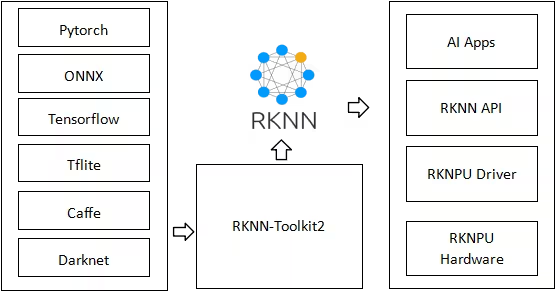
Rockchip entwickelt ARM-basierte System-on-Chips mit integrierten NPUs, die in Einplatinencomputern und eingebetteten Produkten von Unternehmen wie Radxa, ASUS, Pine64, Orange Pi, Odroid, Khadas und Banana Pi eingesetzt werden. RKNN, kurz für Rockchip Neural Network, ist das Modellformat dieser NPUs. Das RKNN Toolkit konvertiert Modelle auf einem PC in dieses Format und führt sie auf dem Gerät aus.
Häufig gestellte Fragen#
Verwende den Namen des Prozessors auf dem Board, nicht den Namen des Boards: zum Beispiel
rk3588für ein Radxa Rock 5B oderrk3566für ein Radxa Zero 3W. Auf dem Board gibtcat /proc/device-tree/compatibledie Zeichenfolge aus, anhand derer Ultralytics den Chip erkennt. Ein für einen Chip exportiertes Modell ist nicht für einen anderen Chip erstellt. Exportiere das Modell daher einmal pro Chip. Unter Zielchips findest du die zulässigen Namen.Beginne mit FP16, der Standardeinstellung. Dafür sind keine Kalibrierungsdaten erforderlich, und die Rohvorhersagen werden ohne ein zweites Modell auf der CPU zurückgegeben. Wähle INT8 (
quantize=8), wenn du ein kleineres und schnelleres Modell benötigst oder der Chip nur INT8 unterstützt: YOLO26n für den RK3588 ist mit INT8 4.3 MB groß, gegenüber 7.4 MB mit FP16. In den Benchmarks, die mit einem früheren Export gemessen wurden, lief YOLO26n mit INT8 in 41.2 ms pro Bild, gegenüber 58.5 ms mit FP16. Für INT8 sind repräsentative Kalibrierungsdaten erforderlich. Bei Erkennungs-, Segmentierungs-, Pose- und OBB-Modellen wird die Box-Dekodierung mit INT8 auf der CPU ausgeführt, und zwar mittail.onnx. Miss Latenz und Genauigkeit auf deinem Gerät, bevor du dich entscheidest.Nicht mit
YOLO(), das RKNN-Modelle nur auf Rockchip-Geräten lädt. Um das Modell selbst auf dem PC zu prüfen, validiere den PyTorch-Checkpoint oder die Zwischendateiyolo26n.onnx, die beim Export neben dem Verzeichnis abgelegt wird, mit ONNX Runtime: Das RKNN-Modell wird aus diesem Graphen konvertiert. Das ersetzt keine Validierung auf dem Gerät, insbesondere bei INT8, da die Quantisierung die Ausgaben verändert.Ja, mit dem Exportformat des jeweiligen Beschleunigers: Ein RKNN-Modell läuft nur auf Rockchip-NPUs. Siehe TensorRT für NVIDIA Jetson, Hailo, Axelera, DEEPX und Coral Edge TPU. Einen Überblick findest du im Leitfaden zu Optionen für die Modellbereitstellung.


Kommentare45
Stell eine Frage, teile deine Ergebnisse oder hilf jemand anderem.
as-jackson
We are pleased to confirm that the following ArmSoM boards based on Rockchip RK3576 have been successfully tested with Ultralytics projects (e.g., YOLO11n):
Validation Scope:
Model training/inference pipeline
1yizi72
I tried to convert the yolo11n.pt into a rknn model through codes below: from ultralytics import YOLO model = YOLO("yolo11n.pt") model.export(format="rknn", name="rk3588") and everything went correct. A rknn model named yolo11n-rk3588.rknn was build and used to infer a very traditional yolo demo image "bus"(a blue bus with several people in front of it), but no detection result was obtained.
I tried to convert the yolol11n.pt into onnx model through above codes firstly, and then used a convert.py offered by rknn_model_zoo/examples/yolo11/python,
import sys from rknn.api import RKNN
DATASET_PATH = '../../../datasets/COCO/coco_subset_20.txt' DEFAULT_RKNN_PATH = '/home/yizi/model/yolo11/yolodet.rknn' DEFAULT_QUANT = False
def parse_arg(): if len(sys.argv) < 3: print("Usage: python3 {} onnx_model_path [platform] [dtype(optional)] [output_rknn_path(optional)]".format(sys.argv[0])) print(" platform choose from [rk3562,rk3566,rk3568,rk3588,rk3576,rk1808,rv1109,rv1126]") print(" dtype choose from [i8, fp] for [rk3562,rk3566,rk3568,rk3588,rk3576]") print(" dtype choose from [u8, fp] for [rk1808,rv1109,rv1126]") exit(1)
model_path = sys.argv[1]
platform = sys.argv[2]

do_quant = DEFAULT_QUANT
if len(sys.argv) > 3:
    model_type = sys.argv[3]
    if model_type not in ['i8', 'u8', 'fp']:
        print("ERROR: Invalid model type: {}".format(model_type))
        exit(1)
    elif model_type in ['i8', 'u8']:
        do_quant = True
    else:
        do_quant = False

if len(sys.argv) > 4:
    output_path = sys.argv[4]
else:
    output_path = DEFAULT_RKNN_PATH

return model_path, platform, do_quant, output_path
if name == 'main': model_path, platform, do_quant, output_path = parse_arg()
# Create RKNN object
rknn = RKNN(verbose=False)

# Pre-process config
print('--> Config model')
rknn.config(mean_values=[[0, 0, 0]], std_values=[[255, 255, 255]], target_platform=platform)
print('done')

# Load model
print('--> Loading model')
ret = rknn.load_onnx(model=model_path)
if ret != 0:
    print('Load model failed!')
    exit(ret)
print('done')

# Build model
print('--> Building model')
ret = rknn.build(do_quantization=do_quant, dataset=DATASET_PATH)
if ret != 0:
    print('Build model failed!')
    exit(ret)
print('done')

# Export rknn model
print('--> Export rknn model')
ret = rknn.export_rknn(output_path)
if ret != 0:
    print('Export rknn model failed!')
    exit(ret)
print('done')

# Release
rknn.release()
Still everything went correct. A rknn model was created and applied to "bus.jpg", and there was no detection at all. I wonder what's wrong in the whole process?
1 Glenn JocherUltralytics
@yizi72 thanks for the detailed report. For RKNN inference issues with YOLO11, please ensure:
- You're using matching RKNN Toolkit and runtime versions (update both if needed)
- Input images are 640x640 with pixel values normalized 0-255
- You load models via
YOLO('./yolo11n_rknn_model')as shown in our RKNN deployment docs
If issues persist, please share your full environment details and validation results from both export methods.
1、I used rknn-toolkit2-2.3.0 which is the latest version ,bu I still did "pip install rknn-toolkit2 --upgrade" again. 2、The input image is 640*640, uchar, 0-255. 3. I used the following setting to transfer yolo11n.pt to onnx, from ultralytics import YOLO
加载一个模型,路径为 YOLO 模型的 .pt 文件
model = YOLO("yolo11n.pt")
导出模型,设置多种参数
model.export( format="onnx", imgsz=(640, 640),
keras=False,
optimize=True,
half=False,
int8=False,
dynamic=False,
simplify=True,
opset=12,
#workspace=4.0,
nms=False,
batch=1
) and applied the following codes to verify yolo11n.onnx model:from ultralytics import YOLO from PIL import Image
Load a model
model = YOLO("/home/yizi/models/yolo11/yolo11n.onnx") # load an official model
Predict with the model
results = model("bus.jpg") # predict on an image #results = rknn_model("bus.jpg")
Access the results
for result in results: xywh = result.boxes.xywh # center-x, center-y, width, height xywhn = result.boxes.xywhn # normalized xyxy = result.boxes.xyxy # top-left-x, top-left-y, bottom-right-x, bottom-right-y xyxyn = result.boxes.xyxyn # normalized names = [result.names[cls.item()] for cls in result.boxes.cls.int()] # class name of each box confs = result.boxes.conf # confidence score of each box
The results are good. All objects in bus.jpg were detected. Then I run the following code to transfer onnx to rknn:
from rknn.api import RKNN import cv2 import numpy as np
if name == 'main': rknn = RKNN(verbose=True,verbose_file="log.txt") rknn.config( mean_values=[[0, 0, 0]], std_values=[[255, 255, 255]], target_platform="rk3588", optimization_level=3 )
rknn.load_onnx(
    model="/home/yizi/models/yolo11/yolo11n.onnx",
    input_size_list=[[1,3,640,640]],
)
rknn.build(
    do_quantization=False
)

rknn.export_rknn(
    export_path="/home/yizi/models/yolo11/yolo11n.rknn"
)

rknn.release()
The transferring process went smooth, two problems appeared.
Firstly,when this rknn model was pushed into a rk3588 tablet, and run with a binary executable file generated by cross-compilation, no result was detected.
Secondly, I tried to run the following codes:
from ultralytics import YOLO from PIL import Image
rknn_model = YOLO("/home/yizi/models/yolo11/yolo11n.rknn", task=detect)
results = model("bus.jpg")
An error message, "model='/home/yizi/models/yolo11/yolo11n.rknn' is not a supported model format. Ultralytics supports: ('PyTorch', 'TorchScript', 'ONNX', 'OpenVINO', 'TensorRT', 'CoreML', 'TensorFlow SavedModel', 'TensorFlow GraphDef', 'TensorFlow Lite', 'TensorFlow Edge TPU', 'TensorFlow.js', 'PaddlePaddle', 'MNN', 'NCNN', 'IMX', 'RKNN') See https://docs.ultralytics.com/modes/predict for help. " appeared.
Last question, how many outputs does yolo11 yield? one or six?
- Glenn JocherUltralytics
@yizi72 thank you for the detailed report. For RKNN deployment issues:
- When using Ultralytics RKNN export, load models via the exported directory (not .rknn file), as shown in our RKNN deployment docs:
model = YOLO('./yolo11n_rknn_model') # directory path-
Ensure your RK3588 runtime uses matching librknnrt.so versions with your RKNN Toolkit 2.3.0 installation
-
YOLO11 detection models output 3 tensors by default (different from older YOLO versions). For conversion issues, we recommend using our native
model.export(format='rknn')rather than manual ONNX conversion.
Let me know if you still face issues after verifying these points.
Thanks for replies. I did verify all points you've mentioned above. When running model("bus.jpg"), error messages show:
File "/home/yizi/anaconda3/envs/rknn/lib/python3.9/site-packages/ultralytics/engine/model.py", line 182, in call return self.predict(source, stream, **kwargs) File "/home/yizi/anaconda3/envs/rknn/lib/python3.9/site-packages/ultralytics/engine/model.py", line 543, in predict self.predictor.setup_model(model=self.model, verbose=is_cli) File "/home/yizi/anaconda3/envs/rknn/lib/python3.9/site-packages/ultralytics/engine/predictor.py", line 378, in setup_model self.model = AutoBackend( File "/home/yizi/anaconda3/envs/rknn/lib/python3.9/site-packages/torch/utils/_contextlib.py", line 116, in decorate_context return func(*args, **kwargs) File "/home/yizi/anaconda3/envs/rknn/lib/python3.9/site-packages/ultralytics/nn/autobackend.py", line 495, in init raise OSError("RKNN inference is only supported on Rockchip devices.") OSError: RKNN inference is only supported on Rockchip devices.
It's very strange because I did connect a RK3588 tablet with my virtual machine.
I still have a quesiton on yolo11n output: yolo11n.pt has one output with shape (1, 84, 8400), and yolo11n-rk3588.rknn has one output with shape (1,84, 8400, 0). Are they correct? If so, can I use the similar codes to analyze rknn output, such as :
for result in results: xywh = result.boxes.xywh # center-x, center-y, width, height xywhn = result.boxes.xywhn # normalized xyxy = result.boxes.xyxy # top-left-x, top-left-y, bottom-right-x, bottom-right-y xyxyn = result.boxes.xyxyn # normalized names = [result.names[cls.item()] for cls in result.boxes.cls.int()] # class name of each box confs = result.boxes.conf
- Glenn JocherUltralytics
@yizi72 thanks for the details. For the RKNN inference error: ensure your Python script is running directly on the RK3588 hardware (not through a VM) as RKNN models require native Rockchip NPU access. Regarding outputs, YOLO11 detection models produce 3 output tensors by default (see our RKNN deployment docs), but your code should work if using the exported RKNN directory with the included postprocessing. Let me know if you still face issues after verifying native hardware execution.
 Yufeng Wu
Hello, Ultralytics team. I wonder if it's possible to port yolo26n-pose to rknn? I'm not sure if it's difficult to work out on my own? Is there any model architecture problems that prevent porting the pose models to rknn?
- Glenn JocherUltralytics
@kamosmkey exports fine. See https://platform.ultralytics.com/glenn-jocher/example-project/exp-24?tab=export
2
montemadjo
It appears it does not support rv1106 platform yet
When I try to export the model using this command
model.export(format="rknn", name="rv1106", imgsz=320)It gives the following error
E build: Current target_platform(rv1106) not support do_quantization = False!
E export_rknn: RKNN model does not exist, please load & build model first!
🤔
- Glenn JocherUltralytics(bearbeitet)
rv1106is an INT8-only target, so it needs a quantized RKNN build. Older Ultralytics releases always built withdo_quantization=False, which fails with the message you saw. Current releases support it: upgrade withpip install -U ultralyticsand export withquantize=8plus calibration data:model.export(format="rknn", name="rv1106", imgsz=320, quantize=8, data="coco8.yaml")See the Rockchip RKNN export guide. If it still fails, share your
!yolo checksoutput andrknn-toolkit2version here and we can sanity-check the environment.1 Here's the quick workaround for those who want to work with yolo26 on RV1106 chip (like Luckfox pico etc). I ran into a couple of issues there, including quantization erasing my confidence results.
Long story short - first you need to monkey-patch head.Detect.forward function in order to get two tensors - one for bboxes and one for scores. That way you escape all the heavy non-supported tensor functions. Then you export your yolo26 model to onnx format and finally to rknn like this
import torch
from ultralytics.nn.modules import head

# 1. First we monkey-patch the forward function
def patched_forward(self, x):
    if self.end2end:
        h = self.one2one
    else:
        h = self.one2many

    box_head = h["box_head"]
    cls_head = h["cls_head"]

    if box_head is None or cls_head is None:
        raise RuntimeError("Head moduls are None")

    bs = x[0].shape[0]
    boxes = torch.cat([box_head[i](x[i]).view(bs, 4 * self.reg_max, -1) for i in range(self.nl)], dim=-1)
    scores = torch.cat([cls_head[i](x[i]).view(bs, self.nc, -1) for i in range(self.nl)], dim=-1)

    preds = {"boxes": boxes, "scores": scores, "feats": x}
    y = self._inference(preds)

    # We are splitting into 2 tensors - both gets its own scale/zp at INT8 quantization
    bboxes = y[:, :4, :]   # [1, 4, 2100] — range 0-640
    scores = y[:, 4:, :]   # [1, 1, 2100] — range 0-1 (already sigmoid-ed)
    score_max_idx = scores[0, 0, :].argmax()
    return bboxes, scores

head.Detect.forward = patched_forward

# 2. Then we export to onnx model (we got best.pt model from ultralytics platform)
from ultralytics import YOLO
model = YOLO("best.pt")
model.export(format="onnx", dynamic=False, opset=12, imgsz=320)

# 3. Then we export to RKNN format
from rknn.api import RKNN

rknn = RKNN()

# 3.1. Konfiguracija specifična za RV1106
rknn.config(
    mean_values=[[0, 0, 0]],
    std_values=[[255, 255, 255]],
    target_platform='rv1106',
    quantized_algorithm='normal', # Ili 'mmse' za bolju preciznost
    quantized_dtype='asymmetric_quantized-8'
)

# 3.2. Load the ONNX model
print("Loading ONNX model...")
rknn.load_onnx(model='best.onnx')

# 3.3. Build modela sa INT8 kvantizacijom
# calib.txt should contain paths to calibration images
print("Building RKNN model with quantization...")
rknn.build(do_quantization=True, dataset='./calib.txt')

# 3.4. Exporting final .rknn file
print("Exporting RKNN model...")
rknn.export_rknn('./yolo26_rv1106_model_optimized.rknn')

rknn.release()
After this you need to postprocess those two outputs like this
yolo26_postprocess.h
/**
 * YOLO26 Post-processing header for Fish Counter
 *
 * Supports YOLO26 2-output format: boxes [1, 4, N] + scores [1, nc, N]
 *
 * Based on the working rknn_minimal_test example.
 */

#ifndef _YOLO26_POSTPROCESS_H_
#define _YOLO26_POSTPROCESS_H_

#include <stdint.h>
#include <vector>
#include "rknn_api.h"
#include "rknn_detector.h"

// YOLO26 model configuration defaults
#define YOLO26_CONF_THRESHOLD 0.25f
#define YOLO26_NMS_THRESHOLD 0.45f

// Detection result (same structure as postprocess.h for compatibility)
typedef struct
{
    float x1, y1, x2, y2; // Bounding box (in model coordinates)
    float confidence;
    int class_id;
} yolo26_detection_t;

// YOLO26 context for format detection and caching
typedef struct
{
    int num_predictions;
    int num_classes;
    bool boxes_transposed; // true = [1, 4, N], false = [1, N, 4]
} yolo26_context_t;

/**
 * Initialize YOLO26 post-processing
 * Detects the output format from model attributes
 *
 * @param app_ctx The RKNN app context with model info
 * @param yolo26_ctx Output: YOLO26 context for format info
 * @return 0 on success, -1 on error
 */
int yolo26_init_postprocess(rknn_app_context_t *app_ctx, yolo26_context_t *yolo26_ctx);

/**
 * Deinitialize YOLO26 post-processing
 */
void yolo26_deinit_postprocess();

/**
 * YOLO26 post_process: processes model outputs and returns detections
 * Uses 2-output format: boxes [1, 4, N] + scores [1, nc, N]
 *
 * @param app_ctx The RKNN app context
 * @param yolo26_ctx YOLO26 context from init
 * @param outputs Pointer to output tensor memory array
 * @param letter_box Letterbox transform info for coordinate mapping
 * @param conf_threshold Confidence threshold
 * @param nms_threshold NMS threshold
 * @param od_results Output: detection results (compatible with existing code)
 * @return 0 on success, -1 on error
 */
int yolo26_post_process(rknn_app_context_t *app_ctx, yolo26_context_t *yolo26_ctx,
                        void *outputs, letterbox_t *letter_box,
                        float conf_threshold, float nms_threshold,
                        object_detect_result_list *od_results);

#endif // _YOLO26_POSTPROCESS_H_
yolo26_postprocess.cc
/**
 * YOLO26 Post-processing for Fish Counter on RV1106
 *
 * Supports YOLO26 2-output format: boxes [1, 4, N] + scores [1, nc, N]
 *
 * Based on the working rknn_minimal_test example.
 */

#include "yolo26_postprocess.h"

#include <math.h>
#include <stdint.h>
#include <stdio.h>
#include <stdlib.h>
#include <string.h>
#include <algorithm>
#include <vector>

// Clamp value to range
inline static int clamp(float val, int min, int max)
{
    return val > min ? (val < max ? val : max) : min;
}

// Dequantize INT8 to float
static inline float dequantize(int8_t qnt, int32_t zp, float scale)
{
    return ((float)qnt - (float)zp) * scale;
}

// Sigmoid function
static inline float sigmoid(float x)
{
    return 1.0f / (1.0f + expf(-x));
}

// Calculate IoU between two boxes
static float calculate_iou(float x1_a, float y1_a, float x2_a, float y2_a,
                           float x1_b, float y1_b, float x2_b, float y2_b)
{
    float x1 = std::max(x1_a, x1_b);
    float y1 = std::max(y1_a, y1_b);
    float x2 = std::min(x2_a, x2_b);
    float y2 = std::min(y2_a, y2_b);

    float inter_w = std::max(0.0f, x2 - x1);
    float inter_h = std::max(0.0f, y2 - y1);
    float inter_area = inter_w * inter_h;

    float area_a = (x2_a - x1_a) * (y2_a - y1_a);
    float area_b = (x2_b - x1_b) * (y2_b - y1_b);
    float union_area = area_a + area_b - inter_area;

    return union_area > 0 ? inter_area / union_area : 0;
}

// Non-Maximum Suppression for YOLO26 detections
static std::vector<yolo26_detection_t> yolo26_nms(std::vector<yolo26_detection_t> &detections, float nms_threshold)
{
    // Sort by confidence (descending)
    std::sort(detections.begin(), detections.end(),
              [](const yolo26_detection_t &a, const yolo26_detection_t &b)
              { return a.confidence > b.confidence; });

    std::vector<yolo26_detection_t> result;
    std::vector<bool> suppressed(detections.size(), false);

    for (size_t i = 0; i < detections.size(); i++)
    {
        if (suppressed[i])
            continue;

        result.push_back(detections[i]);

        for (size_t j = i + 1; j < detections.size(); j++)
        {
            if (suppressed[j])
                continue;

            // Only suppress same class
            if (detections[i].class_id != detections[j].class_id)
                continue;

            float iou = calculate_iou(
                detections[i].x1, detections[i].y1, detections[i].x2, detections[i].y2,
                detections[j].x1, detections[j].y1, detections[j].x2, detections[j].y2);

            if (iou > nms_threshold)
            {
                suppressed[j] = true;
            }
        }
    }

    return result;
}

// Parse YOLO26 2-output format: boxes [1, 4, N] + scores [1, nc, N]
static std::vector<yolo26_detection_t> parse_yolo26_2output(
    rknn_tensor_mem **output_mems,
    rknn_tensor_attr *output_attrs,
    int model_width, int model_height,
    float conf_threshold, int num_classes,
    bool boxes_transposed)
{
    std::vector<yolo26_detection_t> detections;

    int8_t *boxes_data = (int8_t *)output_mems[0]->virt_addr;
    int32_t boxes_zp = output_attrs[0].zp;
    float boxes_scale = output_attrs[0].scale;

    int8_t *scores_data = (int8_t *)output_mems[1]->virt_addr;
    int32_t scores_zp = output_attrs[1].zp;
    float scores_scale = output_attrs[1].scale;

    // Determine number of anchors
    int num_anchors;
    if (boxes_transposed)
    {
        num_anchors = output_attrs[0].dims[2];
    }
    else
    {
        num_anchors = output_attrs[0].dims[1];
    }

    // Check if scores are already sigmoid or logits
    float scores_min = 9999, scores_max = -9999;
    for (int i = 0; i < (int)output_attrs[1].n_elems; i++)
    {
        float val = dequantize(scores_data[i], scores_zp, scores_scale);
        if (val < scores_min)
            scores_min = val;
        if (val > scores_max)
            scores_max = val;
    }
    bool scores_are_sigmoid = (scores_min >= -0.1f && scores_max <= 1.1f);

    for (int i = 0; i < num_anchors; i++)
    {
        // Get box coordinates
        float x1, y1, x2, y2;
        if (boxes_transposed)
        {
            // [1, 4, N] - channel first
            x1 = dequantize(boxes_data[0 * num_anchors + i], boxes_zp, boxes_scale);
            y1 = dequantize(boxes_data[1 * num_anchors + i], boxes_zp, boxes_scale);
            x2 = dequantize(boxes_data[2 * num_anchors + i], boxes_zp, boxes_scale);
            y2 = dequantize(boxes_data[3 * num_anchors + i], boxes_zp, boxes_scale);
        }
        else
        {
            // [1, N, 4] - anchor first
            x1 = dequantize(boxes_data[i * 4 + 0], boxes_zp, boxes_scale);
            y1 = dequantize(boxes_data[i * 4 + 1], boxes_zp, boxes_scale);
            x2 = dequantize(boxes_data[i * 4 + 2], boxes_zp, boxes_scale);
            y2 = dequantize(boxes_data[i * 4 + 3], boxes_zp, boxes_scale);
        }

        // Check if format is xywh instead of xyxy
        if (x2 < x1 || y2 < y1)
        {
            // Assume xywh format: convert to xyxy
            float cx = x1, cy = y1, w = x2, h = y2;
            x1 = cx - w / 2.0f;
            y1 = cy - h / 2.0f;
            x2 = cx + w / 2.0f;
            y2 = cy + h / 2.0f;
        }

        // Find max class score
        float max_score = -9999;
        int max_class = 0;
        for (int c = 0; c < num_classes; c++)
        {
            float score;
            if (boxes_transposed)
            {
                // [1, nc, N]
                score = dequantize(scores_data[c * num_anchors + i], scores_zp, scores_scale);
            }
            else
            {
                // [1, N, nc]
                score = dequantize(scores_data[i * num_classes + c], scores_zp, scores_scale);
            }

            if (!scores_are_sigmoid)
            {
                score = sigmoid(score);
            }

            if (score > max_score)
            {
                max_score = score;
                max_class = c;
            }
        }

        if (max_score < conf_threshold)
            continue;

        // Clamp to model bounds
        x1 = std::max(0.0f, std::min(x1, (float)model_width));
        y1 = std::max(0.0f, std::min(y1, (float)model_height));
        x2 = std::max(0.0f, std::min(x2, (float)model_width));
        y2 = std::max(0.0f, std::min(y2, (float)model_height));

        // Skip invalid boxes
        if (x2 <= x1 || y2 <= y1)
            continue;

        yolo26_detection_t det;
        det.x1 = x1;
        det.y1 = y1;
        det.x2 = x2;
        det.y2 = y2;
        det.confidence = max_score;
        det.class_id = max_class;

        detections.push_back(det);
    }

    return detections;
}

int yolo26_init_postprocess(rknn_app_context_t *app_ctx, yolo26_context_t *yolo26_ctx)
{
    if (!app_ctx || !yolo26_ctx)
    {
        printf("[YOLO26] ERROR: Invalid parameters\n");
        return -1;
    }

    memset(yolo26_ctx, 0, sizeof(yolo26_context_t));

    int n_output = app_ctx->io_num.n_output;

    printf("[YOLO26] Initializing 2-output format (%d outputs)...\n", n_output);

    // Print output tensor info
    for (int i = 0; i < n_output; i++)
    {
        printf("  Output %d: dims=[%d,%d,%d,%d], size=%d\n", i,
               app_ctx->output_attrs[i].dims[0],
               app_ctx->output_attrs[i].dims[1],
               app_ctx->output_attrs[i].dims[2],
               app_ctx->output_attrs[i].dims[3],
               app_ctx->output_attrs[i].size);
    }

    if (n_output != 2)
    {
        printf("[YOLO26] ERROR: Expected 2 outputs (boxes + scores), got %d\n", n_output);
        return -1;
    }

    // Parse 2-output format: boxes + scores
    int boxes_dim1 = app_ctx->output_attrs[0].dims[1];
    int boxes_dim2 = app_ctx->output_attrs[0].dims[2];
    int scores_dim1 = app_ctx->output_attrs[1].dims[1];
    int scores_dim2 = app_ctx->output_attrs[1].dims[2];

    if (boxes_dim1 == 4)
    {
        // [1, 4, N] boxes format
        yolo26_ctx->num_predictions = boxes_dim2;
        yolo26_ctx->boxes_transposed = true;
        yolo26_ctx->num_classes = scores_dim1;
        printf("[YOLO26] Format: boxes [1,4,%d], scores [1,%d,%d]\n",
               boxes_dim2, scores_dim1, scores_dim2);
    }
    else if (boxes_dim2 == 4)
    {
        // [1, N, 4] boxes format
        yolo26_ctx->num_predictions = boxes_dim1;
        yolo26_ctx->boxes_transposed = false;
        yolo26_ctx->num_classes = scores_dim2;
        printf("[YOLO26] Format: boxes [1,%d,4], scores [1,%d,%d]\n",
               boxes_dim1, scores_dim1, scores_dim2);
    }
    else
    {
        printf("[YOLO26] ERROR: Invalid boxes dimensions [1,%d,%d], expected [1,4,N] or [1,N,4]\n",
               boxes_dim1, boxes_dim2);
        return -1;
    }

    printf("[YOLO26] Predictions: %d, Classes: %d\n",
           yolo26_ctx->num_predictions, yolo26_ctx->num_classes);

    return 0;
}

void yolo26_deinit_postprocess()
{
    // Nothing to cleanup currently
}

int yolo26_post_process(rknn_app_context_t *app_ctx, yolo26_context_t *yolo26_ctx,
                        void *outputs, letterbox_t *letter_box,
                        float conf_threshold, float nms_threshold,
                        object_detect_result_list *od_results)
{
    if (!app_ctx || !yolo26_ctx || !outputs || !letter_box || !od_results)
    {
        return -1;
    }

    rknn_tensor_mem **output_mems = (rknn_tensor_mem **)outputs;

    int model_width = app_ctx->model_width;
    int model_height = app_ctx->model_height;

    // Parse 2-output format
    std::vector<yolo26_detection_t> raw_detections = parse_yolo26_2output(
        output_mems,
        app_ctx->output_attrs,
        model_width, model_height,
        conf_threshold,
        yolo26_ctx->num_classes > 0 ? yolo26_ctx->num_classes : 1,
        yolo26_ctx->boxes_transposed);

    // Apply NMS
    std::vector<yolo26_detection_t> final_detections = yolo26_nms(raw_detections, nms_threshold);

    // Convert to output format with letterbox coordinate mapping
    memset(od_results, 0, sizeof(object_detect_result_list));
    int count = 0;

    for (const auto &det : final_detections)
    {
        if (count >= OBJ_NUMB_MAX_SIZE)
            break;

        // Map coordinates back to original image space
        float x1 = det.x1 - letter_box->x_pad;
        float y1 = det.y1 - letter_box->y_pad;
        float x2 = det.x2 - letter_box->x_pad;
        float y2 = det.y2 - letter_box->y_pad;

        // Scale back to original coordinates
        od_results->results[count].box.left = (int)(clamp(x1, 0, model_width) / letter_box->scale);
        od_results->results[count].box.top = (int)(clamp(y1, 0, model_height) / letter_box->scale);
        od_results->results[count].box.right = (int)(clamp(x2, 0, model_width) / letter_box->scale);
        od_results->results[count].box.bottom = (int)(clamp(y2, 0, model_height) / letter_box->scale);
        od_results->results[count].prop = det.confidence;
        od_results->results[count].cls_id = det.class_id;

        count++;
    }

    od_results->count = count;

    return 0;
}
And you're good to go! 🚀
- Glenn JocherUltralytics(bearbeitet)
Thanks for sharing this—splitting the head into 2 outputs (boxes + scores) is a sensible RV1106 workaround to keep RKNN-friendly ops and avoid INT8 scale/zero-point coupling issues; just note that monkey-patching
head.Detect.forwardis inherently version-fragile. Current Ultralytics already provides an INT8 flow for RV1106 viaquantize=8withdata=calibration images (see the Rockchip RKNN export guide), so please try that first. If you still need your custom split, open a GitHub issue linking back to this thread and include!yolo checks, yourrknn-toolkit2version, and a minimal calibration set description so we can evaluate it.
dttvn0010
99ms per image is too bad. Using rknn native with 3 npu cores, I can achieve ~11ms per image
NikolayKash
Hi, what did you done to achieve this performance?
- Glenn JocherUltralytics
@Arshapjoy thanks for the detailed info; for YOLO11 detection heads the export output shape is
(1, nc + 4, 8400)(4 box coords plusncclass scores), so with 2 classes(1, 6, 8400)is expected and both classes are present, whereas a postprocessor assuming5 + nc(old YOLO layout with an extra objectness channel) will effectively drop one class. I’d suggest updating your RKNN-side decoder to treat channels[0:4]as[x, y, w, h]and[4:]as class logits for allncclasses; if you still see a true(1, 7, 8400)PyTorch output on the same checkpoint, please share yourultralyticsversion andyolo checksoutput so we can dig deeper. The overall YOLO11 head behaviour is also outlined in the YOLO11 model documentation.@BakhtiariB the high-level
YOLO("./yolo11n_rknn_model")interface is designed to keep preprocessing, NPU inference and postprocessing together, so if you need to run only the core RKNN inference on the NPU while fully controlling pre/post on the CPU you’ll need to load the exported.rknnwith Rockchip’sRKNNAPI directly and implement your own preprocessing and YOLO11 postprocessing around it.@dttvn0010 the ~99 ms figure is a conservative end-to-end pipeline measurement on our RK3588 test setup, so seeing ~11 ms from a highly tuned RKNN deployment using all three NPU cores is quite reasonable; if you are open to sharing your exact model variant, quantization mode, input size and NPU core configuration, we can use that to cross-check and better explain the gap between baseline and fully optimized numbers.
@NikolayKash in practice, large gains like that usually come from combining INT8-quantized RKNN models, all three NPU cores enabled, a suitable input resolution and very lean Python-side pre/postprocessing, so it would be great if @dttvn0010 can share their exact script and RK3588 configuration for others to replicate.
guojieli
he YOLO11 benchmark was run by the Ultralytics team on a Radxa Rock 5B based on the Rockchip RK3588, using the RKNN model format to evaluate speed and accuracy. Could you please clarify whether this was an INT8-quantized model?
- Glenn JocherUltralytics(bearbeitet)
Those RKNN benchmarks were not INT8-quantized; they used the floating-point RKNN build. INT8 RKNN export is now available with
quantize=8anddata=for calibration; see the Rockchip RKNN export guide.
BakhtiariB
I used ultralytics for rk3588 by below code, but i want do inference in NPU and do preprocess and postprocess in CPU, how can separate them. while, in below code, line: "results = rknn_model("https://ultralytics.com/images/bus.jpg")" just all of them!
from ultralytics import YOLO
Load the exported RKNN model
rknn_model = YOLO("./yolo11n_rknn_model")
Run inference
results = rknn_model("https://ultralytics.com/images/bus.jpg")
Arshapjoy
Exported RKNN/ONNX model only has 1 output class instead of 2
Overview
I’m using Ultralytics YOLOv11s with two custom classes and exporting it to ONNX and RKNN formats. After conversion, inference on the RKNN device only detects a single class, and the output tensor shape is
(1, 6, 8400)instead of the expected(1, 7, 8400). I’ve validated that the source.ptmodel correctly reports 2 classes, but both ONNX and RKNN exports drop one class.
Model Details
- Checkpoint path:
path/to/yolo11s_custom.pt - Number of classes: 2
- Input size: 640×640
from ultralytics import YOLO
Load the YOLO11 model
model = YOLO("custom_yolo11s.pt")
Export the model to RKNN format
rknn_path = model.export(format="rknn", name="rk3588") print(f"RKNN model saved to: {rknn_path}")
Actual Behavior
- Received ONNX , RKNN and metadata.yaml after conversion
- Exported ONNX model output shape:
(1, 6, 8400) - Exported RKNN model output shape:
(1, 6, 8400) - Only one class is detected during inference on the RK3588 board.
7. Logs & Metadata
- metadata.yaml generated alongside the RKNN model:
model: name: yolo11s_custom format: rknn input_shape: [1, 3, 640, 640] output_shape: [1, 6, 8400] classes: 2 - ONNX graph info: Attached minimal
onnx.shape_inferencelog shows only 6 channels in the final layer.
8. Additional Notes
- Manual ONNX export yields the same issue, so it’s unlikely to be an Ultralytics export bug alone.
- I’ve confirmed that the PyTorch forward pass on the
.ptcheckpoint produces a shape(1, 7, 8400).
9. Request Could you please:
- Confirm whether there’s an option/flag in the YOLO-Ultralytics or RKNN export pipeline I’m missing to preserve all classes.
- Suggest any workarounds or patches to ensure correct output-channel dimensionality.
- Identify if this might be a known issue in RKNN-Toolkit 1.5.0 or Ultralytics YOLO v11.
Thank you for your assistance!
- Checkpoint path:
WeiIIzz
Hello, when I exported the rknn model, I performed int8 quantization, but I had an error like this: E build: If set do_quantization = True, dataset file need be provided. But it`s value is None! E export_rknn: RKNN model does not exist, please load build model first! My export code is: from ultralytics import YOLO
model = YOLO("/home/ky/dfxw/runs/detect/train3/weights/best.pt") model.export(format="rknn", name="rk3576", int8=True, data="/home/ky/rknn_yolo_test/data.yaml") The path pointed to by data is the same as the training dataset. How to solve it
The content of data.yaml is as follows path: /home/ky/dfxw/split_jiaqian # dataset root dir train: images/train val: images/val
names: 0: 0 1: 1
- Glenn JocherUltralytics(bearbeitet)
@WeiIIzz INT8 export for RKNN is supported with
quantize=8(it replaces the deprecatedint8=True) together withdatapointing to a dataset YAML, which Ultralytics converts into the calibration image list that RKNN needs:from ultralytics import YOLO model = YOLO("/home/ky/dfxw/runs/detect/train3/weights/best.pt") model.export(format="rknn", name="rk3576", quantize=8, data="/home/ky/rknn_yolo_test/data.yaml")The error you saw comes from an older version that did not pass a calibration dataset to RKNN, so run
pip install -U ultralyticsand retry. Make sure the YAML points to existing images. Let us know if this resolves your issue! @glenn-jocher I followed your steps to modify the code as follows. But I still encountered the same problem.
from ultralytics import YOLO

model = YOLO("/home/ky/dfxw/runs/detect/train3/weights/best.pt")
model.export(format="rknn", name="rk3576", int8=True, data="/home/ky/rknn_yolo_test/images")
Is there only images in the data path?
- Glenn JocherUltralytics(bearbeitet)
@WeiIIzz older releases ignored
int8=Truefor RKNN and built the model without quantization. Current Ultralytics supports INT8 RKNN export, so afterpip install -U ultralyticsyou can export with:model.export(format="rknn", name="rk3576", quantize=8, data="data.yaml")Here
datais used for the calibration images. Withoutquantize, the export builds a floating-point (FP16) model.
VictorAboba
Good day,
Is RKNN available for obb tasks? I tried to use it directly, but got an error saying that some operations (cos) are not available in RKNN. As a fix, RKNN suggested adding disable_rules = ['reduce_reshape_op_around_concat'] to my configuration. I actually did this inside the YOLO library. Model was exported first to ONNX and then from ONNX to RKNN works and returns the responses in the format (1,6,21504), which seems what I expected. However, if I use this model through YOLO ("path_to_rknn_model", task = 'obb'), will I still get the results in the standard YOLO format? I just don't want to prescribe pre - and post-processing on my own :)
Thank you!
- Glenn JocherUltralytics(bearbeitet)
@VictorAboba thank you for your question! RKNN export now supports all seven Ultralytics tasks, including OBB, so you can export OBB models directly with
format="rknn"and load the exported_rknn_modeldirectory withYOLO(...)to get standard YOLO results without writing your own pre- and post-processing. See the Rockchip RKNN guide for details. Spidrre
Hey! Did you notice any significant decrease in quality of your model after conversion? I am also trying to find a way to convert from OBB onnx to RKNN without 'reduce_reshape_op_around_concat'.
Hey! Did you notice any significant decrease in quality of your model after conversion? I am also trying to find a way to convert from OBB onnx to RKNN without 'reduce_reshape_op_around_concat'.
Hello, after @glenn-jocher answer, I didn't attempt to convert the OBB model. We have a few other models, and all of them except YOLO were converted to the RKNN format. We will try using this stuff (YOLO without an NPU and others with it) ^_^ After conversion, the OCR model, for example, has almost the same quality, but it doesn't need 'reduce_reshape_op_around_concat' to be used.