고속 Segment Anything 모델(FastSAM)#
고속 Segment Anything 모델(FastSAM)은 Segment Anything 작업을 위한 새로운 실시간 CNN 기반 솔루션입니다. 이 작업은 다양한 사용자 상호작용 프롬프트를 바탕으로 이미지 내의 모든 객체를 세그먼트화하도록 설계되었습니다. FastSAM은 경쟁력 있는 성능을 유지하면서 계산 요구량을 크게 줄여 다양한 비전 작업에 실용적인 선택지를 제공합니다.
시청: Ultralytics에서 FastSAM을 사용한 객체 추적
모델 아키텍처#
개요#
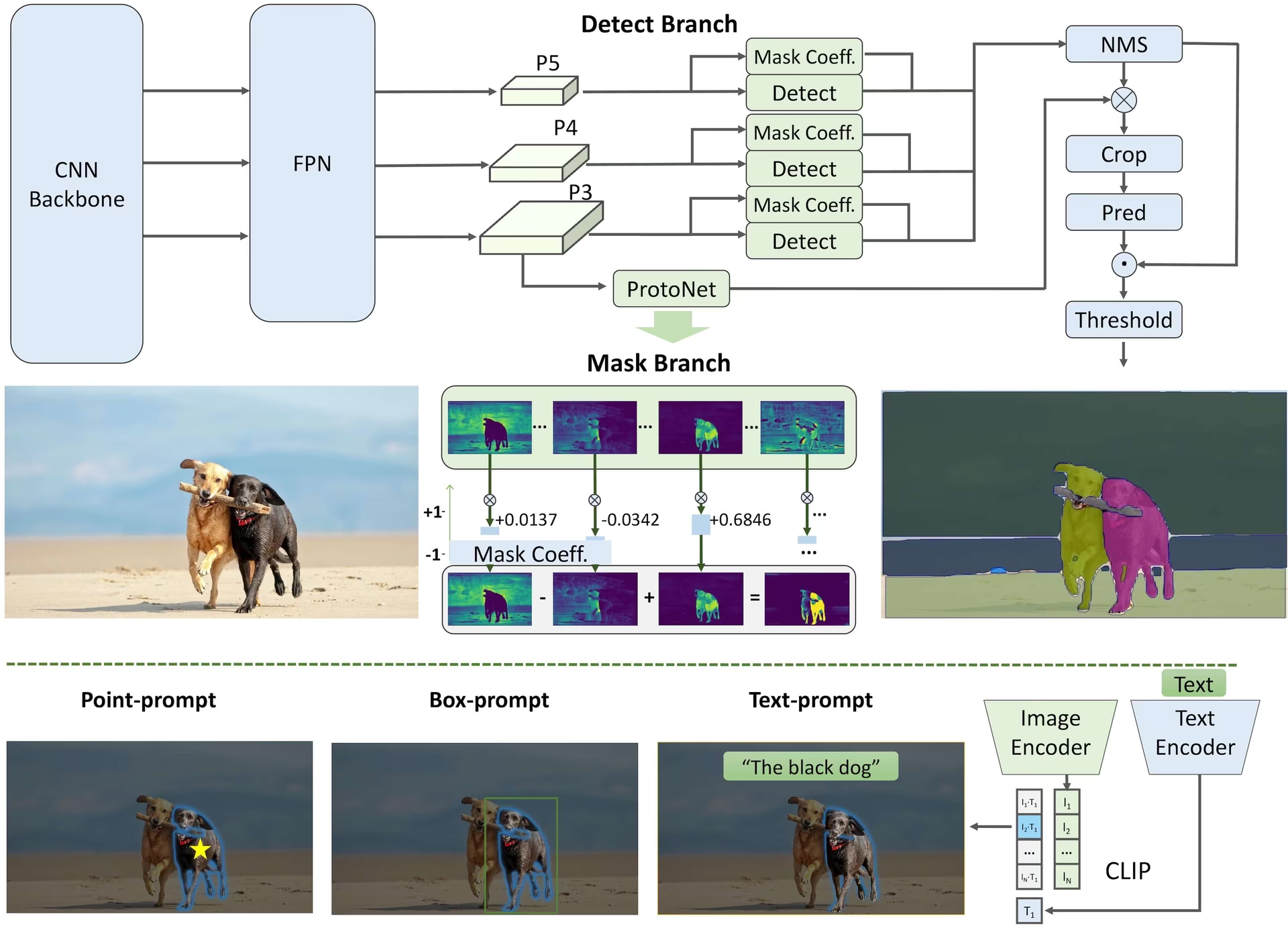
FastSAM은 상당한 계산 리소스를 요구하는 대규모 Transformer 모델인 Segment Anything 모델(SAM)의 한계를 해결하도록 설계되었습니다. FastSAM은 Segment Anything 작업을 순차적으로 수행되는 두 단계, 즉 전체 인스턴스 세그멘테이션과 프롬프트 기반 선택으로 분리합니다. 첫 번째 단계에서는 YOLOv8-seg을 사용해 이미지 내 모든 인스턴스의 세그멘테이션 마스크를 생성합니다. 두 번째 단계에서는 프롬프트에 해당하는 관심 영역을 출력합니다.
주요 기능#
-
실시간 솔루션: CNN의 계산 효율성을 활용하는 FastSAM은 Segment Anything 작업을 위한 실시간 솔루션을 제공하므로, 빠른 결과가 필요한 산업 애플리케이션에 유용합니다.
-
효율성 및 성능: FastSAM은 성능 품질을 저하시키지 않으면서 계산 및 리소스 요구량을 크게 줄입니다. SAM과 비슷한 성능을 훨씬 적은 계산 리소스로 제공하므로 실시간 애플리케이션에 활용할 수 있습니다.
-
프롬프트 기반 세그멘테이션: FastSAM은 다양한 사용자 상호작용 프롬프트를 바탕으로 이미지 내의 모든 객체를 세그먼트화할 수 있어 다양한 상황에 유연하게 대응합니다.
-
YOLOv8-seg 기반: FastSAM은 인스턴스 세그멘테이션 분기를 갖춘 객체 탐지기인 YOLOv8-seg을 기반으로 합니다. 따라서 이미지 내 모든 인스턴스의 세그멘테이션 마스크를 효과적으로 생성할 수 있습니다.
-
벤치마크에서의 경쟁력 있는 결과: MS COCO 객체 제안 작업에서 FastSAM은 단일 NVIDIA RTX 3090 환경에서 SAM보다 훨씬 빠른 속도로 높은 점수를 기록해 효율성과 성능을 입증했습니다.
-
실용적인 애플리케이션: 제안된 접근 방식은 다양한 비전 작업에 새로운 실용적 솔루션을 제공합니다. 현재 방법보다 수십 배에서 수백 배 빠른 속도로 작동합니다.
-
모델 압축의 실현 가능성: FastSAM은 구조에 인공적 사전 정보를 도입하여 계산량을 크게 줄이는 경로의 실현 가능성을 보여 줍니다. 이를 통해 일반 비전 작업을 위한 대규모 모델 아키텍처의 새로운 가능성을 열어 줍니다.
사용 가능한 모델, 지원 작업 및 작동 모드#
이 표에는 사용 가능한 모델과 각 모델의 사전 학습 가중치, 지원 작업, 추론, 검증, 학습, 내보내기와 같은 다양한 작동 모드와의 호환성이 나와 있습니다. 지원되는 모드는 ✅ 이모지로, 지원되지 않는 모드는 ❌ 이모지로 표시됩니다.
| 모델 유형 | 사전 학습 가중치 | 지원 작업 | 학습 | 검증 | 추론 | 내보내기 |
|---|---|---|---|---|---|---|
| FastSAM-s | FastSAM-s.pt | 인스턴스 분할 | ❌ | ✅ | ✅ | ✅ |
| FastSAM-x | FastSAM-x.pt | 인스턴스 분할 | ❌ | ✅ | ✅ | ✅ |
FastSAM과 YOLO 비교#
여기서는 FastSAM-s를 Meta의 SAM 변형 모델 및 YOLO26n-seg을 포함한 Ultralytics 세그멘테이션 모델과 비교합니다:
| 모델 | 크기 (MB) | 매개변수 (M) | 속도(CPU) (ms/im) |
|---|---|---|---|
| Meta SAM-b | 375 | 93.7 | 41703 |
| Meta SAM2-b | 162 | 80.8 | 28867 |
| Meta SAM2-t | 78.1 | 38.9 | 23430 |
| MobileSAM | 40.7 | 10.1 | 23802 |
| FastSAM-s와 YOLOv8 백본 | 23.9 | 11.8 | 58.0 |
| Ultralytics YOLOv8n-seg | 7.1 (11.0배 더 작음) | 3.4 (11.4배 더 적음) | 24.8 (945배 더 빠름) |
| Ultralytics YOLO11n-seg | 6.2 (12.6배 더 작음) | 2.9 (13.4배 더 적음) | 24.3 (964배 더 빠름) |
| Ultralytics YOLO26n-seg | 6.7 (11.7배 더 작음) | 2.7 (14.4배 더 적음) | 25.2 (930배 더 빠름) |
이 비교는 SAM 변형 모델과 YOLO 세그멘테이션 모델 간 모델 크기와 속도의 상당한 차이를 보여줍니다. SAM은 고유한 자동 세그멘테이션 기능을 제공하지만, 특히 YOLOv8n-seg, YOLO11n-seg, YOLO26n-seg와 같은 YOLO 모델은 크기가 훨씬 작고 속도가 빠르며 연산 효율성이 더 높습니다.
SAM 속도는 PyTorch로 측정했으며, YOLO 속도는 ONNX Runtime으로 측정했습니다. 테스트는 16GB RAM을 탑재한 2025년형 Apple M4 Air에서 torch==2.10.0, ultralytics==8.4.31, onnxruntime==1.24.4를 사용해 실행했습니다. 이 테스트를 재현하려면 다음을 수행합니다:
from ultralytics import ASSETS, SAM, YOLO, FastSAM

# SAM2-t, SAM2-b, SAM-b, MobileSAM 프로파일링
for file in ["sam_b.pt", "sam2_b.pt", "sam2_t.pt", "mobile_sam.pt"]:
    model = SAM(file)
    model.info()
    model(ASSETS)

# FastSAM-s 프로파일링
model = FastSAM("FastSAM-s.pt")
model.info()
model(ASSETS)

# YOLO 모델 프로파일링(ONNX)
for file_name in ["yolov8n-seg.pt", "yolo11n-seg.pt", "yolo26n-seg.pt"]:
    model = YOLO(file_name)
    model.info()
    onnx_path = model.export(format="onnx", dynamic=True, nms=False)  # YOLO26 NMS 없는 헤드; YOLOv8/YOLO11에서는 작동하지 않음
    model = YOLO(onnx_path)
    model(ASSETS)
사용 예시#
FastSAM 모델은 Python 애플리케이션에 쉽게 통합할 수 있습니다. Ultralytics는 개발을 간소화하는 사용자 친화적인 Python API와 CLI 명령을 제공합니다.
예측 사용법#
이미지를 세그먼트화하려면 아래와 같이 predict 메서드를 사용하세요:
from ultralytics import FastSAM

# 추론 소스를 정의합니다
source = "path/to/bus.jpg"

# FastSAM 모델을 생성합니다
model = FastSAM("FastSAM-s.pt")  # 또는 FastSAM-x.pt

# 이미지에서 추론 실행
everything_results = model(source, device="cpu", retina_masks=True, imgsz=1024, conf=0.4, iou=0.9)

# bboxes 프롬프트로 추론 실행
results = model(source, bboxes=[439, 437, 524, 709])

# 포인트 프롬프트로 추론을 실행합니다
results = model(source, points=[[200, 200]], labels=[1])

# 텍스트 프롬프트로 추론을 실행합니다
results = model(source, texts="a photo of a dog")

# 바운딩 박스, 포인트, 텍스트 프롬프트를 동시에 사용해 추론을 실행합니다
results = model(source, bboxes=[439, 437, 524, 709], points=[[200, 200]], labels=[1], texts="a photo of a dog")
이 코드 조각은 사전 학습 모델을 간편하게 불러오고 이미지에서 예측을 실행하는 방법을 보여 줍니다.
이 방법을 사용하면 이미지에서 추론을 실행해 모든 세그먼트 results를 한 번에 가져온 다음, 추론을 여러 번 실행하지 않고도 프롬프트 추론을 반복해서 실행할 수 있습니다.
from ultralytics.models.fastsam import FastSAMPredictor

# FastSAMPredictor를 생성합니다
overrides = {"conf": 0.25, "task": "segment", "mode": "predict", "model": "FastSAM-s.pt", "save": False, "imgsz": 1024}
predictor = FastSAMPredictor(overrides=overrides)

# 모든 항목을 세그먼트화합니다
everything_results = predictor("ultralytics/assets/bus.jpg")

# 프롬프트 추론
bbox_results = predictor.prompt(everything_results, bboxes=[[200, 200, 300, 300]])
point_results = predictor.prompt(everything_results, points=[200, 200])
text_results = predictor.prompt(everything_results, texts="a photo of a dog")위 예시에서 반환되는 모든 results은 Results 객체이며, 이를 통해 예측된 마스크와 원본 이미지에 쉽게 접근할 수 있습니다.
검증 사용법#
FastSAM은 단일 객체 클래스를 탐지하고 세그먼트화하는 기능만 지원합니다. 즉, 모든 객체를 동일한 클래스로 인식하고 세그먼트화합니다. 따라서 데이터셋을 준비할 때 모든 객체 범주 ID를 0으로 변환해야 합니다.
데이터셋에서 모델을 다음과 같이 검증할 수 있습니다:
from ultralytics import FastSAM

# FastSAM 모델을 생성합니다
model = FastSAM("FastSAM-s.pt")  # 또는 FastSAM-x.pt

# 모델을 검증합니다
results = model.val(data="coco8-seg.yaml")
추적 사용법#
이미지에서 객체 추적을 수행하려면 아래와 같이 track 메서드를 사용합니다:
from ultralytics import FastSAM

# FastSAM 모델을 생성합니다
model = FastSAM("FastSAM-s.pt")  # 또는 FastSAM-x.pt

# 비디오에서 FastSAM 모델로 추적
results = model.track(source="path/to/video.mp4", imgsz=640)
FastSAM 공식 사용법#
FastSAM은 CASIA-LMC-Lab/FastSAM 리포지토리에서도 바로 사용할 수 있습니다. FastSAM을 사용하는 일반적인 단계는 다음과 같습니다:
설치#
-
FastSAM 리포지토리를 복제합니다:
git clone https://github.com/CASIA-LMC-Lab/FastSAM.git -
Python 3.9를 사용하는 Conda 환경을 만들고 활성화합니다:
conda create -n FastSAM python=3.9 conda activate FastSAM -
복제한 리포지토리로 이동한 다음 필수 패키지를 설치합니다:
cd FastSAM pip install -r requirements.txt -
CLIP 모델을 설치합니다:
pip install git+https://github.com/ultralytics/CLIP.git
사용 예시#
-
모델 체크포인트를 다운로드합니다.
-
추론에 FastSAM을 사용합니다. 명령어 예시는 다음과 같습니다:
-
이미지의 모든 항목을 분할합니다:
python Inference.py --model_path ./weights/FastSAM.pt --img_path ./images/dogs.jpg -
텍스트 프롬프트를 사용하여 특정 객체를 분할합니다:
python Inference.py --model_path ./weights/FastSAM.pt --img_path ./images/dogs.jpg --text_prompt "the yellow dog" -
바운딩 박스 내의 객체를 분할합니다(xywh 형식으로 박스 좌표를 입력합니다):
python Inference.py --model_path ./weights/FastSAM.pt --img_path ./images/dogs.jpg --box_prompt "[570,200,230,400]" -
특정 지점 주변의 객체를 분할합니다:
python Inference.py --model_path ./weights/FastSAM.pt --img_path ./images/dogs.jpg --point_prompt "[[520,360],[620,300]]" --point_label "[1,0]"
-
또한 CASIA-LMC-Lab의 Colab 데모를 통해 FastSAM을 사용해 볼 수 있습니다.
인용 및 감사의 글#
실시간 인스턴스 분할 분야에 크게 기여한 FastSAM 저자들에게 감사의 뜻을 전합니다:
@misc{zhao2023fast,
      title={Fast Segment Anything},
      author={Xu Zhao and Wenchao Ding and Yongqi An and Yinglong Du and Tao Yu and Min Li and Ming Tang and Jinqiao Wang},
      year={2023},
      eprint={2306.12156},
      archivePrefix={arXiv},
      primaryClass={cs.CV}
}
FastSAM 원본 논문은 arXiv에서 확인할 수 있습니다. 저자들은 연구 내용을 공개했으며, 코드베이스는 GitHub에서 확인할 수 있습니다. 해당 분야를 발전시키고 더 넓은 커뮤니티가 연구 내용을 이용할 수 있도록 한 저자들의 노력에 감사드립니다.
자주 묻는 질문#
Fast Segment Anything Model의 약자인 FastSAM은 객체 분할 작업에서 높은 성능을 유지하면서 계산 요구량을 줄이도록 설계된 실시간 합성곱 신경망(CNN) 기반 솔루션입니다. 더 무거운 Transformer 기반 아키텍처를 사용하는 Segment Anything Model(SAM)과 달리, FastSAM은 Ultralytics YOLOv8-seg를 활용해 2단계로 효율적인 인스턴스 분할을 수행합니다. 먼저 모든 인스턴스를 분할한 후 프롬프트 기반 선택을 진행합니다.
FastSAM은 분할 작업을 YOLOv8-seg를 사용한 모든 인스턴스 분할 단계와 프롬프트 기반 선택 단계로 분리하여 실시간 분할을 구현합니다. CNN의 계산 효율성을 활용하는 FastSAM은 경쟁력 있는 성능을 유지하면서 계산량과 리소스 요구량을 크게 줄입니다. 이 2단계 접근 방식 덕분에 빠른 결과가 필요한 애플리케이션에 적합한 고속·고효율 분할을 제공할 수 있습니다.
Python에서 추론에 FastSAM을 사용하려면 다음 예제를 참고하세요:
from ultralytics import FastSAM

# 추론 소스를 정의합니다
source = "path/to/bus.jpg"

# FastSAM 모델을 생성합니다
model = FastSAM("FastSAM-s.pt")  # 또는 FastSAM-x.pt

# 이미지에서 추론 실행
everything_results = model(source, device="cpu", retina_masks=True, imgsz=1024, conf=0.4, iou=0.9)

# bboxes 프롬프트로 추론 실행
results = model(source, bboxes=[439, 437, 524, 709])

# 포인트 프롬프트로 추론을 실행합니다
results = model(source, points=[[200, 200]], labels=[1])

# 텍스트 프롬프트로 추론을 실행합니다
results = model(source, texts="a photo of a dog")

# 바운딩 박스, 포인트, 텍스트 프롬프트를 동시에 사용해 추론을 실행합니다
results = model(source, bboxes=[439, 437, 524, 709], points=[[200, 200]], labels=[1], texts="a photo of a dog")
추론 방법에 대한 자세한 내용은 문서의 예측 사용법 섹션을 참조하세요.
FastSAM은 분할 작업을 안내하기 위해 여러 유형의 프롬프트를 지원합니다:
- 전체 프롬프트: 보이는 모든 객체를 분할합니다.
- 바운딩 박스(BBox) 프롬프트: 지정된 바운딩 박스 내의 객체를 분할합니다.
- 텍스트 프롬프트: 설명과 일치하는 객체를 텍스트 설명을 사용해 분할합니다.
- 포인트 프롬프트: 사용자가 지정한 특정 지점 주변의 객체를 분할합니다.
이러한 유연성 덕분에 FastSAM은 다양한 사용자 상호작용 시나리오에 대응하여 여러 애플리케이션에서 유용하게 활용할 수 있습니다. 이러한 프롬프트 사용에 대한 자세한 내용은 주요 기능 섹션을 참조하세요.