Ultralytics YOLO를 사용한 다중 객체 추적#
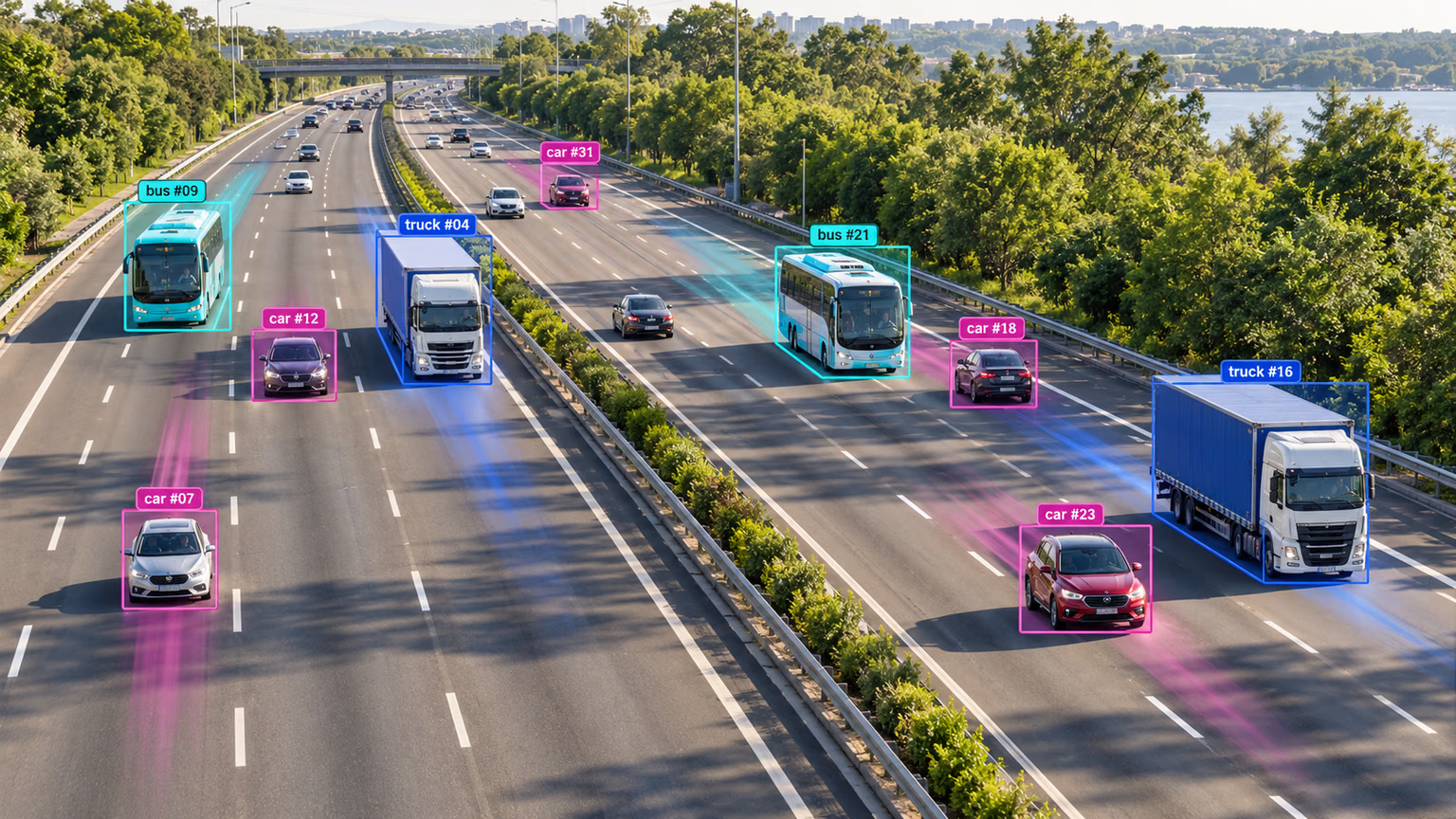
비디오 분석 분야의 객체 추적은 프레임 내 객체의 위치와 클래스를 식별할 뿐만 아니라, 비디오가 진행되는 동안 감지된 각 객체에 고유 ID를 유지하는 중요한 작업입니다. 감시 및 보안부터 실시간 스포츠 분석까지 다양한 분야에서 활용할 수 있습니다.
예정된 추적 지원에 대한 자세한 내용은 미출시 YOLO27 프리뷰를 참조하세요.
ultralytics 8.4.63부터 BoT-SORT 및 ByteTrack과 함께 OC-SORT, Deep OC-SORT, FastTracker, TrackTrack을 사용할 수 있습니다.
객체 추적에 Ultralytics YOLO를 선택해야 하는 이유#
Ultralytics 트래커의 출력은 표준 객체 detection과 일관되며 객체 ID가 추가됩니다. 따라서 비디오 스트림에서 객체를 쉽게 추적하고 후속 분석을 수행할 수 있습니다. 객체 추적에 Ultralytics YOLO를 고려해야 하는 이유는 다음과 같습니다.
- 효율성: 정확도를 저하시키지 않으면서 비디오 스트림을 실시간으로 처리합니다.
- 유연성: 여러 추적 알고리즘과 구성을 지원합니다.
- 사용 편의성: 빠른 통합 및 배포를 위한 간편한 Python API와 CLI 옵션을 제공합니다.
- 사용자 지정 가능성: 사용자 지정 학습 YOLO 모델과 쉽게 사용할 수 있어 도메인별 애플리케이션에 통합할 수 있습니다.
시청: Ultralytics YOLO26으로 다중 객체 추적을 실행하는 방법 | BoT-SORT 및 ByteTrack | VisionAI 🚀
실제 적용 사례#
| 교통 | 소매 | 양식업 |
|---|---|---|
| 차량 추적 | 사람 추적 | 물고기 추적 |
빠른 시작#
기본 TrackTrack 트래커로 비디오 추적을 실행하세요. tracker 인수를 변경하면 다른 트래커로 전환할 수 있습니다.
from ultralytics import YOLO

model = YOLO("yolo26n.pt")

# 기본 트래커(TrackTrack)
results = model.track(source="https://youtu.be/LNwODJXcvt4", show=True)

# ByteTrack으로 전환
results = model.track(source="https://youtu.be/LNwODJXcvt4", show=True, tracker="bytetrack.yaml")
비디오 스트림에서 트래커를 실행하려면 YOLO26n, YOLO26n-seg, YOLO26n-pose 또는 YOLO26n-obb와 같은 학습된 Detect, Segment, Pose 또는 OBB 모델을 사용하세요. 사용자 지정 모델은 로컬에서 학습하거나 Ultralytics Platform 클라우드 학습을 이용해 학습할 수 있습니다.
from ultralytics import YOLO

# 공식 모델 또는 사용자 지정 모델 로드
model = YOLO("yolo26n.pt")  # 공식 Detect 모델 로드
model = YOLO("yolo26n-seg.pt")  # 공식 Segment 모델 로드
model = YOLO("yolo26n-pose.pt")  # 공식 Pose 모델 로드
model = YOLO("path/to/best.pt")  # 사용자 지정 학습 모델 로드

# 모델로 추적 수행
results = model.track("https://youtu.be/LNwODJXcvt4", show=True)  # 기본 트래커로 추적
results = model.track("https://youtu.be/LNwODJXcvt4", show=True, tracker="bytetrack.yaml")  # ByteTrack 사용
지원되는 트래커#
Ultralytics YOLO에는 기본 트래커 6개가 포함되어 있습니다. tracker 인수에 해당 YAML 구성 파일을 전달하여 트래커를 활성화하세요.
| 트래커 | 구성 파일 | 모션 모델 | 외관 / ReID | 카메라 모션 보정 | 가림 처리 |
|---|---|---|---|---|---|
| BoT-SORT | botsort.yaml | 선형 Kalman | 선택 사항(with_reid) | 구성 가능(gmc_method) | 트랙 버퍼 + ReID 재연결 |
| ByteTrack | bytetrack.yaml | 선형 Kalman | 없음 | 아니요 | 2단계 저신뢰도 복구 |
| OC-SORT | ocsort.yaml | 관측 중심 Kalman | 없음 | 아니요 | 마지막 관측값을 기준으로 ORU, OCM, OCR 재업데이트 |
| Deep OC-SORT | deepocsort.yaml | 관측 중심 Kalman | 선택 사항(with_reid) | 구성 가능(gmc_method) | OC-SORT + 선택적 적응형 외관 EMA |
| FastTracker | fasttrack.yaml | 선형 Kalman + 롤백 | 없음 | 아니요 | Kalman 롤백 + 가림 발생 시 bbox 확대 |
| TrackTrack | tracktrack.yaml | 선형 Kalman(NSA) | 선택 사항(with_reid) | 구성 가능(gmc_method) | 반복적 다중 단서 연관 + TAI |
어떤 트래커를 사용해야 하나요?#
이 흐름을 참고해 시작점을 선택하세요. tracker을 전달하지 않으면 tracktrack.yaml이 사용됩니다.
- 가장 빠르고 간단한 기준이 필요한가요? → ByteTrack(ReID 없음, 카메라 모션 보정 없음, 오버헤드 최소화).
- 핸드헬드, 드론 또는 이동 카메라로 촬영한 영상인가요? → BoT-SORT(카메라 모션 보정 및 선택적 ReID 추가).
- 비선형 모션(스포츠, 춤, 급격한 회전)이며 ReID가 필요 없나요? → OC-SORT(외관 비교 비용 없이 관측 중심 보정 수행).
- ID 전환이 주된 문제인 복잡한 이동 카메라 장면인가요? → Deep OC-SORT 또는 TrackTrack(둘 다 선택적 외관 매칭을 지원하며, TrackTrack은 다중 단서 연관 및 중복 ID 억제 기능도 추가로 제공합니다).
- 실시간으로 부분적인 겹침이 자주 발생하고 ReID 예산이 없나요? → FastTracker(Kalman 롤백을 사용하는 가림 인식 ByteTrack 변형).
트래커 전환#
tracker=에 트래커 구성 파일명을 전달하세요. 나머지 코드는 그대로 유지됩니다.
from ultralytics import YOLO

model = YOLO("yolo26n.pt")

results = model.track(source="path/to/video.mp4", tracker="bytetrack.yaml")
results = model.track(source="path/to/video.mp4", tracker="ocsort.yaml")
results = model.track(source="path/to/video.mp4", tracker="tracktrack.yaml")구성#
추적 인수#
추적 구성은 conf, iou, show와 같은 Predict 모드 속성을 공유합니다. 추가 구성은 Predict 모델 페이지를 참조하세요.
from ultralytics import YOLO

# 추적 매개변수를 구성하고 트래커를 실행합니다
model = YOLO("yolo26n.pt")
results = model.track(source="https://youtu.be/LNwODJXcvt4", conf=0.1, iou=0.7, show=True)
사용자 지정 트래커 구성#
Ultralytics에서는 수정된 트래커 구성 파일도 사용할 수 있습니다. 이렇게 하려면 ultralytics/cfg/trackers에서 트래커 구성 파일(예: custom_tracker.yaml)을 복사한 다음, 필요에 따라 tracker_type를 제외한 구성을 수정하면 됩니다.
from ultralytics import YOLO

# 모델을 로드하고 사용자 지정 구성 파일로 트래커를 실행합니다
model = YOLO("yolo26n.pt")
results = model.track(source="https://youtu.be/LNwODJXcvt4", tracker="custom_tracker.yaml")
공통 트래커 인수#
다음 매개변수는 대부분의 트래커 YAML 파일에서 공통으로 사용됩니다. 모든 구성에 모든 매개변수가 포함되는 것은 아닙니다.
track_high_thresh 이상인 detection은 첫 번째 연관 단계로 진입합니다. track_low_thresh과 track_high_thresh 사이의 detection은 선택한 트래커에서 저신뢰도 연관 기능을 활성화한 경우 기존 트랙을 복구할 수 있지만, 새 트랙을 시작하지는 않습니다. track_low_thresh 이하인 detection은 무시됩니다.
| 매개변수 | 유효한 값 또는 범위 | 설명 |
|---|---|---|
tracker_type | botsort, bytetrack, ocsort, deepocsort, fasttrack, tracktrack | 트래커 유형을 지정합니다. |
track_high_thresh | 0.0-1.0 | 첫 번째 연관 관계 설정을 위한 임계값입니다. 탐지 결과를 기존 트랙과 얼마나 확신 있게 매칭할지에 영향을 줍니다. |
track_low_thresh | 0.0-1.0 | 신뢰도가 낮은 복구용 탐지 결과의 하한값입니다. OC-SORT와 Deep OC-SORT는 use_byte: True일 때만 이 값을 사용합니다. TrackTrack은 페널티가 적용되는 연관 풀에 이 탐지 결과를 포함합니다. |
new_track_thresh | 0.0-1.0 | 탐지 결과가 기존 트랙과 일치하지 않을 때 새 트랙을 초기화하는 임계값입니다. |
track_buffer | >=0 | 손실된 트랙을 제거하기 전까지 유지하는 프레임 수입니다. 값이 높을수록 가림 현상에 대한 허용도가 높아집니다. |
match_thresh | 0.0-1.0 | 트랙 매칭 임계값입니다. 값이 높을수록 매칭이 더 느슨해집니다. |
fuse_score | True, False | 매칭 전에 신뢰도 점수를 IoU 거리와 결합할지 여부입니다. |
gmc_method | sparseOptFlow, orb, sift, ecc, none | 전역 모션 보정 방식입니다. 카메라 움직임을 보정하는 데 도움이 됩니다. |
proximity_thresh | 0.0-1.0 | 유효한 ReID 매칭에 필요한 최소 IoU입니다. 외형 정보를 사용하기 전에 공간적으로 가까운지 확인합니다. |
appearance_thresh | 0.0-1.0 | ReID에 필요한 최소 정규화 외형 유사도입니다. |
with_reid | True, False | 가림이 발생해도 더 잘 추적할 수 있도록 외형 기반 매칭을 활성화합니다. BoT-SORT, Deep OC-SORT, TrackTrack에서 지원됩니다. |
model | auto 또는 호환되는 ReID 모델 경로 | ReID 모델입니다. 사용 가능한 경우 auto은 YOLO 기본 백본 특성을 사용하고, 그렇지 않으면 yolo26n-cls.pt로 대체합니다. 사용자 지정 인코더는 .pt 체크포인트나 .torchscript, .onnx, .engine와 같은 내보낸 모델 또는 OpenVINO 모델 디렉터리일 수 있습니다. |
트래커별 인수#
각 알고리즘은 공통 매개변수 외에도 추가 설정을 제공합니다. 설명과 튜닝 방법은 아래 트래커별 섹션을 참조하거나 설정 파일을 직접 확인하세요.
재식별(ReID) 활성화#
오버헤드를 최소화하기 위해 ReID는 기본적으로 비활성화되어 있습니다. 트래커 설정 파일에서 with_reid: True을 설정하여 활성화하세요.
ReID 모델 옵션:
model: auto— YOLO 기본 탐지기 특성을 사용하므로 오버헤드가 최소화됩니다. 성능 저하를 크게 유발하지 않으면서 ReID를 사용하려는 경우에 적합합니다. 탐지기가 호환되는 특성을 제공하지 않으면yolo26n-cls.pt로 대체합니다.- 사용자 지정 ReID 모델 —
model:에.pt체크포인트 또는.torchscript,.onnx,.engine와 같은 호환되는 내보낸 임베딩 모델이나 OpenVINO 모델 디렉터리를 지정합니다. 내보낸 모델은AutoBackend를 통해 로드되며 임베딩 텐서를 직접 출력해야 합니다.
모든 모델 크기에서 바로 사용할 수 있는 ONNX 인코더를 제공합니다. model:에 인코더 이름 중 하나를 지정하면 트래커를 처음 실행할 때 파일이 자동으로 다운로드됩니다(YOLO 가중치를 가져오는 방식과 동일). 별도로 내보내거나 다운로드할 필요가 없습니다.
# In your tracker config (e.g. tracktrack.yaml)
with_reid: True
model: yolo26n-reid.onnx # downloaded on first use; swap n→s/m/l/x for a larger encoder| 모델 | 크기 (픽셀) | 매개변수 (M) | FLOPs (B) |
|---|---|---|---|
| YOLO26n-reid.onnx | 448 | 2.8 | 2.0 |
| YOLO26s-reid.onnx | 448 | 7.5 | 6.6 |
| YOLO26m-reid.onnx | 448 | 12.4 | 20.1 |
| YOLO26l-reid.onnx | 448 | 15.3 | 25.2 |
| YOLO26x-reid.onnx | 448 | 32.7 | 55.9 |
현재 트래커 외형 분기에서 사용할 ONNX ReID 인코더만 제공됩니다. ReID의 train, val, predict 모드와 전용 ReID 내보내기 레시피는 아직 개발 중입니다.
별도의 분류 모델을 사용할 때 성능을 높이려면 TensorRT와 같이 더 빠른 백엔드로 내보내세요.
from torch import nn

from ultralytics import YOLO

# 분류 모델 로드
model = YOLO("yolo26n-cls.pt")

# 평균 풀링 레이어 추가
head = model.model.model[-1]
pool = nn.Sequential(nn.AdaptiveAvgPool2d((1, 1)), nn.Flatten(start_dim=1))
pool.f, pool.i = head.f, head.i
model.model.model[-1] = pool

# TensorRT로 내보내기
model.export(format="engine", quantize=16, dynamic=True, batch=32)
내보낸 후 트래커 설정에서 TensorRT 모델 경로를 지정하세요.
트래커 세부 정보#
아래 섹션에서는 각 트래커의 설계, 고유 매개변수, 튜닝 팁을 설명합니다.
시청: 어떤 객체 트래커의 성능이 더 좋을까요? | 속도, FPS 및 ID 안정성 | Ultralytics YOLO26 📊
BoT-SORT#
BoT-SORT(Aharon 외, 2022)는 카메라 모션 보정과 선택적 ReID를 추가하여 ByteTrack을 확장합니다.
- 카메라 모션 보정(CMC): 매 프레임 추정한 아핀 워프(기본적으로 희소 광학 흐름을 사용하며 ORB/ECC도 사용 가능)를 IoU 매칭 전에 칼만 상태에 적용합니다.
- 선택적 ReID: 외형 임베딩을 비용 행렬에 결합할 수 있습니다. 기본적으로 비활성화되어 있으며
with_reid: True으로 활성화할 수 있습니다.
적합한 경우: 범용 추적, 특히 카메라가 움직이는 환경에 적합합니다. 외형이 비슷한 객체가 많은 군중에서 ID가 바뀌는 경우에만 ReID를 추가하세요.
BoT-SORT 전용 인수:
| 매개변수 | 유효한 값 또는 범위 | 설명 |
|---|---|---|
gmc_method | sparseOptFlow, orb, sift, ecc, none | 카메라 모션 보정 백엔드입니다. sparseOptFlow이 기본값입니다. none은 CMC를 비활성화합니다. |
with_reid | True, False | 외형 기반 매칭을 활성화합니다. 기본적으로 꺼져 있습니다. |
model | auto 또는 호환되는 ReID 모델 경로 | 사용 가능한 경우 auto은 YOLO 기본 특성을 사용합니다. 사용자 지정 모델로는 .pt 체크포인트나 호환되는 내보낸 모델을 사용할 수 있습니다. |
proximity_thresh | 0.0-1.0 | 외형 특성을 고려하기 위한 최소 IoU입니다. |
appearance_thresh | 0.0-1.0 | ReID 매칭에 필요한 최소 정규화 외형 유사도입니다. 값을 높이면 매칭이 더 엄격해집니다. |
튜닝 팁:
- 고정 카메라: 프레임당 몇 밀리초를 절약하려면
gmc_method: none으로 설정하세요. - 카메라 움직임이 큼:
sparseOptFlow을 유지하세요.ecc은 더 정확하지만 느립니다. - 외형이 비슷한 객체가 많은 군중:
with_reid: True을 활성화하고appearance_thresh을 높이세요(예:0.85+).
ByteTrack#
ByteTrack(Zhang 외, ECCV 2022)은 경량 기준 모델입니다. 선형 칼만 필터와 IoU를 사용하며, 2단계 연관 방식을 적용합니다.
- 1단계: 높은 점수의 탐지 결과를 활성 트랙과 매칭합니다.
- 2단계: 매칭되지 않은 트랙을 낮은 점수의 탐지 결과와 다시 매칭하여 짧은 부분 가림 상황에서 트랙을 복구합니다.
외형 모델과 카메라 모션 보정은 사용하지 않습니다.
적합한 경우: 탐지기 비용이 대부분을 차지하는 고정 또는 거의 고정된 카메라 환경에서 트래커 오버헤드를 최소화하려는 경우에 적합합니다.
ByteTrack 전용 인수: 공통 트래커 인수 외에는 없습니다.
튜닝 팁:
- 탐지 결과에 노이즈가 많음: 2단계에서 더 많은 후보를 사용하도록
track_low_thresh을 낮추세요. - 재현율이 높은 탐지기: ID 분할을 줄이려면
track_high_thresh을 높이세요. - ID가 자주 깜빡임: 잠시 놓친 트랙을 유지할 수 있도록
track_buffer을 높이세요.
OC-SORT#
OC-SORT(Cao 외, CVPR 2023)는 SORT를 관측 중심으로 확장한 알고리즘입니다. SORT의 경량 설계(외형 특성 없음)를 유지하면서 다음 세 가지 보정 기능을 추가합니다.
- 관측 중심 재업데이트(ORU): 마지막 관측과 현재 탐지 결과 사이의 가상 궤적을 재생하고 칼만 업데이트를 다시 실행하여 속도 드리프트를 보정합니다.
- 관측 중심 모멘텀(OCM): 속도 일관성 항을 통해 잘못된 방향으로 움직이는 탐지 결과에 페널티를 부여합니다.
- 관측 중심 복구(OCR): 예측 상태 대신 마지막 관측값을 사용하여 매칭되지 않은 탐지 결과를 최근 손실된 트랙과 다시 확인합니다.
적합한 경우: ReID 모델의 비용 없이 비선형 움직임을 추적하려는 경우에 적합합니다.
OC-SORT 전용 인수:
| 매개변수 | 유효한 값 또는 범위 | 설명 |
|---|---|---|
delta_t | >=1 | OCM에서 속도 방향을 계산할 때 사용하는 시간 윈도우(프레임)입니다. 값이 클수록 더 부드럽게 계산됩니다. |
inertia | 0.0-1.0 | 속도 일관성 비용의 가중치입니다. 값이 높을수록 급격한 방향 변화에 더 큰 페널티를 부여합니다. |
use_byte | True, False | 신뢰도가 낮은 탐지 결과에 대해 ByteTrack 방식의 2차 연관 패스를 활성화합니다. |
튜닝 팁:
- 비선형 움직임:
inertia을 높이세요(예:0.3-0.4). - 탐지 결과가 드묾:
use_byte: True을 활성화하세요. - 가림이 오래 지속됨: OCR이 다시 연결할 손실 트랙을 더 확보하도록
track_buffer을 높이세요.
OBB 모델에서는 방향이 지정된 마지막 관측 이력이 유지되지 않으므로 OCR이 칼만 필터로 예측한 방향 박스를 사용합니다.
Deep OC-SORT#
Deep OC-SORT는 외형 정보와 카메라 모션 보정을 OC-SORT에 추가합니다.
- 외형 매칭: 코사인 임베딩 거리를 중첩 기준으로 제한하고 모션 비용과 결합합니다.
- 동적 외형 EMA: 트랙 임베딩은 탐지 신뢰도에 따라 평활화 계수가 조정되는 EMA를 사용해 업데이트됩니다.
- 카메라 모션 보정: 희소 광학 흐름, ORB 또는 ECC를 사용해 프레임 간 칼만 상태를 워핑합니다.
적합한 경우: 시각적으로 다르지만 공간적으로 가까운 객체 간 ID 변경이 자주 발생하는 혼잡한 환경이나 카메라가 움직이는 환경에 적합합니다.
Deep OC-SORT 전용 인수:
| 매개변수 | 유효한 값 또는 범위 | 설명 |
|---|---|---|
with_reid | True, False | 외형 기반 매칭을 활성화합니다. 기본적으로 꺼져 있습니다. |
model | auto 또는 호환되는 ReID 모델 경로 | 사용 가능한 경우 auto은 YOLO 기본 특성을 사용합니다. 사용자 지정 모델로는 .pt 체크포인트나 호환되는 내보낸 모델을 사용할 수 있습니다. |
proximity_thresh | 0.0-1.0 | 외형 특성을 고려하기 위한 최소 IoU입니다. |
appearance_thresh | 0.0-1.0 | ReID 매칭에 필요한 최소 정규화 외형 유사도입니다. |
alpha_fixed_emb | 0.0-1.0 | 트랙 임베딩 업데이트에 사용하는 기본 EMA 계수입니다. 값이 높을수록 이전 임베딩이 더 오래 유지됩니다. |
gmc_method | sparseOptFlow, orb, sift, ecc, none | 전역 모션 보정 방식입니다. |
delta_t | >=1 | OCM에서 속도 방향을 계산하는 시간 윈도우(프레임)입니다(OC-SORT에서 상속됨). |
inertia | 0.0-1.0 | 속도 일관성 비용의 가중치입니다(OC-SORT에서 상속됨). |
use_byte | True, False | 신뢰도가 낮은 탐지 결과에 대해 ByteTrack 방식의 2차 연관을 활성화합니다(OC-SORT에서 상속됨). |
튜닝 팁:
- 군중 속 ID 변경:
appearance_thresh을 높이고(예:0.92-0.95), 임베딩이 더 천천히 적응하도록alpha_fixed_emb도 높이세요. - 카메라 이동:
gmc_method: sparseOptFlow으로 설정하세요(Deep OC-SORT의 기본값은none입니다). - 지연 시간 감소: 모션과 CMC만 사용하도록
with_reid: False(기본값)을 유지하고, ID 변경이 주된 오류 원인일 때만 ReID를 활성화하세요.
FastTracker#
FastTracker는 외형 모델이 없는 가림 인식형 ByteTrack 변형입니다.
- 가림 감지: 다른 활성 트랙이 차지하는 비율이
occ_cover_thresh을 초과하면 해당 트랙이 가려진 것으로 표시합니다. - 가림 중 칼만 롤백: 링 버퍼에 저장된 이력을 사용해 칼만 상태를 가림 이전 프레임으로 되돌립니다.
- 모션 감쇠 및 검색 범위 확대: 가려진 동안 속도를 감쇠하고 예측 bbox를 확대합니다.
- 초기화 IoU 억제: 활성 트랙 위에 새 트랙이 생성되지 않도록 합니다.
적합한 경우: 객체 간 겹침이 자주 발생하는 군중, 대기열, 스포츠 환경에서 실시간 탐지만 수행하는 파이프라인에 적합합니다.
FastTracker 관련 인수:
| 매개변수 | 유효한 값 또는 범위 | 설명 |
|---|---|---|
reset_velocity_offset_occ | >=0 | 가림이 시작될 때 Kalman 속도를 복원하기 위해 되돌아갈 히스토리 프레임 수입니다. |
reset_pos_offset_occ | >=0 | 가림이 시작될 때 Kalman 위치를 복원하기 위해 되돌아갈 히스토리 프레임 수입니다. |
enlarge_bbox_occ | >=1.0 | 가림 중 예측된 bbox에 적용되는 높이 배율입니다(너비는 XYAH 종횡비를 통해 조정됩니다). |
dampen_motion_occ | 0.0-1.0 | 가림 중 속도 배율입니다. 값을 낮추면 트랙이 가림 구간을 지날 때 "속도가 느려집니다". |
active_occ_to_lost_thresh | >=1 | 활성 트랙이 lost 상태로 이동하기 전까지 허용되는 연속 가림 프레임의 최대 수입니다. |
occ_cover_thresh | 0.0-1.0 | 가림으로 판정하기 위해 다른 활성 트랙이 덮어야 하는 트랙 면적의 비율입니다. |
occ_reappear_window | >=0 | 최근 가려진 lost 트랙을 우선적으로 다시 찾을 수 있는 프레임 수입니다. |
init_iou_suppress | 0.0-1.0 | 새 트랙의 IoU가 활성 트랙 중 하나라도 이 값을 초과하면 초기화를 억제합니다. 비활성화하려면 1.0으로 설정합니다. |
튜닝 팁:
- 부분 가림이 잦은 경우:
occ_cover_thresh을 낮춥니다(예:0.5-0.6). - 겹침 구간에서 중복 ID가 발생하는 경우:
init_iou_suppress을 낮춥니다(예:0.5). - 가림이 오래 지속되는 경우:
occ_reappear_window과track_buffer을 함께 높입니다. - 빠르게 움직이는 대상:
dampen_motion_occ을 높여1.0에 가깝게 설정합니다. 더 넓은 검색 영역이 복구에 도움이 되는 경우에만enlarge_bbox_occ를 높입니다.
TrackTrack#
TrackTrack(Shim 외, CVPR 2025)는 기본 트래커입니다. 각 트랙의 관점에서 판단하며, 여러 단서를 반복적으로 연결합니다:
- 트랙 관점 기반 연결(TPA): HMIoU, 선택적 코사인 ReID 거리, 신뢰도 투영 거리, 코너 각도 거리를 결합합니다. 완화되는 임계값을 사용해 반복적으로 할당을 계산합니다.
- 트랙 인식 초기화(TAI): 새 ID를 생성하기 전에 중복 트랙 생성을 억제합니다.
적합한 경우: 가림이 잦고 중복 ID가 문제가 되는 혼잡한 장면입니다.
TrackTrack 전용 인수:
| 매개변수 | 유효한 값 또는 범위 | 설명 |
|---|---|---|
iou_weight | 0.0-1.0 | ReID가 활성화된 경우 HMIoU 거리의 가중치입니다. 그렇지 않으면 HMIoU를 직접 사용합니다. |
reid_weight | 0.0-1.0 | ReID가 활성화된 경우 코사인 ReID 거리의 가중치입니다. 그렇지 않으면 무시됩니다. |
conf_weight | 0.0-1.0 | 신뢰도 투영 거리의 가중치입니다. |
angle_weight | 0.0-1.0 | 코너 각도 거리의 가중치입니다. |
penalty_p | 0.0-1.0 | 신뢰도가 낮은 검출에 대한 비용 페널티입니다. |
penalty_q | 0.0-1.0 | 보조 NMS로 복구된 검출에 대한 비용 페널티입니다. |
reduce_step | 0.0-1.0 | 반복마다 적용되는 매칭 임계값 완화 폭입니다. |
tai_thr | 0.0-1.0 | 트랙 인식 초기화 NMS의 IoU 임계값입니다. |
min_track_len | >=0 | 새 트랙을 확정하기 전 필요한 최소 히스토리 길이입니다. |
lost_match_thr | 0.0-1.0 | 완화된 lost 재연결 단계에 적용되는 더 느슨한 비용 게이트입니다. 0으로 설정하면 비활성화됩니다. |
with_reid | True, False | 코사인 ReID 외관 매칭을 활성화합니다(네이티브 YOLO 특성을 사용함). 기본적으로 비활성화되어 있습니다. |
model | auto 또는 호환되는 ReID 모델 경로 | 사용 가능한 경우 auto은 YOLO 기본 특성을 사용합니다. 사용자 지정 모델로는 .pt 체크포인트나 호환되는 내보낸 모델을 사용할 수 있습니다. |
gmc_method | sparseOptFlow, orb, sift, ecc, none | 전역 모션 보정 방식입니다. |
튜닝 팁:
- 혼잡한 보행자 장면: 중복 트랙 생성을 더 억제하려면
tai_thr을 낮춥니다(예:0.45). 가림이 오래 지속되는 경우에는track_buffer를 높입니다. - 카메라가 빠르게 움직이는 경우:
gmc_method: sparseOptFlow을 활성화된 상태로 유지합니다. - 작거나 빠른 객체:
angle_weight을 약간 높이고min_track_len을 낮춥니다. - 필요한 경우에만 ReID 활성화: 추론 비용이 추가됩니다. 가림이 짧은 경우에는 기본 다중 단서 비용으로 대체로 충분합니다.
Segment 및 Pose 모델에서는 TrackTrack이 완화된 NMS 검출 복구를 건너뛰므로 마스크와 키포인트가 해당 검출과 정렬된 상태로 유지됩니다.
Python 예제#
시청: Ultralytics YOLO26으로 대화형 객체 추적을 구축하는 방법: 몇 분 만에 완성하기 | Python!
트랙을 유지하는 루프#
다음은 OpenCV(cv2)와 YOLO26을 사용하여 비디오 프레임에서 객체 추적을 수행하는 Python 스크립트입니다. 이 스크립트는 필요한 패키지(opencv-python 및 ultralytics)가 이미 설치되어 있다고 가정합니다. persist=True 인수는 현재 이미지나 프레임이 시퀀스의 다음 프레임이며, 현재 이미지에서 이전 이미지의 트랙을 이어받아야 한다고 트래커에 알립니다.
동일한 비디오 스트림의 연속 프레임을 model.track()에 전달하는 경우에만 persist=True을 사용합니다. 이를 통해 트래커가 이전 프레임의 상태를 재사용하고 시간에 따라 일관된 트랙 ID를 유지할 수 있습니다. 이전 트랙 상태가 이어질 수 있으므로 서로 관련이 없는 이미지나 다른 스트림에 persist=True를 사용하지 마세요.
tracker="botsort.yaml", tracker="bytetrack.yaml" 또는 tracker="tracktrack.yaml"와 같은 트래커 구성 파일을 전달하여 트래커 백엔드를 선택할 수도 있습니다.
import cv2

from ultralytics import YOLO

# YOLO26 모델을 불러옵니다
model = YOLO("yolo26n.pt")

# 비디오 파일을 엽니다
video_path = "path/to/video.mp4"
cap = cv2.VideoCapture(video_path)

# 비디오 프레임을 순회합니다
while cap.isOpened():
    # 비디오에서 프레임을 읽습니다
    success, frame = cap.read()

    if success:
        # 프레임에서 YOLO26 추적을 실행하고 프레임 간 트랙을 유지합니다
        # BoT-SORT 트래커 백엔드를 사용합니다
        results = model.track(frame, persist=True, tracker="botsort.yaml")

        # 프레임에 결과를 시각화합니다
        annotated_frame = results[0].plot()

        # 주석이 추가된 프레임을 표시합니다
        cv2.imshow("YOLO26 Tracking", annotated_frame)

        # 'q'를 누르면 루프를 종료합니다
        if cv2.waitKey(1) & 0xFF == ord("q"):
            break
    else:
        # 비디오 끝에 도달하면 루프를 종료합니다
        break

# 비디오 캡처 객체를 해제하고 표시 창을 닫습니다
cap.release()
cv2.destroyAllWindows()
객체 추적을 활성화하는 변경 사항은 model(frame)에서 model.track(frame)로 바뀐 부분입니다. 이 수정된 스크립트는 비디오의 각 프레임에서 트래커를 실행하고, 결과를 시각화하여 창에 표시합니다. 'q'를 눌러 루프를 종료할 수 있습니다.
시간에 따른 트랙 시각화#
연속된 프레임에서 객체 트랙을 시각화하면 비디오 내에서 검출된 객체의 이동 패턴과 동작을 파악하는 데 유용한 통찰을 얻을 수 있습니다. Ultralytics YOLO26을 사용하면 이러한 트랙을 간편하고 효율적으로 그릴 수 있습니다.
다음 예제에서는 YOLO26의 추적 기능을 활용해 여러 비디오 프레임에서 검출된 객체의 이동 경로를 표시하는 방법을 보여 줍니다. 이 스크립트는 비디오 파일을 열어 프레임 단위로 읽고, YOLO 모델을 사용해 다양한 객체를 식별하고 추적합니다. 검출된 bbox의 중심점을 저장하고 서로 연결하면 추적된 객체가 이동한 경로를 나타내는 선을 그릴 수 있습니다.
from collections import defaultdict

import cv2
import numpy as np

from ultralytics import YOLO

# YOLO26 모델을 불러옵니다
model = YOLO("yolo26n.pt")

# 비디오 파일을 엽니다
video_path = "path/to/video.mp4"
cap = cv2.VideoCapture(video_path)

# 트랙 히스토리를 저장합니다
track_history = defaultdict(list)

# 비디오 프레임을 순회합니다
while cap.isOpened():
    # 비디오에서 프레임을 읽습니다
    success, frame = cap.read()

    if success:
        # 프레임에서 YOLO26 추적을 실행하고 프레임 간 트랙을 유지합니다
        result = model.track(frame, persist=True)[0]

        # 박스와 트랙 ID를 가져옵니다
        if result.boxes and result.boxes.is_track:
            boxes = result.boxes.xywh.cpu()
            track_ids = result.boxes.id.int().cpu().tolist()

            # 프레임에 결과를 시각화합니다
            frame = result.plot()

            # 트랙을 그립니다
            for box, track_id in zip(boxes, track_ids):
                x, y, w, h = box
                track = track_history[track_id]
                track.append((float(x), float(y)))  # x, y 중심점
                if len(track) > 30:  # 30프레임 동안 트랙 30개를 유지합니다
                    track.pop(0)

                # 추적선을 그립니다
                points = np.hstack(track).astype(np.int32).reshape((-1, 1, 2))
                cv2.polylines(frame, [points], isClosed=False, color=(230, 230, 230), thickness=10)

        # 주석이 추가된 프레임을 표시합니다
        cv2.imshow("YOLO26 Tracking", frame)

        # 'q'를 누르면 루프를 종료합니다
        if cv2.waitKey(1) & 0xFF == ord("q"):
            break
    else:
        # 비디오 끝에 도달하면 루프를 종료합니다
        break

# 비디오 캡처 객체를 해제하고 표시 창을 닫습니다
cap.release()
cv2.destroyAllWindows()
멀티스레드 추적#
멀티스레드 추적을 사용하면 여러 비디오 스트림에서 객체 추적을 동시에 실행할 수 있습니다. 이는 여러 감시 카메라의 영상처럼 다수의 비디오 입력을 처리할 때 특히 유용하며, 동시 처리를 통해 효율성과 성능을 크게 높일 수 있습니다.
제공된 Python 스크립트에서는 Python의 threading 모듈을 사용해 여러 트래커 인스턴스를 동시에 실행합니다. 각 스레드는 하나의 비디오 파일에서 트래커를 실행하며, 모든 스레드는 백그라운드에서 동시에 실행됩니다.
각 스레드에 올바른 매개변수(비디오 파일, 사용할 모델, 파일 인덱스)를 전달하기 위해 이러한 매개변수를 받고 주요 추적 루프를 포함하는 run_tracker_in_thread 함수를 정의합니다. 이 함수는 비디오를 프레임 단위로 읽고, 트래커를 실행한 다음 주석이 추가된 결과를 저장합니다.
이 예제에서는 yolo26n.pt과 yolo26n-seg.pt이라는 두 가지 모델을 사용하며, 각 모델은 서로 다른 비디오 파일에서 객체를 추적합니다. 비디오 파일은 SOURCES에 지정되어 있습니다.
threading.Thread의 daemon=True 매개변수는 메인 프로그램이 종료되는 즉시 해당 스레드가 종료됨을 의미합니다. 그런 다음 start()로 스레드를 시작하고, join()을 사용해 두 트래커 스레드가 모두 종료될 때까지 메인 스레드가 대기하도록 합니다.
마지막으로 모든 스레드의 작업이 완료되면 cv2.destroyAllWindows()을 사용해 결과를 표시하는 창을 닫습니다.
import threading

import cv2

from ultralytics import YOLO

# 모델 이름과 비디오 소스를 정의합니다
MODEL_NAMES = ["yolo26n.pt", "yolo26n-seg.pt"]
SOURCES = ["path/to/video.mp4", "0"]  # 로컬 비디오, 웹캠은 0

def run_tracker_in_thread(model_name, filename):
    """Run YOLO tracker in its own thread for concurrent processing.

    Args:
        model_name (str): Model checkpoint name or path loaded inside the thread.
        filename (str): The path to the video file or the identifier for the webcam/external camera source.
    """
    model = YOLO(model_name)
    results = model.track(filename, save=True, stream=True)
    for r in results:
        pass

# for 루프를 사용해 트래커 스레드를 생성하고 시작합니다
tracker_threads = []
for video_file, model_name in zip(SOURCES, MODEL_NAMES):
    thread = threading.Thread(target=run_tracker_in_thread, args=(model_name, video_file), daemon=True)
    tracker_threads.append(thread)
    thread.start()

# 모든 트래커 스레드가 종료될 때까지 기다립니다
for thread in tracker_threads:
    thread.join()

# 정리하고 창을 닫습니다
cv2.destroyAllWindows()
같은 방법론을 적용해 스레드를 추가하면 이 예제를 확장하여 더 많은 비디오 파일과 모델을 손쉽게 처리할 수 있습니다.
새 트래커 기여#
다중 객체 추적에 능숙하고 Ultralytics YOLO를 사용해 추적 알고리즘을 성공적으로 구현하거나 조정하셨나요? ultralytics/cfg/trackers의 트래커 섹션에 기여해 주세요! 실제 적용 사례와 솔루션은 추적 작업을 수행하는 사용자에게 큰 도움이 될 수 있습니다.
이 섹션에 기여하면 Ultralytics YOLO 프레임워크에서 사용할 수 있는 추적 솔루션의 범위를 넓히고, 커뮤니티에 더 많은 기능과 활용성을 더하는 데 도움이 됩니다.
기여를 시작하려면 Pull Request(PR)를 제출하는 방법에 대한 자세한 안내를 기여 가이드에서 확인하세요 🛠️. 여러분이 기여해 주실 내용을 기대하겠습니다!
함께 Ultralytics YOLO 생태계의 추적 기능을 향상해 나가겠습니다 🙏!
자주 묻는 질문#
아니요. 표준 Ultralytics
.pt파일에는 YOLO 모델 가중치가 저장되며,model.track()가 추론 시 트래커를 생성합니다. 트랙 ID는 연속 프레임의 트래커 상태에 따라 달라지므로, 단일 독립 이미지에서는 박스, 클래스, 신뢰도 등의 검출 결과를 반환할 수 있지만 그 자체로 의미 있는 지속적 추적 ID를 생성할 수는 없습니다.배포 시에는 검출기와 트래커를 함께 애플리케이션에 패키징하고, 동일한 비디오 스트림에서 가져온 프레임에는
persist=True과 함께model.track()을 프레임 단위로 호출합니다. 비디오 간에 상태가 이어지지 않도록 서로 관련이 없는 스트림에는 별도의 모델 또는 트래커 인스턴스를 사용합니다.기존 트래커 구성 파일(예:
custom_tracker.yaml)을 Ultralytics 트래커 구성 디렉터리에서 복사한 뒤tracker_type를 제외한 필요한 매개변수를 수정하여 사용자 지정 트래커를 구성할 수 있습니다. 다음과 같이 추적 모델에서 이 파일을 사용합니다:예제from ultralytics import YOLO model = YOLO("yolo26n.pt") results = model.track(source="https://youtu.be/LNwODJXcvt4", tracker="custom_tracker.yaml")여러 비디오 스트림에서 객체 추적을 동시에 실행하려면 Python의
threading모듈을 사용할 수 있습니다. 각 스레드가 별도의 비디오 스트림을 처리합니다. 다음은 설정 예제입니다:멀티스레드 추적import threading import cv2 from ultralytics import YOLO # 모델 이름과 비디오 소스를 정의합니다 MODEL_NAMES = ["yolo26n.pt", "yolo26n-seg.pt"] SOURCES = ["path/to/video.mp4", "0"] # 로컬 비디오, 웹캠은 0 def run_tracker_in_thread(model_name, filename): """Run YOLO tracker in its own thread for concurrent processing. Args: model_name (str): Model checkpoint name or path loaded inside the thread. filename (str): The path to the video file or the identifier for the webcam/external camera source. """ model = YOLO(model_name) results = model.track(filename, save=True, stream=True) for r in results: pass # for 루프를 사용해 트래커 스레드를 생성하고 시작합니다 tracker_threads = [] for video_file, model_name in zip(SOURCES, MODEL_NAMES): thread = threading.Thread(target=run_tracker_in_thread, args=(model_name, video_file), daemon=True) tracker_threads.append(thread) thread.start() # 모든 트래커 스레드가 종료될 때까지 기다립니다 for thread in tracker_threads: thread.join() # 정리하고 창을 닫습니다 cv2.destroyAllWindows()Ultralytics YOLO를 활용한 다중 객체 추적은 다음을 비롯한 다양한 분야에 적용할 수 있습니다:
- 교통: 교통 관리를 위한 차량 추적 및 자율 주행.
- 소매: 매장 내 분석과 보안을 위한 사람 추적.
- 양식업: 수중 환경을 모니터링하기 위한 어류 추적.
- 스포츠 분석: 경기력 분석을 위한 선수와 장비 추적.
- 보안 시스템: 의심스러운 활동 모니터링 및 보안 경보 생성.
이러한 분야에서는 높은 정확도로 고프레임률 비디오를 실시간 처리하는 Ultralytics YOLO의 기능을 활용할 수 있습니다.
여러 비디오 프레임의 객체 트랙을 시각화하려면 YOLO 모델의 추적 기능과 OpenCV를 함께 사용해 검출된 객체의 경로를 그릴 수 있습니다. 다음은 이를 보여 주는 예제 스크립트입니다:
여러 비디오 프레임에서 트랙 그리기from collections import defaultdict import cv2 import numpy as np from ultralytics import YOLO model = YOLO("yolo26n.pt") video_path = "path/to/video.mp4" cap = cv2.VideoCapture(video_path) track_history = defaultdict(list) while cap.isOpened(): success, frame = cap.read() if success: result = model.track(frame, persist=True)[0] annotated_frame = result.plot() if result.boxes and result.boxes.is_track: boxes = result.boxes.xywh.cpu() track_ids = result.boxes.id.int().cpu().tolist() for box, track_id in zip(boxes, track_ids): x, y, w, h = box track = track_history[track_id] track.append((float(x), float(y))) if len(track) > 30: track.pop(0) points = np.hstack(track).astype(np.int32).reshape((-1, 1, 2)) cv2.polylines(annotated_frame, [points], isClosed=False, color=(230, 230, 230), thickness=10) cv2.imshow("YOLO26 Tracking", annotated_frame) if cv2.waitKey(1) & 0xFF == ord("q"): break else: break cap.release() cv2.destroyAllWindows()이 스크립트는 시간에 따른 추적 객체의 이동 경로를 추적선으로 그려 객체의 동작과 패턴을 파악하는 데 유용한 통찰을 제공합니다.