Датасет Open Images V7#
Open Images V7 — масштабный датасет для обнаружения объектов, созданный Google. В конфигурации Ultralytics он содержит 1 743 042 обучающих и 41 620 валидационных изображений с 601 классом объектов. Исходная версия датасета охватывает около 9 миллионов изображений с разметкой на уровне изображений, рамками объектов, масками сегментации, визуальными связями и локализованными описаниями. Это один из самых обширных ресурсов для разметки в области компьютерного зрения.
Смотри: Обнаружение объектов с предварительно обученной моделью Open Images V7
Предварительно обученные модели Open Images V7#
Ultralytics публикует пять моделей YOLOv8, предварительно обученных на Open Images V7, чтобы ты мог обнаруживать объекты 601 класса, не скачивая датасет:
| Модель | размер (пиксели) | mAPval50-95 | Скорость CPU ONNX (мс) | Скорость A100 TensorRT (мс) | параметры (M) | FLOPs (B) |
|---|---|---|---|---|---|---|
| YOLOv8n | 640 | 18.4 | 142.4 | 1.21 | 3.5 | 10.4 |
| YOLOv8s | 640 | 27.7 | 183.1 | 1.40 | 11.4 | 29.7 |
| YOLOv8m | 640 | 33.6 | 408.5 | 2.26 | 26.2 | 80.6 |
| YOLOv8l | 640 | 34.9 | 596.9 | 2.43 | 44.1 | 167.4 |
| YOLOv8x | 640 | 36.3 | 860.6 | 3.56 | 68.7 | 260.6 |
На визуализации ниже показаны классы объектов, которые могут обнаруживать эти модели:
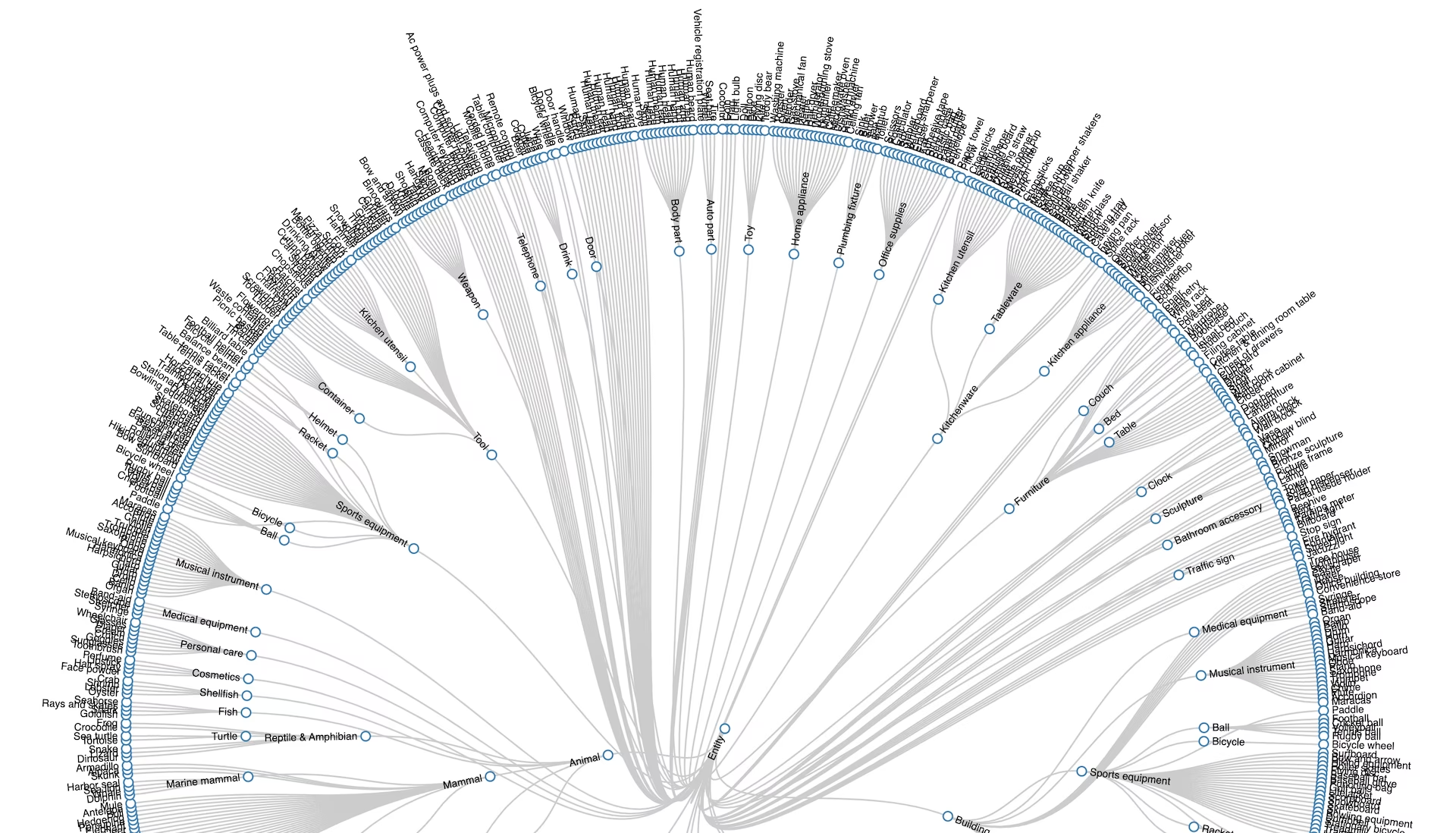
Ты можешь запустить предсказание или начать дообучение с этих контрольных точек следующим образом.
from ultralytics import YOLO

# Загрузи предварительно обученную модель YOLOv8n для Open Images V7
model = YOLO("yolov8n-oiv7.pt")

# Выполни предсказание
results = model.predict(source="image.jpg")

# Начни обучение с предварительно обученной контрольной точки
results = model.train(data="coco8.yaml", epochs=100, imgsz=640)
Основные особенности#
- Open Images V7 содержит около 9 миллионов изображений с разметкой для нескольких задач компьютерного зрения; в среднем на изображении отмечено 8,3 объекта.
- Около 90% из 16 миллионов ограничивающих рамок на 1,9 миллиона изображений были размечены вручную профессиональными разметчиками, что обеспечивает единообразную и качественную разметку.
- Разметка не ограничивается рамками: 3,3 миллиона аннотаций визуальных связей для 1 466 триплетов, маски сегментации для 2,8 миллиона объектов 350 классов (добавлены в V5), 675 тысяч локализованных описаний (V6) и 66,4 миллиона точечных меток на 1,4 миллиона изображений 5 827 классов (V7).
- 61,4 миллиона меток на уровне изображений для 20 638 классов делают датасет подходящим для классификации изображений и мультимодальных исследований наряду с обнаружением объектов и сегментацией экземпляров.
Структура набора данных#
Конфигурация Ultralytics open-images-v7.yaml загружает подмножество Open Images V7 для обнаружения объектов:
| Подвыборка | Изображения | Описание |
|---|---|---|
| Обучение | 1,743,042 | Изображения с разметкой рамками для обучения модели |
| Валидация | 41,620 | Отложенные изображения для оценки и сравнительного тестирования |
В конфигурации определён 601 класс объектов с индексами от 0 до 600 — от Accordion до Zucchini. В документации Google это число округлено до 600, но и в официальном списке классов с разметкой рамками, и в YAML-файле Ultralytics содержится 601 запись. Значение ключа test: в конфигурации оставлено пустым.
Применение#
Open Images V7 подходит для обучения и оценки моделей в различных задачах компьютерного зрения:
- Обнаружение объектов с большим словарём классов: благодаря 601 классу детекторы, обученные на Open Images V7, распознают гораздо больше категорий, чем модели, обученные на COCO.
- Обнаружение визуальных связей: 3,3 миллиона аннотаций связей помогают обучать модели понимать взаимодействие между объектами.
- Сегментация экземпляров: маски для 2,8 миллиона объектов позволяют анализировать сцены на уровне пикселей.
- Мультимодальное обучение: локализованные описания, объединяющие голос, текст и следы перемещения мыши, связывают визуальные данные с подробными описаниями.
- Оценка в режиме zero-shot: широкий охват классов помогает оценить, как модели zero-shot справляются с объектами, которые не встречались при обучении.
Чтобы размечать собственные изображения, обучать модели и управлять крупными датасетами в браузере, выполни весь рабочий процесс на платформе Ultralytics.
Файл YAML набора данных#
Файл open-images-v7.yaml задаёт конфигурацию датасета: пути к данным, названия классов и другие метаданные. Файл поддерживается в репозитории Ultralytics по адресу https://github.com/ultralytics/ultralytics/blob/main/ultralytics/cfg/datasets/open-images-v7.yaml.
# Ultralytics 🚀 AGPL-3.0 License - https://ultralytics.com/license

# Open Images v7 dataset https://storage.googleapis.com/openimages/web/index.html by Google
# Documentation: https://docs.ultralytics.com/datasets/detect/open-images-v7
# Example usage: yolo train data=open-images-v7.yaml
# parent
# ├── ultralytics
# └── datasets
#     └── open-images-v7 ← downloads here (561 GB)

# Train/val/test sets as 1) dir: path/to/imgs, 2) file: path/to/imgs.txt, or 3) list: [path/to/imgs1, path/to/imgs2, ..]
path: open-images-v7 # dataset root dir
train: images/train # train images (relative to 'path') 1743042 images
val: images/val # val images (relative to 'path') 41620 images
test: # test images (optional)

# Classes
names:
  0: Accordion
  1: Adhesive tape
  2: Aircraft
  3: Airplane
  4: Alarm clock
  5: Alpaca
  6: Ambulance
  7: Animal
  8: Ant
  9: Antelope
  10: Apple
  11: Armadillo
  12: Artichoke
  13: Auto part
  14: Axe
  15: Backpack
  16: Bagel
  17: Baked goods
  18: Balance beam
  19: Ball
  20: Balloon
  21: Banana
  22: Band-aid
  23: Banjo
  24: Barge
  25: Barrel
  26: Baseball bat
  27: Baseball glove
  28: Bat (Animal)
  29: Bathroom accessory
  30: Bathroom cabinet
  31: Bathtub
  32: Beaker
  33: Bear
  34: Bed
  35: Bee
  36: Beehive
  37: Beer
  38: Beetle
  39: Bell pepper
  40: Belt
  41: Bench
  42: Bicycle
  43: Bicycle helmet
  44: Bicycle wheel
  45: Bidet
  46: Billboard
  47: Billiard table
  48: Binoculars
  49: Bird
  50: Blender
  51: Blue jay
  52: Boat
  53: Bomb
  54: Book
  55: Bookcase
  56: Boot
  57: Bottle
  58: Bottle opener
  59: Bow and arrow
  60: Bowl
  61: Bowling equipment
  62: Box
  63: Boy
  64: Brassiere
  65: Bread
  66: Briefcase
  67: Broccoli
  68: Bronze sculpture
  69: Brown bear
  70: Building
  71: Bull
  72: Burrito
  73: Bus
  74: Bust
  75: Butterfly
  76: Cabbage
  77: Cabinetry
  78: Cake
  79: Cake stand
  80: Calculator
  81: Camel
  82: Camera
  83: Can opener
  84: Canary
  85: Candle
  86: Candy
  87: Cannon
  88: Canoe
  89: Cantaloupe
  90: Car
  91: Carnivore
  92: Carrot
  93: Cart
  94: Cassette deck
  95: Castle
  96: Cat
  97: Cat furniture
  98: Caterpillar
  99: Cattle
  100: Ceiling fan
  101: Cello
  102: Centipede
  103: Chainsaw
  104: Chair
  105: Cheese
  106: Cheetah
  107: Chest of drawers
  108: Chicken
  109: Chime
  110: Chisel
  111: Chopsticks
  112: Christmas tree
  113: Clock
  114: Closet
  115: Clothing
  116: Coat
  117: Cocktail
  118: Cocktail shaker
  119: Coconut
  120: Coffee
  121: Coffee cup
  122: Coffee table
  123: Coffeemaker
  124: Coin
  125: Common fig
  126: Common sunflower
  127: Computer keyboard
  128: Computer monitor
  129: Computer mouse
  130: Container
  131: Convenience store
  132: Cookie
  133: Cooking spray
  134: Corded phone
  135: Cosmetics
  136: Couch
  137: Countertop
  138: Cowboy hat
  139: Crab
  140: Cream
  141: Cricket ball
  142: Crocodile
  143: Croissant
  144: Crown
  145: Crutch
  146: Cucumber
  147: Cupboard
  148: Curtain
  149: Cutting board
  150: Dagger
  151: Dairy Product
  152: Deer
  153: Desk
  154: Dessert
  155: Diaper
  156: Dice
  157: Digital clock
  158: Dinosaur
  159: Dishwasher
  160: Dog
  161: Dog bed
  162: Doll
  163: Dolphin
  164: Door
  165: Door handle
  166: Donut
  167: Dragonfly
  168: Drawer
  169: Dress
  170: Drill (Tool)
  171: Drink
  172: Drinking straw
  173: Drum
  174: Duck
  175: Dumbbell
  176: Eagle
  177: Earrings
  178: Egg (Food)
  179: Elephant
  180: Envelope
  181: Eraser
  182: Face powder
  183: Facial tissue holder
  184: Falcon
  185: Fashion accessory
  186: Fast food
  187: Fax
  188: Fedora
  189: Filing cabinet
  190: Fire hydrant
  191: Fireplace
  192: Fish
  193: Flag
  194: Flashlight
  195: Flower
  196: Flowerpot
  197: Flute
  198: Flying disc
  199: Food
  200: Food processor
  201: Football
  202: Football helmet
  203: Footwear
  204: Fork
  205: Fountain
  206: Fox
  207: French fries
  208: French horn
  209: Frog
  210: Fruit
  211: Frying pan
  212: Furniture
  213: Garden Asparagus
  214: Gas stove
  215: Giraffe
  216: Girl
  217: Glasses
  218: Glove
  219: Goat
  220: Goggles
  221: Goldfish
  222: Golf ball
  223: Golf cart
  224: Gondola
  225: Goose
  226: Grape
  227: Grapefruit
  228: Grinder
  229: Guacamole
  230: Guitar
  231: Hair dryer
  232: Hair spray
  233: Hamburger
  234: Hammer
  235: Hamster
  236: Hand dryer
  237: Handbag
  238: Handgun
  239: Harbor seal
  240: Harmonica
  241: Harp
  242: Harpsichord
  243: Hat
  244: Headphones
  245: Heater
  246: Hedgehog
  247: Helicopter
  248: Helmet
  249: High heels
  250: Hiking equipment
  251: Hippopotamus
  252: Home appliance
  253: Honeycomb
  254: Horizontal bar
  255: Horse
  256: Hot dog
  257: House
  258: Houseplant
  259: Human arm
  260: Human beard
  261: Human body
  262: Human ear
  263: Human eye
  264: Human face
  265: Human foot
  266: Human hair
  267: Human hand
  268: Human head
  269: Human leg
  270: Human mouth
  271: Human nose
  272: Humidifier
  273: Ice cream
  274: Indoor rower
  275: Infant bed
  276: Insect
  277: Invertebrate
  278: Ipod
  279: Isopod
  280: Jacket
  281: Jacuzzi
  282: Jaguar (Animal)
  283: Jeans
  284: Jellyfish
  285: Jet ski
  286: Jug
  287: Juice
  288: Kangaroo
  289: Kettle
  290: Kitchen & dining room table
  291: Kitchen appliance
  292: Kitchen knife
  293: Kitchen utensil
  294: Kitchenware
  295: Kite
  296: Knife
  297: Koala
  298: Ladder
  299: Ladle
  300: Ladybug
  301: Lamp
  302: Land vehicle
  303: Lantern
  304: Laptop
  305: Lavender (Plant)
  306: Lemon
  307: Leopard
  308: Light bulb
  309: Light switch
  310: Lighthouse
  311: Lily
  312: Limousine
  313: Lion
  314: Lipstick
  315: Lizard
  316: Lobster
  317: Loveseat
  318: Luggage and bags
  319: Lynx
  320: Magpie
  321: Mammal
  322: Man
  323: Mango
  324: Maple
  325: Maracas
  326: Marine invertebrates
  327: Marine mammal
  328: Measuring cup
  329: Mechanical fan
  330: Medical equipment
  331: Microphone
  332: Microwave oven
  333: Milk
  334: Miniskirt
  335: Mirror
  336: Missile
  337: Mixer
  338: Mixing bowl
  339: Mobile phone
  340: Monkey
  341: Moths and butterflies
  342: Motorcycle
  343: Mouse
  344: Muffin
  345: Mug
  346: Mule
  347: Mushroom
  348: Musical instrument
  349: Musical keyboard
  350: Nail (Construction)
  351: Necklace
  352: Nightstand
  353: Oboe
  354: Office building
  355: Office supplies
  356: Orange
  357: Organ (Musical Instrument)
  358: Ostrich
  359: Otter
  360: Oven
  361: Owl
  362: Oyster
  363: Paddle
  364: Palm tree
  365: Pancake
  366: Panda
  367: Paper cutter
  368: Paper towel
  369: Parachute
  370: Parking meter
  371: Parrot
  372: Pasta
  373: Pastry
  374: Peach
  375: Pear
  376: Pen
  377: Pencil case
  378: Pencil sharpener
  379: Penguin
  380: Perfume
  381: Person
  382: Personal care
  383: Personal flotation device
  384: Piano
  385: Picnic basket
  386: Picture frame
  387: Pig
  388: Pillow
  389: Pineapple
  390: Pitcher (Container)
  391: Pizza
  392: Pizza cutter
  393: Plant
  394: Plastic bag
  395: Plate
  396: Platter
  397: Plumbing fixture
  398: Polar bear
  399: Pomegranate
  400: Popcorn
  401: Porch
  402: Porcupine
  403: Poster
  404: Potato
  405: Power plugs and sockets
  406: Pressure cooker
  407: Pretzel
  408: Printer
  409: Pumpkin
  410: Punching bag
  411: Rabbit
  412: Raccoon
  413: Racket
  414: Radish
  415: Ratchet (Device)
  416: Raven
  417: Rays and skates
  418: Red panda
  419: Refrigerator
  420: Remote control
  421: Reptile
  422: Rhinoceros
  423: Rifle
  424: Ring binder
  425: Rocket
  426: Roller skates
  427: Rose
  428: Rugby ball
  429: Ruler
  430: Salad
  431: Salt and pepper shakers
  432: Sandal
  433: Sandwich
  434: Saucer
  435: Saxophone
  436: Scale
  437: Scarf
  438: Scissors
  439: Scoreboard
  440: Scorpion
  441: Screwdriver
  442: Sculpture
  443: Sea lion
  444: Sea turtle
  445: Seafood
  446: Seahorse
  447: Seat belt
  448: Segway
  449: Serving tray
  450: Sewing machine
  451: Shark
  452: Sheep
  453: Shelf
  454: Shellfish
  455: Shirt
  456: Shorts
  457: Shotgun
  458: Shower
  459: Shrimp
  460: Sink
  461: Skateboard
  462: Ski
  463: Skirt
  464: Skull
  465: Skunk
  466: Skyscraper
  467: Slow cooker
  468: Snack
  469: Snail
  470: Snake
  471: Snowboard
  472: Snowman
  473: Snowmobile
  474: Snowplow
  475: Soap dispenser
  476: Sock
  477: Sofa bed
  478: Sombrero
  479: Sparrow
  480: Spatula
  481: Spice rack
  482: Spider
  483: Spoon
  484: Sports equipment
  485: Sports uniform
  486: Squash (Plant)
  487: Squid
  488: Squirrel
  489: Stairs
  490: Stapler
  491: Starfish
  492: Stationary bicycle
  493: Stethoscope
  494: Stool
  495: Stop sign
  496: Strawberry
  497: Street light
  498: Stretcher
  499: Studio couch
  500: Submarine
  501: Submarine sandwich
  502: Suit
  503: Suitcase
  504: Sun hat
  505: Sunglasses
  506: Surfboard
  507: Sushi
  508: Swan
  509: Swim cap
  510: Swimming pool
  511: Swimwear
  512: Sword
  513: Syringe
  514: Table
  515: Table tennis racket
  516: Tablet computer
  517: Tableware
  518: Taco
  519: Tank
  520: Tap
  521: Tart
  522: Taxi
  523: Tea
  524: Teapot
  525: Teddy bear
  526: Telephone
  527: Television
  528: Tennis ball
  529: Tennis racket
  530: Tent
  531: Tiara
  532: Tick
  533: Tie
  534: Tiger
  535: Tin can
  536: Tire
  537: Toaster
  538: Toilet
  539: Toilet paper
  540: Tomato
  541: Tool
  542: Toothbrush
  543: Torch
  544: Tortoise
  545: Towel
  546: Tower
  547: Toy
  548: Traffic light
  549: Traffic sign
  550: Train
  551: Training bench
  552: Treadmill
  553: Tree
  554: Tree house
  555: Tripod
  556: Trombone
  557: Trousers
  558: Truck
  559: Trumpet
  560: Turkey
  561: Turtle
  562: Umbrella
  563: Unicycle
  564: Van
  565: Vase
  566: Vegetable
  567: Vehicle
  568: Vehicle registration plate
  569: Violin
  570: Volleyball (Ball)
  571: Waffle
  572: Waffle iron
  573: Wall clock
  574: Wardrobe
  575: Washing machine
  576: Waste container
  577: Watch
  578: Watercraft
  579: Watermelon
  580: Weapon
  581: Whale
  582: Wheel
  583: Wheelchair
  584: Whisk
  585: Whiteboard
  586: Willow
  587: Window
  588: Window blind
  589: Wine
  590: Wine glass
  591: Wine rack
  592: Winter melon
  593: Wok
  594: Woman
  595: Wood-burning stove
  596: Woodpecker
  597: Worm
  598: Wrench
  599: Zebra
  600: Zucchini

# Download script/URL (optional) ---------------------------------------------------------------------------------------
download: |
  import warnings

  from ultralytics.utils import LOGGER, SETTINGS, Path
  from ultralytics.utils.checks import check_requirements

  check_requirements("fiftyone")

  import fiftyone as fo
  import fiftyone.zoo as foz

  name = "open-images-v7"
  fo.config.dataset_zoo_dir = Path(SETTINGS["datasets_dir"]) / "fiftyone" / name
  fraction = 1.0  # fraction of full dataset to use
  LOGGER.warning("Open Images V7 dataset requires at least **561 GB of free space. Starting download...")
  for split in "train", "validation":  # 1743042 train, 41620 val images
      train = split == "train"

      # Load Open Images dataset
      dataset = foz.load_zoo_dataset(
          name,
          split=split,
          label_types=["detections"],
          max_samples=round((1743042 if train else 41620) * fraction),
      )

      # Define classes
      if train:
          classes = dataset.default_classes  # all classes
          # classes = dataset.distinct('ground_truth.detections.label')  # only observed classes

      # Export to YOLO format
      with warnings.catch_warnings():
          warnings.filterwarnings("ignore", category=UserWarning, module="fiftyone.utils.yolo")
          dataset.export(
              export_dir=str(Path(SETTINGS["datasets_dir"]) / name),
              dataset_type=fo.types.YOLOv5Dataset,
              label_field="ground_truth",
              split="val" if split == "validation" else split,
              classes=classes,
              overwrite=train,
)Использование#
При первом использовании Open Images V7 загружается автоматически. Для 1 743 042 обучающих и 41 620 валидационных изображений требуется около 561 ГБ свободного места на диске. Скрипт загрузки устанавливает пакет fiftyone, чтобы скачать изображения, и преобразует разметку в формат YOLO; в зависимости от подключения и оборудования это может занять много времени.
Чтобы обучить модель YOLO26n на датасете Open Images V7 в течение 100 эпох с размером изображения 640, используй следующие фрагменты кода.
from ultralytics import YOLO

# Загрузить модель YOLO26n, предобученную на COCO
model = YOLO("yolo26n.pt")

# Обучи модель на наборе данных Open Images V7
results = model.train(data="open-images-v7.yaml", epochs=100, imgsz=640)
Примеры изображений и аннотаций#
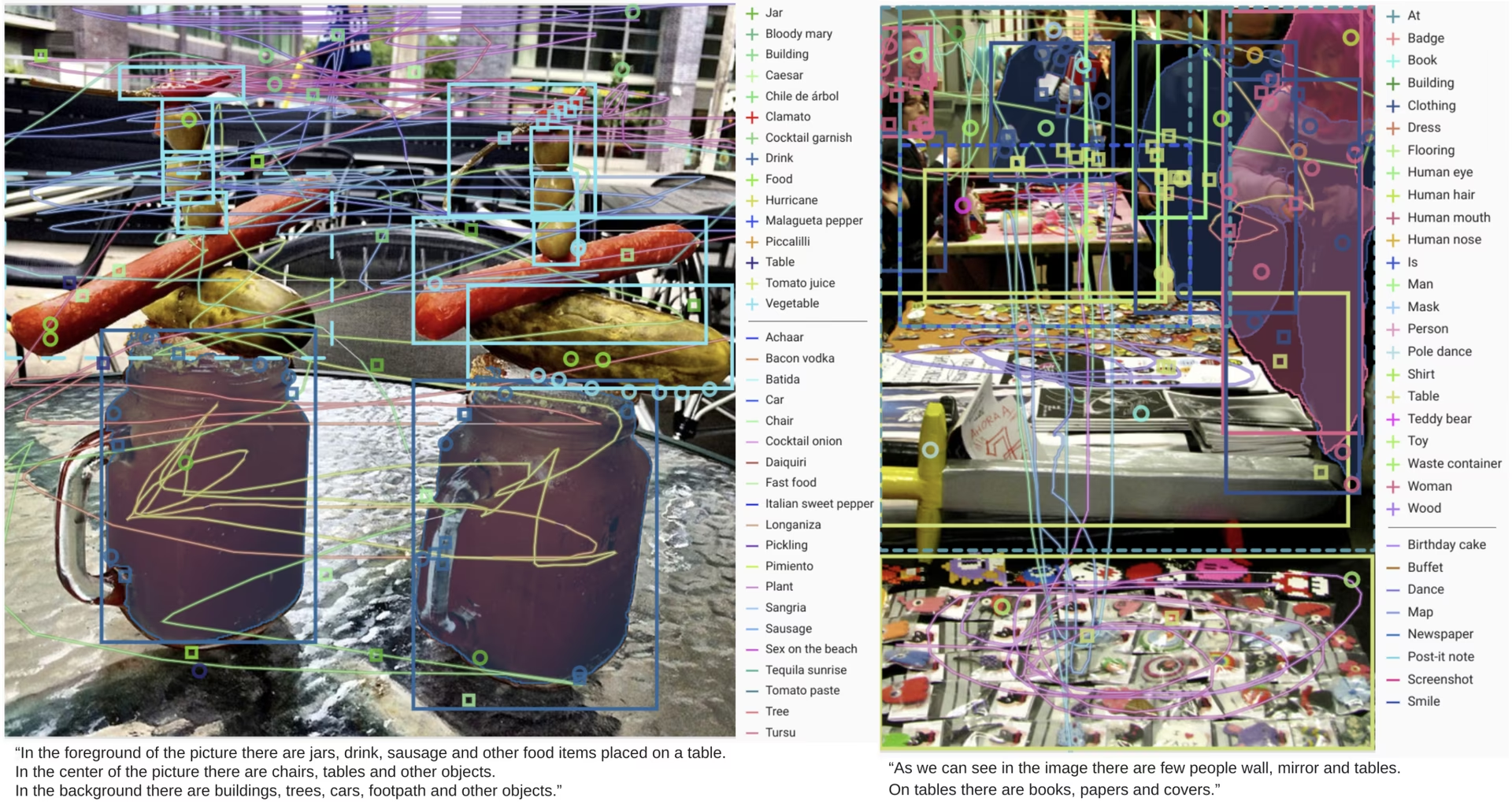
На примере ниже показаны аннотации ограничивающих рамок, связей и масок, которые Open Images V7 накладывает на одно изображение:
Цитирование и благодарности#
Если ты используешь набор данных Open Images V7 в исследовательской или практической работе, процитируй следующую статью:
@article{OpenImages,
  author = {Alina Kuznetsova and Hassan Rom and Neil Alldrin and Jasper Uijlings and Ivan Krasin and Jordi Pont-Tuset and Shahab Kamali and Stefan Popov and Matteo Malloci and Alexander Kolesnikov and Tom Duerig and Vittorio Ferrari},
  title = {The Open Images Dataset V4: Unified image classification, object detection, and visual relationship detection at scale},
  year = {2020},
  journal = {IJCV}
}
Мы благодарим команду Google AI за создание и поддержку набора данных Open Images V7. Подробнее о наборе данных см. на официальном сайте Open Images V7.
Часто задаваемые вопросы#
Набор данных Open Images V7 используется для обучения и оценки моделей обнаружения объектов в машинном обучении и компьютерном зрении. Конфигурация Ultralytics включает 1,743,042 обучающих и 41,620 валидационных изображений с 601 классом объектов, а исходный выпуск также содержит маски сегментации, визуальные связи, локализованные описания и метки на уровне точек для более широкого спектра исследований.
Конфигурация Ultralytics
open-images-v7.yamlвключает 601 класс объектов, 1,743,042 обучающих и 41,620 валидационных изображений, без тестовой выборки. Полная исходная версия содержит около 9 миллионов изображений; в документации Google округлено до 600 число классов, для которых можно задать ограничивающие рамки, но официальный список классов содержит 601 позицию.Для Open Images V7 требуется около 561 ГБ свободного места на диске; загрузка начинается автоматически при первой тренировке с
data="open-images-v7.yaml". Скрипт загрузки устанавливает пакетfiftyoneи преобразует аннотации в формат YOLO. Если тебе нужен набор поменьше, посмотри обзор наборов данных для обнаружения объектов.Для обучения модели YOLO26 на наборе данных Open Images V7 можно использовать команды Python и CLI. Ниже приведён пример обучения модели YOLO26n в течение 100 эпох с размером изображения 640:
Пример обученияfrom ultralytics import YOLO # Загрузить модель YOLO26n, предобученную на COCO model = YOLO("yolo26n.pt") # Обучи модель на наборе данных Open Images V7 results = model.train(data="open-images-v7.yaml", epochs=100, imgsz=640)Подробнее об аргументах и настройках см. на странице Обучение.
Да. Пять предварительно обученных моделей Open Images V7 (
yolov8n-oiv7.pt–yolov8x-oiv7.pt, с показателями от 18,4 до 36,3 mAP) сразу обнаруживают все 601 класс, поэтому ты можешь запускать предсказание на собственных изображениях без загрузки 561 ГБ данных.Open Images V7 крупнее и разнообразнее: 601 класс объектов и 1,743,042 обучающих изображения против 80 классов и 118,287 обучающих изображений в COCO. COCO остаётся стандартным бенчмарком для сравнения детекторов, а Open Images V7 лучше подходит для обнаружения объектов с большим словарём классов и предварительного обучения моделей, которым нужен широкий охват категорий.
Комментарии38
Glenn JocherUltralytics Hey Ultralytics Users!
Exciting news! 🎉 We've added the Open Images V7 dataset to our collection. It's perfect for enhancing your YOLO models across various applications.
What's in it for you?
🌍 Diverse range of categories. 🎯 Accurate annotations for better training. 💡 Ideal for AI/ML advancements in computer vision. Check out our new Open Images V7 page in the docs for all the details.
Questions or need help? Just ask us! We're here to support your YOLO journey.
Happy modeling! 🤖👀
6DevanshL HI,can we finetune this OpenImages v7 dataset only for two classes car,person on yolov2 model.
1Glenn JocherUltralytics Yes, but not in the current Ultralytics package with
YOLOv2: if you only needcarandperson, you can filter Open Images V7 to those 2 classes and train a supported model like Ultralytics YOLO26 on that subset; forYOLOv2you’d need a separate legacy implementation. The Open Images V7 docs show the dataset layout and download setup, and feel free to keep follow-up questions here so the Ultralytics team can see them.
nandiniigarg I am trying to train the YOLOv8m model using python for selected classes. Here's my YAML file:
# Ultralytics YOLO 🚀, AGPL-3.0 license
# Open Images v7 dataset https://storage.googleapis.com/openimages/web/index.html by Google
# Documentation: https://docs.ultralytics.com/datasets/detect/open-images-v7/
# Example usage: yolo train data=open-images-v7.yaml
# parent
# ├── ultralytics
# └── datasets
#     └── open-images-v7  ← downloads here (561 GB)

# Train/val/test sets as 1) dir: path/to/imgs, 2) file: path/to/imgs.txt, or 3) list: [path/to/imgs1, path/to/imgs2, ..]
path: fiftyone/open-images-v7 # dataset root dir
train: train # train images (relative to 'path') 1743042 images
val: validation # val images (relative to 'path') 41620 images
test: # test images (optional)

# Classes
names:
  0: Bathroom accessory
  1: Bathroom cabinet
  2: Bathtub
  3: Bed
  4: Bench
.....
  159: Wine glass
  160: Wine rack
  161: Wood-burning stove

# Download script/URL (optional) ---------------------------------------------------------------------------------------
download: |
  from ultralytics.utils import LOGGER, SETTINGS, Path, is_ubuntu, get_ubuntu_version
  from ultralytics.utils.checks import check_requirements, check_version

  check_requirements('fiftyone')
  if is_ubuntu() and check_version(get_ubuntu_version(), '>=22.04'):
      # Ubuntu>=22.04 patch https://github.com/voxel51/fiftyone/issues/2961#issuecomment-1666519347
      check_requirements('fiftyone-db-ubuntu2204')

  import fiftyone as fo
  import fiftyone.zoo as foz
  import warnings
  classes_list = ["Bathroom accessory","Bathroom cabinet","Bathtub","Bed", "Bench", "Bidet", "Blender", "Book", "Bookcase", "Bowl", "Box", "Bronze sculpture>

  name = 'open-images-v7'
  fraction = 1.0  # fraction of full dataset to use
  LOGGER.warning('WARNING ⚠️ Open Images V7 dataset requires at least **561 GB of free space. Starting download...')
  for split in 'train', 'validation':  # 1743042 train, 41620 val images
      train = split == 'train'

      # Load Open Images dataset
      dataset = foz.load_zoo_dataset(name,
                                     split=split,
                                     label_types=['detections'],
                                     classes = classes_list,
                                     dataset_dir=Path(SETTINGS['datasets_dir']) / 'fiftyone' / name,
                                     max_samples=round((1743042 if train else 41620) * fraction))

      # Define classes
      if train:
          classes = dataset.default_classes  # all classes
          # classes = dataset.distinct('ground_truth.detections.label')  # only observed classes

      # Export to YOLO format
      with warnings.catch_warnings():
          warnings.filterwarnings("ignore", category=UserWarning, module="fiftyone.utils.yolo")
          dataset.export(export_dir=str(Path(SETTINGS['datasets_dir']) / name),
                         dataset_type=fo.types.YOLOv5Dataset,
                         label_field='ground_truth',
                         split='val' if split == 'validation' else split,
                         classes=classes,
                         overwrite=train)
I am running into this error after the first epoch:
Starting training for 100 epochs...

      Epoch    GPU_mem   box_loss   cls_loss   dfl_loss  Instances       Size
      1/100      7.34G          0      83.18          0          0        640:   7%|▋         | 1794/27205 [13:28<1:51:55,  3.78it/s]^[[B^[[B^[[B^[[B^[[B^[[B
      1/100      7.34G          0      5.485          0          0        640: 100%|██████████| 27205/27205 [1:52:47<00:00,  4.02it/s]
                 Class     Images  Instances      Box(P          R      mAP50  mAP50-95): 100%|██████████| 376/376 [02:20<00:00,  2.67it/s]
Traceback (most recent call last):
  File "/home/nirwana/nandini/open_images_test/ultralyticsTrial/train.py", line 7, in <module>
    results = model.train(data="open-images-v7.yaml", epochs=100, imgsz=640, device=0, patience=5, save=True, verbose=True, plots=True)
  File "/home/nirwana/.local/lib/python3.10/site-packages/ultralytics/engine/model.py", line 813, in train
    self.trainer.train()
  File "/home/nirwana/.local/lib/python3.10/site-packages/ultralytics/engine/trainer.py", line 206, in train
    self._do_train(world_size)
  File "/home/nirwana/.local/lib/python3.10/site-packages/ultralytics/engine/trainer.py", line 430, in _do_train
    self.metrics, self.fitness = self.validate()
  File "/home/nirwana/.local/lib/python3.10/site-packages/ultralytics/engine/trainer.py", line 575, in validate
    metrics = self.validator(self)
  File "/home/nirwana/.local/lib/python3.10/site-packages/torch/utils/_contextlib.py", line 116, in decorate_context
    return func(*args, **kwargs)
  File "/home/nirwana/.local/lib/python3.10/site-packages/ultralytics/engine/validator.py", line 193, in __call__
    stats = self.get_stats()
  File "/home/nirwana/.local/lib/python3.10/site-packages/ultralytics/models/yolo/detect/val.py", line 181, in get_stats
    stats = {k: torch.cat(v, 0).cpu().numpy() for k, v in self.stats.items()}  # to numpy
  File "/home/nirwana/.local/lib/python3.10/site-packages/ultralytics/models/yolo/detect/val.py", line 181, in <dictcomp>
    stats = {k: torch.cat(v, 0).cpu().numpy() for k, v in self.stats.items()}  # to numpy
RuntimeError: torch.cat(): expected a non-empty list of Tensors
I cannot figure out how to fix this error.
1Glenn JocherUltralytics @nandiniigarg it looks like the error might be due to an empty list of tensors during validation. Please ensure that your dataset and annotations are correctly formatted and that the selected classes have sufficient instances. Also, verify if the issue persists with the latest version of the Ultralytics package. For more details, you can refer to the Open Images V7 documentation.
safwene-bahroun(изменено) HELLO @glenn-jocher, i have the same error . Can you help me to fix it ?
Glenn JocherUltralytics @safwene-bahroun please provide a https://docs.ultralytics.com/help/minimum-reproducible-example/ to allow us to help you better.
safwene-bahroun path: ../datasets/open-images-v7 train: C:\Users\GIGABYTE\datasets\open-images-v7\images\open-images-v7\train val: C:\Users\GIGABYTE\datasets\open-images-v7\images\open-images-v7\validation nc: 36 names: 0: Person 1: Man 2: Woman 3: Boy 4: Belt 5: Clothing 6: Coat 7: Cowboy hat 8: Dress 9: Fedora 10: Footwear 11: Glasses 12: Glove 13: Goggles 14: Hat 15: High heels 16: Jeans 17: Miniskirt 18: Scarf 19: Shirt 20: Shorts 21: Skirt 22: Sock 23: Sombrero 24: Suit 25: Sun hat 26: Sunglasses 27: Swim cap 28: Swimwear 29: Tie 30: Trousers 31: Cosmetics 32: Face powder 33: Hair spray 34: Lipstick 35: Perfume download: | from ultralytics.utils import LOGGER, SETTINGS, Path, is_ubuntu, get_ubuntu_version from ultralytics.utils.checks import check_requirements, check_version import fiftyone as fo import fiftyone.zoo as foz from fiftyone import ViewField as F # Import F for filtering import warnings
Define the list of classes
classes = [ "Person", "Man", "Woman", "Boy", "Belt", "Clothing", "Coat", "Cowboy hat", "Dress", "Fedora", "Footwear", "Glasses", "Glove", "Goggles", "Hat", "High heels", "Jeans", "Miniskirt", "Scarf", "Shirt", "Shorts", "Skirt", "Sock", "Sombrero", "Suit", "Sun hat", "Sunglasses", "Swim cap", "Swimwear", "Tie", "Trousers", "Cosmetics", "Face powder", "Hair spray", "Lipstick", "Perfume" ]
Dataset name and directory setup
name = "open-images-v7" fo.config.dataset_zoo_dir = Path(SETTINGS["datasets_dir"]) / name / "images"
Log the start of the download process
LOGGER.warning('Open Images V7 dataset: Starting download...')
Loop through train and validation splits
for split in ['train', 'validation']: # Load Open Images dataset dataset = foz.load_zoo_dataset( name, split=split, classes=classes, label_types=['detections'], max_samples=5000 )
  # Define export directory
  export_dir = Path(SETTINGS['datasets_dir']) / name / "images" / ('train' if split == 'train' else 'validation')

  # Filter dataset to include only the specified classes
  filtered_dataset = dataset.match(F("ground_truth.detections.label").is_in(classes))

  # Export to YOLO format
  with warnings.catch_warnings():
      warnings.filterwarnings("ignore", category=UserWarning, module="fiftyone.utils.yolo")
      filtered_dataset.export(
          export_dir=str(export_dir),
          dataset_type=fo.types.YOLOv5Dataset,
          label_field='ground_truth',
          split=split,
          classes=classes,
          overwrite=True
      )
Glenn JocherUltralytics The
RuntimeError: torch.cat(): expected a non-empty list of Tensorstypically occurs when no validation predictions are generated. For Open Images V7 training with custom classes, please verify:- Class Consistency: Ensure your 36 selected classes exist in both train/val splits. Some fine-grained categories like "Man"/"Woman" might have limited val instances.
- Path Formatting: Use forward slashes in paths:
train: datasets/open-images-v7/images/train - Annotations: Confirm your filtered dataset contains labels by inspecting
labels/valfolder
For reference, see the Open Images V7 dataset setup guide in our documentation. Let us know if these checks resolve the validation issue.
1
danielbob32 Hi Glenn,
I noticed that while FiftyOne has support for YOLOv5Dataset, it doesn’t currently support instance segmentation, which I needed for training a custom YOLO model on a new class (lemons - don’t ask 😄).
After digging around, I couldn’t find a built-in API to export data in the format required by the segmentation models. So, I ended up creating a custom pipeline to handle the conversion. After a bit of fine-tuning, it worked quite well.
I’m wondering if this is something you’d be interested in adding here, and if so, what’s the best way to share it?
Also, I’d appreciate it if you could help me verify that my polygon annotations are formatted correctly.
Thanks! Daniel
ABINAYA200264 Hello I'm Abinaya I want selective classes in Open Images v7 dataset I use class Id to extract spacific classes but it not work it detect all the the defult classes I want only selected class, I don't have training spcilities please can some one help me
laila-e Install necessary libraries
!pip install fiftyone
import fiftyone as fo import fiftyone.zoo as foz
Define the classes you want to include
classes = ["Broccoli", "Carrot"]
Load the Open Images V7 dataset
dataset = foz.load_zoo_dataset( "open-images-v7", split="train", label_types=["detections"], classes=classes, max_samples=1000, # Adjust this number based on your needs dataset_dir="/content/open-images-v7" )
Export the dataset to YOLO format
dataset.export( export_dir="/content/open-images-v7-yolo", dataset_type=fo.types.YOLOv5Dataset, label_field="detections", classes=classes, split="train" ) I try this code and it works well but I need labels for detection and for visual relationship and I do not know how do that
Glenn JocherUltralytics @laila-e to include labels for both detection and visual relationships in your dataset, you'll need to adjust the
label_typesparameter in theload_zoo_datasetfunction to include both "detections" and "relationships". For more detailed guidance, please refer to the Open Images V7 documentation.
MiguelTucto Hello! It's my first time training with yolov8. I need help about some processes. I've downloaded 3126 images from openimagesv7. These images are between fruits and vegetables. I trained with 50 epochs, but it stopped in 19 because It didn't present positive changes. After that, I've used the best.pt model exported to detect. When I use that model, It don't recognize how I expected the fruits and vegetable that I've trained. I need add more epochs? or maybe the quantity of fruits and vegetable have to be similar? Thank you in advance!
Glenn JocherUltralytics @MiguelTucto it sounds like your model might benefit from more training data or balanced class representation. Consider increasing the number of images for each class and possibly extending the training epochs. You can also experiment with data augmentation to enhance model performance. For more detailed guidance, you might want to explore the Open Images V7 documentation.
1MiguelTucto Thanks dude! but I was thinking in two possibilities. The first one is to apply data augmentation and all images are between 2000 images. The second one is reduce all of images to 500 images. Which one will work better?
Glenn JocherUltralytics Applying data augmentation to your 2000 images would likely yield better results than reducing the dataset to 500 images. Augmentation can enhance model robustness by introducing variability, which is beneficial for training.
davidhuangal For the pretrained Oi7 models, what hyperparameters were used? Was it the
default.yamlparameters? Or were things changed, like the number of epochs, etc.? I would like to train some YOLOv9 and YOLOv10 models on the dataset and wanted to make sure I was following the same training design as the YOLOv8 pretrained Oi7 models.Glenn JocherUltralytics(изменено) @davidhuangal the pretrained YOLOv8 models for the Open Images V7 dataset were trained using the
default.yamlparameters, exceptepochswas lowered to 30 since OIv7 is much larger than COCO. For your YOLOv9 and YOLOv10 models, you can start with these default settings and adjust as needed based on your specific requirements. If you encounter any issues or need further customization, please refer to the Ultralytics documentation for detailed guidance.1Glenn JocherUltralytics @davidhuangal ah one small change, epochs was lowered to 30 since OIv7 is so much larger than COCO. All else should be identical.
1
kaymanas I have downloaded and used the Ultralytics Open Images V7 Pretrained Models and they work great. However when I export to CoreML to use with XCode, the results are very different and much worse. There are many many more predictions and they're way off, the image attached predicted Snake, Treadmill, dumbell, Tent and many more at 99-100% confidence.
See the images below for example of the output with the model as is and then converted to mlpackage format.
Is there something wrong with the conversion process?
My python code here:
from ultralytics import YOLO
model = YOLO("yolov8x-oiv7.pt") # load model
model.export(format="coreml",nms=True) # convert model
Paula DerrengerUltralytics @kaymanas it sounds like the CoreML conversion might be causing issues with the model's performance. First, ensure you are using the latest version of the Ultralytics package. If the issue persists, try adjusting the
nmsparameter during export to see if it improves the results. Additionally, verify that the input image size and preprocessing steps in your XCode project match those used during training. If the problem continues, please provide more details or share minimal reproducible code snippets for further assistance.kaymanas Thanks @pderrenger. I've updated to the latest Ultralytics package (8.2.61).
I've tested exporting the model with nms=False. When reloaded into python and tested against a test image from the open image dataset it works perfectly. I cannot see the prediction when I load this into XCode unfortunately as there is no preview on the model page.
When I export with nms=True I cannot reload this into the python script as I get this error: "Ultralytics only supports inference of non-pipelined CoreML models exported with 'nms=False', but 'model=640' has an NMS pipeline created by an 'nms=True' export."
So I can only test this in XCode and it has a very poor prediction. Two image results here: https://imgur.com/a/am7oF6Z
Paula DerrengerUltralytics Thanks for updating to the latest version and testing the export options. The error message you're encountering indicates that the current implementation only supports non-pipelined CoreML models with
nms=False. This limitation might be causing the poor predictions in XCode. To address this, ensure that the preprocessing steps in XCode match those used during training. If the issue persists, consider reporting it on our GitHub issues page for further investigation.kaymanas How do I ensure that the preprocessing steps in XCode match those used during training? Sorry I'm new to this, I tried googling but couldn't find any info...
Paula DerrengerUltralytics @kaymanas to ensure preprocessing steps in XCode match those used during training, you need to replicate the same image resizing, normalization, and other preprocessing steps. Typically, this involves resizing images to the same dimensions used during training (e.g., 640x640), normalizing pixel values to the same range (e.g., 0-1), and applying any other transformations like mean subtraction or standard deviation scaling. You can find the exact preprocessing steps in the training script or model documentation. If you need further assistance, please refer to the Ultralytics documentation.
kaymanas Thanks for the help! where do I find the training script or model documentation? This page (the one you linked) doesn't have that information....
Paula DerrengerUltralytics You can find the training script and model documentation in the Ultralytics YOLO repository on GitHub. Specifically, the Ultralytics documentation provides comprehensive details on training, validation, and exporting models. For the Open Images V7 dataset, refer to the dataset's YAML configuration and the training section in the documentation. If you need further assistance, please check the repository's README or the relevant sections in the documentation.
naga08krishna I have converted the dataset into yolo format but all the images are in the training set only. Please tell me how to divide the dataset into training and validate datasets
On Mon, Jun 24, 2024, 22:56 Naga Krishna Reddy @.***> wrote:
Hi sorry to disturb you but please tell help me in this doubt After downloading the images, when I try to convert the dataset into yolo format I am getting below error repeatedly. Please help me in this. [image: image.png] [image: image.png]
And also tell me how to divide the dataset into train and validate datasets.
On Sat, Jun 22, 2024 at 11:35 PM Glenn Jocher @.***> wrote:
Hi @naga08krishna https://github.com/naga08krishna,
To train a YOLO model on only vegetable images from the Open Images V7 dataset, you can create a custom YAML file that includes only the classes you're interested in. Here's how you can do it in Google Colab:
- Create a Custom YAML File: Modify the open-images-v7.yaml to include only the vegetable classes you need. For example, if you want to include "Broccoli" and "Carrot", your YAML file would look like this:
Custom Open Images V7 dataset for vegetable classespath: ../datasets/open-images-v7train: images/trainval: images/val
Classesnames:
0: Broccoli 1: Carrot
- Download and Prepare the Dataset: Use the fiftyone library to download and filter the dataset for your specific classes. Here’s a Colab script to help you get started:
Install necessary libraries
!pip install fiftyone import fiftyone as foimport fiftyone.zoo as foz
Define the classes you want to includeclasses = ["Broccoli", "Carrot"]
Load the Open Images V7 datasetdataset = foz.load_zoo_dataset(
"open-images-v7",
split="train",
label_types=["detections"],
classes=classes,
max_samples=1000,  # Adjust this number based on your needs
dataset_dir="/content/open-images-v7"
)
Export the dataset to YOLO formatdataset.export(
export_dir="/content/open-images-v7-yolo",
dataset_type=fo.types.YOLOv5Dataset,
label_field="detections",
classes=classes,
split="train"
)
- Train the Model: Use the custom YAML file to train your model.
Python Example
from ultralytics import YOLO
Load a COCO-pretrained YOLOv8n modelmodel = YOLO("yolov8n.pt")
Train the model on the custom Open Images V7 datasetresults = model.train(data="/content/open-images-v7-yolo/custom-open-images-v7.yaml", epochs=100, imgsz=640)
CLI Example
Train a COCO-pretrained YOLOv8n model on the custom Open Images V7 dataset
yolo detect train data=/content/open-images-v7-yolo/custom-open-images-v7.yaml model=yolov8n.pt epochs=100 imgsz=640
This approach ensures that your training process focuses only on the specified vegetable classes. For more details, you can refer to the Open Images V7 documentation https://docs.ultralytics.com/datasets/detect/open-images-v7/.
Feel free to reach out if you have any more questions! 😊
— Reply to this email directly, view it on GitHub https://github.com/orgs/ultralytics/discussions/7912#discussioncomment-9848232, or unsubscribe https://github.com/notifications/unsubscribe-auth/BAV6QX2UTYJPQL6VRYD25T3ZIW4GJAVCNFSM6AAAAABCR3JU3KVHI2DSMVQWIX3LMV43SRDJONRXK43TNFXW4Q3PNVWWK3TUHM4TQNBYGIZTE . You are receiving this because you were mentioned.Message ID: @.*** com>
Paula DerrengerUltralytics(изменено) Hi @naga08krishna,
Thank you for reaching out! To split your dataset into training and validation sets, you can use the
fiftyonelibrary, which provides a convenient way to handle and manipulate datasets. Here's a step-by-step guide to help you achieve this:-
Install FiftyOne: Ensure you have the
fiftyonelibrary installed. You can install it using pip:pip install fiftyone -
Load and Split the Dataset: Use the following script to load your dataset and split it into training and validation sets. This example assumes you have already converted the dataset into YOLO format and all images are currently in the training set.
import fiftyone as fo import fiftyone.zoo as foz # Load your dataset dataset_dir = "/path/to/your/yolo/dataset" dataset = fo.Dataset.from_dir( dataset_type=fo.types.YOLOv5Dataset, data_path=dataset_dir, labels_path=dataset_dir, include_id=True ) # Split the dataset into training and validation sets train_view = dataset.take(int(0.8 * len(dataset)), seed=51) val_view = dataset.exclude([s.id for s in train_view]) # Export the training set train_view.export( export_dir="/path/to/save/train", dataset_type=fo.types.YOLOv5Dataset, label_field="ground_truth", classes=dataset.default_classes, split="train" ) # Export the validation set val_view.export( export_dir="/path/to/save/val", dataset_type=fo.types.YOLOv5Dataset, label_field="ground_truth", classes=dataset.default_classes, split="val" ) -
Update Your YAML File: Ensure your
open-images-v7.yamlfile points to the correct directories for training and validation images:path: ../datasets/open-images-v7 train: /path/to/save/train/images val: /path/to/save/val/images -
Train Your Model: Now you can train your model using the updated YAML file:
from ultralytics import YOLO

# Load a COCO-pretrained YOLO26n model
model = YOLO("yolo26n.pt")

# Train the model on the Open Images V7 dataset
results = model.train(data="open-images-v7.yaml", epochs=100, imgsz=640)
Or via CLI:
yolo detect train data=open-images-v7.yaml model=yolo26n.pt epochs=100 imgsz=640
This should help you split your dataset and proceed with training. If you encounter any issues or need further assistance, feel free to ask! 😊
For more detailed information, you can refer to the Open Images V7 documentation.
-