Датасет ключевых точек кисти руки
Введение#
Датасет Hand Keypoints от Ultralytics содержит 26 768 изображений рук, размеченных 21 ключевой точкой каждое. Разметка создана с помощью библиотеки Google MediaPipe, что обеспечивает высокую точность и согласованность. Датасет совместим с форматами Ultralytics YOLO26 для обучения моделей оценки позы.
Смотри: Оценка ключевых точек кисти с Ultralytics YOLO | Руководство по оценке позы человеческой кисти
Ключевые точки#
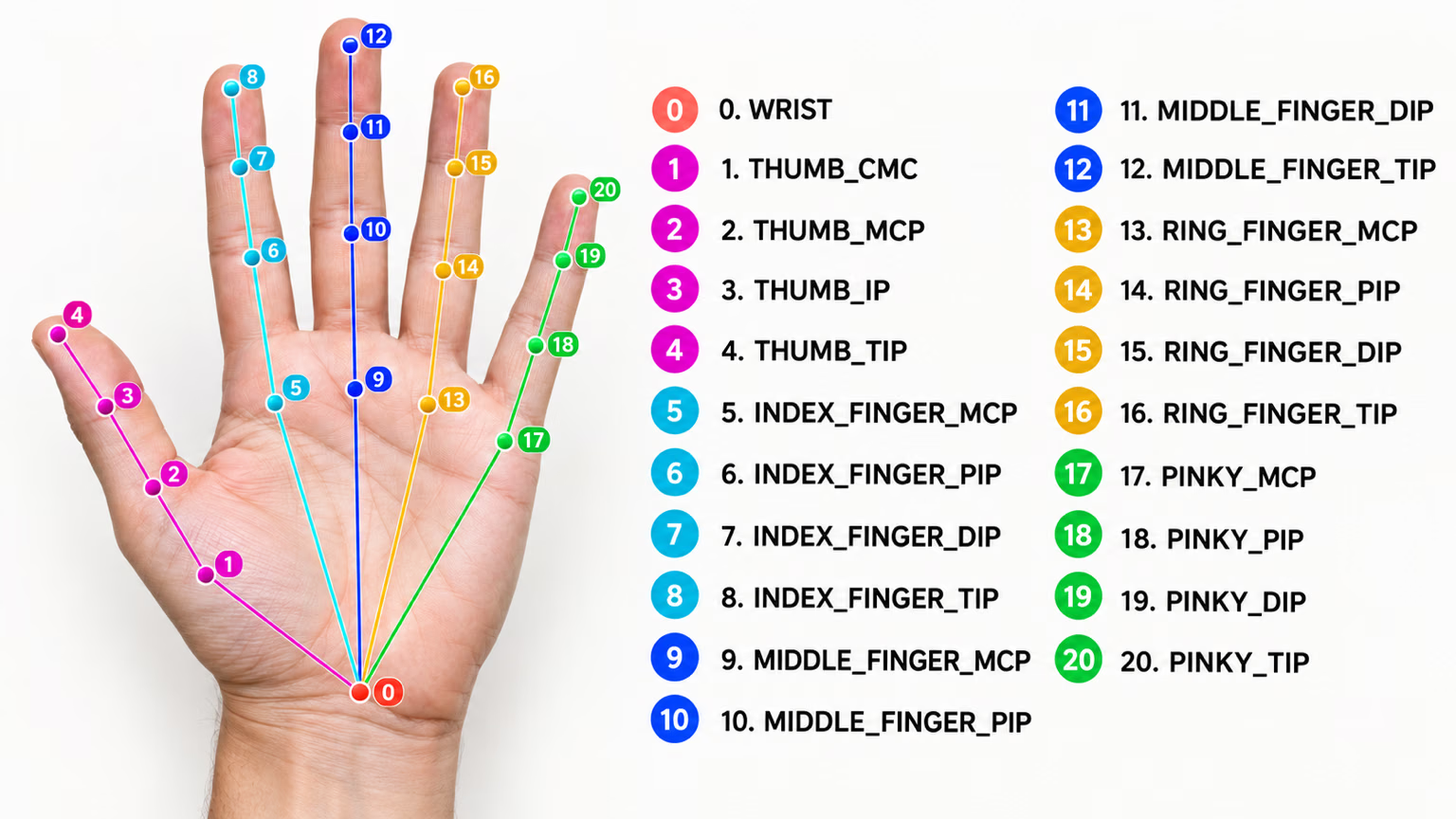
Каждая кисть размечена 21 ключевой точкой:
- Запястье
- Большой палец (4 точки)
- Указательный палец (4 точки)
- Средний палец (4 точки)
- Безымянный палец (4 точки)
- Мизинец (4 точки)
Структура набора данных#
- Всего изображений: 26 768 (18 776 train / 7 992 val).
- Классы: 1 (кисть руки).
- Ключевые точки: 21 на кисть, представленные триплетами
(x, y, visibility). - Размер загрузки: ~369 МБ.
Если тебе нужен собственный словарь жестов, а не стандартные ориентиры кисти, платформа Ultralytics позволяет размечать и обучать собственный датасет прямо в браузере.
Применение#
Ключевые точки рук полезны для решения ряда практических задач:
- Распознавание жестов: взаимодействие человека с компьютером и бесконтактное управление.
- Управление в AR/VR: точное взаимодействие с виртуальными объектами.
- Роботизированные манипуляции: точное управление роботизированными кистями.
- Здравоохранение: анализ движений кисти для медицинской диагностики.
- Анимация: захват движений для реалистичной анимации кисти.
- Биометрическая аутентификация: системы безопасности на основе геометрии кисти руки.
Файл YAML набора данных#
Для описания конфигурации датасета используется YAML-файл. В нём содержатся пути к данным, классы и другая необходимая информация. Для датасета ключевых точек кисти руки файл hand-keypoints.yaml поддерживается по адресу https://github.com/ultralytics/ultralytics/blob/main/ultralytics/cfg/datasets/hand-keypoints.yaml.
# Ultralytics 🚀 AGPL-3.0 License - https://ultralytics.com/license

# Hand Keypoints dataset by Ultralytics
# Documentation: https://docs.ultralytics.com/datasets/pose/hand-keypoints
# Example usage: yolo train data=hand-keypoints.yaml
# parent
# ├── ultralytics
# └── datasets
#     └── hand-keypoints ← downloads here (369 MB)

# Train/val/test sets as 1) dir: path/to/imgs, 2) file: path/to/imgs.txt, or 3) list: [path/to/imgs1, path/to/imgs2, ..]
path: hand-keypoints # dataset root dir
train: images/train # train images (relative to 'path') 18776 images
val: images/val # val images (relative to 'path') 7992 images

# Keypoints
kpt_shape: [21, 3] # number of keypoints, number of dims (2 for x,y or 3 for x,y,visible)
flip_idx: [0, 1, 2, 3, 4, 5, 6, 7, 8, 9, 10, 11, 12, 13, 14, 15, 16, 17, 18, 19, 20]

# Classes
names:
  0: hand

# Keypoint names per class
kpt_names:
  0:
    - wrist
    - thumb_cmc
    - thumb_mcp
    - thumb_ip
    - thumb_tip
    - index_mcp
    - index_pip
    - index_dip
    - index_tip
    - middle_mcp
    - middle_pip
    - middle_dip
    - middle_tip
    - ring_mcp
    - ring_pip
    - ring_dip
    - ring_tip
    - pinky_mcp
    - pinky_pip
    - pinky_dip
    - pinky_tip

# Download script/URL (optional)
download: https://github.com/ultralytics/assets/releases/download/v0.0.0/hand-keypoints.zipИспользование#
Чтобы обучить модель YOLO26n-pose на наборе данных Hand Keypoints в течение 100 эпох с размером изображения 640, используй следующие фрагменты кода.
from ultralytics import YOLO

# Загрузить модель
model = YOLO("yolo26n-pose.pt")  # загрузить предварительно обученную модель (рекомендуется для обучения)

# Обучить модель
results = model.train(data="hand-keypoints.yaml", epochs=100, imgsz=640)
Примеры изображений и аннотаций#
Датасет ключевых точек кисти руки содержит разнообразные изображения человеческих кистей с разметкой ключевых точек. Ниже приведены примеры изображений из датасета с соответствующими аннотациями:
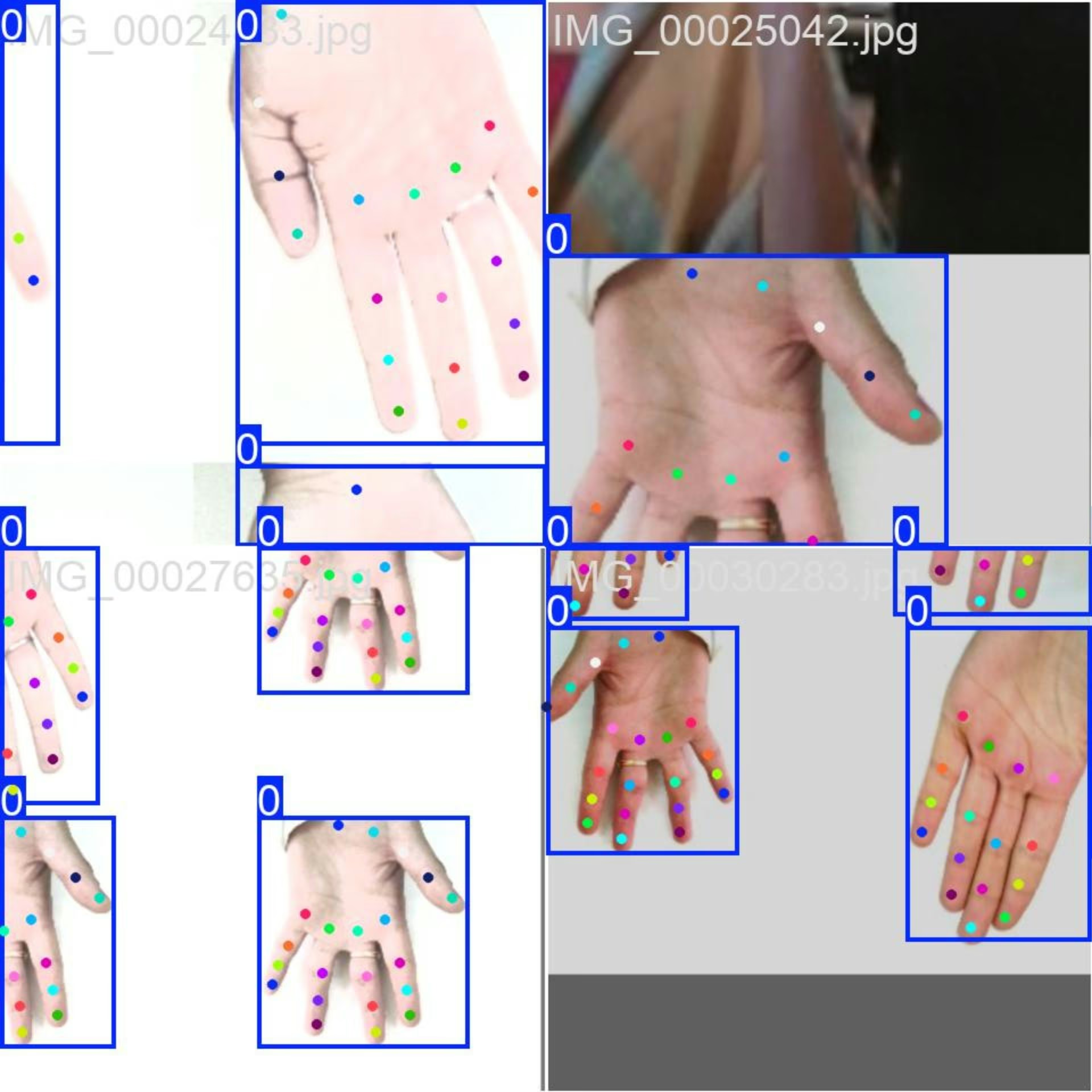
- Мозаичное изображение: на изображении показан обучающий батч, составленный из мозаично объединённых изображений датасета. Мозаичное объединение — это метод, применяемый во время обучения: несколько изображений объединяются в одно, чтобы увеличить разнообразие объектов и сцен в каждом обучающем батче. Это помогает модели лучше обобщать данные для объектов разных размеров, с разными соотношениями сторон и в разных контекстах.
Этот пример демонстрирует разнообразие и сложность изображений в датасете ключевых точек кисти руки, а также преимущества использования мозаичной аугментации при обучении.
Цитирование и благодарности#
Если ты используешь датасет ключевых точек кисти руки в исследованиях или разработке, укажи следующие источники:
Мы хотели бы поблагодарить следующие источники за предоставленные изображения, использованные в этом датасете:
Изображения были собраны и использованы в соответствии с лицензиями, предоставленными каждой платформой, и распространяются по лицензии Creative Commons Attribution-NonCommercial-ShareAlike 4.0 International License.
Мы также хотели бы поблагодарить создателя этого датасета, Rion Dsilva, за его вклад в сообщество исследований Vision AI.
Часто задаваемые вопросы#
Загрузи
yolo26n-pose.ptи вызовиmodel.train(data="hand-keypoints.yaml", epochs=100, imgsz=640)— полный код на Python и примеры команд CLI смотри выше в разделе Пример обучения, а полный список аргументов — на странице модели Обучение.Набор данных Hand Keypoints содержит 26 768 аннотированных изображений и 21 ключевую точку на руку, полученную с помощью Google MediaPipe. Такой масштаб и точность аннотаций подходят моделям оценки позы для решения сложных задач.
Hand Keypoints подходит для распознавания жестов, управления в AR/VR, манипуляций роботами, анализа движений в здравоохранении, анимации и биометрической аутентификации — подробное описание каждого направления см. в разделе Применение.
Набор данных Hand Keypoints разделён на две подвыборки:
- Train: 18 776 изображений для обучения моделей оценки позы.
- Val: 7 992 изображения для валидации во время обучения модели.
Конфигурация набора данных задаётся в YAML-файле, который содержит пути, классы и другие необходимые сведения. Файл
hand-keypoints.yamlдоступен по ссылке hand-keypoints.yaml.Чтобы использовать этот YAML-файл для обучения, укажи его в скрипте обучения или команде CLI, как показано в примере обучения выше. Подробнее см. в разделе YAML-файл набора данных.


Комментарии32
Задай вопрос, поделись результатами или помоги кому-нибудь.
vbalab
Ready-to-use YOLO26s-pose fine-tuned for hand keypoints!
The link: https://github.com/vbalab/YOLO26s-pose-hands
2 Glenn JocherUltralytics
Thanks for sharing your YOLO26s hand-keypoints weights repo — for anyone trying it, please include (in that repo) the exact
ultralyticsversion + training args and a validation result on the official Hand Keypoints dataset so others can reproduce/compare easily; quick sanity-check command:yolo pose val model=path/to/best.pt data=hand-keypoints.yaml imgsz=640
MengBo-GitHub
感谢如此详细的教学文档,可惜在个人学习使用阶段没有足够的 训练条件 ,我请求分享一些训练后的模型提供给学习者使用,感激不尽😄
1- Glenn JocherUltralytics(изменено)
感谢支持!目前我们未提供基于 Hand Keypoints 的官方预训练权重;建议从 YOLO26n‑pose.pt 做迁移学习,或使用 Ultralytics Platform 进行一键云端训练获取可用模型,如有社区训练的 checkpoint 也欢迎在此贴共享链接。
chrismuntean
I trained a model using this tutorial so you don't have to!
Feel free to use it as you wish:
https://github.com/chrismuntean/YOLO11n-pose-hands
1zlj127
Wow! Thank you so much for your contribution, bro. It has saved me most of the time for pre-training. You're my god!
1
RedAbraham
what's the meaning of output(130069)? I wanna deploy the model by myself but I don't know how to analyze the output
- Glenn JocherUltralytics(изменено)
That
(1, 300, 69)is the exported end-to-end pose head output shaped as(batch, num_predictions, num_channels); for Hand Keypointskpt_shape: [21, 3], so69 = 4 (box x1,y1,x2,y2) + 1 (confidence score) + 1 (class index,names: {0: hand}) + 21*3 (keypoints x,y,visibility). There is no separate objectness channel. See the Hand Keypoints dataset docs and the general pose dataset overview.# out: (1, 300, 69) pred = out[0] # (300, 69) boxes_xyxy = pred[:, 0:4] # x1,y1,x2,y2 score = pred[:, 4] # confidence score cls = pred[:, 5] # class index (1 class) kpts = pred[:, 6:].reshape(-1, 21, 3) # (300, 21, 3) -> x,y,visIf you tell me your export format (e.g. ONNX/TensorRT), you can drop the tensor names and a small snippet of the output here in this discussion so the team can see it.
samasadii(изменено)
I've noticed in this dataset almost all of the points are labeled as visible, even the ones that are not visible in the image.
changshen123
Hi @glenn-jocher i want to konw that how much epochs are suitable for your dataset?
jugal-sheth
from ultralytics import YOLO

# Load a model
model = YOLO("yolo11n-pose.pt")  # load a pretrained model (recommended for training)

# Train the model
results = model.train(data="hand-keypoints.yaml", epochs=100, imgsz=640)
Error
train: WARNING ⚠️ D:\projects\hand-track\datasets\dataset\train\images\IMG_00035498.jpg: ignoring corrupt image/label: cannot reshape array of size 67 into shape (2) train: WARNING ⚠️ D:\projects\hand-track\datasets\dataset\train\images\IMG_00035499.jpg: ignoring corrupt image/label: cannot reshape array of size 67 into shape (2) train: WARNING ⚠️ D:\projects\hand-track\datasets\dataset\train\images\IMG_00035500.jpg: ignoring corrupt image/label: cannot reshape array of size 67 into shape (2) . . . . . . . train: WARNING ⚠️ D:\projects\hand-track\datasets\dataset\train\images\IMG_00035501.jpg: ignoring corrupt image/label: cannot reshape array of size 67 into shape (2) train: WARNING ⚠️ D:\projects\hand-track\datasets\dataset\train\images\IMG_00035503.jpg: ignoring corrupt image/label: cannot reshape array of size 67 into shape (2) train: WARNING ⚠️ D:\projects\hand-track\datasets\dataset\train\images\IMG_00035504.jpg: ignoring corrupt image/label: cannot reshape array of size 67 into shape (2) train: WARNING ⚠️ D:\projects\hand-track\datasets\dataset\train\images\IMG_00035505.jpg: ignoring corrupt image/label: cannot reshape array of size 67 into shape (2) train: WARNING ⚠️ D:\projects\hand-track\datasets\dataset\train\images\IMG_00035507.jpg: ignoring corrupt image/label: cannot reshape array of size 67 into shape (2) train: WARNING ⚠️ D:\projects\hand-track\datasets\dataset\train\images\IMG_00035509.jpg: ignoring corrupt image/label: cannot reshape array of size 67 into shape (2) WARNING ⚠️ No images found in D:\projects\hand-track\datasets\dataset\train\labels.cache, training may not work correctly. See https://docs.ultralytics.com/datasets for dataset formattingg guidance. Traceback (most recent call last): File "d:\projects\hand-track\test.py", line 36, in model.train(data="config.yaml", epochs=100, imgsz=896, device=0) File "C:\Users\jugal\miniconda3\envs\hand\Lib\site-packages\ultralytics\engine\model.py", line 808, in train self.trainer.train() File "C:\Users\jugal\miniconda3\envs\hand\Lib\site-packages\ultralytics\engine\trainer.py", line 207, in train self._do_train(world_size) File "C:\Users\jugal\miniconda3\envs\hand\Lib\site-packages\ultralytics\engine\trainer.py", line 322, in _do_train self._setup_train(world_size) File "C:\Users\jugal\miniconda3\envs\hand\Lib\site-packages\ultralytics\engine\trainer.py", line 286, in _setup_train self.train_loader = self.get_dataloader(self.trainset, batch_size=batch_size, rank=LOCAL_RANK, mode="train") ^^^^^^^^^^^^^^^^^^^^^^^^^^^^^^^^^^^^^^^^^^^^^^^^^^^^^^^^^^^^^^^^^^^^^^^^^^^^^^^^^^^^^^^^ File "C:\Users\jugal\miniconda3\envs\hand\Lib\site-packages\ultralytics\models\yolo\detect\train.py", line 49, in get_dataloader dataset = self.build_dataset(dataset_path, mode, batch_size) ^^^^^^^^^^^^^^^^^^^^^^^^^^^^^^^^^^^^^^^^^^^^^^^^^^ File "C:\Users\jugal\miniconda3\envs\hand\Lib\site-packages\ultralytics\models\yolo\detect\train.py", line 43, in build_dataset return build_yolo_dataset(self.args, img_path, batch, self.data, mode=mode, rect=mode == "val", stride=gs) ^^^^^^^^^^^^^^^^^^^^^^^^^^^^^^^^^^^^^^^^^^^^^^^^^^^^^^^^^^^^^^^^^^^^^^^^^^^^^^^^^^^^^^^^^^^^^^^^^^^ File "C:\Users\jugal\miniconda3\envs\hand\Lib\site-packages\ultralytics\data\build.py", line 99, in build_yolo_dataset return dataset( ^^^^^^^^ File "C:\Users\jugal\miniconda3\envs\hand\Lib\site-packages\ultralytics\data\dataset.py", line 64, in init super().init(*args, **kwargs) File "C:\Users\jugal\miniconda3\envs\hand\Lib\site-packages\ultralytics\data\base.py", line 74, in init self.labels = self.get_labels() ^^^^^^^^^^^^^^^^^ File "C:\Users\jugal\miniconda3\envs\hand\Lib\site-packages\ultralytics\data\dataset.py", line 161, in get_labels len_cls, len_boxes, len_segments = (sum(x) for x in zip(*lengths)) ^^^^^^^^^^^^^^^^^^^^^^^^^^^^^^^^ ValueError: not enough values to unpack (expected 3, got 0)
- Glenn JocherUltralytics(изменено)
@jugal-sheth hi there! It looks like your labels are incorrectly formatted for hand keypoints estimation. Each hand-keypoints label row needs 68 values: class, x, y, width, height (5 values) plus 21 keypoints with 3 values each (x, y, visibility = 63), but your rows appear to have 67. Please verify your label files match the format shown in the hand-keypoints documentation. Let us know if you need any other assistance!
Hi @glenn-jocher Thank you for your reply I haven't changed anything in sample code given on this website https://docs.ultralytics.com/datasets/pose/hand-keypoints/#how-do-i-train-a-yolo11-model-on-the-hand-keypoints-dataset
- Glenn JocherUltralytics
@jugal-sheth hi there! It seems your custom labels may not include the required bounding box coordinates alongside keypoints. The YOLO pose format requires each label to start with class, x_center, y_center, width, height (5 values) followed by 21 keypoints (63 values), totaling 68 values per label. Your 67-value labels suggest missing one element. Please verify your label format matches our pose estimation requirements exactly. Let us know if you need further clarification! 🚀
berlintop
I used yolov11n and yolov11x to train many models based on this dataset. The log accuracy of small batch and large epoch training is very good, but it is very poor during actual inference, much worse than mediaPipa, especially when rotating, the key points are very inaccurate. I am very confused about this, is there any trick to the training parameters?
- Glenn JocherUltralytics
@737296 the issue you described could be due to overfitting or suboptimal augmentation and training practices. To address inaccuracies during inference, consider increasing data augmentation (e.g., rotation, scaling), fine-tuning learning rates or epochs, and ensuring sufficient diversity in the dataset. MediaPipe's robustness might stem from its architecture and preprocessing, so refining training parameters or exploring a different YOLO11 variant could help. Refer to the Hand Keypoints Dataset documentation for guidance on dataset setup and training. Let us know if further clarification is needed!
chengziNaomi
In yolov8-pose, what effect does the number of key points have on the detection results? Less key points, better results or more key points, better results? Now I want to identify the basket in the field, do I identify the four corner points on the top of the basket or the eight corner points on the basket?
- Glenn JocherUltralytics
@chengziNaomi the number of keypoints can affect detection results based on your specific application. For identifying a basket, consider the complexity and precision needed. Using more keypoints might provide better detail, but it depends on your use case. For further guidance, you can explore the hand keypoints documentation at Ultralytics Docs.
Thank you for your reply. I have one more question. Why is the ratio of train and valid about 2:1 in this hand keypoints datasets? but in seg, the ratio is 10:1:1?Is it a special requirements from yolov8-pose?
- Glenn JocherUltralytics
The dataset split ratios are often determined by the specific requirements of the task and dataset characteristics. For hand keypoints, a 2:1 ratio might balance training and validation needs effectively, while segmentation tasks might use a 10:1:1 ratio to ensure sufficient data for training, validation, and testing. These choices are not specific to YOLOv8-pose but are tailored to optimize model performance for each dataset type.
Thank you very much! I want to add negative samples to the datasets, what is the way for yolov8-pose to add negative samples?All I need to do is add the background image and blank txt text to train and val,right?
- Glenn JocherUltralytics
To add negative samples in YOLOv8-pose, you can include background images with corresponding blank
.txtfiles in your dataset. This approach helps the model learn to distinguish between relevant and irrelevant features.
redsuning
train: WARNING ⚠️ G:\datasets\hand\hand-keypoints\train\images\IMG_00001070.jpg: ignoring corrupt image/label: non-normalized or out of bounds coordinates [ 1.0379] train: WARNING ⚠️ G:\datasets\hand\hand-keypoints\train\images\IMG_00001796.jpg: ignoring corrupt image/label: non-normalized or out of bounds coordinates [ 1.0006] train: WARNING ⚠️ G:\datasets\hand\hand-keypoints\train\images\IMG_00001800.jpg: ignoring corrupt image/label: non-normalized or out of bounds coordinates [ 1.0027] train: WARNING ⚠️ G:\datasets\hand\hand-keypoints\train\images\IMG_00001801.jpg: ignoring corrupt image/label: non-normalized or out of bounds coordinates [ 1.0049] train: WARNING ⚠️ G:\datasets\hand\hand-keypoints\train\images\IMG_00001886.jpg: ignoring corrupt image/label: non-normalized or out of bounds coordinates [ 1.0051 1.0038 1.0088 1.0114] train: WARNING ⚠️ G:\datasets\hand\hand-keypoints\train\images\IMG_00001887.jpg: ignoring corrupt image/label: non-normalized or out of bounds coordinates [ 1.0048 1.0062 1.0099 1.0121] train: WARNING ⚠️ G:\datasets\hand\hand-keypoints\train\images\IMG_00001888.jpg: ignoring corrupt image/label: non-normalized or out of bounds coordinates [ 1 1.0017] train: WARNING ⚠️ G:\datasets\hand\hand-keypoints\train\images\IMG_00001994.jpg: ignoring corrupt image/label: non-normalized or out of bounds coordinates [ 1.0059] train: WARNING ⚠️ G:\datasets\hand\hand-keypoints\train\images\IMG_00001998.jpg: ignoring corrupt image/label: non-normalized or out of bounds coordinates [ 1.0044] train: WARNING ⚠️ G:\datasets\hand\hand-keypoints\train\images\IMG_00001999.jpg: ignoring corrupt image/label: non-normalized or out of bounds coordinates [ 1.007] train: WARNING ⚠️ G:\datasets\hand\hand-keypoints\train\images\IMG_00002000.jpg: ignoring corrupt image/label: non-normalized or out of bounds coordinates [ 1.0083] train: WARNING ⚠️ G:\datasets\hand\hand-keypoints\train\images\IMG_00002001.jpg: ignoring corrupt image/label: non-normalized or out of bounds coordinates [ 1.0146] train: WARNING ⚠️ G:\datasets\hand\hand-keypoints\train\images\IMG_00002002.jpg: ignoring corrupt image/label: non-normalized or out of bounds coordinates [ 1.0178] train: WARNING ⚠️ G:\datasets\hand\hand-keypoints\train\images\IMG_00002003.jpg: ignoring corrupt image/label: non-normalized or out of bounds coordinates [ 1.0178] train: WARNING ⚠️ G:\datasets\hand\hand-keypoints\train\images\IMG_00002143.jpg: ignoring corrupt image/label: non-normalized or out of bounds coordinates [ 1.0582 1.0216] train: WARNING ⚠️ G:\datasets\hand\hand-keypoints\train\images\IMG_00002144.jpg: ignoring corrupt image/label: non-normalized or out of bounds coordinates [ 1.0641 1.0333] train: WARNING ⚠️ G:\datasets\hand\hand-keypoints\train\images\IMG_00002202.jpg: ignoring corrupt image/label: non-normalized or out of bounds coordinates [ 1.0041 1.0052 1.008 1.0093 1.0108 1.0112 1.0116] train: WARNING ⚠️ G:\datasets\hand\hand-keypoints\train\images\IMG_00002451.jpg: ignoring corrupt image/label: non-normalized or out of bounds coordinates [ 1.0121] train: WARNING ⚠️ G:\datasets\hand\hand-keypoints\train\images\IMG_00002454.jpg: ignoring corrupt image/label: non-normalized or out of bounds coordinates [ 1.023 1.0012] Many of the callout coordinates are beyond 1
- Glenn JocherUltralytics
@redsuning the warnings indicate that some images have non-normalized or out-of-bounds coordinates. Please check your dataset annotations to ensure all keypoints are within the expected range. You might need to normalize the coordinates to fit within the [0, 1] range. For more details, you can refer to the dataset documentation.
I know the reason for this warning, but the dataset I'm using is the default Hand-keypoints dataset you uploaded, and I mean your Hand-keypoints dataset labeling data needs to be modified.
1- Glenn JocherUltralytics
Thank you for bringing this to our attention. We'll review the dataset annotations for any inconsistencies. If you have further questions, feel free to ask here.
AlgosDuCouteau
seem like the issue has not been fixed, i am still get the errors, will it affect training results?
1- Glenn JocherUltralytics
The warnings won't affect training results if the majority of your dataset is intact. We'll review the dataset annotations for any issues. For further details, please refer to the hand-keypoints documentation.
In fact, the official dataset has 5% incorrect labels.
- Glenn JocherUltralytics
Thank you for pointing this out. We will investigate and address any labeling issues in the Hand Keypoints dataset as soon as possible. Meanwhile, you may exclude problematic samples or adjust the annotations for your use case to ensure optimal training results.