Ultralytics YOLO Hiperparametre Ayarlama Kılavuzu
Ultralytics YOLO'da hiperparametre ayarlama, öğrenme hızı, kayıp ağırlıkları ve artırma şiddeti gibi ayarları optimize ederek bir makine öğrenmesi modelinin doğruluk, kesinlik ve geri çağırma gibi performans metriklerini en üst düzeye çıkarmaya yönelik otomatik ve yinelemeli bir aramadır. Bu değerleri elle denemek yerine Ultralytics YOLO, kısa eğitim çalıştırmaları boyunca aday yapılandırmaları değiştirip değerlendirerek hiperparametre uzayını genetik algoritmayla araştırır.
İzle: Daha iyi model performansı için hiperparametreler nasıl ayarlanır 🚀
Hiperparametreler nedir?#
Hiperparametreler, algoritmaya ait üst düzey yapısal ayarlardır. Eğitim aşamasından önce belirlenir ve eğitim sırasında sabit kalırlar. Ultralytics YOLO'da sıkça ayarlanan hiperparametrelerden bazıları şunlardır:
- Öğrenme Hızı
lr0: Kayıp fonksiyonundaki minimuma doğru ilerlerken her yinelemedeki adım boyutunu belirler. - Yığın Boyutu
batch: İleri geçişte eşzamanlı olarak işlenen görüntü sayısı. - Epoch Sayısı
epochs: Bir epoch, tüm eğitim örnekleri üzerinde yapılan tek bir ileri ve geri geçiştir. - Mimariye Özgü Ayrıntılar: Kanal sayıları, katman sayısı, aktivasyon fonksiyonu türleri vb. Bunlar eğitim argümanlarında değil, model YAML yapılandırmasında bulunur.
Bu dört değerden yalnızca öğrenme hızı varsayılan arama uzayındadır: batch, epochs ve mimari sabit kalır. Ayarlayıcı ayrıca çizelgeyi, kayıp katsayılarını ve artırmaları aşağıda listelendiği gibi değiştirir.
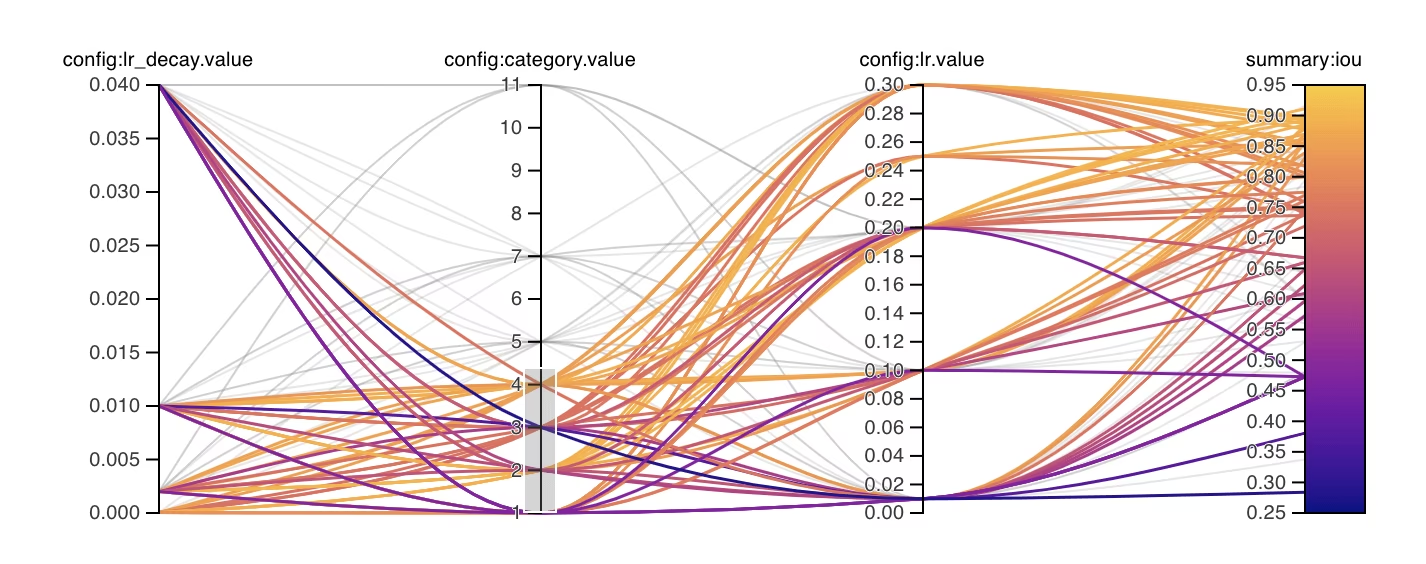
Genetik Evrim ve Mutasyon#
Ultralytics YOLO, hiperparametreleri optimize etmek için bir evrimsel algoritma ailesi olan genetik algoritmaları kullanır. Genetik algoritmalar, doğal seçilim ve genetik mekanizmalarından esinlenmiştir.
- Seçilim: Her yinelemede, uygunluk değerlerine göre ağırlıklandırılarak en yüksek uygunluğa sahip dokuz adaya kadar yapılandırmadan biri seçilir. 30 sonuçtan sonra, tüm sonuçların en iyi %20'si (en fazla 30 sonuç) parametre kovaryansını da tahmin eder; seçkin örnekler biriktikçe bu tahminin etkisi artar.
- Mutasyon: Her yinelemede parametrelerin yaklaşık yarısı, arama aralıklarına göre normalize edilmiş Gauss adımları kullanılarak mutasyona uğratılır. Kovaryans etkinleştiğinde, en fazla %40'lık güven ağırlıklı bir payda ilişkili adımlar kullanılır; yansıtma yöntemi, kırpılmış değerleri biriktirmeden bu adımları sınırlar içinde tutar. Denemeler iyileşme olmadan biriktikçe adım boyutları 25 deneme boyunca doğrusal olarak en fazla %20 daralır ve yeni bir en iyi sonuç bulunduğunda sıfırlanır. 1. yinelemenin bir ebeveyni yoktur ve başlangıç değeri olarak varsayılan eğitim hiperparametrelerini kullanır.
Hiperparametre Ayarına Hazırlanma#
Ayarlama sürecine başlamadan önce şunları yapman önemlidir:
- Metrikleri belirle: Yerleşik ayarlayıcı (
use_ray=False), denemeleri görevinfitnesspuanına göre sıralarkenuse_ray=Truegörev metriğini kullanır. AP50 veya F1 puanı gibi hangi ikincil metrikleri inceleyeceğine karar ver. - Ayarlama Bütçesini Belirle: Ne kadar hesaplama kaynağı ayırmak istediğini tanımla. Hiperparametre ayarlama, hesaplama açısından yoğun olabilir.
Ayarlama Döngüsünün İşleyişi#
Yerleşik ayarlayıcı her yinelemede aşağıdaki döngüyü tekrarlar:
- Hiperparametreleri başlat — Ultralytics YOLO'nun belirlediği varsayılan hiperparametrelerle ya da alan bilgin veya önceki deneylerine dayalı değerlerle makul bir başlangıç noktası seç.
- Hiperparametreleri mutasyona uğrat —
Tunersınıfı,_mutateyöntemiyle mevcut kümeden otomatik olarak yeni bir hiperparametre kümesi üretir. - Modeli eğit — mutasyona uğratılmış hiperparametreleri kullanarak modeli eğit, ardından seçtiğin ölçütlerle eğitim performansını değerlendir.
- Modeli değerlendir — değerlendirme süreci, yinelemenin uygunluk puanını üretir. Bu puan, mevcut hiperparametrelerin iyileşme sağlayıp sağlamadığını belirlemek için önceki yinelemelerle karşılaştırılır.
- Sonuçları kaydet — ileride başvurmak üzere hem performans ölçütlerini hem de bunlara karşılık gelen hiperparametreleri kaydet. Ultralytics YOLO bu sonuçları NDJSON biçiminde otomatik olarak kaydeder.
- Tekrarla — belirlenen yineleme sayısına ulaşılana kadar devam et; her yineleme önceki çalışmalardan edinilen bilgiler üzerine kurulur. Yerleşik ayarlayıcı tüm
iterationsişlemlerini çalıştırır; Ray Tune ise her fit epoch'undan sonra ölçütleri raporlayarak ASHA'nın ek bekleme süresinin ardından zayıf denemeleri durdurmasına olanak tanır.
Yinelemeler ve Popülasyon Boyutu#
Yerleşik ayarlayıcıda (use_ray=False), iterations toplam sıralı deneme sayısını belirler ve varsayılan değeri 300'dür. Her denemede tek bir model, tek bir hiperparametre yapılandırmasıyla eğitilir. Örneğin, iterations=40 ve epochs=50 kullanıldığında, birbirinden bağımsız 40 adet 50 epoch'luk eğitim çalışması planlanır; 40 adaydan oluşan ayrı bir popülasyonla yapılan tek bir 50 epoch'luk çalışma değil.
Yerleşik genetik algoritmada açık bir popülasyon boyutu parametresi yoktur. Önceki denemeler mevcut olduğunda, en yüksek uygunluk değerine sahip en fazla dokuz yapılandırma arasından seçim yapar ve her yinelemede bir adayı mutasyona uğratır.
Paralel denemeler veya daha gelişmiş arama stratejileri için Ray Tune'u kullanmak üzere use_ray=True değerini ayarla. Ray Tune aynı 300 denemelik varsayılanı kullanır ve iterations değerini num_samples olarak alır. Ayrıntılar için Ray Tune entegrasyon kılavuzuna bak.
Varsayılan Arama Alanı#
Aşağıdaki tabloda YOLO26'da hiperparametre ayarı için varsayılan arama alanı parametreleri listelenmiştir. Her parametrenin aralığı (min, max) biçiminde bir demetle tanımlanır.
| Parametre | Tür | Değer Aralığı | Açıklama |
|---|---|---|---|
lr0 | float | (1e-5, 1e-2) | Eğitimin başlangıcındaki ilk öğrenme oranı. Düşük değerler eğitimi daha kararlı, yakınsamayı ise daha yavaş hâle getirir. |
lrf | float | (0.01, 1.0) | Son öğrenme oranının lr0 değerine oranı. Öğrenme oranının eğitim sırasında ne kadar düşeceğini kontrol eder. |
momentum | float | (0.7, 0.98) | SGD momentum katsayısı. Yüksek değerler tutarlı gradyan yönünü korumaya yardımcı olur ve yakınsamayı hızlandırabilir. |
weight_decay | float | (0.0, 0.001) | Aşırı öğrenmeyi önlemek için L2 düzenlileştirme katsayısı. Daha yüksek değerler daha güçlü düzenlileştirme uygular. |
warmup_epochs | float | (0.0, 5.0) | Doğrusal öğrenme oranı ısınması için epoch sayısı. Eğitimin başındaki kararsızlığı önlemeye yardımcı olur. |
warmup_momentum | float | (0.0, 0.95) | Isınma aşamasındaki ilk momentum. Son momentum değerine kademeli olarak yükselir. |
box | float | (1.0, 20.0) | Toplam kayıp fonksiyonundaki sınırlayıcı kutu kayıp ağırlığı. Kutu regresyonu ile sınıflandırma arasındaki dengeyi belirler. |
cls | float | (0.1, 4.0) | Toplam kayıp fonksiyonundaki sınıflandırma kaybı ağırlığı. Daha yüksek değerler doğru sınıf tahminini öne çıkarır. |
cls_pw | float | (0.0, 1.0) | Sınıf dengesizliğini ele almak için kullanılan sınıf ağırlıklandırma kuvveti. Daha yüksek değerler seyrek sınıfların ağırlığını artırır. |
dfl | float | (0.4, 12.0) | Kutu mesafesi regresyon teriminin ağırlığı. DFL içermeyen YOLO26, bu katsayıyı normalize edilmiş kutu mesafeleri üzerinde L1 kaybına uygular; daha yüksek değerler hassas konumlandırmayı öne çıkarır. |
hsv_h | float | (0.0, 0.1) | HSV renk uzayında rastgele ton artırma aralığı. Modelin renk değişikliklerine genelleme yapmasına yardımcı olur. |
hsv_s | float | (0.0, 0.9) | HSV uzayında rastgele doygunluk artırma aralığı. Farklı ışık koşullarını taklit eder. |
hsv_v | float | (0.0, 0.9) | Rastgele değer (parlaklık) artırma aralığı. Modelin farklı pozlama düzeylerini işlemesine yardımcı olur. |
degrees | float | (0.0, 45.0) | Derece cinsinden maksimum döndürme artırması. Modelin nesne yönelimlerine karşı değişmez hâle gelmesine yardımcı olur. |
translate | float | (0.0, 0.9) | Görüntü boyutunun kesri olarak maksimum öteleme artırması. Nesne konumuna karşı dayanıklılığı artırır. |
scale | float | (0.0, 0.95) | Rastgele ölçeklendirme artırma aralığı. Modelin farklı boyutlardaki nesneleri algılamasına yardımcı olur. |
shear | float | (0.0, 10.0) | Derece cinsinden maksimum kaydırma artırması. Eğitim görüntülerine perspektif benzeri bozulmalar ekler. |
perspective | float | (0.0, 0.001) | Rastgele perspektif artırma aralığı. Farklı bakış açılarını taklit eder. |
flipud | float | (0.0, 1.0) | Eğitim sırasında görüntüyü dikey çevirme olasılığı. Tepeden çekilmiş ve havadan görüntüler için kullanışlıdır. |
fliplr | float | (0.0, 1.0) | Görüntüyü yatay çevirme olasılığı. Modelin nesne yönüne karşı değişmez hâle gelmesine yardımcı olur. |
bgr | float | (0.0, 1.0) | Renk kanallarını değiştiren BGR artırmasını kullanma olasılığı. Renk değişmezliğine yardımcı olabilir. |
mosaic | float | (0.0, 1.0) | Dört görüntüyü birleştiren mozaik artırmasını kullanma olasılığı. Küçük nesne algılamada özellikle kullanışlıdır. |
mixup | float | (0.0, 1.0) | İki görüntüyü harmanlayan mixup artırmasını kullanma olasılığı. Modelin dayanıklılığını artırabilir. |
cutmix | float | (0.0, 1.0) | cutmix artırmasını kullanma olasılığı. Yerel özellikleri korurken görüntü bölgelerini birleştirir. |
copy_paste | float | (0.0, 1.0) | flip modunda kopyalanmaya uygun nesnelerin oranı; mixup modunda ise uygulama olasılığı da kullanılır. |
close_mosaic | int | (0.0, 10.0) | Eğitim tamamlanmadan önce kararlılık sağlamak için son N epoch'ta mozaiği devre dışı bırakır. Önce kayan noktalı sayı olarak mutasyona uğratılır, ardından tam epoch sayısına yuvarlanır. |
Özel Arama Alanı Örneği#
Aşağıdaki örnek bir arama uzayı tanımlar ve model.tune() işlevini çağırır. Bu işlev, YOLO26n modelini AdamW optimize edicisiyle COCO8 üzerinde 30 dönem boyunca ayarlamak için Tuner sınıfını çalıştırır. Ayarlamayı hızlandırmak için çizim, kontrol noktası kaydetme ve son dönem dışındaki doğrulamalar atlanır.
Bu örnek yalnızca gösterim amaçlıdır. Kısa veya küçük ölçekli ayarlama çalışmalarından elde edilen hiperparametreler, gerçek dünya eğitimleri için nadiren en iyi sonucu verir. Güvenilir ve aktarılabilir sonuçlar elde etmek için ayarlama, benzer veri kümeleri, epoch sayıları ve artırmalar dâhil, tam eğitimdekilere yakın ayarlar altında yapılmalıdır. Hızlı ayarlama, parametreleri daha hızlı yakınsamaya veya genellenemeyen kısa vadeli doğrulama kazanımlarına göre yönlendirebilir.
from ultralytics import YOLO

# YOLO modelini başlat
model = YOLO("yolo26n.pt")

# Arama alanını tanımla
search_space = {
    "lr0": (1e-5, 1e-2),
    "degrees": (0.0, 45.0),
}

# COCO8 üzerinde 30 epoch boyunca hiperparametreleri ayarla
model.tune(
    data="coco8.yaml",
    epochs=30,
    iterations=300,
    optimizer="AdamW",
    space=search_space,
    plots=False,
    save=False,
    val=False,
)
Kesintiye Uğrayan Hiperparametre Ayar Oturumunu Sürdürme#
Kesintiye uğrayan bir hiperparametre ayar oturumunu sürdürmek için resume=True değerini iletebilirsin. Sürdürmek için runs/{task} altında kullanılan name dizinini isteğe bağlı olarak iletebilirsin. name olmadan, en son çalıştırılan oturum yerine varsayılan ad olan tune adlı dizinde devam eder; bu nedenle özel adla başlattığın tüm çalıştırmalar için name değerini ilet. Ayrıca data, epochs, iterations ve space dâhil önceki tüm eğitim argümanlarını da sağlaman gerekir.
from ultralytics import YOLO

# Bir YOLO modeli tanımla
model = YOLO("yolo26n.pt")

# Arama alanını tanımla
search_space = {
    "lr0": (1e-5, 1e-2),
    "degrees": (0.0, 45.0),
}

# Önceki çalıştırmayı sürdür
results = model.tune(data="coco8.yaml", epochs=50, iterations=300, space=search_space, resume=True)

# 'tune_exp' adlı ayarlama çalışmasını sürdür
results = model.tune(data="coco8.yaml", epochs=50, iterations=300, space=search_space, name="tune_exp", resume=True)Sonuçlar#
Hiperparametre ayarlama sürecini başarıyla tamamladıktan sonra, ayarlama sonuçlarını içeren çeşitli dosya ve dizinler elde edersin. Aşağıda her biri açıklanmıştır:
Dosya Yapısı#
Sonuç dizininin yapısı şöyle görünür. multitrain/ ve multitrain-2/ gibi tarama dizinleri, her veri kümesi için adlandırılmış bir alt dizinde bulunan tekil ayarlama yinelemelerini, yani her biri tek bir hiperparametre kümesiyle eğitilmiş modelleri barındırır. Depolama alanından tasarruf etmek için ayarlayıcı, o anki en iyi sonuç olmayan yinelemelerin veri kümesi başına çalıştırma dizinlerini siler. tune/ dizini, tekil model eğitimlerinin tümünün ayarlama sonuçlarını içerir:
runs/
└── detect/
    ├── multitrain/
    │   └── coco8/
    ├── multitrain-2/
    ├── ...
    └── tune/
        ├── best_hyperparameters.yaml
        ├── tune_fitness.png
        ├── tune_results.ndjson
        ├── tune_scatter_plots.png
        └── weights/
            ├── last.pt
            └── best.pt
Dosya Açıklamaları#
best_hyperparameters.yaml#
Bu YAML dosyası, ayarlama sürecinde bulunan en iyi performanslı hiperparametreleri içerir. Gelecekteki eğitimleri bu optimize edilmiş ayarlarla başlatmak için dosyayı kullanabilirsin.
-
Biçim: YAML
-
Kullanım: Hiperparametre sonuçları
-
Örnek:
# 558/900 iterations complete ✅ (45536.81s)
# Results saved to /usr/src/ultralytics/runs/detect/tune
# Best fitness=0.64297 observed at iteration 498
# Best fitness metrics are {'metrics/precision(B)': 0.87247, 'metrics/recall(B)': 0.71387, 'metrics/mAP50(B)': 0.79106, 'metrics/mAP50-95(B)': 0.62651, 'val/box_loss': 2.79884, 'val/cls_loss': 2.72386, 'val/l1_loss': 0.68503, 'fitness': 0.64297}
# Best fitness model is /usr/src/ultralytics/runs/detect/tune/weights
# Best fitness hyperparameters are printed below.

lr0: 0.00269
lrf: 0.00288
momentum: 0.73375
weight_decay: 0.00015
warmup_epochs: 1.22935
warmup_momentum: 0.1525
box: 18.27875
cls: 1.32899
dfl: 0.56016
hsv_h: 0.01148
hsv_s: 0.53554
hsv_v: 0.13636
degrees: 0.0
translate: 0.12431
scale: 0.07643
shear: 0.0
perspective: 0.0
flipud: 0.0
fliplr: 0.08631
mosaic: 0.42551
mixup: 0.0
copy_paste: 0.0
tune_fitness.png#
Bu grafik, yineleme sayısına göre uygunluk değerini gösterir. Genetik algoritmanın zaman içinde nasıl performans gösterdiğini görselleştirmene yardımcı olur.
- Biçim: PNG
- Kullanım: Performans görselleştirme
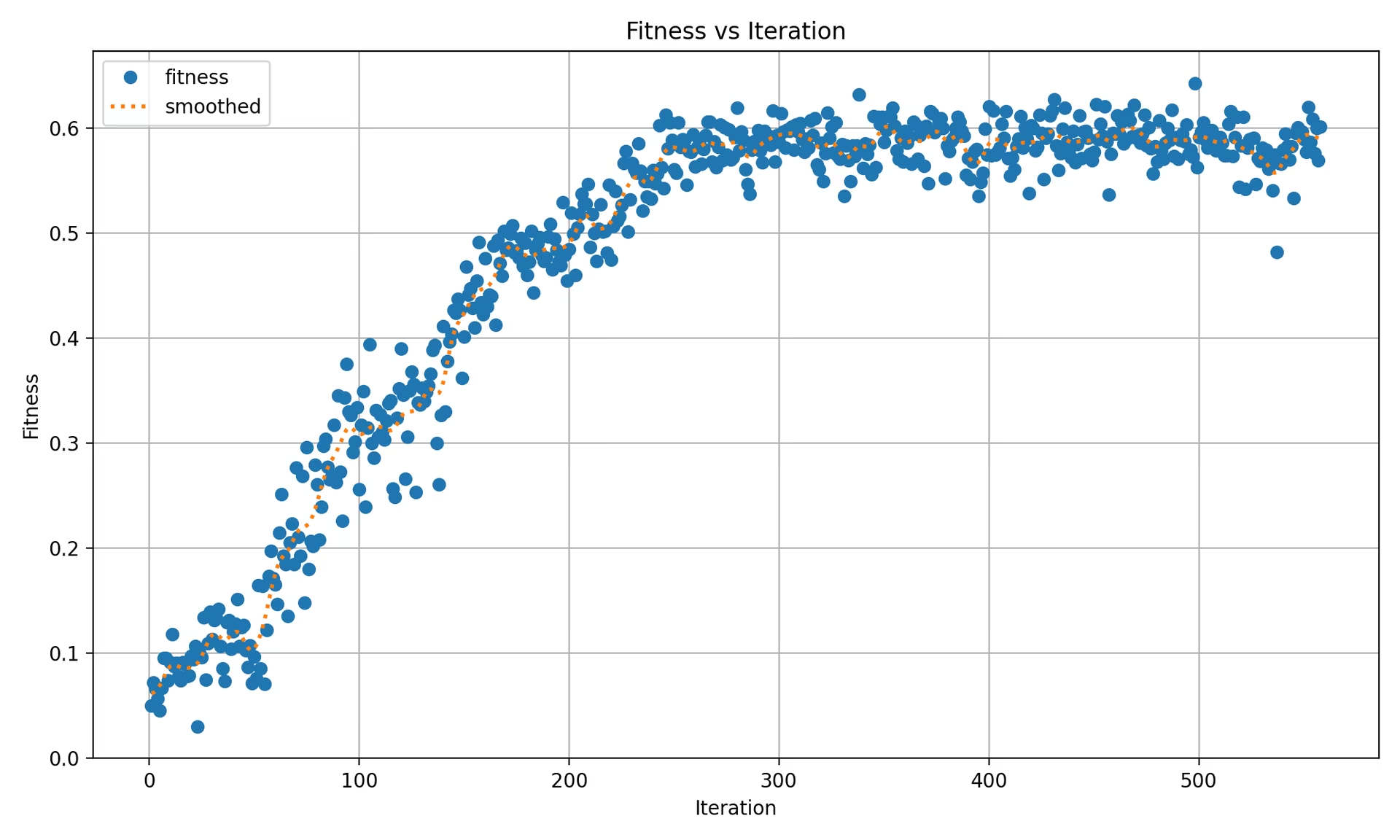
Grafik şunları içerir:
- Her veri kümesindeki her yineleme için bir işaretçi; tek veri kümeli bir çalıştırmada her yineleme için bir nokta, çok veri kümeli bir çalıştırmada ise her yinelemede her veri kümesi için bir nokta gösterilir.
- Yineleme başına üst düzey uygunluk değerleri üzerinde Gauss yumuşatma (
sigma=3) uygulanarak hesaplanan noktalı bir "yumuşatılmış ortalama" çizgisi.
tune_results.ndjson#
Her ayarlama yinelemesinin ayrıntılı sonuçlarını içeren bir NDJSON dosyası. Her satırda toplu uygunluk değerini, ayarlanan hiperparametreleri ve veri kümesi başına ölçütleri içeren bir JSON nesnesi bulunur. Tek ve çok veri kümeli ayarlamalarda aynı dosya biçimi kullanılır.
- Biçim: NDJSON
- Kullanım: Yineleme başına sonuçların takibi.
- Örnek:
Aşağıda okunabilirlik için biçimlendirilmiş bir örnek verilmiştir; gerçek .ndjson dosyasında her nesne tek satırda saklanır.
{
    "iteration": 1,
    "fitness": 0.48628,
    "hyperparameters": {
        "lr0": 0.01,
        "lrf": 0.01,
        "momentum": 0.937,
        "weight_decay": 0.0005
    },
    "datasets": {
        "coco8": {
            "metrics/precision(B)": 0.65666,
            "metrics/recall(B)": 0.85,
            "metrics/mAP50(B)": 0.85086,
            "metrics/mAP50-95(B)": 0.64104,
            "val/box_loss": 1.57958,
            "val/cls_loss": 1.04986,
            "val/l1_loss": 1.32641,
            "fitness": 0.64104
        },
        "coco8-grayscale": {
            "metrics/precision(B)": 0.6582,
            "metrics/recall(B)": 0.51667,
            "metrics/mAP50(B)": 0.59106,
            "metrics/mAP50-95(B)": 0.33152,
            "val/box_loss": 1.95424,
            "val/cls_loss": 1.64059,
            "val/l1_loss": 1.70226,
            "fitness": 0.33152
        }
    },
    "save_dirs": {
        "coco8": "runs/detect/multitrain/coco8",
        "coco8-grayscale": "runs/detect/multitrain/coco8-grayscale"
    }
}
En üst düzeydeki fitness, veri kümesi başına fitness değerlerinin aritmetik ortalamasıdır. Tek veri kümeli ayarlamada datasets sözlüğü, fitness değerinin en üst düzey fitness değerine eşit olduğu tek bir girdi içerir. Tamamlanan her yineleme için bir JSON nesnesi kaydedilir. Gerçek save_dirs yolları mutlaktır; okunabilirlik için yukarıda kısaltılmıştır.
tune_scatter_plots.png#
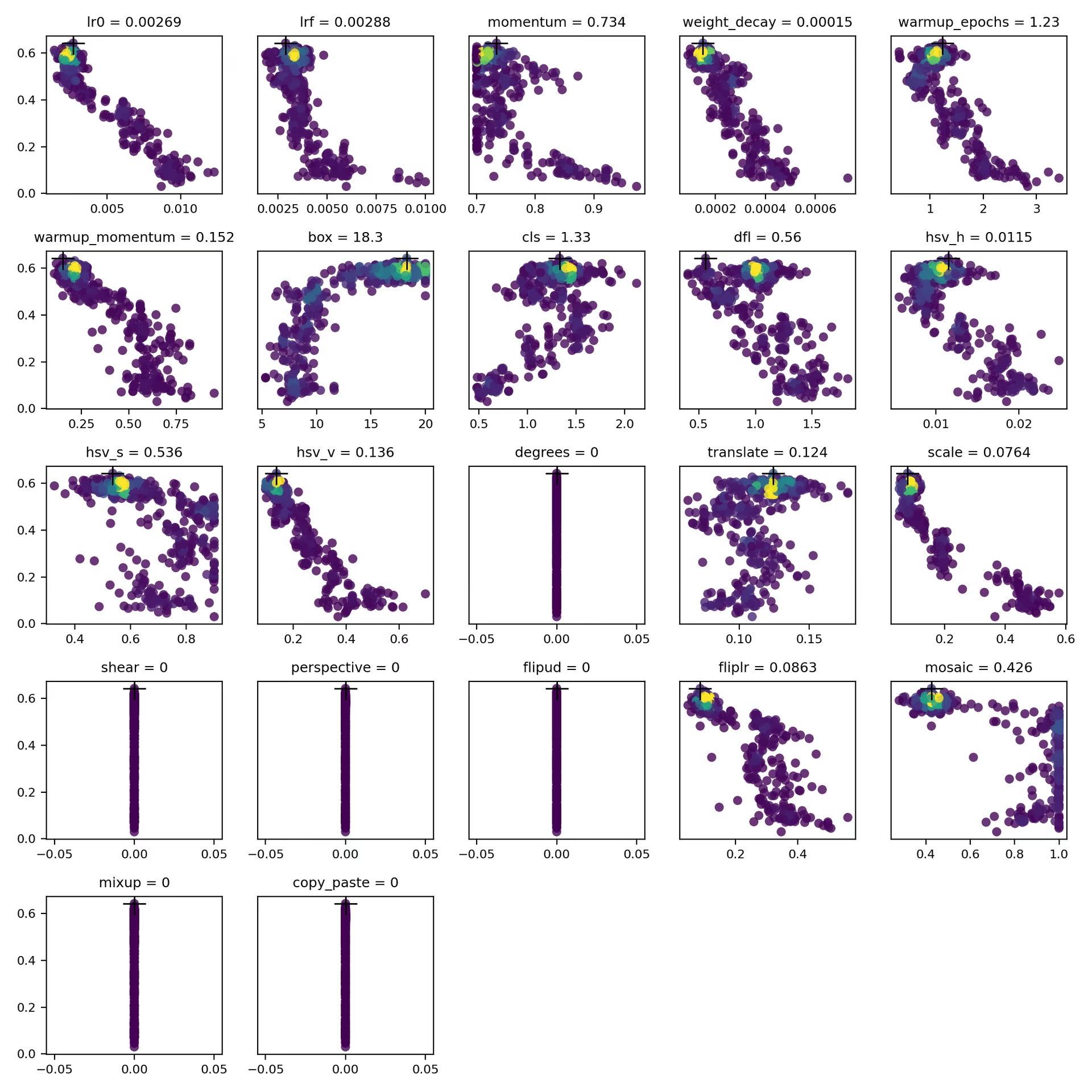
Bu dosya, tune_results.ndjson verilerinden oluşturulan saçılım grafiklerini içerir ve farklı hiperparametrelerle performans ölçütleri arasındaki ilişkileri görselleştirmene yardımcı olur. Mutasyon, her hiperparametrenin yapılandırılmış aralığını kullanır; bu nedenle değerler, degrees ve shear gibi sıfır değerli varsayılanlardan başlayarak değişebilir.
- Biçim: PNG
- Kullanım: Keşifsel veri analizi
weights/#
Bu dizin, ayarlama çalışmasının en yüksek uygunluk değerine sahip yinelemesinden kaydedilen PyTorch modellerini içerir. Her iki dosya da aynı yinelemeden gelir:
last.pt: İlgili yinelemenin eğitim çalıştırmasındaki son dönemin ağırlıkları.best.pt: İlgili yinelemenin eğitim çalıştırmasında uygunluk değeri en yüksek dönemin ağırlıkları.
Bu sonuçları kullanarak gelecekteki model eğitimleri ve analizleri için daha bilinçli kararlar alabilirsin.
Sonuç#
Ultralytics YOLO'da hiperparametre ayarını başlatmak kolaydır ve genetik algoritmada uygunluk ağırlıklı seçim ile aralık-normalize mutasyon kullanımı sayesinde arka planda güçlü bir şekilde çalışır. Bu kılavuzda açıklanan döngüyü izleyerek modelini daha iyi performans için sistematik olarak ayarlayabilir, ardından elde edilen best_hyperparameters.yaml değerini gelecekteki eğitim çalışmalarını başlatmak için yeniden kullanabilirsin. Ayarlamayı paralel denemelere ve daha gelişmiş arama algoritmalarına ölçeklendirmek için Ray Tune entegrasyon kılavuzuna göz atabilir veya yapılandırılabilir hiperparametreler ve gerçek zamanlı metrik takibiyle yönetilen işleri Ultralytics Platform üzerinden bulut eğitimi ile çalıştırabilirsin.
Katman başına öğrenme oranları veya özel uygunluk metriği gibi hiçbir argümanın sunmadığı ayarlar için bunun yerine eğitici alt sınıfı oluştur. Daha derinlemesine bilgi edinmek için Tuner sınıfının kaynak kodunu incele. Soruların veya özellik isteklerin varsa GitHub ya da Discord üzerinden bize ulaş.
Sık Sorulan Sorular#
lr0parametresiyle bir başlangıç değeri belirle — yaygın değerler0.001ile0.01arasında değişir — ve en uygun değeri bulmak için ayarlamanın bu değeri değiştirmesine izin ver. Bunumodel.tune()yöntemiyle otomatikleştirebilirsin. Örneğin:Örnekfrom ultralytics import YOLO # YOLO modelini başlat model = YOLO("yolo26n.pt") # COCO8 üzerinde 30 epoch boyunca hiperparametreleri ayarla model.tune(data="coco8.yaml", epochs=30, iterations=300, optimizer="AdamW", plots=False, save=False, val=False)Daha fazla ayrıntı için Ultralytics YOLO yapılandırma sayfasına göz at.
Genetik algoritmalar, Ultralytics YOLO26'nın elle deneme yanılmaya gerek kalmadan hiperparametre uzayını güvenilir biçimde araştırmasını sağlar. Başlıca avantajları şunlardır:
- Verimli Arama: Uygunluk ağırlıklı seçim güçlü yapılandırmaları korurken aralık-normalize mutasyon yeni adayları keşfeder.
- Yerel Minimumlardan Kaçınma: Rastgele mutasyonlar, aramanın yalnızca açgözlü bir yöntemin takılıp kalabileceği yerel minimumlardan çıkmasına yardımcı olur.
- Performans Metrikleri: Bunlar göreve özgü bir uygunluk puanına göre uyarlanır (tespit için mAP50-95).
Genetik algoritmaların hiperparametreleri nasıl optimize edebileceğini görmek için hiperparametre evrimi kılavuzuna göz at.
Ultralytics YOLO ile hiperparametre ayarlaması için gereken süre büyük ölçüde veri kümesinin boyutu, model mimarisinin karmaşıklığı, yineleme sayısı ve kullanılabilir hesaplama kaynakları gibi çeşitli etkenlere bağlıdır. Örneğin, YOLO26n'yi COCO8 gibi bir veri kümesinde 30 epoch boyunca ayarlamak, donanıma bağlı olarak birkaç saatten birkaç güne kadar sürebilir.
Ayarlama süresini etkili biçimde yönetmek için Hiperparametre Ayarlamaya Hazırlık bölümünde açıklandığı gibi önceden net bir ayarlama bütçesi belirle. Bu, kaynak tahsisi ile optimizasyon hedefleri arasında denge kurmana yardımcı olur.
YOLO'da hiperparametre ayarlaması sırasında model performansını değerlendirirken birkaç temel metrik kullanabilirsin:
- AP50: IoU eşiği 0.50 olduğundaki ortalama kesinlik.
- F1-Skoru: Kesinlik ve duyarlılığın harmonik ortalaması.
- Kesinlik ve Duyarlılık: Modelin doğru pozitifleri yanlış pozitif ve yanlış negatiflere kıyasla belirlemedeki doğruluğunu gösteren ayrı metrikler.
Bu metrikler, modelinin performansının farklı yönlerini anlamana yardımcı olur.
Evet, Ultralytics YOLO26 gelişmiş hiperparametre optimizasyonu için Ray Tune ile entegre çalışır. Ray Tune, Bayes optimizasyonu ve Hyperband gibi arama algoritmalarının yanı sıra ayarlama sürecini hızlandıran paralel çalıştırma özellikleri sunar.
Ray Tune'u YOLO26 ile kullanmak için
model.tune()yöntem çağrısındause_ray=Trueparametresini ayarla.


Yorumlar152
Bir soru sor, sonuçlarını paylaş veya başka birine yardım et.
GengBin414(düzenlendi)
I tuned my defect detection dataset ,which are composed of 8000+ images, this is my tune code: model.tune( data="../data/data20260420_line_scan_merged_6ch.yaml", epochs=300, iterations=300, #space=search_space, #optimizer="AdamW", optimizer="MuSGD", lr0=0.01, momentum=0.9, shear=1, degrees=1, perspective=0.0001, mixup=0.1, cutmix=0.1, batch=20 )
I got the best mAP 0.586 at iteration 5 after tuned 30+ iterations, then I retrain the dataset with the following code: model.train( data="../data/data20260420_line_scan_merged_6ch.yaml", epochs=300, batch=20, imgsz=640, device=0, workers=16, optimizer="MuSGD", lr0=0.00721, lrf=0.01267, momentum=0.81816, weight_decay=0.00077, warmup_epochs=3.31429, warmup_momentum=0.95, box=7.11682, cls=0.48318, dfl=0.9397, hsv_h=0.00364, hsv_s=0.9, hsv_v=0.29751, degrees=0.99922, translate=0.07662, scale=0.51303, shear=0.76723, perspective=0.0, flipud=0.00019, fliplr=0.57639, bgr=0.00634, mosaic=0.62424, mixup=0.11307, cutmix=0.13007, copy_paste=0.00583, close_mosaic=10 #cfg="best_hyperparameters_map0.586.yaml" )
I copied the hyperparameters from best_hyperparameters_map0.586.yaml, but I got the best mAP 0.568, what cause the discrepancy?Can sb help me out? Thanks.
 Glenn JocherUltralytics
A small gap like
0.586 -> 0.568is usually expected becausetune()saves the best single stochastic run, while your latertrain()is a fresh run with different randomness and augmentation order; please first validate the tuning checkpointruns/detect/tune/weights/best.pt, then retrain with the exact same args plusseed=0anddeterministic=True, and make sure you are comparing the same metric (fitness/mAP50-95) described in the Hyperparameter Tuning guide. If the gap still looks too large, please share the text output from validating that checkpoint and the matching row fromtune_results.ndjsonhere in Discussions so the team can compare them directly.Thank you for your timely reply, I validated the tuning checkpoint, here is the text output from validating that checkpoint: (yolo26) ps@ps:~/Desktop/GB/ultralytics$ python val.py Ultralytics 8.4.26 🚀 Python-3.11.15 torch-2.5.1 CUDA:0 (NVIDIA GeForce RTX 4090 D, 24208MiB) YOLO26x summary (fused): 190 layers, 55,645,380 parameters, 0 gradients, 193.9 GFLOPs val: Fast image access ✅ (ping: 0.0±0.0 ms, read: 10744.4±1424.6 MB/s, size: 734.1 KB) val: Scanning /home/ps/Desktop/GB/ultralytics/datasets/Merged_6Chanel_20260420/imagesH/val.cache... 786 images, 47 backgrounds, 0 corrupt: 100% ━━━━━━━━━━━━ 786/786 412.1Mit/s 0.0s Class Images Instances Box(P R mAP50 mAP50-95): 100% ━━━━━━━━━━━━ 50/50 6.9it/s 7.2s all 786 1363 0.843 0.69 0.765 0.585 black 45 47 0.914 0.677 0.828 0.648 crack 120 145 0.681 0.517 0.55 0.334 edge 184 195 0.916 0.899 0.94 0.833 line 116 147 0.809 0.646 0.736 0.544 pit 73 89 0.775 0.543 0.642 0.447 raw 279 318 0.861 0.745 0.81 0.644 white 95 106 0.9 0.623 0.712 0.46 yellow 299 316 0.884 0.873 0.9 0.773 Speed: 0.9ms preprocess, 7.3ms inference, 0.0ms loss, 0.0ms postprocess per image Results saved to /home/ps/Desktop/GB/ultralytics/runs/detect/val81
I checked my retrain args, it show that seed=0 and deterministic=True already set: python train.py New https://pypi.org/project/ultralytics/8.4.53 available 😃 Update with 'pip install -U ultralytics' Ultralytics 8.4.26 🚀 Python-3.11.15 torch-2.5.1 CUDA:0 (NVIDIA GeForce RTX 4090 D, 24208MiB) engine/trainer: agnostic_nms=False, amp=True, angle=1.0, augment=False, auto_augment=randaugment, batch=20, bgr=0.00634, box=7.11682, cache=False, cfg=None, classes=None, close_mosaic=10, cls=0.48318, compile=False, conf=None, copy_paste=0.00583, copy_paste_mode=flip, cos_lr=False, cutmix=0.13007, data=../data/data20260420_line_scan_merged_6ch.yaml, degrees=0.99922, deterministic=True, device=0, dfl=0.9397, dnn=False, dropout=0.0, dynamic=False, embed=None, end2end=None, epochs=500, erasing=0.4, exist_ok=False, fliplr=0.57639, flipud=0.00019, format=torchscript, fraction=1.0, freeze=None, half=False, hsv_h=0.00364, hsv_s=0.9, hsv_v=0.29751, imgsz=640, int8=False, iou=0.7, keras=False, kobj=1.0, line_width=None, lr0=0.00721, lrf=0.01267, mask_ratio=4, max_det=300, mixup=0.11307, mode=train, model=yolo26x.pt, momentum=0.81816, mosaic=0.62424, multi_scale=0.0, name=train137, nbs=64, nms=False, opset=None, optimize=False, optimizer=MuSGD, overlap_mask=True, patience=100, perspective=0.0, plots=True, pose=12.0, pretrained=True, profile=False, project=None, rect=False, resume=False, retina_masks=False, rle=1.0, save=True, save_conf=False, save_crop=False, save_dir=/home/ps/Desktop/GB/ultralytics/runs/detect/train137, save_frames=False, save_json=False, save_period=-1, save_txt=False, scale=0.51303, seed=0, shear=0.76723, show=False, show_boxes=True, show_conf=True, show_labels=True, simplify=True, single_cls=False, source=None, split=val, stream_buffer=False, task=detect, time=None, tracker=botsort.yaml, translate=0.07662, val=True, verbose=True, vid_stride=1, visualize=False, warmup_bias_lr=0.1, warmup_epochs=3.31429, warmup_momentum=0.95, weight_decay=0.00077, workers=16, workspace=None
And here is the train output: Epoch GPU_mem box_loss cls_loss dfl_loss Instances Size 260/300 20.8G 0.4503 0.4947 0.004246 50 640: 100% ━━━━━━━━━━━━ 354/354 2.7it/s 2:10 Class Images Instances Box(P R mAP50 mAP50-95): 100% ━━━━━━━━━━━━ 20/20 4.5it/s 4.4s all 786 1363 0.841 0.682 0.751 0.564 EarlyStopping: Training stopped early as no improvement observed in last 100 epochs. Best results observed at epoch 160, best model saved as best.pt. To update EarlyStopping(patience=100) pass a new patience value, i.e.
patience=300or usepatience=0to disable EarlyStopping.260 epochs completed in 9.792 hours. Optimizer stripped from /home/ps/Desktop/GB/ultralytics/runs/detect/train138/weights/last.pt, 118.4MB Optimizer stripped from /home/ps/Desktop/GB/ultralytics/runs/detect/train138/weights/best.pt, 118.4MB
Validating /home/ps/Desktop/GB/ultralytics/runs/detect/train138/weights/best.pt... Ultralytics 8.4.26 🚀 Python-3.11.15 torch-2.5.1 CUDA:0 (NVIDIA GeForce RTX 4090 D, 24208MiB) YOLO26x summary (fused): 190 layers, 55,645,380 parameters, 0 gradients, 193.9 GFLOPs Class Images Instances Box(P R mAP50 mAP50-95): 100% ━━━━━━━━━━━━ 20/20 4.9it/s 4.1s all 786 1363 0.826 0.685 0.758 0.568 black 45 47 0.882 0.634 0.773 0.579 crack 120 145 0.675 0.559 0.577 0.314 edge 184 195 0.925 0.885 0.949 0.824 line 116 147 0.785 0.667 0.714 0.52 pit 73 89 0.84 0.528 0.662 0.447 raw 279 318 0.812 0.72 0.804 0.638 white 95 106 0.802 0.611 0.674 0.434 yellow 299 316 0.888 0.877 0.911 0.787 Speed: 0.1ms preprocess, 4.4ms inference, 0.0ms loss, 0.0ms postprocess per image Results saved to /home/ps/Desktop/GB/ultralytics/runs/detect/train138
And I don't know where to find tune_results.ndjson mentioned in your reply. I guess you mean the matching row from tune_results.csv then here is: fitness lr0 lrf momentum weight_decay warmup_epochs warmup_momentum box cls dfl hsv_h hsv_s hsv_v degrees translate scale shear perspective flipud fliplr bgr mosaic mixup cutmix copy_paste close_mosaic 0.58582 0.00721 0.01267 0.81816 0.00077 3.31429 0.95 7.11682 0.48318 0.9397 0.00364 0.9 0.29751 0.99922 0.07662 0.51303 0.76723 0 0.00019 0.57639 0.00634 0.62424 0.11307 0.13007 0.00583 10
- Glenn JocherUltralytics
The main issue I see is that your retrain is not matching the tuned trial: the runtime log shows
epochs=500rather than300, so the schedule driven bylr0andlrfis different and that alone can explain0.585 -> 0.568; the current Hyperparameter Tuning guide writestune_results.ndjsonunderruns/detect/tune/, but in your older8.4.26install the equivalent may betune_results.csv, so please rerun with the exact runtime args from the best trial, especiallyepochs=300and the samepatience, and if it still printsepochs=500then another override is being applied. Sorry, after hyperparameter tuning, I retrained first with epochs=500, observed mAP=0.57, then I changed epochs=300, observed mAP=0.568. In the previous reply, I mistakenly copied the retrain args from the epochs=500 run. But the train output is correctly copied from the epochs=300 run, you can tell this out from the EarlyStopping output: Epoch GPU_mem box_loss cls_loss dfl_loss Instances Size 260/300 20.8G 0.4503 0.4947 0.004246 50 640: 100% ━━━━━━━━━━━━ 354/354 2.7it/s 2:10 Class Images Instances Box(P R mAP50 mAP50-95): 100% ━━━━━━━━━━━━ 20/20 4.5it/s 4.4s all 786 1363 0.841 0.682 0.751 0.564 EarlyStopping: Training stopped early as no improvement observed in last 100 epochs. Best results observed at epoch 160, best model saved as best.pt. To update EarlyStopping(patience=100) pass a new patience value, i.e. patience=300 or use patience=0 to disable EarlyStopping.
And the retrain args of the epochs=300 run, it shows that seed=0 and deterministic=True already set: python train.py New https://pypi.org/project/ultralytics/8.4.53 available 😃 Update with 'pip install -U ultralytics' Ultralytics 8.4.26 🚀 Python-3.11.15 torch-2.5.1 CUDA:0 (NVIDIA GeForce RTX 4090 D, 24208MiB) engine/trainer: agnostic_nms=False, amp=True, angle=1.0, augment=False, auto_augment=randaugment, batch=20, bgr=0.00634, box=7.11682, cache=False, cfg=None, classes=None, close_mosaic=10, cls=0.48318, compile=False, conf=None, copy_paste=0.00583, copy_paste_mode=flip, cos_lr=False, cutmix=0.13007, data=../data/data20260420_line_scan_merged_6ch.yaml, degrees=0.99922, deterministic=True, device=0, dfl=0.9397, dnn=False, dropout=0.0, dynamic=False, embed=None, end2end=None, epochs=300, erasing=0.4, exist_ok=False, fliplr=0.57639, flipud=0.00019, format=torchscript, fraction=1.0, freeze=None, half=False, hsv_h=0.00364, hsv_s=0.9, hsv_v=0.29751, imgsz=640, int8=False, iou=0.7, keras=False, kobj=1.0, line_width=None, lr0=0.00721, lrf=0.01267, mask_ratio=4, max_det=300, mixup=0.11307, mode=train, model=yolo26x.pt, momentum=0.81816, mosaic=0.62424, multi_scale=0.0, name=train138, nbs=64, nms=False, opset=None, optimize=False, optimizer=MuSGD, overlap_mask=True, patience=100, perspective=0.0, plots=True, pose=12.0, pretrained=True, profile=False, project=None, rect=False, resume=False, retina_masks=False, rle=1.0, save=True, save_conf=False, save_crop=False, save_dir=/home/ps/Desktop/GB/ultralytics/runs/detect/train138, save_frames=False, save_json=False, save_period=-1, save_txt=False, scale=0.51303, seed=0, shear=0.76723, show=False, show_boxes=True, show_conf=True, show_labels=True, simplify=True, single_cls=False, source=None, split=val, stream_buffer=False, task=detect, time=None, tracker=botsort.yaml, translate=0.07662, val=True, verbose=True, vid_stride=1, visualize=False, warmup_bias_lr=0.1, warmup_epochs=3.31429, warmup_momentum=0.95, weight_decay=0.00077, workers=16, workspace=None
 Murat Raimbekov
quick check on what is likely going on, framed generally: tune saves the best of N stochastic trials, and a single retrain is one new stochastic draw with the same hyperparameters. bit-exact reproduction between the two is not guaranteed even with
seed=0, deterministic=True. ourinit_seeds(deterministic=True)setstorch.use_deterministic_algorithms(True, warn_only=True)inultralytics/utils/torch_utils.py, matching the pytorch reproducibility notes - cuda ops without a deterministic alternative still run non-deterministically with just a warning. over many epochs on a real dataset that variance can compound.a few practical takeaways before assuming the gap is a tuning bug:
- your trial weights at
runs/detect/tune/weights/best.ptalready validate to 0.585, so the trial result is real and reusable - if you need exactly that performance for deployment, use that checkpoint directly. - the recommended way to reuse tuned hyperparameters in a fresh train run is
cfg="runs/detect/tune/best_hyperparameters.yaml"(the commented-out line in your script). that file contains the exact values the trial used and matches the workflow described in the hyperparameter tuning guide. - to bound run-to-run variance, retrain a few times with
seed=0,seed=1,seed=2and compare the mean against the tune's reported best, not a single retrain.
unrelated, you are on ultralytics 8.4.26 and the current release is 8.4.53; for new tuning runs it is worth updating.
- your trial weights at
 User
Hi, I have a question about Hyperparameter Tuning. What value of
epochsanditerationsshould I pass to model.tune(). Default value of epochs is 100, and iterations is 10. Are the default values OK, or should I change them ? My dataset is about 10,000 images.- Glenn JocherUltralytics
For a 10k-image dataset, the defaults are fine for a quick sanity check, but for useful tuning you should set
epochsclose to your real training length becauseepochsis per trial, whileiterationsis how many different trials are tested; a practical starting point isepochs=50to100withiterations=30to100depending on your compute budget, then retrain once with the best settings frombest_hyperparameters.yamlas shown in the Hyperparameter Tuning guide.1 - User
Thank you very much ! I will try to search the best hyperparameters !
- Glenn JocherUltralytics
You're welcome — sounds good; if anything looks off during tuning, please share your
model.tune()call plus the resultingbest_hyperparameters.yamlortune_results.ndjsonhere, and we can help compare it against the expected outputs in the Hyperparameter Tuning guide.
harunemrekiran61
You’ve shown the box range as 0.02 to 0.2, but the default value appears to be 7.5. Is there a mistake here? Could you please check?
- Glenn JocherUltralytics
Good catch —
boxis a loss gain (default7.5during training), so the0.02–0.2range shown in the docs table is outdated/incorrect; the current built-in tuner boundsboxto1.0–20.0(see the Tuner class reference), and you can always override it viaspace={...}as shown in the Hyperparameter Tuning guide.
Larry-zhai
How can I directly apply the optimized best_hyperparameters.yaml to my training? In fact, when I use code similar to the following: from ultralytics import YOLO model = YOLO("yolov8n.pt") model.train(data="data.yaml", hyp="hyp.yaml") an error occurs: SyntaxError: 'hyp' is not a valid YOLO argument.
 J.Q. Pan
Hi I have used the above code to apply the tuning but neither the diagram nor the models will be saved. I only get a single tune folder with all tuning details. I may ask if someone else has also the same problem.
BrianNieuwenhuis
When running the code below the model.tune() call does not recognize my model specification. Could someone explain to me what I am doing wrong. I am using model.overrides so that I can also tune the shear and perspective parameters that are otherwise initialized at 0.
from ultralytics import YOLO import wandb from ultralytics import settings settings.update({"wandb": True})
import argparse
def main(): # parse command-line args if needed parser = argparse.ArgumentParser() parser.add_argument("--gpus", type=int, default=1) parser.add_argument("--workers", type=int, default=4) args = parser.parse_args()
# Define a YOLO model
model = YOLO("yolo11x.pt")

# Dynamically assign GPUs based on --gpus argument
device = list(range(args.gpus))  # e.g., [0, 1, 2, 3] if args.gpus = 4

# Define search space
search_space = {
    "lr0": (1e-5, 1e-1),
    "lrf": (0.01, 1.0),
    "momentum": (0.6, 0.98),
    "weight_decay": (0.0, 0.001),
    "warmup_epochs": (0, 5),
    "warmup_momentum": (0.0,0.95),
    "box": (0.02, 0.2),
    "cls": (0.2, 4.0),
    "hsv_h": (0.0, 0.1),
    "hsv_s": (0.0, 0.9),
    "hsv_v": (0.0, 0.9),
    "translate":(0.0, 0.9),
    "scale": (0.0, 0.9),
    "shear": (0.0, 10.0),
    "perspective": (0.0, 0.001),
    "mosaic": (0.0,1.0),
    "mixup": (0.0, 1.0),
    "copy_paste": (0.0, 1.0)
}

# Manually initialize certain hperparameters that would not be tuned otherwise
model.overrides = {
    'shear': 1,
    'perspective': 0.001,
    'mixup': 0.01,
    'copy_paste' : 0.01,

}

# tune the model
results = model.tune(project='./tune/crop1344',name="tune_default_batch16_v100", use_ray = False,
    data="data.yaml",
    #hyp="custom_hyp.yaml", # this does not seem to work work for tune scripts!!
    batch = 16,
    imgsz = 1344,
    device = device,
    workers = args.workers,

    degrees = 180, #these parameters are fixed in the model tune
    flipud = 0.5,
    fliplr = 0.5,
    bgr = 0,
    auto_augment = None,
    #erasing = 0,

    epochs = 100,
    iterations=10,
    space=search_space,
    optimizer="AdamW",
    resume=False,  #start over or resume previous checkpoint
    plots=False,  # don't make plots etc to save time until last timepoint
    save=False,
    val=False,
    verbose=False)
if name == "main": main()
yyagmurkyaa
Hello again, I have trained new models using the parameters you provided and by organizing my datasets. However, a common issue across all of them is that the models mistakenly classify objects like myself or nearby computer screens as the traffic sign "turn right ahead" (which is one of the labeled classes in my dataset). I have checked my dataset and confirmed that there are no such unrelated objects in the background.
Additionally, the models sometimes confuse left and right directional signs.
Why might these errors be occurring, and how can I fix them? Thank you in advance for your help.
- Glenn JocherUltralytics(düzenlendi)
@Fatima-khanjar to balance precision and recall in your over-predicting model, try these adjustments:
- Increase confidence threshold during inference (not training) to filter out low-confidence predictions
- Adjust IoU threshold in NMS to reduce duplicate detections
- Increase classification loss weight with
cls=1.0or higher to improve class discrimination - Check annotation quality in your dataset, especially for small or ambiguous objects
- Add hard negative examples to your dataset - images with objects similar to your classes but not actually part of them
These changes should help improve precision without significantly sacrificing your excellent recall. For implementation details, see our NMS documentation for confidence thresholding examples.
@yyagmurkyaa for your traffic sign confusion issues:
-
For the model detecting unrelated objects as "turn right ahead" signs:
- Add "hard negative" examples to your training set (images with computers, people, but no traffic signs)
- Increase
cls=1.0or higher to improve classification accuracy - Check if the "turn right ahead" sign has visual similarities to these false positives
-
For left/right confusion:
- Create specific augmentations for directional signs without flipping (as you noted)
- Ensure balanced examples of both directional types
- Consider using a slightly larger model like YOLO26m for better feature discrimination
These targeted adjustments should help address the specific confusion patterns you're seeing.
Fatima-khanjar
Hello again!!
First of all, thank you so much for your help @glenn-jocher __ you've truly helped me a lot, and I really appreciate it!
I have a question regarding fine-tuning a pre-trained YOLO model (e.g., trained on the COCO dataset) for my custom use case. My dataset includes a combination of both new classes (not present in COCO) and some of the existing COCO classes , but with different layouts or contexts.
What I’d like to do is the following:
Add my new classes starting from index 80, while still leveraging the pre-trained weights for the existing COCO classes.
Ideally, I want to preserve the learned knowledge for the COCO classes (especially the ones shared with my dataset), and only train the model further on the new classes.
Is it possible to:
Fine-tune the model in such a way that it uses the pre-trained weights for the common classes, and only learns new classes from scratch starting from a different index?
Retain and benefit from the original COCO knowledge while introducing and training on new class definitions?
Also, I’ve noticed that when I fine-tune a pre-trained model and define my own data.yaml file — completely different from coco.yaml — I redefine the class names and indexes based on my custom dataset, completely removing the COCO classes not present in my data. In this case, what really happens during fine-tuning or transfer learning under the hood? Is the model discarding unused class weights? Are shared class weights still used effectively?
I'd greatly appreciate any clarification or guidance on how to approach this setup properly.
Best regards,
- Glenn JocherUltralytics
@Fatima-khanjar great question about fine-tuning with mixed COCO and custom classes!
Yes, you can leverage pre-trained COCO weights while adding new classes. Here's how:
-
When fine-tuning a YOLO model, the model's detection head is automatically resized to accommodate your new class count. The weights for existing classes are preserved where possible.
-
For classes that overlap with COCO, the model will leverage transfer learning from those pre-trained weights, while new classes will be initialized with random weights.
-
You don't need to explicitly start from index 80 - just define your classes in your data.yaml file, and the model will handle the mapping automatically.
-
During fine-tuning, the model doesn't discard unused class weights but rather reshapes the classification head to match your class count. Weights for classes that exist in both datasets are transferred and further optimized for your specific data.
For best results with mixed classes, I recommend using a smaller learning rate initially (e.g.,
lr0=0.001) to preserve the knowledge in the pre-trained weights while allowing the model to adapt to your new classes. -
Hello! @glenn-jocher thank you so much for your explanation!
I have a follow-up question regarding class index matching. Let's say the person class in the COCO dataset is indexed as 0, but in my data.yaml file, I assign person to index 5. In this case, the model will not treat the person at index 5 as the same class as COCO’s index 0, correct?
So, to benefit from the pretrained weights of shared classes, do the class indices in my custom dataset need to match the COCO indices exactly?
Best regards,
- Glenn JocherUltralytics(düzenlendi)
@Fatima-khanjar you're asking a crucial question about class mapping during transfer learning!
You no longer need to keep COCO's class indices. With
cls_remap=True(the default), training copies the pretrained classification-head rows by class name, so a class such aspersonkeeps its pretrained weights at whatever index it has in your dataset, while new classes such astraffic_signstart from fresh weights. Training printsRemapped N/M cls head rows from pretrained weights by class namewhen rows are copied, andcls_remap=Falsedisables it. For example, thisdata.yamlworks:names: 0: person 1: car 2: traffic_signJust make sure the shared classes use the same names as in COCO. See the Fine-Tuning Guide for details.
@glenn-jocher Hello again!!!
Thank you so much for your clarification! I have a quick follow-up question.
Let’s say the COCO dataset defines the following class indices in its YAML file: 0: person, 2: car, 3: cat.
In my own dataset, I share only the person and car classes with COCO — I don’t want to include cat. If I define my shared classes using the same indices as COCO (i.e., 0: person, 2: car), but then replace the COCO class cat at index 3 with a new class (e.g., 3: animal), will I still benefit from the pretrained weights for the shared classes (person and car)?
Or will assigning a new class at an index previously used by COCO (like 3) cause any issues?
best regards,
- Glenn JocherUltralytics(düzenlendi)
@Fatima-khanjar great question about reusing COCO indices for new classes!
With
cls_remap=True(the default), pretrained classification-head rows are matched by class name, not by index. Shared classes such aspersonandcarkeep their pretrained weights wherever they sit in your dataset. A new class like "animal" at index 3 does not inherit the pretrained "cat" row, because the names do not match, so it starts from fresh weights. Reusing a COCO index therefore neither helps nor hurts the shared classes.If a new class is close to a pretrained one, give it that class's name so its row is copied. Using a lower learning rate initially (e.g.,
lr0=0.001) also helps preserve the pretrained features while the model adapts to your new classes.1
Thank you for your feedback. I trained my dataset using YOLOv11s. Although I didn’t experience severe overfitting with the current parameters, I couldn’t achieve optimal performance either. Some traffic signs were misclassified or not detected at all.
While searching for the best hyperparameters, I realized that I hadn't applied data augmentation—except for the flip parameter. I have an example parameter file, and I plan to include all relevant augmentation options except for flipping.
I would really appreciate your help in finding the most suitable parameters for my dataset, as I’m planning to participate in a competition soon. I need to enhance my model by adjusting the parameters properly to achieve the best possible performance.
Thank you in advance for your support.
On Sun, Apr 20, 2025 at 1:51 PM phatima khanjar @.***> wrote:
Hello,
I hope this message finds you well.
image.png (view on web) https://github.com/user-attachments/assets/be6db84b-fe0d-4356-ba77-9b4426c253ee
I fine-tuned YOLOv11s on my custom dataset, which is relatively small (1,156 images split into 75% training, 15% validation, and 10% test). The dataset consists of 41 classes, with each class containing between 200 and 300 images. I experimented with three different sets of hyperparameters: the default values, those optimized using Ray Tune, and others obtained through a Genetic Algorithm. In all cases, I observed oscillations in the validation dfl and box losses, which may indicate signs of overfitting. I would appreciate any suggestions or insights on how to address this issue, particularly given the small size of the dataset, and how to improve model generalization.
best regards,
— Reply to this email directly, view it on GitHub https://github.com/orgs/ultralytics/discussions/9536#discussioncomment-12889695, or unsubscribe https://github.com/notifications/unsubscribe-auth/BPQ7ZLAQ2G7ZL434FN3WFYD22N345AVCNFSM6AAAAABFVXPSL2VHI2DSMVQWIX3LMV43URDJONRXK43TNFXW4Q3PNVWWK3TUHMYTEOBYHE3DSNI . You are receiving this because you were mentioned.Message ID: @.*** com>
- Glenn JocherUltralytics(düzenlendi)
@yyagmurkyaa for traffic sign detection and classification with YOLO26s, I recommend focusing on these specific augmentation and training parameters:
from ultralytics import YOLO

model = YOLO("yolo26s.pt")
model.train(
    data="your_traffic_signs.yaml",
    epochs=100,
    patience=25,
    batch=16,
    imgsz=640,  # Consider 800+ for small traffic signs
    hsv_h=0.015,  # Color augmentation helps with varying lighting conditions
    hsv_s=0.7,
    hsv_v=0.4,
    scale=0.5,  # Scale augmentation critical for varying distances
    translate=0.1,  # Helps with signs at different positions
    mosaic=1.0,  # Excellent for object detection tasks
    mixup=0.1,  # Light mixup can help with generalization
    perspective=0.0005,  # Slight perspective change for different viewing angles
    weight_decay=0.0005,  # Regularization to reduce overfitting
    optimizer="AdamW",
    lr0=0.001,
    lrf=0.01,
    cos_lr=True  # Cosine learning rate scheduler
)
For traffic sign detection specifically:
- Increase image size to better detect small signs
- Focus on color-preserving augmentations as colors are critical for traffic signs
- Use perspective transformations to simulate different viewing angles
- Enable strong scale/translate augmentations to handle varying distances
Consider running
model.tune()with these parameters as starting points to find the optimal configuration for your competition. You might also need to address class imbalance if some signs appear less frequently in your dataset. You're very welcome! I wasn't expecting such a quick response either. I'm excited to hear that you'll be training with these parameters and look forward to seeing the results as soon as possible. Thank you again for your support!
- Glenn JocherUltralytics(düzenlendi)
@Fatima-khanjar for a small dataset (1,156 images) with 41 classes, oscillations in validation losses often indicate overfitting. Here are specific recommendations to improve generalization:
-
Strengthen regularization:
- Increase
weight_decayto 0.001-0.003 - Add dropout with
dropout=0.1to reduce co-adaptation
- Increase
-
Enhance data augmentation:
- Maximize augmentations:
mosaic=1.0,mixup=0.2,copy_paste=0.1 - Use strong geometric transforms:
translate=0.2,scale=0.5
- Maximize augmentations:
-
Training modifications:
- Reduce model complexity by using YOLO26n instead of YOLO26s
- Implement gradual unfreezing (
freezelayers at first) - Enable
cos_lr=Truefor smoother learning rate decay
-
Consider transfer learning modifications:
- Start with a model pre-trained on a domain similar to yours
- Use fewer epochs with higher
patiencefor early stopping
With 41 classes and limited samples per class, these techniques should help stabilize training and improve generalization. You might also benefit from training ensembles of multiple models if computational resources allow. For more details, refer to our Model Training Tips.
-
Hello,
Thank you for your advice! Your instructions have improved my model’s performance compared to before. I have now achieved the following metrics:
Mean Precision: 0.794 Mean Recall: 0.99 Mean F1 Score: 0.881 mAP@0.5: 0.938 mAP@0.5-0.95: 0.827
After analyzing these results, it seems that the model is over-predicting. Do you have any suggestions on how I can better balance precision and recall?
best regards,
Hello,
I hope this message finds you well.
I fine-tuned YOLOv11s on my custom dataset, which is relatively small (1,156 images split into 75% training, 15% validation, and 10% test). The dataset consists of 41 classes, with each class containing between 200 and 300 images. I experimented with three different sets of hyperparameters: the default values, those optimized using Ray Tune, and others obtained through a Genetic Algorithm. In all cases, I observed oscillations in the validation dfl and box losses, which may indicate signs of overfitting. I would appreciate any suggestions or insights on how to address this issue, particularly given the small size of the dataset, and how to improve model generalization.
best regards,
Hello, I am training a model using YOLOv11, and the dataset consists of traffic signs. There are 22 classes, and each class has 400 labeled images. I’m not sure what parameters I should use for training. What parameters should I set to prevent overfitting, and what are the correct values? Could you help me with this?
- Glenn JocherUltralytics(düzenlendi)
@yyagmurkyaa your dataset of 22 classes with 400 images per class should provide a good foundation for traffic sign detection. To prevent overfitting with YOLO26, I'd recommend:
- Start with hyperparameter tuning using the
model.tune()method to find optimal values:
from ultralytics import YOLO model = YOLO("yolo26n.pt") # Start with a smaller model for faster tuning model.tune( data="your_traffic_signs.yaml", epochs=30, iterations=100, weight_decay=0.0005, # Try higher values like 0.001-0.005 to increase regularization patience=15, # Early stopping val=True )-
Key hyperparameters to prevent overfitting:
- Increase
weight_decay(0.001-0.005) - Enable strong data augmentation (
hsv_h,hsv_s,translate,scale,fliplr,mosaic) - Use early stopping with reasonable
patience - Consider reducing model capacity (use n or s model variants)
- Increase
-
Monitor validation metrics to detect overfitting (when training accuracy continues improving but validation metrics plateau or decline)
The automated tuning process should help identify the optimal parameter values for your specific dataset. For more details, check out our Hyperparameter Tuning Guide.
- Start with hyperparameter tuning using the
Thank you for your feedback. I trained my dataset using YOLOv11s. Although I didn’t experience severe overfitting with the current parameters, I couldn’t achieve optimal performance either. Some traffic signs were misclassified or not detected at all.
While searching for the best hyperparameters, I realized that I hadn't applied data augmentation—except for the flip parameter. I have an example parameter file, and I plan to include all relevant augmentation options except for flipping.
I would really appreciate your help in finding the most suitable parameters for my dataset, as I’m planning to participate in a competition soon. I need to enhance my model by adjusting the parameters properly to achieve the best possible performance.
Thank you in advance for your support.