YOLOv5 快速入门 🚀#
开启你探索实时目标检测的精彩旅程,认识 Ultralytics YOLOv5!本指南旨在为希望掌握 YOLOv5 的 AI 爱好者和专业人士提供全面的入门指引。从初始设置到高级训练技术,我们都为你准备好了。读完本指南后,你将掌握所需知识,能够运用先进的深度学习方法,自信地在项目中使用 YOLOv5。现在就启动引擎,畅游 YOLOv5 的世界吧!
安装#
准备启程:克隆 YOLOv5 仓库并搭建环境。这样可以确保安装所有必要的依赖项。确认已准备好 Python>=3.8.0 和 PyTorch>=1.8,即可开始。要高效运行 YOLOv5,这些基础工具必不可少。
git clone https://github.com/ultralytics/yolov5 # clone repository
cd yolov5
pip install -r requirements.txt # install dependencies
使用 PyTorch Hub 进行推理#
体验 YOLOv5 PyTorch Hub 推理的简便性:系统会从最新的 YOLOv5 版本无缝下载模型。此方法借助 PyTorch 的强大功能,轻松加载并运行模型,让你可以便捷地获取预测结果。
import torch

# 模型加载
model = torch.hub.load("ultralytics/yolov5", "yolov5s")  # 可以是 'yolov5n' - 'yolov5x6',也可以是 'custom'

# 对图像进行推理
img = "https://ultralytics.com/images/zidane.jpg"  # 可以是文件、Path、PIL、OpenCV、numpy 或图像列表

# 运行推理
results = model(img)

# 显示结果
results.print()  # 或 .show(), .save(), .crop(), .pandas() 等。
使用 detect.py 进行推理#
使用 detect.py,即可对各种来源进行灵活推理。它会自动获取模型(这些模型来自最新的 YOLOv5 发布版本),并轻松保存结果。此脚本非常适合用于命令行操作,也适合将 YOLOv5 集成到更大型的系统中;它支持图像、视频、目录、网络摄像头,甚至实时流等输入。
python detect.py --weights yolov5s.pt --source 0                              # webcam
python detect.py --weights yolov5s.pt --source image.jpg                      # image
python detect.py --weights yolov5s.pt --source video.mp4                      # video
python detect.py --weights yolov5s.pt --source screen                         # screenshot
python detect.py --weights yolov5s.pt --source path/                          # directory
python detect.py --weights yolov5s.pt --source list.txt                       # list of images
python detect.py --weights yolov5s.pt --source list.streams                   # list of streams
python detect.py --weights yolov5s.pt --source 'path/*.jpg'                   # glob pattern
python detect.py --weights yolov5s.pt --source 'https://youtu.be/LNwODJXcvt4' # YouTube video
python detect.py --weights yolov5s.pt --source 'rtsp://example.com/media.mp4' # RTSP, RTMP, HTTP stream训练#
按照以下训练说明,复现 YOLOv5 COCO 数据集基准测试。所需的模型和数据集(例如 coco128.yaml 或完整的 coco.yaml)会直接从最新的 YOLOv5 发布版本获取。在 V100 GPU 上训练 YOLOv5n/s/m/l/x 通常分别需要 1/2/4/6/8 天(请注意,多 GPU 训练配置的速度更快)。使用尽可能大的 --batch-size,或使用 --batch-size -1 启用 YOLOv5 AutoBatch 功能,以充分提升性能;该功能会自动找到最佳批次大小。以下批次大小适用于 V100-16GB GPU。有关模型配置文件(*.yaml)的详细信息,请参阅架构摘要。
# Train YOLOv5n on COCO128 for 3 epochs
python train.py --data coco128.yaml --epochs 3 --weights yolov5n.pt --batch-size 128

# Train YOLOv5s on COCO for 300 epochs
python train.py --data coco.yaml --epochs 300 --weights '' --cfg yolov5s.yaml --batch-size 64

# Train YOLOv5m on COCO for 300 epochs
python train.py --data coco.yaml --epochs 300 --weights '' --cfg yolov5m.yaml --batch-size 40

# Train YOLOv5l on COCO for 300 epochs
python train.py --data coco.yaml --epochs 300 --weights '' --cfg yolov5l.yaml --batch-size 24

# Train YOLOv5x on COCO for 300 epochs
python train.py --data coco.yaml --epochs 300 --weights '' --cfg yolov5x.yaml --batch-size 16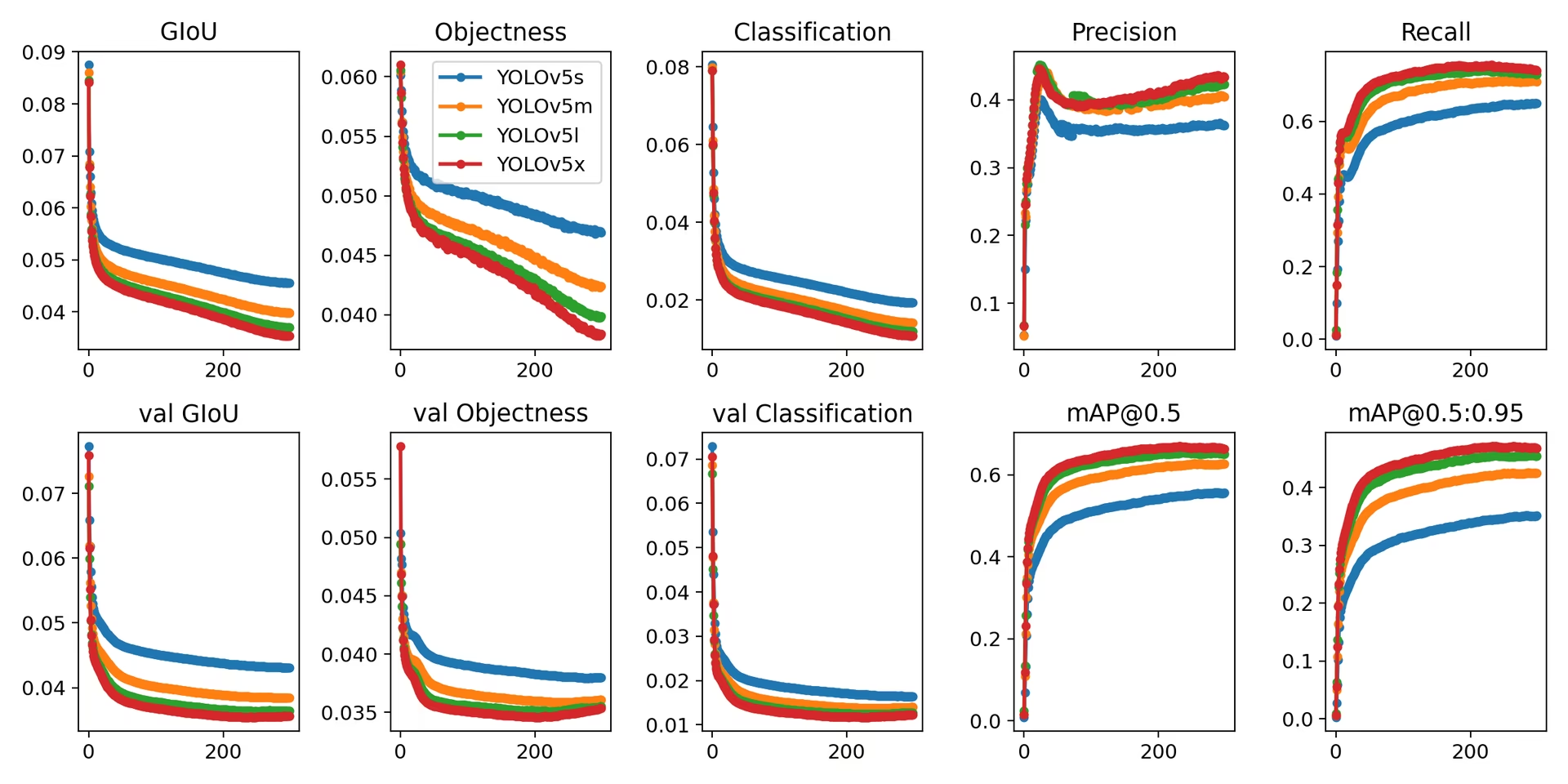
总而言之,YOLOv5 不仅是最先进的目标检测工具,也证明了机器学习能够通过视觉理解改变我们与世界互动的方式。阅读本指南并开始在项目中应用 YOLOv5 时,请记住,你正站在技术革命的前沿,能够在计算机视觉领域取得非凡成果。如果你想进一步了解相关信息,或希望获得其他 visionaries 的支持,欢迎访问我们的 GitHub 仓库,这里汇聚了活跃的开发者和研究人员社区。你还可以探索 Ultralytics Platform 等资源,无需编写代码即可管理数据集和训练模型;也可以查看我们的解决方案页面,了解实际应用并获取灵感。继续探索,持续创新,尽情体验 YOLOv5 的魅力。祝你检测愉快!🌠🔍
常见问题#
推理时不需要。PyTorch Hub 会按需下载代码和权重,并使用
torch.hub.load("ultralytics/yolov5", "yolov5s")。运行train.py、val.py、detect.py和export.py脚本则需要先克隆仓库。对于大多数项目,
yolov5s.pt在速度和准确率之间取得了最佳平衡。边缘设备可使用yolov5n.pt;当准确率比速度更重要时,可使用yolov5m.pt到yolov5x.pt;而对于以 1280 像素进行训练,可使用yolov5s6.pt等 P6 变体。完整列表请参阅预训练检查点表。将图像和 YOLO 格式的标签分别放入并列的
images/和labels/文件夹,在dataset.yaml中描述数据集,然后运行python train.py --data dataset.yaml --weights yolov5s.pt。训练自定义数据教程会逐步讲解整个流程。