从 PyTorch Hub 加载 YOLOv5#
📚 本指南介绍如何从 https://pytorch.org/hub/ultralytics_yolov5 上的 PyTorch Hub 加载 YOLOv5 🚀。
开始之前#
在 Python>=3.8.0 环境中安装 requirements.txt,其中包括 PyTorch>=1.8。模型和数据集会自动从最新的 YOLOv5 发行版下载。
pip install -r https://raw.githubusercontent.com/ultralytics/yolov5/master/requirements.txt无需克隆 ultralytics/yolov5——PyTorch Hub 会自动获取代码。
使用 PyTorch Hub 加载 YOLOv5#
简单示例#
本示例从 PyTorch Hub 加载一个预训练的 YOLOv5s 模型作为 model,并传入一张图像进行推理。'yolov5s' 是一个小巧、快速的 YOLOv5 模型。有关所有可用模型的详细信息,请参阅 README。
import torch

# Model
model = torch.hub.load("ultralytics/yolov5", "yolov5s")

# Image
im = "https://ultralytics.com/images/zidane.jpg"

# Inference
results = model(im)

results.pandas().xyxy[0]
# xmin    ymin    xmax   ymax  置信度  类别    名称
# 0  749.50   43.50  1148.0  704.5    0.874023      0  person
# 1  433.50  433.50   517.5  714.5    0.687988     27     tie
# 2  114.75  195.75  1095.0  708.0    0.624512      0  person
# 3 986.00 304.00 1028.0 420.0 0.286865 27 tie详细示例#
本示例展示了如何对来自 PIL 和 OpenCV 的图像进行批量推理。results 可以打印到控制台、保存到 runs/hub、在受支持的环境中显示在屏幕上,也可以作为张量或 pandas DataFrame 返回。
import cv2
import torch
from PIL import Image

# Model
model = torch.hub.load("ultralytics/yolov5", "yolov5s")

# Images
for f in "zidane.jpg", "bus.jpg":
    torch.hub.download_url_to_file(f"https://ultralytics.com/images/{f}", f)  # download 2 images
im1 = Image.open("zidane.jpg")  # PIL image
im2 = cv2.imread("bus.jpg")[..., ::-1]  # OpenCV image (BGR to RGB)

# Inference
results = model([im1, im2], size=640)  # batch of images

# Results
results.print()
results.save()  # or .show()

results.xyxy[0]  # im1 predictions (tensor)
results.pandas().xyxy[0]  # im1 predictions (pandas)
#      xmin    ymin    xmax   ymax  confidence  class    name
# 0  749.50   43.50  1148.0  704.5    0.874023      0  person
# 1  433.50  433.50   517.5  714.5    0.687988     27     tie
# 2  114.75  195.75  1095.0  708.0    0.624512      0  person
# 3  986.00  304.00  1028.0  420.0    0.286865     27     tie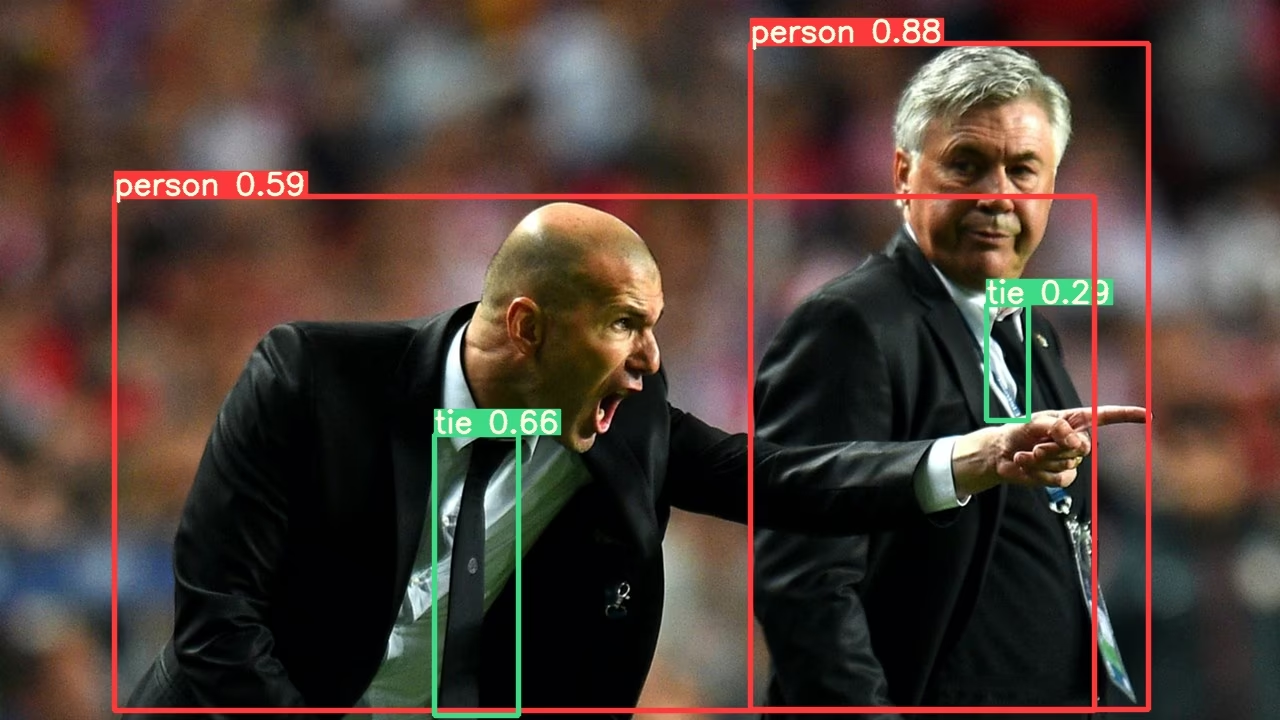
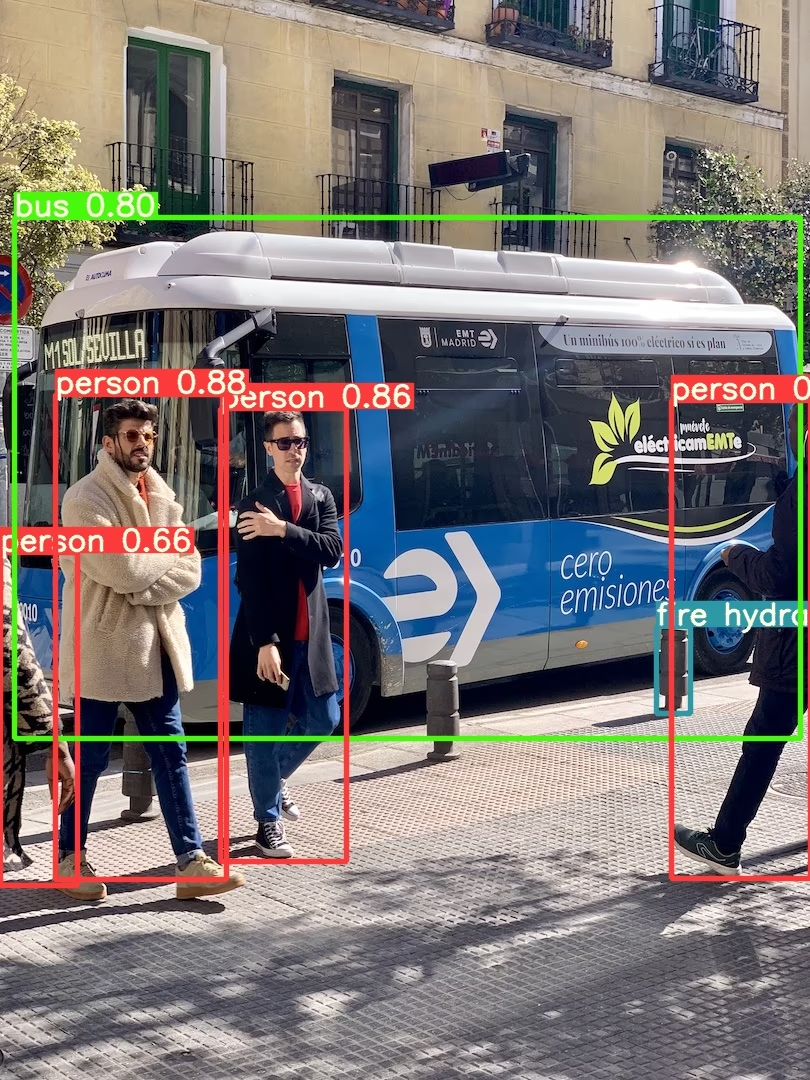
有关所有推理选项,请参阅 YOLOv5 AutoShape() 的 forward 方法。
推理设置#
YOLOv5 模型包含多种推理属性,例如置信度阈值、IoU 阈值等,可以通过以下方式设置:
model.conf = 0.25  # NMS 置信度阈值
model.iou = 0.45  # NMS IoU 阈值
model.agnostic = False  # NMS 与类别无关
model.multi_label = False  # NMS 每个框允许多个标签
model.classes = None  # (可选列表)按类别筛选,例如,COCO 中的人、猫和狗对应 = [0, 15, 16]
model.max_det = 1000  # 每张图像的最大检测数量
model.amp = False  # 自动混合精度(AMP)推理

results = model(im, size=320) # 自定义推理尺寸设备#
创建模型后,可以将模型转移到任何设备:
model.cpu()  # CPU
model.cuda()  # GPU
model.to(device)  # 例如 device=torch.device(0)
也可以直接在任意 device 上创建模型:
model = torch.hub.load("ultralytics/yolov5", "yolov5s", device="cpu") # 在 CPU 上加载推理前,输入图像会自动转移到正确的模型设备上。
静默输出#
可以静默加载模型,方法是使用 _verbose=False:
model = torch.hub.load("ultralytics/yolov5", "yolov5s", _verbose=False) # 静默加载输入通道#
若要加载具有 4 个输入通道(而非默认 3 个输入通道)的预训练 YOLOv5s 模型:
model = torch.hub.load("ultralytics/yolov5", "yolov5s", channels=4)此时,模型由预训练权重构成,但最前面的输入层除外,因为它的形状与预训练输入层不同。输入层仍使用随机权重初始化。
类别数量#
若要加载具有 10 个输出类别(而非默认 80 个输出类别)的预训练 YOLOv5s 模型:
model = torch.hub.load("ultralytics/yolov5", "yolov5s", classes=10)此时,模型由预训练权重构成,但输出层除外,因为它们的形状与预训练输出层不同。输出层仍使用随机权重初始化。
强制重新加载#
如果上述步骤遇到问题,设置 force_reload=True 可能会有所帮助:它会丢弃现有缓存,并强制从 PyTorch Hub 重新下载最新版本的 YOLOv5。缓存副本位于 ~/.cache/torch/hub;删除该文件夹也能达到相同效果。
model = torch.hub.load("ultralytics/yolov5", "yolov5s", force_reload=True) # 强制重新加载屏幕截图推理#
若要对桌面屏幕运行推理:
import torch
from PIL import ImageGrab

# Model
model = torch.hub.load("ultralytics/yolov5", "yolov5s")

# Image
im = ImageGrab.grab()  # 截取屏幕截图

# Inference
results = model(im)
多 GPU 推理#
可以通过多线程推理,将 YOLOv5 模型并行加载到多块 GPU 上:
import threading

import torch

def run(model, im):
    """Performs inference on an image using a given model and saves the output; model must support `.save()` method."""
    results = model(im)
    results.save()

# Models
model0 = torch.hub.load("ultralytics/yolov5", "yolov5s", device=0)
model1 = torch.hub.load("ultralytics/yolov5", "yolov5s", device=1)

# Inference
threading.Thread(target=run, args=[model0, "https://ultralytics.com/images/zidane.jpg"], daemon=True).start()
threading.Thread(target=run, args=[model1, "https://ultralytics.com/images/bus.jpg"], daemon=True).start()训练#
若要加载 YOLOv5 模型用于训练而非推理,请设置 autoshape=False。若要加载随机初始化权重的模型(从头开始训练),请使用 pretrained=False。此时你必须提供自己的训练脚本。或者,参阅我们的 YOLOv5 自定义数据训练教程了解模型训练。
import torch

model = torch.hub.load("ultralytics/yolov5", "yolov5s", autoshape=False)  # 加载预训练模型
model = torch.hub.load("ultralytics/yolov5", "yolov5s", autoshape=False, pretrained=False)  # 从头加载
Base64 结果#
供 API 服务使用。详情请参阅 Flask REST API 示例。
import base64
from io import BytesIO

from PIL import Image

results = model(im)  # inference

results.ims  # 传入模型进行推理的原始图像数组(作为 np 数组)
results.render()  # 使用边界框和标签更新 results.ims
for im in results.ims:
    buffered = BytesIO()
    im_base64 = Image.fromarray(im)
    im_base64.save(buffered, format="JPEG")
print(base64.b64encode(buffered.getvalue()).decode("utf-8")) # 包含结果的 Base64 编码图像裁剪结果#
可以将结果作为检测裁剪图返回并保存:
results = model(im)  # inference
crops = results.crop(save=True)  # 裁剪后的检测结果字典
Pandas 结果#
可以将结果作为 Pandas DataFrames 返回:
results = model(im)  # inference
results.pandas().xyxy[0]  # Pandas DataFrame
Pandas 输出(点击展开)
print(results.pandas().xyxy[0])
# xmin    ymin    xmax   ymax  置信度  类别    名称
# 0  749.50   43.50  1148.0  704.5    0.874023      0  person
# 1  433.50  433.50   517.5  714.5    0.687988     27     tie
# 2  114.75  195.75  1095.0  708.0    0.624512      0  person
# 3 986.00 304.00 1028.0 420.0 0.286865 27 tie排序后的结果#
可以按列对结果排序,例如,按从左到右(x 轴)的顺序排列车牌数字检测结果:
results = model(im)  # inference
results.pandas().xyxy[0].sort_values("xmin")  # 按从左到右排序
JSON 结果#
将结果转换为 .pandas() DataFrame 后,可以使用 .to_json() 方法以 JSON 格式返回结果。可以使用 orient 参数修改 JSON 格式。详情请参阅 pandas .to_json() 文档。
results = model(im)  # inference
results.pandas().xyxy[0].to_json(orient="records")  # JSON img1 预测结果
JSON 输出(点击展开)
[
    {
        "xmin": 749.5,
        "ymin": 43.5,
        "xmax": 1148.0,
        "ymax": 704.5,
        "confidence": 0.8740234375,
        "class": 0,
        "name": "person"
    },
    {
        "xmin": 433.5,
        "ymin": 433.5,
        "xmax": 517.5,
        "ymax": 714.5,
        "confidence": 0.6879882812,
        "class": 27,
        "name": "tie"
    },
    {
        "xmin": 115.25,
        "ymin": 195.75,
        "xmax": 1096.0,
        "ymax": 708.0,
        "confidence": 0.6254882812,
        "class": 0,
        "name": "person"
    },
    {
        "xmin": 986.0,
        "ymin": 304.0,
        "xmax": 1028.0,
        "ymax": 420.0,
        "confidence": 0.2873535156,
        "class": 27,
        "name": "tie"
    }
]自定义模型#
此示例通过 PyTorch Hub 加载一个自定义的 20 类 VOC训练 YOLOv5s 模型 'best.pt'。
import torch

model = torch.hub.load("ultralytics/yolov5", "custom", path="path/to/best.pt")  # 本地模型
model = torch.hub.load("path/to/yolov5", "custom", path="path/to/best.pt", source="local")  # 本地仓库
TensorRT、ONNX 和 OpenVINO 模型#
PyTorch Hub 支持对大多数 YOLOv5 导出格式进行推理,包括自定义训练的模型。有关导出模型的详情,请参阅 TFLite、ONNX、CoreML、TensorRT 导出教程。
import torch

model = torch.hub.load("ultralytics/yolov5", "custom", path="yolov5s.pt")  # PyTorch
model = torch.hub.load("ultralytics/yolov5", "custom", path="yolov5s.torchscript")  # TorchScript
model = torch.hub.load("ultralytics/yolov5", "custom", path="yolov5s.onnx")  # ONNX
model = torch.hub.load("ultralytics/yolov5", "custom", path="yolov5s_openvino_model/")  # OpenVINO
model = torch.hub.load("ultralytics/yolov5", "custom", path="yolov5s.engine")  # TensorRT
model = torch.hub.load("ultralytics/yolov5", "custom", path="yolov5s.mlpackage")  # CoreML(仅限 macOS)
model = torch.hub.load("ultralytics/yolov5", "custom", path="yolov5s.tflite")  # TFLite
model = torch.hub.load("ultralytics/yolov5", "custom", path="yolov5s_paddle_model/") # PaddlePaddle支持的环境#
Ultralytics 提供多种开箱即用的环境,每种环境都预装了 CUDA、CUDNN、Python 和 PyTorch 等必备依赖,助你快速启动项目。
- 免费 GPU 笔记本:



- Google Cloud:GCP 快速入门指南
- Amazon:AWS 快速入门指南
- Azure:AzureML 快速入门指南
- Docker:Docker 快速入门指南

项目状态#

此徽章表示所有 YOLOv5 GitHub Actions 持续集成 (CI) 测试均已成功通过。这些 CI 测试会严格检查 YOLOv5 在多个关键方面的功能和性能:训练、验证、推理、导出和基准测试。这些测试每 24 小时以及每次提交新代码后运行一次,确保 YOLOv5 在 macOS、Windows 和 Ubuntu 上保持稳定可靠地运行。
常见问题#
不需要。首次使用时,
torch.hub.load("ultralytics/yolov5", ...)会将代码下载到~/.cache/torch/hub,并下载权重。只需安装requirements.txt中的软件包。使用
custom入口点并指定检查点路径:torch.hub.load("ultralytics/yolov5", "custom", path="runs/train/exp/weights/best.pt")。添加source="local"和本地仓库路径,即可在不访问网络的情况下加载。可以。将导出的文件传递给同一个
custom加载器,YOLOv5 会根据后缀选择相应的后端,例如yolov5s.onnx、yolov5s.engine或yolov5s_openvino_model/。传入
force_reload=True以丢弃缓存的仓库并获取最新代码,或者手动删除~/.cache/torch/hub。这样也会获取 YOLOv5 的新版本。results.xyxy[0]返回一个包含[x1, y1, x2, y2, confidence, class]行的张量,results.pandas().xyxy[0]返回一个带有类别名称的 DataFrame,而对该 DataFrame 使用.to_json(orient="records")可生成 JSON。