دليل ضبط المعلمات الفائقة في Ultralytics YOLO
يُعد ضبط المعلمات الفائقة في Ultralytics YOLO عملية بحث مؤتمتة وتكرارية تحسّن الإعدادات — مثل معدل التعلّم، وأوزان الخسارة، وشدة زيادة البيانات — لزيادة مقاييس أداء نموذج التعلّم الآلي، مثل الدقة والإحكام والاستدعاء. وبدلًا من اختبار هذه القيم يدويًا، يستكشف Ultralytics YOLO فضاء المعلمات الفائقة باستخدام خوارزمية جينية تُحدث طفرات في التكوينات المرشحة وتقيّمها عبر العديد من عمليات التدريب القصيرة.
شاهد: كيفية ضبط المعلمات الفائقة لتحسين أداء النموذج 🚀
ما المعلمات الفائقة؟#
المعلمات الفائقة هي إعدادات بنيوية عالية المستوى للخوارزمية. تُحدَّد قبل مرحلة التدريب وتظل ثابتة خلالها. فيما يلي بعض المعلمات الفائقة الشائعة التي يجري ضبطها في Ultralytics YOLO:
- معدل التعلّم
lr0: يحدد حجم الخطوة في كل تكرار أثناء التحرك نحو نقطة دنيا في دالة الخسارة. - حجم الدفعة
batch: عدد الصور التي تُعالَج بالتزامن في تمرير أمامي واحد. - عدد العصور
epochs: العصر هو تمرير أمامي وخلفي كامل واحد لجميع أمثلة التدريب. - تفاصيل البنية: مثل أعداد القنوات وعدد الطبقات وأنواع دوال التنشيط وما إلى ذلك. ترد هذه التفاصيل في تهيئة YAML للنموذج لا في وسيطات التدريب.
من بين هذه العناصر الأربعة، لا يوجد في فضاء البحث الافتراضي سوى معدل التعلّم: إذ تبقى batch وepochs والبنية ثابتة. كما تُحدِث أداة الضبط طفرات في الجدول الزمني، ومكاسب الخسارة، وتحويلات زيادة البيانات المدرجة أدناه.
التطور الجيني والطفرات#
يستخدم Ultralytics YOLO الخوارزميات الجينية، وهي عائلة من الخوارزميات التطورية، لتحسين المعلمات الفائقة. وتستند الخوارزميات الجينية إلى آلية الانتقاء الطبيعي والوراثة.
- الانتقاء: يختار كل تكرار واحدًا من التكوينات التسعة الأعلى على الأكثر من حيث الملاءمة، مع ترجيح الاختيار بحسب الملاءمة. بعد 30 نتيجة، تقدّر أفضل 20% من النتائج (حتى 30 نتيجة) أيضًا تغاير المعلمات، ويزداد تأثيرها مع تراكم الأدلة من النخبة.
- الطفرة: يُجري كل تكرار طفرات على نحو نصف المعلمات باستخدام خطوات غاوسية مطبّعة وفق نطاقات البحث الخاصة بها. وعندما يصبح التغاير نشطًا، تستخدم حصة موزونة بالثقة لا تتجاوز 40% خطوات مترابطة، مع إعادة عكسية تُبقي تلك الخطوات ضمن الحدود من دون تراكم القيم المقصوصة. ومع تراكم التجارب من دون تحسن، تضيق أحجام الخطوات خطيًا بنسبة تصل إلى 20% على مدى 25 تجربة، وتُعاد إلى وضعها عند العثور على نتيجة أفضل جديدة. لا يتوفر للتكرار 1 أصل، ويستخدم المعلمات الفائقة الافتراضية للتدريب كخط أساس.
الاستعداد لضبط المعلمات الفائقة#
قبل بدء عملية الضبط، من المهم أن:
- تحديد المقاييس: يرتّب المولّف المدمج (
use_ray=False) التجارب بحسب نتيجةfitnessالخاصة بالمهمة، بينما يستخدمuse_ray=Trueمقياس المهمة. حدّد المقاييس الثانوية التي ستفحصها، مثل AP50 أو درجة F1. - تحديد ميزانية الضبط: حدّد مقدار القدرة الحاسوبية التي ترغب في تخصيصها. قد يتطلب ضبط المعلمات الفائقة موارد حاسوبية كبيرة.
آلية عمل حلقة الضبط#
يكرر الضابط المدمج الحلقة التالية في كل تكرار:
- تهيئة المعلمات الفائقة — ابدأ بخط أساس معقول، إما المعلمات الفائقة الافتراضية التي يحددها Ultralytics YOLO أو قيمًا تستند إلى معرفتك بالمجال أو تجاربك السابقة.
- إجراء طفرات على المعلمات الفائقة — تنشئ الفئة
Tunerمجموعة جديدة من المعلمات الفائقة انطلاقًا من المجموعة الحالية، وذلك تلقائيًا باستخدام أسلوبها_mutate. - تدريب النموذج — درّب النموذج باستخدام المعلمات الفائقة التي أُجريت عليها الطفرات، ثم قيّم أداء التدريب باستخدام المقاييس التي اخترتها.
- تقييم النموذج — تنتج عملية التقييم درجة ملاءمة التكرار، وتُقارَن هذه الدرجة بدرجات التكرارات السابقة لتحديد ما إذا كانت المعلمات الفائقة الحالية تمثل تحسنًا.
- تسجيل النتائج — سجّل مقاييس الأداء والمعلمات الفائقة المقابلة لها للرجوع إليها مستقبلًا. يحفظ Ultralytics YOLO هذه النتائج تلقائيًا بتنسيق NDJSON.
- التكرار — واصل حتى بلوغ عدد التكرارات المحدد، مع بناء كل تكرار على المعرفة المكتسبة من عمليات التشغيل السابقة. يشغّل الضابط المدمج جميع
iterations؛ بينما يبلّغ Ray Tune عن المقاييس بعد كل عصر ملاءمة، ما يتيح لـ ASHA إيقاف التجارب الضعيفة بعد فترة السماح الخاصة بها.
التكرارات وحجم المجموعة#
في الضابط المدمج (use_ray=False)، يتحكم iterations في إجمالي عدد التجارب المتسلسلة، وتكون قيمته الافتراضية 300. تدرّب كل تجربة نموذجًا واحدًا باستخدام تكوين واحد للمعلمات الفائقة — على سبيل المثال، يجدول iterations=40 مع epochs=50 40 عملية تدريب مستقلة مدة كل منها 50 عصرًا، وليس عملية تدريب واحدة مدتها 50 عصرًا تضم مجموعة منفصلة من 40 تكوينًا مرشحًا.
لا تحتوي الخوارزمية الجينية المدمجة على معلمة صريحة لحجم المجموعة. بعد توفر تجارب سابقة، تختار ما يصل إلى تسعة من التكوينات الأعلى ملاءمة، وتجري طفرة على مرشح واحد في كل تكرار.
لإجراء تجارب متوازية أو استخدام استراتيجيات بحث أكثر تقدمًا، اضبط use_ray=True لاستخدام Ray Tune، الذي يستخدم القيمة الافتراضية نفسها، وهي 300 تجربة، ويتلقى iterations بوصفه num_samples. راجع دليل تكامل Ray Tune لمزيد من التفاصيل.
فضاء البحث الافتراضي#
يسرد الجدول التالي معلمات فضاء البحث الافتراضي لضبط المعلمات الفائقة في YOLO26. لكل معلمة نطاق قيم محدد يعرّفه صف (min, max).
| المعلمة | النوع | نطاق القيم | الوصف |
|---|---|---|---|
lr0 | float | (1e-5, 1e-2) | معدل التعلّم الابتدائي عند بدء التدريب. توفر القيم الأقل تدريبًا أكثر استقرارًا، لكنها تؤدي إلى تقارب أبطأ. |
lrf | float | (0.01, 1.0) | عامل معدل التعلّم النهائي بوصفه كسرًا من lr0. يتحكم في مقدار انخفاض معدل التعلّم أثناء التدريب. |
momentum | float | (0.7, 0.98) | عامل زخم SGD. تساعد القيم الأعلى في الحفاظ على اتجاه متسق للتدرج، ويمكنها تسريع التقارب. |
weight_decay | float | (0.0, 0.001) | عامل تنظيم L2 لمنع فرط التكيّف. تفرض القيم الأكبر تنظيمًا أشد. |
warmup_epochs | float | (0.0, 5.0) | عدد عصور الإحماء الخطي لمعدل التعلّم. يساعد على منع عدم الاستقرار في بداية التدريب. |
warmup_momentum | float | (0.0, 0.95) | الزخم الابتدائي خلال مرحلة الإحماء. يزداد تدريجيًا حتى قيمة الزخم النهائية. |
box | float | (1.0, 20.0) | وزن خسارة BBox في دالة الخسارة الإجمالية. يوازن بين انحدار الصندوق والتصنيف. |
cls | float | (0.1, 4.0) | وزن خسارة التصنيف في دالة الخسارة الإجمالية. تؤكد القيم الأعلى على صحة التنبؤ بالفئة. |
cls_pw | float | (0.0, 1.0) | قوة ترجيح الفئات لمعالجة اختلال التوازن بينها. تزيد القيم الأعلى وزن الفئات النادرة. |
dfl | float | (0.4, 12.0) | وزن حد انحدار مسافة الصندوق. يطبّق YOLO26 الخالي من DFL هذا الكسب على خسارة L1 لمسافات الصندوق المطبّعة؛ وتؤكد القيم الأعلى على دقة تحديد المواقع. |
hsv_h | float | (0.0, 0.1) | نطاق تعزيز تدرج اللون العشوائي في فضاء الألوان HSV. يساعد النموذج على التعميم عبر اختلافات الألوان. |
hsv_s | float | (0.0, 0.9) | نطاق تعزيز التشبع العشوائي في فضاء HSV. يحاكي ظروف الإضاءة المختلفة. |
hsv_v | float | (0.0, 0.9) | نطاق تعزيز القيمة (السطوع) العشوائية. يساعد النموذج على التعامل مع مستويات تعريض مختلفة. |
degrees | float | (0.0, 45.0) | أقصى تعزيز للدوران بالدرجات. يساعد النموذج على اكتساب الثبات تجاه اتجاه العنصر. |
translate | float | (0.0, 0.9) | أقصى تعزيز للإزاحة بوصفها نسبة من حجم الصورة. يحسّن المتانة تجاه موضع العنصر. |
scale | float | (0.0, 0.95) | نطاق تعزيز القياس العشوائي. يساعد النموذج على اكتشاف العناصر بأحجام مختلفة. |
shear | float | (0.0, 10.0) | أقصى تعزيز للقص بالدرجات. يضيف تشوهات شبيهة بمنظور الكاميرا إلى صور التدريب. |
perspective | float | (0.0, 0.001) | نطاق تعزيز المنظور العشوائي. يحاكي زوايا الرؤية المختلفة. |
flipud | float | (0.0, 1.0) | احتمال قلب الصورة رأسيًا أثناء التدريب. مفيد للصور العلوية أو الجوية. |
fliplr | float | (0.0, 1.0) | احتمال قلب الصورة أفقيًا. يساعد النموذج على اكتساب الثبات تجاه اتجاه العنصر. |
bgr | float | (0.0, 1.0) | احتمال استخدام تعزيز BGR، الذي يبدّل قنوات الألوان. قد يساعد على تحقيق الثبات تجاه الألوان. |
mosaic | float | (0.0, 1.0) | احتمال استخدام تعزيز الفسيفساء، الذي يدمج 4 صور. وهو مفيد خصوصًا لاكتشاف العناصر الصغيرة. |
mixup | float | (0.0, 1.0) | احتمال استخدام تعزيز mixup، الذي يمزج صورتين. وقد يحسّن متانة النموذج. |
cutmix | float | (0.0, 1.0) | احتمال استخدام تعزيز cutmix. يدمج مناطق الصور مع الحفاظ على السمات المحلية. |
copy_paste | float | (0.0, 1.0) | في وضع flip، هو نسبة العناصر المؤهلة التي تُنسخ؛ وفي وضع mixup، يشمل أيضًا احتمال تطبيقه. |
close_mosaic | int | (0.0, 10.0) | يعطّل الفسيفساء في آخر N من العصور لتحقيق استقرار التدريب قبل انتهائه. تُجرى عليه الطفرات بوصفه عددًا عشريًا، ثم يُقرّب إلى عدد صحيح من العصور. |
مثال على فضاء بحث مخصص#
يحدّد المثال أدناه فضاء البحث ويستدعي model.tune()، الذي يشغّل الفئة Tuner، لضبط YOLO26n على COCO8 لمدة 30 عصرًا باستخدام المحسّن AdamW. ويُتجاوز التخطيط وحفظ نقاط التحقق والتحقق، باستثناء ما يجري في عصر التدريب الأخير، لتسريع الضبط.
هذا المثال لأغراض الاستعراض فقط. نادرًا ما تكون المعلمات الفائقة المستخلصة من عمليات ضبط قصيرة أو صغيرة النطاق مثالية للتدريب الواقعي. عمليًا، ينبغي إجراء الضبط في ظل إعدادات مماثلة للتدريب الكامل — بما يشمل مجموعات البيانات والعصور والتعزيزات المتقاربة — لضمان نتائج موثوقة وقابلة للتعميم. وقد يؤدي الضبط السريع إلى تحيز المعلمات نحو التقارب الأسرع أو مكاسب التحقق قصيرة الأجل التي لا تعمم.
from ultralytics import YOLO
# تهيئة نموذج YOLO
model = YOLO("yolo26n.pt")
# تعريف فضاء البحث
search_space = {
"lr0": (1e-5, 1e-2),
"degrees": (0.0, 45.0),
}
# ضبط المعلمات الفائقة على COCO8 مدة 30 عصرًا
model.tune(
data="coco8.yaml",
epochs=30,
iterations=300,
optimizer="AdamW",
space=search_space,
plots=False,
save=False,
val=False,
)استئناف جلسة ضبط المعلمات الفائقة التي توقفت#
يمكنك استئناف جلسة ضبط المعلمات الفائقة التي توقفت بتمرير resume=True. ويمكنك اختياريًا تمرير الدليل name المستخدم ضمن runs/{task} للاستئناف منه. إذا لم تمرر name، فسيستأنف التنفيذ الدليل المسمى حرفيًا tune، وهو الاسم الافتراضي وليس اسم أحدث جلسة تشغيل؛ لذا مرّر name لأي تشغيل بدأته باسم مخصص. ويلزمك أيضًا توفير جميع وسيطات التدريب السابقة، بما فيها data وepochs وiterations وspace.
from ultralytics import YOLO
# تعريف نموذج YOLO
model = YOLO("yolo26n.pt")
# تعريف فضاء البحث
search_space = {
"lr0": (1e-5, 1e-2),
"degrees": (0.0, 45.0),
}
# استئناف التشغيل السابق
results = model.tune(data="coco8.yaml", epochs=50, iterations=300, space=search_space, resume=True)
# استئناف تشغيل الضبط بالاسم 'tune_exp'
results = model.tune(data="coco8.yaml", epochs=50, iterations=300, space=search_space, name="tune_exp", resume=True)النتائج#
بعد إتمام عملية ضبط المعلمات الفائقة بنجاح، ستحصل على عدة ملفات وأدلة تتضمن نتائج الضبط. فيما يلي وصف لكل منها:
بنية الملفات#
فيما يلي شكل بنية أدلة النتائج. تحتوي أدلة المسح، مثل multitrain/ وmultitrain-2/، على تكرارات الضبط الفردية؛ أي نموذج واحد مدرّب لكل مجموعة بيانات باستخدام مجموعة واحدة من المعلمات الفائقة، ضمن دليل فرعي يحمل اسم كل مجموعة بيانات. لتوفير مساحة التخزين، يحذف الضابط أدلة التشغيل الخاصة بكل مجموعة بيانات للتكرارات التي ليست الأفضل حاليًا. ويحتوي الدليل tune/ على نتائج الضبط لجميع عمليات تدريب النماذج الفردية:
runs/
└── detect/
    ├── multitrain/
    │   └── coco8/
    ├── multitrain-2/
    ├── ...
    └── tune/
        ├── best_hyperparameters.yaml
        ├── tune_fitness.png
        ├── tune_results.ndjson
        ├── tune_scatter_plots.png
        └── weights/
            ├── last.pt
            └── best.pt
أوصاف الملفات#
best_hyperparameters.yaml#
يحتوي ملف YAML هذا على أفضل المعلمات الفائقة أداءً التي عُثر عليها أثناء عملية الضبط. يمكنك استخدام هذا الملف لتهيئة عمليات التدريب المستقبلية بهذه الإعدادات المحسّنة.
-
التنسيق: YAML
-
الاستخدام: نتائج المعلمات الفائقة
-
مثال:
# 558/900 iterations complete ✅ (45536.81s)
# Results saved to /usr/src/ultralytics/runs/detect/tune
# Best fitness=0.64297 observed at iteration 498
# Best fitness metrics are {'metrics/precision(B)': 0.87247, 'metrics/recall(B)': 0.71387, 'metrics/mAP50(B)': 0.79106, 'metrics/mAP50-95(B)': 0.62651, 'val/box_loss': 2.79884, 'val/cls_loss': 2.72386, 'val/l1_loss': 0.68503, 'fitness': 0.64297}
# Best fitness model is /usr/src/ultralytics/runs/detect/tune/weights
# Best fitness hyperparameters are printed below.

lr0: 0.00269
lrf: 0.00288
momentum: 0.73375
weight_decay: 0.00015
warmup_epochs: 1.22935
warmup_momentum: 0.1525
box: 18.27875
cls: 1.32899
dfl: 0.56016
hsv_h: 0.01148
hsv_s: 0.53554
hsv_v: 0.13636
degrees: 0.0
translate: 0.12431
scale: 0.07643
shear: 0.0
perspective: 0.0
flipud: 0.0
fliplr: 0.08631
mosaic: 0.42551
mixup: 0.0
copy_paste: 0.0
tune_fitness.png#
يعرض هذا المخطط الملاءمة مقابل عدد التكرارات. ويساعدك على تصور أداء الخوارزمية الجينية بمرور الوقت.
- التنسيق: PNG
- الاستخدام: تصور الأداء
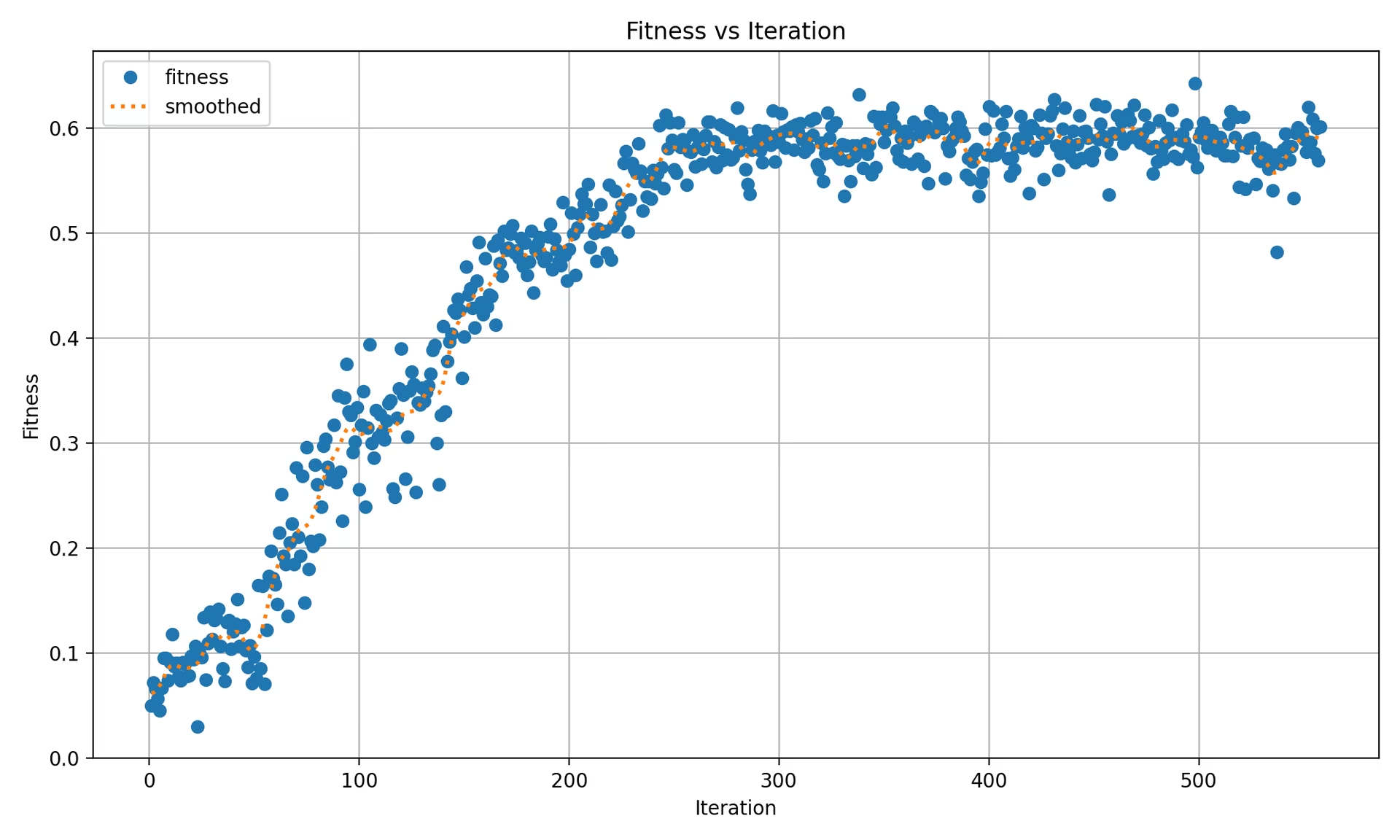
يحتوي المخطط على:
- علامة واحدة لكل تكرار ولكل مجموعة بيانات، لذا يعرض التشغيل على مجموعة بيانات واحدة نقطة واحدة لكل تكرار، بينما يعرض التشغيل متعدد مجموعات البيانات نقطة واحدة لكل مجموعة بيانات في كل تكرار.
- خط منقط لـ"المتوسط المُملّس" يُحسب باستخدام التنعيم الغاوسي (
sigma=3) على قيم الملاءمة الإجمالية لكل تكرار.
tune_results.ndjson#
ملف NDJSON يتضمن النتائج التفصيلية لكل تكرار ضبط. يحتوي كل سطر على كائن JSON واحد يضم الملاءمة الإجمالية والمعلمات الفائقة المضبوطة ومقاييس كل مجموعة بيانات. يستخدم الضبط على مجموعة بيانات واحدة والضبط على مجموعات بيانات متعددة تنسيق الملف نفسه.
- التنسيق: NDJSON
- الاستخدام: تتبّع نتائج كل تكرار.
- مثال:
يأتي فيما يلي مثال منسّق لتحسين سهولة القراءة؛ أما في ملف .ndjson الفعلي، فيُخزَّن كل كائن في سطر واحد.
{
    "iteration": 1,
    "fitness": 0.48628,
    "hyperparameters": {
        "lr0": 0.01,
        "lrf": 0.01,
        "momentum": 0.937,
        "weight_decay": 0.0005
    },
    "datasets": {
        "coco8": {
            "metrics/precision(B)": 0.65666,
            "metrics/recall(B)": 0.85,
            "metrics/mAP50(B)": 0.85086,
            "metrics/mAP50-95(B)": 0.64104,
            "val/box_loss": 1.57958,
            "val/cls_loss": 1.04986,
            "val/l1_loss": 1.32641,
            "fitness": 0.64104
        },
        "coco8-grayscale": {
            "metrics/precision(B)": 0.6582,
            "metrics/recall(B)": 0.51667,
            "metrics/mAP50(B)": 0.59106,
            "metrics/mAP50-95(B)": 0.33152,
            "val/box_loss": 1.95424,
            "val/cls_loss": 1.64059,
            "val/l1_loss": 1.70226,
            "fitness": 0.33152
        }
    },
    "save_dirs": {
        "coco8": "runs/detect/multitrain/coco8",
        "coco8-grayscale": "runs/detect/multitrain/coco8-grayscale"
    }
}
القيمة fitness على المستوى الأعلى هي المتوسط الحسابي لقيم fitness الخاصة بكل مجموعة بيانات. وعند الضبط على مجموعة بيانات واحدة، يحتوي القاموس datasets على مدخل واحد تكون قيمة fitness فيه مساوية لقيمة fitness على المستوى الأعلى. يُسجَّل كائن JSON واحد لكل تكرار مكتمل. وتكون مسارات save_dirs الفعلية مطلقة؛ وقد اختُصرت أعلاه لتسهيل القراءة.
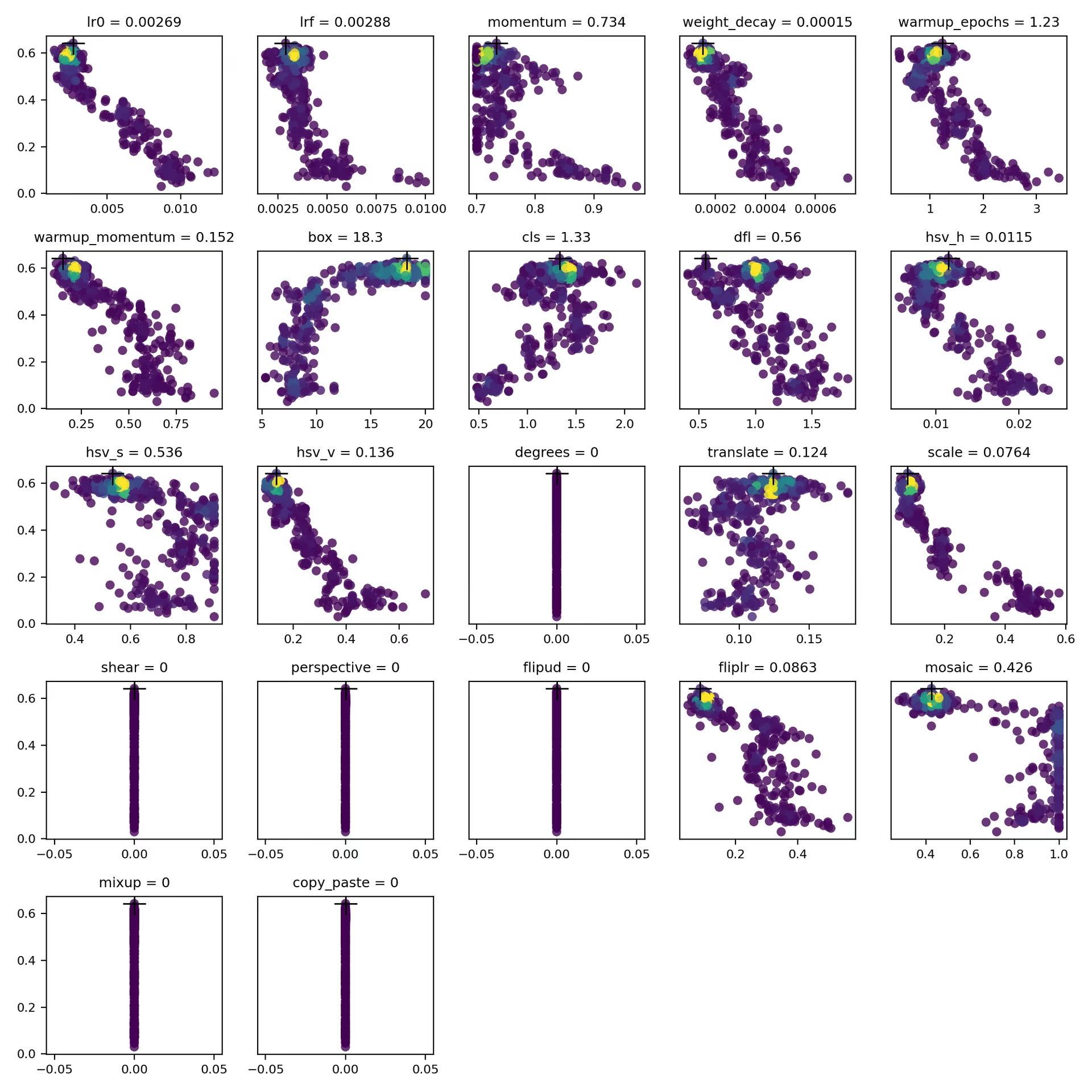
tune_scatter_plots.png#
يحتوي هذا الملف على مخططات تبعثر مولّدة من tune_results.ndjson، تساعدك على تصور العلاقات بين المعلمات الفائقة المختلفة ومقاييس الأداء. تستخدم الطفرات النطاق المُعدّ لكل معلمة فائقة، لذا يمكن أن تتطور القيم انطلاقًا من الإعدادات الافتراضية ذات القيمة صفر، مثل degrees وshear.
- التنسيق: PNG
- الاستخدام: تحليل البيانات الاستكشافي
weights/#
يحتوي هذا الدليل على نماذج PyTorch المحفوظة من التكرار الأعلى ملاءمة في تشغيل الضبط. وكلا الملفين صادر عن التكرار نفسه:
last.pt: الأوزان من آخر عصر تدريب في عملية التدريب لذلك التكرار.best.pt: الأوزان من عصر التدريب ذي أفضل قيمة للملاءمة في عملية التدريب لذلك التكرار.
باستخدام هذه النتائج، يمكنك اتخاذ قرارات أكثر استنارة بشأن عمليات تدريب النماذج وتحليلاتها مستقبلًا.
الخلاصة#
إن ضبط المعلمات الفائقة في Ultralytics YOLO سهل البدء وقوي من الداخل، إذ يستخدم الانتقاء الموزون بالملاءمة والطفرات المُطبّعة إلى النطاق ضمن خوارزمية جينية. يتيح لك اتباع الحلقة الموضحة في هذا الدليل ضبط نموذجك منهجيًا لتحسين الأداء، ثم إعادة استخدام best_hyperparameters.yaml الناتج لتهيئة عمليات التدريب المستقبلية. لتوسيع نطاق الضبط عبر تجارب متوازية وخوارزميات بحث أكثر تقدمًا، تابع إلى دليل تكامل Ray Tune، أو شغّل مهامًا مُدارة بمعلمات فائقة قابلة للتهيئة وتتبع للمقاييس في الوقت الفعلي على منصة Ultralytics عبر التدريب السحابي.
بالنسبة إلى الإعدادات التي لا تتيحها أي وسيطة، مثل معدلات التعلّم لكل طبقة أو مقياس ملاءمة مخصص، استخدم فئة فرعية من المدرّب بدلًا من ذلك. لمزيد من المعلومات المتعمقة، استكشف الشيفرة المصدرية لفئة Tuner. إذا كانت لديك أسئلة أو طلبات ميزات، فتواصل معنا عبر GitHub أو Discord.
الأسئلة الشائعة#
عيّن قيمة ابتدائية باستخدام المعلمة
lr0— وتتراوح القيم الشائعة من0.001إلى0.01— ودع عملية الضبط تُجري طفرات عليها بعد ذلك للعثور على القيمة المثلى. يمكنك أتمتة ذلك باستخدام الطريقةmodel.tune(). على سبيل المثال:مثالfrom ultralytics import YOLO # تهيئة نموذج YOLO model = YOLO("yolo26n.pt") # ضبط المعلمات الفائقة على COCO8 مدة 30 عصرًا model.tune(data="coco8.yaml", epochs=30, iterations=300, optimizer="AdamW", plots=False, save=False, val=False)لمزيد من التفاصيل، راجع صفحة إعدادات Ultralytics YOLO.
توفر الخوارزميات الجينية لـUltralytics YOLO26 طريقة متينة لاستكشاف فضاء المعلمات الفائقة دون الحاجة إلى التجربة والخطأ يدويًا. وتشمل الفوائد الرئيسية:
- البحث الفعّال: يحافظ الانتقاء الموزون بالملاءمة على الإعدادات القوية، بينما تستكشف الطفرات المُطبّعة إلى النطاق مرشحين جددًا.
- تجنب القيم الدنيا المحلية: تساعد الطفرات العشوائية البحث على الخروج من القيم الدنيا المحلية التي قد يعلق عندها بحث جشع بحت.
- مقاييس الأداء: تتكيف هذه المقاييس وفق درجة ملاءمة خاصة بالمهمة (mAP50-95 للكشف).
للاطلاع على كيفية تحسين الخوارزميات الجينية للمعلمات الفائقة، راجع دليل تطور المعلمات الفائقة.
يعتمد الوقت اللازم لضبط المعلمات الفائقة باستخدام Ultralytics YOLO إلى حد كبير على عدة عوامل، مثل حجم مجموعة البيانات، وتعقيد بنية النموذج، وعدد التكرارات، والموارد الحاسوبية المتاحة. فعلى سبيل المثال، قد يستغرق ضبط YOLO26n على مجموعة بيانات مثل COCO8 لمدة 30 حقبة عدة ساعات إلى أيام، حسب الأجهزة.
لإدارة مدة الضبط بفاعلية، حدّد ميزانية واضحة للضبط مسبقًا، كما هو موضح في الاستعداد لضبط المعلمات الفائقة. يساعد ذلك على تحقيق التوازن بين تخصيص الموارد وأهداف التحسين.
عند تقييم أداء النموذج أثناء ضبط المعلمات الفائقة في YOLO، يمكنك استخدام عدة مقاييس أساسية:
- AP50: متوسط الدقة عند عتبة IoU مقدارها 0.50.
- درجة F1: المتوسط التوافقي للدقة والاستدعاء.
- الدقة والاستدعاء: مقياسان منفصلان يوضحان مدى صحة النموذج في تحديد الإيجابيات الحقيقية مقارنةً بالإيجابيات الكاذبة والسلبيات الكاذبة.
تساعدك هذه المقاييس على فهم الجوانب المختلفة من أداء النموذج.
نعم، يتكامل Ultralytics YOLO26 مع Ray Tune لإجراء تحسين متقدم للمعلمات الفائقة. ويوفر Ray Tune خوارزميات بحث مثل التحسين البايزي وHyperband، إلى جانب إمكانات التنفيذ المتوازي لتسريع عملية الضبط.
لاستخدام Ray Tune مع YOLO26، اضبط المعامل
use_ray=Trueفي استدعاء الأسلوبmodel.tune().


التعليقات152
اطرح سؤالًا، وشارك نتائجك، أو ساعد شخصًا آخر.
GengBin414(تم التعديل)
I tuned my defect detection dataset ,which are composed of 8000+ images, this is my tune code: model.tune( data="../data/data20260420_line_scan_merged_6ch.yaml", epochs=300, iterations=300, #space=search_space, #optimizer="AdamW", optimizer="MuSGD", lr0=0.01, momentum=0.9, shear=1, degrees=1, perspective=0.0001, mixup=0.1, cutmix=0.1, batch=20 )
I got the best mAP 0.586 at iteration 5 after tuned 30+ iterations, then I retrain the dataset with the following code: model.train( data="../data/data20260420_line_scan_merged_6ch.yaml", epochs=300, batch=20, imgsz=640, device=0, workers=16, optimizer="MuSGD", lr0=0.00721, lrf=0.01267, momentum=0.81816, weight_decay=0.00077, warmup_epochs=3.31429, warmup_momentum=0.95, box=7.11682, cls=0.48318, dfl=0.9397, hsv_h=0.00364, hsv_s=0.9, hsv_v=0.29751, degrees=0.99922, translate=0.07662, scale=0.51303, shear=0.76723, perspective=0.0, flipud=0.00019, fliplr=0.57639, bgr=0.00634, mosaic=0.62424, mixup=0.11307, cutmix=0.13007, copy_paste=0.00583, close_mosaic=10 #cfg="best_hyperparameters_map0.586.yaml" )
I copied the hyperparameters from best_hyperparameters_map0.586.yaml, but I got the best mAP 0.568, what cause the discrepancy?Can sb help me out? Thanks.
 Glenn JocherUltralytics
A small gap like
0.586 -> 0.568is usually expected becausetune()saves the best single stochastic run, while your latertrain()is a fresh run with different randomness and augmentation order; please first validate the tuning checkpointruns/detect/tune/weights/best.pt, then retrain with the exact same args plusseed=0anddeterministic=True, and make sure you are comparing the same metric (fitness/mAP50-95) described in the Hyperparameter Tuning guide. If the gap still looks too large, please share the text output from validating that checkpoint and the matching row fromtune_results.ndjsonhere in Discussions so the team can compare them directly.Thank you for your timely reply, I validated the tuning checkpoint, here is the text output from validating that checkpoint: (yolo26) ps@ps:~/Desktop/GB/ultralytics$ python val.py Ultralytics 8.4.26 🚀 Python-3.11.15 torch-2.5.1 CUDA:0 (NVIDIA GeForce RTX 4090 D, 24208MiB) YOLO26x summary (fused): 190 layers, 55,645,380 parameters, 0 gradients, 193.9 GFLOPs val: Fast image access ✅ (ping: 0.0±0.0 ms, read: 10744.4±1424.6 MB/s, size: 734.1 KB) val: Scanning /home/ps/Desktop/GB/ultralytics/datasets/Merged_6Chanel_20260420/imagesH/val.cache... 786 images, 47 backgrounds, 0 corrupt: 100% ━━━━━━━━━━━━ 786/786 412.1Mit/s 0.0s Class Images Instances Box(P R mAP50 mAP50-95): 100% ━━━━━━━━━━━━ 50/50 6.9it/s 7.2s all 786 1363 0.843 0.69 0.765 0.585 black 45 47 0.914 0.677 0.828 0.648 crack 120 145 0.681 0.517 0.55 0.334 edge 184 195 0.916 0.899 0.94 0.833 line 116 147 0.809 0.646 0.736 0.544 pit 73 89 0.775 0.543 0.642 0.447 raw 279 318 0.861 0.745 0.81 0.644 white 95 106 0.9 0.623 0.712 0.46 yellow 299 316 0.884 0.873 0.9 0.773 Speed: 0.9ms preprocess, 7.3ms inference, 0.0ms loss, 0.0ms postprocess per image Results saved to /home/ps/Desktop/GB/ultralytics/runs/detect/val81
I checked my retrain args, it show that seed=0 and deterministic=True already set: python train.py New https://pypi.org/project/ultralytics/8.4.53 available 😃 Update with 'pip install -U ultralytics' Ultralytics 8.4.26 🚀 Python-3.11.15 torch-2.5.1 CUDA:0 (NVIDIA GeForce RTX 4090 D, 24208MiB) engine/trainer: agnostic_nms=False, amp=True, angle=1.0, augment=False, auto_augment=randaugment, batch=20, bgr=0.00634, box=7.11682, cache=False, cfg=None, classes=None, close_mosaic=10, cls=0.48318, compile=False, conf=None, copy_paste=0.00583, copy_paste_mode=flip, cos_lr=False, cutmix=0.13007, data=../data/data20260420_line_scan_merged_6ch.yaml, degrees=0.99922, deterministic=True, device=0, dfl=0.9397, dnn=False, dropout=0.0, dynamic=False, embed=None, end2end=None, epochs=500, erasing=0.4, exist_ok=False, fliplr=0.57639, flipud=0.00019, format=torchscript, fraction=1.0, freeze=None, half=False, hsv_h=0.00364, hsv_s=0.9, hsv_v=0.29751, imgsz=640, int8=False, iou=0.7, keras=False, kobj=1.0, line_width=None, lr0=0.00721, lrf=0.01267, mask_ratio=4, max_det=300, mixup=0.11307, mode=train, model=yolo26x.pt, momentum=0.81816, mosaic=0.62424, multi_scale=0.0, name=train137, nbs=64, nms=False, opset=None, optimize=False, optimizer=MuSGD, overlap_mask=True, patience=100, perspective=0.0, plots=True, pose=12.0, pretrained=True, profile=False, project=None, rect=False, resume=False, retina_masks=False, rle=1.0, save=True, save_conf=False, save_crop=False, save_dir=/home/ps/Desktop/GB/ultralytics/runs/detect/train137, save_frames=False, save_json=False, save_period=-1, save_txt=False, scale=0.51303, seed=0, shear=0.76723, show=False, show_boxes=True, show_conf=True, show_labels=True, simplify=True, single_cls=False, source=None, split=val, stream_buffer=False, task=detect, time=None, tracker=botsort.yaml, translate=0.07662, val=True, verbose=True, vid_stride=1, visualize=False, warmup_bias_lr=0.1, warmup_epochs=3.31429, warmup_momentum=0.95, weight_decay=0.00077, workers=16, workspace=None
And here is the train output: Epoch GPU_mem box_loss cls_loss dfl_loss Instances Size 260/300 20.8G 0.4503 0.4947 0.004246 50 640: 100% ━━━━━━━━━━━━ 354/354 2.7it/s 2:10 Class Images Instances Box(P R mAP50 mAP50-95): 100% ━━━━━━━━━━━━ 20/20 4.5it/s 4.4s all 786 1363 0.841 0.682 0.751 0.564 EarlyStopping: Training stopped early as no improvement observed in last 100 epochs. Best results observed at epoch 160, best model saved as best.pt. To update EarlyStopping(patience=100) pass a new patience value, i.e.
patience=300or usepatience=0to disable EarlyStopping.260 epochs completed in 9.792 hours. Optimizer stripped from /home/ps/Desktop/GB/ultralytics/runs/detect/train138/weights/last.pt, 118.4MB Optimizer stripped from /home/ps/Desktop/GB/ultralytics/runs/detect/train138/weights/best.pt, 118.4MB
Validating /home/ps/Desktop/GB/ultralytics/runs/detect/train138/weights/best.pt... Ultralytics 8.4.26 🚀 Python-3.11.15 torch-2.5.1 CUDA:0 (NVIDIA GeForce RTX 4090 D, 24208MiB) YOLO26x summary (fused): 190 layers, 55,645,380 parameters, 0 gradients, 193.9 GFLOPs Class Images Instances Box(P R mAP50 mAP50-95): 100% ━━━━━━━━━━━━ 20/20 4.9it/s 4.1s all 786 1363 0.826 0.685 0.758 0.568 black 45 47 0.882 0.634 0.773 0.579 crack 120 145 0.675 0.559 0.577 0.314 edge 184 195 0.925 0.885 0.949 0.824 line 116 147 0.785 0.667 0.714 0.52 pit 73 89 0.84 0.528 0.662 0.447 raw 279 318 0.812 0.72 0.804 0.638 white 95 106 0.802 0.611 0.674 0.434 yellow 299 316 0.888 0.877 0.911 0.787 Speed: 0.1ms preprocess, 4.4ms inference, 0.0ms loss, 0.0ms postprocess per image Results saved to /home/ps/Desktop/GB/ultralytics/runs/detect/train138
And I don't know where to find tune_results.ndjson mentioned in your reply. I guess you mean the matching row from tune_results.csv then here is: fitness lr0 lrf momentum weight_decay warmup_epochs warmup_momentum box cls dfl hsv_h hsv_s hsv_v degrees translate scale shear perspective flipud fliplr bgr mosaic mixup cutmix copy_paste close_mosaic 0.58582 0.00721 0.01267 0.81816 0.00077 3.31429 0.95 7.11682 0.48318 0.9397 0.00364 0.9 0.29751 0.99922 0.07662 0.51303 0.76723 0 0.00019 0.57639 0.00634 0.62424 0.11307 0.13007 0.00583 10
- Glenn JocherUltralytics
The main issue I see is that your retrain is not matching the tuned trial: the runtime log shows
epochs=500rather than300, so the schedule driven bylr0andlrfis different and that alone can explain0.585 -> 0.568; the current Hyperparameter Tuning guide writestune_results.ndjsonunderruns/detect/tune/, but in your older8.4.26install the equivalent may betune_results.csv, so please rerun with the exact runtime args from the best trial, especiallyepochs=300and the samepatience, and if it still printsepochs=500then another override is being applied. Sorry, after hyperparameter tuning, I retrained first with epochs=500, observed mAP=0.57, then I changed epochs=300, observed mAP=0.568. In the previous reply, I mistakenly copied the retrain args from the epochs=500 run. But the train output is correctly copied from the epochs=300 run, you can tell this out from the EarlyStopping output: Epoch GPU_mem box_loss cls_loss dfl_loss Instances Size 260/300 20.8G 0.4503 0.4947 0.004246 50 640: 100% ━━━━━━━━━━━━ 354/354 2.7it/s 2:10 Class Images Instances Box(P R mAP50 mAP50-95): 100% ━━━━━━━━━━━━ 20/20 4.5it/s 4.4s all 786 1363 0.841 0.682 0.751 0.564 EarlyStopping: Training stopped early as no improvement observed in last 100 epochs. Best results observed at epoch 160, best model saved as best.pt. To update EarlyStopping(patience=100) pass a new patience value, i.e. patience=300 or use patience=0 to disable EarlyStopping.
And the retrain args of the epochs=300 run, it shows that seed=0 and deterministic=True already set: python train.py New https://pypi.org/project/ultralytics/8.4.53 available 😃 Update with 'pip install -U ultralytics' Ultralytics 8.4.26 🚀 Python-3.11.15 torch-2.5.1 CUDA:0 (NVIDIA GeForce RTX 4090 D, 24208MiB) engine/trainer: agnostic_nms=False, amp=True, angle=1.0, augment=False, auto_augment=randaugment, batch=20, bgr=0.00634, box=7.11682, cache=False, cfg=None, classes=None, close_mosaic=10, cls=0.48318, compile=False, conf=None, copy_paste=0.00583, copy_paste_mode=flip, cos_lr=False, cutmix=0.13007, data=../data/data20260420_line_scan_merged_6ch.yaml, degrees=0.99922, deterministic=True, device=0, dfl=0.9397, dnn=False, dropout=0.0, dynamic=False, embed=None, end2end=None, epochs=300, erasing=0.4, exist_ok=False, fliplr=0.57639, flipud=0.00019, format=torchscript, fraction=1.0, freeze=None, half=False, hsv_h=0.00364, hsv_s=0.9, hsv_v=0.29751, imgsz=640, int8=False, iou=0.7, keras=False, kobj=1.0, line_width=None, lr0=0.00721, lrf=0.01267, mask_ratio=4, max_det=300, mixup=0.11307, mode=train, model=yolo26x.pt, momentum=0.81816, mosaic=0.62424, multi_scale=0.0, name=train138, nbs=64, nms=False, opset=None, optimize=False, optimizer=MuSGD, overlap_mask=True, patience=100, perspective=0.0, plots=True, pose=12.0, pretrained=True, profile=False, project=None, rect=False, resume=False, retina_masks=False, rle=1.0, save=True, save_conf=False, save_crop=False, save_dir=/home/ps/Desktop/GB/ultralytics/runs/detect/train138, save_frames=False, save_json=False, save_period=-1, save_txt=False, scale=0.51303, seed=0, shear=0.76723, show=False, show_boxes=True, show_conf=True, show_labels=True, simplify=True, single_cls=False, source=None, split=val, stream_buffer=False, task=detect, time=None, tracker=botsort.yaml, translate=0.07662, val=True, verbose=True, vid_stride=1, visualize=False, warmup_bias_lr=0.1, warmup_epochs=3.31429, warmup_momentum=0.95, weight_decay=0.00077, workers=16, workspace=None
 Murat Raimbekov
quick check on what is likely going on, framed generally: tune saves the best of N stochastic trials, and a single retrain is one new stochastic draw with the same hyperparameters. bit-exact reproduction between the two is not guaranteed even with
seed=0, deterministic=True. ourinit_seeds(deterministic=True)setstorch.use_deterministic_algorithms(True, warn_only=True)inultralytics/utils/torch_utils.py, matching the pytorch reproducibility notes - cuda ops without a deterministic alternative still run non-deterministically with just a warning. over many epochs on a real dataset that variance can compound.a few practical takeaways before assuming the gap is a tuning bug:
- your trial weights at
runs/detect/tune/weights/best.ptalready validate to 0.585, so the trial result is real and reusable - if you need exactly that performance for deployment, use that checkpoint directly. - the recommended way to reuse tuned hyperparameters in a fresh train run is
cfg="runs/detect/tune/best_hyperparameters.yaml"(the commented-out line in your script). that file contains the exact values the trial used and matches the workflow described in the hyperparameter tuning guide. - to bound run-to-run variance, retrain a few times with
seed=0,seed=1,seed=2and compare the mean against the tune's reported best, not a single retrain.
unrelated, you are on ultralytics 8.4.26 and the current release is 8.4.53; for new tuning runs it is worth updating.
- your trial weights at
 User
Hi, I have a question about Hyperparameter Tuning. What value of
epochsanditerationsshould I pass to model.tune(). Default value of epochs is 100, and iterations is 10. Are the default values OK, or should I change them ? My dataset is about 10,000 images.- Glenn JocherUltralytics
For a 10k-image dataset, the defaults are fine for a quick sanity check, but for useful tuning you should set
epochsclose to your real training length becauseepochsis per trial, whileiterationsis how many different trials are tested; a practical starting point isepochs=50to100withiterations=30to100depending on your compute budget, then retrain once with the best settings frombest_hyperparameters.yamlas shown in the Hyperparameter Tuning guide.1 - User
Thank you very much ! I will try to search the best hyperparameters !
- Glenn JocherUltralytics
You're welcome — sounds good; if anything looks off during tuning, please share your
model.tune()call plus the resultingbest_hyperparameters.yamlortune_results.ndjsonhere, and we can help compare it against the expected outputs in the Hyperparameter Tuning guide.
harunemrekiran61
You’ve shown the box range as 0.02 to 0.2, but the default value appears to be 7.5. Is there a mistake here? Could you please check?
- Glenn JocherUltralytics
Good catch —
boxis a loss gain (default7.5during training), so the0.02–0.2range shown in the docs table is outdated/incorrect; the current built-in tuner boundsboxto1.0–20.0(see the Tuner class reference), and you can always override it viaspace={...}as shown in the Hyperparameter Tuning guide.
Larry-zhai
How can I directly apply the optimized best_hyperparameters.yaml to my training? In fact, when I use code similar to the following: from ultralytics import YOLO model = YOLO("yolov8n.pt") model.train(data="data.yaml", hyp="hyp.yaml") an error occurs: SyntaxError: 'hyp' is not a valid YOLO argument.
 J.Q. Pan
Hi I have used the above code to apply the tuning but neither the diagram nor the models will be saved. I only get a single tune folder with all tuning details. I may ask if someone else has also the same problem.
BrianNieuwenhuis
When running the code below the model.tune() call does not recognize my model specification. Could someone explain to me what I am doing wrong. I am using model.overrides so that I can also tune the shear and perspective parameters that are otherwise initialized at 0.
from ultralytics import YOLO import wandb from ultralytics import settings settings.update({"wandb": True})
import argparse
def main(): # parse command-line args if needed parser = argparse.ArgumentParser() parser.add_argument("--gpus", type=int, default=1) parser.add_argument("--workers", type=int, default=4) args = parser.parse_args()
# Define a YOLO model
model = YOLO("yolo11x.pt")

# Dynamically assign GPUs based on --gpus argument
device = list(range(args.gpus))  # e.g., [0, 1, 2, 3] if args.gpus = 4

# Define search space
search_space = {
    "lr0": (1e-5, 1e-1),
    "lrf": (0.01, 1.0),
    "momentum": (0.6, 0.98),
    "weight_decay": (0.0, 0.001),
    "warmup_epochs": (0, 5),
    "warmup_momentum": (0.0,0.95),
    "box": (0.02, 0.2),
    "cls": (0.2, 4.0),
    "hsv_h": (0.0, 0.1),
    "hsv_s": (0.0, 0.9),
    "hsv_v": (0.0, 0.9),
    "translate":(0.0, 0.9),
    "scale": (0.0, 0.9),
    "shear": (0.0, 10.0),
    "perspective": (0.0, 0.001),
    "mosaic": (0.0,1.0),
    "mixup": (0.0, 1.0),
    "copy_paste": (0.0, 1.0)
}

# Manually initialize certain hperparameters that would not be tuned otherwise
model.overrides = {
    'shear': 1,
    'perspective': 0.001,
    'mixup': 0.01,
    'copy_paste' : 0.01,

}

# tune the model
results = model.tune(project='./tune/crop1344',name="tune_default_batch16_v100", use_ray = False,
    data="data.yaml",
    #hyp="custom_hyp.yaml", # this does not seem to work work for tune scripts!!
    batch = 16,
    imgsz = 1344,
    device = device,
    workers = args.workers,

    degrees = 180, #these parameters are fixed in the model tune
    flipud = 0.5,
    fliplr = 0.5,
    bgr = 0,
    auto_augment = None,
    #erasing = 0,

    epochs = 100,
    iterations=10,
    space=search_space,
    optimizer="AdamW",
    resume=False,  #start over or resume previous checkpoint
    plots=False,  # don't make plots etc to save time until last timepoint
    save=False,
    val=False,
    verbose=False)
if name == "main": main()
yyagmurkyaa
Hello again, I have trained new models using the parameters you provided and by organizing my datasets. However, a common issue across all of them is that the models mistakenly classify objects like myself or nearby computer screens as the traffic sign "turn right ahead" (which is one of the labeled classes in my dataset). I have checked my dataset and confirmed that there are no such unrelated objects in the background.
Additionally, the models sometimes confuse left and right directional signs.
Why might these errors be occurring, and how can I fix them? Thank you in advance for your help.
- Glenn JocherUltralytics(تم التعديل)
@Fatima-khanjar to balance precision and recall in your over-predicting model, try these adjustments:
- Increase confidence threshold during inference (not training) to filter out low-confidence predictions
- Adjust IoU threshold in NMS to reduce duplicate detections
- Increase classification loss weight with
cls=1.0or higher to improve class discrimination - Check annotation quality in your dataset, especially for small or ambiguous objects
- Add hard negative examples to your dataset - images with objects similar to your classes but not actually part of them
These changes should help improve precision without significantly sacrificing your excellent recall. For implementation details, see our NMS documentation for confidence thresholding examples.
@yyagmurkyaa for your traffic sign confusion issues:
-
For the model detecting unrelated objects as "turn right ahead" signs:
- Add "hard negative" examples to your training set (images with computers, people, but no traffic signs)
- Increase
cls=1.0or higher to improve classification accuracy - Check if the "turn right ahead" sign has visual similarities to these false positives
-
For left/right confusion:
- Create specific augmentations for directional signs without flipping (as you noted)
- Ensure balanced examples of both directional types
- Consider using a slightly larger model like YOLO26m for better feature discrimination
These targeted adjustments should help address the specific confusion patterns you're seeing.
Fatima-khanjar
Hello again!!
First of all, thank you so much for your help @glenn-jocher __ you've truly helped me a lot, and I really appreciate it!
I have a question regarding fine-tuning a pre-trained YOLO model (e.g., trained on the COCO dataset) for my custom use case. My dataset includes a combination of both new classes (not present in COCO) and some of the existing COCO classes , but with different layouts or contexts.
What I’d like to do is the following:
Add my new classes starting from index 80, while still leveraging the pre-trained weights for the existing COCO classes.
Ideally, I want to preserve the learned knowledge for the COCO classes (especially the ones shared with my dataset), and only train the model further on the new classes.
Is it possible to:
Fine-tune the model in such a way that it uses the pre-trained weights for the common classes, and only learns new classes from scratch starting from a different index?
Retain and benefit from the original COCO knowledge while introducing and training on new class definitions?
Also, I’ve noticed that when I fine-tune a pre-trained model and define my own data.yaml file — completely different from coco.yaml — I redefine the class names and indexes based on my custom dataset, completely removing the COCO classes not present in my data. In this case, what really happens during fine-tuning or transfer learning under the hood? Is the model discarding unused class weights? Are shared class weights still used effectively?
I'd greatly appreciate any clarification or guidance on how to approach this setup properly.
Best regards,
- Glenn JocherUltralytics
@Fatima-khanjar great question about fine-tuning with mixed COCO and custom classes!
Yes, you can leverage pre-trained COCO weights while adding new classes. Here's how:
-
When fine-tuning a YOLO model, the model's detection head is automatically resized to accommodate your new class count. The weights for existing classes are preserved where possible.
-
For classes that overlap with COCO, the model will leverage transfer learning from those pre-trained weights, while new classes will be initialized with random weights.
-
You don't need to explicitly start from index 80 - just define your classes in your data.yaml file, and the model will handle the mapping automatically.
-
During fine-tuning, the model doesn't discard unused class weights but rather reshapes the classification head to match your class count. Weights for classes that exist in both datasets are transferred and further optimized for your specific data.
For best results with mixed classes, I recommend using a smaller learning rate initially (e.g.,
lr0=0.001) to preserve the knowledge in the pre-trained weights while allowing the model to adapt to your new classes. -
Hello! @glenn-jocher thank you so much for your explanation!
I have a follow-up question regarding class index matching. Let's say the person class in the COCO dataset is indexed as 0, but in my data.yaml file, I assign person to index 5. In this case, the model will not treat the person at index 5 as the same class as COCO’s index 0, correct?
So, to benefit from the pretrained weights of shared classes, do the class indices in my custom dataset need to match the COCO indices exactly?
Best regards,
- Glenn JocherUltralytics(تم التعديل)
@Fatima-khanjar you're asking a crucial question about class mapping during transfer learning!
You no longer need to keep COCO's class indices. With
cls_remap=True(the default), training copies the pretrained classification-head rows by class name, so a class such aspersonkeeps its pretrained weights at whatever index it has in your dataset, while new classes such astraffic_signstart from fresh weights. Training printsRemapped N/M cls head rows from pretrained weights by class namewhen rows are copied, andcls_remap=Falsedisables it. For example, thisdata.yamlworks:names: 0: person 1: car 2: traffic_signJust make sure the shared classes use the same names as in COCO. See the Fine-Tuning Guide for details.
@glenn-jocher Hello again!!!
Thank you so much for your clarification! I have a quick follow-up question.
Let’s say the COCO dataset defines the following class indices in its YAML file: 0: person, 2: car, 3: cat.
In my own dataset, I share only the person and car classes with COCO — I don’t want to include cat. If I define my shared classes using the same indices as COCO (i.e., 0: person, 2: car), but then replace the COCO class cat at index 3 with a new class (e.g., 3: animal), will I still benefit from the pretrained weights for the shared classes (person and car)?
Or will assigning a new class at an index previously used by COCO (like 3) cause any issues?
best regards,
- Glenn JocherUltralytics(تم التعديل)
@Fatima-khanjar great question about reusing COCO indices for new classes!
With
cls_remap=True(the default), pretrained classification-head rows are matched by class name, not by index. Shared classes such aspersonandcarkeep their pretrained weights wherever they sit in your dataset. A new class like "animal" at index 3 does not inherit the pretrained "cat" row, because the names do not match, so it starts from fresh weights. Reusing a COCO index therefore neither helps nor hurts the shared classes.If a new class is close to a pretrained one, give it that class's name so its row is copied. Using a lower learning rate initially (e.g.,
lr0=0.001) also helps preserve the pretrained features while the model adapts to your new classes.1
Thank you for your feedback. I trained my dataset using YOLOv11s. Although I didn’t experience severe overfitting with the current parameters, I couldn’t achieve optimal performance either. Some traffic signs were misclassified or not detected at all.
While searching for the best hyperparameters, I realized that I hadn't applied data augmentation—except for the flip parameter. I have an example parameter file, and I plan to include all relevant augmentation options except for flipping.
I would really appreciate your help in finding the most suitable parameters for my dataset, as I’m planning to participate in a competition soon. I need to enhance my model by adjusting the parameters properly to achieve the best possible performance.
Thank you in advance for your support.
On Sun, Apr 20, 2025 at 1:51 PM phatima khanjar @.***> wrote:
Hello,
I hope this message finds you well.
image.png (view on web) https://github.com/user-attachments/assets/be6db84b-fe0d-4356-ba77-9b4426c253ee
I fine-tuned YOLOv11s on my custom dataset, which is relatively small (1,156 images split into 75% training, 15% validation, and 10% test). The dataset consists of 41 classes, with each class containing between 200 and 300 images. I experimented with three different sets of hyperparameters: the default values, those optimized using Ray Tune, and others obtained through a Genetic Algorithm. In all cases, I observed oscillations in the validation dfl and box losses, which may indicate signs of overfitting. I would appreciate any suggestions or insights on how to address this issue, particularly given the small size of the dataset, and how to improve model generalization.
best regards,
— Reply to this email directly, view it on GitHub https://github.com/orgs/ultralytics/discussions/9536#discussioncomment-12889695, or unsubscribe https://github.com/notifications/unsubscribe-auth/BPQ7ZLAQ2G7ZL434FN3WFYD22N345AVCNFSM6AAAAABFVXPSL2VHI2DSMVQWIX3LMV43URDJONRXK43TNFXW4Q3PNVWWK3TUHMYTEOBYHE3DSNI . You are receiving this because you were mentioned.Message ID: @.*** com>
- Glenn JocherUltralytics(تم التعديل)
@yyagmurkyaa for traffic sign detection and classification with YOLO26s, I recommend focusing on these specific augmentation and training parameters:
from ultralytics import YOLO

model = YOLO("yolo26s.pt")
model.train(
    data="your_traffic_signs.yaml",
    epochs=100,
    patience=25,
    batch=16,
    imgsz=640,  # Consider 800+ for small traffic signs
    hsv_h=0.015,  # Color augmentation helps with varying lighting conditions
    hsv_s=0.7,
    hsv_v=0.4,
    scale=0.5,  # Scale augmentation critical for varying distances
    translate=0.1,  # Helps with signs at different positions
    mosaic=1.0,  # Excellent for object detection tasks
    mixup=0.1,  # Light mixup can help with generalization
    perspective=0.0005,  # Slight perspective change for different viewing angles
    weight_decay=0.0005,  # Regularization to reduce overfitting
    optimizer="AdamW",
    lr0=0.001,
    lrf=0.01,
    cos_lr=True  # Cosine learning rate scheduler
)
For traffic sign detection specifically:
- Increase image size to better detect small signs
- Focus on color-preserving augmentations as colors are critical for traffic signs
- Use perspective transformations to simulate different viewing angles
- Enable strong scale/translate augmentations to handle varying distances
Consider running
model.tune()with these parameters as starting points to find the optimal configuration for your competition. You might also need to address class imbalance if some signs appear less frequently in your dataset. You're very welcome! I wasn't expecting such a quick response either. I'm excited to hear that you'll be training with these parameters and look forward to seeing the results as soon as possible. Thank you again for your support!
- Glenn JocherUltralytics(تم التعديل)
@Fatima-khanjar for a small dataset (1,156 images) with 41 classes, oscillations in validation losses often indicate overfitting. Here are specific recommendations to improve generalization:
-
Strengthen regularization:
- Increase
weight_decayto 0.001-0.003 - Add dropout with
dropout=0.1to reduce co-adaptation
- Increase
-
Enhance data augmentation:
- Maximize augmentations:
mosaic=1.0,mixup=0.2,copy_paste=0.1 - Use strong geometric transforms:
translate=0.2,scale=0.5
- Maximize augmentations:
-
Training modifications:
- Reduce model complexity by using YOLO26n instead of YOLO26s
- Implement gradual unfreezing (
freezelayers at first) - Enable
cos_lr=Truefor smoother learning rate decay
-
Consider transfer learning modifications:
- Start with a model pre-trained on a domain similar to yours
- Use fewer epochs with higher
patiencefor early stopping
With 41 classes and limited samples per class, these techniques should help stabilize training and improve generalization. You might also benefit from training ensembles of multiple models if computational resources allow. For more details, refer to our Model Training Tips.
-
Hello,
Thank you for your advice! Your instructions have improved my model’s performance compared to before. I have now achieved the following metrics:
Mean Precision: 0.794 Mean Recall: 0.99 Mean F1 Score: 0.881 mAP@0.5: 0.938 mAP@0.5-0.95: 0.827
After analyzing these results, it seems that the model is over-predicting. Do you have any suggestions on how I can better balance precision and recall?
best regards,
Hello,
I hope this message finds you well.
I fine-tuned YOLOv11s on my custom dataset, which is relatively small (1,156 images split into 75% training, 15% validation, and 10% test). The dataset consists of 41 classes, with each class containing between 200 and 300 images. I experimented with three different sets of hyperparameters: the default values, those optimized using Ray Tune, and others obtained through a Genetic Algorithm. In all cases, I observed oscillations in the validation dfl and box losses, which may indicate signs of overfitting. I would appreciate any suggestions or insights on how to address this issue, particularly given the small size of the dataset, and how to improve model generalization.
best regards,
Hello, I am training a model using YOLOv11, and the dataset consists of traffic signs. There are 22 classes, and each class has 400 labeled images. I’m not sure what parameters I should use for training. What parameters should I set to prevent overfitting, and what are the correct values? Could you help me with this?
- Glenn JocherUltralytics(تم التعديل)
@yyagmurkyaa your dataset of 22 classes with 400 images per class should provide a good foundation for traffic sign detection. To prevent overfitting with YOLO26, I'd recommend:
- Start with hyperparameter tuning using the
model.tune()method to find optimal values:
from ultralytics import YOLO model = YOLO("yolo26n.pt") # Start with a smaller model for faster tuning model.tune( data="your_traffic_signs.yaml", epochs=30, iterations=100, weight_decay=0.0005, # Try higher values like 0.001-0.005 to increase regularization patience=15, # Early stopping val=True )-
Key hyperparameters to prevent overfitting:
- Increase
weight_decay(0.001-0.005) - Enable strong data augmentation (
hsv_h,hsv_s,translate,scale,fliplr,mosaic) - Use early stopping with reasonable
patience - Consider reducing model capacity (use n or s model variants)
- Increase
-
Monitor validation metrics to detect overfitting (when training accuracy continues improving but validation metrics plateau or decline)
The automated tuning process should help identify the optimal parameter values for your specific dataset. For more details, check out our Hyperparameter Tuning Guide.
- Start with hyperparameter tuning using the
Thank you for your feedback. I trained my dataset using YOLOv11s. Although I didn’t experience severe overfitting with the current parameters, I couldn’t achieve optimal performance either. Some traffic signs were misclassified or not detected at all.
While searching for the best hyperparameters, I realized that I hadn't applied data augmentation—except for the flip parameter. I have an example parameter file, and I plan to include all relevant augmentation options except for flipping.
I would really appreciate your help in finding the most suitable parameters for my dataset, as I’m planning to participate in a competition soon. I need to enhance my model by adjusting the parameters properly to achieve the best possible performance.
Thank you in advance for your support.