مشروع نظام إنذار أمني باستخدام Ultralytics YOLO26
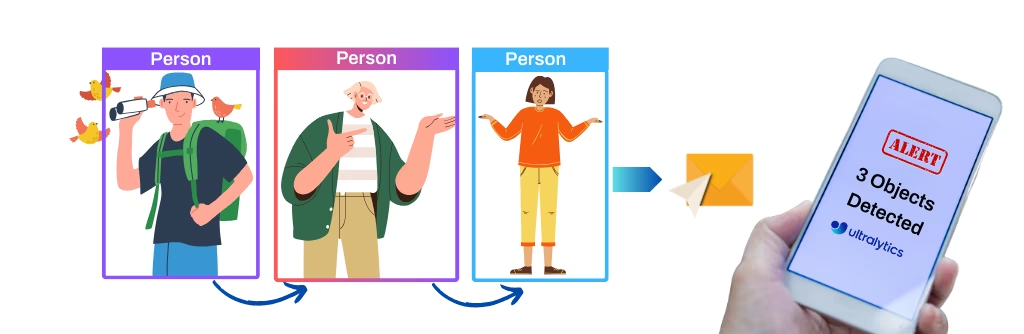
يستخدم هذا المشروع الرؤية الحاسوبية من Ultralytics YOLO26 لإنشاء نظام إنذار أمني. يوفر YOLO26 اكتشافًا آنيًا للكائنات، ما يتيح للنظام تحديد التهديدات الأمنية المحتملة والاستجابة لها بسرعة. ويوفر هذا المشروع مزايا عديدة:
- الاكتشاف في الوقت الفعلي: تتيح كفاءة YOLO26 لنظام الإنذار الأمني اكتشاف الحوادث الأمنية والاستجابة لها آنيًا، ما يقلل زمن الاستجابة.
- الدقة: يقلل اكتشاف الكائنات الدقيق في YOLO26 الإيجابيات الكاذبة ويحسّن موثوقية نظام الإنذار الأمني.
- قدرات التكامل: يمكن للمشروع إضافة تحليلات الذكاء الاصطناعي إلى كاميرات الأمن الحالية، موفرًا طبقة اكتشاف ذكية فوق أنظمة المراقبة القائمة.
شاهد: نظام الإنذار الأمني مع Ultralytics YOLO26 + حلول اكتشاف الكائنات
إرسال التنبيهات الأمنية باستخدام YOLO26#
يتتبع الحل SecurityAlarm الكائنات في بث الفيديو ويرسل تنبيهًا واحدًا عبر البريد الإلكتروني مرفقًا بصورة مشروحة، فور بلوغ عدد الاكتشافات عتبة records. صادق على حساب Gmail باستخدام كلمة مرور تطبيق، ثم شغّل الحل على المصدر لديك.
انتقل إلى مولّد كلمات مرور التطبيقات، وحدد اسمًا للتطبيق مثل "مشروع أمني"، واحصل على كلمة مرور مكوّنة من 16 حرفًا. انسخ كلمة المرور والصقها في الحقل password في الكود أدناه.
import cv2
from ultralytics import solutions
cap = cv2.VideoCapture("path/to/video.mp4")
assert cap.isOpened(), "Error reading video file"
# كاتب الفيديو
w, h, fps = (int(cap.get(x)) for x in (cv2.CAP_PROP_FRAME_WIDTH, cv2.CAP_PROP_FRAME_HEIGHT, cv2.CAP_PROP_FPS))
video_writer = cv2.VideoWriter("security_output.avi", cv2.VideoWriter_fourcc(*"mp4v"), fps, (w, h))
from_email = "abc@gmail.com" # عنوان البريد الإلكتروني للمرسل
password = "---- ---- ---- ----" # كلمة مرور تطبيق مكوّنة من 16 حرفًا، تم إنشاؤها عبر: https://myaccount.google.com/apppasswords
to_email = "xyz@gmail.com" # عنوان البريد الإلكتروني للمستلم
# تهيئة كائن الإنذار الأمني
securityalarm = solutions.SecurityAlarm(
show=True, # # اعرض الناتج
model="yolo26n.pt", # مثلًا، yolo26s.pt أو yolo26m.pt
records=1, # العدد الإجمالي للاكتشافات المطلوب إرساله عبر البريد الإلكتروني
)
securityalarm.authenticate(from_email, password, to_email) # مصادقة خادم البريد الإلكتروني
# معالجة الفيديو
while cap.isOpened():
success, im0 = cap.read()
if not success:
print("Video frame is empty or video processing has been successfully completed.")
break
results = securityalarm(im0)
# print(results) # الوصول إلى المخرجات
video_writer.write(results.plot_im) # كتابة الإطار المعالَج.
cap.release()
video_writer.release()
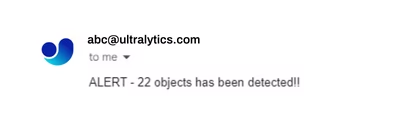
cv2.destroyAllWindows() # إغلاق جميع النوافذ المفتوحةعند تشغيل الشيفرة، ستتلقى إشعارًا واحدًا عبر البريد الإلكتروني إذا اكتُشف أي كائن. يُرسل الإشعار فورًا، وليس بشكل متكرر. يمكنك تخصيص الشيفرة لتلبية متطلبات مشروعك.
مثال على رسالة بريد إلكتروني مستلمة#
وسيطات SecurityAlarm#
إليك جدولًا بمعاملات SecurityAlarm:
| المعامل | النوع | الافتراضي | الوصف |
|---|---|---|---|
model | str | None | مسار ملف نموذج Ultralytics YOLO. |
records | int | 5 | إجمالي عدد الاكتشافات اللازم لإطلاق رسالة بريد إلكتروني مع نظام إنذار أمني. |
line_width | int | 2 | سماكة الخط للصناديق والنقاط المفتاحية والعدادات التي يرسمها الحل. |
verbose | bool | True | يفعّل سجل الحل لكل إطار، ويشمل شكل المدخل وعدد الفئات وسرعة المعالجة. يظل استدعاء التتبع نفسه صامتًا دائمًا. |
يدعم الحل SecurityAlarm مجموعة متنوعة من المعلمات track:
| المعامل | النوع | الافتراضي | الوصف |
|---|---|---|---|
tracker | str | 'tracktrack.yaml' | يحدد خوارزمية التتبع المطلوب استخدامها. الخيارات المضمنة: botsort.yaml، bytetrack.yaml، ocsort.yaml، deepocsort.yaml، fasttrack.yaml، tracktrack.yaml. |
conf | float | 0.25 | يضبط عتبة الثقة للكشوفات؛ إذ تسمح القيم الأقل بتتبع مزيد من الكائنات، لكنها قد تتضمن إيجابيات كاذبة. |
iou | float | 0.5 | يضبط عتبة التقاطع على الاتحاد (IoU) لتصفية الكشوفات المتداخلة. |
classes | list | None | يصفّي النتائج حسب فهرس الفئة. على سبيل المثال، لا يتتبع classes=[0, 2, 3] إلا الفئات المحددة. |
device | str | None | يحدد الجهاز المستخدم للاستدلال (مثل cpu أو cuda:0 أو 0). ويتيح للمستخدمين الاختيار بين CPU أو GPU محددة أو أجهزة حوسبة أخرى لتنفيذ النموذج. |
imgsz | int or tuple | 640 | حجم صورة الاستدلال المستهدف: عدد صحيح لصورة مربعة، أو زوج (height, width). تُعدّل الأبعاد وفقًا لخطوة النموذج. |
max_det | int | 300 | الحد الأقصى لعدد الكشوفات التي يُحتفظ بها لكل إطار قبل التتبع، ما يحد من عدد الكائنات التي يعالجها الحل في المشاهد الكثيفة. |
quantize | int or str | None | دقة الاستدلال: 16 (FP16) أو 32/unset (FP32) لنماذج PyTorch وTorchScript خارج CPU؛ أما التنسيقات الأخرى فتستخدم الدقة التي يحددها الملف الاصطناعي وبيئة التشغيل. يحل هذا الوسيط محل الوسيطة half المهملة. |
علاوة على ذلك، تتوفر إعدادات التصور التالية:
| المعامل | النوع | الافتراضي | الوصف |
|---|---|---|---|
show | bool | False | إذا كان True، يعرض الصور أو مقاطع الفيديو المشروحة في نافذة. يفيد ذلك في الحصول على ملاحظات مرئية فورية أثناء التطوير أو الاختبار. |
show_conf | bool | True | يعرض درجة الثقة لكل اكتشاف بجوار التسمية، ما يوضح مدى يقين النموذج بشأن كل اكتشاف. |
show_labels | bool | True | يعرض تسميات كل اكتشاف في المخرجات المرئية، ما يتيح فهم الكائنات المكتشفة فورًا. |
آلية العمل#
يستخدم نظام الإنذار الأمني تتبع الكائنات لمراقبة بث الفيديو واكتشاف التهديدات الأمنية المحتملة. عندما يصل عدد الكائنات المكتشفة في إطار إلى الحد المحدد (المعيّن بواسطة المعلمة records)، يرسل النظام تلقائيًا إشعارًا عبر البريد الإلكتروني مرفقًا به صورة تُظهر الكائنات المكتشفة.
يستفيد النظام من الفئة SecurityAlarm، التي توفر طرائق من أجل:
- معالجة الإطارات واستخراج اكتشافات الكائنات منها
- إضافة مربعات إحاطة إلى الإطارات حول الكائنات المكتشفة
- إرسال إشعارات عبر البريد الإلكتروني عند بلوغ حدود الكشف
يناسب هذا التطبيق أمن المنازل ومراقبة متاجر التجزئة وغيرها من تطبيقات المراقبة التي يكون فيها الإشعار الفوري بالكائنات المكتشفة أمرًا بالغ الأهمية.
الأسئلة الشائعة#
يعزز Ultralytics YOLO26 أنظمة الإنذار الأمني من خلال توفير اكتشاف دقيق وآني للكائنات، ما يقلل الإيجابيات الكاذبة بحيث يستجيب النظام للأحداث الحقيقية في المقام الأول. ويمكنك تقليل الإنذارات الكاذبة أكثر من خلال قصر الاكتشاف على
classesذات الصلة (الأشخاص فقط مثلًا)، أو رفع عتبةconf، أو زيادةrecords.نعم. يعالج الحل
SecurityAlarmالإطارات من أي مصدر يمكن لـ OpenCV قراءته، بما في ذلك ملفات الفيديو وكاميرات الويب وتدفقات RTSP من كاميرات IP، ما يتيح لك إضافة اكتشاف YOLO26 إلى إعداد كاميرات موجود.يتطلب تشغيل Ultralytics YOLO26 على إعداد عادي عادةً نحو 5GB من مساحة القرص الحرة. ويشمل ذلك مساحة تخزين نموذج YOLO26 وأي تبعيات إضافية. أما الحلول السحابية، فتوفر Ultralytics Platform إدارة فعالة للمشروعات والتعامل مع مجموعات البيانات، ما قد يحسّن تلبية احتياجات التخزين. وتزيد الخطة الاحترافية مساحة التخزين إلى 500 GB.
يتفوق Ultralytics YOLO26 على نماذج مثل Faster R-CNN أو SSD بفضل قدراته على الاكتشاف الآني ودقته الأعلى. وتعالج بنيته أحادية المرحلة الصور بسرعة أكبر بكثير من دون المساس بالدقة، ما يجعله مناسبًا للتطبيقات الحساسة للوقت مثل أنظمة الإنذار الأمني.
للحد من الإيجابيات الكاذبة، تأكد من تدريب نموذج Ultralytics YOLO26 تدريبًا كافيًا باستخدام مجموعة بيانات متنوعة وموسومة جيدًا. ويمكن أن يؤدي ضبط المعلمات الفائقة وتحديث النموذج بانتظام باستخدام بيانات جديدة إلى تحسين دقة الاكتشاف بشكل ملحوظ.


التعليقات153
اطرح سؤالًا، وشارك نتائجك، أو ساعد شخصًا آخر.
e9l7a5f
hi, i cant do the email setting, of Sign in with app passwords and the authentication part , it looks like google change the setting i cant find them, is there another way?
1 Glenn JocherUltralytics(تم التعديل)
Hey there! 😊 It seems like Google's app password settings have indeed evolved, and I appreciate you reaching out for assistance on this. While the current documentation may reference older interfaces, the essence of setting up app passwords for projects like the Security Alarm System with Ultralytics YOLOv8 remains relevant.
If you're experiencing difficulties locating the specific options for app passwords on Google, you might consider looking into alternative email sending services that offer API support, such as SendGrid, Mailgun, or even using a local SMTP server setup, depending on your project's complexity and scale.
For a quick fix using
smtplibwith Gmail, ensure you've enabled two-factor authentication on your account, and then create an app password here: https://myaccount.google.com/apppasswords.Here's a simplified version of how to use an app password:
import smtplib

EMAIL = "your_email@gmail.com"
APP_PASSWORD = "your_app_password"

with smtplib.SMTP("smtp.gmail.com", 587) as smtp:
    smtp.starttls()
    smtp.login(EMAIL, APP_PASSWORD)
    subject = "Security Alert"
    body = "Alert description"
    msg = f"Subject: {subject}\n\n{body}"
    smtp.sendmail(EMAIL, "receiver_email@gmail.com", msg)
Make sure to replace
"your_email@gmail.com"and"your_app_password"with your actual Gmail email and the 16-digit app password you generate, respectively.It's recommended to review the current Gmail documentation or seek updated guidance if Google's procedures have significantly changed since our last update. Hope this helps! If you have further questions or need more personalized assistance, feel free to ask.
thanks for replying, i fix it for the yolov8 as the same steps u explained, now i want to use it on yolov9 but i cant with these steps, because i am using the detect.py and i dont know how to deal with it , where to put each code, i dont have that much background in DL and python codes. the email part is working now
- Glenn JocherUltralytics(تم التعديل)
@e9l7a5f you can use YOLOv9 models the same way as you currently use YOLOv8 models; see https://docs.ultralytics.com/models/yolov9. For new projects we recommend YOLO26: https://docs.ultralytics.com/models/yolo26/.
aaurelions
% python3.11 main.py
Ultralytics Solutions: ✅ {'source': None, 'model': 'yolo11n.pt', 'classes': None, 'show_conf': True, 'show_labels': True, 'region': None, 'colormap': 21, 'show_in': True, 'show_out': True, 'up_angle': 145.0, 'down_angle': 90, 'kpts': [6, 8, 10], 'analytics_type': 'line', 'figsize': (12.8, 7.2), 'blur_ratio': 0.5, 'vision_point': (20, 20), 'crop_dir': 'cropped-detections', 'json_file': None, 'line_width': 2, 'records': 1, 'fps': 30.0, 'max_hist': 5, 'meter_per_pixel': 0.05, 'max_speed': 120, 'show': True, 'iou': 0.7, 'conf': 0.25, 'device': None, 'max_det': 300, 'half': False, 'tracker': 'botsort.yaml', 'verbose': True, 'data': 'images'}
Traceback (most recent call last):
  File "/Users/llama/Developer/sec/main.py", line 23, in <module>
    securityalarm.authenticate(from_email, password, to_email)  # authenticate the email server
    ^^^^^^^^^^^^^^^^^^^^^^^^^^^^^^^^^^^^^^^^^^^^^^^^^^^^^^^^^^
  File "/Users/llama/.venv/3.11/lib/python3.11/site-packages/ultralytics/solutions/security_alarm.py", line 68, in authenticate
    self.server = smtplib.SMTP("smtp.gmail.com: 587")
                  ^^^^^^^^^^^^^^^^^^^^^^^^^^^^^^^^^^^
  File "/opt/homebrew/Cellar/python@3.11/3.11.13/Frameworks/Python.framework/Versions/3.11/lib/python3.11/smtplib.py", line 255, in __init__
    (code, msg) = self.connect(host, port)
                  ^^^^^^^^^^^^^^^^^^^^^^^^
  File "/opt/homebrew/Cellar/python@3.11/3.11.13/Frameworks/Python.framework/Versions/3.11/lib/python3.11/smtplib.py", line 341, in connect
    self.sock = self._get_socket(host, port, self.timeout)
                ^^^^^^^^^^^^^^^^^^^^^^^^^^^^^^^^^^^^^^^^^^
  File "/opt/homebrew/Cellar/python@3.11/3.11.13/Frameworks/Python.framework/Versions/3.11/lib/python3.11/smtplib.py", line 312, in _get_socket
    return socket.create_connection((host, port), timeout,
           ^^^^^^^^^^^^^^^^^^^^^^^^^^^^^^^^^^^^^^^^^^^^^^^
  File "/opt/homebrew/Cellar/python@3.11/3.11.13/Frameworks/Python.framework/Versions/3.11/lib/python3.11/socket.py", line 863, in create_connection
    raise exceptions[0]
  File "/opt/homebrew/Cellar/python@3.11/3.11.13/Frameworks/Python.framework/Versions/3.11/lib/python3.11/socket.py", line 848, in create_connection
    sock.connect(sa)
ConnectionRefusedError: [Errno 61] Connection refused
RizwanMunawar
@aaurelions Hi, thanks for sharing it. You will need to configure the parameters first by following the docs: https://docs.ultralytics.com/guides/security-alarm-system/
1
EQUINOX391
Dear ultralytics team! First of all i really appreciate this amazing works, I'm working on my projects for detecting crime and i aalready have a trained resnet 50 model for detecting some crime as dummy, I really wonder can i integrate the Security Alarm System by Ultralytics in my projects and make it like have this functionality :
- have input of CCTV from RTSP
- when detecting people (or maybe car, bike, etc) , my resnet model will also detecting what they do, after we know what the activity is, we can send it the email
- customize the email messaging like "ALERT 2 people 2 cars detected, Activity Probability : Suspicious - Stealing"
- also send different email if the people stays too long in the frame.
- keep making new notification IF There's new people(s) inside the frame.
- notified if the people or another object is gone from the frame
- is there any pretrain model that detect something related to crime like hammer, crowbar, spraying can, grafitti, gun, etc?
- is there any pretrain model yolo have for pose estimation? i mean there's some but i don't find anything inside the documentation that said it can estimate some general pose like, squat, stand, walk, run, etc
i have so many question but i think that is the most of it! Thank you, and sorry for my bad english.
Cheikh-Ahmedand
Hi Glenn-jocher!
I am very appreciative of your help to your clients as i am one of them.
in onder to integrate security alarm system in an application, using streamlit package, how can i let the end user input their capture_index value and their email:
st. input_text ( )
from_email = "@gmail.com" # must match the email used to generate the password
st. input_text ( )
detector = ObjectDetection(capture_index=0) detector()
with examples, please!
Best regards!
- Glenn JocherUltralytics(تم التعديل)
@Cheikh-Ahmedand thank you for your support! For Streamlit integration, you can collect user inputs like this:
import cv2
import streamlit as st
from ultralytics import solutions

# User inputs
from_email = st.text_input("Sender Email")
password = st.text_input("App Password", type="password")
to_email = st.text_input("Receiver Email")
capture_source = st.text_input("Camera Index/Video Path", "0")

# Initialize SecurityAlarm with user inputs
security = solutions.SecurityAlarm(show=True, model="yolo26n.pt", records=1)
security.authenticate(from_email, password, to_email)
cap = cv2.VideoCapture(int(capture_source) if capture_source.isdigit() else capture_source)
The SecurityAlarm implementation details remain as shown in our security alarm system guide. For email setup, ensure users follow the App Password Generator instructions.
Hello there, glenn-jocher!
Thanks for your nice Help!
I would like st.input_text for end users for from_emails /to_email and detector = ObjectDetection(capture_index=0) in the below code, not for the code you gave an example on:
Securiy Alarm System
password = " " from_email = "@gmail.com" # must match the email used to generate the password to_email = "@gmail.com" # receiver email
import smtplib server = smtplib.SMTP('smtp.gmail.com: 587') server.starttls() server.login(from_email, password)
from email.mime.multipart import MIMEMultipart from email.mime.text import MIMEText from email.mime.image import MIMEImage
def send_email(to_email, from_email, image_path, object_detected=1): """Sends an email with an image attachment.""" message = MIMEMultipart() message["From"] = from_email message["To"] = to_email message["Subject"] = "Security Alert" message_body = f"ALERT - {object_detected} objects have been detected!" message.attach(MIMEText(message_body, "plain")) with open(image_path, 'rb') as img_file: img = MIMEImage(img_file.read()) message.attach(img) server.sendmail(from_email, to_email, message.as_string())
from time import time
import cv2 import torch from ultralytics import YOLO from ultralytics.utils.plotting import Annotator, colors
class ObjectDetection: def init(self, capture_index): """Initializes an ObjectDetection instance with a given camera index.""" self.capture_index = capture_index self.email_sent = False
    # model information
    self.model = YOLO("yolo11n.pt")

    # visual information
    self.annotator = None
    self.start_time = 0
    self.end_time = 0

    # device information
    self.device = "cuda" if torch.cuda.is_available() else "cpu"

def predict(self, im0):
    """Run prediction using a YOLO model for the input image `im0`."""
    results = self.model(im0, classes=[0])
    return results

def display_fps(self, im0):
    """Displays the FPS on an image `im0` by calculating and overlaying as white text on a black rectangle."""
    self.end_time = time()
    fps = 1 / round(self.end_time - self.start_time, 2)
    text = f"FPS: {int(fps)}"
    text_size = cv2.getTextSize(text, cv2.FONT_HERSHEY_SIMPLEX, 1.0, 2)[0]
    gap = 10
    cv2.rectangle(
        im0,
        (20 - gap, 70 - text_size[1] - gap),
        (20 + text_size[0] + gap, 70 + gap),
        (255, 255, 255),
        -1,
    )
    cv2.putText(im0, text, (20, 70), cv2.FONT_HERSHEY_SIMPLEX, 1.0, (0, 0, 0), 2)

def plot_bboxes(self, results, im0):
    """Plots bounding boxes on an image given detection results; returns annotated image and class IDs."""
    class_ids = []
    self.annotator = Annotator(im0, 3, results[0].names)
    boxes = results[0].boxes.xyxy.cpu()
    clss = results[0].boxes.cls.cpu().tolist()
    names = results[0].names
    for box, cls in zip(boxes, clss):
        class_ids.append(cls)
        self.annotator.box_label(box, label=names[int(cls)], color=colors(int(cls), True))
    return im0, class_ids

def __call__(self):
    """Run object detection on video frames from a camera stream, plotting and showing the results."""
    cap = cv2.VideoCapture(self.capture_index)
    assert cap.isOpened()
    cap.set(cv2.CAP_PROP_FRAME_WIDTH, 640)
    cap.set(cv2.CAP_PROP_FRAME_HEIGHT, 480)
    frame_count = 0
    while True:
        self.start_time = time()
        ret, im0 = cap.read()
        assert ret
        results = self.predict(im0)
        im0, class_ids = self.plot_bboxes(results, im0)
        if len(class_ids) > 0:
           image_path = f"detected_frame_{frame_count}.jpg"
           cv2.imwrite(image_path, im0)
           if not self.email_sent:
            send_email(to_email, from_email, image_path, len(class_ids))
            self.email_sent = True
        else:
            self.email_sent = False

        self.display_fps(im0)
        cv2.imshow("YOLO11 Detection", im0)
        frame_count += 1
        if cv2.waitKey(5) & 0xFF == 27:
            break
    cap.release()
    cv2.destroyAllWindows()
    server.quit()
detector = ObjectDetection(capture_index=0) detector()
would you please give an example of st. input_text for end users letting them write their emails and capture_index on the above code?
Sincerely Yours!
- Glenn JocherUltralytics
Thank you for your question! For Streamlit integration with user inputs in your security system, here's how to modify your code:
import streamlit as st

# User inputs
from_email = st.text_input("Sender Email")
to_email = st.text_input("Receiver Email")
password = st.text_input("App Password", type="password")
capture_index = st.text_input("Camera Index/Video Path", "0")

# Initialize detector with user inputs
detector = ObjectDetection(capture_index=int(capture_index) if capture_index.isdigit() else capture_index)
This allows users to specify their email credentials and camera source through Streamlit's interactive interface. The Security Alarm System guide shows how these inputs integrate with YOLO11's detection capabilities. For email setup requirements, please ensure users follow the App Password Generator instructions from our security alarm documentation.
boukosho
Hey glenn-jocher!
As you know, ML models need frequent check so as their data remain undriffed and their distribution remain unchanged.
To frequently monitor deployed ml models by streamlit in case it is deployed to aws ec2, Google Cloud, or streamlit community cloud or in local server, what should I do ?
Please give an example!
Thanks!
- Glenn JocherUltralytics(تم التعديل)
@boukosho for monitoring deployed YOLO11 models across cloud platforms, consider implementing a heartbeat system with performance metrics logging. Our Security Alarm System guide shows email alert integration that could be adapted for drift detection notifications. For production deployments, Ultralytics Platform provides monitoring for deployed endpoints; see the Platform monitoring documentation. A minimal implementation might track inference statistics and trigger alerts via our solutions.SecurityAlarm class when thresholds are exceeded.
Hello there glenn-jocher!
Thanks for your respectful responses!
If I want the alarm system to only notify me when it is confident of more than 0.3 % .
So how to do it, with examples, please!
 # model information

    self.model = YOLO("yolo11.pt")

    # visual information

    self.annotator = None

    self.start_t        ime = 0

    self.end_time = 0


    # device information

    self.device = "cuda" if torch.cuda.is_available() else "cpu"


def predict(self, im0):

    """Run prediction using a YOLO model for the input image `im0`."""

    results = self.model(im0, classes=[0])

     return results
Sincelrely Yours!
- Glenn JocherUltralytics(تم التعديل)
@Cheikh-Ahmedand to adjust the confidence threshold in your security alarm system, set the
confargument when initializing the solution. For example:security = solutions.SecurityAlarm(model="yolo26n.pt", conf=0.5) # only detections above 0.5 confidenceThis ensures notifications only trigger for detections exceeding your specified confidence level. For more details, refer to the Security Alarm System guide.
hey!
Thanks glenn-jocher for your respectful response.
security = solutions.SecurityAlarm(model="yolo11n.pt", conf=0.5) # Set confidence threshold >0.3 security.model.conf = 0.5 # Alternative direct method
N.B, I would like to add conf=0.5 for the below function (self.model = YOLO("yolo11n.pt"), not for the above one
class ObjectDetection:
def __init__(self, capture_index):

    """Initializes an ObjectDetection instance with a given camera index."""

    self.capture_index = capture_index

    self.email_sent = False

    # model information

    self.model = YOLO("yolo11n.pt")
visual information
    self.annotator = None

    self.start_time = 0

    self.end_time = 0

    # device information

    self.device = "cuda" if torch.cuda.is_available() else "cpu"
How to do so with examples, please!
Sincerely Yours!
- Glenn JocherUltralytics(تم التعديل)
@Cheikh-Ahmedand in your own
ObjectDetectionclass, passconfwhen you run inference rather than when loading the model:self.model = YOLO("yolo26n.pt") results = self.model.predict(im0, conf=0.5)For more details on model arguments, see the Predict mode documentation.
Hey glenn- jocher!
Thanks lots for your respectful response.
self.model = YOLO("yolo11n.pt", task="detect").set({"conf": 0.5})
When i run the above code, an error has been occured:
(AttributeError: 'DetectionModel' object has no attribute 'set')
What should i do instead? With examples, Please.
Best Regards!
- Glenn JocherUltralytics
To set the confidence threshold in your custom
ObjectDetectionclass, modify yourpredictmethod like this:def predict(self, im0): results = self.model.predict(im0, classes=[0], conf=0.5) # Add conf here return resultsThe
confparameter should be passed during inference rather than model initialization. For more details on prediction arguments, see the Predict mode documentation.
Hello there! What do you mean by the below function?
cap = cv2.VideoCapture("Path/to/video/file.mp4") assert cap.isOpened(), "Error reading video file"
Namely, I have a Webcam or the laptop camera or dvr/nvr cameras and I want to attach them to the above function. How to do so? With examples, please!! . Sincerely Yours!
- Glenn JocherUltralytics(تم التعديل)
To use your webcam or camera stream with OpenCV's
VideoCapture, replace the file path with:0for default laptop camera (e.g.,cap = cv2.VideoCapture(0))- RTSP URL for network cameras (e.g.,
cap = cv2.VideoCapture("rtsp://username:password@camera_ip:port/stream"))
For DVR/NVR cameras, use your camera's RTSP stream URL. See OpenCV VideoCapture docs for more input formats.
Hay!
Glenn-jocher I asked you questions here, you haven't answered me yet? Do you still respond kindly to questions regarding yolo security alarm system here? Or you no longer do so?
Best Regards!
- Glenn JocherUltralytics
@boukosho hi! We're happy to help with YOLO security alarm system questions. Our comprehensive Security Alarm System guide at https://docs.ultralytics.com/guides/security-alarm-system/ provides complete implementation code and documentation. For specific issues, feel free to open a GitHub Discussion with details about your implementation and we'll assist there. 😊
Hello there! What do you mean by the below function?
cap = cv2.VideoCapture("Path/to/video/file.mp4") assert cap.isOpened(), "Error reading video file"
Namely, I have a Webcam or the laptop camera or dvr/nvr cameras and I want to attach them to the above function. How to do so? With examples, please!! . Sincerely Yours!
- Glenn JocherUltralytics(تم التعديل)
To use your webcam, laptop camera, or DVR/NVR cameras with
cv2.VideoCapture, modify the source argument:-
Webcam/Laptop Camera:
cap = cv2.VideoCapture(0)(0 for default camera, 1 for secondary, etc.) -
IP/DVR/NVR Cameras:
Use RTSP/HTTP stream URLs like:
cap = cv2.VideoCapture("rtsp://username:password@camera_ip:port/stream")
The rest of the security alarm code remains unchanged. Ensure your camera feed is accessible and credentials are correctly formatted in URLs. For more details on video sources, see our Object Detection and Tracking guide.
-
Hello there! What do you mean by the below function?
cap = cv2.VideoCapture("Path/to/video/file.mp4") assert cap.isOpened(), "Error reading video file"
Namely, I have a Webcam or the laptop camera or dvr/nvr cameras and I want to attach them to the above function. How to do so? With examples, please!! . Sincerely Yours!
- Glenn JocherUltralytics(تم التعديل)
For webcam/laptop camera use
cap = cv2.VideoCapture(0)(0=default camera index). For IP cameras, use an RTSP URL likecap = cv2.VideoCapture("rtsp://username:password@camera_ip:port/path"). Theassertchecks if the video source opens successfully. You can find specific camera URL formats in your DVR/NVR documentation.
andrewjang2234
Traceback (most recent call last): File "C:\Users\User\class-iot\apps\iot07\security.py", line 17, in server.login(from_email, password) File "C:\Users\User\miniconda3\envs\class-iot061\lib\smtplib.py", line 750, in login raise last_exception File "C:\Users\User\miniconda3\envs\class-iot061\lib\smtplib.py", line 739, in login (code, resp) = self.auth( File "C:\Users\User\miniconda3\envs\class-iot061\lib\smtplib.py", line 662, in auth raise SMTPAuthenticationError(code, resp) smtplib.SMTPAuthenticationError: (534, b'5.7.9 Application-specific password required. For more information, go to\n5.7.9 https://support.google.com/mail/?p=InvalidSecondFactor 41be03b00d2f7-7fd430cec7bsm8095565a12.67 - gsmtp')
I don't know why this error is keep causing.......... what is the problem?
sorry I sovle that problem if I want to use my laptob cam what do I have to do?
- Glenn JocherUltralytics
@andrewjang2234 to use your laptop's camera, set the
capture_indexparameter in theObjectDetectionclass to0(e.g.,ObjectDetection(capture_index=0)). This should automatically access your default webcam. If issues persist, ensure your camera is not being used by another application.
I have a question. what exactly 'to_email' is? 'from_email' is my main emial, and 'password' is 'from_email's password and what is to_email?
- Glenn JocherUltralytics
@andrewjang2234 the
to_emailrefers to the recipient's email address where the alert or notification will be sent. If you have further questions about this setup, feel free to ask!