Meituan YOLOv6
Panoramica#
Meituan YOLOv6, rilasciato nel 2022, è un modello di rilevamento di oggetti che offre un ottimo equilibrio tra velocità e accuratezza, risultando una scelta diffusa per le applicazioni in tempo reale. Questo modello introduce diversi miglioramenti degni di nota nell'architettura e nello schema di addestramento, tra cui l'implementazione di un modulo Bi-directional Concatenation (BiC), una strategia di addestramento assistita da anchor (AAT) e un design migliorato del backbone e del neck per garantire un'elevata accuratezza sul dataset COCO.
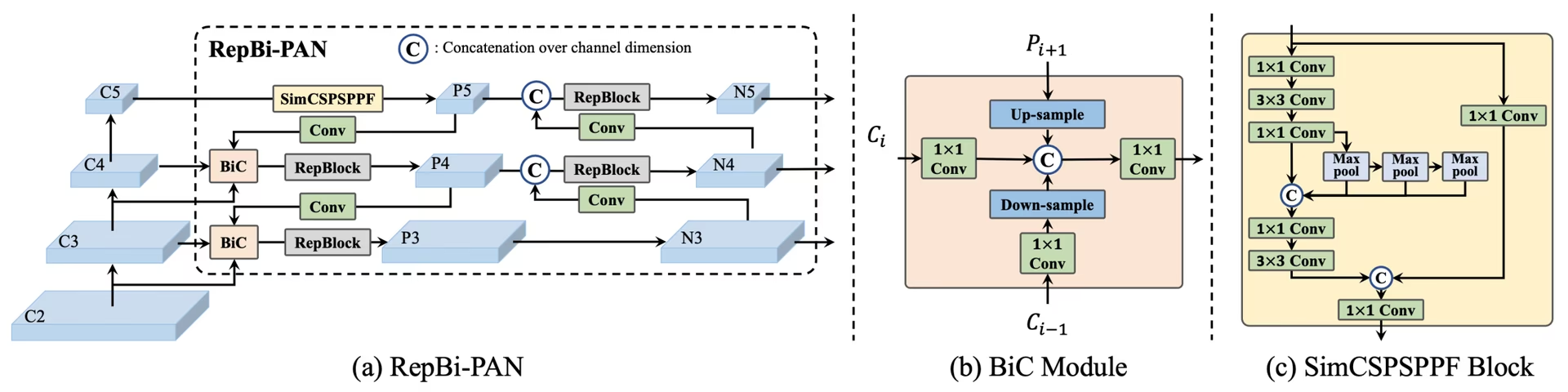 Panoramica di YOLOv6. Diagramma dell'architettura del modello che mostra i componenti di rete riprogettati e le strategie di addestramento che hanno portato a significativi miglioramenti delle prestazioni. (a) Il neck di YOLOv6 (sono mostrati N e S). Nota: per M/L, RepBlocks è sostituito da CSPStackRep. (b) La struttura di un modulo BiC. (c) Un blocco SimCSPSPPF. (fonte.
Funzionalità principali#
- Modulo di concatenazione bidirezionale (BiC): YOLOv6 introduce un modulo BiC nel neck del rilevatore, migliorando i segnali di localizzazione e offrendo vantaggi prestazionali con un degrado trascurabile della velocità.
- Strategia di addestramento assistito da anchor (AAT): AAT combina i vantaggi dei paradigmi basati su anchor e senza anchor senza compromettere l'efficienza dell'inferenza.
- Progettazione migliorata del backbone e del neck: Estendendo YOLOv6 con un ulteriore stadio nel backbone e nel neck, al momento del rilascio questo modello ha ottenuto prestazioni elevate sul dataset COCO con input ad alta risoluzione.
- Strategia di auto-distillazione: viene implementata una nuova strategia di auto-distillazione per migliorare le prestazioni dei modelli YOLOv6 più piccoli, potenziando il ramo di regressione ausiliario durante l'addestramento e rimuovendolo in fase di inferenza per evitare un calo significativo della velocità.
Metriche di prestazione#
YOLOv6 offre diversi modelli preaddestrati con varie dimensioni:
- YOLOv6-N: 37,5% AP sul set COCO val2017 a 1187 FPS con una GPU NVIDIA T4.
- YOLOv6-S: 45,0% AP a 484 FPS.
- YOLOv6-M: 50,0% AP a 226 FPS.
- YOLOv6-L: 52,8% AP a 116 FPS.
- YOLOv6-L6: precisione all'avanguardia in tempo reale.
YOLOv6 offre anche modelli quantizzati con diverse precisioni numeriche e modelli ottimizzati per le piattaforme mobili.
Esempi d'uso#
Questo esempio illustra semplici esempi di addestramento e inferenza con YOLOv6.
I file YOLOv6 *.yaml possono essere passati alla classe YOLO() per creare il modello corrispondente in Python:
from ultralytics import YOLO

# Crea da zero un modello YOLOv6n
model = YOLO("yolov6n.yaml")

# Visualizza le informazioni sul modello (facoltativo)
model.info()

# Addestra il modello sul dataset di esempio COCO8 per 100 epoche
results = model.train(data="coco8.yaml", epochs=100, imgsz=640)

# Esegui l'inferenza con il modello YOLOv6n sull'immagine 'bus.jpg'
results = model("path/to/bus.jpg")
Attività e modalità supportate#
La serie YOLOv6 offre una gamma di modelli, ciascuno ottimizzato per il rilevamento di oggetti, che copre diversi budget computazionali e requisiti di accuratezza.
| Modello | Nomi dei file | Attività | Addestramento | Validazione | Inferenza | Esporta |
|---|---|---|---|---|---|---|
| YOLOv6-N | yolov6n.yaml | Rilevamento di oggetti | ✅ | ✅ | ✅ | ✅ |
| YOLOv6-S | yolov6s.yaml | Rilevamento di oggetti | ✅ | ✅ | ✅ | ✅ |
| YOLOv6-M | yolov6m.yaml | Rilevamento di oggetti | ✅ | ✅ | ✅ | ✅ |
| YOLOv6-L | yolov6l.yaml | Rilevamento di oggetti | ✅ | ✅ | ✅ | ✅ |
| YOLOv6-X | yolov6x.yaml | Rilevamento di oggetti | ✅ | ✅ | ✅ | ✅ |
Questa tabella riassume le varianti del modello YOLOv6 e il supporto per le modalità Training, Validation, Inference ed Export. Ultralytics fornisce solo file YAML dei modelli YOLOv6, quindi i modelli vengono addestrati da zero.
Citazioni e ringraziamenti#
Desideriamo ringraziare gli autori per il loro importante contributo al campo del rilevamento di oggetti in tempo reale:
@misc{li2023yolov6,
      title={YOLOv6 v3.0: A Full-Scale Reloading},
      author={Chuyi Li and Lulu Li and Yifei Geng and Hongliang Jiang and Meng Cheng and Bo Zhang and Zaidan Ke and Xiaoming Xu and Xiangxiang Chu},
      year={2023},
      eprint={2301.05586},
      archivePrefix={arXiv},
      primaryClass={cs.CV}
}
L'articolo originale su YOLOv6 è disponibile su arXiv. Gli autori hanno reso pubblica la loro ricerca e il codice è disponibile su GitHub. Apprezziamo il loro impegno nel far progredire il settore e nel rendere il loro lavoro accessibile alla comunità più ampia.
Domande frequenti#
Meituan YOLOv6, rilasciato nel 2022, è un rilevatore di oggetti che bilancia velocità e precisione, progettato per le applicazioni in tempo reale. Presenta notevoli miglioramenti architetturali, come il modulo di concatenazione bidirezionale (BiC) e una strategia di addestramento assistito da anchor (AAT). Queste innovazioni offrono significativi miglioramenti delle prestazioni con un degrado minimo della velocità, rendendo YOLOv6 una scelta competitiva per le attività di rilevamento di oggetti.
Il modulo di concatenazione bidirezionale (BiC) di YOLOv6 migliora i segnali di localizzazione nel neck del rilevatore, offrendo prestazioni superiori con un impatto trascurabile sulla velocità. Questo modulo combina efficacemente diverse mappe di caratteristiche, aumentando la capacità del modello di rilevare gli oggetti con precisione. Per ulteriori dettagli sulle funzionalità di YOLOv6, consulta la sezione Funzionalità chiave.
Puoi addestrare un modello YOLOv6 usando Ultralytics con semplici comandi Python o CLI. Ad esempio:
Esempiofrom ultralytics import YOLO # Crea da zero un modello YOLOv6n model = YOLO("yolov6n.yaml") # Addestra il modello sul dataset di esempio COCO8 per 100 epoche results = model.train(data="coco8.yaml", epochs=100, imgsz=640)Per ulteriori informazioni, visita la pagina Addestramento.
YOLOv6 offre diverse versioni, ciascuna ottimizzata per requisiti di prestazione differenti:
- YOLOv6-N: 37,5% AP a 1187 FPS
- YOLOv6-S: 45,0% AP a 484 FPS
- YOLOv6-M: 50,0% AP a 226 FPS
- YOLOv6-L: 52,8% AP a 116 FPS
- YOLOv6-L6: precisione all'avanguardia negli scenari in tempo reale
Questi modelli sono valutati sul dataset COCO usando una GPU NVIDIA T4. Per ulteriori informazioni sulle metriche di prestazione, consulta la sezione Metriche di prestazione.
L'addestramento assistito da anchor (AAT) di YOLOv6 combina elementi degli approcci basati su anchor e di quelli senza anchor, migliorando le capacità di rilevamento del modello senza compromettere l'efficienza dell'inferenza. Questa strategia sfrutta gli anchor durante l'addestramento per migliorare le predizioni dei riquadri di delimitazione, rendendo YOLOv6 efficace in diverse attività di rilevamento di oggetti.
YOLOv6 supporta le modalità di addestramento, convalida, inferenza ed esportazione.


Commenti14
Fai una domanda, condividi i tuoi risultati o aiuta qualcun altro.
AkaashSamson
Hey, So I have actually trained my YOLOv6 model with the original repo, now I have a .pt file. using this file is there any way of getting my model in ultralytics format. mainly I want to run the ultralytics validation on my model as the original repo eval.py doesn't provide sufficient metrics.
 Glenn JocherUltralytics
Direct conversion of Meituan YOLOv6 .pt checkpoints to Ultralytics format isn’t supported; to use Ultralytics metrics, either train/fine-tune the matching yolov6*.yaml in Ultralytics and run validation, or export your Meituan model’s detections to COCO JSON and compute P/R via the COCO API; the metrics Ultralytics reports are outlined in the Val mode docs at Ultralytics validation.
tino926(modificato)
I want to replicate your training accuracy of the YOLOv6-N model. Is this the correct command:
yolo train model=yolov6n.yaml data=coco.yaml epochs=400 optimizer=SGD cos_lr=True lr0=0.02? According to YOLOv6's repo https://github.com/meituan/YOLOv6/blob/main/docs/Train_coco_data.md, they have to use anchor-aid and distilling techniques to achieve this accuracy. But I can't find the corresponding parameters in ultralytics'.- Glenn JocherUltralytics
@tino926 to achieve the training accuracy of the YOLOv6-N model as described in the YOLOv6 repository, you would indeed use the anchor-aided training (AAT) and self-distillation strategies, which are not explicitly parameterized in the Ultralytics YOLO interface. Ensure you are using the latest version and check the YOLOv6 documentation for any updates on incorporating these strategies. For precise replication, consider following the original YOLOv6 GitHub instructions alongside Ultralytics for any additional settings or configurations.
@glenn-jocher, thanks for your response.
I apologize if I misunderstood your explanation, as I am not a native English speaker. Could you please clarify if the phrase "which are not explicitly parameterized in the Ultralytics YOLO interface" means that AAT and self-distillation cannot currently be implemented solely through the Ultralytics YOLO interface? Therefore I should manually add anchor branches and implement distillation with additional code?
- Glenn JocherUltralytics
Thank you for your question. Yes, that's correct. The current Ultralytics YOLO interface does not explicitly support anchor-aided training (AAT) and self-distillation, so you would need to implement these strategies manually by modifying the code to include anchor branches and self-distillation techniques. If you need further guidance on implementing these, referring to the original YOLOv6 repository might be helpful.
kadirnar
Does ultralytics library support yolov6 model?
ModuleNotFoundError: No module named 'yolov6'
 Paula DerrengerUltralytics(modificato)
@kadirnar hi there!
Yes, the Ultralytics library does support YOLOv6 models. It seems like you might be encountering a
ModuleNotFoundErrorbecause the YOLOv6 model isn't being recognized. Let's ensure you're using the latest versions oftorchandultralytics. Please update your packages and try again:pip install --upgrade torch ultralyticsHere's a quick example to get you started with YOLOv6 using the Ultralytics library:
Python
from ultralytics import YOLO

# Load a YOLOv6n model
model = YOLO("yolov6n.yaml")

# Train the model on the COCO8 example dataset for 100 epochs
results = model.train(data="coco8.yaml", epochs=100, imgsz=640)

# Run inference with the trained model on an image
results = model("path/to/bus.jpg")
CLI
# Train YOLOv6n model
yolo train model=yolov6n.yaml data=coco8.yaml epochs=100 imgsz=640

# Run inference with your trained weights
yolo predict model=path/to/best.pt source=path/to/bus.jpg
If you continue to face issues, please provide a minimum reproducible example so we can better assist you. You can refer to our guide on creating a minimum reproducible example here: Minimum Reproducible Example.
Feel free to reach out if you have any more questions! 😊
akhilesh99sharma
There are AP and AR values for results but not precision and recall. I need to compare precision and recall values for different YOLO versions (v5,v6,v7 etc.) on my custom dataset. How to get precision and recall values for YOLOv6 evaluation?
- Paula DerrengerUltralytics(modificato)
Hey there! 👋
You don't need to compute precision and recall by hand: validation already reports them. After
model.val(), the results object holds them directly:from ultralytics import YOLO # Load your trained model model = YOLO("path/to/your/custom-yolov6-model.pt") # Run validation results = model.val(data="path/to/your/dataset.yaml") print(f"Precision: {results.box.mp}, Recall: {results.box.mr}") # mean over all classes print(results.box.p, results.box.r) # per-class precision and recallHope this helps, and happy comparing across YOLO versions! 🚀
Hello , I tried but was still not able to get these values, could you please help me with that?
- Paula DerrengerUltralytics(modificato)
Hey there! 😊
Precision and recall are reported by Ultralytics validation, so you don't need to count TP/FP/FN yourself. After
results = model.val(data="path/to/dataset.yaml"), useresults.box.mp(mean precision),results.box.mr(mean recall), andresults.box.p/results.box.rfor per-class values.If you need them computed from raw counts, precision = TP / (TP + FP) and recall = TP / (TP + FN), where the counts come from matching predictions to ground-truth boxes at an IoU threshold.
Hope this helps! Let me know if there's anything else I can do for you. Happy modeling! 🚀
Hello, I tried doing it but was not able to do so. I get the predictions json file in the val folder but don't know how to compare it with the labels to get TP, FP etc. Can you please help me with that? I need to compare results of YOLOv6 with v8, v9 but I am not getting precision and recall values in v6 , I get average precision and average recall
- Paula DerrengerUltralytics(modificato)
@akhilesh99sharma hey there! 🌞
You can get precision and recall directly from validation without processing the predictions JSON yourself. After
results = model.val(data="path/to/dataset.yaml"), useresults.box.mp(mean precision),results.box.mr(mean recall), andresults.box.p/results.box.rfor per-class values.If you still need TP, FP and FN counts from the saved predictions JSON, you will have to match predicted boxes to ground-truth boxes per image using an IoU threshold. The confusion matrix saved in the run folder (
confusion_matrix.png, ormodel.val(plots=True)) also shows these counts per class.For comparing across YOLO versions, run each model with consistent settings on your custom dataset and read the same metrics from each.
I hope this simplifies the process for you! 🚀 Let me know if you need further assistance.