Rockchip RKNNへのエクスポート
RKNNは、RK3588やRK3566などのRockchipプロセッサに搭載されたNPUsのモデル形式です。format="rknn"を使用してUltralytics YOLO26モデルをエクスポートすると、1つのRockchipチップ向けにビルドされた.rknnファイルを格納するyolo26n_rknn_model/ディレクトリが作成されます。チップはname引数で選択し、精度はFP16またはINT8です。
概要#
| プロパティ | 詳細 |
|---|---|
format 引数 | rknn |
| 出力 | yolo26n_rknn_model/は、yolo26n-rk3588.rknnとmetadata.yamlを含むディレクトリです。detect、segment、pose、OBBモデルのINT8エクスポートではtail.onnxも追加されます |
| 実行環境 | エクスポートごとに、次のRockchipチップのいずれか1つのNPUを使用します: RK3588、RK3576、RK3566、RK3568、RK3562、RK2118、RV1126B、RV1103、RV1106、RV1103B、RV1106B。対象チップを参照してください |
| ランタイム | Rockchipデバイス上のRKNN Toolkit Lite2(rknn-toolkit-lite2 Pythonパッケージ) |
| 適合率 | FP16(デフォルト)とINT8に対応しています。INT8のみ対応するのはRV1103、RV1106、RV1103B、RV1106Bです。FP32エクスポートには対応していません。RK3588向けYOLO26nは、FP16で7.4 MB、INT8で4.3 MBです |
| エクスポートホスト | Python 3.12以前を使用するLinux x86-64環境。PC上でエクスポートし、エクスポートしたディレクトリをRockchipデバイスにコピーしてください |
Ultralytics Platformでは、トレーニング済みモデルを選択したRockchipチップ向けにRKNN形式でエクスポートできるため、ローカルのエクスポート環境は不要です。
クイックスタート#
x86-64 Linuxマシン上の独立した仮想環境にUltralyticsパッケージをインストールし、RKNNツールキットに必要なバージョンのprotobufとnumpyもインストールしてください:
pip install ultralytics "protobuf<7" "numpy<2.4"初回のエクスポートでは、存在しない場合にonnx、onnxslim、onnxruntime、および依存関係とともにrknn-toolkit2がインストールされます。通常のpip install ultralytics環境では、初回エクスポート時に、以下の範囲外のバージョンであるnumpy、protobuf、setuptoolsも置き換えられるため、別の環境を使用してください。protobufまたはnumpyを置き換える必要がある場合、そのエクスポートは失敗しますが、新しいプロセスで次のエクスポートを実行すれば成功します。エクスポートには次のバージョン要件があります:
| パッケージ | 必須バージョン |
|---|---|
| Python | 3.12以前。rknn-toolkit2 2.3.2がビルドを提供する最新バージョンです |
rknn-toolkit2 | 2.3.2。必要な範囲(2.3.2以上、2.5未満)でPyPIに公開されている唯一のリリースです |
onnx | 1.16.1以上、1.19.0未満 |
numpy | 2.4未満 |
protobuf | 7未満 |
setuptools | 82未満 |
その他のインストール方法については、インストールガイドを参照してください。次に、PC上でモデルをエクスポートし、エクスポートしたディレクトリをRockchipデバイスにコピーして、そこで読み込み、推論または精度検証を実行します。
from ultralytics import YOLO

# YOLO26モデルを読み込みます
model = YOLO("yolo26n.pt")

# モデルをRK3588向けのFP16 RKNN形式にエクスポートします
model.export(format="rknn", name="rk3588")  # creates 'yolo26n_rknn_model/'

# または、キャリブレーションデータを使用してINT8量子化RKNNモデルをエクスポートします
model.export(format="rknn", name="rk3588", quantize=8, data="coco8.yaml") # creates 'yolo26n_rknn_model/'どちらのエクスポートでも同じyolo26n_rknn_model/ディレクトリに書き込むため、2回目のエクスポートで1回目の内容が置き換えられます。PredictとValidateはRockchipデバイス上でのみ実行できます:
from ultralytics import YOLO

# エクスポートしたRKNNモデルをRockchipデバイス上で読み込みます
model = YOLO("yolo26n_rknn_model")

# 推論を実行
results = model("https://ultralytics.com/images/bus.jpg")from ultralytics import YOLO
# エクスポートしたRKNNモデルをRockchipデバイス上で読み込みます
model = YOLO("yolo26n_rknn_model")
# COCO8データセットで精度を検証します
metrics = model.val(data="coco8.yaml")対応タスク#
RKNNエクスポートは、YOLOv8、YOLO11、YOLO26モデルで、Ultralyticsの7つすべてのタスクに対応しています: 物体検出、セグメンテーション、セマンティックセグメンテーション、深度推定、分類、姿勢推定、OBB。セマンティックセグメンテーションと深度推定に対応しているのは、これらのヘッドを搭載する唯一のファミリーであるYOLO26のみです。
エクスポート引数#
| 引数 | 種類 | デフォルト | 説明 |
|---|---|---|---|
format | str | 'rknn' | エクスポートしたモデルのターゲットフォーマットです。さまざまなデプロイ環境との互換性を定義します。 |
name | str | 'rk3588' | モデルのビルド対象となるRockchipチップ名。大文字と小文字は区別されません。対象チップを参照してください。 |
imgsz | intまたはtuple | 640 | モデル入力の画像サイズです。正方形の画像の場合は整数、またはタプル(height, width)を指定します。指定しない場合、チェックポイントのトレーニング時のサイズが使用されます。公式YOLO26チェックポイントでは、detect、segment、poseモデル、およびADE20Kで事前トレーニングされたsemanticモデルに640、OBBモデルおよびCityscapesで事前トレーニングされたsemanticモデルに1024、depthに768、classifyに224が使用されます。 |
quantize | intまたはstr | None | 精度: 16を指定するか未設定にするとFP16がビルドされ、8を指定するとdataでキャリブレーションされたINT8がビルドされます。INT8のみ対応するチップでは、未設定の場合にINT8がビルドされ、16を指定するとエラーになります。32はエラーになり、quantize=8でトレーニングされたチェックポイントはRKNNにエクスポートできません。制限事項とトラブルシューティングを参照してください。非推奨のhalf/int8フラグを置き換える引数です。 |
data | str | None | INT8キャリブレーションに使用するデータセットYAML。分類の場合は、代わりにデータセットディレクトリまたは組み込みデータセット名を指定します。キャリブレーションでは、splitが設定されていない限り、valの分割を使用します。quantize=8が指定されていない場合、Ultralyticsはモデルのタスクに対応した小規模なデフォルトデータセットを使用します。たとえば、検出ではcoco8.yamlを使用します。 |
fraction | float、int、またはlist | 1.0 | キャリブレーション用サブセット: 比率、画像数(1を超える整数)、または[train, val, test]リストを指定します。リストの場合、キャリブレーション分割のエントリが使用されます。 |
batch | int | 1 | エクスポートしたモデルのバッチサイズ。入力形状に固定されます。 |
simplify | bool | True | onnxslimを使用して、中間ONNXグラフを簡素化します。 |
opset | int | None | 中間ONNXグラフのONNX opsetバージョンです。未設定の場合は19が使用され、それより大きい値は19に引き下げられます。 |
nms | bool、省略可 | None | RKNNモデルは常に外部NMS用の未加工の予測を返します。NMS-freeヘッド(False)と組み込みNMS(True)は使用できません。制限事項とトラブルシューティングを参照してください。 |
device | str | None | 中間ONNXグラフをトレースするデバイスです。cpu(デフォルト)、またはCUDA GPUの場合は0を指定します。 |
すべての形式に共通する引数については、エクスポートモードのドキュメントを参照してください。
対象チップ#
.rknnファイルは1つのチップ向けにビルドされ、nameでチップを選択します。サイズは、quantizeを未設定にしてimgsz=640でエクスポートしたYOLO26n検出モデルのものです:
name | 精度 | quantizeを未設定にすると、次がビルドされます | YOLO26nファイル | サイズ |
|---|---|---|---|---|
rk3588 | FP16、INT8 | FP16 | yolo26n-rk3588.rknn | 7.4 MB |
rk3576 | FP16、INT8 | FP16 | yolo26n-rk3576.rknn | 10.5 MB |
rk3566 | FP16、INT8 | FP16 | yolo26n-rk3566.rknn | 6.8 MB |
rk3568 | FP16、INT8 | FP16 | yolo26n-rk3568.rknn | 6.8 MB |
rk3562 | FP16、INT8 | FP16 | yolo26n-rk3562.rknn | 6.8 MB |
rk2118 | FP16、INT8 | FP16 | yolo26n-rk2118.rknn | 6.8 MB |
rv1126b | FP16、INT8 | FP16 | yolo26n-rv1126b.rknn | 7.1 MB |
rv1103 | INT8 | INT8 | yolo26n-rv1103.rknn | 4.2 MB |
rv1106 | INT8 | INT8 | yolo26n-rv1106.rknn | 4.2 MB |
rv1103b | INT8 | INT8 | yolo26n-rv1103b.rknn | 4.2 MB |
rv1106b | INT8 | INT8 | yolo26n-rv1106b.rknn | 4.2 MB |
INT8のみ対応する4つのチップは、この表のデフォルトのcoco8.yamlでキャリブレーションされ、エクスポート時にはtail.onnxも書き込まれます。
量子化#
quantizeで.rknnファイルの精度を選択します。サイズはimgsz=640およびbatch=1でエクスポートした場合のものです:
quantize | 適合率 | キャリブレーションデータ | YOLO26nおよびrk3588用のファイル | サイズ |
|---|---|---|---|---|
未設定または16 | FP16 | いいえ | yolo26n-rk3588.rknn | 7.4 MB |
8 | INT8 | はい | yolo26n-rk3588.rknnとtail.onnx | 4.3 MBおよび0.2 MB |
- FP16: 対応する7つのチップでのデフォルトです。キャリブレーションデータは不要です。
- INT8:
quantize=8はキャリブレーション画像をモデルに通し、重みとアクティベーションを8ビット整数で保存します。エクスポートでは、dataのval分割、またはsplitで指定した分割を使ってキャリブレーションします。画像が300枚未満の場合は警告が表示されます。画像数を制限するにはfractionを使用します。 - 混合精度: FP16に対応する7つのチップでは、INT8エクスポート時に量子化による出力の変化が大きすぎるレイヤーを、RKNN ToolkitがFP16のまま保持します(
auto_hybrid)。INT8のみ対応する4つのチップでは、この処理は行われません。 - 検出ヘッド: detect、segment、pose、OBBモデルの場合、INT8の
.rknnファイルはヘッドの出力畳み込み層で終わります。出力をボックスにデコードする演算はtail.onnxとして保存され、デバイスのCPU上で浮動小数点演算により実行されます。これは、テンソル単位のINT8ではボックスのデコードに必要なピクセル範囲の値を表現できないためです。 - 深度モデル: 深度INT8エクスポートでは、深度マップとペアになった深度データセットの画像を使ってキャリブレーションします。デプロイ先のシーンの近距離から遠距離までを含むキャリブレーション画像を選んでください。検証画像が4枚のデフォルトの
depth8.yamlを使用した場合、rknn-toolkit2シミュレーター上のYOLO26n-depth INT8モデルは、FP16モデルが最大13.9を返した街路画像で、最大3.9の深度を返しました。 - デバイス上での検証状況: すべてのタスクのINT8エクスポートをrknn-toolkit2シミュレーターで実行し、単一画像を使ってONNXモデルと比較しました。データセットまたはRockchipハードウェア上での精度は測定していません。デプロイ前に、使用するデバイスと独自のデータでINT8モデルを検証してください。
from ultralytics import YOLO

model = YOLO("yolo26n.pt")

# COCOの検証画像の10%(500枚)でキャリブレーションします。coco.yamlを独自のデータセットに置き換えてください
model.export(format="rknn", name="rk3588", quantize=8, data="coco.yaml", fraction=0.1)出力形式#
エクスポートでは1つのディレクトリが書き込まれます:
| ファイル | 内容 |
|---|---|
yolo26n-rk3588.rknn | モデル。ファイル名にはnameで指定したチップが含まれます |
tail.onnx | INT8のdetect、segment、pose、OBBモデルのみ: ヘッドの出力を未加工の予測にデコードする演算。CPU上で実行します |
metadata.yaml | クラス名、タスク、画像サイズ、バッチサイズ、ストライド、エクスポート引数。Ultralyticsはモデルの読み込み時にこれらを読み取ります |
中間のyolo26n.onnxファイルはディレクトリと同じ場所に残ります。.rknnモデルは、形状が(batch, height, width, 3)の入力を1つ受け取ります。形式はRGB、チャンネルラスト(NHWC)、値の範囲は0~255のuint8です。255による除算はモデルに含まれているため、画像を自分でスケーリングしないでください。0~1にスケーリングされたチャンネルファーストのfloat32画像を受け取るONNXエクスポートとは異なります。
出力はタスクと精度によって異なります。以下の形状は、セマンティックセグメンテーション用のCityscapesチェックポイントyolo26n-sem.ptを含む、公式YOLO26nチェックポイントをデフォルトのエクスポートサイズで使用した場合のものです:
| タスク | デフォルトの imgsz | FP16の出力、およびINT8の場合はtail.onnxの出力 | INT8の.rknn出力 |
|---|---|---|---|
| Detect | 640 | (1, 84, 8400) | 6つのヘッドテンソル。tail.onnxでデコードされます |
| Segment | 640 | (1, 116, 8400)と(1, 32, 160, 160) | 9つのヘッドテンソルと(1, 32, 160, 160)。tail.onnxでデコードされます |
| セマンティック | 1024 | (1, 19, 1024, 1024)。各クラスおよび各ピクセルのスコア | FP16と同じ |
| 深度 | 768 | (1, 1, 768, 768)、深度マップ | FP16と同じ |
| 分類 | 224 | (1, 1000)、クラス確率 | FP16と同じ |
| 姿勢推定 | 640 | (1, 56, 8400) | 9つのヘッドテンソル。tail.onnxでデコードされます |
| OBB | 1024 | (1, 20, 21504) | 9つのヘッドテンソル。tail.onnxでデコードされます |
- 未加工の予測: FP16モデルと、INT8モデルの
tail.onnxは、デフォルトのONNXエクスポートと同じ未加工の予測を返します。各アンカーについて、入力ピクセル単位のボックス中心x、中心y、幅、高さに続き、クラススコア、さらにタスク固有の値(32個のマスク係数、17 x 3個のキーポイント値、またはラジアン単位のOBB角度)が返されます。NMSは自分で適用してください。各タスクのデータ配置については、ONNXの出力形式を参照してください。 - INT8ヘッドテンソル: INT8検出モデルは、3つの検出スケールそれぞれについて、ボックス値とクラススコアの2つのテンソルを返します。セグメンテーション、pose、OBBモデルは、追加の値を含むテンソルをスケールごとにもう1つ返します。モデルが返す順序で
tail.onnxに渡してください。セグメンテーションモデルでは、マスクプロトタイプも変更せずにtail.onnxに渡します。 - セマンティックセグメンテーション: 出力には各クラスと各ピクセルのスコアが含まれ、ONNXエクスポートのようなクラスマップではありません。そのため、独自のコードでクラス軸に沿ってargmaxを計算してください。
- NMS: NMS-free出力と組み込みNMS出力はありません。制限事項とトラブルシューティングを参照してください。
YOLO("yolo26n_rknn_model")はmetadata.yamlからデータ配置を読み取り、tail.onnxを実行してNMSを適用するため、独自のコードでモデルを実行する場合にのみ、これらの詳細が必要です。metadata.yamlのキーには、names、task、imgsz、stride、batch、end2end、argsが含まれ、poseモデルではkpt_shapeも含まれます。
RKNN Toolkit Lite2で実行する#
Ultralyticsパッケージを使わずにデバイス上でモデルを実行するには、rknn-toolkit-lite2パッケージでモデルを読み込み、INT8のdetect、segment、pose、OBBモデルの場合は、ONNX Runtimeを使用して出力をtail.onnxに渡します:
# まずエクスポートします: yolo export model=yolo26n.pt format=rknn name=rk3588 quantize=8 data=coco8.yaml
import numpy as np
import onnxruntime as ort
from rknnlite.api import RKNNLite

rknn = RKNNLite()
assert rknn.load_rknn("yolo26n_rknn_model/yolo26n-rk3588.rknn") == 0
assert rknn.init_runtime() == 0

image = np.zeros((1, 640, 640, 3), dtype=np.uint8)  # レターボックス処理済みの画像: RGB、NHWC、0~255
outputs = rknn.inference(inputs=[image])  # INT8検出モデルの6つのヘッドテンソル

tail = ort.InferenceSession("yolo26n_rknn_model/tail.onnx", providers=["CPUExecutionProvider"])
feed = {t.name: x.astype(np.float32) for t, x in zip(tail.get_inputs(), outputs)}
predictions = tail.run(None, feed)[0]  # 形状(1, 84, 8400)。NMSが必要な未加工の予測
assert predictions.shape == (1, 84, 8400), "export a detection model at imgsz=640 with quantize=8"tail.onnxのバッチサイズは、エクスポート時のbatchにかかわらず1です。そのため、より大きなバッチでエクスポートしたモデルでは、画像ごとに1回実行してください。FP16モデルにはtail.onnxがなく、outputs[0]には未加工の予測がすでに含まれています。
デプロイする#
Rockchipデバイスにpip install ultralyticsでパッケージをインストールし、yolo26n_rknn_model/ディレクトリをコピーしてください。Quickstartに記載のprotobufとnumpyのバージョンが必要なのはエクスポート時のみです。YOLO("yolo26n_rknn_model")はrknn-toolkit-lite2 Pythonパッケージを使ってNPU上でモデルを実行します。このパッケージは、ディレクトリにtail.onnxが含まれる場合、初回使用時にonnxruntimeとともにUltralyticsによってインストールされます。デバイスでは、rknn-toolkit-lite2がビルドを提供する最新バージョンであるPython 3.12以前が必要です。
- Rockchipデバイスが必要です: UltralyticsがRKNNモデルを読み込めるのは、デバイスツリーの
compatible文字列がサポート対象チップ名のいずれかで終わる64ビットARM Linuxシステムのみです。それ以外では読み込みに失敗します。制限事項とトラブルシューティングを参照してください。rknn-toolkit-lite2も64ビットARM Linux向けのビルドのみを提供しているため、これらの条件を満たさないターゲットでは、RockchipのC APIで.rknnファイルを実行し、tail.onnxを実行するか、独自のコードで同じデコード処理を実装してください。 - チップの一致: ボード上のチップに対応する
nameを指定してエクスポートします。 - 入力形状は固定です: モデルは常にエクスポート時の
imgszとbatchで実行されます。これらはUltralyticsがmetadata.yamlから読み取ります。predictまたはvalに渡したimgszは無視されます。大きなバッチはエクスポート時のバッチサイズごとに分割され、小さなバッチはパディングされるため、画像数にかかわらず動作します。 device: 選択するデバイスはありません。.rknnモデルはRKNNランタイム経由で実行され、tail.onnxはCPU上でONNX Runtimeを使って実行されます。
このワークフローの旧バージョンは、Radxa Rock 5B(RK3588)とRadxa Zero 3W(RK3566)でテストされました。現在のINT8エクスポートは、まだハードウェア上で実行されていません。
デプロイガイド#
- ボードのセットアップ: まずOSを書き込みます。Radxa Rock 5BおよびRadxa Zero 3Wのスタートガイドを参照してください。
- GitHub上のRKNN Toolkit2: 変換ツールキット、RKNN Toolkit Lite2ランタイム、およびC APIを備えた
librknnrt.soランタイムライブラリです。 - RKNN Model Zoo: RockchipによるCおよびPythonのデプロイ例です。
- RockchipへのUltralytics YOLOのデプロイ: Ultralyticsブログでワークフローの概要を紹介しています。
- モデルのデプロイオプション: RKNNを他のエクスポート形式と比較できます。
制限事項とトラブルシューティング#
-
エクスポートホスト: x86-64 Linuxマシン上でエクスポートしてください。macOSでは
rknn-toolkit2をインストールできず、No module named 'rknn'で失敗します。このパッケージはmacOS版およびWindows版のビルドを提供していません。Rockchipボードを含むARM64 Linux上でのエクスポートは未テストであり、サポート対象外です。UltralyticsがRKNNエクスポートをテストしているのはx86-64 Linuxのみです。 -
Pythonバージョン:
rknn-toolkit22.3.2はPython 3.12以前向けのビルドを提供しています。それより新しいPythonでは、Python 3.12を使って環境を作成してください。 -
新しい環境での初回エクスポート: Quickstartに記載の
protobufおよびnumpyのバージョンがない環境では、初回エクスポートの実行中にこれらのパッケージが置き換えられ、失敗します。pipがonnxとともにインストールするprotobuf7を置き換える場合、エラーはAttributeError: 'google._upb._message.FieldDescriptor' object has no attribute 'label'です。numpyのみを置き換える場合、エラーはTypeError: only 0-dimensional arrays can be converted to Python scalarsです。ノートブックではカーネルを再起動するなど、新しいプロセスでエクスポートを再実行してください。または、Quickstartの手順に従い、初回エクスポート前に"protobuf<7" "numpy<2.4"をインストールしてください。 -
RKNNモデルはPC上では実行できません: PC上、または
/proc/device-tree/compatible文字列がサポート対象チップ名のいずれかで終わらないボード上では、YOLO("yolo26n_rknn_model")を使った予測または検証はRKNN inference is only supported on Rockchip devices.で失敗します。cat /proc/device-tree/compatibleで文字列を表示してください。 -
FP32:
quantize=32はquantize=32 (FP32) is not supported; format='rknn' supports quantize=16 (FP16), 8 (INT8).で失敗します -
INT8のみ対応するチップ:
rv1103、rv1106、rv1103b、rv1106bでは、quantizeを指定しないエクスポートはRockchip target 'rv1106' requires INT8 quantization, enabling it.を記録してINT8モデルをビルドし、quantize=16はRockchip target 'rv1106' only supports INT8, but got quantize=16.で失敗します -
nameがない、または正しくない場合:nameがない状態でエクスポートすると、Rockchip RKNN export requires a missing 'name' arg for processor type. Using default name='rk3588'.が記録されます。不明な値を指定すると、Invalid processor name 'rk9999' for Rockchip RKNN export.の後に有効な名前が表示され、処理に失敗します。 -
NMS-freeヘッド: RKNNモデルは常にNMSが必要な未加工の予測を返します。
nms=Falseを指定した場合、YOLO26またはYOLOv10モデルのエクスポートではThis export format does not support end2end models, disabling the end2end branch.が記録され、one-to-manyヘッドが使用されます。たとえばYOLO11など、その他のdetect、segmentation、pose、OBBモデルではThis model has no one-to-one head; using one-to-many outputs.が記録されます。分類、セマンティックセグメンテーション、深度モデルではnms=Falseは無視されます。 -
組み込みNMS:
nms=Trueはformat=rknn does not support embedded NMS; exporting native outputs for external NMS.を記録し、未加工の出力を書き込みます。 -
quantize=8でトレーニングされたチェックポイント: 量子化を考慮したトレーニングでファインチューニングされたチェックポイントは、format='rknn' cannot export a QAT model: its Q/DQ ranges are only read by the 'onnx' and 'engine' backendsで失敗します。代わりに、ファインチューニングの開始元となったチェックポイントをquantize=8でエクスポートしてください。 -
RT-DETR:
rknn-toolkit22.3.2では、FP16およびINT8の両方でRT-DETRモデルをエクスポートすると、ツールキット内でrtdetr-l.ptに対してimgsz=640でValueError: operands could not be broadcast together with shapes (256,256) (8400,1)を使用した場合に失敗します。 -
入力形状は固定です:
dynamic=Trueはargument 'dynamic' is not supported for format='rknn'で失敗します。画像サイズまたはバッチサイズを変更するには、再度エクスポートしてください。 -
dataを指定しないキャリブレーション: 検出モデルのquantize=8エクスポートではINT8 export requires a missing 'data' arg for calibration. Using default 'data=coco8.yaml'.が記録され、その小規模なデータセットでキャリブレーションされます。その他のタスクでは、それぞれのデフォルトデータセットが使用されます。デプロイ時のデータを代表する画像とともにdataを指定してください。 -
キャリブレーションサイズ: キャリブレーション分割の画像が300枚未満の場合、エクスポート時に
>300 images recommended for INT8 calibration, found 4 images.が記録されます。coco8.yamlの検証画像はわずか4枚で、エクスポートのテストには十分ですが、デプロイ用モデルのキャリブレーションには不十分です。 -
出力ディレクトリ: 1つのチェックポイントをエクスポートするたびに、
name、quantize、imgsz、batchにかかわらず、同じyolo26n_rknn_model/ディレクトリに出力され、以前の内容は最初に削除されます。別のチップまたは精度向けに再度エクスポートする前にディレクトリ名を変更し、たとえばyolo26n_rk3566_rknn_model/のように、Ultralyticsが形式を識別するための_rknn_modelを名前に含めてください。 -
ONNX opset:
opsetが19を超える場合、rknn-toolkit2 requires opset<=19, setting opset=19.が記録されます -
以前のバージョンで作成したINT8モデル:
ultralytics8.4.191より前にエクスポートしたINT8の検出、セグメンテーション、姿勢推定、OBBモデルを再エクスポートしてください。このリリースではtail.onnxが追加されました。これらのモデルはボックスとキーポイントの座標を入力サイズに対する相対値として返しますが、現在のリリースでは再スケーリングされないため、エラーなく読み込めても誤ったボックスが返されます。 -
ランタイムのバージョン不一致: デバイスのログにRKNNランタイムのバージョンがRKNN Toolkitのバージョンと一致しないと表示され、推論に失敗する場合は、
/usr/lib/librknnrt.soを公式のlibrknnrt.soファイルに置き換えてください。
その他のエラーについては、よくある問題のガイドを参照してください。
ベンチマーク#
以下のYOLO26ベンチマークは、Rockchip RK3588を搭載したRadxa Rock 5BでUltralyticsチームが実行し、rknnモデル形式の速度と精度を測定したものです。
| モデル | 形式 | 適合率 | ステータス | サイズ(MB) | mAP50-95(B) | 推論時間(ms/im) |
|---|---|---|---|---|---|---|
| YOLO26n | rknn | FP16 | ✅ | 7.2 | 0.477 | 58.5 |
| YOLO26n | rknn | INT8 | ✅ | 4.1 | 0.463 | 41.2 |
| YOLO26s | rknn | FP16 | ✅ | 21.0 | 0.569 | 93.8 |
| YOLO26s | rknn | INT8 | ✅ | 12.0 | 0.554 | 61.9 |
| YOLO26m | rknn | FP16 | ✅ | 43.0 | 0.608 | 226.3 |
| YOLO26m | rknn | INT8 | ✅ | 22.0 | 0.603 | 122.0 |
| YOLO26l | rknn | FP16 | ✅ | 53.0 | 0.628 | 264.7 |
| YOLO26l | rknn | INT8 | ✅ | 28.0 | 0.617 | 145.3 |
| YOLO26x | rknn | FP16 | ✅ | 113.0 | 0.664 | 655.4 |
| YOLO26x | rknn | INT8 | ✅ | 58.0 | 0.649 | 287.4 |
ultralytics 8.4.60でベンチマークを実施
上記のベンチマークの検証にはCOCO128データセットを使用しました。推論時間には前処理と後処理は含まれません。現在のINT8エクスポートパス(ホスト側のデコードとauto_hybrid)がRockchipハードウェアで検証された後、INT8の行を更新します。
表のサイズは以前のバージョンで記録されたものです。このページの他の箇所に記載されているサイズは、現在のエクスポートで生成された.rknnファイルのサイズで、単位はMB(10^6バイト)です。YOLO26モデルページには、COCO検証セット全体でのPyTorchチェックポイントの精度が記載されています。
RKNNについて#
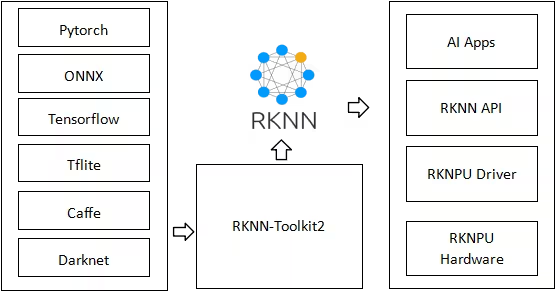
Rockchipは、NPUを内蔵したARMベースのシステムオンチップを設計しています。これらは、Radxa、ASUS、Pine64、Orange Pi、Odroid、Khadas、Banana Piなどの企業が提供するシングルボードコンピューターや組み込み製品に使われています。RKNN(Rockchip Neural Network)は、これらのNPUのモデル形式です。RKNN Toolkitを使うと、PC上でモデルを変換し、デバイス上で実行できます。
よくある質問#
ボード名ではなく、ボード上のプロセッサ名を使用してください。たとえば、Radxa Rock 5Bでは
rk3588、Radxa Zero 3Wではrk3566を使用します。ボード上でcat /proc/device-tree/compatibleを実行すると、Ultralyticsがチップ名として読み取る文字列が表示されます。あるチップ向けにエクスポートしたモデルは別のチップ向けには作られていないため、チップごとに一度ずつエクスポートしてください。使用できる名前については、対象チップをご覧ください。まずはデフォルトのFP16から始めてください。キャリブレーションデータは不要で、CPU上の2つ目のモデルを介さずに生の予測結果を返します。より小さく高速なモデルが必要な場合や、チップがINT8専用の場合はINT8(
quantize=8)を選択してください。RK3588向けYOLO26nはINT8で4.3 MB、FP16で7.4 MBです。また、以前のエクスポートで測定されたベンチマークでは、YOLO26nの推論時間はINT8で画像あたり41.2 ms、FP16で58.5 msでした。INT8には代表的なキャリブレーションデータが必要です。また、検出、セグメンテーション、姿勢推定、OBBモデルでは、tail.onnxを使ってCPU上でボックスのデコードを実行します。選択する前に、実際のデバイスでレイテンシと精度を測定してください。YOLO()ではできません。RKNNモデルはRockchipデバイス上でのみ読み込まれます。PC上でモデル自体を確認するには、PyTorchチェックポイント、またはエクスポート時にディレクトリの隣に生成される中間のyolo26n.onnxファイルを、ONNX Runtimeで検証してください。RKNNモデルはそのグラフから変換されます。特にINT8では量子化によって出力が変わるため、この検証はデバイス上での検証の代わりにはなりません。はい。各アクセラレーターに対応したエクスポート形式を使用してください。RKNNモデルはRockchip NPU上でのみ実行できます。NVIDIA JetsonについてはTensorRT、Hailo、Axelera、DeepX、Coral Edge TPUをご覧ください。概要については、モデルデプロイオプションガイドをご覧ください。


コメント45
質問したり、結果を共有したり、ほかの人をサポートしたりできます。
as-jackson
We are pleased to confirm that the following ArmSoM boards based on Rockchip RK3576 have been successfully tested with Ultralytics projects (e.g., YOLO11n):
Validation Scope:
Model training/inference pipeline
1yizi72
I tried to convert the yolo11n.pt into a rknn model through codes below: from ultralytics import YOLO model = YOLO("yolo11n.pt") model.export(format="rknn", name="rk3588") and everything went correct. A rknn model named yolo11n-rk3588.rknn was build and used to infer a very traditional yolo demo image "bus"(a blue bus with several people in front of it), but no detection result was obtained.
I tried to convert the yolol11n.pt into onnx model through above codes firstly, and then used a convert.py offered by rknn_model_zoo/examples/yolo11/python,
import sys from rknn.api import RKNN
DATASET_PATH = '../../../datasets/COCO/coco_subset_20.txt' DEFAULT_RKNN_PATH = '/home/yizi/model/yolo11/yolodet.rknn' DEFAULT_QUANT = False
def parse_arg(): if len(sys.argv) < 3: print("Usage: python3 {} onnx_model_path [platform] [dtype(optional)] [output_rknn_path(optional)]".format(sys.argv[0])) print(" platform choose from [rk3562,rk3566,rk3568,rk3588,rk3576,rk1808,rv1109,rv1126]") print(" dtype choose from [i8, fp] for [rk3562,rk3566,rk3568,rk3588,rk3576]") print(" dtype choose from [u8, fp] for [rk1808,rv1109,rv1126]") exit(1)
model_path = sys.argv[1]
platform = sys.argv[2]

do_quant = DEFAULT_QUANT
if len(sys.argv) > 3:
    model_type = sys.argv[3]
    if model_type not in ['i8', 'u8', 'fp']:
        print("ERROR: Invalid model type: {}".format(model_type))
        exit(1)
    elif model_type in ['i8', 'u8']:
        do_quant = True
    else:
        do_quant = False

if len(sys.argv) > 4:
    output_path = sys.argv[4]
else:
    output_path = DEFAULT_RKNN_PATH

return model_path, platform, do_quant, output_path
if name == 'main': model_path, platform, do_quant, output_path = parse_arg()
# Create RKNN object
rknn = RKNN(verbose=False)

# Pre-process config
print('--> Config model')
rknn.config(mean_values=[[0, 0, 0]], std_values=[[255, 255, 255]], target_platform=platform)
print('done')

# Load model
print('--> Loading model')
ret = rknn.load_onnx(model=model_path)
if ret != 0:
    print('Load model failed!')
    exit(ret)
print('done')

# Build model
print('--> Building model')
ret = rknn.build(do_quantization=do_quant, dataset=DATASET_PATH)
if ret != 0:
    print('Build model failed!')
    exit(ret)
print('done')

# Export rknn model
print('--> Export rknn model')
ret = rknn.export_rknn(output_path)
if ret != 0:
    print('Export rknn model failed!')
    exit(ret)
print('done')

# Release
rknn.release()
Still everything went correct. A rknn model was created and applied to "bus.jpg", and there was no detection at all. I wonder what's wrong in the whole process?
1 Glenn JocherUltralytics
@yizi72 thanks for the detailed report. For RKNN inference issues with YOLO11, please ensure:
- You're using matching RKNN Toolkit and runtime versions (update both if needed)
- Input images are 640x640 with pixel values normalized 0-255
- You load models via
YOLO('./yolo11n_rknn_model')as shown in our RKNN deployment docs
If issues persist, please share your full environment details and validation results from both export methods.
1、I used rknn-toolkit2-2.3.0 which is the latest version ,bu I still did "pip install rknn-toolkit2 --upgrade" again. 2、The input image is 640*640, uchar, 0-255. 3. I used the following setting to transfer yolo11n.pt to onnx, from ultralytics import YOLO
加载一个模型,路径为 YOLO 模型的 .pt 文件
model = YOLO("yolo11n.pt")
导出模型,设置多种参数
model.export( format="onnx", imgsz=(640, 640),
keras=False,
optimize=True,
half=False,
int8=False,
dynamic=False,
simplify=True,
opset=12,
#workspace=4.0,
nms=False,
batch=1
) and applied the following codes to verify yolo11n.onnx model:from ultralytics import YOLO from PIL import Image
Load a model
model = YOLO("/home/yizi/models/yolo11/yolo11n.onnx") # load an official model
Predict with the model
results = model("bus.jpg") # predict on an image #results = rknn_model("bus.jpg")
Access the results
for result in results: xywh = result.boxes.xywh # center-x, center-y, width, height xywhn = result.boxes.xywhn # normalized xyxy = result.boxes.xyxy # top-left-x, top-left-y, bottom-right-x, bottom-right-y xyxyn = result.boxes.xyxyn # normalized names = [result.names[cls.item()] for cls in result.boxes.cls.int()] # class name of each box confs = result.boxes.conf # confidence score of each box
The results are good. All objects in bus.jpg were detected. Then I run the following code to transfer onnx to rknn:
from rknn.api import RKNN import cv2 import numpy as np
if name == 'main': rknn = RKNN(verbose=True,verbose_file="log.txt") rknn.config( mean_values=[[0, 0, 0]], std_values=[[255, 255, 255]], target_platform="rk3588", optimization_level=3 )
rknn.load_onnx(
    model="/home/yizi/models/yolo11/yolo11n.onnx",
    input_size_list=[[1,3,640,640]],
)
rknn.build(
    do_quantization=False
)

rknn.export_rknn(
    export_path="/home/yizi/models/yolo11/yolo11n.rknn"
)

rknn.release()
The transferring process went smooth, two problems appeared.
Firstly,when this rknn model was pushed into a rk3588 tablet, and run with a binary executable file generated by cross-compilation, no result was detected.
Secondly, I tried to run the following codes:
from ultralytics import YOLO from PIL import Image
rknn_model = YOLO("/home/yizi/models/yolo11/yolo11n.rknn", task=detect)
results = model("bus.jpg")
An error message, "model='/home/yizi/models/yolo11/yolo11n.rknn' is not a supported model format. Ultralytics supports: ('PyTorch', 'TorchScript', 'ONNX', 'OpenVINO', 'TensorRT', 'CoreML', 'TensorFlow SavedModel', 'TensorFlow GraphDef', 'TensorFlow Lite', 'TensorFlow Edge TPU', 'TensorFlow.js', 'PaddlePaddle', 'MNN', 'NCNN', 'IMX', 'RKNN') See https://docs.ultralytics.com/modes/predict for help. " appeared.
Last question, how many outputs does yolo11 yield? one or six?
- Glenn JocherUltralytics
@yizi72 thank you for the detailed report. For RKNN deployment issues:
- When using Ultralytics RKNN export, load models via the exported directory (not .rknn file), as shown in our RKNN deployment docs:
model = YOLO('./yolo11n_rknn_model') # directory path-
Ensure your RK3588 runtime uses matching librknnrt.so versions with your RKNN Toolkit 2.3.0 installation
-
YOLO11 detection models output 3 tensors by default (different from older YOLO versions). For conversion issues, we recommend using our native
model.export(format='rknn')rather than manual ONNX conversion.
Let me know if you still face issues after verifying these points.
Thanks for replies. I did verify all points you've mentioned above. When running model("bus.jpg"), error messages show:
File "/home/yizi/anaconda3/envs/rknn/lib/python3.9/site-packages/ultralytics/engine/model.py", line 182, in call return self.predict(source, stream, **kwargs) File "/home/yizi/anaconda3/envs/rknn/lib/python3.9/site-packages/ultralytics/engine/model.py", line 543, in predict self.predictor.setup_model(model=self.model, verbose=is_cli) File "/home/yizi/anaconda3/envs/rknn/lib/python3.9/site-packages/ultralytics/engine/predictor.py", line 378, in setup_model self.model = AutoBackend( File "/home/yizi/anaconda3/envs/rknn/lib/python3.9/site-packages/torch/utils/_contextlib.py", line 116, in decorate_context return func(*args, **kwargs) File "/home/yizi/anaconda3/envs/rknn/lib/python3.9/site-packages/ultralytics/nn/autobackend.py", line 495, in init raise OSError("RKNN inference is only supported on Rockchip devices.") OSError: RKNN inference is only supported on Rockchip devices.
It's very strange because I did connect a RK3588 tablet with my virtual machine.
I still have a quesiton on yolo11n output: yolo11n.pt has one output with shape (1, 84, 8400), and yolo11n-rk3588.rknn has one output with shape (1,84, 8400, 0). Are they correct? If so, can I use the similar codes to analyze rknn output, such as :
for result in results: xywh = result.boxes.xywh # center-x, center-y, width, height xywhn = result.boxes.xywhn # normalized xyxy = result.boxes.xyxy # top-left-x, top-left-y, bottom-right-x, bottom-right-y xyxyn = result.boxes.xyxyn # normalized names = [result.names[cls.item()] for cls in result.boxes.cls.int()] # class name of each box confs = result.boxes.conf
- Glenn JocherUltralytics
@yizi72 thanks for the details. For the RKNN inference error: ensure your Python script is running directly on the RK3588 hardware (not through a VM) as RKNN models require native Rockchip NPU access. Regarding outputs, YOLO11 detection models produce 3 output tensors by default (see our RKNN deployment docs), but your code should work if using the exported RKNN directory with the included postprocessing. Let me know if you still face issues after verifying native hardware execution.
 Yufeng Wu
Hello, Ultralytics team. I wonder if it's possible to port yolo26n-pose to rknn? I'm not sure if it's difficult to work out on my own? Is there any model architecture problems that prevent porting the pose models to rknn?
- Glenn JocherUltralytics
@kamosmkey exports fine. See https://platform.ultralytics.com/glenn-jocher/example-project/exp-24?tab=export
2
montemadjo
It appears it does not support rv1106 platform yet
When I try to export the model using this command
model.export(format="rknn", name="rv1106", imgsz=320)It gives the following error
E build: Current target_platform(rv1106) not support do_quantization = False!
E export_rknn: RKNN model does not exist, please load & build model first!
🤔
- Glenn JocherUltralytics(編集済み)
rv1106is an INT8-only target, so it needs a quantized RKNN build. Older Ultralytics releases always built withdo_quantization=False, which fails with the message you saw. Current releases support it: upgrade withpip install -U ultralyticsand export withquantize=8plus calibration data:model.export(format="rknn", name="rv1106", imgsz=320, quantize=8, data="coco8.yaml")See the Rockchip RKNN export guide. If it still fails, share your
!yolo checksoutput andrknn-toolkit2version here and we can sanity-check the environment.1 Here's the quick workaround for those who want to work with yolo26 on RV1106 chip (like Luckfox pico etc). I ran into a couple of issues there, including quantization erasing my confidence results.
Long story short - first you need to monkey-patch head.Detect.forward function in order to get two tensors - one for bboxes and one for scores. That way you escape all the heavy non-supported tensor functions. Then you export your yolo26 model to onnx format and finally to rknn like this
import torch
from ultralytics.nn.modules import head

# 1. First we monkey-patch the forward function
def patched_forward(self, x):
    if self.end2end:
        h = self.one2one
    else:
        h = self.one2many

    box_head = h["box_head"]
    cls_head = h["cls_head"]

    if box_head is None or cls_head is None:
        raise RuntimeError("Head moduls are None")

    bs = x[0].shape[0]
    boxes = torch.cat([box_head[i](x[i]).view(bs, 4 * self.reg_max, -1) for i in range(self.nl)], dim=-1)
    scores = torch.cat([cls_head[i](x[i]).view(bs, self.nc, -1) for i in range(self.nl)], dim=-1)

    preds = {"boxes": boxes, "scores": scores, "feats": x}
    y = self._inference(preds)

    # We are splitting into 2 tensors - both gets its own scale/zp at INT8 quantization
    bboxes = y[:, :4, :]   # [1, 4, 2100] — range 0-640
    scores = y[:, 4:, :]   # [1, 1, 2100] — range 0-1 (already sigmoid-ed)
    score_max_idx = scores[0, 0, :].argmax()
    return bboxes, scores

head.Detect.forward = patched_forward

# 2. Then we export to onnx model (we got best.pt model from ultralytics platform)
from ultralytics import YOLO
model = YOLO("best.pt")
model.export(format="onnx", dynamic=False, opset=12, imgsz=320)

# 3. Then we export to RKNN format
from rknn.api import RKNN

rknn = RKNN()

# 3.1. Konfiguracija specifična za RV1106
rknn.config(
    mean_values=[[0, 0, 0]],
    std_values=[[255, 255, 255]],
    target_platform='rv1106',
    quantized_algorithm='normal', # Ili 'mmse' za bolju preciznost
    quantized_dtype='asymmetric_quantized-8'
)

# 3.2. Load the ONNX model
print("Loading ONNX model...")
rknn.load_onnx(model='best.onnx')

# 3.3. Build modela sa INT8 kvantizacijom
# calib.txt should contain paths to calibration images
print("Building RKNN model with quantization...")
rknn.build(do_quantization=True, dataset='./calib.txt')

# 3.4. Exporting final .rknn file
print("Exporting RKNN model...")
rknn.export_rknn('./yolo26_rv1106_model_optimized.rknn')

rknn.release()
After this you need to postprocess those two outputs like this
yolo26_postprocess.h
/**
 * YOLO26 Post-processing header for Fish Counter
 *
 * Supports YOLO26 2-output format: boxes [1, 4, N] + scores [1, nc, N]
 *
 * Based on the working rknn_minimal_test example.
 */

#ifndef _YOLO26_POSTPROCESS_H_
#define _YOLO26_POSTPROCESS_H_

#include <stdint.h>
#include <vector>
#include "rknn_api.h"
#include "rknn_detector.h"

// YOLO26 model configuration defaults
#define YOLO26_CONF_THRESHOLD 0.25f
#define YOLO26_NMS_THRESHOLD 0.45f

// Detection result (same structure as postprocess.h for compatibility)
typedef struct
{
    float x1, y1, x2, y2; // Bounding box (in model coordinates)
    float confidence;
    int class_id;
} yolo26_detection_t;

// YOLO26 context for format detection and caching
typedef struct
{
    int num_predictions;
    int num_classes;
    bool boxes_transposed; // true = [1, 4, N], false = [1, N, 4]
} yolo26_context_t;

/**
 * Initialize YOLO26 post-processing
 * Detects the output format from model attributes
 *
 * @param app_ctx The RKNN app context with model info
 * @param yolo26_ctx Output: YOLO26 context for format info
 * @return 0 on success, -1 on error
 */
int yolo26_init_postprocess(rknn_app_context_t *app_ctx, yolo26_context_t *yolo26_ctx);

/**
 * Deinitialize YOLO26 post-processing
 */
void yolo26_deinit_postprocess();

/**
 * YOLO26 post_process: processes model outputs and returns detections
 * Uses 2-output format: boxes [1, 4, N] + scores [1, nc, N]
 *
 * @param app_ctx The RKNN app context
 * @param yolo26_ctx YOLO26 context from init
 * @param outputs Pointer to output tensor memory array
 * @param letter_box Letterbox transform info for coordinate mapping
 * @param conf_threshold Confidence threshold
 * @param nms_threshold NMS threshold
 * @param od_results Output: detection results (compatible with existing code)
 * @return 0 on success, -1 on error
 */
int yolo26_post_process(rknn_app_context_t *app_ctx, yolo26_context_t *yolo26_ctx,
                        void *outputs, letterbox_t *letter_box,
                        float conf_threshold, float nms_threshold,
                        object_detect_result_list *od_results);

#endif // _YOLO26_POSTPROCESS_H_
yolo26_postprocess.cc
/**
 * YOLO26 Post-processing for Fish Counter on RV1106
 *
 * Supports YOLO26 2-output format: boxes [1, 4, N] + scores [1, nc, N]
 *
 * Based on the working rknn_minimal_test example.
 */

#include "yolo26_postprocess.h"

#include <math.h>
#include <stdint.h>
#include <stdio.h>
#include <stdlib.h>
#include <string.h>
#include <algorithm>
#include <vector>

// Clamp value to range
inline static int clamp(float val, int min, int max)
{
    return val > min ? (val < max ? val : max) : min;
}

// Dequantize INT8 to float
static inline float dequantize(int8_t qnt, int32_t zp, float scale)
{
    return ((float)qnt - (float)zp) * scale;
}

// Sigmoid function
static inline float sigmoid(float x)
{
    return 1.0f / (1.0f + expf(-x));
}

// Calculate IoU between two boxes
static float calculate_iou(float x1_a, float y1_a, float x2_a, float y2_a,
                           float x1_b, float y1_b, float x2_b, float y2_b)
{
    float x1 = std::max(x1_a, x1_b);
    float y1 = std::max(y1_a, y1_b);
    float x2 = std::min(x2_a, x2_b);
    float y2 = std::min(y2_a, y2_b);

    float inter_w = std::max(0.0f, x2 - x1);
    float inter_h = std::max(0.0f, y2 - y1);
    float inter_area = inter_w * inter_h;

    float area_a = (x2_a - x1_a) * (y2_a - y1_a);
    float area_b = (x2_b - x1_b) * (y2_b - y1_b);
    float union_area = area_a + area_b - inter_area;

    return union_area > 0 ? inter_area / union_area : 0;
}

// Non-Maximum Suppression for YOLO26 detections
static std::vector<yolo26_detection_t> yolo26_nms(std::vector<yolo26_detection_t> &detections, float nms_threshold)
{
    // Sort by confidence (descending)
    std::sort(detections.begin(), detections.end(),
              [](const yolo26_detection_t &a, const yolo26_detection_t &b)
              { return a.confidence > b.confidence; });

    std::vector<yolo26_detection_t> result;
    std::vector<bool> suppressed(detections.size(), false);

    for (size_t i = 0; i < detections.size(); i++)
    {
        if (suppressed[i])
            continue;

        result.push_back(detections[i]);

        for (size_t j = i + 1; j < detections.size(); j++)
        {
            if (suppressed[j])
                continue;

            // Only suppress same class
            if (detections[i].class_id != detections[j].class_id)
                continue;

            float iou = calculate_iou(
                detections[i].x1, detections[i].y1, detections[i].x2, detections[i].y2,
                detections[j].x1, detections[j].y1, detections[j].x2, detections[j].y2);

            if (iou > nms_threshold)
            {
                suppressed[j] = true;
            }
        }
    }

    return result;
}

// Parse YOLO26 2-output format: boxes [1, 4, N] + scores [1, nc, N]
static std::vector<yolo26_detection_t> parse_yolo26_2output(
    rknn_tensor_mem **output_mems,
    rknn_tensor_attr *output_attrs,
    int model_width, int model_height,
    float conf_threshold, int num_classes,
    bool boxes_transposed)
{
    std::vector<yolo26_detection_t> detections;

    int8_t *boxes_data = (int8_t *)output_mems[0]->virt_addr;
    int32_t boxes_zp = output_attrs[0].zp;
    float boxes_scale = output_attrs[0].scale;

    int8_t *scores_data = (int8_t *)output_mems[1]->virt_addr;
    int32_t scores_zp = output_attrs[1].zp;
    float scores_scale = output_attrs[1].scale;

    // Determine number of anchors
    int num_anchors;
    if (boxes_transposed)
    {
        num_anchors = output_attrs[0].dims[2];
    }
    else
    {
        num_anchors = output_attrs[0].dims[1];
    }

    // Check if scores are already sigmoid or logits
    float scores_min = 9999, scores_max = -9999;
    for (int i = 0; i < (int)output_attrs[1].n_elems; i++)
    {
        float val = dequantize(scores_data[i], scores_zp, scores_scale);
        if (val < scores_min)
            scores_min = val;
        if (val > scores_max)
            scores_max = val;
    }
    bool scores_are_sigmoid = (scores_min >= -0.1f && scores_max <= 1.1f);

    for (int i = 0; i < num_anchors; i++)
    {
        // Get box coordinates
        float x1, y1, x2, y2;
        if (boxes_transposed)
        {
            // [1, 4, N] - channel first
            x1 = dequantize(boxes_data[0 * num_anchors + i], boxes_zp, boxes_scale);
            y1 = dequantize(boxes_data[1 * num_anchors + i], boxes_zp, boxes_scale);
            x2 = dequantize(boxes_data[2 * num_anchors + i], boxes_zp, boxes_scale);
            y2 = dequantize(boxes_data[3 * num_anchors + i], boxes_zp, boxes_scale);
        }
        else
        {
            // [1, N, 4] - anchor first
            x1 = dequantize(boxes_data[i * 4 + 0], boxes_zp, boxes_scale);
            y1 = dequantize(boxes_data[i * 4 + 1], boxes_zp, boxes_scale);
            x2 = dequantize(boxes_data[i * 4 + 2], boxes_zp, boxes_scale);
            y2 = dequantize(boxes_data[i * 4 + 3], boxes_zp, boxes_scale);
        }

        // Check if format is xywh instead of xyxy
        if (x2 < x1 || y2 < y1)
        {
            // Assume xywh format: convert to xyxy
            float cx = x1, cy = y1, w = x2, h = y2;
            x1 = cx - w / 2.0f;
            y1 = cy - h / 2.0f;
            x2 = cx + w / 2.0f;
            y2 = cy + h / 2.0f;
        }

        // Find max class score
        float max_score = -9999;
        int max_class = 0;
        for (int c = 0; c < num_classes; c++)
        {
            float score;
            if (boxes_transposed)
            {
                // [1, nc, N]
                score = dequantize(scores_data[c * num_anchors + i], scores_zp, scores_scale);
            }
            else
            {
                // [1, N, nc]
                score = dequantize(scores_data[i * num_classes + c], scores_zp, scores_scale);
            }

            if (!scores_are_sigmoid)
            {
                score = sigmoid(score);
            }

            if (score > max_score)
            {
                max_score = score;
                max_class = c;
            }
        }

        if (max_score < conf_threshold)
            continue;

        // Clamp to model bounds
        x1 = std::max(0.0f, std::min(x1, (float)model_width));
        y1 = std::max(0.0f, std::min(y1, (float)model_height));
        x2 = std::max(0.0f, std::min(x2, (float)model_width));
        y2 = std::max(0.0f, std::min(y2, (float)model_height));

        // Skip invalid boxes
        if (x2 <= x1 || y2 <= y1)
            continue;

        yolo26_detection_t det;
        det.x1 = x1;
        det.y1 = y1;
        det.x2 = x2;
        det.y2 = y2;
        det.confidence = max_score;
        det.class_id = max_class;

        detections.push_back(det);
    }

    return detections;
}

int yolo26_init_postprocess(rknn_app_context_t *app_ctx, yolo26_context_t *yolo26_ctx)
{
    if (!app_ctx || !yolo26_ctx)
    {
        printf("[YOLO26] ERROR: Invalid parameters\n");
        return -1;
    }

    memset(yolo26_ctx, 0, sizeof(yolo26_context_t));

    int n_output = app_ctx->io_num.n_output;

    printf("[YOLO26] Initializing 2-output format (%d outputs)...\n", n_output);

    // Print output tensor info
    for (int i = 0; i < n_output; i++)
    {
        printf("  Output %d: dims=[%d,%d,%d,%d], size=%d\n", i,
               app_ctx->output_attrs[i].dims[0],
               app_ctx->output_attrs[i].dims[1],
               app_ctx->output_attrs[i].dims[2],
               app_ctx->output_attrs[i].dims[3],
               app_ctx->output_attrs[i].size);
    }

    if (n_output != 2)
    {
        printf("[YOLO26] ERROR: Expected 2 outputs (boxes + scores), got %d\n", n_output);
        return -1;
    }

    // Parse 2-output format: boxes + scores
    int boxes_dim1 = app_ctx->output_attrs[0].dims[1];
    int boxes_dim2 = app_ctx->output_attrs[0].dims[2];
    int scores_dim1 = app_ctx->output_attrs[1].dims[1];
    int scores_dim2 = app_ctx->output_attrs[1].dims[2];

    if (boxes_dim1 == 4)
    {
        // [1, 4, N] boxes format
        yolo26_ctx->num_predictions = boxes_dim2;
        yolo26_ctx->boxes_transposed = true;
        yolo26_ctx->num_classes = scores_dim1;
        printf("[YOLO26] Format: boxes [1,4,%d], scores [1,%d,%d]\n",
               boxes_dim2, scores_dim1, scores_dim2);
    }
    else if (boxes_dim2 == 4)
    {
        // [1, N, 4] boxes format
        yolo26_ctx->num_predictions = boxes_dim1;
        yolo26_ctx->boxes_transposed = false;
        yolo26_ctx->num_classes = scores_dim2;
        printf("[YOLO26] Format: boxes [1,%d,4], scores [1,%d,%d]\n",
               boxes_dim1, scores_dim1, scores_dim2);
    }
    else
    {
        printf("[YOLO26] ERROR: Invalid boxes dimensions [1,%d,%d], expected [1,4,N] or [1,N,4]\n",
               boxes_dim1, boxes_dim2);
        return -1;
    }

    printf("[YOLO26] Predictions: %d, Classes: %d\n",
           yolo26_ctx->num_predictions, yolo26_ctx->num_classes);

    return 0;
}

void yolo26_deinit_postprocess()
{
    // Nothing to cleanup currently
}

int yolo26_post_process(rknn_app_context_t *app_ctx, yolo26_context_t *yolo26_ctx,
                        void *outputs, letterbox_t *letter_box,
                        float conf_threshold, float nms_threshold,
                        object_detect_result_list *od_results)
{
    if (!app_ctx || !yolo26_ctx || !outputs || !letter_box || !od_results)
    {
        return -1;
    }

    rknn_tensor_mem **output_mems = (rknn_tensor_mem **)outputs;

    int model_width = app_ctx->model_width;
    int model_height = app_ctx->model_height;

    // Parse 2-output format
    std::vector<yolo26_detection_t> raw_detections = parse_yolo26_2output(
        output_mems,
        app_ctx->output_attrs,
        model_width, model_height,
        conf_threshold,
        yolo26_ctx->num_classes > 0 ? yolo26_ctx->num_classes : 1,
        yolo26_ctx->boxes_transposed);

    // Apply NMS
    std::vector<yolo26_detection_t> final_detections = yolo26_nms(raw_detections, nms_threshold);

    // Convert to output format with letterbox coordinate mapping
    memset(od_results, 0, sizeof(object_detect_result_list));
    int count = 0;

    for (const auto &det : final_detections)
    {
        if (count >= OBJ_NUMB_MAX_SIZE)
            break;

        // Map coordinates back to original image space
        float x1 = det.x1 - letter_box->x_pad;
        float y1 = det.y1 - letter_box->y_pad;
        float x2 = det.x2 - letter_box->x_pad;
        float y2 = det.y2 - letter_box->y_pad;

        // Scale back to original coordinates
        od_results->results[count].box.left = (int)(clamp(x1, 0, model_width) / letter_box->scale);
        od_results->results[count].box.top = (int)(clamp(y1, 0, model_height) / letter_box->scale);
        od_results->results[count].box.right = (int)(clamp(x2, 0, model_width) / letter_box->scale);
        od_results->results[count].box.bottom = (int)(clamp(y2, 0, model_height) / letter_box->scale);
        od_results->results[count].prop = det.confidence;
        od_results->results[count].cls_id = det.class_id;

        count++;
    }

    od_results->count = count;

    return 0;
}
And you're good to go! 🚀
- Glenn JocherUltralytics(編集済み)
Thanks for sharing this—splitting the head into 2 outputs (boxes + scores) is a sensible RV1106 workaround to keep RKNN-friendly ops and avoid INT8 scale/zero-point coupling issues; just note that monkey-patching
head.Detect.forwardis inherently version-fragile. Current Ultralytics already provides an INT8 flow for RV1106 viaquantize=8withdata=calibration images (see the Rockchip RKNN export guide), so please try that first. If you still need your custom split, open a GitHub issue linking back to this thread and include!yolo checks, yourrknn-toolkit2version, and a minimal calibration set description so we can evaluate it.
dttvn0010
99ms per image is too bad. Using rknn native with 3 npu cores, I can achieve ~11ms per image
NikolayKash
Hi, what did you done to achieve this performance?
- Glenn JocherUltralytics
@Arshapjoy thanks for the detailed info; for YOLO11 detection heads the export output shape is
(1, nc + 4, 8400)(4 box coords plusncclass scores), so with 2 classes(1, 6, 8400)is expected and both classes are present, whereas a postprocessor assuming5 + nc(old YOLO layout with an extra objectness channel) will effectively drop one class. I’d suggest updating your RKNN-side decoder to treat channels[0:4]as[x, y, w, h]and[4:]as class logits for allncclasses; if you still see a true(1, 7, 8400)PyTorch output on the same checkpoint, please share yourultralyticsversion andyolo checksoutput so we can dig deeper. The overall YOLO11 head behaviour is also outlined in the YOLO11 model documentation.@BakhtiariB the high-level
YOLO("./yolo11n_rknn_model")interface is designed to keep preprocessing, NPU inference and postprocessing together, so if you need to run only the core RKNN inference on the NPU while fully controlling pre/post on the CPU you’ll need to load the exported.rknnwith Rockchip’sRKNNAPI directly and implement your own preprocessing and YOLO11 postprocessing around it.@dttvn0010 the ~99 ms figure is a conservative end-to-end pipeline measurement on our RK3588 test setup, so seeing ~11 ms from a highly tuned RKNN deployment using all three NPU cores is quite reasonable; if you are open to sharing your exact model variant, quantization mode, input size and NPU core configuration, we can use that to cross-check and better explain the gap between baseline and fully optimized numbers.
@NikolayKash in practice, large gains like that usually come from combining INT8-quantized RKNN models, all three NPU cores enabled, a suitable input resolution and very lean Python-side pre/postprocessing, so it would be great if @dttvn0010 can share their exact script and RK3588 configuration for others to replicate.
guojieli
he YOLO11 benchmark was run by the Ultralytics team on a Radxa Rock 5B based on the Rockchip RK3588, using the RKNN model format to evaluate speed and accuracy. Could you please clarify whether this was an INT8-quantized model?
- Glenn JocherUltralytics(編集済み)
Those RKNN benchmarks were not INT8-quantized; they used the floating-point RKNN build. INT8 RKNN export is now available with
quantize=8anddata=for calibration; see the Rockchip RKNN export guide.
BakhtiariB
I used ultralytics for rk3588 by below code, but i want do inference in NPU and do preprocess and postprocess in CPU, how can separate them. while, in below code, line: "results = rknn_model("https://ultralytics.com/images/bus.jpg")" just all of them!
from ultralytics import YOLO
Load the exported RKNN model
rknn_model = YOLO("./yolo11n_rknn_model")
Run inference
results = rknn_model("https://ultralytics.com/images/bus.jpg")
Arshapjoy
Exported RKNN/ONNX model only has 1 output class instead of 2
Overview
I’m using Ultralytics YOLOv11s with two custom classes and exporting it to ONNX and RKNN formats. After conversion, inference on the RKNN device only detects a single class, and the output tensor shape is
(1, 6, 8400)instead of the expected(1, 7, 8400). I’ve validated that the source.ptmodel correctly reports 2 classes, but both ONNX and RKNN exports drop one class.
Model Details
- Checkpoint path:
path/to/yolo11s_custom.pt - Number of classes: 2
- Input size: 640×640
from ultralytics import YOLO
Load the YOLO11 model
model = YOLO("custom_yolo11s.pt")
Export the model to RKNN format
rknn_path = model.export(format="rknn", name="rk3588") print(f"RKNN model saved to: {rknn_path}")
Actual Behavior
- Received ONNX , RKNN and metadata.yaml after conversion
- Exported ONNX model output shape:
(1, 6, 8400) - Exported RKNN model output shape:
(1, 6, 8400) - Only one class is detected during inference on the RK3588 board.
7. Logs & Metadata
- metadata.yaml generated alongside the RKNN model:
model: name: yolo11s_custom format: rknn input_shape: [1, 3, 640, 640] output_shape: [1, 6, 8400] classes: 2 - ONNX graph info: Attached minimal
onnx.shape_inferencelog shows only 6 channels in the final layer.
8. Additional Notes
- Manual ONNX export yields the same issue, so it’s unlikely to be an Ultralytics export bug alone.
- I’ve confirmed that the PyTorch forward pass on the
.ptcheckpoint produces a shape(1, 7, 8400).
9. Request Could you please:
- Confirm whether there’s an option/flag in the YOLO-Ultralytics or RKNN export pipeline I’m missing to preserve all classes.
- Suggest any workarounds or patches to ensure correct output-channel dimensionality.
- Identify if this might be a known issue in RKNN-Toolkit 1.5.0 or Ultralytics YOLO v11.
Thank you for your assistance!
- Checkpoint path:
WeiIIzz
Hello, when I exported the rknn model, I performed int8 quantization, but I had an error like this: E build: If set do_quantization = True, dataset file need be provided. But it`s value is None! E export_rknn: RKNN model does not exist, please load build model first! My export code is: from ultralytics import YOLO
model = YOLO("/home/ky/dfxw/runs/detect/train3/weights/best.pt") model.export(format="rknn", name="rk3576", int8=True, data="/home/ky/rknn_yolo_test/data.yaml") The path pointed to by data is the same as the training dataset. How to solve it
The content of data.yaml is as follows path: /home/ky/dfxw/split_jiaqian # dataset root dir train: images/train val: images/val
names: 0: 0 1: 1
- Glenn JocherUltralytics(編集済み)
@WeiIIzz INT8 export for RKNN is supported with
quantize=8(it replaces the deprecatedint8=True) together withdatapointing to a dataset YAML, which Ultralytics converts into the calibration image list that RKNN needs:from ultralytics import YOLO model = YOLO("/home/ky/dfxw/runs/detect/train3/weights/best.pt") model.export(format="rknn", name="rk3576", quantize=8, data="/home/ky/rknn_yolo_test/data.yaml")The error you saw comes from an older version that did not pass a calibration dataset to RKNN, so run
pip install -U ultralyticsand retry. Make sure the YAML points to existing images. Let us know if this resolves your issue! @glenn-jocher I followed your steps to modify the code as follows. But I still encountered the same problem.
from ultralytics import YOLO

model = YOLO("/home/ky/dfxw/runs/detect/train3/weights/best.pt")
model.export(format="rknn", name="rk3576", int8=True, data="/home/ky/rknn_yolo_test/images")
Is there only images in the data path?
- Glenn JocherUltralytics(編集済み)
@WeiIIzz older releases ignored
int8=Truefor RKNN and built the model without quantization. Current Ultralytics supports INT8 RKNN export, so afterpip install -U ultralyticsyou can export with:model.export(format="rknn", name="rk3576", quantize=8, data="data.yaml")Here
datais used for the calibration images. Withoutquantize, the export builds a floating-point (FP16) model.
VictorAboba
Good day,
Is RKNN available for obb tasks? I tried to use it directly, but got an error saying that some operations (cos) are not available in RKNN. As a fix, RKNN suggested adding disable_rules = ['reduce_reshape_op_around_concat'] to my configuration. I actually did this inside the YOLO library. Model was exported first to ONNX and then from ONNX to RKNN works and returns the responses in the format (1,6,21504), which seems what I expected. However, if I use this model through YOLO ("path_to_rknn_model", task = 'obb'), will I still get the results in the standard YOLO format? I just don't want to prescribe pre - and post-processing on my own :)
Thank you!
- Glenn JocherUltralytics(編集済み)
@VictorAboba thank you for your question! RKNN export now supports all seven Ultralytics tasks, including OBB, so you can export OBB models directly with
format="rknn"and load the exported_rknn_modeldirectory withYOLO(...)to get standard YOLO results without writing your own pre- and post-processing. See the Rockchip RKNN guide for details. Spidrre
Hey! Did you notice any significant decrease in quality of your model after conversion? I am also trying to find a way to convert from OBB onnx to RKNN without 'reduce_reshape_op_around_concat'.
Hey! Did you notice any significant decrease in quality of your model after conversion? I am also trying to find a way to convert from OBB onnx to RKNN without 'reduce_reshape_op_around_concat'.
Hello, after @glenn-jocher answer, I didn't attempt to convert the OBB model. We have a few other models, and all of them except YOLO were converted to the RKNN format. We will try using this stuff (YOLO without an NPU and others with it) ^_^ After conversion, the OCR model, for example, has almost the same quality, but it doesn't need 'reduce_reshape_op_around_concat' to be used.