Ultralytics Solutions:YOLO26で現実世界の課題を解決
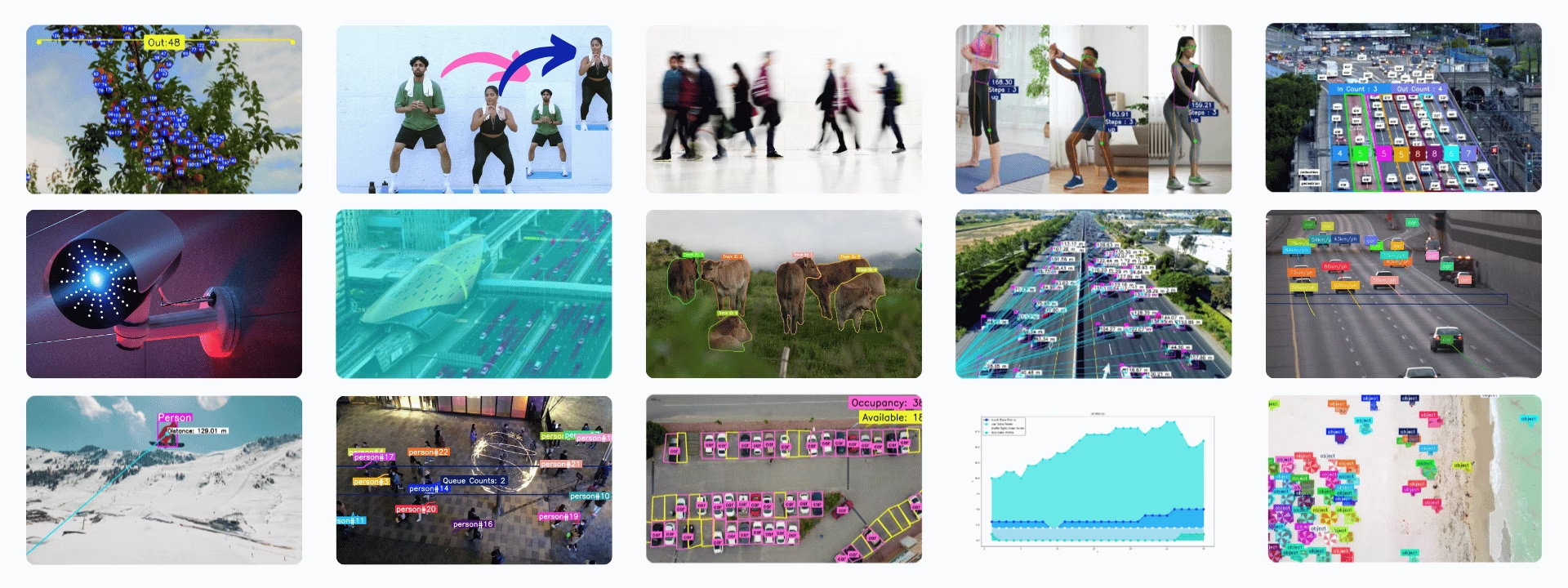
Ultralytics Solutionsは、コンピュータービジョンの一般的な課題に対応する、Ultralytics YOLOモデルのすぐに使えるアプリケーションです。物体カウント、ヒートマップ、速度推定、キュー管理、物体のぼかしなどに対応しています。ほとんどのソリューションは、検出、トラッキング、または姿勢推定を設定可能なクラスでラップしており、Pythonまたはyolo solutions CLIから実行できます。
視聴: コマンドライン(CLI)から Ultralytics Solutions を実行する方法 | Ultralytics YOLO26 🚀
Solutions#
以下の各ソリューションには、専用のガイドがあります。
- 分析: YOLO26の検出結果から折れ線グラフ、棒グラフ、円グラフ、面グラフを作成し、時間の経過に伴う傾向を分析します。
- 距離計算: YOLO26でバウンディングボックスの重心間の距離を計算し、空間分析を行います。
- ヒートマップ: YOLO26の検出結果をヒートマップに蓄積して重ね合わせ、物体が最も頻繁に出現または移動する場所を示します。
- 物体トラッキングを用いたインスタンスセグメンテーション: インスタンスセグメンテーションと物体トラッキングをYOLO26で組み合わせ、動画フレーム間で物体の輪郭を追跡します。
- Streamlitによるライブ推論: Streamlitインターフェースを通じて、Webブラウザー上でYOLO26によるリアルタイム物体検出を実行します。
- 物体のぼかし処理:YOLO26を使って画像や動画の処理時に物体をぼかし、プライバシーを保護します。
- 物体カウント: YOLO26を使用して、動画やライブストリーム内で線を横切る物体や領域に入る物体をカウントします。
- 領域内の物体カウント: YOLO26を使用して、ユーザーが定義した複数の領域内にある物体をカウントします。
- 物体の切り抜き: YOLO26を使用して画像や動画から検出した物体を切り抜き、それぞれを別の画像として保存します。
- OCR:YOLO26-Text検出器とPP-OCRv6認識機能を使用して、あらゆる回転角度のシーンや文書内のテキストを検出、認識、順序付けできます。また、PP-OCRv5言語モデルを使用して、韓国語、キリル文字、アラビア文字などを読み取れます。
- 駐車場管理: YOLO26を使用して、使用中と空きの駐車スペースを監視します。
- キュー管理:YOLO26を使用して待機列の領域内にいる人を数え、列の長さを監視します。
- セキュリティアラームシステム: YOLO26を使用してセキュリティアラームシステムを構築します。検出された物体の数がしきい値に達すると、メールでアラートを送信します。
- 類似度検索: OpenAI CLIPの埋め込みとコサイン類似度検索を組み合わせ、「バッグを持つ人」や「移動中の車両」などの自然言語クエリで画像を取得します。
- 速度推定: YOLO26と物体トラッキングを使用して物体の速度を推定します。交通モニタリングなどの用途に利用できます。
- ゾーン内の物体トラッキング: YOLO26を使用して、動画フレーム内の定義されたゾーンにある物体だけを追跡します。
- VisionEyeによる物体マッピング: 検出した物体を固定された観測点に関連付け、特定の物体に焦点を合わせる人間の目の働きを模倣します。
- ワークアウトのモニタリング: YOLO26の姿勢推定を使用して、運動の反復回数を数え、ワークアウトの段階をリアルタイムで追跡します。
Solutionsの引数#
| 引数 | 種類 | デフォルト | 説明 |
|---|---|---|---|
model | str | None | Ultralytics YOLOモデルファイルへのパスです。 |
region | listまたはdict | None | 関心領域を定義するポイントです。(x, y)タプルのリスト、または複数領域用に領域名とポイントリストを対応付ける辞書(RegionCounterのみ)を指定します。Noneの場合、領域が必要なSolutionsでは定義済みのデフォルト値が使用されます。 |
show_in | bool | True | 動画ストリームに入場数を表示するかどうかを制御するフラグです。 |
show_out | bool | True | 動画ストリームに退場数を表示するかどうかを制御するフラグです。 |
analytics_type | str | 'line' | グラフの種類です。line、bar、area、pieを指定できます。 |
colormap | int | cv2.COLORMAP_DEEPGREEN | ヒートマップに使用するカラーマップです。 |
line_width | int | 2 | Solutionが描画するボックス、キーポイント、カウント表示の線幅です。 |
verbose | bool | True | 各フレームの入力shape、クラス数、処理速度を記録するSolutionのログを有効にします。トラッキング呼び出し自体は常にログを出力しません。 |
json_file | str | None | すべての駐車座標データを含むJSONファイルへのパスです。 |
up_angle | float | 145.0 | 「上」ポーズの角度しきい値です。 |
kpts | list[int] | [6, 8, 10] | ワークアウトのモニタリングに使用する3つのキーポイントインデックスのリストです。これらのキーポイントは、腕立て伏せ、懸垂、スクワット、腹筋運動などで使用する肩、肘、手首といった身体の関節や部位に対応します。 |
down_angle | float | 90.0 | 「下」ポーズの角度しきい値です。 |
blur_ratio | float | 0.5 | ぼかしの強度をパーセンテージで調整します。値の範囲は 0.1 - 1.0 です。 |
crop_dir | str | 'cropped-detections' | 切り抜いた検出結果を保存するディレクトリ名です。 |
records | int | 5 | セキュリティ警報システムでメールを送信するトリガーとなる検出数の合計です。 |
vision_point | tuple[int, int] | (20, 20) | VisionEye Solutionを使用して、ビジョンがオブジェクトを追跡し、軌跡を描画する位置です。 |
source | str | None | 入力ソース(動画、RTSPなど)へのパスです。Solutionsのコマンドラインインターフェース(CLI)でのみ使用できます。 |
figsize | tuple[float, float] | (12.8, 7.2) | Analytics のチャートで使用するインチ単位の図のサイズです。(12.8, 7.2) は1280×720のフレームを描画します。 |
fps | float | 30.0 | 速度の計算に使用する1秒あたりのフレーム数です。 |
max_hist | int | 5 | 速度や方向の計算で、オブジェクトごとに追跡する履歴ポイントの最大数です。 |
meter_per_pixel | float | 0.05 | ピクセル距離を実世界の単位に変換するためのスケーリング係数です。 |
max_speed | int | 120 | 速度の上限(km/h)です。推定速度がこの値を超える場合、この値に制限されます。 |
data | str | 'images' | 類似検索に使用する画像ディレクトリへのパスです。 |
imgsz | int | 640 | モデル推論に使用する入力画像のサイズです。 |
recognizer | strまたはCallable | 'paddleocr' | テキスト認識バックエンド: 'paddleocr'(ONNX Runtime上のPP-OCRv6)、'tensorrt'(NVIDIA GPU上でFP16 TensorRTエンジンとして実行するPP-OCRv6)、'korean_PP-OCRv5_mobile_rec'のようなPaddleOCR言語モデル名、またはBGRクロップを受け取り、(text, confidence)を返す呼び出し可能オブジェクトです。 |
Solutionsは、以下の推論およびトラッキング引数をmodel.track()に渡します。
| 引数 | 種類 | デフォルト | 説明 |
|---|---|---|---|
tracker | str | 'tracktrack.yaml' | 使用するトラッキングアルゴリズムを指定します。組み込みのオプション:botsort.yaml、bytetrack.yaml、ocsort.yaml、deepocsort.yaml、fasttrack.yaml、tracktrack.yaml。 |
conf | float | 0.25 | 検出の信頼度しきい値を設定します。値を低くすると、より多くの物体を追跡できますが、誤検出が含まれる可能性があります。 |
iou | float | 0.5 | 重複する検出をフィルタリングするためのIntersection over Union(IoU)しきい値を設定します。 |
classes | list | None | クラスインデックスで結果をフィルタリングします。たとえば、classes=[0, 2, 3]を指定すると、指定したクラスのみを追跡します。 |
device | str | None | 推論に使用するデバイスを指定します(例:cpu、cuda:0、0)。モデル実行に使用するCPU、特定のGPU、その他の計算デバイスを選択できます。 |
imgsz | int or tuple | 640 | 推論時の入力画像サイズです。正方形の場合は整数、または(height, width)のペアを指定します。形状はモデルのストライドに合わせて調整されます。 |
max_det | int | 300 | トラッキング前にフレームごとに保持する検出の最大数です。混雑したシーンでソリューションが処理する物体数を制限します。 |
quantize | int or str | None | 推論精度: CPU以外で実行するPyTorchおよびTorchScriptモデルでは、16(FP16)または32/未設定(FP32)を使用します。その他の形式では、アーティファクトとランタイムによって選択される精度が使用されます。非推奨のhalf引数を置き換えます。 |
show_conf、show_labels、その他の説明済みの引数を使って、可視化をカスタマイズできます。
| 引数 | 種類 | デフォルト | 説明 |
|---|---|---|---|
show | bool | False | Trueの場合、注釈付き画像または動画をウィンドウに表示します。開発やテスト中にすぐ視覚的なフィードバックを得るのに便利です。 |
show_conf | bool | True | 各検出のラベルとともに信頼度スコアを表示します。各検出に対するモデルの確信度を確認できます。 |
show_labels | bool | True | 可視化出力で各検出のラベルを表示します。検出されたオブジェクトをすぐに把握できます。 |
SolutionAnnotatorの使用方法#
すべてのUltralytics SolutionsはSolutionAnnotatorクラスを使用します。このクラスはメインのAnnotatorクラスを拡張し、次のメソッドを提供します。
| メソッド | 戻り値の型 | 説明 |
|---|---|---|
draw_region() | None | 指定した点、色、太さを使って領域を描画します。 |
queue_counts_display() | None | 指定した領域内の行列人数を表示します。 |
display_analytics() | None | 駐車場管理の全体統計を表示します。 |
estimate_pose_angle() | float | 物体の姿勢における3点間の角度を計算します。 |
draw_specific_kpts() | np.ndarray | 画像上に指定したキーポイントを描画します。 |
plot_workout_information() | int | 画像上にラベル付きのテキストボックスを描画します。 |
plot_angle_and_count_and_stage() | None | ワークアウトのモニタリング用に、角度、ステップ数、ステージを可視化します。 |
plot_distance_and_line() | None | 重心間の距離を表示し、線で結びます。 |
display_objects_labels() | None | バウンディングボックスに物体クラスのラベルを付けます。 |
sweep_annotator() | None | 垂直なスイープラインと、任意のラベルを可視化します。 |
visioneye() | None | 物体の重心を視覚的な「目」のポイントにマッピングして接続します。 |
adaptive_label() | None | バウンディングボックスの中央に円形または長方形の背景付きラベルを描画します。 |
SolutionResultsの使用方法#
類似度検索を除くすべてのソリューションは、呼び出されるとSolutionResultsオブジェクトを返します。
- 物体カウントでは、結果に
in_count、out_count、classwise_countが含まれます。
import cv2

from ultralytics import solutions

im0 = cv2.imread("path/to/img")

region_points = [(20, 400), (1080, 400), (1080, 360), (20, 360)]

counter = solutions.ObjectCounter(
    show=True,  # 出力を表示する
    region=region_points,  # 領域の点を渡す
    model="yolo26n.pt",  # model="yolo26n-obb.pt"で、OBBモデルを使った物体カウントを行います。
    # classes=[0, 2],  # COCOの事前学習済みモデルで、人物や車など特定のクラスをカウントします。
    # tracker="botsort.yaml"  # bytetrack.yamlなどのトラッカーを選択します。
)
results = counter(im0)
print(results.in_count)  # display in_counts
print(results.out_count)  # display out_counts
print(results.classwise_count)  # display classwise_count
SolutionResults オブジェクトには、次の属性があります。
| 属性 | 種類 | 説明 |
|---|---|---|
plot_im | np.ndarray | カウント、ぼかし効果、ソリューション固有の機能強化などの視覚的なオーバーレイを含む画像です。 |
in_count | int | 動画ストリーム内で、定義されたゾーンに入る物体の合計数です。 |
out_count | int | 動画ストリーム内で、定義されたゾーンから出る物体の合計数です。 |
classwise_count | dict[str, dict[str, int] | int] | クラスごとのカウント:ObjectCounterとHeatmapでは{"IN": int, "OUT": int}、Analyticsではintです。 |
queue_count | int | 事前に定義された行列または待機エリア内に現在いる物体の数です(行列管理に適しています)。 |
workout_count | list[int] | AI Gymにおけるトラックごとのワークアウト反復回数(現在追跡中の個体ごとに1つのエントリー)。 |
workout_angle | list[float] | AI Gymにおけるトラックごとのエクササイズ角度(現在追跡中の個体ごとに1つのエントリー)。 |
workout_stage | list[str] | AI Gymにおけるトラックごとの現在のワークアウトステージ(現在追跡中の個体ごとに1つのエントリー)。 |
pixels_distance | float | バウンディングボックスなど、2つの物体または点のピクセル単位の距離です(距離計算に適しています)。 |
available_slots | int | 監視対象エリア内の空き駐車枠の数です(駐車場管理に適しています)。 |
filled_slots | int | 監視対象エリアの使用中の駐車スペース数です(駐車場管理に適しています)。 |
email_sent | bool | 通知またはアラートメールが正常に送信されたかどうかを示します(セキュリティアラームに適しています)。 |
total_tracks | int | 動画分析中に観測された、重複のない物体トラックの合計数です。 |
region_counts | dict[str, int] | ユーザー定義の領域またはゾーン内のオブジェクト数です。 |
speed_dict | dict[int, int] | SpeedEstimatorによって推定された速度をkm/h単位でトラックごとに格納した辞書です。速度の分析に役立ちます。 |
total_crop_objects | int | ObjectCropperソリューションによって生成された、切り抜き済みオブジェクト画像の合計数です。 |
speed | dict[str, float] | トラッキングとソリューション処理のパフォーマンス指標を格納した辞書です。 |
詳細については、SolutionResultsクラスのドキュメントをご覧ください。
CLIでのSolutionsの使用方法#
ほとんどのソリューションは、コマンドラインインターフェースから直接実行できます。
構文
yolo SOLUTIONS SOLUTION_NAME ARGS
- SOLUTIONSは必須のキーワードです。
- SOLUTION_NAMEには、次のいずれかを指定します:
['count', 'crop', 'blur', 'workout', 'heatmap', 'isegment', 'queue', 'speed', 'analytics', 'trackzone', 'inference', 'visioneye', 'region', 'security', 'parking']。 - ARGS(省略可)は、デフォルト設定を上書きするための
arg=valueとshow_in=Trueなどのカスタムペアです。
yolo solutions count show=True # for object counting

yolo solutions count source="path/to/video.mp4" # specify video file pathSolutionsへの貢献#
コミュニティからの貢献を歓迎します。ここで紹介されていないUltralytics YOLOを使ったソリューションを作成した場合は、他のユーザーにも役立つよう、ガイドとして共有してください。
よくある質問#
Ultralytics YOLO26は、検出とトラッキングを組み合わせてリアルタイムに物体をカウントするため、物体が線を横切るときや領域に入るときに、それぞれ1回だけカウントされます。ライブ動画ストリームの分析用にYOLO26を設定するには、
ultralyticsをインストールし、モデルを読み込んで、動画フレームをsolutions.ObjectCounterに渡します。Ultralytics YOLO26は、カメラベースのセキュリティシステムにリアルタイムの物体検出とアラート機能を追加します。セキュリティアラームシステムソリューションでは、監視エリア内で検出された物体の数がしきい値に達すると、YOLO26がメールでアラートを送信します。
Ultralytics YOLO26はキュー領域内の人をカウントして追跡し、リアルタイムの行列の長さを表示します。これにより、待ち時間の短縮やスタッフ配置の計画に役立てられます。
はい。Ultralytics YOLO26の姿勢モデルは、身体のキーポイントをリアルタイムで追跡するため、ワークアウトモニタリングソリューションで関節角度の測定、反復回数のカウント、現在の運動段階の報告ができます。


コメント23
質問したり、結果を共有したり、ほかの人をサポートしたりできます。
ZHIYUAN816(編集済み)
But acturally I don't konw how to set plots_max
 Glenn JocherUltralytics(編集済み)
@ZHIYUAN816 you don't need to set anything: the warning has no effect on training or metrics, only on how many items are drawn on the plotted validation images (optional, for visual review). In current versions that limit follows the
max_detargument (default 300).
WARNING ⚠️ Limiting validation plots to first 50 items per image for speed... WARNING ⚠️ Limiting validation plots to first 50 items per image for speed... how to solve this problem bro?
- Glenn JocherUltralytics(編集済み)
@ZHIYUAN816 this is not an error but a warning that the plotted prediction images are limited to a maximum number of items per image. It does not affect training. In current versions the limit follows
max_det(default 300).
smc0927
If I want a target to be detected only once, is it possible? If so, how can I do it?
RizwanMunawar
@smc0927 Hi! I’m not entirely sure I understand your question. Could you please clarify a bit?
Generally, the counting process is designed to occur only once for each track ID. Once an object is counted, it won't be counted again, even if it crosses the same
regionorlinemultiple times.ok,I want to print out the coordinates of the target, but that's not what I want because it's going to be printed multiple times over a period of time. I want it to be output only once, is there a way to achieve this?
@smc0927 Yes it's possible. You can simply iterate over the detection results. BTW, this discussion is more related to Ultralytics solutions, while your question is related to prediction :)
Sample Code
from ultralytics import YOLO
model = YOLO("yolo11n.pt")
results = model.predict("path/to/im0")

if results[0].boxes.id is not None:
      boxes = results[0].boxes.xyxy.cpu()
      track_ids = results[0].boxes.id.int().cpu().tolist()
      clss = results[0].boxes.cls.cpu().tolist()

      for box, cls in enumerate(boxes, clss):
          # Here you can add the logic to display single-time details of the object
Thanks :)
sorry
hodat2608
Hi everyone, hi @glenn-jocher, I want to install pycuda on my windows 10 using python 3.12, but I still can't do it. It's hard to find any documentation or tutorials like that, @glenn-jocher or anyone can send me a link or tutorial to install pycuda? Please help me. Thanks first
MuhammedEnesGurkan
hey how can ı find yolo v8 solutions source codes.
- Glenn JocherUltralytics
@MuhammedEnesGurkan you can find the source codes for YOLOv8 solutions on the Ultralytics GitHub repository. For more detailed guides and examples, please visit the Ultralytics Solutions page at https://docs.ultralytics.com/solutions/.
maxexplorer
Hi there,
After updating Ultralytics and using YOLO11, will the YOLOv8 models still work in this virtual environment?
Thank you in advance for your help and the great work you’re doing!
- Glenn JocherUltralytics
@maxexplorer yes, YOLOv8 models will continue to work in your virtual environment after updating to YOLO11. If you have further questions, feel free to ask!
yosifsaab
hi i have error during using the google colab for classification two classes images by yolov8n
results = model.train(data=DATA_DIR, epochs=1, imgsz=64)- Glenn JocherUltralytics
@yosifsaab it seems you're encountering an error with YOLOv8n in Google Colab. Please ensure your
DATA_DIRis correctly set and that your dataset is properly formatted. If the issue persists, check the Colab notebook for any specific error messages that might provide more details. For further assistance, you can refer to the Ultralytics documentation.
Nkosiyazimelani
Hi guys, how do i update the nc that my model can detect without having to train with old and new objects. i have updated my .YAML file but the model is still detecting the old number of objects(20 instead of 46). i have been told to look on the model itself and change the output number of class to the new updated on but there is nothing of that sort in the model file( best.pt). please help.
- Glenn JocherUltralytics(編集済み)
@Nkosiyazimelani the number of classes (
nc) is part of the trained model's detection head, so editing the.yamlfile after training doesn't change whatbest.ptpredicts. You need to train again with a dataset YAML that has all 46 classes. You don't have to start from scratch, you can fine-tune from your existing weights, and the layers whose shapes depend on the class count are reinitialized automatically:from ultralytics import YOLO model = YOLO("best.pt") model.train(data="your_46_class_dataset.yaml", epochs=100)Make sure your dataset contains labeled examples of both the old and the new classes, otherwise the model will forget the old ones.
nounotabe
How to specify the device to be used (e.g. cuda:1)?
- Glenn JocherUltralytics
@nounotabe to specify the device for running YOLOv8, you can use the
deviceargument. For example, to use the second GPU (cuda:1), you can setdevice='cuda:1'. This can be done in both the CLI and Python API. If you encounter any issues, please ensure you are using the latest version of the package. For more detailed guidance, you can refer to our documentation at https://docs.ultralytics.com. cobaltautomationdev
lasted version of ultralytics. solutions not works in Windows10, but works in Google Colab. What's wrong with it? How to settle it? from ultralytics import solutions,YOLO , Couldn't import solutions in my windows10.
- Glenn JocherUltralytics
It seems like there might be an issue with the
solutionsmodule on Windows 10. Please ensure you are using the latest version of the Ultralytics package. If the issue persists, try reinstalling the package or running the code in a different environment. For further assistance, you can refer to our documentation at https://docs.ultralytics.com/solutions/. Just updated to v8.2.78 today ,uninstall and reinstall the latest version. and now it works on Windows10 . it seems there something changed in solutions init.py . this file caused import error in previous version. I noticed that in version 8.2.0, file init.py is blank. now add some code in it.