Coral Edge TPU를 사용하여 Raspberry Pi에서 Ultralytics YOLO26 실행하기#
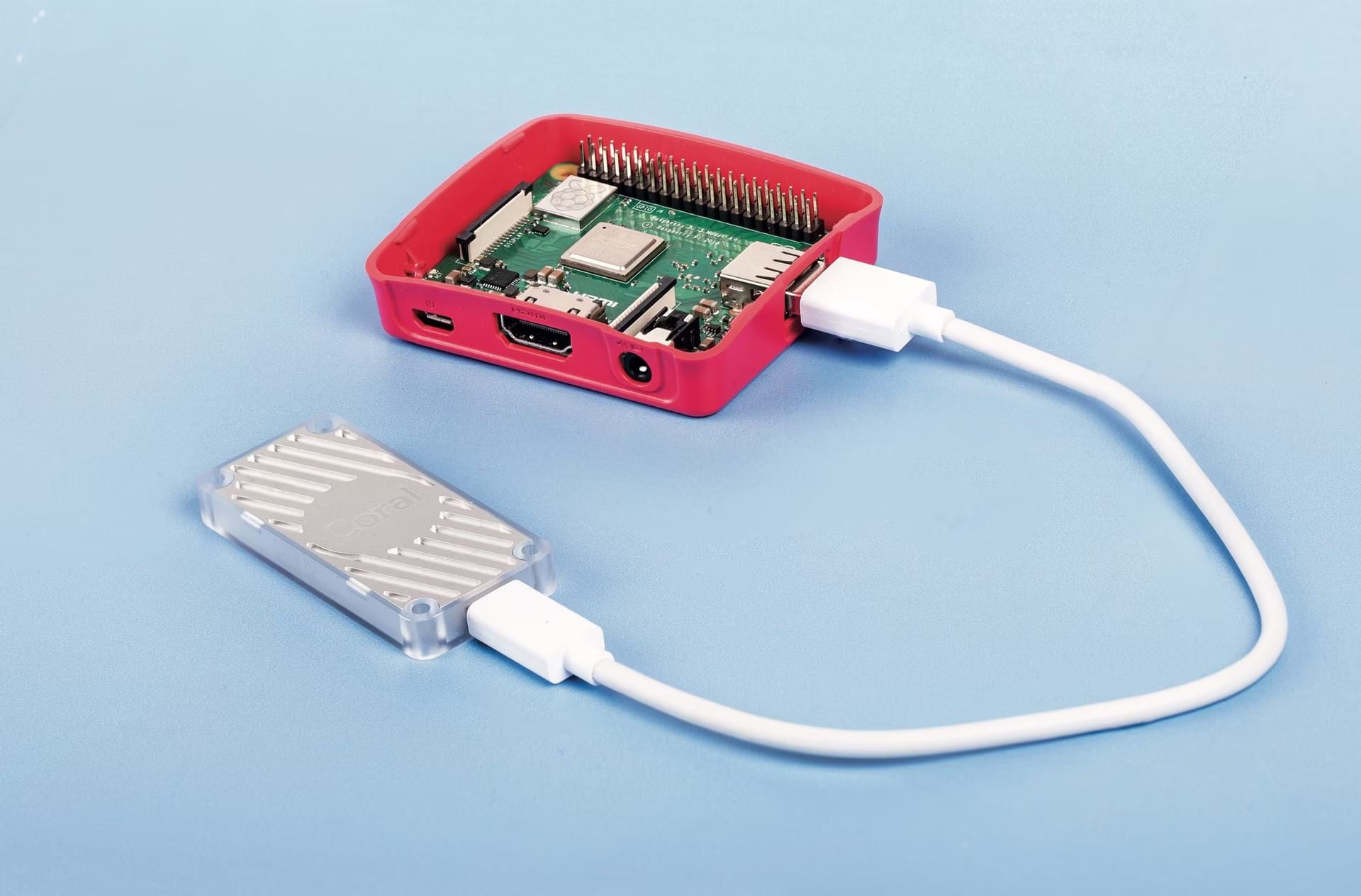
Raspberry Pi는 엣지에서 컴퓨터 비전을 실행하기 위한 전력 효율이 높고 경제적인 플랫폼이지만, ONNX 또는 OpenVINO와 같은 최적화된 형식을 사용해도 디바이스 내 추론은 느립니다. Pi를 Coral Edge TPU 코프로세서와 함께 사용하면 전용 하드웨어로 추론을 분담하여 속도를 크게 높일 수 있습니다. 이 가이드에서는 런타임을 설치하고 Ultralytics YOLO26 모델을 Edge TPU 형식으로 내보낸 다음 가속 추론을 실행하는 방법을 설명합니다.
시청: Google Coral Edge TPU를 사용해 Raspberry Pi에서 추론을 실행하는 방법
Coral Edge TPU를 사용하는 이유#
Coral Edge TPU는 시스템에 Edge TPU 코프로세서를 추가하는 소형 디바이스로, TensorFlow Lite 모델에 저전력·고성능 ML 추론을 제공합니다. CPU만으로는 충분한 성능을 내기 어려운 임베디드 및 모바일 배포에 적합합니다:
- 더 빠른 추론 — Edge TPU는 양자화된 모델을 가속하여 Raspberry Pi CPU 단독으로 달성할 수 있는 성능을 크게 뛰어넘습니다.
- 낮은 전력 소비 — 와트당 높은 처리량을 제공하므로 배터리 또는 태양광으로 구동되는 배포에 적합합니다.
- 간편한 연결 및 사용 — USB 가속기는 USB 3.0으로 연결되므로 별도의 하드웨어 통합이 필요하지 않습니다.
공식 Coral 가이드는 오래되었습니다. 기존 Coral 런타임 빌드는 현재 TensorFlow Lite 런타임 버전과 더 이상 작동하지 않으며, 2021년부터 2025년까지 프로젝트 업데이트도 없었습니다. 이 가이드에서는 현재 유지 관리 중인 Edge TPU 런타임과 최신 tflite-runtime을 사용하므로 최신 Raspberry Pi OS 설치 환경에서도 가속기를 사용할 수 있습니다.
사전 요구 사항#
- Raspberry Pi 4B(2GB 이상 권장) 또는 Raspberry Pi 5(권장)
- 데스크톱이 포함된 Raspberry Pi OS Bullseye/Bookworm(64비트)(권장)
- Coral USB Accelerator
- 모델 내보내기를 위한 x86_64 Linux 플랫폼(Google Colab, x86_64 Linux 머신 또는 x86_64 호스트의 Ultralytics Docker 컨테이너. Edge TPU 컴파일러는 x86_64 Linux에서만 사용할 수 있습니다.)
이 가이드는 ultralytics과 해당 종속 항목이 설치된 Raspberry Pi OS 환경이 이미 정상적으로 작동한다고 가정합니다. 그렇지 않은 경우 먼저 빠른 시작 가이드를 따르세요.
필수 구성 요소를 준비한 후에는 세 단계를 진행합니다. Pi에 Edge TPU 런타임을 설치하고, x86_64 Linux 머신에서 모델을 내보낸 다음, Pi에서 추론을 실행합니다.
Edge TPU 런타임 설치#
런타임은 여러 빌드로 제공되므로 운영 체제에 맞는 빌드를 선택하세요. 고주파 빌드는 Edge TPU를 더 높은 클럭 속도로 실행하여 성능을 높이지만 열 스로틀링이 발생할 수 있으므로, 이 빌드를 선택하는 경우 적절한 냉각 장치를 사용하세요.
| Raspberry Pi OS | 고주파 모드 | 다운로드할 버전 |
|---|---|---|
| Bullseye 32비트 | 아니요 | libedgetpu1-std_ ... .bullseye_armhf.deb |
| Bullseye 64비트 | 아니요 | libedgetpu1-std_ ... .bullseye_arm64.deb |
| Bullseye 32비트 | 예 | libedgetpu1-max_ ... .bullseye_armhf.deb |
| Bullseye 64비트 | 예 | libedgetpu1-max_ ... .bullseye_arm64.deb |
| Bookworm 32비트 | 아니요 | libedgetpu1-std_ ... .bookworm_armhf.deb |
| Bookworm 64비트 | 아니요 | libedgetpu1-std_ ... .bookworm_arm64.deb |
| Bookworm 32비트 | 예 | libedgetpu1-max_ ... .bookworm_armhf.deb |
| Bookworm 64비트 | 예 | libedgetpu1-max_ ... .bookworm_arm64.deb |
여기에서 최신 버전을 다운로드한 다음 .deb 패키지를 설치하세요:
sudo dpkg -i path/to/package.deb런타임을 설치한 후 Coral Edge TPU를 Raspberry Pi의 USB 3.0 포트에 연결하면 새 udev 규칙이 적용됩니다.
먼저 기존 런타임 제거
Coral Edge TPU 런타임이 이미 설치되어 있다면 새 빌드를 설치하기 전에 제거하세요.
# If you installed the standard version
sudo apt remove libedgetpu1-std

# If you installed the high-frequency version
sudo apt remove libedgetpu1-max
모델을 Edge TPU 형식으로 내보내기#
Edge TPU를 사용하려면 모델을 호환되는 형식으로 변환해야 합니다. Edge TPU 컴파일러는 x86_64 Linux에서만 사용할 수 있으므로 Google Colab, x86_64 Linux 머신, x86_64 호스트의 공식 Ultralytics Docker 컨테이너 또는 Ultralytics Platform에서 내보내기를 실행하세요. 사용 가능한 인수는 내보내기 모드에서 확인하세요.
from ultralytics import YOLO

# 모델 로드
model = YOLO("path/to/model.pt")  # 공식 모델 또는 사용자 지정 모델 불러오기

# 모델을 내보냅니다
model.export(format="edgetpu")
내보낸 모델은 <model_name>_saved_model/ 폴더에 <model_name>_full_integer_quant_edgetpu.tflite로 저장됩니다.
파일 이름은 _edgetpu.tflite으로 끝나야 합니다. 다른 이름으로 변경하면 Ultralytics는 Edge TPU를 감지하지 못하고 일반 LiteRT(.tflite) 모델로 불러오므로 가속기가 사용되지 않습니다.
Edge TPU에서 추론 실행#
모델을 실행하기 전에 Raspberry Pi에 올바른 라이브러리를 설치하세요. TensorFlow가 이미 설치되어 있다면 먼저 제거하세요:
pip uninstall tensorflow tensorflow-aarch64그런 다음 tflite-runtime을 설치하거나 업데이트하세요:
pip install -U tflite-runtime이제 추론을 실행할 수 있습니다:
from ultralytics import YOLO

# 모델 로드
model = YOLO("path/to/yolo26n_full_integer_quant_edgetpu.tflite")  # 공식 모델 또는 사용자 지정 모델 불러오기

# 예측 실행
model.predict("path/to/source.png")
예측 모드에 대한 자세한 내용은 예측 페이지를 참조하세요.
Edge TPU가 여러 개 있는 경우 device 인수를 사용하여 특정 장치를 선택할 수 있습니다.
from ultralytics import YOLO

# 모델 로드
model = YOLO("path/to/yolo26n_full_integer_quant_edgetpu.tflite")  # 공식 모델 또는 사용자 지정 모델 불러오기

# 예측 실행
model.predict("path/to/source.png")  # 추론은 기본적으로 첫 번째 TPU를 사용합니다

model.predict("path/to/source.png", device="tpu:0")  # 첫 번째 TPU 선택

model.predict("path/to/source.png", device="tpu:1") # 두 번째 TPU 선택벤치마크#
아래 수치는 Raspberry Pi OS Bookworm 64비트와 USB Coral Edge TPU를 사용하여 측정했습니다. 추론 시간만 나타내며(전처리 및 후처리 제외), Pi 모델과 모드별 Edge TPU 가속 효과를 비교하기 위한 참고 자료입니다.
이 벤치마크는 YOLOv8 모델을 사용하여 측정했습니다. 절대 추론 시간은 모델 버전과 이미지 크기에 따라 달라지지만, Pi 모델과 클럭 모드 간의 상대적인 속도 향상은 유지됩니다.
| 이미지 크기 | 모델 | 표준 추론 시간(ms) | 고주파 추론 시간(ms) |
|---|---|---|---|
| 320 | YOLOv8n | 32.2 | 26.7 |
| 320 | YOLOv8s | 47.1 | 39.8 |
| 512 | YOLOv8n | 73.5 | 60.7 |
| 512 | YOLOv8s | 149.6 | 125.3 |
평균적으로:
- Raspberry Pi 5는 표준 모드에서 Raspberry Pi 4B보다 22% 빠릅니다.
- Raspberry Pi 5는 고주파 모드에서 Raspberry Pi 4B보다 30.2% 빠릅니다.
- 고주파 모드는 표준 모드보다 28.4% 빠릅니다.
결론#
Coral Edge TPU를 사용하면 Raspberry Pi를 Ultralytics YOLO26용 저전력 고성능 추론 디바이스로 활용할 수 있습니다. x86_64 Linux 머신에서 모델을 내보내고 _edgetpu.tflite 접미사를 유지한 다음, Pi에서 tflite-runtime을 사용하여 실행하면 가속 엣지 추론을 수행할 수 있습니다. 다른 배포 옵션은 Raspberry Pi 가이드를 참조하세요.
자주 묻는 질문#
Coral Edge TPU는 시스템에 Edge TPU 코프로세서를 추가하는 소형 디바이스입니다. 이 코프로세서는 저전력·고성능 ML 추론을 지원하며, 특히 TensorFlow Lite 모델에 최적화되어 있습니다. Raspberry Pi에서 Coral Edge TPU는 CPU 단독으로 달성할 수 있는 수준을 크게 뛰어넘는 추론 가속을 제공하여 Ultralytics YOLO26 모델의 성능을 크게 향상합니다.
이 링크에서 Raspberry Pi OS 버전에 맞는
.deb패키지를 다운로드한 다음 설치하세요:sudo dpkg -i path/to/package.debEdge TPU 런타임 설치 섹션의 단계에 따라 이전 Coral Edge TPU 런타임 버전을 모두 제거하세요.
예. Google Colab, x86_64 Linux 머신 또는 Ultralytics Docker 컨테이너에서 내보내기를 실행하세요. Ultralytics Platform을 사용할 수도 있습니다. Python 및 CLI로 내보내는 방법은 다음과 같습니다:
모델 내보내기from ultralytics import YOLO # 모델 로드 model = YOLO("path/to/model.pt") # 공식 모델 또는 사용자 지정 모델 불러오기 # 모델을 내보냅니다 model.export(format="edgetpu")자세한 내용은 내보내기 모드 문서를 참조하세요.
TensorFlow가 설치되어 있고
tflite-runtime으로 전환해야 하는 경우 먼저 TensorFlow를 제거하세요:pip uninstall tensorflow tensorflow-aarch64그런 다음
tflite-runtime을 설치하거나 업데이트하세요:pip install -U tflite-runtime자세한 지침은 Edge TPU에서 추론 실행 섹션을 참조하세요.
YOLO26 모델을 Edge TPU 호환 형식으로 내보낸 후 다음 코드 조각으로 추론을 실행하세요. Ultralytics가 Edge TPU에서 모델을 불러오도록 모델 파일의
_edgetpu.tflite접미사를 유지해야 합니다:모델 실행from ultralytics import YOLO # 모델 로드 model = YOLO("path/to/yolo26n_full_integer_quant_edgetpu.tflite") # 공식 모델 또는 사용자 지정 모델 불러오기 # 예측 실행 model.predict("path/to/source.png")예측 모드에 대한 자세한 내용은 예측 페이지를 참조하세요.