ROS(로봇 운영 체제) 빠른 시작 가이드#
이 가이드에서는 Ultralytics YOLO을 ROS1(rospy) 또는 ROS2(rclpy)와 통합하여 RGB 이미지, 깊이 이미지, 포인트 클라우드에서 실시간 객체 감지와 세그멘테이션을 수행하는 방법을 설명합니다.
YOLO와 ROS 설정하기로 이동한 다음 RGB 이미지, 깊이 이미지 또는 포인트 클라우드를 사용해 보세요.
ROS란 무엇인가요?#
로봇 운영 체제(ROS)는 로봇 연구 및 산업 분야에서 널리 사용되는 오픈 소스 프레임워크입니다. ROS는 개발자가 로봇 애플리케이션을 만들 수 있도록 라이브러리와 도구를 제공합니다. ROS는 다양한 로봇 플랫폼에서 작동하도록 설계되어 로봇 개발자에게 유연하고 강력한 도구가 됩니다. 간단한 소개를 보려면 Open Robotics의 3분 분량 ROS 소개 동영상을 시청하세요.
ROS의 주요 기능#
-
모듈형 아키텍처: ROS는 모듈형 아키텍처를 갖추고 있어 개발자가 노드라는 작고 재사용 가능한 구성 요소를 결합해 복잡한 시스템을 구축할 수 있습니다. 각 노드는 일반적으로 특정 기능을 수행하며, 노드끼리는 토픽이나 서비스를 통해 메시지를 주고받습니다.
-
통신 미들웨어: ROS는 프로세스 간 통신과 분산 컴퓨팅을 지원하는 안정적인 통신 인프라를 제공합니다. 데이터 스트림(토픽)에는 발행-구독 모델을, 서비스 호출에는 요청-응답 모델을 사용합니다.
-
하드웨어 추상화: ROS는 하드웨어 추상화 계층을 제공하므로 개발자는 장치에 구애받지 않는 코드를 작성할 수 있습니다. 이를 통해 동일한 코드를 다양한 하드웨어 구성에 사용할 수 있어 통합과 실험이 더 쉬워집니다.
-
도구 및 유틸리티: ROS는 시각화, 디버깅, 시뮬레이션을 위한 풍부한 도구와 유틸리티를 제공합니다. 예를 들어 RViz는 센서 데이터와 로봇 상태 정보를 시각화하는 데 사용되며, Gazebo는 알고리즘과 로봇 설계를 테스트할 수 있는 강력한 시뮬레이션 환경을 제공합니다.
-
광범위한 생태계: ROS 생태계는 방대하고 계속 성장하고 있으며, 내비게이션, 조작, 인식 등을 포함한 다양한 로봇 애플리케이션용 패키지를 다수 제공합니다. 커뮤니티는 이러한 패키지의 개발과 유지 관리에 적극적으로 기여합니다.
ROS 버전의 발전
2007년 개발이 시작된 이후 ROS는 여러 버전을 거쳐 ROS 1과 ROS 2로 나뉘었습니다. 아래의 기존 예제는 ROS1 Noetic을 사용합니다. ROS2 사용하기의 간결한 어댑터는 현재 ROS2 릴리스에 해당하는 rclpy 인터페이스를 보여줍니다.
ROS 1과 ROS 2 비교#
ROS 1은 로봇 개발을 위한 탄탄한 기반을 제공했지만, ROS 2는 다음과 같은 기능을 제공하여 ROS 1의 단점을 해결합니다.
- 실시간 성능: 실시간 시스템 및 결정론적 동작에 대한 지원이 향상되었습니다.
- 보안: 다양한 환경에서 안전하고 안정적으로 작동할 수 있도록 보안 기능이 강화되었습니다.
- 확장성: 다중 로봇 시스템 및 대규모 배포에 대한 지원이 향상되었습니다.
- 크로스 플랫폼 지원: Linux뿐 아니라 Windows 및 macOS를 포함한 다양한 운영 체제와의 호환성이 확대되었습니다.
- 유연한 통신: 프로세스 간 통신의 유연성과 효율성을 높이기 위해 DDS를 사용합니다.
ROS 메시지 및 토픽#
ROS에서는 메시지와 토픽을 통해 노드 간 통신이 이루어집니다. 메시지는 노드 간에 교환되는 정보를 정의하는 데이터 구조이며, 토픽은 메시지를 송수신하는 이름이 지정된 채널입니다. 노드는 토픽에 메시지를 발행하거나 토픽의 메시지를 구독하여 서로 통신할 수 있습니다. 이 발행-구독 모델을 사용하면 노드 간 비동기 통신과 결합도 감소가 가능합니다. 로봇 시스템의 각 센서 또는 액추에이터는 일반적으로 토픽에 데이터를 발행하며, 다른 노드는 처리 또는 제어를 위해 해당 데이터를 사용할 수 있습니다. 이 가이드에서는 Image, Depth, PointCloud 메시지와 카메라 토픽을 중점적으로 살펴봅니다.
ROS에서 Ultralytics YOLO 설정하기#
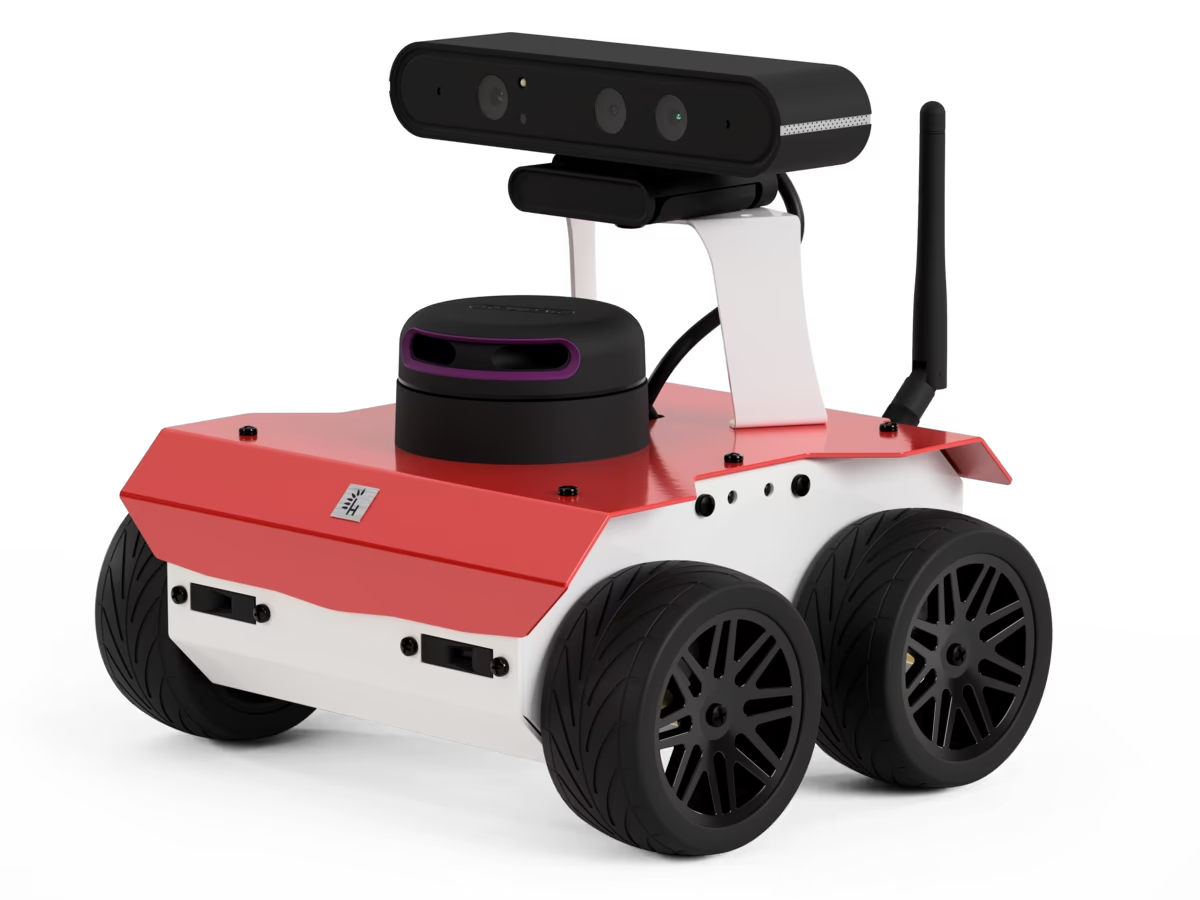
ROS1 예제는 이 ROS 환경을 사용하여 테스트했으며, 이 환경은 ROSbot ROS 저장소의 포크입니다. ROS2에서도 동일한 YOLO 및 NumPy 처리가 적용되며, 노드 수명 주기와 메시지 변환만 다릅니다.
종속성 설치#
ROS 환경 외에도 다음 종속성을 설치해야 합니다.
-
ROS NumPy 패키지: ROS Image 메시지와 NumPy 배열 간의 빠른 변환에 필요합니다.
pip install ros_numpy -
Ultralytics 패키지:
pip install ultralytics
ROS2 사용#
ROS2에서는 rospy을 rclpy로, ros_numpy 이미지 변환을 cv_bridge으로 대체합니다. 다음 노드는 아래 RGB 감지 흐름을 완전히 동일하게 구현한 ROS2 버전입니다. 모델은 한 번만 인스턴스화하고 콜백 간에 재사용합니다.
import cv_bridge
import rclpy
from rclpy.node import Node
from rclpy.qos import qos_profile_sensor_data
from sensor_msgs.msg import Image

from ultralytics import YOLO

class UltralyticsNode(Node):
    """Run YOLO detection on ROS2 image messages."""

    def __init__(self):
        """Initialize the ROS2 node, model, and image interfaces."""
        super().__init__("ultralytics")
        self.bridge = cv_bridge.CvBridge()
        self.model = YOLO("yolo26m.pt")
        self.publisher = self.create_publisher(Image, "/ultralytics/detection/image", 5)
        self.create_subscription(Image, "/camera/color/image_raw", self.callback, qos_profile_sensor_data)

    def callback(self, message):
        """Publish the annotated camera frame."""
        image = self.bridge.imgmsg_to_cv2(message, desired_encoding="bgr8")
        annotated = self.model(image)[0].plot(show=False)
        self.publisher.publish(self.bridge.cv2_to_imgmsg(annotated, encoding="bgr8"))

def main(args=None):
    """Start the ROS2 node."""
    rclpy.init(args=args)
    node = UltralyticsNode()
    rclpy.spin(node)
    node.destroy_node()
    rclpy.shutdown()

if __name__ == "__main__":
    main()
Depth 이미지의 경우 아래의 Depth 처리 코드를 재사용하고 메시지 가져오기 및 변환 부분만 바꿉니다.
self.create_subscription(Image, "/camera/color/image_raw", self.rgb_callback, qos_profile_sensor_data)
self.create_subscription(Image, "/camera/depth/image_raw", self.depth_callback, qos_profile_sensor_data)

def rgb_callback(self, message):
    self.rgb_image = self.bridge.imgmsg_to_cv2(message, desired_encoding="bgr8")

def depth_callback(self, message):
    depth_image = self.bridge.imgmsg_to_cv2(message, desired_encoding="passthrough")
    # 아래 Depth 예제의 NumPy 마스크 및 거리 계산을 적용합니다.
포인트 클라우드의 경우 ROS2에서 sensor_msgs_py.point_cloud2을 제공합니다. 정렬된 클라우드를 한 번 변환한 다음, 아래의 NumPy 분할 및 3D 매핑을 재사용합니다.
from sensor_msgs_py import point_cloud2

points = point_cloud2.read_points_numpy(message, field_names=("x", "y", "z", "rgb"))
points = points.reshape(message.height, message.width, 4)
ROS sensor_msgs/Image과 함께 Ultralytics 사용하기#
sensor_msgs/Image 메시지 유형은 ROS에서 이미지 데이터를 나타내는 데 일반적으로 사용됩니다. 인코딩, 높이, 너비 및 픽셀 데이터 필드를 포함하므로 카메라나 다른 센서로 캡처한 이미지를 전송하는 데 적합합니다. Image 메시지는 시각적 인식, 객체 감지, 내비게이션과 같은 작업을 위해 로봇 애플리케이션에서 널리 사용됩니다.
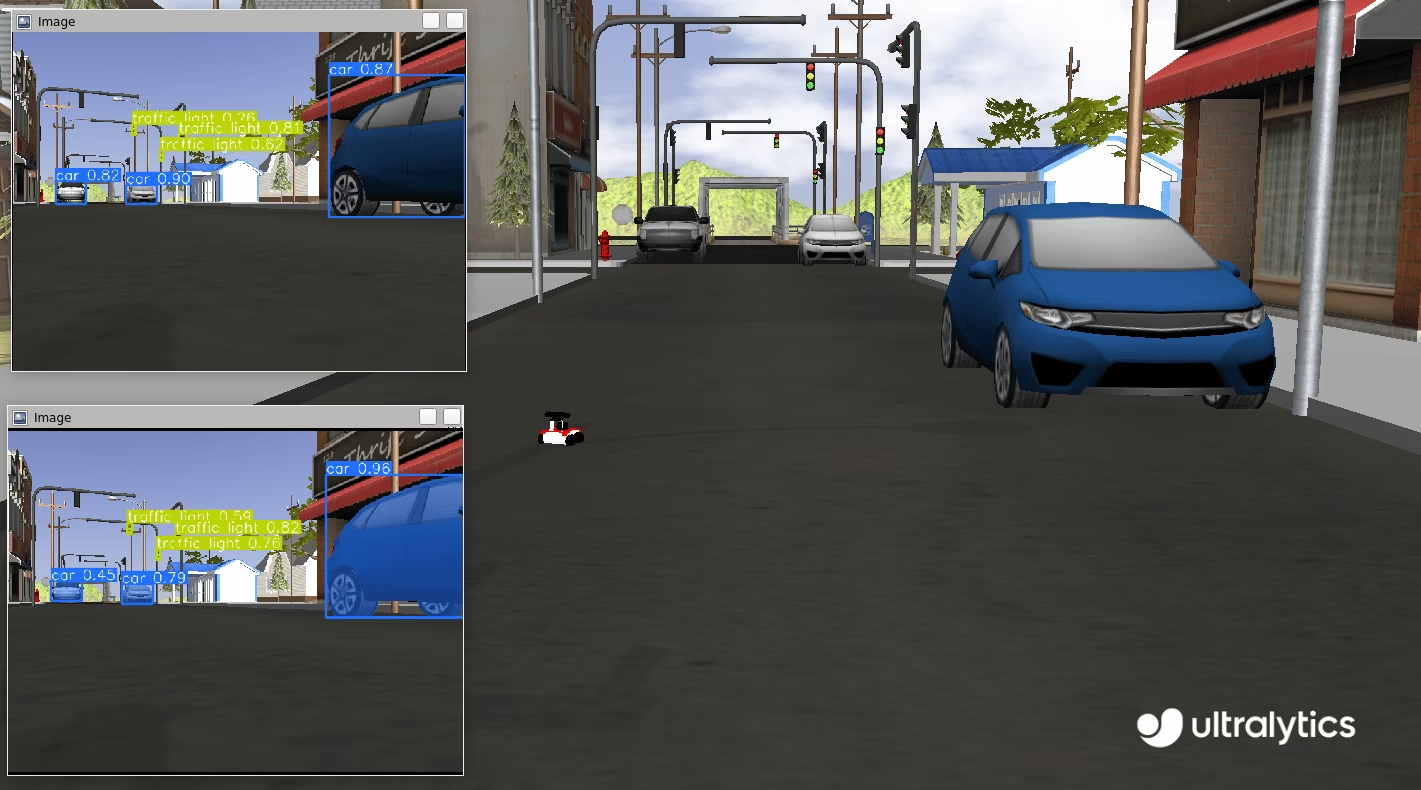
Image 단계별 사용법#
다음 코드 스니펫은 ROS에서 Ultralytics YOLO 패키지를 사용하는 방법을 보여줍니다. 이 예제에서는 카메라 토픽을 구독하고, YOLO로 수신한 이미지를 처리한 다음, 감지된 객체를 감지 및 분할을 위한 새 토픽에 발행합니다.
먼저 필요한 라이브러리를 가져오고 두 개의 모델을 인스턴스화합니다. 하나는 분할용이고 다른 하나는 감지용입니다. ROS 마스터와 통신할 수 있도록 ROS 노드(ultralytics라는 이름)를 초기화합니다. 안정적인 연결을 위해 잠시 대기하여 노드가 다음 작업을 진행하기 전에 연결을 설정할 충분한 시간을 확보합니다.
import time

import rospy

from ultralytics import YOLO

detection_model = YOLO("yolo26m.pt")
segmentation_model = YOLO("yolo26m-seg.pt")
rospy.init_node("ultralytics")
time.sleep(1)
ROS 토픽 두 개를 초기화합니다. 하나는 감지용이고 다른 하나는 분할용입니다. 이 토픽에 주석이 추가된 이미지를 발행하면 해당 이미지를 후속 처리에 사용할 수 있습니다. 노드 간 통신에는 sensor_msgs/Image 메시지를 사용합니다.
from sensor_msgs.msg import Image

det_image_pub = rospy.Publisher("/ultralytics/detection/image", Image, queue_size=5)
seg_image_pub = rospy.Publisher("/ultralytics/segmentation/image", Image, queue_size=5)
마지막으로 /camera/color/image_raw 토픽의 메시지를 수신하고 새 메시지가 도착할 때마다 콜백 함수를 호출하는 구독자를 생성합니다. 이 콜백 함수는 sensor_msgs/Image 유형의 메시지를 받아 ros_numpy를 사용해 NumPy 배열로 변환하고, 앞서 인스턴스화한 YOLO 모델로 이미지를 처리하고 주석을 추가한 다음, 감지용 /ultralytics/detection/image 토픽과 분할용 /ultralytics/segmentation/image 토픽에 각각 다시 발행합니다.
import ros_numpy

def callback(data):
    """Callback function to process image and publish annotated images."""
    array = ros_numpy.numpify(data)
    if det_image_pub.get_num_connections():
        det_result = detection_model(array)
        det_annotated = det_result[0].plot(show=False)
        det_image_pub.publish(ros_numpy.msgify(Image, det_annotated, encoding="rgb8"))

    if seg_image_pub.get_num_connections():
        seg_result = segmentation_model(array)
        seg_annotated = seg_result[0].plot(show=False)
        seg_image_pub.publish(ros_numpy.msgify(Image, seg_annotated, encoding="rgb8"))

rospy.Subscriber("/camera/color/image_raw", Image, callback)

while True:
    rospy.spin()
전체 코드
import time

import ros_numpy
import rospy
from sensor_msgs.msg import Image

from ultralytics import YOLO

detection_model = YOLO("yolo26m.pt")
segmentation_model = YOLO("yolo26m-seg.pt")
rospy.init_node("ultralytics")
time.sleep(1)

det_image_pub = rospy.Publisher("/ultralytics/detection/image", Image, queue_size=5)
seg_image_pub = rospy.Publisher("/ultralytics/segmentation/image", Image, queue_size=5)

def callback(data):
    """Callback function to process image and publish annotated images."""
    array = ros_numpy.numpify(data)
    if det_image_pub.get_num_connections():
        det_result = detection_model(array)
        det_annotated = det_result[0].plot(show=False)
        det_image_pub.publish(ros_numpy.msgify(Image, det_annotated, encoding="rgb8"))

    if seg_image_pub.get_num_connections():
        seg_result = segmentation_model(array)
        seg_annotated = seg_result[0].plot(show=False)
        seg_image_pub.publish(ros_numpy.msgify(Image, seg_annotated, encoding="rgb8"))

rospy.Subscriber("/camera/color/image_raw", Image, callback)

while True:
    rospy.spin()
디버깅
ROS(Robot Operating System) 노드는 분산형 시스템의 특성 때문에 디버깅이 어려울 수 있습니다. 이 과정에 도움이 되는 도구는 다음과 같습니다.
rostopic echo <TOPIC-NAME>: 이 명령을 사용하면 특정 토픽에 발행된 메시지를 확인하여 데이터 흐름을 살펴볼 수 있습니다.rostopic list: 이 명령을 사용하면 ROS 시스템에서 사용 가능한 모든 토픽을 나열하여 활성 데이터 스트림을 파악할 수 있습니다.rqt_graph: 이 시각화 도구는 노드 간 통신 그래프를 표시하여 노드가 어떻게 연결되고 상호작용하는지 파악할 수 있도록 합니다.- 3D 표현과 같은 더 복잡한 시각화에는 RViz를 사용할 수 있습니다. RViz(ROS 시각화)는 ROS용 강력한 3D 시각화 도구입니다. 이 도구를 사용하면 로봇과 환경의 상태를 실시간으로 시각화할 수 있습니다. RViz에서는 센서 데이터(예:
sensor_msgs/Image), 로봇 모델 상태 및 다양한 유형의 정보를 확인할 수 있어 로봇 시스템의 동작을 디버깅하고 이해하기가 더 쉬워집니다.
std_msgs/String을 사용하여 감지된 클래스 발행하기#
표준 ROS 메시지에는 std_msgs/String 메시지도 포함됩니다. 많은 애플리케이션에서는 주석이 추가된 이미지 전체를 다시 발행할 필요 없이 로봇의 시야에 있는 클래스만 필요합니다. 다음 예제에서는 std_msgs/String 메시지를 사용하여 감지된 클래스를 /ultralytics/detection/classes 토픽에 다시 발행하는 방법을 보여줍니다. 이러한 메시지는 더 가볍고 필수 정보를 제공하므로 다양한 애플리케이션에서 유용합니다.
사용 사례 예시#
카메라와 객체 감지 모델을 탑재한 창고 로봇을 생각해 보겠습니다. 로봇은 네트워크를 통해 용량이 큰 주석 추가 이미지를 전송하는 대신, 감지된 클래스 목록을 std_msgs/String 메시지로 발행할 수 있습니다. 예를 들어 로봇이 "box", "pallet", "forklift"와 같은 객체를 감지하면 해당 클래스를 /ultralytics/detection/classes 토픽에 발행합니다. 중앙 모니터링 시스템은 이 정보를 사용하여 실시간으로 재고를 추적하고, 장애물을 피해 로봇의 경로 계획을 최적화하거나, 감지된 상자를 집는 등의 특정 동작을 실행할 수 있습니다. 이 접근 방식은 통신에 필요한 대역폭을 줄이고 중요한 데이터 전송에 집중할 수 있게 합니다.
String 단계별 사용법#
이 예제에서는 ROS에서 Ultralytics YOLO 패키지를 사용하는 방법을 보여줍니다. 카메라 토픽을 구독하고, YOLO로 수신한 이미지를 처리한 다음, std_msgs/String 메시지를 사용하여 감지된 객체를 새 토픽 /ultralytics/detection/classes에 발행합니다. ros_numpy 패키지는 ROS Image 메시지를 NumPy 배열로 변환하여 YOLO로 처리하는 데 사용됩니다.
import time

import ros_numpy
import rospy
from sensor_msgs.msg import Image
from std_msgs.msg import String

from ultralytics import YOLO

detection_model = YOLO("yolo26m.pt")
rospy.init_node("ultralytics")
time.sleep(1)
classes_pub = rospy.Publisher("/ultralytics/detection/classes", String, queue_size=5)

def callback(data):
    """Callback function to process image and publish detected classes."""
    array = ros_numpy.numpify(data)
    if classes_pub.get_num_connections():
        det_result = detection_model(array)
        classes = det_result[0].boxes.cls.cpu().numpy().astype(int)
        names = [det_result[0].names[i] for i in classes]
        classes_pub.publish(String(data=str(names)))

rospy.Subscriber("/camera/color/image_raw", Image, callback)
while True:
    rospy.spin()
ROS Depth 이미지와 함께 Ultralytics 사용하기#
RGB 이미지 외에도 ROS는 카메라와 객체 간 거리에 관한 정보를 제공하는 Depth 이미지를 지원합니다. Depth 이미지는 장애물 회피, 3D 매핑, 위치 추정과 같은 로봇 애플리케이션에 매우 중요합니다.
Depth 이미지는 각 픽셀이 카메라와 객체 간의 거리를 나타내는 이미지입니다. 색상을 캡처하는 RGB 이미지와 달리 Depth 이미지는 공간 정보를 캡처하여 로봇이 주변 환경의 3D 구조를 인식할 수 있게 합니다.
Depth 이미지는 다음과 같은 다양한 센서를 사용하여 가져올 수 있습니다.
- 스테레오 카메라: 두 대의 카메라를 사용하여 이미지 시차를 기반으로 Depth를 계산합니다.
- 비행 시간(ToF) 카메라: 빛이 객체에 닿은 후 돌아오는 데 걸리는 시간을 측정합니다.
- 구조광 센서: 패턴을 투사하고 표면에서 패턴이 변형되는 정도를 측정합니다.
Depth 이미지와 함께 YOLO 사용하기#
ROS에서 Depth 이미지는 sensor_msgs/Image 메시지 유형으로 표현되며, 인코딩, 높이, 너비 및 픽셀 데이터 필드를 포함합니다. Depth 이미지의 인코딩 필드에는 픽셀당 16비트 부호 없는 정수를 나타내는 "16UC1"과 같은 형식이 자주 사용되며, 각 값은 객체까지의 거리를 나타냅니다. Depth 이미지는 환경을 더 종합적으로 파악할 수 있도록 RGB 이미지와 함께 사용하는 경우가 많습니다.
YOLO를 사용하면 RGB 이미지와 Depth 이미지 양쪽에서 정보를 추출하고 결합할 수 있습니다. 예를 들어 YOLO가 RGB 이미지에서 객체를 감지하면 이 감지 결과를 사용하여 Depth 이미지에서 해당 영역을 찾을 수 있습니다. 이를 통해 감지된 객체의 정밀한 Depth 정보를 추출하여 로봇이 주변 환경의 3차원 구조를 이해하는 능력을 향상할 수 있습니다.
Depth 이미지로 작업할 때는 RGB 이미지와 Depth 이미지가 올바르게 정렬되었는지 확인해야 합니다. Intel RealSense 시리즈와 같은 RGB-D 카메라는 RGB 이미지와 Depth 이미지를 동기화하여 제공하므로 두 소스의 정보를 더 쉽게 결합할 수 있습니다. RGB 카메라와 Depth 카메라를 별도로 사용하는 경우 정확하게 정렬되도록 보정해야 합니다.
Depth 단계별 사용법#
이 예제에서는 YOLO로 이미지를 분할하고 추출한 마스크를 Depth 이미지에 적용하여 객체를 분할합니다. 이를 통해 관심 객체의 각 픽셀과 카메라 초점 중심 사이의 거리를 확인할 수 있습니다. 이 거리 정보를 바탕으로 카메라와 장면 내 특정 객체 간의 거리를 계산할 수 있습니다. 먼저 필요한 라이브러리를 가져오고 ROS 노드를 생성한 다음 분할 모델과 ROS 토픽을 인스턴스화합니다.
import time

import rospy
from std_msgs.msg import String

from ultralytics import YOLO

rospy.init_node("ultralytics")
time.sleep(1)

segmentation_model = YOLO("yolo26m-seg.pt")

classes_pub = rospy.Publisher("/ultralytics/detection/distance", String, queue_size=5)
다음으로 수신한 Depth 이미지 메시지를 처리하는 콜백 함수를 정의합니다. 이 함수는 Depth 이미지 및 RGB 이미지 메시지를 기다린 후 NumPy 배열로 변환하고 RGB 이미지에 분할 모델을 적용합니다. 이어서 감지된 각 객체의 분할 마스크를 추출하고 Depth 이미지를 사용하여 객체와 카메라 간 평균 거리를 계산합니다. 대부분의 센서에는 클립 거리라고 하는 최대 거리가 있으며, 이 거리를 초과하는 값은 inf(np.inf)로 표시됩니다. 처리 전에 이러한 null 값을 필터링하고 0 값을 할당하는 것이 중요합니다. 마지막으로 감지된 객체와 각 객체의 평균 거리를 /ultralytics/detection/distance 토픽에 발행합니다.
import numpy as np
import ros_numpy
from sensor_msgs.msg import Image

def callback(data):
    """Callback function to process depth image and RGB image."""
    image = rospy.wait_for_message("/camera/color/image_raw", Image)
    image = ros_numpy.numpify(image)
    depth = ros_numpy.numpify(data)
    result = segmentation_model(image, retina_masks=True)  # masks at the original image resolution

    all_objects = []
    for index, cls in enumerate(result[0].boxes.cls):
        class_index = int(cls.cpu().numpy())
        name = result[0].names[class_index]
        mask = result[0].masks.data.cpu().numpy()[index, :, :].astype(int)
        obj = depth[mask == 1]
        obj = obj[~np.isnan(obj)]
        avg_distance = np.mean(obj) if len(obj) else np.inf
        all_objects.append(f"{name}: {avg_distance:.2f}m")

    classes_pub.publish(String(data=str(all_objects)))

rospy.Subscriber("/camera/depth/image_raw", Image, callback)

while True:
    rospy.spin()
전체 코드
import time

import numpy as np
import ros_numpy
import rospy
from sensor_msgs.msg import Image
from std_msgs.msg import String

from ultralytics import YOLO

rospy.init_node("ultralytics")
time.sleep(1)

segmentation_model = YOLO("yolo26m-seg.pt")

classes_pub = rospy.Publisher("/ultralytics/detection/distance", String, queue_size=5)

def callback(data):
    """Callback function to process depth image and RGB image."""
    image = rospy.wait_for_message("/camera/color/image_raw", Image)
    image = ros_numpy.numpify(image)
    depth = ros_numpy.numpify(data)
    result = segmentation_model(image, retina_masks=True)  # masks at the original image resolution

    all_objects = []
    for index, cls in enumerate(result[0].boxes.cls):
        class_index = int(cls.cpu().numpy())
        name = result[0].names[class_index]
        mask = result[0].masks.data.cpu().numpy()[index, :, :].astype(int)
        obj = depth[mask == 1]
        obj = obj[~np.isnan(obj)]
        avg_distance = np.mean(obj) if len(obj) else np.inf
        all_objects.append(f"{name}: {avg_distance:.2f}m")

    classes_pub.publish(String(data=str(all_objects)))

rospy.Subscriber("/camera/depth/image_raw", Image, callback)

while True:
    rospy.spin()
ROS sensor_msgs/PointCloud2과 함께 Ultralytics 사용하기#
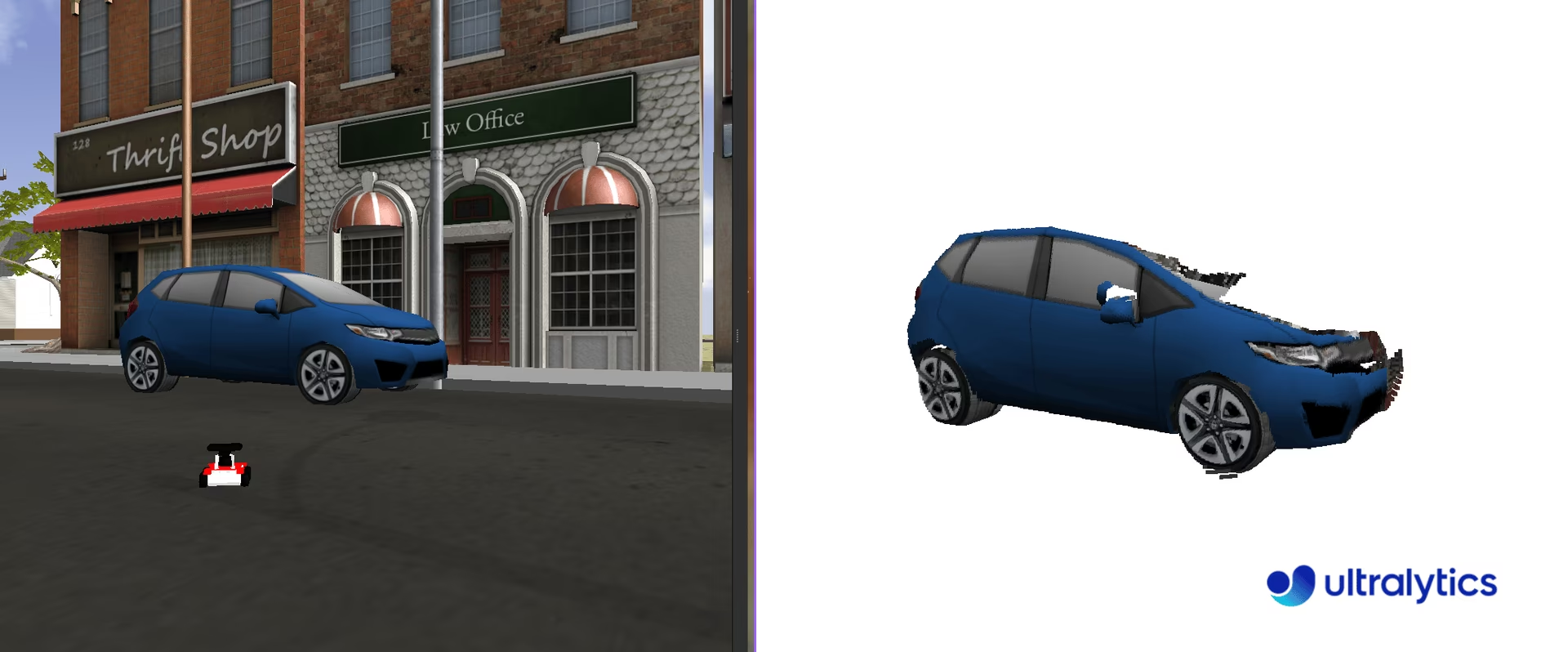
sensor_msgs/PointCloud2 메시지 유형은 ROS에서 3D 포인트 클라우드 데이터를 표현하는 데 사용되는 데이터 구조입니다. 이 메시지 유형은 3D 매핑, 객체 인식 및 위치 추정과 같은 작업을 지원하므로 로봇 애플리케이션에 필수적입니다.
포인트 클라우드는 3차원 좌표계에 정의된 데이터 포인트의 모음입니다. 이러한 데이터 포인트는 3D 스캐닝 기술로 캡처한 객체 또는 장면의 외부 표면을 나타냅니다. 클라우드의 각 포인트에는 공간 내 위치에 해당하는 X, Y, Z 좌표가 있으며, 색상 및 강도와 같은 추가 정보가 포함될 수도 있습니다.
sensor_msgs/PointCloud2을 사용할 때는 포인트 클라우드 데이터를 획득한 센서의 참조 프레임을 고려해야 합니다. 포인트 클라우드는 처음에 센서의 참조 프레임으로 캡처됩니다. /tf_static 토픽을 구독하면 이 참조 프레임을 확인할 수 있습니다. 하지만 애플리케이션의 특정 요구 사항에 따라 포인트 클라우드를 다른 참조 프레임으로 변환해야 할 수 있습니다. 이 변환은 좌표 프레임 관리 및 프레임 간 데이터 변환 도구를 제공하는 tf2_ros 패키지로 수행할 수 있습니다.
포인트 클라우드는 다음과 같은 다양한 센서를 사용하여 가져올 수 있습니다.
- LIDAR(광 검출 및 거리 측정): 레이저 펄스를 사용하여 객체까지의 거리를 측정하고 고-정밀도 3D 맵을 생성합니다.
- Depth 카메라: 각 픽셀의 Depth 정보를 캡처하여 장면을 3D로 재구성할 수 있게 합니다.
- 스테레오 카메라: 두 대 이상의 카메라를 사용하여 삼각 측량으로 Depth 정보를 얻습니다.
- 구조광 스캐너: 알려진 패턴을 표면에 투사하고 변형 정도를 측정하여 Depth를 계산합니다.
포인트 클라우드와 함께 YOLO 사용하기#
YOLO를 sensor_msgs/PointCloud2 유형의 메시지와 통합하려면 Depth 맵에 사용한 것과 유사한 방법을 적용할 수 있습니다. 포인트 클라우드에 포함된 색상 정보를 활용해 2D 이미지를 추출하고, YOLO로 해당 이미지를 분할한 다음, 결과 마스크를 3차원 포인트에 적용하여 관심 있는 3D 객체를 분리할 수 있습니다.
포인트 클라우드 처리를 위해 사용하기 쉬운 Python 라이브러리인 Open3D(pip install open3d)를 권장합니다. Open3D는 포인트 클라우드 데이터 구조를 관리하고 시각화하며 복잡한 작업을 원활하게 실행하는 강력한 도구를 제공합니다. 이 라이브러리는 처리 과정을 크게 간소화하고 YOLO 기반 분할과 함께 포인트 클라우드를 조작하고 분석하는 능력을 향상할 수 있습니다.
포인트 클라우드 단계별 사용법#
필요한 라이브러리를 가져오고 분할용 YOLO 모델을 인스턴스화합니다.
import time

import rospy

from ultralytics import YOLO

rospy.init_node("ultralytics")
time.sleep(1)
segmentation_model = YOLO("yolo26m-seg.pt")
pointcloud2_to_array 함수를 생성하여 sensor_msgs/PointCloud2 메시지를 두 개의 NumPy 배열로 변환합니다. sensor_msgs/PointCloud2 메시지에는 획득한 이미지의 width 및 height를 기반으로 하는 n 포인트가 포함됩니다. 예를 들어 480 x 640 이미지에는 307,200 포인트가 있습니다. 각 포인트에는 세 개의 공간 좌표(xyz)와 RGB 형식의 해당 색상이 포함됩니다. 이는 서로 다른 두 개의 정보 채널로 볼 수 있습니다.
이 함수는 원래 카메라 해상도(width x height) 형식의 xyz 좌표와 RGB 값을 반환합니다. 대부분의 센서에는 클립 거리라고 하는 최대 거리가 있으며, 이 거리를 초과하는 값은 inf(np.inf)로 표시됩니다. 처리 전에 이러한 null 값을 필터링하고 0 값을 할당하는 것이 중요합니다.
import numpy as np
import ros_numpy

def pointcloud2_to_array(pointcloud2: PointCloud2) -> tuple:
    """Convert a ROS PointCloud2 message to a numpy array.

    Args:
        pointcloud2 (PointCloud2): the PointCloud2 message

    Returns:
        (tuple): tuple containing (xyz, rgb)
    """
    pc_array = ros_numpy.point_cloud2.pointcloud2_to_array(pointcloud2)
    split = ros_numpy.point_cloud2.split_rgb_field(pc_array)
    rgb = np.stack([split["b"], split["g"], split["r"]], axis=2)
    xyz = ros_numpy.point_cloud2.get_xyz_points(pc_array, remove_nans=False)
    xyz = np.array(xyz).reshape((pointcloud2.height, pointcloud2.width, 3))
    nan_rows = np.isnan(xyz).all(axis=2)
    xyz[nan_rows] = [0, 0, 0]
    rgb[nan_rows] = [0, 0, 0]
    return xyz, rgb
다음으로 /camera/depth/points 토픽을 구독하여 포인트 클라우드 메시지를 수신하고, sensor_msgs/PointCloud2 메시지를 XYZ 좌표와 RGB 값을 포함하는 NumPy 배열로 변환합니다(pointcloud2_to_array 함수 사용). YOLO 모델로 RGB 이미지를 처리하여 분할된 객체를 추출합니다. 감지된 각 객체에 대해 분할 마스크를 추출하고 RGB 이미지와 XYZ 좌표 모두에 적용하여 3D 공간에서 객체를 분리합니다.
마스크는 객체의 존재를 나타내는 1과 부재를 나타내는 0로 이루어진 이진값이므로 간단하게 처리할 수 있습니다. 마스크를 적용하려면 원본 채널에 마스크를 곱하면 됩니다. 이 연산으로 이미지에서 관심 객체를 효과적으로 분리할 수 있습니다. 마지막으로 Open3D 포인트 클라우드 객체를 생성하고 관련 색상과 함께 분할된 객체를 3D 공간에 시각화합니다.
import sys

import open3d as o3d

ros_cloud = rospy.wait_for_message("/camera/depth/points", PointCloud2)
xyz, rgb = pointcloud2_to_array(ros_cloud)
result = segmentation_model(rgb, retina_masks=True)  # 원본 이미지 해상도의 마스크

if not len(result[0].boxes.cls):
    print("No objects detected")
    sys.exit()

classes = result[0].boxes.cls.cpu().numpy().astype(int)
for index, class_id in enumerate(classes):
    mask = result[0].masks.data.cpu().numpy()[index, :, :].astype(int)
    mask_expanded = np.stack([mask, mask, mask], axis=2)

    obj_rgb = rgb * mask_expanded
    obj_xyz = xyz * mask_expanded

    pcd = o3d.geometry.PointCloud()
    pcd.points = o3d.utility.Vector3dVector(obj_xyz.reshape((ros_cloud.height * ros_cloud.width, 3)))
    pcd.colors = o3d.utility.Vector3dVector(obj_rgb.reshape((ros_cloud.height * ros_cloud.width, 3)) / 255)
    o3d.visualization.draw_geometries([pcd])
전체 코드
import sys
import time

import numpy as np
import open3d as o3d
import ros_numpy
import rospy
from sensor_msgs.msg import PointCloud2

from ultralytics import YOLO

rospy.init_node("ultralytics")
time.sleep(1)
segmentation_model = YOLO("yolo26m-seg.pt")

def pointcloud2_to_array(pointcloud2: PointCloud2) -> tuple:
    """Convert a ROS PointCloud2 message to a numpy array.

    Args:
        pointcloud2 (PointCloud2): the PointCloud2 message

    Returns:
        (tuple): tuple containing (xyz, rgb)
    """
    pc_array = ros_numpy.point_cloud2.pointcloud2_to_array(pointcloud2)
    split = ros_numpy.point_cloud2.split_rgb_field(pc_array)
    rgb = np.stack([split["b"], split["g"], split["r"]], axis=2)
    xyz = ros_numpy.point_cloud2.get_xyz_points(pc_array, remove_nans=False)
    xyz = np.array(xyz).reshape((pointcloud2.height, pointcloud2.width, 3))
    nan_rows = np.isnan(xyz).all(axis=2)
    xyz[nan_rows] = [0, 0, 0]
    rgb[nan_rows] = [0, 0, 0]
    return xyz, rgb

ros_cloud = rospy.wait_for_message("/camera/depth/points", PointCloud2)
xyz, rgb = pointcloud2_to_array(ros_cloud)
result = segmentation_model(rgb, retina_masks=True)  # 원본 이미지 해상도의 마스크

if not len(result[0].boxes.cls):
    print("No objects detected")
    sys.exit()

classes = result[0].boxes.cls.cpu().numpy().astype(int)
for index, class_id in enumerate(classes):
    mask = result[0].masks.data.cpu().numpy()[index, :, :].astype(int)
    mask_expanded = np.stack([mask, mask, mask], axis=2)

    obj_rgb = rgb * mask_expanded
    obj_xyz = xyz * mask_expanded

    pcd = o3d.geometry.PointCloud()
    pcd.points = o3d.utility.Vector3dVector(obj_xyz.reshape((ros_cloud.height * ros_cloud.width, 3)))
    pcd.colors = o3d.utility.Vector3dVector(obj_rgb.reshape((ros_cloud.height * ros_cloud.width, 3)) / 255)
    o3d.visualization.draw_geometries([pcd])
결론#
Ultralytics YOLO를 ROS와 통합하면 로봇이 RGB 이미지, Depth 이미지, 포인트 클라우드에서 객체 감지와 분할을 실행하여 원시 센서 스트림을 활용 가능한 인식 정보로 변환할 수 있습니다. 다음으로 Predict 모드를 살펴보고 추론 옵션을 더 확인하거나, 컴퓨터 비전 프로젝트 단계를 따라 로봇 애플리케이션을 프로토타입에서 프로덕션으로 발전시켜 보세요.
자주 묻는 질문#
Robot Operating System(ROS)은 개발자가 강력한 로봇 애플리케이션을 만들 수 있도록 로보틱스 분야에서 널리 사용되는 오픈 소스 프레임워크입니다. 이 프레임워크는 로봇 시스템을 구축하고 연동하기 위한 라이브러리 및 도구를 제공하여 복잡한 애플리케이션을 더 쉽게 개발할 수 있게 합니다. ROS는 토픽 또는 서비스를 통해 메시지를 주고받는 노드 간 통신을 지원합니다.
Ultralytics YOLO를 ROS와 통합하려면 ROS 환경을 설정하고 YOLO를 사용하여 센서 데이터를 처리해야 합니다. 먼저
ros_numpy및 Ultralytics YOLO와 같은 필수 종속성을 설치합니다.pip install ros_numpy ultralytics다음으로 ROS 노드를 생성하고 이미지 토픽을 구독하여 수신 데이터를 객체 감지에 사용할 수 있도록 처리합니다. 다음은 최소 예제입니다.
import ros_numpy
import rospy
from sensor_msgs.msg import Image

from ultralytics import YOLO

detection_model = YOLO("yolo26m.pt")
rospy.init_node("ultralytics")
det_image_pub = rospy.Publisher("/ultralytics/detection/image", Image, queue_size=5)

def callback(data):
    array = ros_numpy.numpify(data)
    det_result = detection_model(array)
    det_annotated = det_result[0].plot(show=False)
    det_image_pub.publish(ros_numpy.msgify(Image, det_annotated, encoding="rgb8"))

rospy.Subscriber("/camera/color/image_raw", Image, callback)
rospy.spin()
ROS 토픽은 발행-구독 모델을 사용하여 ROS 네트워크의 노드 간 통신을 지원합니다. 토픽은 노드가 메시지를 비동기적으로 송수신하는 데 사용하는 이름이 지정된 채널입니다. Ultralytics YOLO에서는 노드가 이미지 토픽을 구독하고 YOLO로 이미지를 처리하여 감지 또는 분할과 같은 작업을 수행한 다음 결과를 새 토픽에 발행하도록 설정할 수 있습니다.
예를 들어 카메라 토픽을 구독하고 수신한 이미지를 감지용으로 처리합니다.
rospy.Subscriber("/camera/color/image_raw", Image, callback)ROS에서 YOLO를 사용하여 3D 포인트 클라우드를 시각화하려면 다음을 수행합니다.
sensor_msgs/PointCloud2메시지를 NumPy 배열로 변환합니다.- YOLO를 사용하여 RGB 이미지를 분할합니다.
- 분할 마스크를 포인트 클라우드에 적용합니다.
시각화에 Open3D를 사용하는 예제입니다.
import sys

import numpy as np
import open3d as o3d
import ros_numpy
import rospy
from sensor_msgs.msg import PointCloud2

from ultralytics import YOLO

rospy.init_node("ultralytics")
segmentation_model = YOLO("yolo26m-seg.pt")

def pointcloud2_to_array(pointcloud2):
    pc_array = ros_numpy.point_cloud2.pointcloud2_to_array(pointcloud2)
    split = ros_numpy.point_cloud2.split_rgb_field(pc_array)
    rgb = np.stack([split["b"], split["g"], split["r"]], axis=2)
    xyz = ros_numpy.point_cloud2.get_xyz_points(pc_array, remove_nans=False)
    xyz = np.array(xyz).reshape((pointcloud2.height, pointcloud2.width, 3))
    return xyz, rgb

ros_cloud = rospy.wait_for_message("/camera/depth/points", PointCloud2)
xyz, rgb = pointcloud2_to_array(ros_cloud)
result = segmentation_model(rgb, retina_masks=True)  # 원본 이미지 해상도의 마스크

if not len(result[0].boxes.cls):
    print("No objects detected")
    sys.exit()

classes = result[0].boxes.cls.cpu().numpy().astype(int)
for index, class_id in enumerate(classes):
    mask = result[0].masks.data.cpu().numpy()[index, :, :].astype(int)
    mask_expanded = np.stack([mask, mask, mask], axis=2)

    obj_rgb = rgb * mask_expanded
    obj_xyz = xyz * mask_expanded

    pcd = o3d.geometry.PointCloud()
    pcd.points = o3d.utility.Vector3dVector(obj_xyz.reshape((-1, 3)))
    pcd.colors = o3d.utility.Vector3dVector(obj_rgb.reshape((-1, 3)) / 255)
    o3d.visualization.draw_geometries([pcd])
이 접근 방식은 분할된 객체의 3D 시각화를 제공하며, 로봇 애플리케이션의 내비게이션 및 조작과 같은 작업에 유용합니다.