SAM 2: Segment Anything Model 2

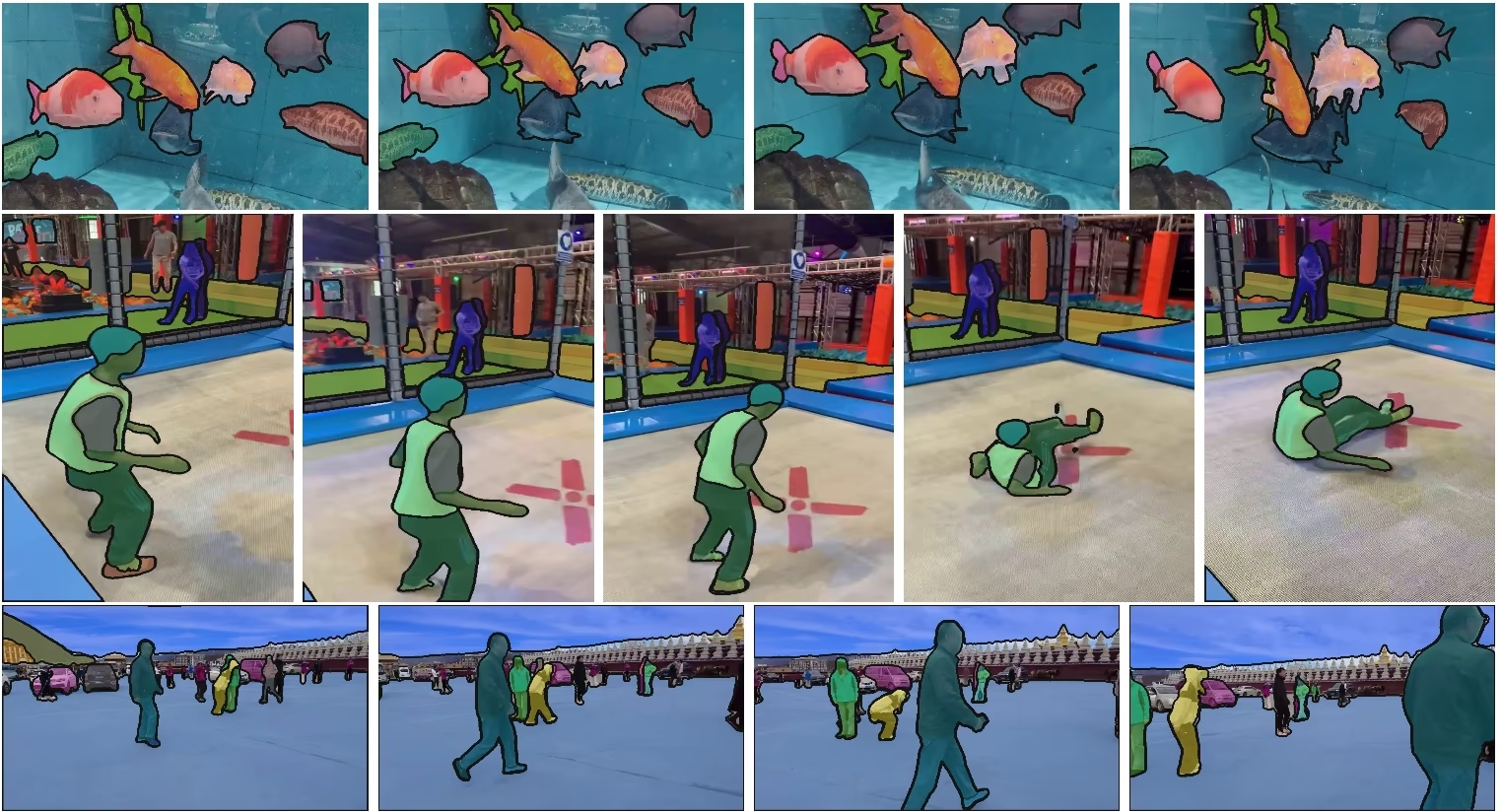
Meta의 세그먼트 애니싱 모델(SAM)을 계승한 SAM 2는 이미지와 동영상 모두에서 프롬프트 기반 객체 분할을 지원하는 통합 모델입니다. 단일 프롬프트 기반 아키텍처는 실시간 처리와 제로샷 일반화를 지원합니다.
SAM 2.1 모델은 Ultralytics Platform의 스마트 주석 기능을 구동하여 클릭 기반 분할로 데이터셋에 빠르게 라벨을 지정할 수 있게 합니다. 자세한 내용은 주석 가이드를 참조하세요.
주요 기능#
시청: Ultralytics를 사용한 Meta SAM2 추론 실행 방법 | 단계별 가이드
통합 모델 아키텍처#
SAM 2는 이미지와 동영상 분할 기능을 하나의 모델로 통합합니다. 이러한 통합으로 배포가 간소화되고 미디어 유형 전반에서 일관된 성능을 제공합니다. 유연한 프롬프트 기반 인터페이스를 사용하므로 사용자는 포인트, 바운딩 박스, 마스크 등 다양한 유형의 프롬프트로 관심 객체를 지정할 수 있습니다.
실시간 성능#
이 모델은 초당 약 44프레임을 처리하는 실시간 추론 속도를 달성합니다. 따라서 비디오 편집 및 증강 현실처럼 즉각적인 피드백이 필요한 애플리케이션에 SAM 2를 적합하게 사용할 수 있습니다.
제로샷 일반화#
SAM 2는 이전에 접한 적이 없는 객체도 분할할 수 있어 뛰어난 제로샷 일반화 성능을 보여줍니다. 사전 정의된 카테고리로는 가능한 모든 객체를 포함하기 어려운 다양하거나 변화하는 시각 도메인에서 특히 유용합니다.
인터랙티브 세분화#
사용자는 프롬프트를 추가해 분할 결과를 반복적으로 다듬을 수 있으므로 출력 결과를 정밀하게 제어할 수 있습니다. 이러한 상호작용 기능은 동영상 어노테이션이나 의료 영상과 같은 애플리케이션에서 결과를 개선하는 데 필수적입니다.
시각적 문제의 고급 처리#
SAM 2에는 객체 가림과 재등장 같은 일반적인 동영상 분할 문제를 관리하는 메커니즘이 포함되어 있습니다. 프레임 전반에서 객체를 추적하는 메모리 메커니즘을 사용하므로 객체가 일시적으로 가려지거나 장면에서 사라졌다 다시 나타나더라도 연속성을 유지합니다.
SAM 2의 아키텍처와 기능을 자세히 알아보려면 SAM 2 연구 논문을 살펴보세요.
성능 및 기술 세부 정보#
Meta에 따르면 SAM 2는 여러 지표에서 이전 모델보다 우수한 성능을 보입니다:
| 지표 | SAM 2 | 이전 최고 성능 |
|---|---|---|
| 인터랙티브 비디오 분할 | 최고 | - |
| 필요한 사람의 상호작용 | 3배 적음 | 기준 모델 |
| 이미지 분할 정확도 | 향상됨 | SAM |
| 추론 속도 | 6배 빠름 | SAM |
모델 아키텍처#
핵심 구성 요소#
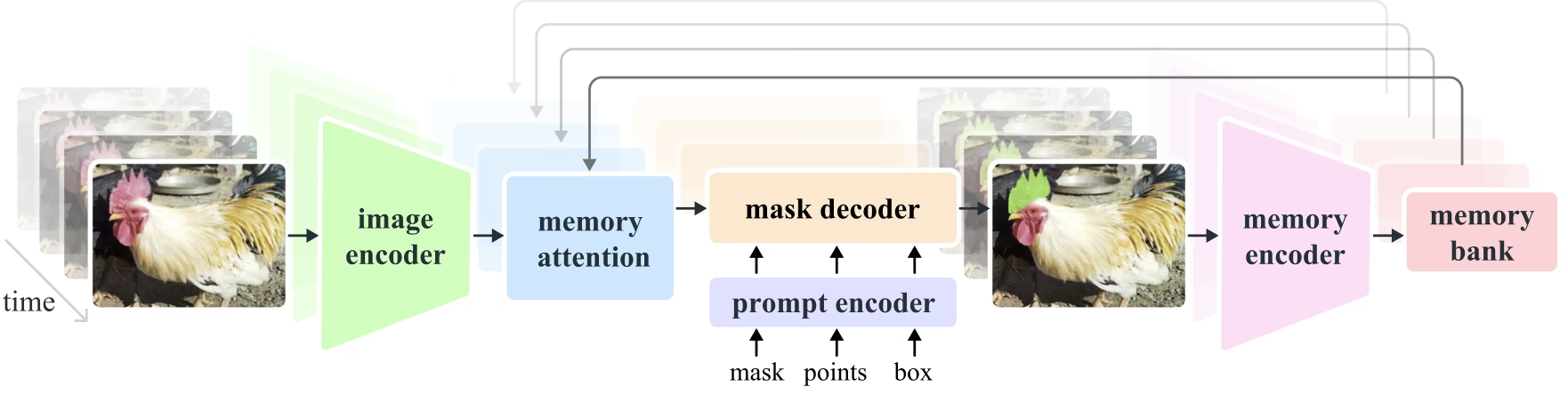
- 이미지 및 비디오 인코더: 트랜스포머 기반 아키텍처를 활용하여 이미지와 비디오 프레임 모두에서 고수준 특징을 추출합니다. 이 구성 요소는 각 시간 단계에서 시각적 콘텐츠를 이해하는 역할을 합니다.
- 프롬프트 인코더: 사용자가 제공한 프롬프트(점, 박스, 마스크)를 처리하여 분할 작업을 안내합니다. 이를 통해 SAM 2는 사용자 입력에 맞춰 장면 내 특정 객체를 대상으로 지정할 수 있습니다.
- 메모리 메커니즘: 메모리 인코더, 메모리 뱅크, 메모리 어텐션 모듈을 포함합니다. 이러한 구성 요소는 과거 프레임의 정보를 함께 저장하고 활용하여 시간이 지나도 일관된 객체 추적을 유지할 수 있게 합니다.
- 마스크 디코더: 인코딩된 이미지 특징과 프롬프트를 바탕으로 최종 분할 마스크를 생성합니다. 비디오에서는 프레임 간 정확한 추적을 위해 메모리 컨텍스트도 사용합니다.
메모리 메커니즘 및 가림 처리#
메모리 메커니즘을 통해 SAM 2는 비디오 데이터의 시간적 종속성과 가림을 처리할 수 있습니다. 객체가 움직이고 상호작용할 때 SAM 2는 객체의 특징을 메모리 뱅크에 기록합니다. 객체가 가려지면 모델은 이 메모리를 활용해 객체가 다시 나타날 때의 위치와 외형을 예측할 수 있습니다. 가림 헤드는 객체가 보이지 않는 상황을 전담하여 객체가 가려져 있을 가능성을 예측합니다.
다중 마스크 모호성 해결#
객체가 겹치는 경우처럼 모호한 상황에서 SAM 2는 여러 마스크 예측 결과를 생성할 수 있습니다. 이를 통해 단일 마스크로는 의도한 객체를 제대로 표현하지 못할 수 있는 복잡한 장면을 나타낼 수 있습니다.
SA-V 데이터셋#
SAM 2의 학습을 위해 개발된 SA-V 데이터셋은 현재 이용할 수 있는 비디오 분할 데이터셋 중 가장 크고 다양한 데이터셋의 하나입니다. 다음을 포함합니다.
- 동영상 51,000개 이상: 47개 국가에서 촬영되어 다양한 실제 환경을 제공합니다.
- 마스크 주석 600,000개 이상: 전체 객체와 부분을 포괄하는 상세한 시공간 마스크 주석으로, "마스크렛"이라고 합니다.
- 데이터셋 규모: 이전의 최대 동영상 분할 데이터셋보다 동영상이 4.5배, 어노테이션이 53배 더 많습니다.
벤치마크#
비디오 객체 분할#
SAM 2는 주요 동영상 분할 벤치마크에서 다음과 같은 결과를 보고했습니다:
| 데이터셋 | J&F | J | F |
|---|---|---|---|
| DAVIS 2017 | 82.5 | 79.8 | 85.2 |
| YouTube-VOS | 81.2 | 78.9 | 83.5 |
인터랙티브 분할#
대화형 분할 작업에서 SAM 2는 다음과 같은 결과를 달성합니다:
| 데이터셋 | NoC@90 | AUC |
|---|---|---|
| DAVIS 인터랙티브 | 1.54 | 0.872 |
설치#
SAM 2는 ultralytics 패키지에 포함되어 있습니다. 다음 명령어로 설치하면 처음 사용할 때 SAM 2 가중치가 자동으로 다운로드됩니다.
pip install ultralyticsSAM 2 사용 방법: 이미지 및 비디오 분할의 다재다능함#
다음 표에서는 사용 가능한 SAM 2 모델, 사전 학습 가중치, 지원 작업, 학습, 검증, 추론, 내보내기 등의 운영 모드와의 호환성을 자세히 설명합니다.
| 모델 유형 | 사전 학습 가중치 | 지원 작업 | 학습 | 검증 | 추론 | 내보내기 |
|---|---|---|---|---|---|---|
| SAM 2 tiny | sam2_t.pt | 인스턴스 분할 | ❌ | ❌ | ✅ | ❌ |
| SAM 2 small | sam2_s.pt | 인스턴스 분할 | ❌ | ❌ | ✅ | ❌ |
| SAM 2 base | sam2_b.pt | 인스턴스 분할 | ❌ | ❌ | ✅ | ❌ |
| SAM 2 large | sam2_l.pt | 인스턴스 분할 | ❌ | ❌ | ✅ | ❌ |
| SAM 2.1 tiny | sam2.1_t.pt | 인스턴스 분할 | ❌ | ❌ | ✅ | ❌ |
| SAM 2.1 small | sam2.1_s.pt | 인스턴스 분할 | ❌ | ❌ | ✅ | ❌ |
| SAM 2.1 base | sam2.1_b.pt | 인스턴스 분할 | ❌ | ❌ | ✅ | ❌ |
| SAM 2.1 large | sam2.1_l.pt | 인스턴스 분할 | ❌ | ❌ | ✅ | ❌ |
SAM 2 예측 예시#
SAM 2는 실시간 동영상 편집, 의료 영상, 자율 시스템을 비롯한 폭넓은 작업에 사용할 수 있습니다. 정적 시각 데이터와 동적 시각 데이터를 모두 분할할 수 있어 연구자와 개발자에게 다용도 도구가 됩니다.
프롬프트로 분할#
프롬프트를 사용하여 이미지나 비디오에서 특정 객체를 분할합니다.
from ultralytics import SAM

# 모델 로드
model = SAM("sam2.1_b.pt")

# 모델 정보 표시(선택 사항)
model.info()

# bboxes 프롬프트로 추론 실행
results = model("path/to/image.jpg", bboxes=[100, 100, 200, 200])

# 단일 점으로 추론 실행
results = model(points=[900, 370], labels=[1])

# 여러 점으로 추론 실행
results = model(points=[[400, 370], [900, 370]], labels=[1, 1])

# 객체마다 여러 점 프롬프트로 추론 실행
results = model(points=[[[400, 370], [900, 370]]], labels=[[1, 1]])

# 음수 점 프롬프트로 추론 실행
results = model(points=[[[400, 370], [900, 370]]], labels=[[1, 0]])
모든 항목 분할#
특정 프롬프트 없이 이미지나 비디오의 전체 콘텐츠를 분할합니다.
from ultralytics import SAM

# 모델 로드
model = SAM("sam2.1_b.pt")

# 모델 정보 표시(선택 사항)
model.info()

# 추론 실행
model("path/to/video.mp4")- 이 예제에서는 프롬프트(bboxes/점/마스크)가 제공되지 않을 때 SAM 2를 사용하여 이미지나 비디오의 전체 콘텐츠를 분할하는 방법을 보여줍니다.
비디오 분할 및 객체 추적#
특정 프롬프트를 사용해 비디오 콘텐츠 전체를 분할하고 객체를 추적합니다.
from ultralytics.models.sam import SAM2VideoPredictor

# Create SAM2VideoPredictor
overrides = {"conf": 0.25, "task": "segment", "mode": "predict", "imgsz": 1024, "model": "sam2_b.pt"}
predictor = SAM2VideoPredictor(overrides=overrides)

# 단일 점으로 추론 실행
results = predictor(source="test.mp4", points=[920, 470], labels=[1])

# 여러 점으로 추론 실행
results = predictor(source="test.mp4", points=[[920, 470], [909, 138]], labels=[1, 1])

# 객체마다 여러 점 프롬프트로 추론 실행
results = predictor(source="test.mp4", points=[[[920, 470], [909, 138]]], labels=[[1, 1]])

# 음수 점 프롬프트로 추론 실행
results = predictor(source="test.mp4", points=[[[920, 470], [909, 138]]], labels=[[1, 0]])
동적 인터랙티브 분할 및 추적#
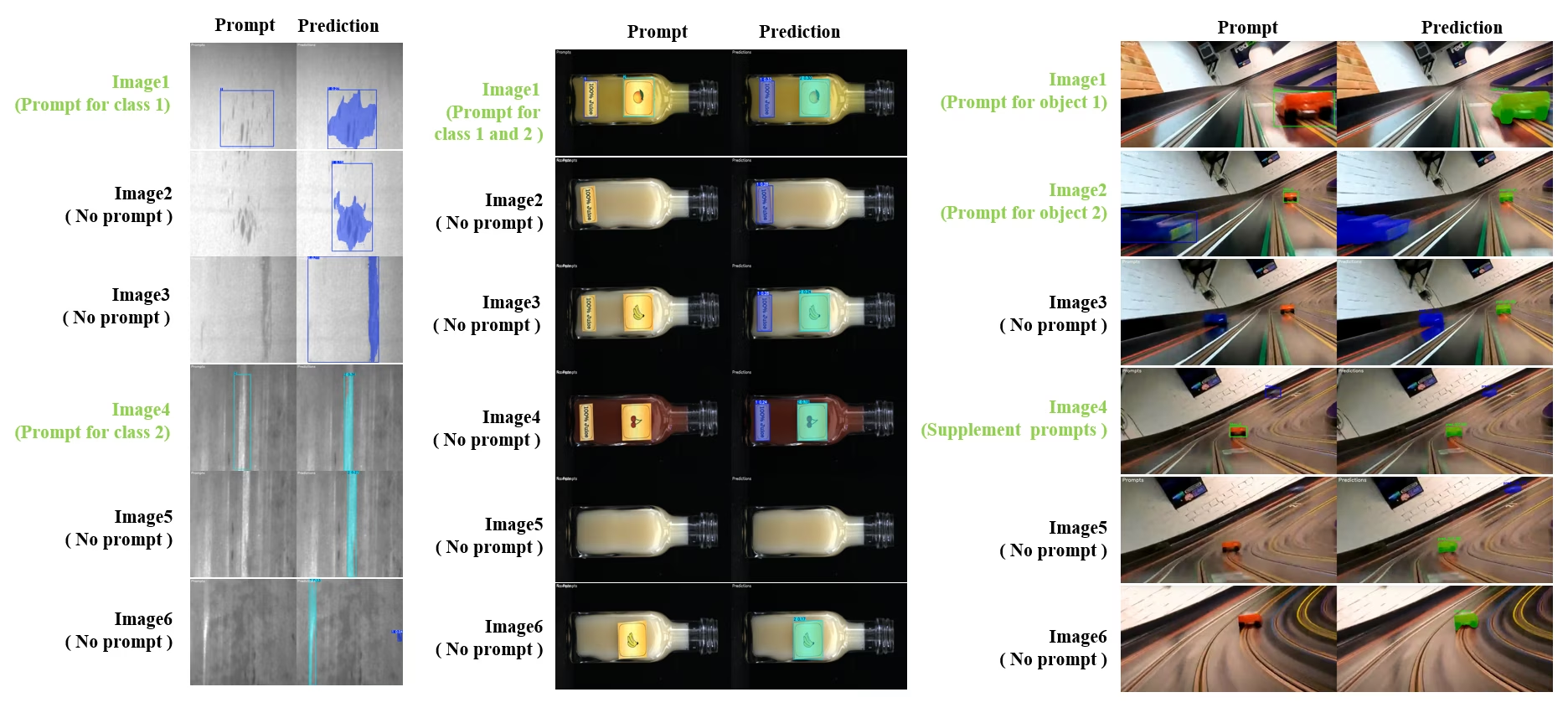
SAM2DynamicInteractivePredictor은 여러 프레임과 동적으로 상호작용하고 지속적 학습 기능을 제공하도록 SAM 2를 확장한 학습 불필요 확장 기능입니다. 이 예측기는 실시간 프롬프트 업데이트와 메모리 관리를 지원해 이미지 시퀀스 전반의 추적 성능을 개선합니다. 기존 SAM 2와 비교할 때 SAM2DynamicInteractivePredictor은 추가 학습 없이 사전 학습된 SAM 2 모델을 최대한 활용할 수 있도록 추론 흐름을 재구성합니다.
주요 기능#
다음 세 가지 개선 사항을 제공합니다:
- 동적 대화형 기능: 동영상 처리 중 언제든지 이후 프레임에서 새로 등장한 미추적 인스턴스에 프롬프트를 추가할 수 있습니다.
- 지속 학습: 기존 인스턴스에 새 프롬프트를 추가하여 시간의 흐름에 따라 모델 성능을 향상합니다.
- 독립적인 다중 이미지 지원: 메모리를 공유하고 이미지 간 객체를 추적하면서 서로 독립적인 여러 이미지(비디오 시퀀스에서 가져온 이미지일 필요 없음)를 처리합니다.
핵심 기능#
- 프롬프트 유연성: 바운딩 박스, 점, 마스크를 프롬프트로 입력할 수 있습니다.
- 메모리 뱅크 관리: 프레임 전반에서 객체 상태를 저장하는 동적 메모리 뱅크를 유지합니다.
- 다중 객체 추적: 개별 객체 ID를 사용해 여러 객체를 동시에 추적할 수 있습니다.
- 실시간 업데이트: 이전 프레임을 다시 처리하지 않고 추론 중에 새 프롬프트를 추가할 수 있습니다.
- 독립 이미지 처리: 이미지 간 객체 일관성을 유지하기 위해 공유 메모리 컨텍스트를 사용하여 개별 이미지를 처리합니다.
from ultralytics.models.sam import SAM2DynamicInteractivePredictor

# Create SAM2DynamicInteractivePredictor
overrides = {"conf": 0.01, "task": "segment", "mode": "predict", "imgsz": 1024, "model": "sam2_t.pt", "save": False}
predictor = SAM2DynamicInteractivePredictor(overrides=overrides, max_obj_num=10)

# 박스 프롬프트로 카테고리 정의
predictor(source="image1.jpg", bboxes=[[100, 100, 200, 200]], obj_ids=[0], update_memory=True)

# 새 이미지에서 이 특정 객체 감지
results = predictor(source="image2.jpg")

# 새 객체 ID로 새 카테고리 추가
results = predictor(
    source="image4.jpg",
    bboxes=[[300, 300, 400, 400]],  # 새 객체
    obj_ids=[1],  # 새 객체 ID
    update_memory=True,  # 메모리에 추가
)
# 추론 수행
results = predictor(source="image5.jpg")

# 성능을 높이려면 동일한 카테고리에 정제 프롬프트를 추가합니다
# 이 기능은 객체의 외형이 크게 바뀌는 경우에 유용합니다
results = predictor(
    source="image6.jpg",
    points=[[150, 150]],  # 정제 포인트
    labels=[1],  # 긍정 포인트
    obj_ids=[1],  # 동일한 객체 ID
    update_memory=True,  # 새 정보로 메모리 업데이트
)
# 새 이미지에서 추론 수행
results = predictor(source="image7.jpg")SAM2DynamicInteractivePredictor은 SAM 2 모델과 함께 작동하도록 설계되었으며, SAM 2가 기본적으로 지원하는 모든 박스, 포인트 및 마스크 프롬프트를 사용해 카테고리를 추가하고 정제할 수 있습니다. 비디오 어노테이션이나 대화형 편집 작업과 같이 객체가 시간에 따라 나타나거나 변하는 시나리오에서 특히 유용합니다.
인수#
| 이름 | 기본값 | 데이터 유형 | 설명 |
|---|---|---|---|
max_obj_num | 3 | int | 사전 설정된 최대 카테고리 수 |
update_memory | False | bool | 새 프롬프트로 메모리를 업데이트할지 여부 |
obj_ids | None | List[int] | 프롬프트에 해당하는 객체 ID 목록 |
사용 사례#
SAM2DynamicInteractivePredictor은 다음과 같은 경우에 적합합니다:
- 시퀀스 중에 새 객체가 나타나는 비디오 어노테이션 워크플로
- 실시간 객체 추가 및 정제가 필요한 대화형 비디오 편집
- 동적 객체 추적이 필요한 감시 애플리케이션
- 시계열 전반에 걸쳐 해부학적 구조를 추적하는 의료 영상
- 적응형 객체 탐지 및 추적이 필요한 자율 시스템
- 독립적인 이미지 전반에서 일관된 객체 세분화를 위한 다중 이미지 데이터셋
- 서로 다른 장면에서 객체를 추적해야 하는 이미지 컬렉션 분석
- 다양한 이미지 컨텍스트의 메모리를 활용하는 도메인 간 세분화
- 최소한의 수동 개입으로 효율적인 데이터셋을 생성하는 반자동 어노테이션
SAM과 YOLO 비교#
여기서는 SAM2-t 초소형 변형을 포함한 Meta의 SAM 2 모델과 YOLO26을 포함한 Ultralytics 분할 모델을 비교합니다:
| 모델 | 크기 (MB) | 매개변수 (M) | 속도(CPU) (ms/im) |
|---|---|---|---|
| Meta SAM-b | 375 | 93.7 | 41703 |
| Meta SAM2-b | 162 | 80.8 | 28867 |
| Meta SAM2-t | 78.1 | 38.9 | 23430 |
| MobileSAM | 40.7 | 10.1 | 23802 |
| FastSAM-s와 YOLOv8 백본 | 23.9 | 11.8 | 58.0 |
| Ultralytics YOLOv8n-seg | 7.1 (11.0배 더 작음) | 3.4 (11.4배 더 적음) | 24.8 (945배 더 빠름) |
| Ultralytics YOLO11n-seg | 6.2 (12.6배 더 작음) | 2.9 (13.4배 더 적음) | 24.3 (964배 더 빠름) |
| Ultralytics YOLO26n-seg | 6.7 (11.7배 더 작음) | 2.7 (14.4배 더 적음) | 25.2 (930배 더 빠름) |
이 비교는 SAM 변형 모델과 YOLO 세그멘테이션 모델 간 모델 크기와 속도의 상당한 차이를 보여줍니다. SAM은 고유한 자동 세그멘테이션 기능을 제공하지만, 특히 YOLOv8n-seg, YOLO11n-seg, YOLO26n-seg와 같은 YOLO 모델은 크기가 훨씬 작고 속도가 빠르며 연산 효율성이 더 높습니다.
SAM 속도는 PyTorch로 측정했으며, YOLO 속도는 ONNX Runtime으로 측정했습니다. 테스트는 16GB RAM을 탑재한 2025년형 Apple M4 Air에서 torch==2.10.0, ultralytics==8.4.31, onnxruntime==1.24.4를 사용해 실행했습니다. 이 테스트를 재현하려면 다음을 수행합니다:
from ultralytics import ASSETS, SAM, YOLO, FastSAM

# SAM2-t, SAM2-b, SAM-b, MobileSAM 프로파일링
for file in ["sam_b.pt", "sam2_b.pt", "sam2_t.pt", "mobile_sam.pt"]:
    model = SAM(file)
    model.info()
    model(ASSETS)

# FastSAM-s 프로파일링
model = FastSAM("FastSAM-s.pt")
model.info()
model(ASSETS)

# YOLO 모델 프로파일링(ONNX)
for file_name in ["yolov8n-seg.pt", "yolo11n-seg.pt", "yolo26n-seg.pt"]:
    model = YOLO(file_name)
    model.info()
    onnx_path = model.export(format="onnx", dynamic=True, nms=False)  # YOLO26 NMS 없는 헤드; YOLOv8/YOLO11에서는 작동하지 않음
    model = YOLO(onnx_path)
    model(ASSETS)
자동 어노테이션: 효율적인 데이터셋 생성#
자동 어노테이션은 SAM 2를 사전 학습된 감지 모델과 결합해 광범위한 수동 레이블링 없이 분할 데이터셋을 빠르게 생성합니다. Ultralytics Platform은 호스팅된 비전 모델을 사용하는 브라우저 기반 자동 어노테이션도 제공합니다. VLM 리더보드에서 감지 정확도, 비용, 속도를 비교해 보세요.
SAM 2로 자동 어노테이션하는 방법#
시청: Ultralytics에서 Meta의 Segment Anything 2 모델로 자동 주석을 수행하는 방법 | 데이터 라벨링
YOLO26x 감지기와 SAM 2를 사용해 데이터셋을 자동 어노테이션하려면 다음 예제를 따르세요:
from ultralytics.data.annotator import auto_annotate

auto_annotate(data="path/to/images", det_model="yolo26x.pt", sam_model="sam2_b.pt")| 인수 | 유형 | 기본값 | 설명 |
|---|---|---|---|
data | str | 필수 | 어노테이션 또는 세분화 대상 이미지가 포함된 디렉터리 경로입니다. |
det_model | str | 'yolo26x.pt' | 초기 객체 탐지를 위한 YOLO 탐지 모델 경로입니다. |
sam_model | str | 'sam_b.pt' | 세분화를 위한 SAM 모델 경로입니다(SAM, SAM 2, MobileSAM 및 SAM 3 가중치 지원). |
device | str | '' | 연산 장치입니다(예: 'cuda:0', 'cpu' 또는 자동 장치 감지를 위한 ''). |
conf | float | 0.25 | 약한 탐지를 필터링하기 위한 YOLO 탐지 신뢰도 임계값입니다. |
iou | float | 0.5 | 겹치는 박스를 필터링하기 위한 비최대 억제의 IoU 임계값입니다. |
imgsz | int | 640 | 이미지 크기 조정에 사용할 입력 크기입니다(필요한 경우 32의 배수로 올림). |
max_det | int | 300 | 메모리 효율성을 위한 이미지당 최대 탐지 수입니다. |
classes | list[int] | None | 탐지할 클래스 인덱스 목록입니다(예: 사람 및 자전거의 경우 [0, 1]). |
output_dir | str | None | 어노테이션 저장 디렉터리입니다(기본값: 동일한 상위 디렉터리의 <data>_auto_annotate_labels). |
이 함수는 레이블이 지정되지 않은 이미지 폴더를 최소한의 수동 작업만으로 분할 데이터셋으로 변환합니다.
제한 사항#
강점에도 불구하고 SAM 2에는 몇 가지 한계가 있습니다:
- 추적 안정성: SAM 2는 긴 시퀀스나 시점이 크게 바뀌는 상황에서 객체 추적을 놓칠 수 있습니다.
- 객체 혼동: 특히 객체가 밀집된 장면에서 모델이 외형이 유사한 객체를 혼동할 수 있습니다.
- 다중 객체 처리 효율성: 객체 간 통신이 부족하기 때문에 여러 객체를 동시에 처리할 때 세분화 효율성이 떨어집니다.
- 세부 정확도: 특히 빠르게 움직이는 객체에서는 미세한 세부 정보를 놓칠 수 있습니다. 프롬프트를 추가하면 이 문제를 부분적으로 해결할 수 있지만, 시간적 매끄러움은 보장되지 않습니다.
인용 및 감사의 글#
연구 또는 개발 작업에서 SAM 2를 사용하신다면 다음 참고 문헌을 인용해 주세요:
@article{ravi2024sam2,
  title={SAM 2: Segment Anything in Images and Videos},
  author={Ravi, Nikhila and Gabeur, Valentin and Hu, Yuan-Ting and Hu, Ronghang and Ryali, Chaitanya and Ma, Tengyu and Khedr, Haitham and R{\"a}dle, Roman and Rolland, Chloe and Gustafson, Laura and Mintun, Eric and Pan, Junting and Alwala, Kalyan Vasudev and Carion, Nicolas and Wu, Chao-Yuan and Girshick, Ross and Doll{\'a}r, Piotr and Feichtenhofer, Christoph},
  journal={arXiv preprint},
  year={2024}
}
이 모델과 데이터셋을 AI 커뮤니티에 공개해 주신 Meta AI에 감사드립니다.
자주 묻는 질문#
Meta의 세그먼트 애니씽 모델(SAM)의 후속 모델인 SAM 2는 이미지와 동영상 모두에서 객체 분할을 수행하는 통합 프롬프트 기반 모델입니다. SAM 2는 원래 SAM에 비해 다음과 같은 여러 개선 사항을 제공합니다:
- 통합 모델 아키텍처: 이미지와 비디오 세분화 기능을 단일 모델에 결합합니다.
- 실시간 성능: 초당 약 44프레임을 처리하므로 즉각적인 피드백이 필요한 애플리케이션에 적합합니다.
- 제로샷 일반화: 이전에 접한 적 없는 객체를 세분화하므로 다양한 시각 도메인에서 유용합니다.
- 대화형 정제: 사용자가 추가 프롬프트를 제공하여 세분화 결과를 반복적으로 정제할 수 있습니다.
- 시각적 문제에 대한 고급 처리: 객체 가림 및 재등장과 같은 일반적인 비디오 세분화 문제를 처리합니다.
SAM 2의 아키텍처와 기능에 대한 자세한 내용은 SAM 2 연구 논문을 참조하세요.
SAM 2는 프롬프트 기반 인터페이스와 빠른 추론을 통해 실시간 동영상 분할을 지원합니다. 기본적인 예시는 다음과 같습니다:
프롬프트로 분할프롬프트를 사용하여 이미지나 비디오에서 특정 객체를 분할합니다.
from ultralytics import SAM

# 모델 로드
model = SAM("sam2_b.pt")

# 모델 정보 표시(선택 사항)
model.info()

# 바운딩 박스 프롬프트로 세분화
results = model("path/to/image.jpg", bboxes=[100, 100, 200, 200])

# 포인트 프롬프트로 세분화
results = model("path/to/image.jpg", points=[150, 150], labels=[1])
보다 자세한 사용 방법은 SAM 2 사용 방법 섹션을 참조하세요.
SAM 2는 이용 가능한 동영상 분할 데이터셋 중 규모가 크고 다양성이 뛰어난 SA-V 데이터셋으로 학습됩니다. SA-V 데이터셋에는 다음 항목이 포함됩니다.
- 동영상 51,000개 이상: 47개 국가에서 촬영되어 다양한 실제 환경을 제공합니다.
- 마스크 주석 600,000개 이상: 전체 객체와 부분을 포괄하는 상세한 시공간 마스크 주석으로, "마스크렛"이라고 합니다.
- 데이터셋 규모: 이전의 최대 데이터셋보다 비디오 수가 4.5배, 어노테이션 수가 53배 많아 전례 없는 다양성과 복잡성을 제공합니다.
이 데이터셋을 통해 SAM 2는 주요 동영상 분할 벤치마크에서 우수한 결과를 달성하고 제로샷 일반화 역량을 강화합니다.
SAM 2에는 동영상 데이터의 시간적 종속성과 가림 현상을 처리하는 메모리 메커니즘이 포함되어 있습니다. 메모리 메커니즘은 다음으로 구성됩니다:
- 메모리 인코더 및 메모리 뱅크: 이전 프레임의 특징을 저장합니다.
- 메모리 어텐션 모듈: 저장된 정보를 활용해 시간에 따라 일관된 객체 추적을 유지합니다.
- 가림 헤드: 객체가 보이지 않는 상황을 전담 처리하고 객체가 가려져 있을 가능성을 예측합니다.
이 메커니즘은 객체가 일시적으로 가려지거나 장면에서 나갔다가 다시 들어와도 연속성을 보장합니다. 자세한 내용은 메모리 메커니즘 및 가림 처리 섹션을 참조하세요.
Meta의 SAM2-t 및 SAM2-b와 같은 SAM 2 모델은 강력한 제로샷 세분화 기능을 제공하지만, YOLO 모델에 비해 크기가 훨씬 크고 속도가 느립니다. 예를 들어 YOLO26n-seg는 CPU에서 SAM2-b보다 약 24배 작고, 1145배 이상 빠릅니다. SAM 2는 다양한 프롬프트 기반 및 제로샷 세분화 시나리오에 강점을 보이는 반면, YOLO26은 NMS가 필요 없는 엔드투엔드 추론을 통해 속도, 효율성 및 실시간 애플리케이션에 최적화되어 있어 리소스가 제한된 환경에 배포하기에 더 적합합니다.


댓글150
질문을 하거나 결과를 공유하거나 다른 사람을 도와주세요.
 Glenn JocherUltralytics
Hey everyone! We wanted to give you a quick update: our team is currently busy integrating SAM 2 (Segment Anything Model 2) into the Ultralytics package. This new model is super exciting, with features like real-time performance and the ability to segment objects it’s never seen before.
We're really pumped about what SAM2 can do, but it's still in the works. Thanks for your patience as we get everything set up! We'll keep you posted as we make progress. Stay tuned!
10- Glenn JocherUltralytics
Update: SAM 2 is now fully integrated! Update your package to
ultralytics>=8.2.70withpip install -U ultralyticsand then for example:from ultralytics import ASSETS, SAM # Load a model model = SAM("sam2_s.pt") # Segment with point prompt results = model(ASSETS / "bus.jpg", points=[150, 150], labels=[1], device="cpu")1
avasanjesh
Hello,
Can i use sam2.1 for real time segmentation? i want to specify the object on the first frame of live video webcam then sam2.1 shows the segmentation and continue to track and show the result of segmentation of that object. Is it possible to do this?
1thedatamask
Breaking News: 🚨 SAM 1.0 outperforms SAM 2.0 on low-contrast images like CT Scan and MRI images! Check out this insightful video from Data Mask YouTube channel where they dive deep into the architecture, demos, and limitations of both Meta's segmentation models. Discover when to use SAM 1.0 for superior results on challenging images.
Use case with ultralytics
https://www.youtube.com/watch?v=vMI-TnyNLYU
Please do like and subscribe for exciting video like above .
#SAM #SAM2.0 #MetaAI #ImageSegmentation #AI #MachineLearning #DeepLearning #DataMask #BreakingNews
1- Glenn JocherUltralytics
@thedatamask thank you for sharing the video. For insights on SAM 2's capabilities and its comparison with other models, you can explore our documentation. If you have specific questions about using SAM 2 with Ultralytics, feel free to ask!
ram-from-tvl
Hi Team,
the below is the code I have been using to annotate some items in a folder of several images. I am planning to segment everything first and then try to cherry pick the ones that are to be annotated for a downstream segmentation task. Could you please tailor the code for the same. I am not getting any help from the docs regarding the same. i have tried auto annotate but its not working for my use case. So please help me in this approach
` from ultralytics import SAM
Load a model
model = SAM("sam2.1_b.pt")
Display model information (optional)
model.info()
Run inference
model("/kaggle/working/10_random_frames") `
Thankyou
Regards Ram
 Onuralp SezerUltralytics
Hi Team,
the below is the code I have been using to annotate some items in a folder of several images. I am planning to segment everything first and then try to cherry pick the ones that are to be annotated for a downstream segmentation task. Could you please tailor the code for the same. I am not getting any help from the docs regarding the same. i have tried auto annotate but its not working for my use case. So please help me in this approach
` from ultralytics import SAM
Load a model
model = SAM("sam2.1_b.pt")
Display model information (optional)
model.info()
Run inference
model("/kaggle/working/10_random_frames") `
Thankyou
Regards Ram
You may want check out here https://docs.ultralytics.com/reference/data/annotator/#ultralytics.data.annotator.auto_annotate
zhaowangalready
Hello, dear doctor, I encountered some problems in the automatic annotation segmentation. I used the successfully annotated data for verification and found that the data of each species has a serial number border. How can I remove the serial number border? I hope to hear from you.
- Glenn JocherUltralytics
auto_annotate()生成的是标准 YOLO-seg 标签:每一行开头的“数字”是类别class_id(必需字段,不能删),如果你看到的是验证/预测保存出来的图片上带编号的边框/轮廓,那只是可视化绘图,不会写进数据本身;你可以按 SAM 2 文档 继续用同一套数据训练/验证,同时关掉这些 plot:yolo val model=yolo26n-seg.pt data=path/to/data.yaml plots=False yolo predict model=sam2.1_b.pt source=path/to/images show_labels=False show_boxes=False方便的话把“带序号边框”的截图 + 对应的一行标签
.txt内容贴在这个 discussion 里,我帮你确认你看到的到底是class_id还是绘图叠加效果。
cyberpunk-edgerunner
I have to question related to SAM2 :
- How to use text-prompt for segmentation using SAM ?
- Along with the bounding box coordinates, is there a way to tell SAM what not to segment ?
I have two questions regarding segmentation with SAM2 and YOLOv11:
1. Visualization and Editing with SAM2 I've used the
auto_annotatefeature and I'm wondering:- How can I visualize the segmentations produced by the SAM2 model?
- Is there a way to manually inspect or edit these segmentations?
I'm aiming to verify the outputs before proceeding further.
2. Saving and Cropping Segmentations I'm using the following code to detect and segment images with YOLOv11 and SAM2:
from ultralytics import YOLO
from ultralytics import SAM

model = YOLO(r"runs\detect\train2\weights\best.pt")
sam_model = SAM("sam2_b.pt")

results = model("more_test_images", save=True)

for result in results:
    class_ids = result.boxes.cls.int().tolist()

    if len(class_ids):
        boxes = result.boxes.xyxy
        sam_results = sam_model(result.orig_img, bboxes=boxes, verbose=False, save=True)
The detection results from YOLOv11 are saved correctly, but only one segmented result is saved by SAM2.
Questions:
- How can I ensure all SAM2 segmentations are saved for each image?
- How can I crop and save only the segmented parts (i.e., masked regions) from each image? I need these as separate images, containing only the segmented pixels.
Any help or pointers would be greatly appreciated!
fangyuZ1025
Hello, dear doctor, I encountered some problems in the automatic annotation segmentation. The automatic annotation automatically marked various marks on my output, but in fact, this is not the correct mark of my picture, and even some pictures cannot recognise the objects in it. How can I make it change the label uniform? For example, all of them are labelled as "fruit", "vehicle" and so on? I hope to get your reply.
from ultralytics.data.annotator import auto_annotate
auto_annotate(data=r"D:\graduation.thesis\mydata\mt_label\images", det_model="yolov8n.pt", sam_model="sam2_b.pt")
image 19/461 D:\graduation.thesis\mydata\mt_label\images\IMG_20241003_112848.jpg: 640x640 (no detections), 33.4ms image 20/461 D:\graduation.thesis\mydata\mt_label\images\IMG_20241003_112858.jpg: 640x640 1 orange, 31.9ms image 21/461 D:\graduation.thesis\mydata\mt_label\images\IMG_20241003_112907.jpg: 640x640 1 apple, 35.3ms image 22/461 D:\graduation.thesis\mydata\mt_label\images\IMG_20241003_112916.jpg: 640x640 (no detections), 34.0ms image 23/461 D:\graduation.thesis\mydata\mt_label\images\IMG_20241003_112938.jpg: 640x640 (no detections), 35.3ms image 24/461 D:\graduation.thesis\mydata\mt_label\images\IMG_20241003_112947.jpg: 640x640 1 donut, 32.1ms image 25/461 D:\graduation.thesis\mydata\mt_label\images\IMG_20241003_113004.jpg: 640x640 (no detections), 28.6ms image 26/461 D:\graduation.thesis\mydata\mt_label\images\IMG_20241003_113014.jpg: 640x640 1 donut, 33.9ms image 27/461 D:\graduation.thesis\mydata\mt_label\images\IMG_20241003_113028.jpg: 640x640 1 apple, 1 donut, 35.8ms
- Glenn JocherUltralytics(수정됨)
@fangyuZ1025 to improve label consistency in auto-annotation, you'll need to train a custom detection model with your specific classes ("fruit", "vehicle") first. The auto_annotate function relies on your detection model's class definitions - it doesn't rename labels but uses whatever classes your det_model was trained on. For immediate improvement, try a newer detection model such as YOLO26 (for example
det_model="yolo26n.pt"), which is more accurate than YOLOv8.
Fatima-khanjar
Hello, I am using SAM2 with my fine-tuned YOLOv11 on my custom dataset to perform auto-annotation for an object detection task. However, the annotations in the .txt file are not in the YOLO format (class_label x_center y_center width height).
Could you clarify the format of the labels generated when using both SAM2 and YOLOv11 for auto-annotation?
- Glenn JocherUltralytics
@Fatima-khanjar the auto-annotation function generates segmentation masks in YOLO segmentation format (polygon points normalized 0-1), not bounding boxes. For object detection tasks, you'll need to convert these masks to bounding boxes using
masks.xyfrom Results objects. We recommend reviewing the Auto-Annotation with SAM2 documentation for implementation details and conversion examples.1
danieltudosiu(수정됨)
How does one use SAM2 with a numpy input? I saw how to do it with SAM but SAM2 does not have a preprocess method like SAM.
- Glenn JocherUltralytics(수정됨)
@danieltudosiu you can pass numpy arrays directly as the source to
SAM. Here's a minimal example:import numpy as np from ultralytics import SAM model = SAM("sam2.1_b.pt") img = np.random.randint(0, 255, (640, 640, 3), dtype=np.uint8) # Your numpy array results = model(img, points=[100, 100], labels=[1])For more details, see the SAM 2 documentation.
But what about the Image one? Or just use the Video one for Images as well?
- Glenn JocherUltralytics(수정됨)
You can pass numpy arrays or file paths directly to
SAM("sam2.1_b.pt"), for examplemodel(img_array, points=[100, 100], labels=[1]).SAM2VideoPredictoris only needed for video. For image-specific examples, see the SAM 2 documentation.