PyTorch Hub에서 YOLOv5 불러오기#
📚 이 가이드에서는 PyTorch Hub(https://pytorch.org/hub/ultralytics_yolov5)에서 YOLOv5 🚀를 불러오는 방법을 설명합니다.
시작하기 전에#
Python>=3.8.0 환경에 requirements.txt를 설치하세요. 여기에는 PyTorch>=1.8도 포함됩니다. 모델과 데이터셋은 최신 YOLOv5 릴리스에서 자동으로 다운로드됩니다.
pip install -r https://raw.githubusercontent.com/ultralytics/yolov5/master/requirements.txtultralytics/yolov5을 클론할 필요는 없습니다. PyTorch Hub가 코드를 자동으로 가져옵니다.
PyTorch Hub로 YOLOv5 불러오기#
간단한 예제#
이 예제에서는 PyTorch Hub에서 사전 학습된 YOLOv5s 모델을 model으로 불러와 이미지에 대해 추론을 수행합니다. 'yolov5s'은 작고 빠른 YOLOv5 모델입니다. 사용 가능한 모든 모델에 대한 자세한 내용은 README를 참조하세요.
import torch

# Model
model = torch.hub.load("ultralytics/yolov5", "yolov5s")

# Image
im = "https://ultralytics.com/images/zidane.jpg"

# Inference
results = model(im)

results.pandas().xyxy[0]
# xmin    ymin    xmax   ymax  confidence  class    name
# 0  749.50   43.50  1148.0  704.5    0.874023      0  person
# 1  433.50  433.50   517.5  714.5    0.687988     27     tie
# 2  114.75  195.75  1095.0  708.0    0.624512      0  person
# 3  986.00  304.00  1028.0  420.0    0.286865     27     tie
자세한 예제#
이 예제에서는 PIL 및 OpenCV 이미지 소스를 사용한 배치 추론을 보여줍니다. results은 콘솔에 출력하거나, runs/hub에 저장하거나, 지원 환경에서 화면에 표시할 수 있으며, 텐서 또는 pandas DataFrame으로 반환할 수도 있습니다.
import cv2
import torch
from PIL import Image

# Model
model = torch.hub.load("ultralytics/yolov5", "yolov5s")

# Images
for f in "zidane.jpg", "bus.jpg":
    torch.hub.download_url_to_file(f"https://ultralytics.com/images/{f}", f)  # download 2 images
im1 = Image.open("zidane.jpg")  # PIL image
im2 = cv2.imread("bus.jpg")[..., ::-1]  # OpenCV image (BGR to RGB)

# Inference
results = model([im1, im2], size=640)  # batch of images

# Results
results.print()
results.save()  # or .show()

results.xyxy[0]  # im1 predictions (tensor)
results.pandas().xyxy[0]  # im1 predictions (pandas)
#      xmin    ymin    xmax   ymax  confidence  class    name
# 0  749.50   43.50  1148.0  704.5    0.874023      0  person
# 1  433.50  433.50   517.5  714.5    0.687988     27     tie
# 2  114.75  195.75  1095.0  708.0    0.624512      0  person
# 3  986.00  304.00  1028.0  420.0    0.286865     27     tie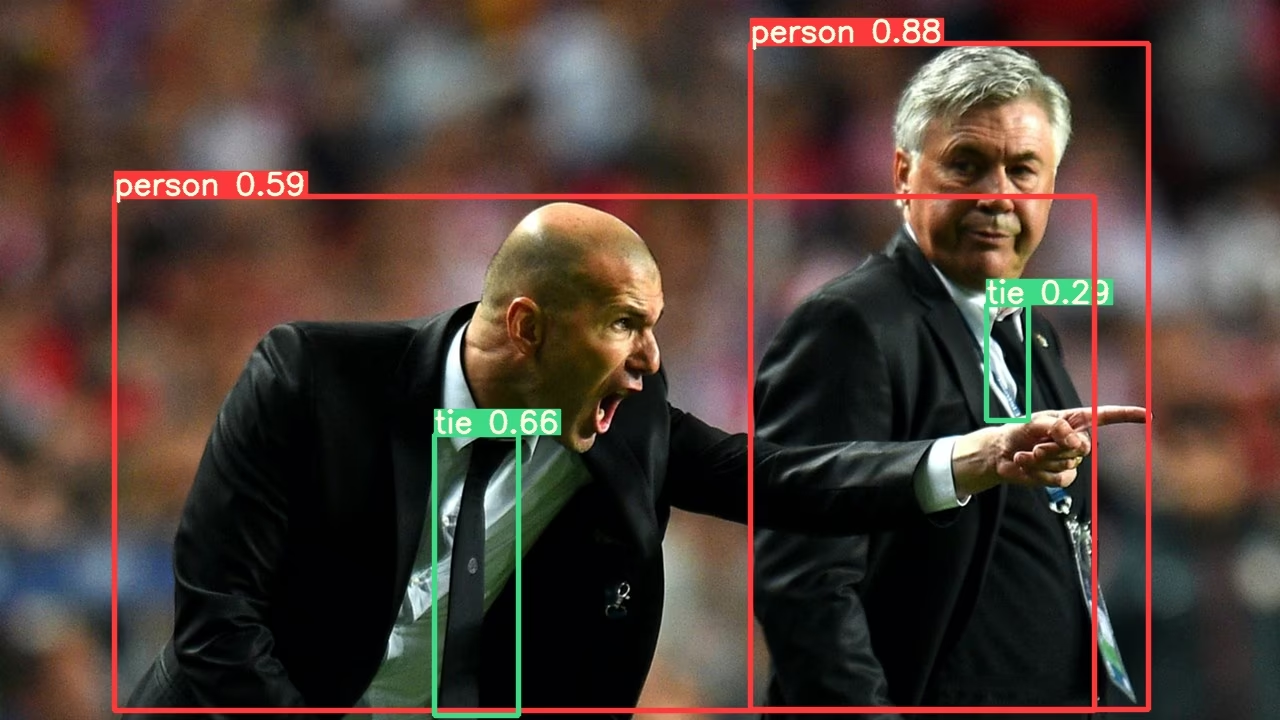
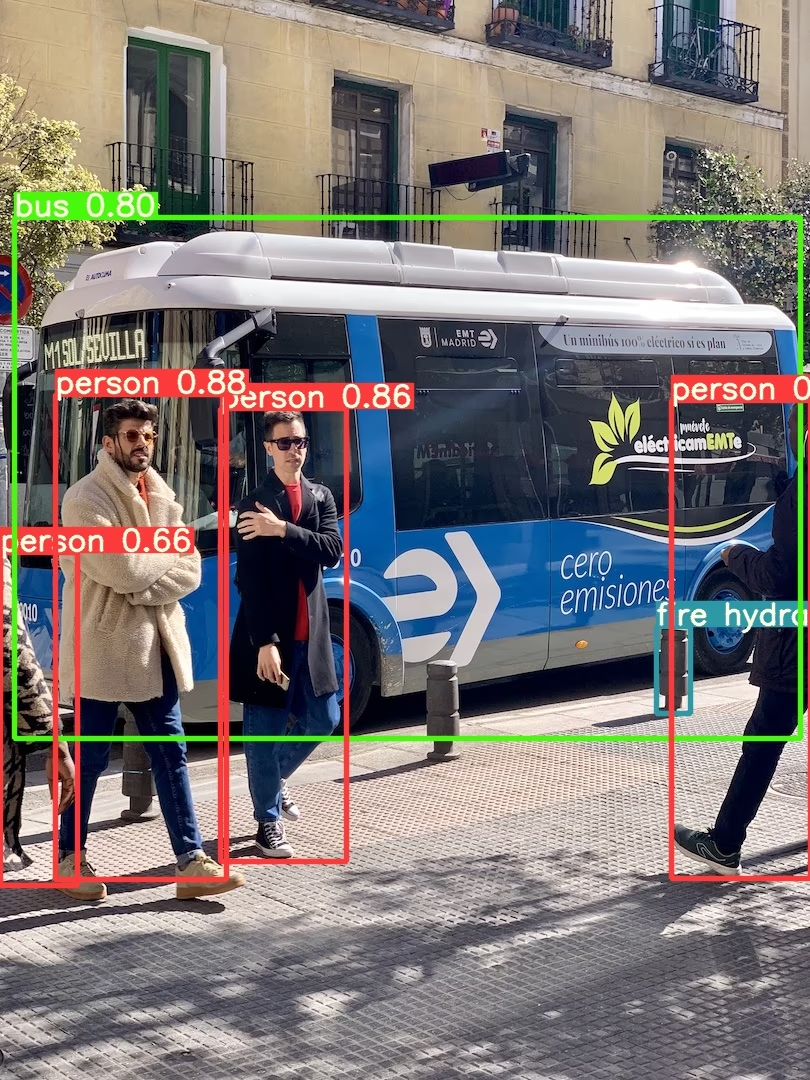
모든 추론 옵션은 YOLOv5 AutoShape()의 forward 메서드를 참조하세요.
추론 설정#
YOLOv5 모델에는 신뢰도 임계값, IoU 임계값 등의 다양한 추론 속성이 있으며, 다음과 같이 설정할 수 있습니다:
model.conf = 0.25  # NMS 신뢰도 임계값
model.iou = 0.45  # NMS IoU 임계값
model.agnostic = False  # NMS 클래스 비종속
model.multi_label = False  # 박스당 여러 NMS 레이블
model.classes = None  # (선택적 목록) 클래스로 필터링합니다. 예: COCO의 사람, 고양이, 개는 = [0, 15, 16]
model.max_det = 1000  # 이미지당 최대 감지 수
model.amp = False  # 자동 혼합 정밀도(AMP) 추론

results = model(im, size=320) # 사용자 지정 추론 크기장치#
모델은 생성한 후 모든 장치로 전송할 수 있습니다:
model.cpu()  # CPU
model.cuda()  # GPU
model.to(device)  # 예: device=torch.device(0)
모델은 device에서 직접 생성할 수도 있습니다:
model = torch.hub.load("ultralytics/yolov5", "yolov5s", device="cpu") # CPU에서 불러오기입력 이미지는 추론 전에 올바른 모델 장치로 자동 전송됩니다.
출력 숨기기#
_verbose=False을 사용하면 모델을 출력 없이 불러올 수 있습니다:
model = torch.hub.load("ultralytics/yolov5", "yolov5s", _verbose=False) # 출력 없이 불러오기입력 채널#
기본값인 3개 대신 입력 채널이 4개인 사전 학습된 YOLOv5s 모델을 불러오려면 다음과 같이 합니다:
model = torch.hub.load("ultralytics/yolov5", "yolov5s", channels=4)이 경우 모델은 사전 학습된 가중치로 구성되지만, 사전 학습된 입력 레이어와 형태가 달라진 첫 번째 입력 레이어는 예외입니다. 입력 레이어는 무작위 가중치로 초기화된 상태를 유지합니다.
클래스 수#
기본값인 80개 대신 출력 클래스가 10개인 사전 학습된 YOLOv5s 모델을 불러오려면 다음과 같이 합니다:
model = torch.hub.load("ultralytics/yolov5", "yolov5s", classes=10)이 경우 모델은 사전 학습된 가중치로 구성되지만, 사전 학습된 출력 레이어와 형태가 달라진 출력 레이어는 예외입니다. 출력 레이어는 무작위 가중치로 초기화된 상태를 유지합니다.
강제 다시 불러오기#
위 단계를 수행하는 데 문제가 발생하면 force_reload=True을 설정하는 것이 도움이 될 수 있습니다. 기존 캐시를 삭제하고 PyTorch Hub에서 최신 YOLOv5 버전을 새로 다운로드하도록 강제합니다. 캐시된 사본은 ~/.cache/torch/hub에 저장되며, 해당 폴더를 삭제해도 같은 효과를 얻을 수 있습니다.
model = torch.hub.load("ultralytics/yolov5", "yolov5s", force_reload=True) # 강제 다시 불러오기스크린샷 추론#
데스크톱 화면에서 추론을 실행하려면 다음과 같이 합니다:
import torch
from PIL import ImageGrab

# Model
model = torch.hub.load("ultralytics/yolov5", "yolov5s")

# Image
im = ImageGrab.grab()  # 스크린샷 캡처

# Inference
results = model(im)
멀티 GPU 추론#
YOLOv5 모델은 스레드 기반 추론을 사용해 여러 GPU에 병렬로 불러올 수 있습니다:
import threading

import torch

def run(model, im):
    """Performs inference on an image using a given model and saves the output; model must support `.save()` method."""
    results = model(im)
    results.save()

# Models
model0 = torch.hub.load("ultralytics/yolov5", "yolov5s", device=0)
model1 = torch.hub.load("ultralytics/yolov5", "yolov5s", device=1)

# Inference
threading.Thread(target=run, args=[model0, "https://ultralytics.com/images/zidane.jpg"], daemon=True).start()
threading.Thread(target=run, args=[model1, "https://ultralytics.com/images/bus.jpg"], daemon=True).start()학습#
추론이 아닌 학습을 위해 YOLOv5 모델을 불러오려면 autoshape=False을 설정합니다. 무작위로 초기화된 가중치로 모델을 불러오려면(처음부터 학습하려면) pretrained=False을 사용합니다. 이 경우 자체 학습 스크립트를 제공해야 합니다. 또는 모델 학습에 관한 내용은 YOLOv5 사용자 지정 데이터 학습 튜토리얼을 참조하세요.
import torch

model = torch.hub.load("ultralytics/yolov5", "yolov5s", autoshape=False)  # 사전 학습 모델 불러오기
model = torch.hub.load("ultralytics/yolov5", "yolov5s", autoshape=False, pretrained=False)  # 처음부터 불러오기
Base64 결과#
API 서비스와 함께 사용할 수 있습니다. 자세한 내용은 Flask REST API 예제를 참조하세요.
import base64
from io import BytesIO

from PIL import Image

results = model(im)  # inference

results.ims  # 추론을 위해 모델에 전달된 원본 이미지 배열(np 배열)
results.render()  # 박스와 레이블로 results.ims를 업데이트합니다
for im in results.ims:
    buffered = BytesIO()
    im_base64 = Image.fromarray(im)
    im_base64.save(buffered, format="JPEG")
    print(base64.b64encode(buffered.getvalue()).decode("utf-8"))  # 결과가 포함된 Base64 인코딩 이미지
크롭 결과#
결과를 감지 크롭으로 반환하고 저장할 수 있습니다:
results = model(im)  # inference
crops = results.crop(save=True)  # 크롭된 감지 결과 딕셔너리
Pandas 결과#
결과를 Pandas DataFrame으로 반환할 수 있습니다:
results = model(im)  # inference
results.pandas().xyxy[0]  # Pandas DataFrame
Pandas 출력(클릭하여 펼치기)
print(results.pandas().xyxy[0])
# xmin    ymin    xmax   ymax  confidence  class    name
# 0  749.50   43.50  1148.0  704.5    0.874023      0  person
# 1  433.50  433.50   517.5  714.5    0.687988     27     tie
# 2  114.75  195.75  1095.0  708.0    0.624512      0  person
# 3  986.00  304.00  1028.0  420.0    0.286865     27     tie
정렬된 결과#
결과는 열을 기준으로 정렬할 수 있습니다. 예를 들어 번호판 숫자 감지 결과를 왼쪽에서 오른쪽으로(x축 기준) 정렬할 수 있습니다:
results = model(im)  # inference
results.pandas().xyxy[0].sort_values("xmin")  # 왼쪽에서 오른쪽으로 정렬
JSON 결과#
결과를 .pandas() DataFrame으로 변환한 다음 .to_json() 메서드를 사용하면 JSON 형식으로 반환할 수 있습니다. orient 인수를 사용해 JSON 형식을 수정할 수 있습니다. 자세한 내용은 pandas .to_json() 문서를 참조하세요.
results = model(im)  # inference
results.pandas().xyxy[0].to_json(orient="records")  # JSON img1 예측 결과
JSON 출력(클릭하여 펼치기)
[
    {
        "xmin": 749.5,
        "ymin": 43.5,
        "xmax": 1148.0,
        "ymax": 704.5,
        "confidence": 0.8740234375,
        "class": 0,
        "name": "person"
    },
    {
        "xmin": 433.5,
        "ymin": 433.5,
        "xmax": 517.5,
        "ymax": 714.5,
        "confidence": 0.6879882812,
        "class": 27,
        "name": "tie"
    },
    {
        "xmin": 115.25,
        "ymin": 195.75,
        "xmax": 1096.0,
        "ymax": 708.0,
        "confidence": 0.6254882812,
        "class": 0,
        "name": "person"
    },
    {
        "xmin": 986.0,
        "ymin": 304.0,
        "xmax": 1028.0,
        "ymax": 420.0,
        "confidence": 0.2873535156,
        "class": 27,
        "name": "tie"
    }
]
사용자 지정 모델#
이 예제에서는 PyTorch Hub를 사용해 사용자 지정 20개 클래스 VOC로 학습된 YOLOv5s 모델 'best.pt'을 로드합니다.
import torch

model = torch.hub.load("ultralytics/yolov5", "custom", path="path/to/best.pt")  # 로컬 모델
model = torch.hub.load("path/to/yolov5", "custom", path="path/to/best.pt", source="local")  # 로컬 저장소
TensorRT, ONNX 및 OpenVINO 모델#
PyTorch Hub는 사용자 지정 데이터로 학습한 모델을 포함하여 대부분의 YOLOv5 내보내기 형식에 대한 추론을 지원합니다. 모델 내보내기에 대한 자세한 내용은 TFLite, ONNX, CoreML, TensorRT 내보내기 튜토리얼을 참조하세요.
import torch

model = torch.hub.load("ultralytics/yolov5", "custom", path="yolov5s.pt")  # PyTorch
model = torch.hub.load("ultralytics/yolov5", "custom", path="yolov5s.torchscript")  # TorchScript
model = torch.hub.load("ultralytics/yolov5", "custom", path="yolov5s.onnx")  # ONNX
model = torch.hub.load("ultralytics/yolov5", "custom", path="yolov5s_openvino_model/")  # OpenVINO
model = torch.hub.load("ultralytics/yolov5", "custom", path="yolov5s.engine")  # TensorRT
model = torch.hub.load("ultralytics/yolov5", "custom", path="yolov5s.mlpackage")  # CoreML (macOS 전용)
model = torch.hub.load("ultralytics/yolov5", "custom", path="yolov5s.tflite")  # TFLite
model = torch.hub.load("ultralytics/yolov5", "custom", path="yolov5s_paddle_model/")  # PaddlePaddle
지원 환경#
Ultralytics는 프로젝트를 빠르게 시작할 수 있도록 CUDA, CUDNN, Python, PyTorch 등 필수 종속성이 사전 설치된 다양한 즉시 사용 가능한 환경을 제공합니다.
- 무료 GPU 노트북:



- Google Cloud: GCP 빠른 시작 가이드
- Amazon: AWS 빠른 시작 가이드
- Azure: AzureML 빠른 시작 가이드
- Docker: Docker 빠른 시작 가이드

프로젝트 상태#

이 배지는 모든 YOLOv5 GitHub Actions 지속적 통합(CI) 테스트가 성공적으로 통과했음을 나타냅니다. 이 CI 테스트는 학습, 검증, 추론, 내보내기, 벤치마크 등 여러 주요 측면에서 YOLOv5의 기능과 성능을 철저히 확인합니다. 테스트는 24시간마다 그리고 새 커밋이 있을 때마다 실행되어 macOS, Windows, Ubuntu에서 일관되고 안정적으로 작동하는지 확인합니다.
자주 묻는 질문#
아니요.
torch.hub.load("ultralytics/yolov5", ...)은 처음 사용할 때 코드를~/.cache/torch/hub에 다운로드하고 가중치를 가져옵니다.requirements.txt의 패키지만 설치하면 됩니다.체크포인트 경로와 함께
custom진입점을 사용하세요:torch.hub.load("ultralytics/yolov5", "custom", path="runs/train/exp/weights/best.pt"). 네트워크에 연결하지 않고 로드하려면source="local"와 로컬 저장소 경로를 추가하세요.예. 내보낸 파일을 동일한
custom로더에 전달하면 YOLOv5가 파일 확장자를 바탕으로 일치하는 백엔드를 선택합니다. 예:yolov5s.onnx,yolov5s.engine또는yolov5s_openvino_model/.캐시된 저장소를 삭제하고 최신 코드를 가져오려면
force_reload=True을 전달하거나~/.cache/torch/hub을 직접 삭제하세요. 이렇게 하면 YOLOv5의 새 릴리스도 가져옵니다.results.xyxy[0]은[x1, y1, x2, y2, confidence, class]행의 텐서를 반환하고,results.pandas().xyxy[0]는 클래스 이름이 포함된 DataFrame을 반환하며, 해당 DataFrame에.to_json(orient="records")을 적용하면 JSON이 생성됩니다.