Google Cloud Platform (GCP) 딥러닝 VM에서 YOLOv5 배포 마스터하기#
인공지능 (AI)과 머신러닝 (ML)의 여정은 특히 클라우드 컴퓨팅 플랫폼의 강력한 기능과 유연성을 활용할 때 매우 흥미로울 수 있습니다. Google Cloud Platform (GCP)은 ML 애호가와 전문가 모두를 위해 설계된 강력한 도구를 제공합니다. 그중 하나인 딥러닝 VM은 데이터 과학 및 ML 작업에 맞게 사전 구성되어 있습니다. 이 튜토리얼에서는 GCP 딥러닝 VM에 Ultralytics YOLOv5를 설정하는 과정을 살펴봅니다. ML을 처음 시작하는 분이든 숙련된 실무자든 이 가이드를 통해 YOLOv5 기반 객체 감지 모델을 구현하는 방법을 명확하게 익힐 수 있습니다.
🆓 또한 GCP를 처음 사용하는 분은 프로젝트를 시작할 수 있도록 제공되는 $300 무료 크레딧을 활용해 보세요.
GCP 외에도 YOLOv5를 빠르게 시작할 수 있는 다른 방법을 살펴보세요. 브라우저에서 사용할 수 있는 Google Colab 노트북  또는 확장성이 뛰어난 Amazon AWS를 이용할 수 있습니다. 컨테이너를 선호하는 사용자는 Docker 빠른 시작 가이드에 따라 Docker Hub에서 제공하는 공식 Docker 이미지를 사용해 격리된 환경을 구성할 수 있습니다
1단계: 딥러닝 VM 생성 및 구성#
먼저 딥러닝에 최적화된 가상 머신을 만들어 보겠습니다.
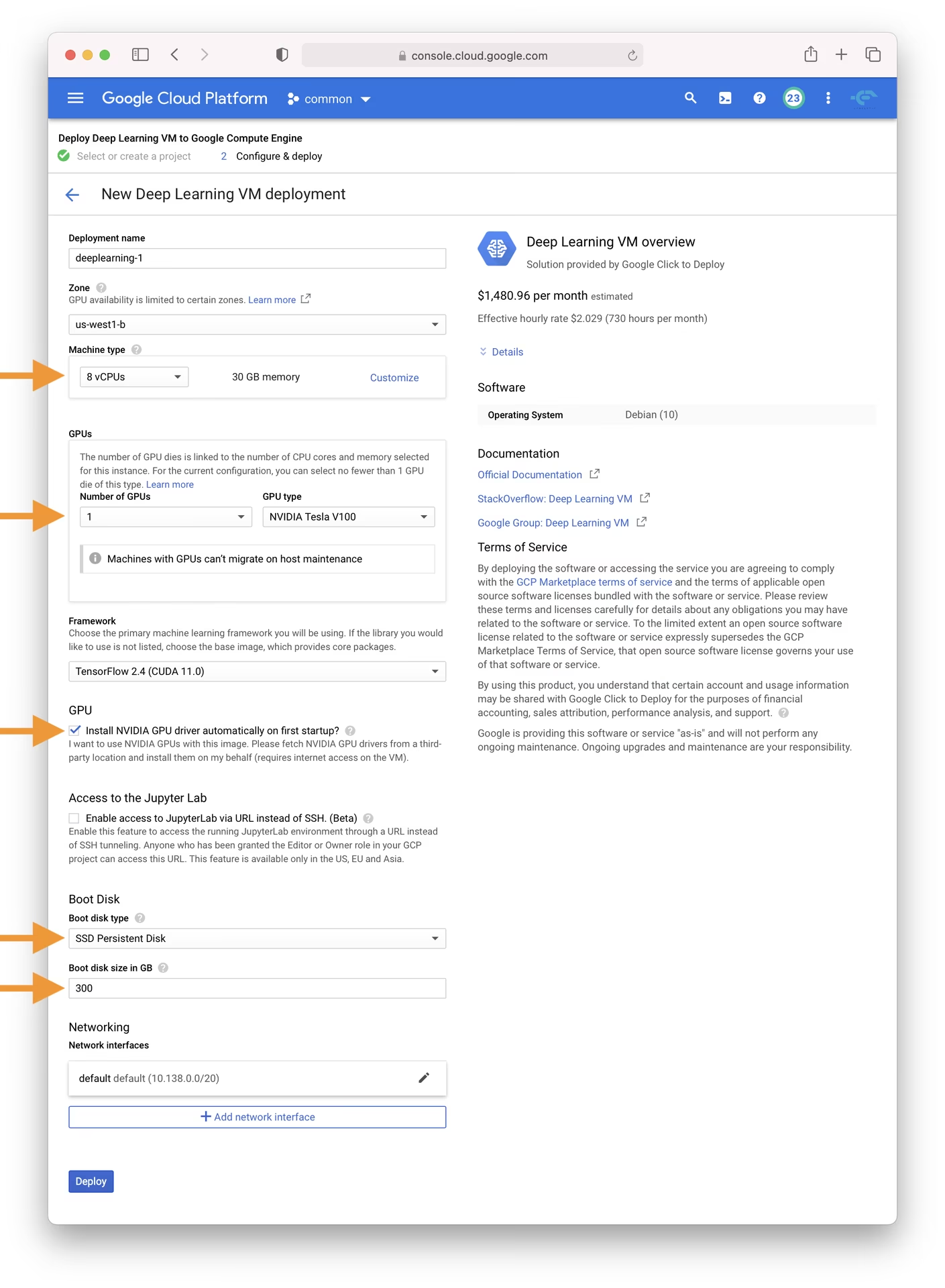
- GCP 마켓플레이스로 이동해 Deep Learning VM을 선택합니다.
- n1-standard-8 인스턴스를 선택하세요. vCPU 8개와 메모리 30GB를 제공하여 다양한 ML 작업에 적합합니다.
- GPU를 선택합니다. 선택은 워크로드에 따라 달라지며, 기본 T4 GPU만으로도 모델 학습을 크게 가속할 수 있습니다.
- 'Install NVIDIA GPU driver automatically on first startup?' 체크박스를 선택하면 설정이 간편해집니다.
- I/O 병목 현상을 방지하려면 300GB SSD 영구 디스크를 할당하세요.
- 'Deploy'를 클릭하고 GCP가 사용자 지정 딥러닝 VM을 프로비저닝할 때까지 기다립니다.
이 VM에는 YOLOv5에 필요한 여러 종속성을 편리하게 포함하는 Anaconda Python 배포판을 비롯해 필수 도구와 프레임워크가 사전 설치되어 있습니다.
2단계: YOLOv5에 맞게 VM 준비#
환경 설정을 마쳤으니 이제 YOLOv5를 설치하고 실행할 준비를 하겠습니다.
# Clone the YOLOv5 repository
git clone https://github.com/ultralytics/yolov5
cd yolov5

# Install dependencies
pip install -r requirements.txt
이 설정 과정에서는 Python 환경 버전 3.8.0 이상과 PyTorch 1.8 이상을 설치합니다. 스크립트가 최신 YOLOv5 릴리스에서 모델과 데이터셋을 자동으로 다운로드하므로 모델 학습을 간편하게 시작할 수 있습니다.
3단계: YOLOv5 모델 학습 및 배포#
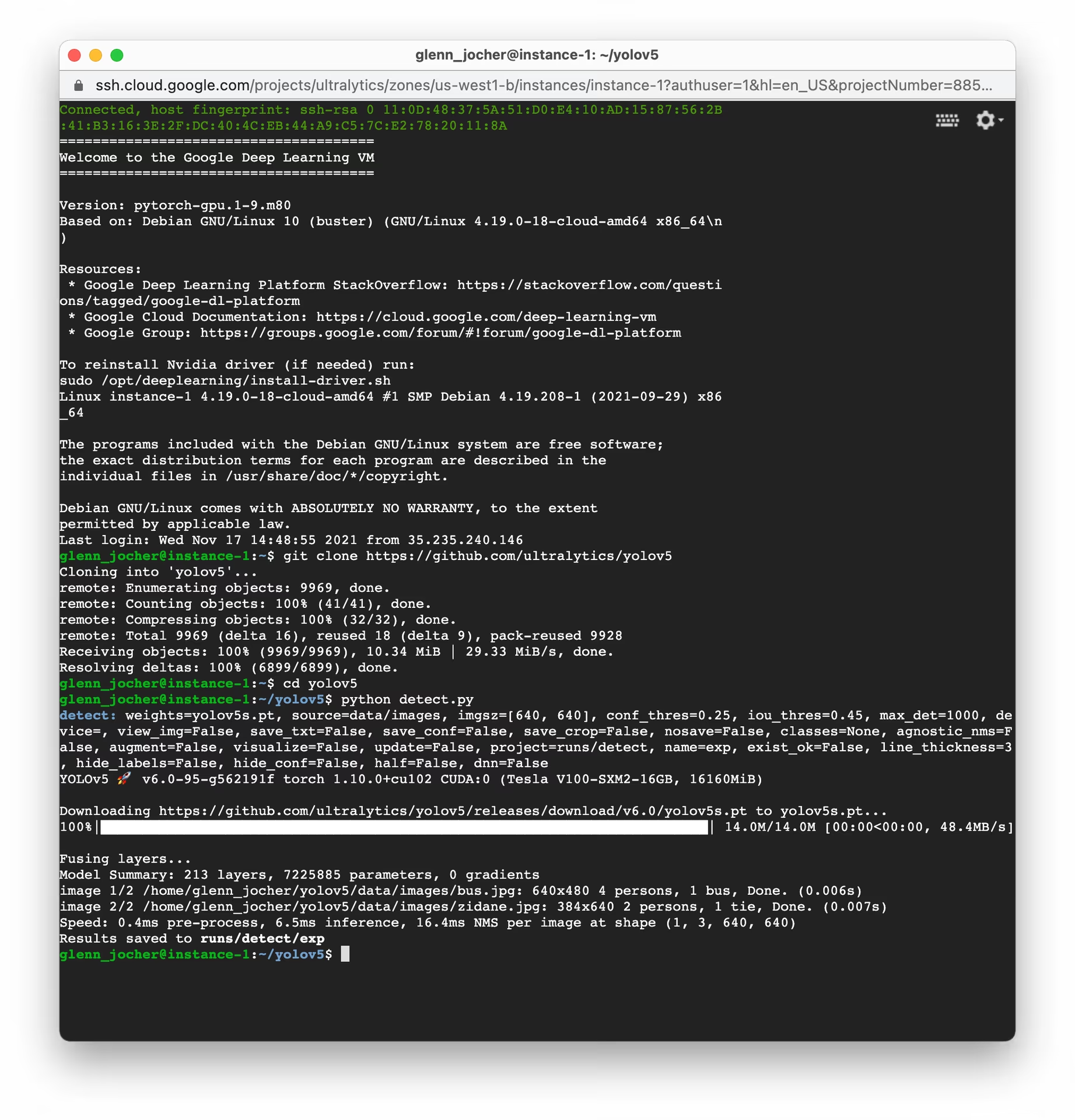
설정이 완료되면 GCP VM에서 YOLOv5를 사용해 학습, 검증, 예측, 내보내기를 수행할 수 있습니다.
# Train a YOLOv5 model on your dataset (e.g., yolov5s)
python train.py --data coco128.yaml --weights yolov5s.pt --img 640

# Validate the trained model to check Precision, Recall, and mAP
python val.py --weights yolov5s.pt --data coco128.yaml

# Run inference using the trained model on images or videos
python detect.py --weights yolov5s.pt --source path/to/your/images_or_videos

# Export the trained model to various formats like ONNX, CoreML, TFLite for deployment
python export.py --weights yolov5s.pt --include onnx coreml tflite
몇 가지 명령만으로 YOLOv5를 사용해 필요에 맞는 사용자 지정 객체 감지 모델을 학습하거나, 다양한 작업에서 빠르게 결과를 얻기 위해 사전 학습된 가중치를 사용할 수 있습니다. 내보낸 후에는 다양한 모델 배포 옵션을 살펴보세요.
스왑 공간 할당 (선택 사항)#
VM의 RAM 용량을 초과할 수 있는 대규모 데이터셋을 사용하는 경우 메모리 오류를 방지하기 위해 스왑 공간을 추가하는 방법을 고려하세요.
# Allocate a 64GB swap file
sudo fallocate -l 64G /swapfile

# Set the correct permissions for the swap file
sudo chmod 600 /swapfile

# Set up the Linux swap area
sudo mkswap /swapfile

# Enable the swap file
sudo swapon /swapfile

# Verify the swap space allocation (should show increased swap memory)
free -h
사용자 지정 데이터셋 학습#
GCP에서 사용자 지정 데이터셋으로 YOLOv5를 학습하려면 다음의 일반적인 단계를 따르세요.
-
YOLOv5 형식(이미지와 해당 레이블 파일)에 맞게 데이터셋을 준비하세요. 자세한 안내는 데이터셋 개요를 참조하세요.
-
gcloud compute scp또는 웹 콘솔의 SSH 기능을 사용해 데이터셋을 GCP VM에 업로드하세요. -
학습 및 검증 데이터의 경로, 클래스 수, 클래스 이름을 지정하는 데이터셋 구성 YAML 파일(
custom_dataset.yaml)을 만드세요. -
사용자 지정 데이터셋 YAML을 사용하고 필요한 경우 사전 학습 가중치에서 시작해 학습 과정을 시작하세요.
# Example: Train YOLOv5s on a custom dataset for 100 epochs
python train.py --img 640 --batch 16 --epochs 100 --data custom_dataset.yaml --weights yolov5s.pt
데이터 준비와 사용자 지정 데이터셋 학습에 관한 자세한 지침은 사용자 지정 데이터 학습 튜토리얼을 참조하세요.
클라우드 스토리지 활용#
특히 대규모 데이터셋이나 다수의 실험을 효율적으로 관리하려면 YOLOv5 워크플로를 Google Cloud Storage와 연동하세요.
# Ensure Google Cloud SDK is installed and initialized
# If not installed: curl https://sdk.cloud.google.com/ | bash
# Then initialize: gcloud init

# Example: Copy your dataset from a GCS bucket to your VM
gsutil cp -r gs://your-data-bucket/my_dataset ./datasets/

# Example: Copy trained model weights from your VM to a GCS bucket
gsutil cp -r ./runs/train/exp/weights gs://your-models-bucket/yolov5_custom_weights/
이 방법을 사용하면 대규모 데이터셋과 학습된 모델을 클라우드에 안전하고 경제적으로 저장하여 VM 인스턴스에 필요한 스토리지 용량을 줄일 수 있습니다.
마무리#
축하합니다! 이제 Ultralytics YOLOv5와 Google Cloud Platform의 컴퓨팅 성능을 함께 활용할 준비가 되었습니다. 이 설정은 객체 감지 프로젝트에 확장성, 효율성, 유연성을 제공합니다. 개인적인 탐구, 학술 연구, 산업용 솔루션 개발 등 어떤 목적이든 클라우드에서 AI와 ML을 활용하는 데 중요한 발걸음을 내디뎠습니다.
모델을 학습하고 관리하는 간편한 노코드 환경을 위해 Ultralytics Platform을 사용해 보세요.
진행 상황을 기록하고 활발한 Ultralytics 커뮤니티와 통찰을 공유하며, 협업과 지원을 위해 GitHub 토론과 같은 리소스를 활용하세요. 이제 YOLOv5와 GCP로 혁신을 시작해 보세요!
ML 역량을 계속 향상하고 싶으신가요? 문서를 살펴보고 Ultralytics 블로그에서 더 많은 튜토리얼과 인사이트를 확인해 보세요. AI 여정을 계속 이어가세요!
자주 묻는 질문#
단일 T4 GPU를 탑재한
n1-standard-8머신이면 대부분의 YOLOv5 학습 및 추론 작업에 충분합니다. 대규모 데이터셋이나 더 큰 모델을 사용한다면 L4 또는 A100으로 업그레이드하고, 첫 시작 시 NVIDIA 드라이버를 자동으로 설치하는 옵션을 반드시 선택하세요.유휴 상태일 때 Compute Engine 콘솔에서 VM을 중지하세요. 연결된 디스크에는 계속 요금이 청구되므로, 프로젝트가 완료되고 가중치를 Cloud Storage에 안전하게 복사한 후 VM과 디스크를 삭제하세요.
소규모 데이터셋에는
gcloud compute scp을 사용하세요. 더 큰 데이터셋은 Cloud Storage 버킷에 업로드한 다음gsutil cp -r gs://your-bucket/dataset ./datasets/로 가져오세요. Google 네트워크 내부에서는 이 방법이 훨씬 빠릅니다.예. Deep Learning VM에는 이미 PyTorch가 설치되어 있으므로
pip install ultralytics을 설치하면yoloCLI를 통해 YOLO26 학습 및 내보내기 기능을 사용할 수 있습니다. 자세한 내용은 빠른 시작을 참조하세요.