Ultralytics YOLO를 사용한 객체 감지#
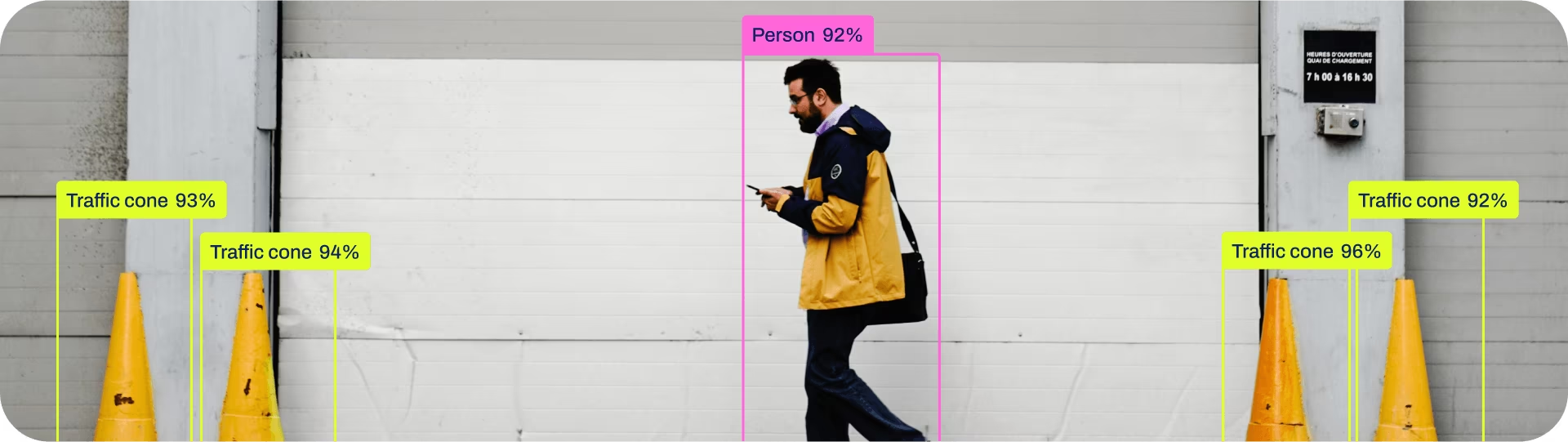
객체 감지는 이미지 또는 비디오 스트림에서 객체의 위치와 클래스를 식별하는 작업입니다.
객체 감지기의 출력은 이미지 내 객체를 둘러싸는 바운딩 박스 집합과 각 박스의 클래스 레이블 및 신뢰도 점수입니다. 장면에서 관심 객체를 식별해야 하지만 객체의 정확한 형태까지 알 필요는 없는 경우 객체 감지를 사용하면 좋습니다.
시청: 사전 학습된 Ultralytics YOLO 모델을 사용한 객체 감지.
YOLO26 Detect 모델은 기본 YOLO26 모델, 즉 yolo26n.pt이며 COCO로 사전 학습되었습니다.
모델#
COCO 데이터셋으로 사전 학습된 YOLO26 Detect 모델은 아래와 같습니다.
모델은 처음 사용할 때 최신 Ultralytics 릴리스에서 자동으로 다운로드됩니다.
| 모델 | 크기 (픽셀) | mAP검증 50-95 | mAP검증 50-95(e2e) | 속도 CPU ONNX (ms) | 속도 T4 TensorRT10 (ms) | 파라미터 (M) | FLOPs (B) |
|---|---|---|---|---|---|---|---|
| YOLO26n | 640 | 40.9 | 40.1 | 38.9 ± 0.7 | 1.7 ± 0.0 | 2.4 | 5.5 |
| YOLO26s | 640 | 48.6 | 47.8 | 87.2 ± 0.9 | 2.5 ± 0.0 | 9.5 | 20.9 |
| YOLO26m | 640 | 53.1 | 52.5 | 220.0 ± 1.4 | 4.7 ± 0.1 | 20.4 | 68.4 |
| YOLO26l | 640 | 55.0 | 54.4 | 286.2 ± 2.0 | 6.2 ± 0.2 | 24.8 | 86.8 |
| YOLO26x | 640 | 57.5 | 56.9 | 525.8 ± 4.0 | 11.8 ± 0.2 | 55.7 | 194.4 |
- mAPval 값은 COCO val2017 데이터셋에서 단일 모델, 단일 스케일로 측정한 결과입니다.
yolo detect val data=coco.yaml device=0로 재현할 수 있습니다. e2e 열을 재현하려면nms=False를 추가하세요. - 속도는 CPU의 ONNX와 NVIDIA T4 GPU의 TensorRT10을 사용하여 COCO val 이미지에서 측정한 평균값입니다.
yolo detect val data=coco.yaml batch=1 device=0|cpu nms=False로 재현할 수 있습니다. - Params 및 FLOPs 값은 Conv/BatchNorm 폴딩과 사용하지 않는 감지 브랜치 제거 후의 융합 모델 기준입니다. 사전 학습된 체크포인트에는 전체 학습 아키텍처가 유지되므로 값이 더 높을 수 있습니다.
예비 COCO 감지 결과는 미공개 YOLO27 프리뷰를 참조하세요.
학습#
COCO8 데이터셋에서 이미지 크기 640으로 100 에포크 동안 YOLO26n을 학습하세요. 사용 가능한 인수 전체 목록은 구성 페이지를 참조하세요.
from ultralytics import YOLO

# 모델 로드
model = YOLO("yolo26n.yaml")  # YAML에서 새 모델을 생성합니다.
model = YOLO("yolo26n.pt")  # 사전 학습된 모델을 불러옵니다(학습에 권장).
model = YOLO("yolo26n.yaml").load("yolo26n.pt")  # YAML에서 모델을 생성하고 가중치를 전이합니다.

# 모델 학습
results = model.train(data="coco8.yaml", epochs=100, imgsz=640)
Train 페이지에서 train 모드의 전체 세부 정보를 확인하세요. 감지 모델은 Ultralytics Platform 클라우드 학습으로도 학습할 수 있습니다.
데이터셋 형식#
YOLO 감지 데이터셋 형식에 대한 자세한 내용은 데이터셋 가이드를 참조하세요. 기존 COCO JSON 데이터셋을 YOLO 형식으로 변환하려면 COCO에서 YOLO로 변환하는 가이드에 설명된 내장 convert_coco 함수를 사용하세요. 또한 Ultralytics Platform의 AI 지원 어노테이션 도구를 사용하여 감지 데이터셋에 어노테이션을 추가하고 관리할 수 있습니다.
검증#
학습된 YOLO26n 모델의 정확도를 검증합니다. model에는 학습 data와 인수가 모델 속성으로 유지되므로 인수가 필요하지 않습니다. Train 예제의 path/to/best.pt은 COCO8에서 검증을 수행합니다. 공식 가중치에는 컴퓨터에 존재하지 않는 학습 데이터셋 경로가 기록되어 있으므로, 경고와 함께 작업 기본값 coco8.yaml로 대체됩니다. 다른 데이터셋에서 검증하려면 data을 전달하세요.
from ultralytics import YOLO

# 모델 로드
model = YOLO("yolo26n.pt")  # 공식 모델을 불러옵니다
model = YOLO("path/to/best.pt")  # 사용자 지정 모델 로드

# 모델을 검증합니다
metrics = model.val()  # 데이터셋과 설정이 기억되므로 인수가 필요하지 않습니다
metrics.box.map  # map50-95
metrics.box.map50  # map50
metrics.box.map75  # map75
metrics.box.maps  # 각 카테고리의 mAP50-95를 포함하는 목록
metrics.box.image_metrics # 정밀도, 재현율, F1, TP, FP, FN이 포함된 이미지별 지표 사전예측#
학습된 YOLO26n 모델을 사용하여 이미지에 대한 예측을 수행합니다.
from ultralytics import YOLO

# 모델 로드
model = YOLO("yolo26n.pt")  # 공식 모델을 불러옵니다
model = YOLO("path/to/best.pt")  # 사용자 지정 모델 로드

# 모델로 예측을 수행합니다
results = model("https://ultralytics.com/images/bus.jpg")  # 이미지에 대해 예측을 수행합니다

# 결과에 액세스합니다
for result in results:
    xywh = result.boxes.xywh  # 중심 x, 중심 y, 너비, 높이
    xywhn = result.boxes.xywhn  # normalized
    xyxy = result.boxes.xyxy  # 왼쪽 위 x, 왼쪽 위 y, 오른쪽 아래 x, 오른쪽 아래 y
    xyxyn = result.boxes.xyxyn  # normalized
    names = [result.names[cls.item()] for cls in result.boxes.cls.int()]  # 각 박스의 클래스 이름
    confs = result.boxes.conf  # 각 박스의 신뢰도 점수
Predict 페이지에서 predict 모드의 전체 세부 정보를 확인하세요.
결과 출력#
객체 감지는 이미지당 Results 객체 하나를 반환합니다. 주요 예측 필드는 result.boxes이며, 여기에 감지된 각 객체의 박스 좌표, 클래스 ID, 신뢰도 점수가 포함됩니다.
| 속성 | 유형 | 형태 | 설명 |
|---|---|---|---|
result.boxes | Boxes | (N) | 탐지 박스입니다. |
result.boxes.data | torch.float32 | (N,6/7) | 원시 [x1,y1,x2,y2,conf,cls]이며, 선택적으로 트랙 ID가 포함됩니다. |
result.boxes.xyxy | torch.float32 | (N,4) | xyxy 픽셀 박스입니다. |
result.boxes.conf | torch.float32 | (N,) | 신뢰도 점수입니다. |
result.boxes.cls | torch.float32 | (N,) | 클래스 ID이며, 이름을 가져오려면 int으로 변환합니다. |
모든 작업에서 작업별 Results 필드를 확인하려면 작업별 예측 결과 섹션을 참조하세요.
내보내기#
YOLO26n 모델을 ONNX, CoreML 등의 다른 형식으로 내보냅니다.
from ultralytics import YOLO

# 모델 로드
model = YOLO("yolo26n.pt")  # 공식 모델을 불러옵니다
model = YOLO("path/to/best.pt")  # 사용자 지정 모델 로드

# 모델을 내보냅니다
model.export(format="onnx")
사용 가능한 YOLO26 내보내기 형식은 아래 표와 같습니다. format 인수, 즉 format='onnx' 또는 format='engine'를 사용하여 원하는 형식으로 내보낼 수 있습니다. 내보낸 모델에서 직접 예측하거나 검증할 수 있습니다. 예: yolo predict model=yolo26n.onnx. 내보내기가 완료되면 해당 모델의 사용 예제가 표시됩니다.
| 형식 | format 인수 | 모델 | 메타데이터 | 인수 |
|---|---|---|---|---|
| PyTorch | - | yolo26n.pt | ✅ | - |
| TorchScript | torchscript | yolo26n.torchscript | ✅ | imgsz, quantize, dynamic, nms, batch, device |
| ONNX | onnx | yolo26n.onnx | ✅ | imgsz, quantize, dynamic, simplify, opset, nms, batch, data, fraction, device |
| OpenVINO | openvino | yolo26n_openvino_model/ | ✅ | imgsz, quantize, dynamic, nms, batch, data, fraction, device |
| TensorRT | engine | yolo26n.engine | ✅ | imgsz, quantize, dynamic, simplify, opset, workspace, nms, batch, data, fraction, device |
| CoreML | coreml | yolo26n.mlpackage | ✅ | imgsz, dynamic, quantize, nms, batch, device |
| Apple Core AI | coreai | yolo26n.aimodel | ✅ | imgsz, batch, quantize |
| TF SavedModel | saved_model | yolo26n_saved_model/ | ✅ | imgsz, quantize, opset, nms, batch, data, fraction, device |
| TF GraphDef | pb | yolo26n.pb | ❌ | imgsz, opset, batch, device |
| TF Edge TPU | edgetpu | yolo26n_edgetpu.tflite | ✅ | imgsz, quantize, opset, data, fraction, device |
| LiteRT | litert | yolo26n.tflite | ✅ | imgsz, quantize, batch, data, fraction, device |
| PaddlePaddle | paddle | yolo26n_paddle_model/ | ✅ | imgsz, batch, device |
| MNN | mnn | yolo26n.mnn | ✅ | imgsz, batch, dynamic, quantize, simplify, opset, nms, device |
| NCNN | ncnn | yolo26n_ncnn_model/ | ✅ | imgsz, quantize, batch, device |
| IMX500 | imx | yolo26n_imx_model/ | ✅ | imgsz, quantize, data, fraction, nms, device |
| RKNN | rknn | yolo26n_rknn_model/ | ✅ | imgsz, batch, name, quantize, simplify, opset, data, fraction, device |
| ExecuTorch | executorch | yolo26n_executorch_model/ | ✅ | imgsz, batch, device |
| Axelera | axelera | yolo26n_axelera_model/ | ✅ | imgsz, batch, quantize, data, fraction, device |
| DEEPX | deepx | yolo26n_deepx_model/ | ✅ | imgsz, quantize, simplify, opset, data, optimize, device |
| Qualcomm QNN | qnn | yolo26n_qnn.onnx | ✅ | imgsz, batch, name, quantize, simplify, opset, data, fraction, device |
| Hailo | hailo | yolo26n_hailo_model/ | ✅ | imgsz, name, quantize, data, fraction, simplify, conf, iou, device |
| Huawei Ascend | ascend | yolo26n_ascend_model/ | ✅ | imgsz, batch, name, quantize, opset, simplify, nms, device |
| AMD Xilinx | xilinx | yolo26n_xilinx_model/ | ✅ | imgsz, name, quantize, data, fraction, opset, simplify, device |
nms=None은 외부 NMS를 위한 원시 출력을 기본값으로 사용합니다. 사용 가능한 NMS-free head를 선택하려면 nms=False을 설정합니다. 지원되지 않는 형식은 해당 형식의 기본 출력 경로로 대체됩니다. 위의 nms 항목은 nms=True을 사용해 NMS를 포함할 수 있는 형식을 나타냅니다.
자세한 export 내용은 내보내기 페이지를 참조하세요.
자주 묻는 질문#
예. Ultralytics Platform 빠른 시작에서는 브라우저 기반 워크플로를 통해 데이터셋에 어노테이션을 추가하고, 클라우드 GPU에서 감지 모델을 학습하며, 추론 엔드포인트에 모델을 배포하는 방법을 안내합니다.
사용자 지정 데이터셋으로 YOLO26 모델을 학습하려면 몇 가지 단계를 거쳐야 합니다:
- 데이터셋 준비: 데이터셋이 YOLO 형식인지 확인합니다. 안내는 데이터셋 가이드를 참조하세요.
- 모델 로드: Ultralytics YOLO 라이브러리를 사용하여 사전 학습된 모델을 로드하거나 YAML 파일에서 새 모델을 생성합니다.
- 모델 학습: Python에서
train메서드를 실행하거나 CLI에서yolo detect train명령을 실행합니다.
예제from ultralytics import YOLO # 사전 학습된 모델 불러오기 model = YOLO("yolo26n.pt") # 사용자 지정 데이터셋으로 모델을 학습합니다 model.train(data="my_custom_dataset.yaml", epochs=100, imgsz=640)자세한 구성 옵션은 구성 페이지를 참조하세요.
Ultralytics YOLO26은 객체 감지, 인스턴스 세그멘테이션, 시맨틱 세그멘테이션, 깊이 추정, 분류, 포즈 추정, 방향성 바운딩 박스용 사전 학습 모델을 다양하게 제공합니다. 이러한 모델은 COCO 데이터셋, 시맨틱 세그멘테이션용 Cityscapes, 깊이 추정용 다중 데이터셋 혼합 데이터, 분류용 ImageNet 또는 OBB용 DOTAv1로 사전 학습되었습니다. 사용 가능한 모델은 다음과 같습니다:
자세한 목록과 성능 지표는 모델 섹션을 참조하세요.
학습된 YOLO26 모델의 정확도를 검증하려면 Python에서
.val()메서드를 사용하거나 CLI에서yolo detect val명령을 실행하면 됩니다. 이를 통해 mAP50-95, mAP50 등의 지표를 확인할 수 있습니다.예제from ultralytics import YOLO # 모델을 로드합니다 model = YOLO("path/to/best.pt") # 모델을 검증합니다 metrics = model.val() print(metrics.box.map) # mAP50-95검증에 대한 자세한 내용은 Val 페이지를 참조하세요.
Ultralytics YOLO26은 객체 감지, 인스턴스 세그멘테이션, 시맨틱 세그멘테이션, 포즈 추정에서 최첨단 성능을 제공하도록 설계되었습니다. 주요 장점은 다음과 같습니다:
- 사전 학습 모델: COCO 및 ImageNet과 같은 인기 데이터셋으로 사전 학습된 모델을 활용하여 개발 속도를 높일 수 있습니다.
- 높은 정확도: 뛰어난 mAP 점수를 달성하여 안정적인 객체 감지를 보장합니다.
- 속도: 실시간 추론에 최적화되어 있어 신속한 처리가 필요한 애플리케이션에 적합합니다.
- 유연성: ONNX 및 TensorRT와 같은 다양한 형식으로 모델을 내보내 여러 플랫폼에 배포할 수 있습니다.
YOLO26의 실제 활용 사례와 성공 사례는 블로그에서 확인하세요.