Ultralytics Tarafından Desteklenen Modeller
Ultralytics; nesne algılama, örnek segmentasyonu, anlamsal segmentasyon, derinlik tahmini, görüntü sınıflandırma, poz tahmini ve yönlendirilmiş sınırlayıcı kutular gibi belirli görevlere uyarlanmış geniş bir model yelpazesini destekler.
Öne Çıkan Modeller#
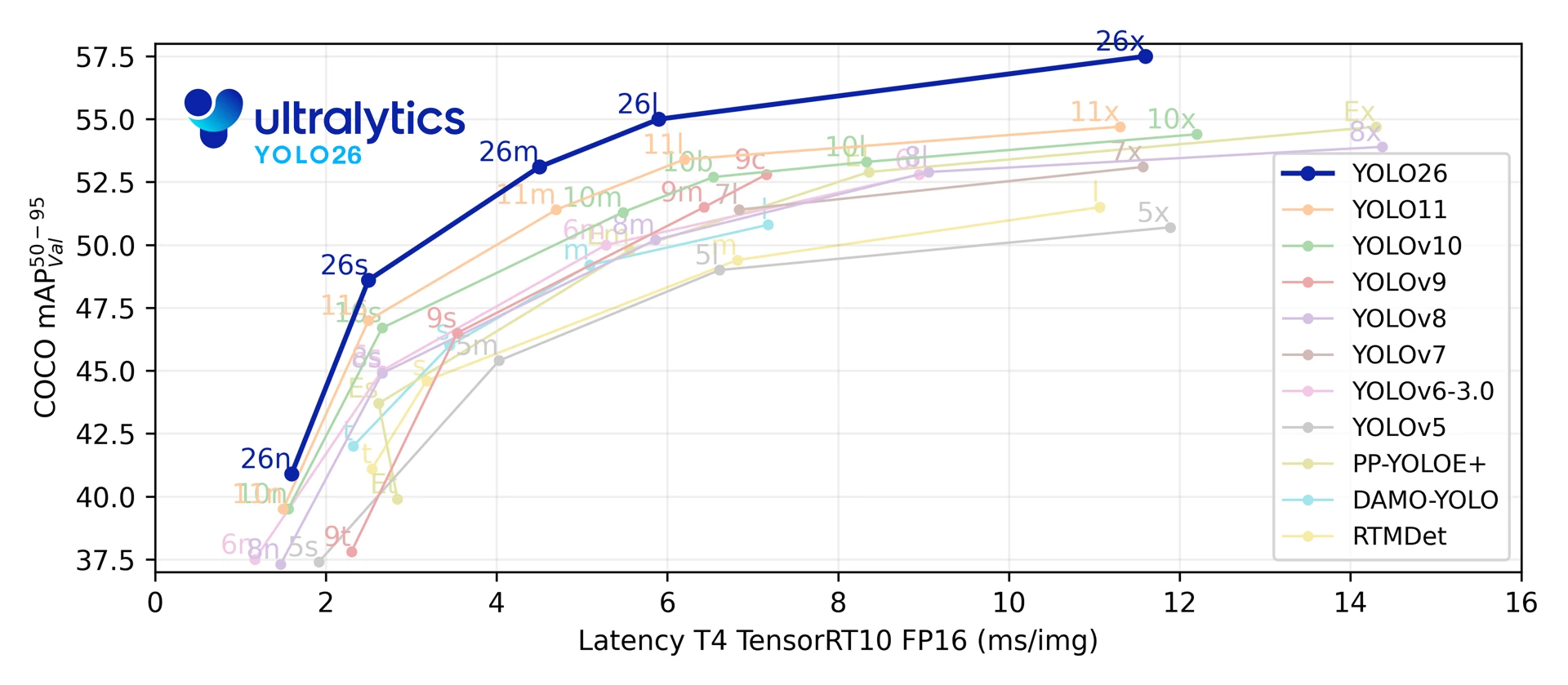
Yeni bir projeye YOLO26 ile başla: Bu, Ultralytics'in en yeni sürümüdür ve yedi görevin tümünü kapsayan tek modeldir. YOLO11, beş görevinin her biri için önceden eğitilmiş kontrol noktaları sunan, olgun bir alternatiftir. Yalnızca istemle yönlendirilebilir segmentasyona (SAM 3), açık kelime dağarcıklı algılamaya (YOLOE, YOLO-World) veya Transformer algılayıcısına (RT-DETR) ihtiyaç duyduğunda özelleşmiş bir aile seç.
YOLO27, bu yılın ilerleyen dönemlerinde yapılması beklenen lansman için son Ar&Ge aşamasında; kesin bir lansman tarihi belirlenmedi. Mimarisini, planlanan yedi görevi ve ilk kıyaslama sonuçlarını önizle. Model ağırlıkları ve paket desteği henüz kullanılamıyor; mevcut projelerinde YOLO26 kullan.
Tabloda yayımlanmış modeller ve mimari referansları; görevleri, desteklenen train, val, predict ve export kipleri ve önerilen kullanım alanlarıyla birlikte listeleniyor. Track ayrı bir öğe olarak listelenmiyor: Detect, Segment, Pose ve OBB modellerinde predict kipinin üzerinde çalışırken SAM 2 ve SAM 3 kendi video tahmincileri aracılığıyla izleme yapıyor. Benchmark da listelenmiyor; çünkü kendi başına destek eklemek yerine farklı biçimlerde export ve val işlemlerini kapsıyor.
| Model | Görevler | Modlar | Şu durumlarda tercih et |
|---|---|---|---|
| YOLO26 🚀 YENİ | Detect, Segment, Semantic, Depth, Classify, Pose, OBB | Train, Val, Predict, Export | Yeni projeler: isteğe bağlı NMS'siz çıkarım, uçta optimize edilmiş dağıtım ve en geniş görev kapsamı |
| YOLO12 | Detect, Segment, Classify, Pose, OBB | Train, Val, Predict, Export | Dikkat mekanizmasını merkeze alan topluluk sürümünü kıyaslama; önceden eğitilmiş ağırlıklar yalnızca algılamayı kapsar |
| YOLO11 | Detect, Segment, Classify, Pose, OBB | Train, Val, Predict, Export | Desteklediği her görev için önceden eğitilmiş kontrol noktaları sunan, kararlı üretim iş yükleri |
| YOLOv10 | Detect | Train, Val, Predict, Export | Tsinghua Üniversitesi'nden NMS'siz algılama araştırması |
| YOLOv9 | Detect, Segment | Train, Val, Predict, Export | Ultralytics YOLOv5 kod tabanında uygulanan Programlanabilir Gradyan Bilgisi (PGI) |
| YOLOv8 | Detect, Segment, Classify, Pose, OBB | Train, Val, Predict, Export | Mevcut YOLOv8 işlem hatları ve yerleşik üçüncü taraf entegrasyonları |
| YOLOv7 | Detect | Tahmin | Üst kaynakta eğitilmiş bir YOLOv7 dışa aktarımını çalıştırma: paket, yalnızca uyumlu bir ONNX veya TensorRT modelinden tahmin yapar; yerel kontrol noktasından asla tahmin yapmaz |
| YOLOv6 | Detect | Train, Val, Predict, Export | Meituan mimarisini kendi YAML dosyasından eğitme; Ultralytics, YOLOv6 .pt kontrol noktalarını barındırmaz |
| YOLOv5 | Detect | Train, Val, Predict, Export | Eski Ultralytics projeleri; güncel sürümler güncellenmiş YOLOv5u kontrol noktalarını yükler |
| YOLOv4 | Yok | Yok | Yalnızca mimari referansı: Alexey Bochkovskiy'nin Darknet yerel modeli paket tarafından desteklenmiyor |
| YOLOv3 | Detect | Train, Val, Predict, Export | Joseph Redmon'un özgün mimarisini kullanan eski projeler; güncel sürümler güncellenmiş YOLOv3u kontrol noktalarını yükler |
| SAM 3 🚀 YENİ | Segment | Tahmin | Meta'nın metin veya görüntü örneklerinden yararlanarak görüntü ve videolarda istemle yönlendirilebilir kavram segmentasyonu; sam3.pt ve SAM 3.1 sam3.1_multiplex.pt (görüntüler) için Hugging Face üzerinden erişim onayı gerekir |
| SAM 2 | Segment | Tahmin | Meta'nın videodaki kareler boyunca nesneleri izleyen, istemle yönlendirilebilir segmentasyonu |
| SAM | Segment | Tahmin | Meta'nın özgün istemle yönlendirilebilir segmentasyonu; otomatik etiketleme de dahildir |
| MobileSAM | Segment | Tahmin | Mobil ve kaynakları kısıtlı diğer cihazlarda istemle yönlendirilebilir segmentasyon (Kyung Hee Üniversitesi) |
| FastSAM | Segment | Val, Predict, Export | SAM gecikmesinin darboğaz olduğu durumlar için CNN tabanlı, istemle yönlendirilebilir segmentasyon (Çin Bilimler Akademisi) |
| YOLO-NAS | Detect | Val, Predict, Export | NVIDIA'nın satın almasının ardından Deci'nin artık bakımını yapmadığı, NAS ile optimize edilmiş algılayıcıları; çıkarım ve dışa aktarma için kullanılmaya devam ediyor |
| RT-DETR | Detect | Train, Val, Predict, Export | Baidu'nun gerçek zamanlı DETR algılayıcısı: hibrit Transformer kodlayıcıya sahip evrişimli bir omurga |
| YOLO-World | Detect | Train, Val, Predict, Export | Metin istemleriyle açık kelime dağarcıklı algılama (Tencent AI Lab); dışa aktarma için -worldv2 kontrol noktaları gerekir |
| YOLOE | Detect, Segment | Train, Val, Predict, Export | Metin, görsel veya istem gerektirmeyen çıkarımla açık kelime dağarcıklı algılama ve segmentasyon |
Ultralytics ayrıca metin ve görüntü anlama için büyük dil modellerine LLM ve görsel-dil modellerine yönelik, OpenAI uyumlu bir arayüz de sunar. Kendine ait görevleri veya modları olmadığından yukarıdaki tabloda yer almaz; ancak tüm YOLO işlem hatlarıyla birlikte kullanılabilir ve OpenAI ya da diğer bulut sağlayıcıları üzerinden veya tamamen yerel bir şirket içi sunucuda çalışır.
İzle: Ultralytics YOLO modellerini yalnızca birkaç satır kodla çalıştır.
Başlarken: Kullanım Örnekleri#
Aşağıdaki örneklerde basit YOLO eğitimi ve çıkarım gösterilmektedir.
Aşağıdaki örnekte, nesne algılama için COCO üzerinde önceden eğitilmiş YOLO26n modeli kullanılır ve model COCO8 örnek veri kümesinde eğitilir. Aynı API, yukarıda listelenen Segment, Semantic, Depth, Classify, Pose ve OBB görevlerinde de kullanılabilir.
PyTorch önceden eğitilmiş *.pt modelleri, Python'da bir model örneği oluşturmak için YOLO(), SAM(), NAS() ve RTDETR() sınıflarına aktarılabilir (YOLO() ve RTDETR() sınıfları *.yaml yapılandırma dosyalarını da kabul eder):
from ultralytics import YOLO

# COCO üzerinde önceden eğitilmiş bir YOLO26n modelini yükle
model = YOLO("yolo26n.pt")

# Model bilgilerini görüntüle (isteğe bağlı)
model.info()

# Modeli COCO8 örnek veri kümesinde 100 dönem boyunca eğit
results = model.train(data="coco8.yaml", epochs=100, imgsz=640)

# 'bus.jpg' görüntüsünde YOLO26n modeliyle çıkarım yap
results = model("path/to/bus.jpg")
Yeni Modellerle Katkıda Bulunma#
Ultralytics yeni model katkılarını memnuniyetle karşılar. Bir model eklemek için:
-
Depoyu çatalla: Önce Ultralytics GitHub deposunu çatalla.
-
Çatalını klonla: Çatalını yerel makineye klonla ve üzerinde çalışmak için yeni bir dal oluştur.
-
Modelini uygula: Modelini, Katkıda Bulunma Kılavuzumuzda belirtilen kodlama standartlarına ve yönergelere uygun olarak ekle.
-
Kapsamlı Test Et: Modelini hem tek başına hem de tüm işlem hattının bir parçası olarak test et.
-
Pull request oluştur: Modelinden memnun kaldığında inceleme için ana depoya bir pull request oluştur.
-
Kod incelemesi ve birleştirme: İncelemenin ardından modelin ölçütlerimizi karşılıyorsa ana depoya birleştirilir.
Sık Sorulan Sorular#
Yayımlanan en yeni Ultralytics YOLO modeli, Ocak 2026'da yayımlanan YOLO26 modelidir. YOLO26 isteğe bağlı, NMS gerektirmeyen uçtan uca çıkarım, optimize edilmiş uç dağıtımı sunar; algılama, örnek segmentasyonu, anlamsal segmentasyon, derinlik tahmini, sınıflandırma, poz tahmini ve OBB'nin yanı sıra açık sözcük dağarcıklı sürümleri destekler. Kararlı üretim iş yükleri için hem YOLO26 hem de YOLO11 önerilen seçeneklerdir.
YOLO27, şu anda son Ar&Ge aşamasında olan yeni model ailesidir. Henüz kullanıma sunulmadı ve kesin bir lansman tarihi belirlenmedi.
Birkaç satır Python koduyla veya tek bir CLI komutuyla özel veriler üzerinde YOLO modeli eğit:
Örnekfrom ultralytics import YOLO # Bir YOLO modeli yükle model = YOLO("yolo26n.pt") # veya başka bir YOLO modeli # Modeli özel veri kümesinde eğit results = model.train(data="custom_data.yaml", epochs=100, imgsz=640)Daha ayrıntılı yönergeler için Train belgeleri sayfasını ziyaret et.
Ultralytics; YOLOv3, YOLOv5, YOLOv6, YOLOv8, YOLOv9, YOLOv10, YOLO11, YOLO12 ve YOLO26'nın yanı sıra SAM ailesini (SAM 3, SAM 2, SAM, MobileSAM ve FastSAM), YOLO-NAS, RT-DETR, YOLO-World ve YOLOE'yi yerel olarak destekler. Paket, YOLOv4 veya YOLOv7 için ağırlık ya da YAML dosyası yayımlamaz: YOLOv4 yalnızca mimari referansı olarak belgelenmiştir; YOLOv7 ise dışa aktarılmış bir ONNX veya TensorRT modeli olarak çalışır. Her model için kullanılabilen görevler ve modlar hakkında bilgi edinmek için Öne Çıkan Modeller sayfasına bak.
Ultralytics Platform, veri kümelerine açıklama eklemek ve YOLO makine öğrenimi modellerini eğitmek, dağıtmak ve yönetmek için kod gerektirmeyen, uçtan uca bir ortamdır. Bulut eğitimi, veri kümesi yönetimi ve hem yeni başlayanlara hem de deneyimli geliştiricilere uygun bir arayüz sunar.
Ultralytics YOLO modelleri; nesne algılama, örnek segmentasyonu, anlamsal segmentasyon, derinlik tahmini, sınıflandırma, poz tahmini ve yönlendirilmiş nesne algılama (OBB) gibi görevleri gerçekleştirebilir. En yeni model YOLO26, yedi görevin tümünün yanı sıra açık sözcük dağarcıklı algılamayı da destekler.


Yorumlar44
Bir soru sor, sonuçlarını paylaş veya başka birine yardım et.
muminaadimi-art
Naked girl
Sudharsanam-1
hello ! For detecting 31 Chinese symbols (16 true and 15 fake), how many classes should be used in the model? Is it more efficient to detect the true symbols using only true class , or should we also include the fake symbols as separate classes?
 Glenn JocherUltralytics(düzenlendi)
Use as many classes as you need to distinguish at inference: if you only care about authenticity, train a 2‑class detector (“true”, “fake”); if you need per‑symbol IDs, use 31 classes (one per symbol)—explicitly labeling “fake” typically reduces false positives versus leaving them unlabeled; you can start with YOLO26 detect and your dataset YAML as usual:
yolo detect train data=symbols.yaml model=yolo26s.pt imgsz=960 epochs=100Model overview and task setup are in the YOLO26 models documentation and the Detection task guide.
Rohith-John-kct
Hi. Could you please suggest which YOLO model works best for both detecting and segmenting 15 Chinese symbols? Also, how many images would be ideal to include in the dataset?
- Glenn JocherUltralytics(düzenlendi)
Use a single Ultralytics YOLO26 Segment model—it outputs both boxes and masks—start with
yolo26s-segfor a good speed/accuracy balance, and scale up to-m/-lif needed; for 15 symbols, begin with roughly 100–200 labeled images per class (2k–5k total instances) and increase until validation mAP stabilizes, and use a larger input size for small characters (e.g.,imgsz=960–1280):yolo segment train data=your_symbols.yaml model=yolo26s-seg.pt imgsz=960 epochs=100Model details: see the YOLO26 overview in the YOLO26 models documentation; segmentation specifics and best practices are in the Instance Segmentation task guide.
Ranjith3436
Hi Guys!, Could you please clarify how you select best.pt ? what is the parameter use for that? how early Stop works? sometime val/loss is going to high but earlystop doesn't stop training for classification?
- Glenn JocherUltralytics(düzenlendi)
best.pt is the epoch with the highest validation “fitness” metric; for detection it’s mAP50-95 (seg and pose add their mask/keypoint mAP50-95), for classification it’s the mean of top‑1 and top‑5 accuracy, and Early Stop watches the same fitness (not val_loss) and stops after patience epochs without improvement (set via patience). Rising val_loss won’t trigger stopping if that fitness is still improving; see how fitness/metrics are computed in the Insights on Model Evaluation and Fine-Tuning guide: https://docs.ultralytics.com/guides/model-evaluation-insights/.
LiJiang97
1
anyhopex
Do you support RT-DETRv2 ?
- Glenn JocherUltralytics(düzenlendi)
Ultralytics supports the original RT-DETR models (
rtdetr-landrtdetr-x) for training, validation, prediction and export, but RT-DETRv2 weights and architecture are not integrated. See the RT-DETR documentation for supported models and usage; for new projects, also consider YOLO26.
matteobona
Hi, Is it possibile to use a yolo-pose model (with a custom dataset and training) to detect simultaneously a class of objects with keypoints inside and a different class with no keypoints?. For example I need to detect a football pitch with some keypoints inside of it and the football players as simple bounding boxes. Is there a way to use a unique model instead of using two separate models (yolo-pose + yolo-detect)? for example putting at 0 0 0 any keypoints related to the players (but I think that this solution may confuse the model during the training)
- Glenn JocherUltralytics
Yes, you can train a single YOLO-pose model to detect both classes. For objects without keypoints (players), simply set all keypoint coordinates to zero in your dataset annotations. The model will learn to ignore these zero-value keypoints while still detecting bounding boxes for both classes. For implementation details, see the Pose Estimation task documentation on handling mixed annotations.
This approach is efficient and avoids the complexity of running two separate models, though we recommend thorough validation to ensure keypoint absence doesn't degrade detection performance for non-keypoint classes.
hemanthmandava945
@glenn-jocher @pderrenger Car Segmentation on Reflectivity Images
What I'm doing:
Running inference with a pretrained YOLOv8 model to segment cars in the LiDAR reflectivity domain. Detection performance (bounding boxes) looks good, but the segmentation masks aren’t very accurate. The problem:
When I project these predicted masks onto the 3D point cloud, I see a lot of misclassified points (points that are not actually part of the car end up being labeled as car). These noisy masks reduce the accuracy of any downstream tasks that rely on correct 3D segmentation. Question:
Has anyone else dealt with similar mask inaccuracy issues when segmenting LiDAR-based 2D images? Are there recommended strategies to improve segmentation masks on reflectivity images? (e.g., domain-specific data augmentation, fine-tuning from a LiDAR-focused checkpoint, multi-modal approaches, etc.)
Pallet Detection on Reflectivity Images
What I'm planning:
Train YOLOv8 to detect pallets in LiDAR reflectivity images (again, 512×128, single channel). Pallets appear relatively small in these images. Potential multi-modal approach:
Considering combining RGB camera images with LiDAR reflectivity data in the training set (even though the reflectivity images look more like grayscale). My concern: Will mixing these modalities confuse the model or help it? Pallets are already small in lidar images, and might be even harder to identify in reflectivity data. Questions:
Is it advisable to train on both RGB and reflectivity images at once, or should I keep them separate? Does anyone have experience or tips on multi-modal YOLO training (camera + LiDAR reflectivity)? If combining them is possible, any best practices for merging different modalities (e.g., input channels, data augmentation techniques, etc.)?
Additional No response
- Glenn JocherUltralytics
@hemanthmandava945 for segmentation mask inaccuracies in LiDAR reflectivity images, consider fine-tuning the pretrained YOLOv8 model on a domain-specific dataset with augmentations tailored for reflectivity images. For multi-modal training (RGB + reflectivity), it’s advisable to preprocess and align modalities carefully to avoid introducing noise. Experimenting with separate models or fusing features at specific layers during training can help. For more insights, refer to the YOLOv8 documentation. Let us know if you need further clarification!
@glenn-jocher i guess further clarification will be greatly helpful as i am beginner in this field so that the information from you will be greatly helpful for my further research
- Glenn JocherUltralytics
@hemanthmandava945 thank you for your comment! For beginners, I recommend exploring the Ultralytics YOLOv8 documentation for step-by-step guides on training, inference, and customization. If you have specific questions, feel free to ask!
@glenn-jocher i want to train the model on to detect pallet in lidar reflectivity images.as the resolution of images is 512 * 128 and single channel(0 -255).my questions are? can is use pretrained model using transfer learning to train on custom data ? is it possible? 2.do i need to resize the image of my data set for training (640 * 640)? as i used to pretrained model to detect cars in lidar reflectivity images of resolution 1024 *128 it work perfectly fine. 3. for annotation in images as i only need to detect pallet is annotating pallet would enough?
- Glenn JocherUltralytics
- Yes, you can use a pretrained YOLO model and fine-tune it on your custom dataset for pallet detection.
- Resizing your dataset to match the model's input size (e.g., 640x640) is recommended for consistent results.
- Annotating only the pallets is sufficient if pallet detection is your sole objective.
For training details, refer to the Ultralytics Train documentation. Let me know if you need further assistance!
@glenn-jocher i am using yolov8x for car segmentation on lidar 2d reflective data,i got the following results: 0: 128x1024 11 cars, 4127.8ms Speed: 1.6ms preprocess, 4127.8ms inference, 221.6ms postprocess per image at shape (1, 3, 128, 1024) which actually performs well on lidar 2d data. But catch is when i am validating the model, i made annotaion of 50 images where it consist of cats and persons but i am getting poor results: Ultralytics 8.3.28 🚀 Python-3.10.12 torch-2.5.1+cu124 CPU (Intel Core(TM) i5-8265U 1.60GHz) val: Scanning /home/mandava/myenv/share/traffic-2/valid/labels.cache... 50 images, 0 backgrounds, 0 corrupt: 100%|██████████| 50/50 [00:00<?, ?it/s] Class Images Instances Box(P R mAP50 mAP50-95) Mask(P R mAP50 mAP50-95): 100%|██████████| 4/4 [04:16 all 50 491 0.00184 0.0148 0.00104 0.000264 0.00524 0.0426 0.00275 0.000623 person 50 473 0.00367 0.0296 0.00208 0.000528 0.00367 0.0296 0.00189 0.000525 bicycle 18 18 0 0 0 0 0.0068 0.0556 0.0036 0.00072 Speed: 4.3ms preprocess, 5012.5ms inference, 0.0ms loss, 3.5ms postprocess per image Results saved to runs/segment/val4 map50-95:0.0002641973106310545 i want to evaluate the model on lidar data and inference speed it taking , can you explain why i am getting the validation metrics very poor as i am getting prediction was good. here my yaml file: names:
-
car
-
person nc: 2 roboflow:
version: 2 workspace: hemanthmandava test: ../test/images train: ../train/images val: ./valid/images
-
- Glenn JocherUltralytics
Thank you for sharing these details. The poor validation metrics could stem from class mismatches (your YAML defines 2 classes but validation includes 'cats'), potential annotation format issues, or domain gap between training/validation data. For LiDAR-specific segmentation improvements, consider fine-tuning on domain-adapted data and verifying label consistency. More validation guidance can be found in our Val Mode documentation.
@glenn-jocher could explain in more details, I am working with Ouster LiDAR reflectivity images and aiming to evaluate the inference speed and performance of pretrained YOLOv8, YOLOv9, and YOLOv11 models for instance segmentation. However, I am facing issues when using the YOLO validation function (val), even though the visual inspection of inference results looks good. note: the model or running on lidar video segmenting cars very well and tracking of masks also performs good
My Understanding & Key Questions: Fine-Tuning vs. Direct Evaluation:
I understand that fine-tuning means training a pretrained model on my dataset (LiDAR 2D images). However, my goal is to only validate the pretrained YOLO models without fine-tuning. Does the poor validation performance indicate a need for fine-tuning, or is it possible that the pretrained models just do not generalize well to my LiDAR images? Dataset & Annotation Format:
I have 50 annotated images (no separate training set, only validation). The annotations are in YOLO format, where segmentation masks are represented as polygon coordinates normalized to image width and height. Example annotation: 0 0.478515625 0.4783950617283951 0.52734375 0.4783950617283951 0.52734375 0.6790123456790124 0.478515625 0.6790123456790124 Validation Issues:
When I run YOLO inference, the visual results look reasonable, and the model seems to segment objects correctly. However, when using YOLO’s val function, the evaluation metrics are poor. What could be the reasons behind this discrepancy? Performance Metrics to Focus On:
Since my goal is to compare YOLOv8, YOLOv9, and YOLOv11 on LiDAR reflectivity images in terms of inference speed and segmentation accuracy, what are the most relevant evaluation metrics I should consider? I am currently looking at: IoU (Intersection over Union) F1 score mAP (mean Average Precision) FPS (Frames Per Second) for inference speed Are there any specific metrics better suited for LiDAR-based segmentation? What strategies would you recommend for properly evaluating segmentation models on LiDAR images? Are there better methods to verify annotation alignment and ensure the YOLO val function produces meaningful results?
- Glenn JocherUltralytics
Hi there! 👋 Your observed discrepancy between visual results and validation metrics likely stems from a domain gap between COCO-pretrained models (RGB images) and LiDAR reflectivity data (single-channel). Here's a concise breakdown:
- Domain Adaptation: Pretrained models struggle with LiDAR's unique characteristics. Fine-tuning (even briefly) on LiDAR data is strongly recommended (YOLO Train Docs)
- Annotation Verification: Use
yolo valwithplots=Trueto visualize predictions vs. ground truth. Check mask alignment in LiDAR coordinates - Key Metrics: Focus on mAP50-95(M) for segmentation quality and FPS for speed. LiDAR-specific metrics like point-wise IoU could add value
- Quick Fix: Try converting LiDAR to 3-channel (replicate single channel) to better match pretrained weights
For direct evaluation without fine-tuning, consider benchmarking against manually verified samples rather than relying solely on automated metrics. Our COCO-Seg validation example might help as reference. Let us know how it goes! 🚀
@glenn-jocher Issue: When using YOLOv8 for instance segmentation, I’ve noticed that the predicted masks extend slightly beyond the true object boundaries. This results in overlapping masks when objects are close together and inaccurate measurements of object sizes and shapes.
Observations:
Oversized Masks: The masks often include extra pixels along the edges, sometimes producing “flat” boundaries—similar to known issues where masks align too closely with the bounding box edges. Overlap with Adjacent Objects: Due to these extra pixels, masks of nearby objects tend to merge or overlap, which is problematic for applications requiring precise segmentation as i am projecting in 3d some of pixels segmented car points where projected on other objects . Architectural Artifact: The issue appears inherent to the current segmentation head in YOLOv8, where the approximated boundaries may not capture fine details, especially for smaller objects.
is it possible to reduce the size of the mask like getting 90% of mask, as i don't require the mask till the edge of the car. i can get major pixels of car.
this result of yolo inference on lidar data
- Glenn JocherUltralytics
Thank you for sharing these details. For mask size reduction in YOLOv8 segmentation, you can post-process predictions by applying a mask confidence threshold and morphological erosion. Here's a minimal example to shrink masks:
from ultralytics import YOLO
import cv2

model = YOLO('yolov8x-seg.pt')
results = model(your_image)
masks = results[0].masks.data.cpu().numpy()

# Apply erosion to shrink masks
kernel = cv2.getStructuringElement(cv2.MORPH_ELLIPSE, (5,5))  # Adjust kernel size as needed
eroded_masks = [cv2.erode(m, kernel) for m in masks]
For better domain adaptation, consider fine-tuning the segmentation head on LiDAR data using our Train docs. The pretrained COCO weights may struggle with LiDAR's unique reflectance patterns.
When using yolo11 for inference, what operations will the preprocessing process perform on the input image? Is it just scaling the image to 640? Which part is the operation file? Thank you
- Glenn JocherUltralytics(düzenlendi)
@LiJiang97 the preprocessing for YOLO11 typically involves resizing the input image to the specified
imgsz(default 640) while maintaining aspect ratio by padding as needed. These operations are handled internally in the Ultralytics framework. The resizing is done byLetterBoxinultralytics/data/augment.py, andBasePredictor.preprocessinultralytics/engine/predictor.pyconverts BGR to RGB and scales pixel values to 0-1. Let us know if you need further assistance!
Zelyanne
Hello please, is there a way for making yolov11 to predict 2 class per detection so that when it fails to detect the first class , if the second class is detected it ll show it
- Glenn JocherUltralytics
@Zelyanne thank you for your question. YOLO models are designed to predict a single class per object detection, but multi-class labeling per detection isn't natively supported. You could implement a custom post-processing step to assign secondary classes based on your criteria or train the model with augmented multi-label datasets. For advanced use cases like this, consider modifying the model or leveraging additional resources to meet your requirements.