计算机视觉的数据收集与标注策略
数据收集和标注是每个计算机视觉项目的两个基础步骤:先收集具有代表性的图像或视频,再为其添加标签,让模型从中学习。数据质量直接决定模型性能,因此在开始训练前,类别定义、无偏的数据来源和一致的标注方式都至关重要。
观看: 如何为计算机视觉构建有效的数据收集和标注策略 🚀
本指南介绍如何设置类别并收集数据、什么是数据标注以及可选的标注类型和格式,还有高效标注策略——所有决策都应符合你的项目目标。
设置类别并收集数据#
为计算机视觉项目收集图像和视频,主要涉及三个决策:定义多少个类别、从哪里获取数据,以及如何确保数据集不带偏差。
为项目选择合适的类别#
启动计算机视觉项目时,首先要考虑的问题之一是应包含多少个类别。你需要确定类别成员范围,也就是模型需要识别和区分的不同类别或标签。类别数量应根据项目的具体目标来确定。
例如,如果你想监控交通,类别可以包括“汽车”“卡车”“公交车”“摩托车”和“自行车”。另一方面,如果要跟踪商店中的商品,类别可以是“水果”“蔬菜”“饮料”和“零食”。根据项目目标定义类别,有助于让数据集保持相关性并聚焦于目标。
定义类别时,另一个重要的区别是选择粗粒度还是细粒度的类别数量。“类别数量”指你关注的不同类别的个数。这一选择会影响数据的粒度和模型的复杂程度。以下是两种方法各自需要考虑的因素:
- 粗粒度类别:类别范围更宽、更包容,例如“车辆”和“非车辆”。这种划分能简化标注并减少计算资源需求,但提供的信息较少,可能会限制模型在复杂场景中的效果。
- 细粒度类别:类别更多,区分也更细致,例如“轿车”“SUV”“皮卡”和“摩托车”。这种划分能捕捉更详细的信息,提升模型准确率和性能。不过,标注这类数据更耗时、更费力,也需要更多计算资源。
从更具体的类别开始会很有帮助,尤其是在重视细节的复杂项目中。更具体的类别有助于你收集更详细的数据、获得更深入的见解,并更清楚地区分类别。这不仅能提高模型的准确率,也能让你在需要时更轻松地调整模型,从而节省时间和资源。
数据来源#
你可以使用公开数据集,也可以自行收集定制数据。Kaggle 和 Google 数据集搜索等平台上的公开数据集经过充分标注且格式标准,是训练和验证模型的良好起点。
另一方面,收集定制数据可以根据你的具体需求调整数据集。你可以用相机或无人机拍摄图像和视频、从网上抓取图像,或使用组织内部已有的数据。定制数据让你能够更好地控制数据质量和相关性。结合公开数据和定制数据,有助于创建多样且全面的数据集。
避免数据收集中的偏差#
如果数据集中某些群体或场景所占比例过低或过高,就会产生偏差。这会导致模型在某些数据上表现良好,在其他数据上表现不佳。避免人工智能中的偏差至关重要,这样你的计算机视觉模型才能在各种场景中表现良好。
以下是收集数据时避免偏差的方法:
- 多样化来源:从多个来源收集数据,以覆盖不同的视角和场景。
- 均衡呈现:确保所有相关群体都得到均衡呈现。例如,考虑不同年龄、性别和族裔的人群。
- 持续监控:定期检查并更新数据集,以发现和处理新出现的偏差。
- 偏差缓解技术:采用过采样少数类别、数据增强和公平性感知算法等方法。
遵循这些做法有助于构建更稳健、更公平的模型,使其能够很好地泛化到现实应用中。
什么是数据标注?#
数据标注是为数据添加标签,使其可用于训练机器学习模型的过程。在计算机视觉中,这意味着为图像或视频添加模型所需学习的信息标签。如果没有正确标注的数据,模型就无法准确学习输入与输出之间的关系。
数据标注的类型#
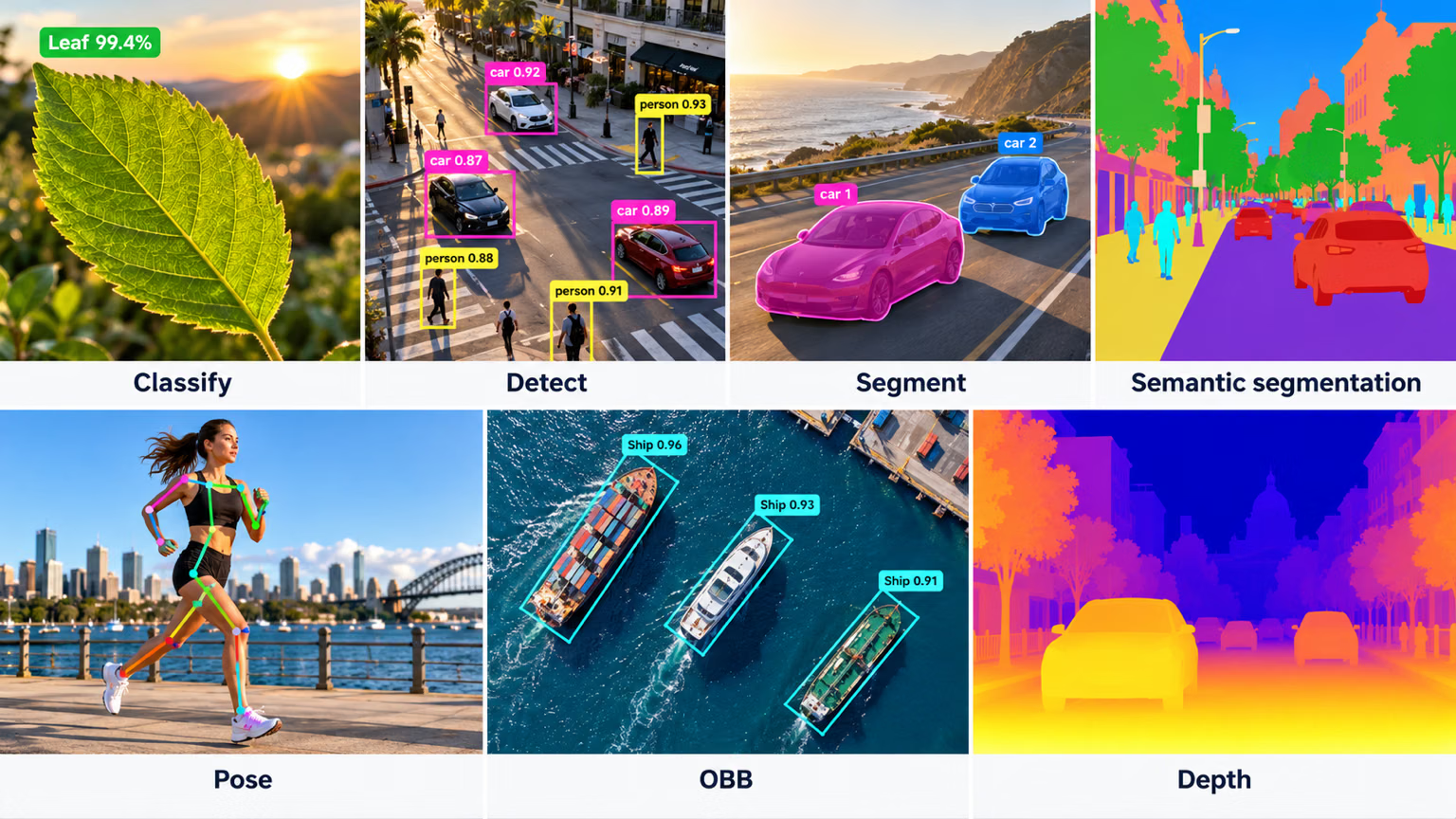
根据计算机视觉任务的具体要求,数据标注有多种类型。以下是一些示例:
- 边界框:在图像中的物体周围绘制的矩形框,主要用于目标检测任务。边界框由左上角和右下角坐标定义。
- 多边形:物体的详细轮廓,标注精度高于边界框。多边形用于实例分割等任务,在这些任务中,物体形状十分重要。
- 掩码:二值掩码,其中每个像素要么属于物体,要么属于背景。掩码用于语义分割任务,以提供像素级细节。
- 关键点:在图像中标记的特定点,用于确定感兴趣的位置。关键点用于姿态估计和人脸关键点检测等任务。
- 有向边界框:带有旋转角度的矩形,用于OBB任务;在这类任务中,物体可能以任意方向出现,例如航空图像中的物体。
常见标注格式#
选定标注类型后,还需要选择合适的格式来存储和共享标注。最常见的格式包括:
| 格式 | 文件结构 | 常见用途 |
|---|---|---|
| COCO | 单个 JSON 文件 | 目标检测、实例分割、关键点检测、背景区域与全景分割、图像描述 |
| Pascal VOC | 每张图像对应一个 XML 文件 | 目标检测 |
| YOLO | 每张图像对应一个 .txt 文件 | 目标检测、分割、姿态估计和有向边界框 |
YOLO 格式为每个对象存储一行,类别索引从 0 开始。对于目标检测,该行格式为 class x_center y_center width height,坐标归一化到 0–1。分割行会以对象归一化后的多边形点替换边界框;姿态行则保留边界框,并在其后附加关键点坐标;如果数据集声明了 kpt_shape: [n, 3],则每个关键点还会带有可见性标志。OBB行使用归一化后的角点坐标存储 class x1 y1 x2 y2 x3 y3 x4 y4。
如果你的标注工具导出 COCO JSON,可以将其转换为 YOLO .txt 标签,也可以使用自定义数据集类直接基于 JSON 进行训练。
制定标注指南#
选定标注类型和格式后,下一步是制定清晰、客观的标注规则。这些规则就像路线图,能确保整个标注过程保持一致和准确。规则的关键要素包括:
- 清晰详尽:确保说明清楚。使用示例和图示说明预期要求。
- 一致性:保持标注统一。为不同类型的数据制定标准,确保所有标注都遵循相同的规则。
- 减少偏差:保持中立。训练自己客观地进行标注,尽量减少个人偏见,确保标注公平。
- 效率:使用能够自动化重复任务的工具和工作流,让标注过程更快速、更高效。
定期检查并更新标注规则,有助于确保标注准确、一致,并符合项目目标。
标注工具#
优质的标注工具可以让你标注任务所需的每种类型、确保遵循一致的指南,并以可直接用于训练的格式导出标签。Ultralytics Platform提供内置的标注编辑器,支持检测、实例分割、语义分割、分类、姿态估计和 OBB;还提供SAM 驱动的智能标注,只需单击一次,即可为检测、实例分割、语义分割和 OBB 任务生成掩码。由于标注会按每种任务所需的布局保存——空间任务使用 YOLO .txt 行,分类任务使用类别文件夹——因此你标注好的数据集无需转换即可直接用于训练。
标注质量:准确度、精确度和离群值#
在大规模标注之前,了解准确率、精确率、离群值和质量控制会很有帮助,这样你就不会以适得其反的方式标注数据。
理解准确度和精确度#
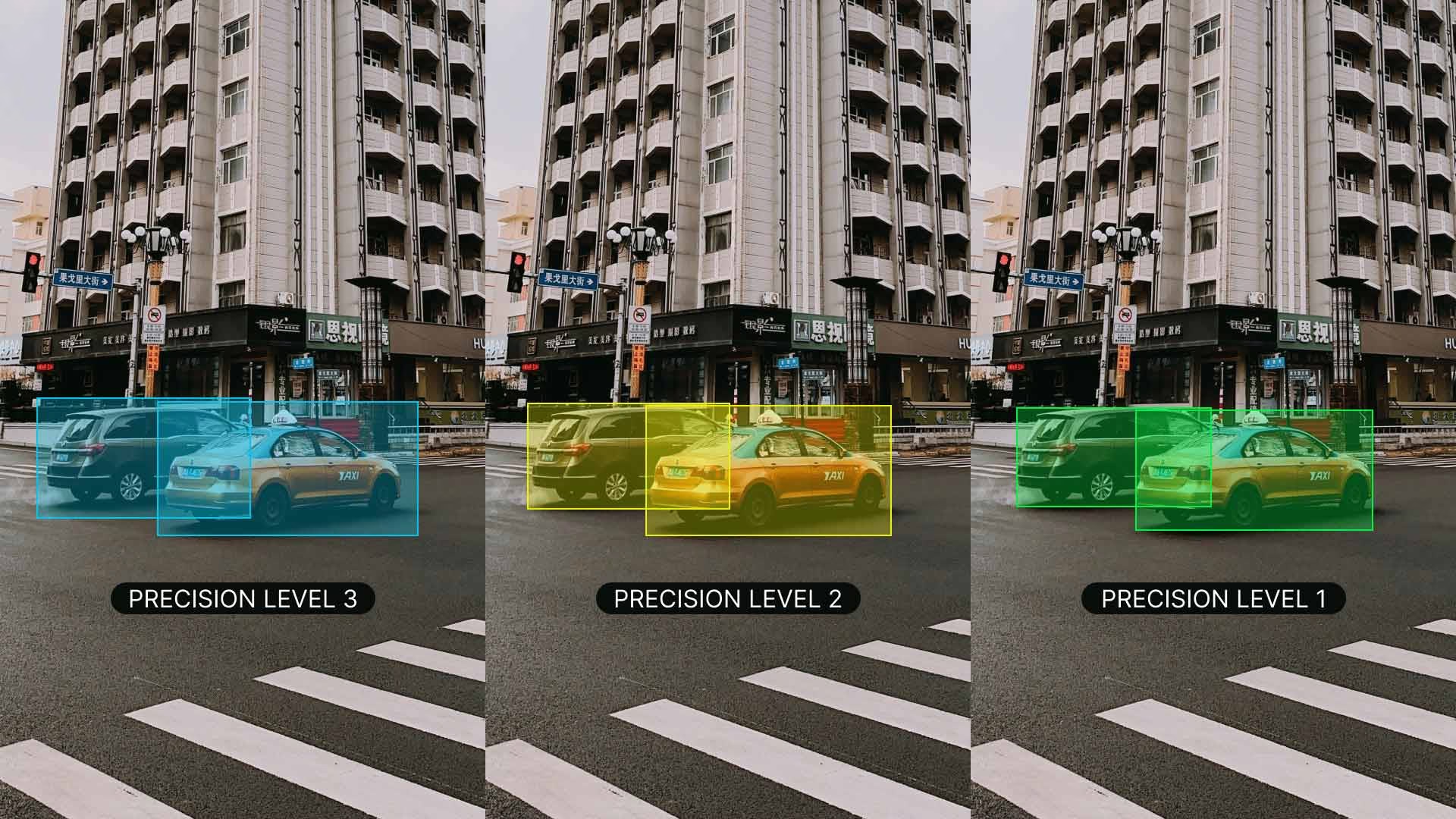
理解准确度和精确度的区别,以及它们与标注的关系十分重要。准确度指标注数据与真实值的接近程度。它可以帮助我们衡量标签对现实场景的反映有多准确。精确度则表示标注的一致性,用于检查你是否在整个数据集中为同一物体或特征赋予相同的标签。较高的准确度和精确度能减少噪声,提升模型从训练数据中泛化的能力,从而训练出更好的模型。
识别离群值#
离群值是与数据集中其他观测值差异较大的数据点。对于标注来说,离群值可能是标签错误的图像,也可能是不符合数据集中其他数据的标注。离群值值得关注,因为它们可能扭曲模型的学习过程,导致预测不准确且泛化能力较差。
你可以使用多种方法来检测并纠正离群值:
- 统计方法:对于像素值、边界框坐标或物体尺寸等数值特征中的离群值,你可以使用箱线图、直方图或 z 分数等方法进行检测。
- 可视化方法:要发现物体类别、颜色或形状等类别特征中的异常,可以使用绘制图像、标签或热力图等可视化方法。
- 算法方法:使用聚类(例如 K-means 聚类、DBSCAN)和异常检测算法,根据数据分布模式识别离群值。
标注数据的质量控制#
与其他技术项目一样,标注数据也必须进行质量控制。定期检查标注,确保其准确且一致,是一种良好做法。可以通过以下几种方式进行检查:
- 抽查部分标注数据
- 使用自动化工具发现常见错误
- 请其他人复核标注
如果你与多人协作,不同标注员之间保持一致很重要。良好的标注员间一致性意味着指南清晰明确,而且每个人都以相同的方式遵循指南。这样能让所有人保持一致,并确保标注结果一致。
审核时如果发现错误,请予以纠正并更新指南,以避免今后再犯。向标注人员提供反馈,并定期开展培训,以帮助减少错误。建立完善的错误处理流程,能让数据集保持准确可靠。
高效的数据标注策略#
要让数据标注流程更顺畅、更高效,可以考虑采用以下策略:
- 明确的标注指南:提供包含示例的详细说明,确保所有标注人员对任务的理解一致。例如,标注鸟类时,明确是要标注整只鸟,还是只标注特定部位。
- 定期质量检查:设定基准并使用具体指标审核工作,通过持续反馈维持高标准。
- 使用预标注工具:许多现代标注平台都提供 AI 辅助预标注功能,可自动生成初始标注,之后由人工完善,从而显著加快流程。
- 实施主动学习:这种方法会优先标注信息量最大的样本,从而在保持模型性能的同时减少所需的标注总量。
- 批量处理:将相似图像分组进行标注,以保持一致性并提升效率。
这些策略有助于保持高质量标注,同时减少标注流程所需的时间和资源。
结论#
收集多样且无偏的数据,并使用合适的工具以一致的方式进行标注,是构建可靠计算机视觉模型的基础。完成数据集的收集和标注后,请继续阅读计算机视觉项目步骤指南,开始训练和评估。如果过程中遇到问题,可以在 Ultralytics GitHub 仓库或 Ultralytics Discord 服务器向社区提问。
常见问题#
要尽量减少偏差,请从多种来源收集数据,确保所有相关群体(例如不同年龄、性别和族裔)都得到均衡代表,定期审核并更新数据集以发现新出现的偏差,并采用缓解方法,例如对代表不足的类别过采样、数据增强和公平性感知算法。通过这些方式避免偏差,可以让计算机视觉模型在各种真实场景中保持良好性能,并提升泛化能力。
制定清晰、客观的标注指南,提供详细说明、示例和插图,然后将其统一应用于所有数据类型,确保每项标注都遵循相同规则。培训标注人员保持中立,以减少个人偏见;定期审核并更新指南;使用自动一致性检查和标注人员之间的反馈,确保准确性并符合项目目标。
每个类别标注几百个对象就足以开始尝试迁移学习,但要在真实场景中获得可靠性能,Ultralytics 建议每个类别至少使用 1,500 张图像和 10,000 个标注实例。将规模足够大的数据集与合理的训练计划相结合——约 300 个 epoch是常见的起点,如果模型过早过拟合,则应缩短训练时间——并确保标注严谨且符合项目的具体目标。在 YOLO26 训练指南中了解详细的训练策略。
是的。Ultralytics Platform内置了标注编辑器,可在同一工作区中支持边界框、多边形、关键点、有向框和分类标签。由 SAM 驱动的智能标注可通过一次点击生成掩码,加快目标检测、实例分割、语义分割和 OBB 任务的标注速度;姿态数据集可以使用 YOLO 姿态模型进行智能标注,而分类则需手动标注。标注会按照各任务所需的格式存储——空间任务使用 YOLO
.txt行,分类使用类别文件夹——可直接用于训练。


评论16
提出问题、分享结果,或帮助其他人。
 Letícia Rama
Hello,
Has anyone worked with oriented object detection using a multisource dataset that combines satellite and UAV imagery?
I am currently developing a scientific project focused on oriented detection of fishing vessels. As part of this work, I conducted two systematic reviews: one covering existing oriented detection models and another covering publicly available datasets. So far, I have identified multisource datasets that combine imagery from multiple satellite platforms; however, I have not found datasets that explicitly integrate both satellite and UAV images.
I understand the importance of source diversity to mitigate dataset bias and improve model generalization. That said, I would appreciate insights from the community on whether combining UAV and satellite imagery might introduce excessive domain variability (e.g., differences in spatial resolution, viewing angles, and sensor characteristics), potentially hindering model training and convergence.
Any experiences, references, or best practices related to this type of multisource setup would be highly appreciated.
 Glenn JocherUltralytics
Great question—mixing UAV + satellite can increase domain shift (GSD/resolution, look-angle, sensor PSF), but it’s usually manageable if you control the dataset and evaluation: keep one unified, very explicit labeling policy (same object extent/rotation rules) and balanced sampling as described in our Data Collection and Annotation guide, then train with per-source “slice” validation (sat-only/UAV-only) and consider staged training (pretrain on the larger domain, then fine-tune on the smaller) rather than a single fully-mixed run; if you’re using Ultralytics YOLO for oriented detection, the OBB task docs cover the expected label format and training flow—feel free to share your planned split strategy and a couple example tiles (UAV + satellite) here and the team/community can sanity-check the setup.
1- Letícia Rama
Hi Glenn,
To be more specific,
I am using a pretrained yolo26 m obb to perform detection of a single class: ships of a particular type (fishing boats).
I have a dataset with satellite optical images collected from google earth pro counting 331 pairs of images/labels. The total number of instances is 5974. Images size are fixed at 4823 height x 8192 width. The bounding boxes have 0.075 height x 0.04 width (according to yolo train results). Resolution varies from very-low to very-high. The images were captured with an altitude between 200-400 meters.
I also have 21 very-high resolution images collected from UAV. Images size are fixed at 3072 height x 4096 width. The images were captured with an altitude of 120 meters.
I would like to test if incorporating UAV images in training data would improved the models hability to detect the objects.
From what you proposed, please confirm if I understood correctly:
- Should the train set be mixed (sat+UAV) and the validation set be separate (sat-only/UAV-only)?
- If so, is this separation configured the staged training you are refering? That is, pretrain with sat+UAV as the train set and sat-only as validation subset, and further fine-tune with the same train subset (sat+UAV) but now using the uav-only as the validation set?
Thanks
- Letícia Rama
OBS.: sorry, sometimes I wrote 'train subset', and 'validation subset' but all of them was supposed to be written as 'train set', and 'validation set'.
- Glenn JocherUltralytics
Your first interpretation is correct: compare a satellite-only baseline against mixed satellite+UAV training while keeping fixed, disjoint satellite-only and UAV-only evaluation sets. This is not staged training—changing only the validation set does not fine-tune the model. Staged training would first train on satellite data, then continue from that checkpoint using only the UAV training split with a lower learning rate, evaluating both domains afterward. With only 21 UAV images, split by original scene before tiling to prevent leakage, and consider grouped k-fold validation because a single UAV split will be unstable.
1 - Letícia Rama
Understood, thanks.
Sudharsanam-1
hello ! For detecting 31 Chinese symbols (16 true and 15 fake), how many classes should be used in the model? Is it more efficient to detect the true symbols using only true class , or should we also include the fake symbols as separate classes?
Team-Q-Botix
I’m working on Robocon 2026 (Kung Fu Quest) and using YOLO-seg for detecting KFS symbols — ancient Chinese oracle bone characters. There are 15 true symbols, 15 fake ones (random patterns mimicking the real ones), plus 1 “other” class → total 31 classes.
Do you think instance segmentation (YOLOv8-seg / YOLOv11-seg) is the right approach for these detailed 2D symbols, or would box detection + contour refinement be better? Also, any advice on which model to start with and how large a dataset (per class) you’d recommend for good mask performance on Jetson Orin?
robert-hardman
Hello In object recognition with YOLO11 If we label images by drawing polygons: When training, does YOLO11 convert polygon coordinates to boxes? How does Inference handle polygon coordinates?
- Glenn JocherUltralytics
@robert-hardman yOLO11 does not inherently convert polygon annotations to bounding boxes during training. Polygons are used directly for tasks like instance segmentation, while bounding boxes are utilized for object detection. During inference, polygon annotations are retained for segmentation tasks, ensuring accurate object shape representation. For more on annotation types, refer to Data Annotation Guide.
1
ghost
Hello, thanks for the info ! I would like to know how to perform active learning, specifically what are the metrics to choose the most informative images when the task is multi-instance multi-class object detection ?
 Paula DerrengerUltralytics(已编辑)
@cawilchesp hello! Great question on active learning for multi-instance multi-class object detection. Active learning can significantly enhance your model by iteratively selecting the most informative samples for annotation. Here are some key metrics and strategies to consider:
Metrics for Selecting Informative Images:
-
Uncertainty Sampling: Choose images where the model is least confident. This can be measured using:
- Entropy: High entropy indicates uncertainty in predictions.
- Margin Sampling: Select samples where the difference between the top two class probabilities is smallest.
- Least Confidence: Select samples with the lowest maximum class probability.
-
Diversity Sampling: Ensure a diverse set of samples to avoid redundancy.
- Core-Set Selection: Use clustering techniques to select a diverse subset of data points.
- Representative Sampling: Choose samples that represent the overall data distribution.
-
Error-Based Sampling: Focus on samples where the model previously made errors.
- Misclassified Samples: Select images where the model's predictions were incorrect.
- High Loss Samples: Choose samples with high loss values during training.
Implementing Active Learning:
Here's a basic example using least-confidence uncertainty sampling for detection, based on each image's mean box confidence (
result.probsis only available for classification models):import numpy as np from ultralytics import YOLO # Load your model model = YOLO('yolo26n.pt') # Predict on a batch of images results = model(['image1.jpg', 'image2.jpg', 'image3.jpg']) # Mean box confidence per image (0 if nothing was detected) scores = [r.boxes.conf.mean().item() if len(r.boxes) else 0.0 for r in results] # Select the image with the lowest confidence most_informative_image = results[int(np.argmin(scores))]Additional Resources:
For more detailed strategies and examples, you can refer to our Data Collection and Annotation Strategies.
Feel free to experiment with these methods and see which works best for your specific use case. If you have any further questions or need more examples, don't hesitate to ask! 😊
-
MoAbbasid
Hello, Im looking for an open source annotation tool similar to labelme that exports directly to YOLOv8 format, something other than labelme?
- Glenn JocherUltralytics
@MoAbbasid hello! For an open-source annotation tool that exports directly to YOLOv8 format, you might want to try CVAT. It's quite versatile and supports exporting annotations directly into YOLO format among others. Another good option could be Label Studio, which offers flexibility in configuring export formats, including YOLO. Both tools provide robust features for efficient data labeling and are well-suited for various annotation tasks. Happy annotating! 😊
1 @glenn-jocher do they offer polygon annotations for instance segmentation?
- Glenn JocherUltralytics(已编辑)
Hello @MoAbbasid,
Yes, Ultralytics YOLO does support polygon annotations for instance segmentation. This allows for more precise labeling of objects compared to traditional bounding boxes, which can be particularly useful for complex shapes and detailed segmentation tasks.
To create polygon annotations, you can use tools like Roboflow Annotate or CVAT. Both of these tools support polygon annotations and can export the data in a format compatible with Ultralytics YOLO.
Here's a brief overview of how you can use Roboflow for this purpose:
- Create a Project: Start by creating a new project in Roboflow.
- Upload Images: Upload your images to the project.
- Annotate Images: Use the polygon tool to draw detailed outlines around objects. Roboflow also offers a SAM-based label assistant to speed up the annotation process.
- Export Annotations: Once your annotations are complete, you can export the dataset in YOLO format.
For more detailed steps on using Roboflow for data annotation and management, you can refer to the Roboflow documentation.
Here's a quick example of how to load and use a dataset with polygon annotations:
from ultralytics import YOLO

# Load a YOLO26 segmentation model
model = YOLO('yolo26n-seg.pt')

# Train the model on your custom dataset
model.train(data='path/to/your/dataset.yaml', epochs=100, imgsz=640)

# Validate the model
metrics = model.val()

# Make predictions
results = model.predict(source='path/to/your/images')

# Visualize results
results[0].show()
Feel free to reach out if you have any more questions or need further assistance. Happy annotating! 😊
1