Ultralytics YOLO26を使用したセキュリティアラームシステムプロジェクト
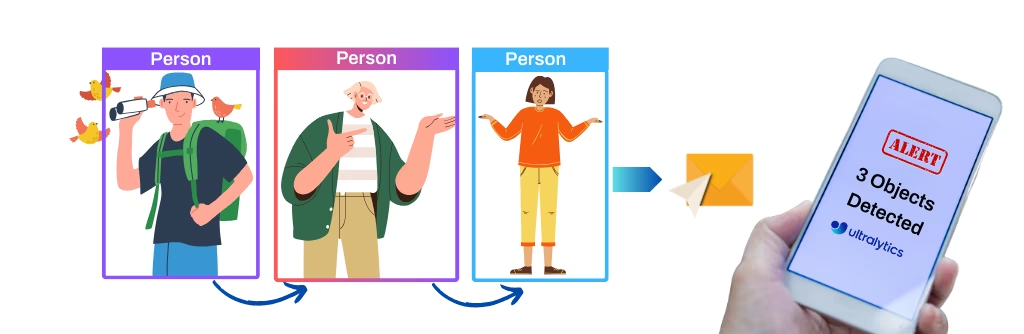
このプロジェクトでは、Ultralytics YOLO26のコンピュータービジョンを使ってセキュリティアラームシステムを構築します。YOLO26はリアルタイムの物体検出を実行し、潜在的なセキュリティ上の脅威をシステムが速やかに識別して対応できるようにします。このプロジェクトには、次のような利点があります。
- リアルタイム検出: YOLO26は効率的なため、セキュリティアラームシステムでセキュリティ上のインシデントをリアルタイムに検出して対応でき、応答時間を最小限に抑えます。
- 精度: YOLO26の高精度な物体検出によって誤検出が減り、セキュリティアラームシステムの信頼性が向上します。
- 統合機能: このプロジェクトでは、既存のセキュリティカメラにAI分析を追加し、現在の監視システムにインテリジェントな検出レイヤーを追加できます。
視聴: Ultralytics YOLO26とSolutionsによるセキュリティアラームシステムの物体検出
YOLO26でセキュリティアラートを送信#
SecurityAlarmソリューションは動画フィード内のオブジェクトを追跡し、検出数がrecordsのしきい値に達すると、注釈付き画像を添付したメールアラートを1通送信します。アプリパスワードを使ってGmailアカウントを認証し、ソースに対してソリューションを実行します。
アプリパスワード生成ツールに移動し、「security project」などのアプリ名を指定して、16文字のパスワードを取得します。このパスワードをコピーし、以下のコードのpasswordフィールドに貼り付けます。
import cv2

from ultralytics import solutions

cap = cv2.VideoCapture("path/to/video.mp4")
assert cap.isOpened(), "Error reading video file"

# 動画ライター
w, h, fps = (int(cap.get(x)) for x in (cv2.CAP_PROP_FRAME_WIDTH, cv2.CAP_PROP_FRAME_HEIGHT, cv2.CAP_PROP_FPS))
video_writer = cv2.VideoWriter("security_output.avi", cv2.VideoWriter_fourcc(*"mp4v"), fps, (w, h))

from_email = "abc@gmail.com"  # 送信者のメールアドレス
password = "---- ---- ---- ----"  # 16文字のアプリパスワードの生成元: https://myaccount.google.com/apppasswords
to_email = "xyz@gmail.com"  # 受信者のメールアドレス

# セキュリティアラームオブジェクトを初期化
securityalarm = solutions.SecurityAlarm(
    show=True,  # 出力を表示する
    model="yolo26n.pt",  # 例: yolo26s.pt、yolo26m.pt
    records=1,  # メール送信に必要な検出数
)

securityalarm.authenticate(from_email, password, to_email)  # メールサーバーを認証する

# 動画を処理
while cap.isOpened():
    success, im0 = cap.read()

    if not success:
        print("Video frame is empty or video processing has been successfully completed.")
        break

    results = securityalarm(im0)

    # print(results)  # 出力にアクセス

    video_writer.write(results.plot_im)  # 処理済みフレームを書き込みます。

cap.release()
video_writer.release()
cv2.destroyAllWindows()  # 開いているすべてのウィンドウを破棄
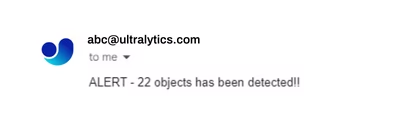
コードを実行すると、オブジェクトが1つでも検出された場合に、メール通知が1回届きます。通知はすぐに送信され、繰り返し送信されることはありません。プロジェクトの要件に合わせてコードをカスタマイズできます。
メール受信サンプル#
SecurityAlarmの引数#
SecurityAlarmの引数を以下の表に示します。
| 引数 | 種類 | デフォルト | 説明 |
|---|---|---|---|
model | str | None | Ultralytics YOLOモデルファイルへのパスです。 |
records | int | 5 | セキュリティ警報システムでメールを送信するトリガーとなる検出数の合計です。 |
line_width | int | 2 | Solutionが描画するボックス、キーポイント、カウント表示の線幅です。 |
verbose | bool | True | 各フレームの入力shape、クラス数、処理速度を記録するSolutionのログを有効にします。トラッキング呼び出し自体は常にログを出力しません。 |
SecurityAlarmソリューションは、さまざまなtrackパラメーターに対応しています。
| 引数 | 種類 | デフォルト | 説明 |
|---|---|---|---|
tracker | str | 'tracktrack.yaml' | 使用するトラッキングアルゴリズムを指定します。組み込みのオプション:botsort.yaml、bytetrack.yaml、ocsort.yaml、deepocsort.yaml、fasttrack.yaml、tracktrack.yaml。 |
conf | float | 0.25 | 検出の信頼度しきい値を設定します。値を低くすると、より多くの物体を追跡できますが、誤検出が含まれる可能性があります。 |
iou | float | 0.5 | 重複する検出をフィルタリングするためのIntersection over Union(IoU)しきい値を設定します。 |
classes | list | None | クラスインデックスで結果をフィルタリングします。たとえば、classes=[0, 2, 3]を指定すると、指定したクラスのみを追跡します。 |
device | str | None | 推論に使用するデバイスを指定します(例:cpu、cuda:0、0)。モデル実行に使用するCPU、特定のGPU、その他の計算デバイスを選択できます。 |
imgsz | int or tuple | 640 | 推論時の入力画像サイズです。正方形の場合は整数、または(height, width)のペアを指定します。形状はモデルのストライドに合わせて調整されます。 |
max_det | int | 300 | トラッキング前にフレームごとに保持する検出の最大数です。混雑したシーンでソリューションが処理する物体数を制限します。 |
quantize | int or str | None | 推論精度: CPU以外で実行するPyTorchおよびTorchScriptモデルでは、16(FP16)または32/未設定(FP32)を使用します。その他の形式では、アーティファクトとランタイムによって選択される精度が使用されます。非推奨のhalf引数を置き換えます。 |
さらに、次の可視化設定を利用できます。
| 引数 | 種類 | デフォルト | 説明 |
|---|---|---|---|
show | bool | False | Trueの場合、注釈付き画像または動画をウィンドウに表示します。開発やテスト中にすぐ視覚的なフィードバックを得るのに便利です。 |
show_conf | bool | True | 各検出のラベルとともに信頼度スコアを表示します。各検出に対するモデルの確信度を確認できます。 |
show_labels | bool | True | 可視化出力で各検出のラベルを表示します。検出されたオブジェクトをすぐに把握できます。 |
仕組み#
Security Alarm Systemはオブジェクトトラッキングを使用してビデオフィードを監視し、潜在的なセキュリティ上の脅威を検出します。フレーム内の検出オブジェクト数が指定したしきい値(recordsパラメーターで設定)に達すると、検出オブジェクトを示す画像を添付したメール通知を自動的に送信します。
SecurityAlarmクラスには、次の処理を行うメソッドが用意されています。
- フレームを処理し、オブジェクト検出結果を抽出します
- 検出オブジェクトの周囲にバウンディングボックスを描画して、フレームにアノテーションを付けます
- 検出しきい値に達したときにメール通知を送信します
この実装は、検出した物体の即時通知が重要なホームセキュリティ、小売店舗の監視、その他の監視用途に適しています。
よくある質問#
Ultralytics YOLO26は高精度なリアルタイム物体検出を実現し、誤検出を減らすことで、セキュリティアラームシステムが実際のイベントを中心に応答できるようにします。検出対象を関連する
classes(たとえば人物のみ)に制限する、confのしきい値を引き上げる、またはrecordsを増やすことで、誤警報をさらに減らせます。はい。
SecurityAlarmソリューションは、動画ファイル、Webカメラ、IPカメラからのRTSPストリームなど、OpenCVが読み込めるあらゆるソースからフレームを処理できるため、既存のカメラ環境にYOLO26の検出機能を追加できます。Ultralytics YOLO26を標準的な環境で実行するには、通常、約5GBの空きディスク容量が必要です。これには、YOLO26モデルと追加の依存関係の保存に必要な容量が含まれます。クラウドベースのソリューションでは、Ultralytics Platformが効率的なプロジェクト管理とデータセット処理を提供し、ストレージの必要量を最適化できます。Proプランでは、ストレージ容量が500 GBに増加します。
Ultralytics YOLO26はリアルタイム検出機能と高い精度を備えており、Faster R-CNNやSSDなどのモデルよりも優れています。1段階アーキテクチャによって精度を損なうことなく画像をはるかに高速に処理できるため、セキュリティアラームシステムのように時間的制約がある用途に適しています。
誤検出を減らすには、多様で適切にアノテーションされたデータセットを使ってUltralytics YOLO26モデルを十分にトレーニングしてください。ハイパーパラメーターの調整や新しいデータを使った定期的なモデル更新によって、検出精度を大幅に向上させることができます。


コメント153
質問したり、結果を共有したり、ほかの人をサポートしたりできます。
e9l7a5f
hi, i cant do the email setting, of Sign in with app passwords and the authentication part , it looks like google change the setting i cant find them, is there another way?
1 Glenn JocherUltralytics(編集済み)
Hey there! 😊 It seems like Google's app password settings have indeed evolved, and I appreciate you reaching out for assistance on this. While the current documentation may reference older interfaces, the essence of setting up app passwords for projects like the Security Alarm System with Ultralytics YOLOv8 remains relevant.
If you're experiencing difficulties locating the specific options for app passwords on Google, you might consider looking into alternative email sending services that offer API support, such as SendGrid, Mailgun, or even using a local SMTP server setup, depending on your project's complexity and scale.
For a quick fix using
smtplibwith Gmail, ensure you've enabled two-factor authentication on your account, and then create an app password here: https://myaccount.google.com/apppasswords.Here's a simplified version of how to use an app password:
import smtplib

EMAIL = "your_email@gmail.com"
APP_PASSWORD = "your_app_password"

with smtplib.SMTP("smtp.gmail.com", 587) as smtp:
    smtp.starttls()
    smtp.login(EMAIL, APP_PASSWORD)
    subject = "Security Alert"
    body = "Alert description"
    msg = f"Subject: {subject}\n\n{body}"
    smtp.sendmail(EMAIL, "receiver_email@gmail.com", msg)
Make sure to replace
"your_email@gmail.com"and"your_app_password"with your actual Gmail email and the 16-digit app password you generate, respectively.It's recommended to review the current Gmail documentation or seek updated guidance if Google's procedures have significantly changed since our last update. Hope this helps! If you have further questions or need more personalized assistance, feel free to ask.
thanks for replying, i fix it for the yolov8 as the same steps u explained, now i want to use it on yolov9 but i cant with these steps, because i am using the detect.py and i dont know how to deal with it , where to put each code, i dont have that much background in DL and python codes. the email part is working now
- Glenn JocherUltralytics(編集済み)
@e9l7a5f you can use YOLOv9 models the same way as you currently use YOLOv8 models; see https://docs.ultralytics.com/models/yolov9. For new projects we recommend YOLO26: https://docs.ultralytics.com/models/yolo26/.
aaurelions
% python3.11 main.py
Ultralytics Solutions: ✅ {'source': None, 'model': 'yolo11n.pt', 'classes': None, 'show_conf': True, 'show_labels': True, 'region': None, 'colormap': 21, 'show_in': True, 'show_out': True, 'up_angle': 145.0, 'down_angle': 90, 'kpts': [6, 8, 10], 'analytics_type': 'line', 'figsize': (12.8, 7.2), 'blur_ratio': 0.5, 'vision_point': (20, 20), 'crop_dir': 'cropped-detections', 'json_file': None, 'line_width': 2, 'records': 1, 'fps': 30.0, 'max_hist': 5, 'meter_per_pixel': 0.05, 'max_speed': 120, 'show': True, 'iou': 0.7, 'conf': 0.25, 'device': None, 'max_det': 300, 'half': False, 'tracker': 'botsort.yaml', 'verbose': True, 'data': 'images'}
Traceback (most recent call last):
  File "/Users/llama/Developer/sec/main.py", line 23, in <module>
    securityalarm.authenticate(from_email, password, to_email)  # authenticate the email server
    ^^^^^^^^^^^^^^^^^^^^^^^^^^^^^^^^^^^^^^^^^^^^^^^^^^^^^^^^^^
  File "/Users/llama/.venv/3.11/lib/python3.11/site-packages/ultralytics/solutions/security_alarm.py", line 68, in authenticate
    self.server = smtplib.SMTP("smtp.gmail.com: 587")
                  ^^^^^^^^^^^^^^^^^^^^^^^^^^^^^^^^^^^
  File "/opt/homebrew/Cellar/python@3.11/3.11.13/Frameworks/Python.framework/Versions/3.11/lib/python3.11/smtplib.py", line 255, in __init__
    (code, msg) = self.connect(host, port)
                  ^^^^^^^^^^^^^^^^^^^^^^^^
  File "/opt/homebrew/Cellar/python@3.11/3.11.13/Frameworks/Python.framework/Versions/3.11/lib/python3.11/smtplib.py", line 341, in connect
    self.sock = self._get_socket(host, port, self.timeout)
                ^^^^^^^^^^^^^^^^^^^^^^^^^^^^^^^^^^^^^^^^^^
  File "/opt/homebrew/Cellar/python@3.11/3.11.13/Frameworks/Python.framework/Versions/3.11/lib/python3.11/smtplib.py", line 312, in _get_socket
    return socket.create_connection((host, port), timeout,
           ^^^^^^^^^^^^^^^^^^^^^^^^^^^^^^^^^^^^^^^^^^^^^^^
  File "/opt/homebrew/Cellar/python@3.11/3.11.13/Frameworks/Python.framework/Versions/3.11/lib/python3.11/socket.py", line 863, in create_connection
    raise exceptions[0]
  File "/opt/homebrew/Cellar/python@3.11/3.11.13/Frameworks/Python.framework/Versions/3.11/lib/python3.11/socket.py", line 848, in create_connection
    sock.connect(sa)
ConnectionRefusedError: [Errno 61] Connection refused
RizwanMunawar
@aaurelions Hi, thanks for sharing it. You will need to configure the parameters first by following the docs: https://docs.ultralytics.com/guides/security-alarm-system/
1
EQUINOX391
Dear ultralytics team! First of all i really appreciate this amazing works, I'm working on my projects for detecting crime and i aalready have a trained resnet 50 model for detecting some crime as dummy, I really wonder can i integrate the Security Alarm System by Ultralytics in my projects and make it like have this functionality :
- have input of CCTV from RTSP
- when detecting people (or maybe car, bike, etc) , my resnet model will also detecting what they do, after we know what the activity is, we can send it the email
- customize the email messaging like "ALERT 2 people 2 cars detected, Activity Probability : Suspicious - Stealing"
- also send different email if the people stays too long in the frame.
- keep making new notification IF There's new people(s) inside the frame.
- notified if the people or another object is gone from the frame
- is there any pretrain model that detect something related to crime like hammer, crowbar, spraying can, grafitti, gun, etc?
- is there any pretrain model yolo have for pose estimation? i mean there's some but i don't find anything inside the documentation that said it can estimate some general pose like, squat, stand, walk, run, etc
i have so many question but i think that is the most of it! Thank you, and sorry for my bad english.
Cheikh-Ahmedand
Hi Glenn-jocher!
I am very appreciative of your help to your clients as i am one of them.
in onder to integrate security alarm system in an application, using streamlit package, how can i let the end user input their capture_index value and their email:
st. input_text ( )
from_email = "@gmail.com" # must match the email used to generate the password
st. input_text ( )
detector = ObjectDetection(capture_index=0) detector()
with examples, please!
Best regards!
- Glenn JocherUltralytics(編集済み)
@Cheikh-Ahmedand thank you for your support! For Streamlit integration, you can collect user inputs like this:
import cv2
import streamlit as st
from ultralytics import solutions

# User inputs
from_email = st.text_input("Sender Email")
password = st.text_input("App Password", type="password")
to_email = st.text_input("Receiver Email")
capture_source = st.text_input("Camera Index/Video Path", "0")

# Initialize SecurityAlarm with user inputs
security = solutions.SecurityAlarm(show=True, model="yolo26n.pt", records=1)
security.authenticate(from_email, password, to_email)
cap = cv2.VideoCapture(int(capture_source) if capture_source.isdigit() else capture_source)
The SecurityAlarm implementation details remain as shown in our security alarm system guide. For email setup, ensure users follow the App Password Generator instructions.
Hello there, glenn-jocher!
Thanks for your nice Help!
I would like st.input_text for end users for from_emails /to_email and detector = ObjectDetection(capture_index=0) in the below code, not for the code you gave an example on:
Securiy Alarm System
password = " " from_email = "@gmail.com" # must match the email used to generate the password to_email = "@gmail.com" # receiver email
import smtplib server = smtplib.SMTP('smtp.gmail.com: 587') server.starttls() server.login(from_email, password)
from email.mime.multipart import MIMEMultipart from email.mime.text import MIMEText from email.mime.image import MIMEImage
def send_email(to_email, from_email, image_path, object_detected=1): """Sends an email with an image attachment.""" message = MIMEMultipart() message["From"] = from_email message["To"] = to_email message["Subject"] = "Security Alert" message_body = f"ALERT - {object_detected} objects have been detected!" message.attach(MIMEText(message_body, "plain")) with open(image_path, 'rb') as img_file: img = MIMEImage(img_file.read()) message.attach(img) server.sendmail(from_email, to_email, message.as_string())
from time import time
import cv2 import torch from ultralytics import YOLO from ultralytics.utils.plotting import Annotator, colors
class ObjectDetection: def init(self, capture_index): """Initializes an ObjectDetection instance with a given camera index.""" self.capture_index = capture_index self.email_sent = False
    # model information
    self.model = YOLO("yolo11n.pt")

    # visual information
    self.annotator = None
    self.start_time = 0
    self.end_time = 0

    # device information
    self.device = "cuda" if torch.cuda.is_available() else "cpu"

def predict(self, im0):
    """Run prediction using a YOLO model for the input image `im0`."""
    results = self.model(im0, classes=[0])
    return results

def display_fps(self, im0):
    """Displays the FPS on an image `im0` by calculating and overlaying as white text on a black rectangle."""
    self.end_time = time()
    fps = 1 / round(self.end_time - self.start_time, 2)
    text = f"FPS: {int(fps)}"
    text_size = cv2.getTextSize(text, cv2.FONT_HERSHEY_SIMPLEX, 1.0, 2)[0]
    gap = 10
    cv2.rectangle(
        im0,
        (20 - gap, 70 - text_size[1] - gap),
        (20 + text_size[0] + gap, 70 + gap),
        (255, 255, 255),
        -1,
    )
    cv2.putText(im0, text, (20, 70), cv2.FONT_HERSHEY_SIMPLEX, 1.0, (0, 0, 0), 2)

def plot_bboxes(self, results, im0):
    """Plots bounding boxes on an image given detection results; returns annotated image and class IDs."""
    class_ids = []
    self.annotator = Annotator(im0, 3, results[0].names)
    boxes = results[0].boxes.xyxy.cpu()
    clss = results[0].boxes.cls.cpu().tolist()
    names = results[0].names
    for box, cls in zip(boxes, clss):
        class_ids.append(cls)
        self.annotator.box_label(box, label=names[int(cls)], color=colors(int(cls), True))
    return im0, class_ids

def __call__(self):
    """Run object detection on video frames from a camera stream, plotting and showing the results."""
    cap = cv2.VideoCapture(self.capture_index)
    assert cap.isOpened()
    cap.set(cv2.CAP_PROP_FRAME_WIDTH, 640)
    cap.set(cv2.CAP_PROP_FRAME_HEIGHT, 480)
    frame_count = 0
    while True:
        self.start_time = time()
        ret, im0 = cap.read()
        assert ret
        results = self.predict(im0)
        im0, class_ids = self.plot_bboxes(results, im0)
        if len(class_ids) > 0:
           image_path = f"detected_frame_{frame_count}.jpg"
           cv2.imwrite(image_path, im0)
           if not self.email_sent:
            send_email(to_email, from_email, image_path, len(class_ids))
            self.email_sent = True
        else:
            self.email_sent = False

        self.display_fps(im0)
        cv2.imshow("YOLO11 Detection", im0)
        frame_count += 1
        if cv2.waitKey(5) & 0xFF == 27:
            break
    cap.release()
    cv2.destroyAllWindows()
    server.quit()
detector = ObjectDetection(capture_index=0) detector()
would you please give an example of st. input_text for end users letting them write their emails and capture_index on the above code?
Sincerely Yours!
- Glenn JocherUltralytics
Thank you for your question! For Streamlit integration with user inputs in your security system, here's how to modify your code:
import streamlit as st

# User inputs
from_email = st.text_input("Sender Email")
to_email = st.text_input("Receiver Email")
password = st.text_input("App Password", type="password")
capture_index = st.text_input("Camera Index/Video Path", "0")

# Initialize detector with user inputs
detector = ObjectDetection(capture_index=int(capture_index) if capture_index.isdigit() else capture_index)
This allows users to specify their email credentials and camera source through Streamlit's interactive interface. The Security Alarm System guide shows how these inputs integrate with YOLO11's detection capabilities. For email setup requirements, please ensure users follow the App Password Generator instructions from our security alarm documentation.
boukosho
Hey glenn-jocher!
As you know, ML models need frequent check so as their data remain undriffed and their distribution remain unchanged.
To frequently monitor deployed ml models by streamlit in case it is deployed to aws ec2, Google Cloud, or streamlit community cloud or in local server, what should I do ?
Please give an example!
Thanks!
- Glenn JocherUltralytics(編集済み)
@boukosho for monitoring deployed YOLO11 models across cloud platforms, consider implementing a heartbeat system with performance metrics logging. Our Security Alarm System guide shows email alert integration that could be adapted for drift detection notifications. For production deployments, Ultralytics Platform provides monitoring for deployed endpoints; see the Platform monitoring documentation. A minimal implementation might track inference statistics and trigger alerts via our solutions.SecurityAlarm class when thresholds are exceeded.
Hello there glenn-jocher!
Thanks for your respectful responses!
If I want the alarm system to only notify me when it is confident of more than 0.3 % .
So how to do it, with examples, please!
 # model information

    self.model = YOLO("yolo11.pt")

    # visual information

    self.annotator = None

    self.start_t        ime = 0

    self.end_time = 0


    # device information

    self.device = "cuda" if torch.cuda.is_available() else "cpu"


def predict(self, im0):

    """Run prediction using a YOLO model for the input image `im0`."""

    results = self.model(im0, classes=[0])

     return results
Sincelrely Yours!
- Glenn JocherUltralytics(編集済み)
@Cheikh-Ahmedand to adjust the confidence threshold in your security alarm system, set the
confargument when initializing the solution. For example:security = solutions.SecurityAlarm(model="yolo26n.pt", conf=0.5) # only detections above 0.5 confidenceThis ensures notifications only trigger for detections exceeding your specified confidence level. For more details, refer to the Security Alarm System guide.
hey!
Thanks glenn-jocher for your respectful response.
security = solutions.SecurityAlarm(model="yolo11n.pt", conf=0.5) # Set confidence threshold >0.3 security.model.conf = 0.5 # Alternative direct method
N.B, I would like to add conf=0.5 for the below function (self.model = YOLO("yolo11n.pt"), not for the above one
class ObjectDetection:
def __init__(self, capture_index):

    """Initializes an ObjectDetection instance with a given camera index."""

    self.capture_index = capture_index

    self.email_sent = False

    # model information

    self.model = YOLO("yolo11n.pt")
visual information
    self.annotator = None

    self.start_time = 0

    self.end_time = 0

    # device information

    self.device = "cuda" if torch.cuda.is_available() else "cpu"
How to do so with examples, please!
Sincerely Yours!
- Glenn JocherUltralytics(編集済み)
@Cheikh-Ahmedand in your own
ObjectDetectionclass, passconfwhen you run inference rather than when loading the model:self.model = YOLO("yolo26n.pt") results = self.model.predict(im0, conf=0.5)For more details on model arguments, see the Predict mode documentation.
Hey glenn- jocher!
Thanks lots for your respectful response.
self.model = YOLO("yolo11n.pt", task="detect").set({"conf": 0.5})
When i run the above code, an error has been occured:
(AttributeError: 'DetectionModel' object has no attribute 'set')
What should i do instead? With examples, Please.
Best Regards!
- Glenn JocherUltralytics
To set the confidence threshold in your custom
ObjectDetectionclass, modify yourpredictmethod like this:def predict(self, im0): results = self.model.predict(im0, classes=[0], conf=0.5) # Add conf here return resultsThe
confparameter should be passed during inference rather than model initialization. For more details on prediction arguments, see the Predict mode documentation.
Hello there! What do you mean by the below function?
cap = cv2.VideoCapture("Path/to/video/file.mp4") assert cap.isOpened(), "Error reading video file"
Namely, I have a Webcam or the laptop camera or dvr/nvr cameras and I want to attach them to the above function. How to do so? With examples, please!! . Sincerely Yours!
- Glenn JocherUltralytics(編集済み)
To use your webcam or camera stream with OpenCV's
VideoCapture, replace the file path with:0for default laptop camera (e.g.,cap = cv2.VideoCapture(0))- RTSP URL for network cameras (e.g.,
cap = cv2.VideoCapture("rtsp://username:password@camera_ip:port/stream"))
For DVR/NVR cameras, use your camera's RTSP stream URL. See OpenCV VideoCapture docs for more input formats.
Hay!
Glenn-jocher I asked you questions here, you haven't answered me yet? Do you still respond kindly to questions regarding yolo security alarm system here? Or you no longer do so?
Best Regards!
- Glenn JocherUltralytics
@boukosho hi! We're happy to help with YOLO security alarm system questions. Our comprehensive Security Alarm System guide at https://docs.ultralytics.com/guides/security-alarm-system/ provides complete implementation code and documentation. For specific issues, feel free to open a GitHub Discussion with details about your implementation and we'll assist there. 😊
Hello there! What do you mean by the below function?
cap = cv2.VideoCapture("Path/to/video/file.mp4") assert cap.isOpened(), "Error reading video file"
Namely, I have a Webcam or the laptop camera or dvr/nvr cameras and I want to attach them to the above function. How to do so? With examples, please!! . Sincerely Yours!
- Glenn JocherUltralytics(編集済み)
To use your webcam, laptop camera, or DVR/NVR cameras with
cv2.VideoCapture, modify the source argument:-
Webcam/Laptop Camera:
cap = cv2.VideoCapture(0)(0 for default camera, 1 for secondary, etc.) -
IP/DVR/NVR Cameras:
Use RTSP/HTTP stream URLs like:
cap = cv2.VideoCapture("rtsp://username:password@camera_ip:port/stream")
The rest of the security alarm code remains unchanged. Ensure your camera feed is accessible and credentials are correctly formatted in URLs. For more details on video sources, see our Object Detection and Tracking guide.
-
Hello there! What do you mean by the below function?
cap = cv2.VideoCapture("Path/to/video/file.mp4") assert cap.isOpened(), "Error reading video file"
Namely, I have a Webcam or the laptop camera or dvr/nvr cameras and I want to attach them to the above function. How to do so? With examples, please!! . Sincerely Yours!
- Glenn JocherUltralytics(編集済み)
For webcam/laptop camera use
cap = cv2.VideoCapture(0)(0=default camera index). For IP cameras, use an RTSP URL likecap = cv2.VideoCapture("rtsp://username:password@camera_ip:port/path"). Theassertchecks if the video source opens successfully. You can find specific camera URL formats in your DVR/NVR documentation.
andrewjang2234
Traceback (most recent call last): File "C:\Users\User\class-iot\apps\iot07\security.py", line 17, in server.login(from_email, password) File "C:\Users\User\miniconda3\envs\class-iot061\lib\smtplib.py", line 750, in login raise last_exception File "C:\Users\User\miniconda3\envs\class-iot061\lib\smtplib.py", line 739, in login (code, resp) = self.auth( File "C:\Users\User\miniconda3\envs\class-iot061\lib\smtplib.py", line 662, in auth raise SMTPAuthenticationError(code, resp) smtplib.SMTPAuthenticationError: (534, b'5.7.9 Application-specific password required. For more information, go to\n5.7.9 https://support.google.com/mail/?p=InvalidSecondFactor 41be03b00d2f7-7fd430cec7bsm8095565a12.67 - gsmtp')
I don't know why this error is keep causing.......... what is the problem?
sorry I sovle that problem if I want to use my laptob cam what do I have to do?
- Glenn JocherUltralytics
@andrewjang2234 to use your laptop's camera, set the
capture_indexparameter in theObjectDetectionclass to0(e.g.,ObjectDetection(capture_index=0)). This should automatically access your default webcam. If issues persist, ensure your camera is not being used by another application.
I have a question. what exactly 'to_email' is? 'from_email' is my main emial, and 'password' is 'from_email's password and what is to_email?
- Glenn JocherUltralytics
@andrewjang2234 the
to_emailrefers to the recipient's email address where the alert or notification will be sent. If you have further questions about this setup, feel free to ask!