Ultralyticsがサポートするモデル
Ultralyticsは、物体検出、インスタンスセグメンテーション、セマンティックセグメンテーション、深度推定、画像分類、姿勢推定、Oriented Bounding Boxなど、特定のタスクに合わせた幅広いモデルをサポートします。
注目のモデル#
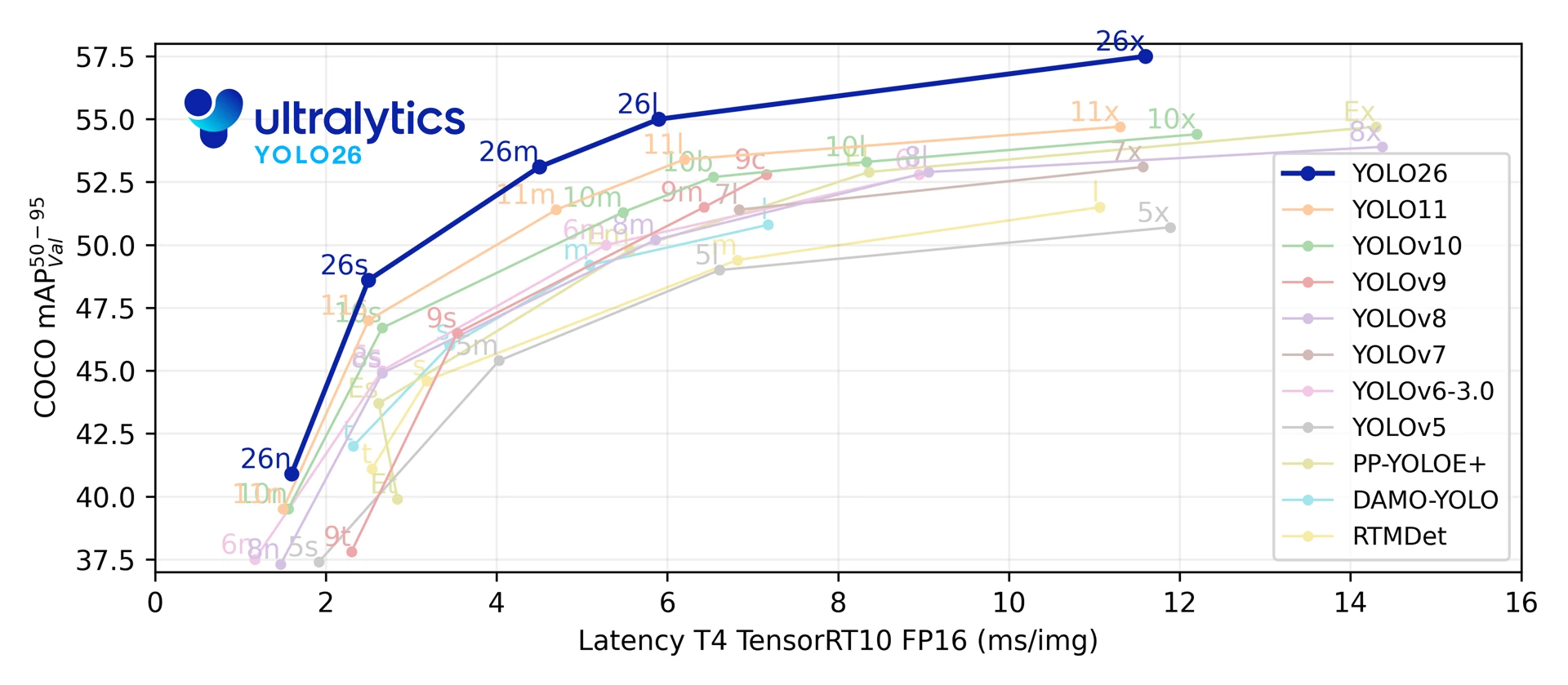
新しいプロジェクトではYOLO26から始めましょう。Ultralyticsの最新リリースであり、7つすべてのタスクに対応する唯一のモデルです。YOLO11は成熟した代替モデルで、対応する5つのタスクそれぞれに事前トレーニング済みチェックポイントがあります。プロンプト可能なセグメンテーション(SAM 3)、オープンボキャブラリー検出(YOLOE、YOLO-World)、またはTransformer検出器(RT-DETR)が必要な場合に限り、特化したモデルファミリーを選択してください。
YOLO27は、今年後半のリリースを目指して最終段階のR&Dを進めていますが、リリース日は未定です。アーキテクチャ、予定している7つのタスク、初期ベンチマークをご覧ください。モデルの重みとパッケージのサポートはまだ利用できません。現在のプロジェクトにはYOLO26をご使用ください。
この表では、リリース済みモデルとアーキテクチャのリファレンスについて、対応タスク、train、val、predict、exportモード、おすすめの用途を示しています。Trackは個別に記載していません。Detect、Segment、Pose、OBBモデルのpredict上で実行される一方、SAM 2とSAM 3は独自の動画predictorを通じてトラッキングを行います。Benchmarkも個別に記載していません。独自のサポートを追加するのではなく、複数の形式にわたるexportとvalをまとめて実行するためです。
| モデル | タスク | モード | 選択する理由 |
|---|---|---|---|
| YOLO26 🚀 新登場 | Detect、Segment、Semantic、Depth、Classify、Pose、OBB | Train、Val、Predict、Export | 新規プロジェクト向け:NMSなし推論を選択可能、エッジ向けに最適化されたデプロイ、最も幅広いタスクへの対応 |
| YOLO12 | Detect、Segment、Classify、Pose、OBB | Train、Val、Predict、Export | アテンション中心のコミュニティリリースのベンチマークに最適です。事前トレーニング済みの重みは検出のみを対象としています。 |
| YOLO11 | Detect、Segment、Classify、Pose、OBB | Train、Val、Predict、Export | 安定した本番ワークロードに適しており、対応するすべてのタスクに事前トレーニング済みチェックポイントがあります。 |
| YOLOv10 | Detect | Train、Val、Predict、Export | 清華大学によるNMSなし検出の研究 |
| YOLOv9 | Detect、Segment | Train、Val、Predict、Export | UltralyticsのYOLOv5コードベースに実装されたプログラム可能な勾配情報(PGI) |
| YOLOv8 | Detect、Segment、Classify、Pose、OBB | Train、Val、Predict、Export | 既存のYOLOv8パイプラインや、広く利用されているサードパーティ統合に適しています。 |
| YOLOv7 | Detect | 推論 | 上流でトレーニングされたYOLOv7のエクスポートを実行します。パッケージは互換性のあるONNXまたはTensorRTモデルから推論を行い、ネイティブチェックポイントからは推論しません。 |
| YOLOv6 | Detect | Train、Val、Predict、Export | YAMLからMeituanのアーキテクチャをトレーニングできます。UltralyticsはYOLOv6の.ptチェックポイントを提供していません。 |
| YOLOv5 | Detect | Train、Val、Predict、Export | 従来のUltralyticsプロジェクト向けです。現在のリリースでは、更新版YOLOv5uのチェックポイントを読み込みます。 |
| YOLOv4 | なし | なし | アーキテクチャのリファレンスのみです。Alexey BochkovskiyによるDarknetネイティブモデルはパッケージでサポートされていません。 |
| YOLOv3 | Detect | Train、Val、Predict、Export | Joseph Redmonのオリジナルアーキテクチャを使用する従来のプロジェクト向けです。現在のリリースでは、更新版YOLOv3uのチェックポイントを読み込みます。 |
| SAM 3 🚀 新登場 | Segment | 推論 | Metaによる、テキストまたは画像の例から画像や動画内の概念をプロンプトで指定してセグメンテーションする機能です。sam3.ptおよびSAM 3.1のsam3.1_multiplex.pt(画像)を利用するには、Hugging Faceでアクセス承認が必要です。 |
| SAM 2 | Segment | 推論 | Metaによるプロンプト可能なセグメンテーション機能で、動画のフレーム間で物体を追跡します。 |
| SAM | Segment | 推論 | 自動アノテーションを含む、Metaによる初代のプロンプト可能なセグメンテーションです。 |
| MobileSAM | Segment | 推論 | モバイルやその他のリソースに制約のあるデバイスでのプロンプト可能なセグメンテーション(慶熙大学) |
| FastSAM | Segment | Val、Predict、Export | SAMのレイテンシがボトルネックとなる場合に適した、CNNベースのプロンプト可能なセグメンテーション(中国科学院) |
| YOLO-NAS | Detect | Val、Predict、Export | DeciのNAS最適化検出器です。推論とエクスポート向けに維持されています。NVIDIAによる買収後、Deciはメンテナンスを終了しました。 |
| RT-DETR | Detect | Train、Val、Predict、Export | BaiduのリアルタイムDETR検出器です。畳み込みバックボーンとハイブリッドTransformerエンコーダーを備えています。 |
| YOLO-World | Detect | Train、Val、Predict、Export | テキストプロンプトによるオープンボキャブラリー検出(Tencent AI Lab)です。エクスポートには-worldv2チェックポイントが必要です。 |
| YOLOE | Detect、Segment | Train、Val、Predict、Export | テキスト、視覚情報、またはプロンプトなしの推論によるオープンボキャブラリー検出とセグメンテーション |
視聴: わずか数行のコードで Ultralytics YOLO モデルを実行する方法。
はじめに:使用例#
以下の例では、YOLOのトレーニングと推論の基本的な手順を示します。
以下の例では、COCOで事前学習されたYOLO26nモデルを使用して物体検出を行い、サンプルのCOCO8データセットでトレーニングします。同じAPIは、上記のSegment、Semantic、Depth、Classify、Pose、OBBタスクにも適用できます。
PyTorchの事前学習済み*.ptモデルは、YOLO()、SAM()、NAS()、RTDETR()クラスに渡して、Pythonでモデルインスタンスを作成できます(YOLO()とRTDETR()は、*.yaml設定ファイルも受け付けます)。
from ultralytics import YOLO

# COCOで事前学習したYOLO26nモデルを読み込む
model = YOLO("yolo26n.pt")

# モデル情報を表示(任意)
model.info()

# COCO8サンプルデータセットでモデルを100エポック学習する
results = model.train(data="coco8.yaml", epochs=100, imgsz=640)

# 'bus.jpg'画像でYOLO26nモデルを使って推論を実行する
results = model("path/to/bus.jpg")新しいモデルの提供#
Ultralyticsは新しいモデルの貢献を歓迎します。モデルを追加するには、次の手順を実行してください。
-
リポジトリをフォークする:Ultralytics GitHubリポジトリをフォークすることから始めます。
-
フォークをクローンする:フォークをローカルマシンにクローンし、作業用の新しいブランチを作成します。
-
モデルを実装する:貢献ガイドに記載されているコーディング標準とガイドラインに従って、モデルを追加します。
-
十分にテストする: モデル単体と、パイプライン全体の一部としての両方でテストしてください。
-
プルリクエストを作成する:モデルに問題がないことを確認したら、レビューのためにメインリポジトリへプルリクエストを作成します。
-
コードレビューとマージ:レビュー後、モデルが基準を満たしていれば、メインリポジトリにマージされます。
よくある質問#
最新のリリース済みUltralytics YOLOモデルは、2026年1月にリリースされたYOLO26です。YOLO26は、オプションでNMSを使用しないエンドツーエンド推論に対応し、エッジデプロイ向けに最適化されており、検出、インスタンスセグメンテーション、セマンティックセグメンテーション、深度推定、分類、姿勢推定、OBBに加え、オープンボキャブラリーバージョンをサポートします。安定性が求められる本番環境のワークロードには、YOLO26とYOLO11の両方が推奨される選択肢です。
YOLO27は現在、最終段階のR&Dを進めている次期モデルファミリーです。まだ利用できず、リリース日は未定です。
数行のPythonコードまたは1つのCLIコマンドで、カスタムデータを使用してYOLOモデルをトレーニングできます。
例from ultralytics import YOLO # YOLOモデルを読み込む model = YOLO("yolo26n.pt") # またはその他のYOLOモデル # カスタムデータセットでモデルをトレーニング results = model.train(data="custom_data.yaml", epochs=100, imgsz=640)詳しい手順については、Trainのドキュメントページをご覧ください。
Ultralyticsは、YOLOv3、YOLOv5、YOLOv6、YOLOv8、YOLOv9、YOLOv10、YOLO11、YOLO12、YOLO26に加え、SAMファミリー(SAM 3、SAM 2、SAM、MobileSAM、FastSAM)、YOLO-NAS、RT-DETR、YOLO-World、YOLOEを標準でサポートしています。パッケージではYOLOv4またはYOLOv7の重みやYAMLは公開していません。YOLOv4はアーキテクチャの参考情報としてのみドキュメント化されており、YOLOv7はエクスポート済みのONNXまたはTensorRTモデルとして実行できます。各モデルで利用できるタスクとモードについては、注目のモデルをご覧ください。
Ultralytics Platformは、データセットのアノテーション、YOLOの機械学習モデルのトレーニング、デプロイ、管理を行うためのノーコードのエンドツーエンド環境です。クラウドトレーニング、データセット管理に加え、初心者から経験豊富な開発者まで使いやすいインターフェースを提供します。
Ultralytics YOLOモデルは、物体検出、インスタンスセグメンテーション、セマンティックセグメンテーション、深度推定、分類、姿勢推定、方向付き物体検出(OBB)などのタスクを実行できます。最新モデルのYOLO26は、これら7つすべてのタスクに加え、オープンボキャブラリー検出にも対応しています。


コメント44
質問したり、結果を共有したり、ほかの人をサポートしたりできます。
muminaadimi-art
Naked girl
Sudharsanam-1
hello ! For detecting 31 Chinese symbols (16 true and 15 fake), how many classes should be used in the model? Is it more efficient to detect the true symbols using only true class , or should we also include the fake symbols as separate classes?
 Glenn JocherUltralytics(編集済み)
Use as many classes as you need to distinguish at inference: if you only care about authenticity, train a 2‑class detector (“true”, “fake”); if you need per‑symbol IDs, use 31 classes (one per symbol)—explicitly labeling “fake” typically reduces false positives versus leaving them unlabeled; you can start with YOLO26 detect and your dataset YAML as usual:
yolo detect train data=symbols.yaml model=yolo26s.pt imgsz=960 epochs=100Model overview and task setup are in the YOLO26 models documentation and the Detection task guide.
Rohith-John-kct
Hi. Could you please suggest which YOLO model works best for both detecting and segmenting 15 Chinese symbols? Also, how many images would be ideal to include in the dataset?
- Glenn JocherUltralytics(編集済み)
Use a single Ultralytics YOLO26 Segment model—it outputs both boxes and masks—start with
yolo26s-segfor a good speed/accuracy balance, and scale up to-m/-lif needed; for 15 symbols, begin with roughly 100–200 labeled images per class (2k–5k total instances) and increase until validation mAP stabilizes, and use a larger input size for small characters (e.g.,imgsz=960–1280):yolo segment train data=your_symbols.yaml model=yolo26s-seg.pt imgsz=960 epochs=100Model details: see the YOLO26 overview in the YOLO26 models documentation; segmentation specifics and best practices are in the Instance Segmentation task guide.
Ranjith3436
Hi Guys!, Could you please clarify how you select best.pt ? what is the parameter use for that? how early Stop works? sometime val/loss is going to high but earlystop doesn't stop training for classification?
- Glenn JocherUltralytics(編集済み)
best.pt is the epoch with the highest validation “fitness” metric; for detection it’s mAP50-95 (seg and pose add their mask/keypoint mAP50-95), for classification it’s the mean of top‑1 and top‑5 accuracy, and Early Stop watches the same fitness (not val_loss) and stops after patience epochs without improvement (set via patience). Rising val_loss won’t trigger stopping if that fitness is still improving; see how fitness/metrics are computed in the Insights on Model Evaluation and Fine-Tuning guide: https://docs.ultralytics.com/guides/model-evaluation-insights/.
LiJiang97
1
anyhopex
Do you support RT-DETRv2 ?
- Glenn JocherUltralytics(編集済み)
Ultralytics supports the original RT-DETR models (
rtdetr-landrtdetr-x) for training, validation, prediction and export, but RT-DETRv2 weights and architecture are not integrated. See the RT-DETR documentation for supported models and usage; for new projects, also consider YOLO26.
matteobona
Hi, Is it possibile to use a yolo-pose model (with a custom dataset and training) to detect simultaneously a class of objects with keypoints inside and a different class with no keypoints?. For example I need to detect a football pitch with some keypoints inside of it and the football players as simple bounding boxes. Is there a way to use a unique model instead of using two separate models (yolo-pose + yolo-detect)? for example putting at 0 0 0 any keypoints related to the players (but I think that this solution may confuse the model during the training)
- Glenn JocherUltralytics
Yes, you can train a single YOLO-pose model to detect both classes. For objects without keypoints (players), simply set all keypoint coordinates to zero in your dataset annotations. The model will learn to ignore these zero-value keypoints while still detecting bounding boxes for both classes. For implementation details, see the Pose Estimation task documentation on handling mixed annotations.
This approach is efficient and avoids the complexity of running two separate models, though we recommend thorough validation to ensure keypoint absence doesn't degrade detection performance for non-keypoint classes.
hemanthmandava945
@glenn-jocher @pderrenger Car Segmentation on Reflectivity Images
What I'm doing:
Running inference with a pretrained YOLOv8 model to segment cars in the LiDAR reflectivity domain. Detection performance (bounding boxes) looks good, but the segmentation masks aren’t very accurate. The problem:
When I project these predicted masks onto the 3D point cloud, I see a lot of misclassified points (points that are not actually part of the car end up being labeled as car). These noisy masks reduce the accuracy of any downstream tasks that rely on correct 3D segmentation. Question:
Has anyone else dealt with similar mask inaccuracy issues when segmenting LiDAR-based 2D images? Are there recommended strategies to improve segmentation masks on reflectivity images? (e.g., domain-specific data augmentation, fine-tuning from a LiDAR-focused checkpoint, multi-modal approaches, etc.)
Pallet Detection on Reflectivity Images
What I'm planning:
Train YOLOv8 to detect pallets in LiDAR reflectivity images (again, 512×128, single channel). Pallets appear relatively small in these images. Potential multi-modal approach:
Considering combining RGB camera images with LiDAR reflectivity data in the training set (even though the reflectivity images look more like grayscale). My concern: Will mixing these modalities confuse the model or help it? Pallets are already small in lidar images, and might be even harder to identify in reflectivity data. Questions:
Is it advisable to train on both RGB and reflectivity images at once, or should I keep them separate? Does anyone have experience or tips on multi-modal YOLO training (camera + LiDAR reflectivity)? If combining them is possible, any best practices for merging different modalities (e.g., input channels, data augmentation techniques, etc.)?
Additional No response
- Glenn JocherUltralytics
@hemanthmandava945 for segmentation mask inaccuracies in LiDAR reflectivity images, consider fine-tuning the pretrained YOLOv8 model on a domain-specific dataset with augmentations tailored for reflectivity images. For multi-modal training (RGB + reflectivity), it’s advisable to preprocess and align modalities carefully to avoid introducing noise. Experimenting with separate models or fusing features at specific layers during training can help. For more insights, refer to the YOLOv8 documentation. Let us know if you need further clarification!
@glenn-jocher i guess further clarification will be greatly helpful as i am beginner in this field so that the information from you will be greatly helpful for my further research
- Glenn JocherUltralytics
@hemanthmandava945 thank you for your comment! For beginners, I recommend exploring the Ultralytics YOLOv8 documentation for step-by-step guides on training, inference, and customization. If you have specific questions, feel free to ask!
@glenn-jocher i want to train the model on to detect pallet in lidar reflectivity images.as the resolution of images is 512 * 128 and single channel(0 -255).my questions are? can is use pretrained model using transfer learning to train on custom data ? is it possible? 2.do i need to resize the image of my data set for training (640 * 640)? as i used to pretrained model to detect cars in lidar reflectivity images of resolution 1024 *128 it work perfectly fine. 3. for annotation in images as i only need to detect pallet is annotating pallet would enough?
- Glenn JocherUltralytics
- Yes, you can use a pretrained YOLO model and fine-tune it on your custom dataset for pallet detection.
- Resizing your dataset to match the model's input size (e.g., 640x640) is recommended for consistent results.
- Annotating only the pallets is sufficient if pallet detection is your sole objective.
For training details, refer to the Ultralytics Train documentation. Let me know if you need further assistance!
@glenn-jocher i am using yolov8x for car segmentation on lidar 2d reflective data,i got the following results: 0: 128x1024 11 cars, 4127.8ms Speed: 1.6ms preprocess, 4127.8ms inference, 221.6ms postprocess per image at shape (1, 3, 128, 1024) which actually performs well on lidar 2d data. But catch is when i am validating the model, i made annotaion of 50 images where it consist of cats and persons but i am getting poor results: Ultralytics 8.3.28 🚀 Python-3.10.12 torch-2.5.1+cu124 CPU (Intel Core(TM) i5-8265U 1.60GHz) val: Scanning /home/mandava/myenv/share/traffic-2/valid/labels.cache... 50 images, 0 backgrounds, 0 corrupt: 100%|██████████| 50/50 [00:00<?, ?it/s] Class Images Instances Box(P R mAP50 mAP50-95) Mask(P R mAP50 mAP50-95): 100%|██████████| 4/4 [04:16 all 50 491 0.00184 0.0148 0.00104 0.000264 0.00524 0.0426 0.00275 0.000623 person 50 473 0.00367 0.0296 0.00208 0.000528 0.00367 0.0296 0.00189 0.000525 bicycle 18 18 0 0 0 0 0.0068 0.0556 0.0036 0.00072 Speed: 4.3ms preprocess, 5012.5ms inference, 0.0ms loss, 3.5ms postprocess per image Results saved to runs/segment/val4 map50-95:0.0002641973106310545 i want to evaluate the model on lidar data and inference speed it taking , can you explain why i am getting the validation metrics very poor as i am getting prediction was good. here my yaml file: names:
-
car
-
person nc: 2 roboflow:
version: 2 workspace: hemanthmandava test: ../test/images train: ../train/images val: ./valid/images
-
- Glenn JocherUltralytics
Thank you for sharing these details. The poor validation metrics could stem from class mismatches (your YAML defines 2 classes but validation includes 'cats'), potential annotation format issues, or domain gap between training/validation data. For LiDAR-specific segmentation improvements, consider fine-tuning on domain-adapted data and verifying label consistency. More validation guidance can be found in our Val Mode documentation.
@glenn-jocher could explain in more details, I am working with Ouster LiDAR reflectivity images and aiming to evaluate the inference speed and performance of pretrained YOLOv8, YOLOv9, and YOLOv11 models for instance segmentation. However, I am facing issues when using the YOLO validation function (val), even though the visual inspection of inference results looks good. note: the model or running on lidar video segmenting cars very well and tracking of masks also performs good
My Understanding & Key Questions: Fine-Tuning vs. Direct Evaluation:
I understand that fine-tuning means training a pretrained model on my dataset (LiDAR 2D images). However, my goal is to only validate the pretrained YOLO models without fine-tuning. Does the poor validation performance indicate a need for fine-tuning, or is it possible that the pretrained models just do not generalize well to my LiDAR images? Dataset & Annotation Format:
I have 50 annotated images (no separate training set, only validation). The annotations are in YOLO format, where segmentation masks are represented as polygon coordinates normalized to image width and height. Example annotation: 0 0.478515625 0.4783950617283951 0.52734375 0.4783950617283951 0.52734375 0.6790123456790124 0.478515625 0.6790123456790124 Validation Issues:
When I run YOLO inference, the visual results look reasonable, and the model seems to segment objects correctly. However, when using YOLO’s val function, the evaluation metrics are poor. What could be the reasons behind this discrepancy? Performance Metrics to Focus On:
Since my goal is to compare YOLOv8, YOLOv9, and YOLOv11 on LiDAR reflectivity images in terms of inference speed and segmentation accuracy, what are the most relevant evaluation metrics I should consider? I am currently looking at: IoU (Intersection over Union) F1 score mAP (mean Average Precision) FPS (Frames Per Second) for inference speed Are there any specific metrics better suited for LiDAR-based segmentation? What strategies would you recommend for properly evaluating segmentation models on LiDAR images? Are there better methods to verify annotation alignment and ensure the YOLO val function produces meaningful results?
- Glenn JocherUltralytics
Hi there! 👋 Your observed discrepancy between visual results and validation metrics likely stems from a domain gap between COCO-pretrained models (RGB images) and LiDAR reflectivity data (single-channel). Here's a concise breakdown:
- Domain Adaptation: Pretrained models struggle with LiDAR's unique characteristics. Fine-tuning (even briefly) on LiDAR data is strongly recommended (YOLO Train Docs)
- Annotation Verification: Use
yolo valwithplots=Trueto visualize predictions vs. ground truth. Check mask alignment in LiDAR coordinates - Key Metrics: Focus on mAP50-95(M) for segmentation quality and FPS for speed. LiDAR-specific metrics like point-wise IoU could add value
- Quick Fix: Try converting LiDAR to 3-channel (replicate single channel) to better match pretrained weights
For direct evaluation without fine-tuning, consider benchmarking against manually verified samples rather than relying solely on automated metrics. Our COCO-Seg validation example might help as reference. Let us know how it goes! 🚀
@glenn-jocher Issue: When using YOLOv8 for instance segmentation, I’ve noticed that the predicted masks extend slightly beyond the true object boundaries. This results in overlapping masks when objects are close together and inaccurate measurements of object sizes and shapes.
Observations:
Oversized Masks: The masks often include extra pixels along the edges, sometimes producing “flat” boundaries—similar to known issues where masks align too closely with the bounding box edges. Overlap with Adjacent Objects: Due to these extra pixels, masks of nearby objects tend to merge or overlap, which is problematic for applications requiring precise segmentation as i am projecting in 3d some of pixels segmented car points where projected on other objects . Architectural Artifact: The issue appears inherent to the current segmentation head in YOLOv8, where the approximated boundaries may not capture fine details, especially for smaller objects.
is it possible to reduce the size of the mask like getting 90% of mask, as i don't require the mask till the edge of the car. i can get major pixels of car.
this result of yolo inference on lidar data
- Glenn JocherUltralytics
Thank you for sharing these details. For mask size reduction in YOLOv8 segmentation, you can post-process predictions by applying a mask confidence threshold and morphological erosion. Here's a minimal example to shrink masks:
from ultralytics import YOLO
import cv2

model = YOLO('yolov8x-seg.pt')
results = model(your_image)
masks = results[0].masks.data.cpu().numpy()

# Apply erosion to shrink masks
kernel = cv2.getStructuringElement(cv2.MORPH_ELLIPSE, (5,5))  # Adjust kernel size as needed
eroded_masks = [cv2.erode(m, kernel) for m in masks]
For better domain adaptation, consider fine-tuning the segmentation head on LiDAR data using our Train docs. The pretrained COCO weights may struggle with LiDAR's unique reflectance patterns.
When using yolo11 for inference, what operations will the preprocessing process perform on the input image? Is it just scaling the image to 640? Which part is the operation file? Thank you
- Glenn JocherUltralytics(編集済み)
@LiJiang97 the preprocessing for YOLO11 typically involves resizing the input image to the specified
imgsz(default 640) while maintaining aspect ratio by padding as needed. These operations are handled internally in the Ultralytics framework. The resizing is done byLetterBoxinultralytics/data/augment.py, andBasePredictor.preprocessinultralytics/engine/predictor.pyconverts BGR to RGB and scales pixel values to 0-1. Let us know if you need further assistance!
Zelyanne
Hello please, is there a way for making yolov11 to predict 2 class per detection so that when it fails to detect the first class , if the second class is detected it ll show it
- Glenn JocherUltralytics
@Zelyanne thank you for your question. YOLO models are designed to predict a single class per object detection, but multi-class labeling per detection isn't natively supported. You could implement a custom post-processing step to assign secondary classes based on your criteria or train the model with augmented multi-label datasets. For advanced use cases like this, consider modifying the model or leveraging additional resources to meet your requirements.