Meituan YOLOv6
개요#
2022년에 출시된 Meituan YOLOv6은 속도와 정확도의 균형이 뛰어난 객체 감지 모델로, 실시간 애플리케이션에서 널리 사용됩니다. 이 모델은 양방향 연결(BiC) 모듈, 앵커 보조 학습(AAT) 전략, COCO 데이터셋에서 높은 정확도를 제공하는 개선된 백본 및 넥 설계를 비롯해 아키텍처와 학습 방식에 몇 가지 주목할 만한 개선 사항을 도입합니다.
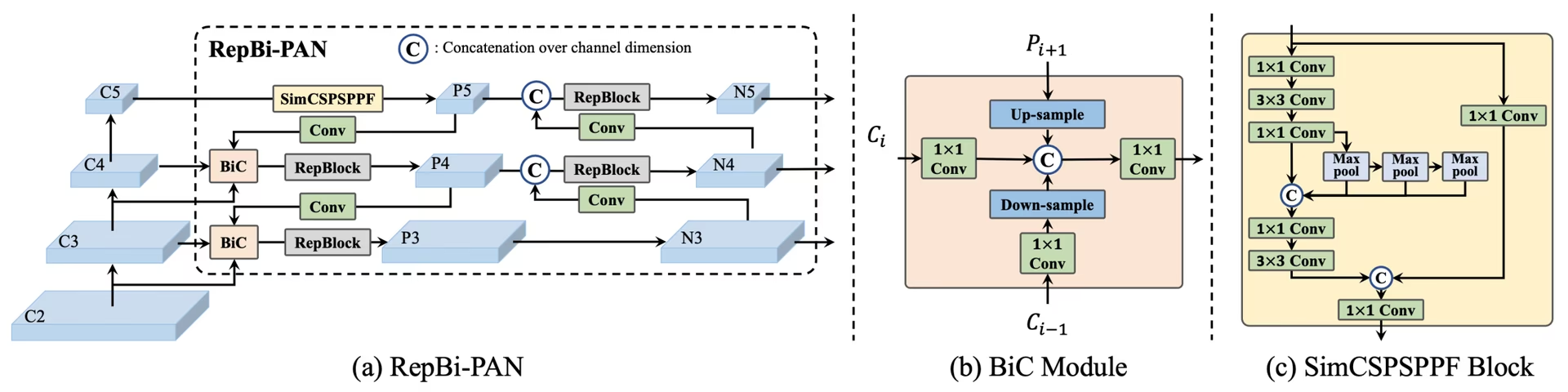 YOLOv6 개요. 재설계된 네트워크 구성 요소와 학습 전략을 보여주는 모델 아키텍처 다이어그램으로, 이를 통해 성능이 크게 향상되었습니다. (a) YOLOv6의 넥(N 및 S 표시). M/L의 경우 RepBlocks가 CSPStackRep로 대체됩니다. (b) BiC 모듈 구조. (c) SimCSPSPPF 블록. (출처.)
주요 기능#
- 양방향 연결(BiC) 모듈: YOLOv6은 탐지기의 넥에 BiC 모듈을 도입하여 위치 파악 신호를 강화하고 속도 저하를 거의 유발하지 않으면서 성능을 향상합니다.
- 앵커 보조 학습(AAT) 전략: AAT는 추론 효율성을 저하시키지 않으면서 앵커 기반 방식과 앵커 프리 방식의 장점을 결합합니다.
- 개선된 백본 및 넥 설계: YOLOv6의 백본과 넥에 단계를 하나 더 추가해 심화한 결과, 출시 당시 고해상도 입력의 COCO 데이터셋에서 뛰어난 성능을 달성했습니다.
- 자기 증류 전략: YOLOv6 소형 모델의 성능을 높이기 위해 새로운 자기 증류 전략을 구현합니다. 학습 중 보조 회귀 분기를 강화하고 추론 시 제거하여 속도가 크게 저하되는 것을 방지합니다.
성능 지표#
YOLOv6은 서로 다른 스케일의 다양한 사전 학습 모델을 제공합니다:
- YOLOv6-N: COCO val2017에서 37.5% AP, NVIDIA T4 GPU에서 1187 FPS.
- YOLOv6-S: 45.0% AP, 484 FPS.
- YOLOv6-M: 50.0% AP, 226 FPS.
- YOLOv6-L: 52.8% AP, 116 FPS.
- YOLOv6-L6: 실시간 환경에서 최첨단 정확도를 제공합니다.
YOLOv6은 다양한 수치 정밀도로 양자화된 모델과 모바일 플랫폼에 최적화된 모델도 제공합니다.
사용 예시#
이 예제에서는 간단한 YOLOv6 학습 및 추론 예제를 제공합니다.
YOLOv6 *.yaml 파일을 YOLO() 클래스에 전달하면 Python에서 해당 모델을 생성할 수 있습니다:
from ultralytics import YOLO

# YOLOv6n 모델을 처음부터 생성
model = YOLO("yolov6n.yaml")

# 모델 정보 표시(선택 사항)
model.info()

# COCO8 예제 데이터셋으로 100 에포크 동안 모델 학습
results = model.train(data="coco8.yaml", epochs=100, imgsz=640)

# 'bus.jpg' 이미지에서 YOLOv6n 모델로 추론 실행
results = model("path/to/bus.jpg")
지원 작업 및 모드#
YOLOv6 시리즈는 다양한 컴퓨팅 예산과 정확도 요구 사항을 아우르도록 여러 객체 감지 모델을 제공하며, 각 모델은 해당 용도에 최적화되어 있습니다.
| 모델 | 파일 이름 | 작업 | 학습 | 검증 | 추론 | 내보내기 |
|---|---|---|---|---|---|---|
| YOLOv6-N | yolov6n.yaml | 객체 탐지 | ✅ | ✅ | ✅ | ✅ |
| YOLOv6-S | yolov6s.yaml | 객체 탐지 | ✅ | ✅ | ✅ | ✅ |
| YOLOv6-M | yolov6m.yaml | 객체 탐지 | ✅ | ✅ | ✅ | ✅ |
| YOLOv6-L | yolov6l.yaml | 객체 탐지 | ✅ | ✅ | ✅ | ✅ |
| YOLOv6-X | yolov6x.yaml | 객체 탐지 | ✅ | ✅ | ✅ | ✅ |
이 표는 YOLOv6 모델 변형과 학습, 검증, 추론, 내보내기 모드 지원 여부를 요약합니다. Ultralytics는 YOLOv6 모델 YAML 파일만 제공하므로 모델은 처음부터 학습됩니다.
인용 및 감사의 글#
실시간 객체 탐지 분야에 크게 기여한 저자들에게 감사를 표합니다:
@misc{li2023yolov6,
      title={YOLOv6 v3.0: A Full-Scale Reloading},
      author={Chuyi Li and Lulu Li and Yifei Geng and Hongliang Jiang and Meng Cheng and Bo Zhang and Zaidan Ke and Xiaoming Xu and Xiangxiang Chu},
      year={2023},
      eprint={2301.05586},
      archivePrefix={arXiv},
      primaryClass={cs.CV}
}
YOLOv6 원본 논문은 arXiv에서 확인할 수 있습니다. 저자들은 연구 결과를 공개했으며, 코드베이스는 GitHub에서 확인할 수 있습니다. 해당 분야를 발전시키고 더 넓은 커뮤니티가 연구 결과를 활용할 수 있도록 한 저자들의 노력에 감사드립니다.
자주 묻는 질문#
2022년에 출시된 Meituan YOLOv6은 속도와 정확도의 균형을 맞춘 객체 탐지기로, 실시간 애플리케이션을 위해 설계되었습니다. 양방향 연결(BiC) 모듈과 앵커 보조 학습(AAT) 전략 등 주목할 만한 아키텍처 개선 사항을 적용했습니다. 이러한 혁신은 속도 저하를 최소화하면서 성능을 크게 향상하므로 YOLOv6은 객체 탐지 작업에 적합한 경쟁력 있는 모델입니다.
간단한 Python 또는 CLI 명령을 사용해 Ultralytics에서 YOLOv6 모델을 학습할 수 있습니다. 예를 들면 다음과 같습니다:
예제from ultralytics import YOLO # YOLOv6n 모델을 처음부터 생성 model = YOLO("yolov6n.yaml") # COCO8 예제 데이터셋으로 100 에포크 동안 모델 학습 results = model.train(data="coco8.yaml", epochs=100, imgsz=640)자세한 내용은 학습 페이지를 참조하세요.
YOLOv6은 각각 서로 다른 성능 요구 사항에 최적화된 여러 버전을 제공합니다:
- YOLOv6-N: 37.5% AP, 1187 FPS
- YOLOv6-S: 45.0% AP, 484 FPS
- YOLOv6-M: 50.0% AP, 226 FPS
- YOLOv6-L: 52.8% AP, 116 FPS
- YOLOv6-L6: 실시간 시나리오에서 최첨단 정확도를 제공합니다.
이 모델은 NVIDIA T4 GPU를 사용해 COCO 데이터셋에서 평가되었습니다. 성능 지표에 대한 자세한 내용은 성능 지표 섹션을 참조하세요.
YOLOv6의 앵커 보조 학습(AAT)은 앵커 기반 방식과 앵커 프리 방식의 요소를 결합하여 추론 효율성을 저해하지 않으면서 모델의 탐지 기능을 향상합니다. 이 전략은 학습 중 앵커를 활용해 바운딩 박스 예측을 개선하므로 YOLOv6은 다양한 객체 탐지 작업에서 효과적입니다.
YOLOv6은 학습, 검증, 추론, 내보내기 모드를 지원합니다.


댓글14
질문을 하거나 결과를 공유하거나 다른 사람을 도와주세요.
AkaashSamson
Hey, So I have actually trained my YOLOv6 model with the original repo, now I have a .pt file. using this file is there any way of getting my model in ultralytics format. mainly I want to run the ultralytics validation on my model as the original repo eval.py doesn't provide sufficient metrics.
 Glenn JocherUltralytics
Direct conversion of Meituan YOLOv6 .pt checkpoints to Ultralytics format isn’t supported; to use Ultralytics metrics, either train/fine-tune the matching yolov6*.yaml in Ultralytics and run validation, or export your Meituan model’s detections to COCO JSON and compute P/R via the COCO API; the metrics Ultralytics reports are outlined in the Val mode docs at Ultralytics validation.
tino926(수정됨)
I want to replicate your training accuracy of the YOLOv6-N model. Is this the correct command:
yolo train model=yolov6n.yaml data=coco.yaml epochs=400 optimizer=SGD cos_lr=True lr0=0.02? According to YOLOv6's repo https://github.com/meituan/YOLOv6/blob/main/docs/Train_coco_data.md, they have to use anchor-aid and distilling techniques to achieve this accuracy. But I can't find the corresponding parameters in ultralytics'.- Glenn JocherUltralytics
@tino926 to achieve the training accuracy of the YOLOv6-N model as described in the YOLOv6 repository, you would indeed use the anchor-aided training (AAT) and self-distillation strategies, which are not explicitly parameterized in the Ultralytics YOLO interface. Ensure you are using the latest version and check the YOLOv6 documentation for any updates on incorporating these strategies. For precise replication, consider following the original YOLOv6 GitHub instructions alongside Ultralytics for any additional settings or configurations.
@glenn-jocher, thanks for your response.
I apologize if I misunderstood your explanation, as I am not a native English speaker. Could you please clarify if the phrase "which are not explicitly parameterized in the Ultralytics YOLO interface" means that AAT and self-distillation cannot currently be implemented solely through the Ultralytics YOLO interface? Therefore I should manually add anchor branches and implement distillation with additional code?
- Glenn JocherUltralytics
Thank you for your question. Yes, that's correct. The current Ultralytics YOLO interface does not explicitly support anchor-aided training (AAT) and self-distillation, so you would need to implement these strategies manually by modifying the code to include anchor branches and self-distillation techniques. If you need further guidance on implementing these, referring to the original YOLOv6 repository might be helpful.
kadirnar
Does ultralytics library support yolov6 model?
ModuleNotFoundError: No module named 'yolov6'
 Paula DerrengerUltralytics(수정됨)
@kadirnar hi there!
Yes, the Ultralytics library does support YOLOv6 models. It seems like you might be encountering a
ModuleNotFoundErrorbecause the YOLOv6 model isn't being recognized. Let's ensure you're using the latest versions oftorchandultralytics. Please update your packages and try again:pip install --upgrade torch ultralyticsHere's a quick example to get you started with YOLOv6 using the Ultralytics library:
Python
from ultralytics import YOLO

# Load a YOLOv6n model
model = YOLO("yolov6n.yaml")

# Train the model on the COCO8 example dataset for 100 epochs
results = model.train(data="coco8.yaml", epochs=100, imgsz=640)

# Run inference with the trained model on an image
results = model("path/to/bus.jpg")
CLI
# Train YOLOv6n model
yolo train model=yolov6n.yaml data=coco8.yaml epochs=100 imgsz=640

# Run inference with your trained weights
yolo predict model=path/to/best.pt source=path/to/bus.jpg
If you continue to face issues, please provide a minimum reproducible example so we can better assist you. You can refer to our guide on creating a minimum reproducible example here: Minimum Reproducible Example.
Feel free to reach out if you have any more questions! 😊
akhilesh99sharma
There are AP and AR values for results but not precision and recall. I need to compare precision and recall values for different YOLO versions (v5,v6,v7 etc.) on my custom dataset. How to get precision and recall values for YOLOv6 evaluation?
- Paula DerrengerUltralytics(수정됨)
Hey there! 👋
You don't need to compute precision and recall by hand: validation already reports them. After
model.val(), the results object holds them directly:from ultralytics import YOLO # Load your trained model model = YOLO("path/to/your/custom-yolov6-model.pt") # Run validation results = model.val(data="path/to/your/dataset.yaml") print(f"Precision: {results.box.mp}, Recall: {results.box.mr}") # mean over all classes print(results.box.p, results.box.r) # per-class precision and recallHope this helps, and happy comparing across YOLO versions! 🚀
Hello , I tried but was still not able to get these values, could you please help me with that?
- Paula DerrengerUltralytics(수정됨)
Hey there! 😊
Precision and recall are reported by Ultralytics validation, so you don't need to count TP/FP/FN yourself. After
results = model.val(data="path/to/dataset.yaml"), useresults.box.mp(mean precision),results.box.mr(mean recall), andresults.box.p/results.box.rfor per-class values.If you need them computed from raw counts, precision = TP / (TP + FP) and recall = TP / (TP + FN), where the counts come from matching predictions to ground-truth boxes at an IoU threshold.
Hope this helps! Let me know if there's anything else I can do for you. Happy modeling! 🚀
Hello, I tried doing it but was not able to do so. I get the predictions json file in the val folder but don't know how to compare it with the labels to get TP, FP etc. Can you please help me with that? I need to compare results of YOLOv6 with v8, v9 but I am not getting precision and recall values in v6 , I get average precision and average recall
- Paula DerrengerUltralytics(수정됨)
@akhilesh99sharma hey there! 🌞
You can get precision and recall directly from validation without processing the predictions JSON yourself. After
results = model.val(data="path/to/dataset.yaml"), useresults.box.mp(mean precision),results.box.mr(mean recall), andresults.box.p/results.box.rfor per-class values.If you still need TP, FP and FN counts from the saved predictions JSON, you will have to match predicted boxes to ground-truth boxes per image using an IoU threshold. The confusion matrix saved in the run folder (
confusion_matrix.png, ormodel.val(plots=True)) also shows these counts per class.For comparing across YOLO versions, run each model with consistent settings on your custom dataset and read the same metrics from each.
I hope this simplifies the process for you! 🚀 Let me know if you need further assistance.