YOLOv7: 학습 가능한 무료 성능 향상 기법 모음#
2022년 7월에 출시된 YOLOv7은 출시 당시 실시간 객체 탐지를 크게 발전시킨 모델이었습니다. GPU V100에서 AP 56.8%를 달성하며 출시 당시 새로운 벤치마크를 세웠습니다. YOLOv7은 속도와 정확도 면에서 YOLOR, YOLOX, Scaled-YOLOv4, YOLOv5와 같은 동시대 객체 탐지 모델보다 뛰어난 성능을 보였습니다. 이 모델은 다른 데이터셋이나 사전 학습 가중치를 사용하지 않고 MS COCO 데이터셋으로 처음부터 학습되었습니다. YOLOv7의 소스 코드는 GitHub에서 확인할 수 있습니다. 이후 YOLO11 및 YOLO26과 같은 최신 모델이 효율성을 높이면서 더 높은 정확도를 달성했습니다.
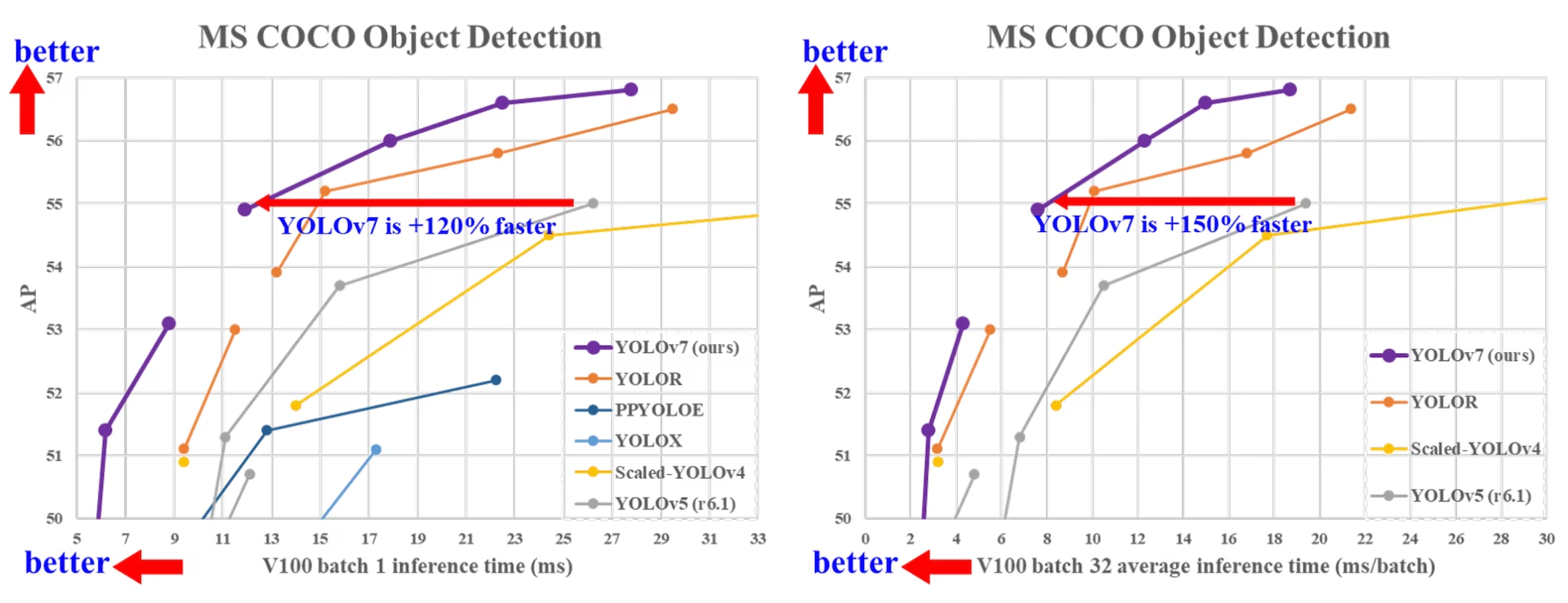
최첨단 객체 탐지 모델 비교#
YOLO 비교 표의 결과를 통해 제안된 방법이 종합적으로 가장 우수한 속도-정확도 균형을 제공함을 알 수 있습니다. YOLOv7-tiny-SiLU와 YOLOv5-N (r6.1)을 비교하면, 제안된 방법은 초당 프레임 수가 127fps 더 높고 AP 정확도는 10.7% 더 높습니다. 또한 YOLOv7은 161fps의 프레임 속도에서 AP 51.4%를 달성한 반면, 동일한 AP를 기록한 PPYOLOE-L의 프레임 속도는 78fps에 불과합니다. 파라미터 사용량 측면에서 YOLOv7은 PPYOLOE-L보다 41% 적습니다.
추론 속도가 114fps인 YOLOv7-X와 추론 속도가 99fps인 YOLOv5-L (r6.1)을 비교하면, YOLOv7-X는 AP를 3.9% 향상할 수 있습니다. 비슷한 규모의 YOLOv5-X (r6.1)와 YOLOv7-X를 비교하면 YOLOv7-X의 추론 속도가 31fps 더 빠릅니다. 또한 파라미터와 연산량 측면에서 YOLOv7-X는 YOLOv5-X (r6.1)보다 파라미터를 22%, 연산량을 8% 줄이면서 AP를 2.2% 향상합니다 (출처).
| 모델 | 파라미터 (M) | FLOPs (G) | 크기 (픽셀) | FPS | AP테스트 / 검증 50-95 | AP테스트 50 | AP테스트 75 | AP테스트 S | AP테스트 M | AP테스트 L |
|---|---|---|---|---|---|---|---|---|---|---|
| YOLOX-S | 9.0 | 26.8 | 640 | 102 | 40.5% / 40.5% | - | - | - | - | - |
| YOLOX-M | 25.3 | 73.8 | 640 | 81 | 47.2% / 46.9% | - | - | - | - | - |
| YOLOX-L | 54.2 | 155.6 | 640 | 69 | 50.1% / 49.7% | - | - | - | - | - |
| YOLOX-X | 99.1 | 281.9 | 640 | 58 | 51.5% / 51.1% | - | - | - | - | - |
| PPYOLOE-S | 7.9 | 17.4 | 640 | 208 | 43.1% / 42.7% | 60.5% | 46.6% | 23.2% | 46.4% | 56.9% |
| PPYOLOE-M | 23.4 | 49.9 | 640 | 123 | 48.9% / 48.6% | 66.5% | 53.0% | 28.6% | 52.9% | 63.8% |
| PPYOLOE-L | 52.2 | 110.1 | 640 | 78 | 51.4% / 50.9% | 68.9% | 55.6% | 31.4% | 55.3% | 66.1% |
| PPYOLOE-X | 98.4 | 206.6 | 640 | 45 | 52.2% / 51.9% | 69.9% | 56.5% | 33.3% | 56.3% | 66.4% |
| YOLOv5-N (r6.1) | 1.9 | 4.5 | 640 | 159 | - / 28.0% | - | - | - | - | - |
| YOLOv5-S (r6.1) | 7.2 | 16.5 | 640 | 156 | - / 37.4% | - | - | - | - | - |
| YOLOv5-M (r6.1) | 21.2 | 49.0 | 640 | 122 | - / 45.4% | - | - | - | - | - |
| YOLOv5-L (r6.1) | 46.5 | 109.1 | 640 | 99 | - / 49.0% | - | - | - | - | - |
| YOLOv5-X (r6.1) | 86.7 | 205.7 | 640 | 83 | - / 50.7% | - | - | - | - | - |
| YOLOR-CSP | 52.9 | 120.4 | 640 | 106 | 51.1% / 50.8% | 69.6% | 55.7% | 31.7% | 55.3% | 64.7% |
| YOLOR-CSP-X | 96.9 | 226.8 | 640 | 87 | 53.0% / 52.7% | 71.4% | 57.9% | 33.7% | 57.1% | 66.8% |
| YOLOv7-tiny-SiLU | 6.2 | 13.8 | 640 | 286 | 38.7% / 38.7% | 56.7% | 41.7% | 18.8% | 42.4% | 51.9% |
| YOLOv7 | 36.9 | 104.7 | 640 | 161 | 51.4% / 51.2% | 69.7% | 55.9% | 31.8% | 55.5% | 65.0% |
| YOLOv7-X | 71.3 | 189.9 | 640 | 114 | 53.1% / 52.9% | 71.2% | 57.8% | 33.8% | 57.1% | 67.4% |
| YOLOv5-N6 (r6.1) | 3.2 | 18.4 | 1280 | 123 | - / 36.0% | - | - | - | - | - |
| YOLOv5-S6 (r6.1) | 12.6 | 67.2 | 1280 | 122 | - / 44.8% | - | - | - | - | - |
| YOLOv5-M6 (r6.1) | 35.7 | 200.0 | 1280 | 90 | - / 51.3% | - | - | - | - | - |
| YOLOv5-L6 (r6.1) | 76.8 | 445.6 | 1280 | 63 | - / 53.7% | - | - | - | - | - |
| YOLOv5-X6 (r6.1) | 140.7 | 839.2 | 1280 | 38 | - / 55.0% | - | - | - | - | - |
| YOLOR-P6 | 37.2 | 325.6 | 1280 | 76 | 53.9% / 53.5% | 71.4% | 58.9% | 36.1% | 57.7% | 65.6% |
| YOLOR-W6 | 79.8 | 453.2 | 1280 | 66 | 55.2% / 54.8% | 72.7% | 60.5% | 37.7% | 59.1% | 67.1% |
| YOLOR-E6 | 115.8 | 683.2 | 1280 | 45 | 55.8% / 55.7% | 73.4% | 61.1% | 38.4% | 59.7% | 67.7% |
| YOLOR-D6 | 151.7 | 935.6 | 1280 | 34 | 56.5% / 56.1% | 74.1% | 61.9% | 38.9% | 60.4% | 68.7% |
| YOLOv7-W6 | 70.4 | 360.0 | 1280 | 84 | 54.9% / 54.6% | 72.6% | 60.1% | 37.3% | 58.7% | 67.1% |
| YOLOv7-E6 | 97.2 | 515.2 | 1280 | 56 | 56.0% / 55.9% | 73.5% | 61.2% | 38.0% | 59.9% | 68.4% |
| YOLOv7-D6 | 154.7 | 806.8 | 1280 | 44 | 56.6% / 56.3% | 74.0% | 61.8% | 38.8% | 60.1% | 69.5% |
| YOLOv7-E6E | 151.7 | 843.2 | 1280 | 36 | 56.8% / 56.8% | 74.4% | 62.1% | 39.3% | 60.5% | 69.0% |
개요#
실시간 객체 탐지는 다중 객체 추적, 자율 주행, 로보틱스, 의료 영상 분석을 비롯한 여러 컴퓨터 비전 시스템의 중요한 구성 요소입니다. 최근 몇 년 동안 실시간 객체 탐지 개발은 효율적인 아키텍처 설계와 다양한 CPU, GPU 및 신경망 처리 장치(NPU)의 추론 속도 향상에 초점을 맞춰 왔습니다. YOLOv7은 엣지부터 클라우드까지 모바일 GPU와 GPU 장치를 모두 지원합니다.
아키텍처 최적화에 중점을 두는 기존 실시간 객체 탐지기와 달리, YOLOv7은 학습 프로세스 최적화에 초점을 맞춥니다. 여기에는 추론 비용을 늘리지 않고 객체 탐지 정확도를 개선하도록 설계된 모듈과 최적화 방법이 포함되며, 이러한 개념을 "학습 가능한 bag-of-freebies"라고 합니다.
주요 기능#
YOLOv7은 몇 가지 핵심 기능을 도입합니다:
-
모델 재매개변수화: YOLOv7은 계획된 재매개변수화 모델을 제안합니다. 이는 그래디언트 전파 경로 개념을 바탕으로 서로 다른 네트워크의 레이어에 적용할 수 있는 전략입니다.
-
동적 레이블 할당: 여러 출력 레이어를 사용하는 모델 학습에는 "서로 다른 분기의 출력에 동적 타깃을 어떻게 할당할 것인가?"라는 새로운 문제가 있습니다. 이 문제를 해결하기 위해 YOLOv7은 coarse-to-fine lead guided label assignment라는 새로운 레이블 할당 방법을 도입합니다.
-
확장 및 복합 스케일링: YOLOv7은 파라미터와 연산을 효과적으로 활용할 수 있는 실시간 객체 탐지기용 "확장" 및 "복합 스케일링" 방법을 제안합니다.
-
효율성: YOLOv7에서 제안한 방법은 최신 실시간 객체 탐지기의 파라미터를 약 40%, 연산량을 50% 줄이는 동시에 추론 속도를 높이고 탐지 정확도를 향상할 수 있습니다.
사용 예시#
Ultralytics는 사전 학습된 yolov7.pt 가중치나 ultralytics/cfg/models/v7/ YAML을 공개하지 않으며, Ultralytics Python 패키지는 YOLOv7의 PyTorch 기본 학습 및 추론을 지원하지 않습니다. 그러나 아래와 같이 YOLOv7 체크포인트를 ONNX 또는 TensorRT로 내보내면 업스트림 YOLOv7 저장소에서 학습한 YOLOv7 체크포인트를 Ultralytics에서 사용할 수 있습니다.
ONNX 내보내기#
Ultralytics에서 YOLOv7 ONNX 모델을 사용하려면:
-
(선택 사항) Ultralytics를 설치하고 ONNX 모델을 내보내면 필요한 종속 항목이 자동으로 설치됩니다:
pip install ultralytics yolo export model=yolo26n.pt format=onnx -
YOLOv7 저장소의 내보내기 도구를 사용해 원하는 YOLOv7 모델을 내보냅니다:
git clone https://github.com/WongKinYiu/yolov7 cd yolov7 python export.py --weights yolov7-tiny.pt --grid --end2end --simplify --topk-all 100 --iou-thres 0.65 --conf-thres 0.35 --img-size 640 640 --max-wh 640 -
다음 스크립트를 사용해 ONNX 모델 그래프를 수정하여 Ultralytics와 호환되도록 합니다:
import numpy as np import onnx from onnx import helper, numpy_helper # Load the ONNX model model_path = "yolov7/yolov7-tiny.onnx" # Replace with your model path model = onnx.load(model_path) graph = model.graph # Fix input shape to batch size 1 input_shape = graph.input[0].type.tensor_type.shape input_shape.dim[0].dim_value = 1 # Define the output of the original model original_output_name = graph.output[0].name # Create slicing nodes sliced_output_name = f"{original_output_name}_sliced" # Define initializers for slicing (remove the first value) start = numpy_helper.from_array(np.array([1], dtype=np.int64), name="slice_start") end = numpy_helper.from_array(np.array([7], dtype=np.int64), name="slice_end") axes = numpy_helper.from_array(np.array([1], dtype=np.int64), name="slice_axes") steps = numpy_helper.from_array(np.array([1], dtype=np.int64), name="slice_steps") graph.initializer.extend([start, end, axes, steps]) slice_node = helper.make_node( "Slice", inputs=[original_output_name, "slice_start", "slice_end", "slice_axes", "slice_steps"], outputs=[sliced_output_name], name="SliceNode", ) graph.node.append(slice_node) # Define segment slicing seg1_start = numpy_helper.from_array(np.array([0], dtype=np.int64), name="seg1_start") seg1_end = numpy_helper.from_array(np.array([4], dtype=np.int64), name="seg1_end") seg2_start = numpy_helper.from_array(np.array([4], dtype=np.int64), name="seg2_start") seg2_end = numpy_helper.from_array(np.array([5], dtype=np.int64), name="seg2_end") seg3_start = numpy_helper.from_array(np.array([5], dtype=np.int64), name="seg3_start") seg3_end = numpy_helper.from_array(np.array([6], dtype=np.int64), name="seg3_end") graph.initializer.extend([seg1_start, seg1_end, seg2_start, seg2_end, seg3_start, seg3_end]) # Create intermediate tensors for segments segment_1_name = f"{sliced_output_name}_segment1" segment_2_name = f"{sliced_output_name}_segment2" segment_3_name = f"{sliced_output_name}_segment3" # Add segment slicing nodes graph.node.extend( [ helper.make_node( "Slice", inputs=[sliced_output_name, "seg1_start", "seg1_end", "slice_axes", "slice_steps"], outputs=[segment_1_name], name="SliceSegment1", ), helper.make_node( "Slice", inputs=[sliced_output_name, "seg2_start", "seg2_end", "slice_axes", "slice_steps"], outputs=[segment_2_name], name="SliceSegment2", ), helper.make_node( "Slice", inputs=[sliced_output_name, "seg3_start", "seg3_end", "slice_axes", "slice_steps"], outputs=[segment_3_name], name="SliceSegment3", ), ] ) # Concatenate the segments concat_output_name = f"{sliced_output_name}_concat" concat_node = helper.make_node( "Concat", inputs=[segment_1_name, segment_3_name, segment_2_name], outputs=[concat_output_name], axis=1, name="ConcatSwapped", ) graph.node.append(concat_node) # Reshape to [1, -1, 6] reshape_shape = numpy_helper.from_array(np.array([1, -1, 6], dtype=np.int64), name="reshape_shape") graph.initializer.append(reshape_shape) final_output_name = f"{concat_output_name}_batched" reshape_node = helper.make_node( "Reshape", inputs=[concat_output_name, "reshape_shape"], outputs=[final_output_name], name="AddBatchDimension", ) graph.node.append(reshape_node) # Get the shape of the reshaped tensor shape_node_name = f"{final_output_name}_shape" shape_node = helper.make_node( "Shape", inputs=[final_output_name], outputs=[shape_node_name], name="GetShapeDim", ) graph.node.append(shape_node) # Extract the second dimension dim_1_index = numpy_helper.from_array(np.array([1], dtype=np.int64), name="dim_1_index") graph.initializer.append(dim_1_index) second_dim_name = f"{final_output_name}_dim1" gather_node = helper.make_node( "Gather", inputs=[shape_node_name, "dim_1_index"], outputs=[second_dim_name], name="GatherSecondDim", ) graph.node.append(gather_node) # Subtract from 100 to determine how many values to pad target_size = numpy_helper.from_array(np.array([100], dtype=np.int64), name="target_size") graph.initializer.append(target_size) pad_size_name = f"{second_dim_name}_padsize" sub_node = helper.make_node( "Sub", inputs=["target_size", second_dim_name], outputs=[pad_size_name], name="CalculatePadSize", ) graph.node.append(sub_node) # Build the [2, 3] pad array: # 1st row -> [0, 0, 0] (no padding at the start of any dim) # 2nd row -> [0, pad_size, 0] (pad only at the end of the second dim) pad_starts = numpy_helper.from_array(np.array([0, 0, 0], dtype=np.int64), name="pad_starts") graph.initializer.append(pad_starts) zero_scalar = numpy_helper.from_array(np.array([0], dtype=np.int64), name="zero_scalar") graph.initializer.append(zero_scalar) pad_ends_name = "pad_ends" concat_pad_ends_node = helper.make_node( "Concat", inputs=["zero_scalar", pad_size_name, "zero_scalar"], outputs=[pad_ends_name], axis=0, name="ConcatPadEnds", ) graph.node.append(concat_pad_ends_node) pad_values_name = "pad_values" concat_pad_node = helper.make_node( "Concat", inputs=["pad_starts", pad_ends_name], outputs=[pad_values_name], axis=0, name="ConcatPadStartsEnds", ) graph.node.append(concat_pad_node) # Create Pad operator to pad with zeros pad_output_name = f"{final_output_name}_padded" pad_constant_value = numpy_helper.from_array( np.array([0.0], dtype=np.float32), name="pad_constant_value", ) graph.initializer.append(pad_constant_value) pad_node = helper.make_node( "Pad", inputs=[final_output_name, pad_values_name, "pad_constant_value"], outputs=[pad_output_name], mode="constant", name="PadToFixedSize", ) graph.node.append(pad_node) # Update the graph's final output to [1, 100, 6] new_output_type = onnx.helper.make_tensor_type_proto( elem_type=graph.output[0].type.tensor_type.elem_type, shape=[1, 100, 6] ) new_output = onnx.helper.make_value_info(name=pad_output_name, type_proto=new_output_type) # Replace the old output with the new one graph.output.pop() graph.output.extend([new_output]) # Save the modified model onnx.save(model, "yolov7-ultralytics.onnx") -
그런 다음 수정한 ONNX 모델을 로드하고 Ultralytics에서 일반적인 방식으로 추론을 실행할 수 있습니다:
from ultralytics import ASSETS, YOLO

model = YOLO("yolov7-ultralytics.onnx", task="detect")

results = model(ASSETS / "bus.jpg")
TensorRT 내보내기#
-
ONNX 내보내기 섹션의 1~2단계를 따릅니다.
-
TensorRTPython 패키지를 설치합니다:pip install tensorrt -
수정한 ONNX 모델을 TensorRT 엔진으로 변환하려면 다음 스크립트를 실행합니다:
from ultralytics.utils.export import onnx2engine onnx2engine("yolov7-ultralytics.onnx", quantize=16) -
Ultralytics에서 모델을 로드하고 실행합니다:
from ultralytics import ASSETS, YOLO

model = YOLO("yolov7-ultralytics.engine", task="detect")

results = model(ASSETS / "bus.jpg")
인용 및 감사의 글#
실시간 객체 탐지 분야에 크게 기여한 YOLOv7 저자들에게 감사를 표합니다:
@inproceedings{wang2023yolov7,
  title={YOLOv7: Trainable Bag-of-Freebies Sets New State-of-the-Art for Real-Time Object Detectors},
  author={Wang, Chien-Yao and Bochkovskiy, Alexey and Liao, Hong-Yuan Mark},
  booktitle={Proceedings of the IEEE/CVF conference on Computer Vision and Pattern Recognition (CVPR)},
  pages={7464--7475},
  year={2023}
}
YOLOv7 공식 논문은 CVF 2023 오픈 액세스에 게재되었으며, arXiv에 프리프린트가 공개되어 있습니다. 저자들은 연구 결과를 공개했으며, 코드베이스는 GitHub에서 확인할 수 있습니다. 해당 분야를 발전시키고 더 넓은 커뮤니티가 연구 결과를 활용할 수 있도록 한 저자들의 노력에 감사드립니다.
자주 묻는 질문#
2022년 7월에 출시된 YOLOv7은 출시 당시 뛰어난 속도와 정확도를 달성한 주요 실시간 객체 탐지 모델이었습니다. 파라미터 사용량과 추론 속도 모두에서 YOLOX, YOLOv5, PPYOLOE와 같은 동시대 모델을 능가했습니다. YOLOv7은 모델 재매개변수화와 동적 레이블 할당을 특징으로 하며, 추론 비용을 늘리지 않고 성능을 최적화합니다. 아키텍처와 다른 최신 객체 탐지기와의 비교 지표에 대한 자세한 내용은 YOLOv7 논문을 참조하세요.
YOLOv7은 모델 재매개변수화와 동적 레이블 할당을 비롯한 여러 혁신을 도입하여 학습 프로세스를 개선하고 추론 정확도를 높입니다. YOLOv5와 비교하면 YOLOv7은 속도와 정확도를 크게 향상합니다. 예를 들어 YOLOv7-X는 YOLOv5-X보다 정확도가 2.2% 향상되고 파라미터가 22% 감소합니다. 자세한 비교는 성능 표 YOLOv7과 SOTA 객체 탐지기 비교에서 확인할 수 있습니다.
현재 Ultralytics는 YOLOv7 ONNX 및 TensorRT 추론만 지원합니다. Ultralytics에서 ONNX 및 TensorRT로 내보낸 YOLOv7 버전을 실행하려면 사용 예제 섹션을 참조하세요.
사용자 지정 YOLOv7 모델을 설치하고 학습하려면 다음 단계를 따르세요:
-
YOLOv7 저장소를 복제합니다:
git clone https://github.com/WongKinYiu/yolov7 -
복제한 디렉터리로 이동한 다음 종속 항목을 설치합니다:
cd yolov7 pip install -r requirements.txt -
데이터셋을 준비하고 저장소에서 제공하는 사용 지침에 따라 모델 파라미터를 설정합니다. 자세한 안내와 최신 정보 및 업데이트는 YOLOv7 GitHub 저장소를 참조하세요.
-
학습이 끝나면 사용 예제에 나온 대로 모델을 ONNX 또는 TensorRT로 내보내 Ultralytics에서 사용할 수 있습니다.
-
YOLOv7은 실시간 객체 탐지에 혁신을 가져오는 몇 가지 핵심 기능을 제공합니다:
- 모델 재매개변수화: 그래디언트 전파 경로를 최적화하여 모델 성능을 향상합니다.
- 동적 레이블 할당: coarse-to-fine lead guided 방법을 사용해 서로 다른 분기의 출력에 동적 타깃을 할당함으로써 정확도를 개선합니다.
- 확장 및 복합 스케일링: 파라미터와 연산을 효율적으로 활용하여 다양한 실시간 애플리케이션에 맞게 모델을 확장합니다.
- 효율성: 다른 최신 모델보다 파라미터 수를 40%, 연산량을 50% 줄이면서 더 빠른 추론 속도를 달성합니다.
이러한 기능에 대한 자세한 내용은 YOLOv7 개요 섹션을 참조하세요.