Object Detection with Ultralytics YOLO
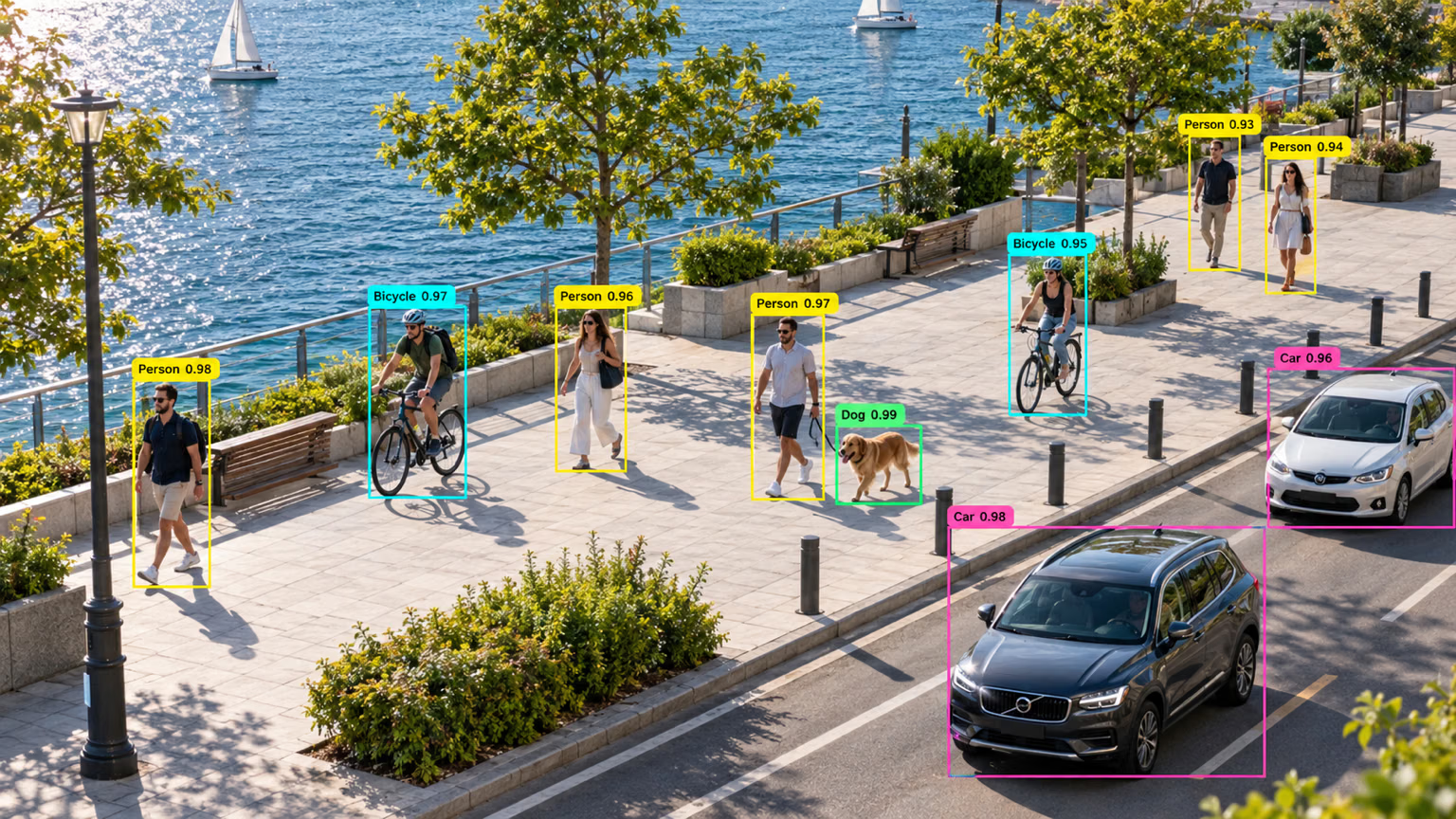
Object detection is a task that involves identifying the location and class of objects in an image or video stream.
The output of an object detector is a set of bounding boxes that enclose the objects in the image, along with class labels and confidence scores for each box. Object detection is a good choice when you need to identify objects of interest in a scene, but don't need to know their exact shape.
Watch: Object Detection with Pretrained Ultralytics YOLO Model.
YOLO26 Detect models are the default YOLO26 models, e.g., yolo26n.pt, and are pretrained on COCO.
Models#
YOLO26 Detect models pretrained on the COCO dataset are shown below.
Models download automatically from the latest Ultralytics release on first use.
| Model | size (pixels) | mAPval50-95 | mAPval50-95 (e2e) | Speed CPU ONNX (ms) | Speed T4 TensorRT10 (ms) | params (M) | FLOPs (B) |
|---|---|---|---|---|---|---|---|
| YOLO26n | 640 | 40.9 | 40.1 | 38.9 ± 0.7 | 1.7 ± 0.0 | 2.4 | 5.5 |
| YOLO26s | 640 | 48.6 | 47.8 | 87.2 ± 0.9 | 2.5 ± 0.0 | 9.5 | 20.9 |
| YOLO26m | 640 | 53.1 | 52.5 | 220.0 ± 1.4 | 4.7 ± 0.1 | 20.4 | 68.4 |
| YOLO26l | 640 | 55.0 | 54.4 | 286.2 ± 2.0 | 6.2 ± 0.2 | 24.8 | 86.8 |
| YOLO26x | 640 | 57.5 | 56.9 | 525.8 ± 4.0 | 11.8 ± 0.2 | 55.7 | 194.4 |
- mAPval values are for single-model single-scale on COCO val2017 dataset.
Reproduce withyolo detect val data=coco.yaml device=0. Addnms=Falseto reproduce the e2e column. - Speed averaged over COCO val images with ONNX on CPU and TensorRT10 on an NVIDIA T4 GPU.
Reproduce withyolo detect val data=coco.yaml batch=1 device=0|cpu nms=False - Params and FLOPs values are for fused models after Conv/BatchNorm folding and removal of the unused detection branch. Pretrained checkpoints retain the full training architecture and may show higher counts.
See the unreleased YOLO27 preview for preliminary COCO detection results.
Train#
Train a YOLO26n model on the COCO8 dataset for 100 epochs at image size 640.
from ultralytics import YOLO

# Load a model
model = YOLO("yolo26n.yaml")  # build a new model from YAML
model = YOLO("yolo26n.pt")  # load a pretrained model (recommended for training)
model = YOLO("yolo26n.yaml").load("yolo26n.pt")  # build from YAML and transfer weights

# Train the model
results = model.train(data="coco8.yaml", epochs=100, imgsz=640)
See full train mode details in the Train page. Detection models can also be trained with Ultralytics Platform cloud training.
Dataset format#
YOLO detection dataset format can be found in detail in the Dataset Guide. To convert an existing COCO JSON dataset to YOLO format, use the built-in convert_coco function described in the COCO to YOLO guide. You can also annotate and manage detection datasets with Ultralytics Platform's AI-assisted annotation tools.
Val#
Validate trained YOLO26n model accuracy, measured as mean average precision (mAP). No arguments are needed, as the model retains its training data and arguments as model attributes: path/to/best.pt from the Train example validates on COCO8. Official weights record a training dataset path that doesn't exist on your machine, so they fall back to the task default coco8.yaml with a warning. Pass data to validate on another dataset.
from ultralytics import YOLO

# Load a model
model = YOLO("yolo26n.pt")  # load an official model
model = YOLO("path/to/best.pt")  # load a custom model

# Validate the model
metrics = model.val()  # no arguments needed, dataset and settings remembered
metrics.box.map  # map50-95
metrics.box.map50  # map50
metrics.box.map75  # map75
metrics.box.maps  # mAP50-95 per class; classes absent from the val set hold the overall mAP
metrics.box.ap_class_index  # class indices that were actually evaluated
metrics.box.image_metrics # per-image metrics dictionary with precision, recall, F1, TP, FP, and FNPredict#
Use a trained YOLO26n model to run predictions on images.
from ultralytics import YOLO

# Load a model
model = YOLO("yolo26n.pt")  # load an official model
model = YOLO("path/to/best.pt")  # load a custom model

# Predict with the model
results = model("https://ultralytics.com/images/bus.jpg")  # predict on an image

# Access the results
for result in results:
    xywh = result.boxes.xywh  # center-x, center-y, width, height
    xywhn = result.boxes.xywhn  # normalized
    xyxy = result.boxes.xyxy  # top-left-x, top-left-y, bottom-right-x, bottom-right-y
    xyxyn = result.boxes.xyxyn  # normalized
    names = [result.names[cls.item()] for cls in result.boxes.cls.int()]  # class name of each box
    confs = result.boxes.conf  # confidence score of each box
See full predict mode details in the Predict page.
Results Output#
Object detection returns one Results object per image. The primary prediction field is result.boxes, which contains
box coordinates, class IDs, and confidence scores for each detected object.
| Attribute | Type | Shape | Description |
|---|---|---|---|
result.boxes | Boxes | (N) | Detection boxes. |
result.boxes.data | torch.float32 | (N,6/7) | Raw [x1,y1,x2,y2,conf,cls], plus optional track ID. |
result.boxes.xyxy | torch.float32 | (N,4) | xyxy pixel boxes. |
result.boxes.conf | torch.float32 | (N,) | Confidence scores. |
result.boxes.cls | torch.float32 | (N,) | Class IDs; cast to int for names. |
For task-specific Results fields across every task, see the Predict Results by Task section.
Export#
Export a YOLO26n model to a different format like ONNX, CoreML, etc.
from ultralytics import YOLO

# Load a model
model = YOLO("yolo26n.pt")  # load an official model
model = YOLO("path/to/best.pt")  # load a custom model

# Export the model
model.export(format="onnx")
Available YOLO26 export formats are in the table below. You can export to any format using the format argument, e.g., format='onnx' or format='engine'. You can predict or validate directly on exported models, e.g., yolo predict model=yolo26n.onnx. Usage examples are shown for your model after export completes.
| Format | format Argument | Model | Metadata | Arguments |
|---|---|---|---|---|
| PyTorch | - | yolo26n.pt | ✅ | - |
| TorchScript | torchscript | yolo26n.torchscript | ✅ | imgsz, quantize, dynamic, nms, batch, device |
| ONNX | onnx | yolo26n.onnx | ✅ | imgsz, quantize, dynamic, simplify, opset, nms, batch, data, fraction, device |
| OpenVINO | openvino | yolo26n_openvino_model/ | ✅ | imgsz, quantize, dynamic, nms, batch, data, fraction, device |
| TensorRT | engine | yolo26n.engine | ✅ | imgsz, quantize, dynamic, simplify, opset, workspace, nms, batch, data, fraction, device |
| CoreML | coreml | yolo26n.mlpackage | ✅ | imgsz, dynamic, quantize, nms, batch, device |
| Apple Core AI | coreai | yolo26n.aimodel | ✅ | imgsz, batch, quantize |
| TF SavedModel | saved_model | yolo26n_saved_model/ | ✅ | imgsz, quantize, opset, nms, batch, data, fraction, device |
| TF GraphDef | pb | yolo26n.pb | ❌ | imgsz, opset, batch, device |
| TF Edge TPU | edgetpu | yolo26n_edgetpu.tflite | ✅ | imgsz, quantize, opset, data, fraction, device |
| LiteRT | litert | yolo26n.tflite | ✅ | imgsz, quantize, batch, data, fraction, device |
| PaddlePaddle | paddle | yolo26n_paddle_model/ | ✅ | imgsz, batch, device |
| MNN | mnn | yolo26n.mnn | ✅ | imgsz, batch, dynamic, quantize, simplify, opset, nms, device |
| NCNN | ncnn | yolo26n_ncnn_model/ | ✅ | imgsz, quantize, batch, device |
| IMX500 | imx | yolo11n_imx_model/ | ✅ | imgsz, quantize, data, fraction, nms, device |
| RKNN | rknn | yolo26n_rknn_model/ | ✅ | imgsz, batch, name, quantize, simplify, opset, data, fraction, device |
| ExecuTorch | executorch | yolo26n_executorch_model/ | ✅ | imgsz, batch, device |
| Axelera | axelera | yolo26n_axelera_model/ | ✅ | imgsz, batch, quantize, data, fraction, device |
| DEEPX | deepx | yolo26n_deepx_model/ | ✅ | imgsz, quantize, simplify, opset, data, optimize, device |
| Qualcomm QNN | qnn | yolo26n_qnn.onnx | ✅ | imgsz, batch, name, quantize, simplify, opset, data, fraction, device |
| Hailo | hailo | yolo26n_hailo_model/ | ✅ | imgsz, name, quantize, data, fraction, simplify, conf, iou, device |
| Huawei Ascend | ascend | yolo26n_ascend_model/ | ✅ | imgsz, batch, name, quantize, opset, simplify, nms, device |
| AMD Xilinx | xilinx | yolo26n_xilinx_model/ | ✅ | imgsz, name, quantize, data, fraction, opset, simplify, device |
nms=None defaults to raw outputs for external NMS (YOLO26 keeps its NMS-free head on Axelera). Set nms=False to select an available NMS-free head; unsupported formats fall back to their native output path. The nms entries above identify formats that can embed NMS with nms=True.
See full export details in the Export page.
FAQ#
Yes. The Ultralytics Platform quickstart covers a browser-based workflow for annotating datasets, training detection models on cloud GPUs, and deploying them to inference endpoints.
Training a YOLO26 model on a custom dataset involves a few steps:
- Prepare the Dataset: Ensure your dataset is in the YOLO format. For guidance, refer to our Dataset Guide.
- Load the Model: Use the Ultralytics YOLO library to load a pretrained model or create a new model from a YAML file.
- Train the Model: Execute the
trainmethod in Python or theyolo detect traincommand in CLI.
Examplefrom ultralytics import YOLO # Load a pretrained model model = YOLO("yolo26n.pt") # Train the model on your custom dataset model.train(data="my_custom_dataset.yaml", epochs=100, imgsz=640)For detailed configuration options, visit the Configuration page.
Ultralytics YOLO26 offers various pretrained models for object detection, instance segmentation, semantic segmentation, depth estimation, classification, pose estimation, and oriented bounding boxes. These models are pretrained on the COCO dataset, Cityscapes for semantic segmentation, a multi-dataset mix for depth estimation, ImageNet for classification, or DOTAv1 for OBB. Here are some of the available models:
To validate the accuracy of your trained YOLO26 model, you can use the
.val()method in Python or theyolo detect valcommand in CLI. This will provide metrics like mAP50-95, mAP50, and more.Examplefrom ultralytics import YOLO # Load the model model = YOLO("path/to/best.pt") # Validate the model metrics = model.val() print(metrics.box.map) # mAP50-95For more validation details, visit the Val page.
Ultralytics YOLO26 allows exporting models to various formats such as ONNX, TensorRT, CoreML, and more to ensure compatibility across different platforms and devices.
Examplefrom ultralytics import YOLO # Load the model model = YOLO("yolo26n.pt") # Export the model to ONNX format model.export(format="onnx")Check the full list of supported formats and instructions on the Export page.
Ultralytics YOLO26 provides fast, accurate models for object detection, instance segmentation, semantic segmentation, pose estimation, and the other supported tasks. Key advantages include:
- Pretrained Models: Use models pretrained on popular datasets like COCO and ImageNet for faster development.
- High Accuracy: Achieves high mAP on COCO.
- Speed: Optimized for real-time inference in latency-sensitive applications.
- Flexibility: Export models to various formats like ONNX and TensorRT for deployment across multiple platforms.


Comments365
Ask a question, share your results, or help someone else.
MrBug1024
I have been using YOLO for many years, but I have always been looking forward to the official release of a face recognition solution. Because the current open-source solutions in the face recognition field, whether in terms of performance or subsequent enhanced training, are not as simple as training a custom object detection model with YOLO. This is what shocks me. Therefore, I still hope that the official team can provide a convenient solution like object detection in the fields of face recognition and OCR!
1sabrinabounehar
Hello, I'm currently working on a project for detecting downy mildew on grapevines using the YOLOv8 model. I've successfully retrained it with my own dataset, and it performs well during testing on images. However, when transitioning to real-time detection, the model produces false detections due to color issues. The disease appears as yellow, gray, and brown spots on the vines, but in real-time, the model detects anything of these colors as the disease. I'm seeking assistance to address this specific problem. thanks
1 Paula DerrengerUltralytics
Hello! It's great to hear about your progress with detecting downy mildew on grapevines using YOLOv8. 🌿 The issue of color-based false detections in a real-time setting can indeed pose a challenge. To refine your model's ability to distinguish between actual disease symptoms and similar-colored objects, you might consider a few strategies:
-
Data Augmentation: Enhance your dataset with more varied lighting and background conditions. Incorporating images that have similar colors but are not the disease can help the model learn to discriminate better.
-
Fine-tuning with Hard Examples: Identify cases where the model currently fails and add more such examples to your training set. This could include images with objects that are similar in color to the disease but aren't the disease itself.
-
Adjust Confidence Threshold: Experiment with adjusting the confidence threshold of your detection. A higher threshold may reduce false positives but be careful to not miss genuine cases of mildew.
results = model.predict('image.jpg', conf=0.5) # Adjusting confidence threshold- Post-Processing: Implement a custom post-processing step that considers additional context or rules specific to your problem domain, for instance, the typical size or shape of diseased spots, or their common locations on a vine.
It's a process of trial and error, so don't hesitate to iterate on these strategies. If you continue to experience issues, please share some examples or further details so we can offer more targeted advice. 🍇
-
arifan-instrumentasi-UB
Hi, can yolov8 detect color sequence?. i create color sequence of rainbow (red, yellow, green) as a real rainbow. if i change the yellow to orange, can yolov8 detect it as a wrong rainbow?
1 Glenn JocherUltralytics
@arifan-instrumentasi-UB hi there! 🌈
YOLOv8 is primarily designed for detecting objects and their categories, rather than the sequence or color composition of objects. It can recognize objects (like a rainbow) based on the training data it has been exposed to, but it doesn't inherently understand the "correct" color sequence of a natural rainbow.
However, you could approach the problem creatively by training your model on labeled data specifying "correct" and "incorrect" rainbows. Here’s a simplified example of how your training annotations might look:
- Image 1 (correct rainbow): Class label “rainbow_correct”
- Image 2 (rainbow with yellow replaced by orange): Class label “rainbow_incorrect”
This way, YOLOv8 could potentially learn to distinguish between the different types of rainbows based on your specific definitions of "correct" and "incorrect."
Remember, accurate detection relies heavily on the diversity and quality of the training dataset. 📊
Hope that helps!
lixjohn
I am working on an object detection project. During the annotation phase, the challenge is that there are a large number of objects in a single image, making the labeling effort extremely high. So my question is, for an object detection task, do we have to label all objects in the image? Or can we just label a few of them and leave the rest unlabeled during training? If not, are there any best practices for this kind of challenge? I appreciate any suggestions..
- Glenn JocherUltralytics
For YOLO detection training, you should label all visible instances of the classes you want the model to learn in each training image; leaving same-class objects unlabeled usually turns them into false background and hurts training. If images are very dense, the usual workaround is to tile/crop them into smaller patches and use model-assisted pre-annotation plus active learning or the Ultralytics Platform annotation tools to reduce manual effort, and you can find more dataset guidance in the data collection and annotation guide.
Thank you for the helpful response. I will proceed with training a model on the initial annotations and integrate it into the active learning cycle. I have one follow-up question: if I train the model on small 640×640 patches cropped from a typical 5k×3k image, can I safely perform inference on the original 5k×3k images?
- Glenn JocherUltralytics
Yes—you can train on
640x640crops and run inference on the original5k×3kimages, but if you infer at a smallimgszthe objects may shrink too much after resize, so for dense/small targets the usual best practice is a largerimgszor tiled inference with SAHI, as noted in the image tiling guidance. Got point. Appricate your help on that, I do believe I will have more questions in project. :-)
- Glenn JocherUltralytics
Happy to help—feel free to post any follow-up questions here so the team and community can weigh in, and if you end up working with tiny or dense targets the small-object mAP guide has a few practical tuning ideas.
Thanks for further information, I see the sentence in guild "there are P2 model variants of the Ultralytics YOLOv8 model that are optimized for preserving fine spatial detail.", does it mean p2 yolo structure such as yolo26-p2.yaml? I plan use this to train my model. And one more question, if I use orignal image size 5k*3k to train model, and use SAHI to do inference, is it right approch for small object?
The project I am working on is a little bit tricky. It includes both dense and sparse objects with vastly different sizes. Some images just have a couple of big objects, but some images include over one hundred small objects. My plan is to label all of them first and train a YOLO model with the original image size of 5k × 3k using an imgsz of 1024 or higher. For the inference phase, I can use SAHI, but the question is, it seems like I cannot apply SAHI to all images because most of the images are sparse. So, how do I handle this situation?
- Glenn JocherUltralytics
Yes, the
P2note refers to the small-object architecture variants such asyolo26-p2.yaml; for training you’d normally use a scaled config likemodel=yolo26n-p2.yaml, and the YOLO26 model docs note these are YAML-only architectures. For your mixed dense/sparse case, using5k×3ksources is fine but the model still trains at your chosenimgsz, so a practical setup is one model trained with all labels at the largestimgszyou can afford, optionally adding tiled crops for the densest images, then using normal inference by default and routing only the high-resolution or small-object cases to SAHI when you need extra recall. Thanks, I will use yolo train model=yolo26x-p2.yaml pretrained=yolo26x.pt as training command. In terms of router, the key is I have to indentify the image is dense/sparse automaticlly, however, seems like no way to know if the image is dense/sparse before inference?
- Glenn JocherUltralytics
Correct—you usually cannot know dense vs. sparse reliably before inference, so a practical setup is a cheap first pass with normal YOLO at your target
imgsz, then re-run only the uncertain high-resolution cases with tiled inference when you see no detections, very low confidence, or mostly tiny boxes; sparse images can stay on the standard object detection pipeline. I see. I've completed an end-to-end cycle from labeling to prediction. Thanks for your help!
During the process, one issue I encountered is that some objects cluster together as a group, so I labeled them with one box and assigned the same label as a single object. The reason for this is that we still need to recognize the object group as well, not just individual objects. Is this the right approach? Or do we have to assign a new, distinct label for the grouped objects?
Another issue is that the predictor assigns multiple/duplicate labels to a single object, the boxes are most overlap. I tried using agnostic_nms and tweaking the iou parameter to reduce these multiple/duplicate labels, but it didn't work well. I am wondering if the final solution to eliminate multiple/duplicate labels is a custom post-prediction step? For example, calculating box overlaps manually and keeping only the one with the highest confidence score?
- Glenn JocherUltralytics
If a cluster is a different target from a single instance, give it a separate class such as
object_groupand apply that rule consistently; mixing single objects and merged clusters under the same class usually creates ambiguous supervision and can cause overlapping duplicates. I’d avoid a custom post-filter first—if you can share 2–3 labeled images and the matching predictions here, we can check whether this is a labeling consistency or small-object resolution issue, since with Ultralytics YOLO26 end-to-end inference and standard NMS behavior, persistent same-class duplicates are usually caused upstream rather than by a missing manual overlap step. Understood. The situation is that there is no exact number of objects in a group—it could range from one to a hundred. This makes it difficult to decide which labels to create, so currently, I put them under the same label regardless of how many objects are in the group. What is the right approach here? Could this ambiguity be the root cause of the duplicate label issue?
I have attached 3 pictures (sorry I am not allowed to share data so I am using masks and fake labels):
Objects 1a and 1b represent an object group containing 3 individual objects. The inference outputs show two different-sized rectangles with the same label. (Confidence = 0.25, IoU = 0.70; changing IoU to 0.25 did not help, agnostic_nms=False).
Object 2 is a single object, but it produces two almost identical, overlapping rectangles with the same label. At a low confidence threshold of 0.10, both rectangles appear; changing it to 0.25 leaves just one.
Is this expected behavior given the IoU settings, or is it a result of the labeling issue?
Thanks again.
- Glenn JocherUltralytics
The better rule here is to define labels by visual granularity rather than count: annotate an individual object when it can be boxed cleanly, annotate a separate
object_groupclass only when the cluster itself is the target or the instances cannot be separated, and avoid mixing large cluster boxes and tight instance boxes under the same class over the same region, since that teaches the model two valid box scales for one label and is a likely cause of yourobject1duplicates; forobject2, seeing two boxes atconf=0.10but one at0.25is generally expected low-threshold behavior, and IoU mainly governs overlap matching rather than fixing class-definition ambiguity, so I’d standardize the labels before adding any custom post-processing. Thank you very much, let me summarize to ensure I understand the label approach:
- Define two labels: one for a single object (object) and another for an object cluster (object_group).
- Annotate an individual object when it can be boxed cleanly — use the object label. 3.Use the object_group label when the cluster itself is the target or the instances cannot be separated. That means if there are multiple objects that cannot be separated and the cluster is the target, use the object_group label.
- Avoid mixing large cluster boxes and tight instance boxes under the same class over the same region — I'm a little confused here: in one image, there must be both single objects and clusters, so how do I avoid mixing large cluster boxes (object_group) and tight instance boxes (object)? I guess the same region means object box and cluster object box overlap?
- Glenn JocherUltralytics
Yes—“same region” means overlapping annotations for the same underlying objects; in one image it’s fine to have both
objectandobject_group, but they should be mutually exclusive by area: useobjectwhere instances can be boxed cleanly, and use oneobject_groupbox only for the dense patch where they cannot, without also boxing those same members individually. If you train both levels on the same pixels, duplicate predictions are very likely, so the key is a consistent one-representation-per-region rule as described in the annotation best-practices guide. Thanks, understand the approach. Really appricate your help! Will let you know any further question. :)
- Glenn JocherUltralytics
Glad that clarified it; if any new edge cases come up, please share a couple of representative labels and predictions here before retraining and we can help sanity-check the annotation rule.
Thanks again! Yes for sure, we'll follow the annotation rule and how things go, keep you post if anything new.
- Glenn JocherUltralytics
Sounds good—after updating the annotations, please delete any
*.cachefiles in yourlabelsfolder before retraining, and feel free to post back here if any edge cases still produce duplicate boxes. Got it. Thanks for reminding. :-)
- Glenn JocherUltralytics
You’re welcome—if anything unexpected shows up after retraining, share a sample label/prediction pair and the
yolo checksoutput here and the Ultralytics team can help verify it.
mslabdelhak29
Hello i want to use yollo in Detection and Tracking for Surveillance Cameras wich is the best config
- Glenn JocherUltralytics(edited)
For surveillance, a strong default is Ultralytics YOLO
yolo26s.ptfor balanced speed/accuracy oryolo26m.ptfor denser scenes, paired withmodel.track(..., tracker="bytetrack.yaml"); the detection guide and tracking docs are good references, and if you share your camera resolution, FPS, and hardware here in Discussions the Ultralytics team can suggest a tighter config.
Hassaan149
Multi-GPU TensorRT Inference Issue (Docker + RTSP Stream)
I am running object detection on an RTSP input inside the
predictfunction.I want to dynamically assign specific GPUs based on VRAM usage (which I monitor using py-nvml).
However, even when I pass:
model.predict(source=stream_url, stream=True, device=str(device))(where
deviceis0or1), the engine file always loads on GPU 0.
Docker Compose Configuration
My
docker-compose.ymlincludes all GPUs:deploy: resources: reservations: devices: - driver: nvidia count: all capabilities: [gpu]
Expected Behavior
- My code automatically selects the GPU ID (
0or1) based on VRAM usage. - I have exported
.enginefiles per GPU. - If
device = 0→ load engine exported for GPU 0. - If
device = 1→ load engine exported for GPU 1.
Current Problem
Regardless of the
devicevalue passed tomodel.predict(), the engine always loads on GPU 0 inside Docker.
Goal
Ensure that:
- The correct GPU is selected at runtime.
- The corresponding
.enginefile (exported for that GPU) is loaded. - Inference runs on the intended GPU device instead of defaulting to GPU 0.
- Glenn JocherUltralytics
For TensorRT
*.enginemodels the GPU is effectively chosen when the engine is deserialized/loaded, anddevice=inmodel.predict()won’t “move” an already-loaded engine off CUDA:0; to avoid PyTorch’s default CUDA init grabbing GPU 0, set the device before creatingYOLO(...)(or pin the process withCUDA_VISIBLE_DEVICES), as noted in our common multi-GPU troubleshooting guidance and predict docs.import os os.environ["CUDA_VISIBLE_DEVICES"] = "1" # pin to physical GPU 1 (it becomes cuda:0 in-process) from ultralytics import YOLO model = YOLO("yolo26n.engine") # load AFTER pinning results = model.predict(source=stream_url, stream=True, device=0)If you need to switch GPUs dynamically per stream/job, you’ll generally need separate processes (or separate containers) per GPU; also please paste
!yolo checksplusnvidia-smi -Lfrom inside the container and the full text logs showing the engine load so we can confirm whether the issue is GPU index remapping vs. early CUDA initialization. I am using Python multiprocessing to offload inference input streams onto separate processes. In each process, I instantiate a YOLO model (TensorRT
.enginefile) for GPU inference.I attempt to assign a specific GPU per process using:
os.environ["CUDA_VISIBLE_DEVICES"] = str(device)However, even when
device=1, the process still runs on GPU 0.
Environment
Inside the container:
nvidia-smi -LOutput:
GPU 0: NVIDIA GeForce RTX 2080 SUPER (UUID: GPU-xxxx...)
GPU 1: NVIDIA GeForce RTX 2080 SUPER (UUID: GPU-yyyy...)
On container startup, I see this warning:
/opt/venv/lib/python3.10/site-packages/torch/cuda/_init_.py:65: FutureWarning:
The pynvml package is deprecated. Please install nvidia-ml-py instead.
If you did not install pynvml directly, please report this to the maintainers
of the package that installed pynvml for you.
  import pynvml
INFO:     Started server process [1]
INFO:     Waiting for application startup
Worker Function (Per Stream Process)
def inference_worker(
    stream_url: str,
    frame_queue,
    idx: int,
    width: int = 640,
    height: int = 480,
    conf: float = 0.7,
    polygon: list = None,
    thread_name: str = None,
    camera_name: str = None,
    device: int = 0,
):
    """Runs YOLO inference in a separate process"""

    alert_thread = {}
    KNOWN_HEIGHT_CM = 155
    FOCAL_LENGTH = 1400

    # Attempt to set device per process
    os.environ["CUDA_VISIBLE_DEVICES"] = str(device)

    try:
        from ultralytics import YOLO
    except Exception as e:
        frame_queue.put(("_ERROR_", f"Import error: {e}"))
        return

    try:
        model = YOLO(model _path+ f"_{device}.engine")
    except Exception:
        model = export(intruder_path + f"_{device}.pt", device=device)
        return
Issue
Even when:
device = 1
os.environ["CUDA_VISIBLE_DEVICES"] = "1"
The inference still runs on GPU 0 instead of GPU 1.
- Glenn JocherUltralytics
This is almost always caused by Linux
multiprocessingdefaulting tofork: if your main server process (e.g. Uvicorn/FastAPI) importstorch/ultralytics(or anything that initializes CUDA/TensorRT) before the fork, the child workers inherit a CUDA context already bound to physical GPU 0, and changingCUDA_VISIBLE_DEVICESinsideinference_worker()won’t take effect; the fix is to usespawn(or run 1 worker process per GPU as a separate OS process/container) and ensure CUDA-related imports only happen after the env var is set, per our multi-GPU troubleshooting guide.# main.py (make sure ultralytics/torch are NOT imported at module top-level) import multiprocessing as mp def inference_worker(stream_url: str, device: int): import os os.environ["CUDA_VISIBLE_DEVICES"] = str(device) # set BEFORE any torch/ultralytics import import torch from ultralytics import YOLO print("CUDA_VISIBLE_DEVICES:", os.environ["CUDA_VISIBLE_DEVICES"]) print("torch sees", torch.cuda.device_count(), "GPU(s); current:", torch.cuda.get_device_name(0)) model = YOLO(f"{model_path}_{device}.engine") for r in model.predict(source=stream_url, stream=True, device=0): pass if __name__ == "__main__": mp.set_start_method("spawn", force=True) # start processes hereIf this still pins to physical GPU 0, please paste the
!yolo checksoutput from inside the container and confirm whether any part of your server importstorchbefore the worker processes are started. Thanks alot Glen, this helped, I had an ocr code which was subtly initializing cuda contexts at container startup, thus preventing GPU selections using os.environ["CUDA_VISIBLE_DEVICES"] = str(device)
- Glenn JocherUltralytics
Glad that surfaced it — anything that touches CUDA (OCR libs,
torch, TensorRT, etc.) must be imported/initialized only afterCUDA_VISIBLE_DEVICESis set in each spawned worker (see PyTorch multiprocessing notes), and you can also swappynvml→nvidia-ml-pyto clear the deprecation warning you’re seeing.
- My code automatically selects the GPU ID (
VeryOnline
你好,yolo的开发者,我使用yolo的CLI转换ONNX模型后,得到的onnx模型输出是一个float32[1,300,6]的输出,这里的输出是如何定义的?我没有找到相关的定义,能帮我解释一下这个输出么?
- Glenn JocherUltralytics(edited)
你好,你看到的
float32[1,300,6]是 YOLO26 的 NMS-free(端到端)检测头的输出,导出时使用nms=False会得到这种格式:300表示最多保留的检测数(max_det),每个检测的 6 个值对应x1, y1, x2, y2, conf, cls(cls以 float 形式存储)。如果你想拿到未做 NMS 的原始输出用于自定义后处理,请使用默认设置导出(不设置nms),此时输出为(B, 4+num_classes, num_predictions)结构,参考 导出文档里的输出张量说明,以及 端到端检测指南。yolo export model=yolo26n.pt format=onnx nms=False # (1, 300, 6) yolo export model=yolo26n.pt format=onnx # (1, 4+nc, N) 原始输出如果方便的话,把你实际的导出命令(包含
imgsz/nms等参数)和 ONNX 的 input/output 名称贴在这个讨论里,我们可以更精确地确认每一维的含义和坐标尺度。
ghost
I want to detect only 'Person' class. Do I need to modify some yaml file and retrain the model for that - I want to reduce the parameters.
rugvedjalit
Not specifically you can use the pretrained model of yolo you just ne to call on person id and reflect it on your processed frames. Class_id == 0 : person
- Glenn JocherUltralytics(edited)
@ShahnawazHusian to add new classes you should fine‑tune from your existing checkpoint on a dataset that contains both the old and new classes; YOLO doesn’t support “locking” all old weights and only appending new ones. By default all layers are trainable, but you can freeze early layers to preserve most features, for example:
from ultralytics import YOLO

model = YOLO("path/to/old/best.pt")  # model already trained on old classes

results = model.train(
    data="data_with_old_and_new_classes.yaml",
    epochs=100,
    freeze=10,          # freeze first 10 layers (backbone-heavy); head stays trainable
    lr0=0.001           # often use a smaller LR when extending a trained model
)
If you want to “re‑train” an existing class, just keep that class in your labels and oversample or rebalance your dataset; freezing the head/neck/backbone entirely would stop any learning. The
freezeargument and related options are summarized in the training configuration docs.
@heymuun as @rugvedjalit mentioned, you don’t need to change the YAML or retrain if you only want the
personclass: you can filter at inference time withclasses=0(COCO’s person index), for example:from ultralytics import YOLO model = YOLO("yolo26n.pt") # COCO‑pretrained results = model.predict(source="video.mp4", classes=0)This keeps the model size the same but returns only person detections; if you truly need fewer parameters, use a smaller model variant (e.g.,
yolo26n.pt) or retrain anc: 1model, though the parameter reduction from changingncalone is quite small.
legend-zhen
Hello, I would like to use the weight file obtained after modifying the YOLO11 model to provide a checkbox for the top-down pose estimation algorithm. Why can it only run normally under the official weight file(yolo11.pt)? When using the weight of the YOLO11 structure improved by myself, the following error message appears. Please ask what should be done to use the weight file trained by myself. D:\Anaconda\envs\openmmlab\python.exe D:\openmmlab\mmpose-11\topdown_demo_with_YOLO1111.py D:\Anaconda\envs\openmmlab\lib\site-packages\mmengine\utils\package_utils.py:48: UserWarning: pkg_resources is deprecated as an API. See https://setuptools.pypa.io/en/latest/pkg_resources.html. The pkg_resources package is slated for removal as early as 2025-11-30. Refrain from using this package or pin to Setuptools<81. from pkg_resources import DistributionNotFound, get_distribution WARNING ⚠️ D:\YOLO\YOLO11\ultralytics-main\runs\detect\train8\weights\best.pt appears to require 'ultralytics.nn.add_modules', which is not in Ultralytics requirements. AutoInstall will run now for 'ultralytics.nn.add_modules' but this feature will be removed in the future. Recommend fixes are to train a new model using the latest 'ultralytics' package or to run a command with an official Ultralytics model, i.e. 'yolo predict model=yolov8n.pt' Traceback (most recent call last): File "D:\Anaconda\envs\openmmlab\lib\site-packages\ultralytics\nn\tasks.py", line 837, in torch_safe_load ckpt = torch.load(file, map_location="cpu") File "D:\Anaconda\envs\openmmlab\lib\site-packages\ultralytics\utils\patches.py", line 86, in torch_load return _torch_load(*args, **kwargs) File "D:\Anaconda\envs\openmmlab\lib\site-packages\torch\serialization.py", line 712, in load return _load(opened_zipfile, map_location, pickle_module, **pickle_load_args) File "D:\Anaconda\envs\openmmlab\lib\site-packages\torch\serialization.py", line 1049, in _load result = unpickler.load() File "D:\Anaconda\envs\openmmlab\lib\site-packages\torch\serialization.py", line 1042, in find_class return super().find_class(mod_name, name) ModuleNotFoundError: No module named 'ultralytics.nn.add_modules'
During handling of the above exception, another exception occurred:
Traceback (most recent call last): File "D:\openmmlab\mmpose-11\topdown_demo_with_YOLO1111.py", line 316, in main() File "D:\openmmlab\mmpose-11\topdown_demo_with_YOLO1111.py", line 196, in main model_yolo11 = YOLO(args.det_checkpoint) File "D:\Anaconda\envs\openmmlab\lib\site-packages\ultralytics\models\yolo\model.py", line 23, in init super().init(model=model, task=task, verbose=verbose) File "D:\Anaconda\envs\openmmlab\lib\site-packages\ultralytics\engine\model.py", line 145, in init self._load(model, task=task) File "D:\Anaconda\envs\openmmlab\lib\site-packages\ultralytics\engine\model.py", line 285, in _load self.model, self.ckpt = attempt_load_one_weight(weights) File "D:\Anaconda\envs\openmmlab\lib\site-packages\ultralytics\nn\tasks.py", line 910, in attempt_load_one_weight ckpt, weight = torch_safe_load(weight) # load ckpt File "D:\Anaconda\envs\openmmlab\lib\site-packages\ultralytics\nn\tasks.py", line 857, in torch_safe_load ckpt = torch.load(file, map_location="cpu") File "D:\Anaconda\envs\openmmlab\lib\site-packages\ultralytics\utils\patches.py", line 86, in torch_load return _torch_load(*args, **kwargs) File "D:\Anaconda\envs\openmmlab\lib\site-packages\torch\serialization.py", line 712, in load return _load(opened_zipfile, map_location, pickle_module, **pickle_load_args) File "D:\Anaconda\envs\openmmlab\lib\site-packages\torch\serialization.py", line 1049, in _load result = unpickler.load() File "D:\Anaconda\envs\openmmlab\lib\site-packages\torch\serialization.py", line 1042, in find_class return super().find_class(mod_name, name) ModuleNotFoundError: No module named 'ultralytics.nn.add_modules'
- Glenn JocherUltralytics(edited)
@legend-zhen Thanks for the traceback. Your checkpoint was saved with custom code (
ultralytics.nn.add_modules) from a modified Ultralytics repo, but you’re loading it with the pip-installed package where that module doesn’t exist. Fix by either installing your modified repo into the same environment, or exporting to a format that doesn’t require the original Python classes:# Option A: load with the same modified code pip uninstall -y ultralytics pip install -e path\to\your_modified_ultralytics # Option B: export once from the environment where it loads, then use the artifact yolo export model="D:\YOLO\YOLO11\ultralytics-main\runs\detect\train8\weights\best.pt" format=onnxPlease also run and paste the text output of:
yolo checksto confirm you’re not mixing a local repo and a pip install; compare the Ultralytics install path it prints with the paths in your traceback. Export formats and usage are summarized in the Export guide and general troubleshooting tips are in Troubleshooting Common YOLO Issues.
likesnow97
YOLO是否实现了将预测结果导出为x-anylabeling可用的json格式接口?