VisDrone 数据集
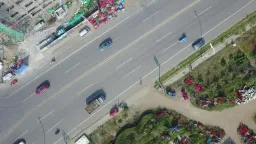
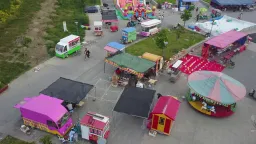
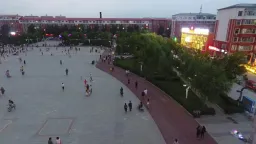
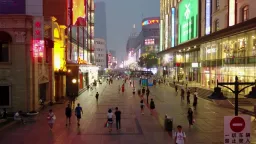
VisDrone 数据集是一个大规模无人机图像基准,其中的检测子集 (VisDrone2019-DET) 提供 8,629 张航拍图像——6,471 张训练图像、548 张验证图像和 1,610 张 test-dev 图像——标注了 10 个目标类别,用于目标检测。该数据集由中国天津大学机器学习与数据挖掘实验室的 AISKYEYE 团队创建。
观看: 如何在 VisDrone 数据集上训练 Ultralytics YOLO | 航拍检测 | 完整教程 🚀
完整的 VisDrone 基准包含 288 段视频片段(261,908 帧)和 10,209 张静态图像,这些图像由无人机搭载的摄像机在中国 14 个不同城市拍摄,涵盖城市和乡村环境、稀疏和拥挤场景,以及多种天气和光照条件。其视频帧包含超过 260 万个人工标注的边界框,以及场景可见度、目标类别和遮挡等额外属性。Ultralytics 的 VisDrone.yaml 配置使用该基准中的 VisDrone2019-DET 静态图像子集。
主要功能#
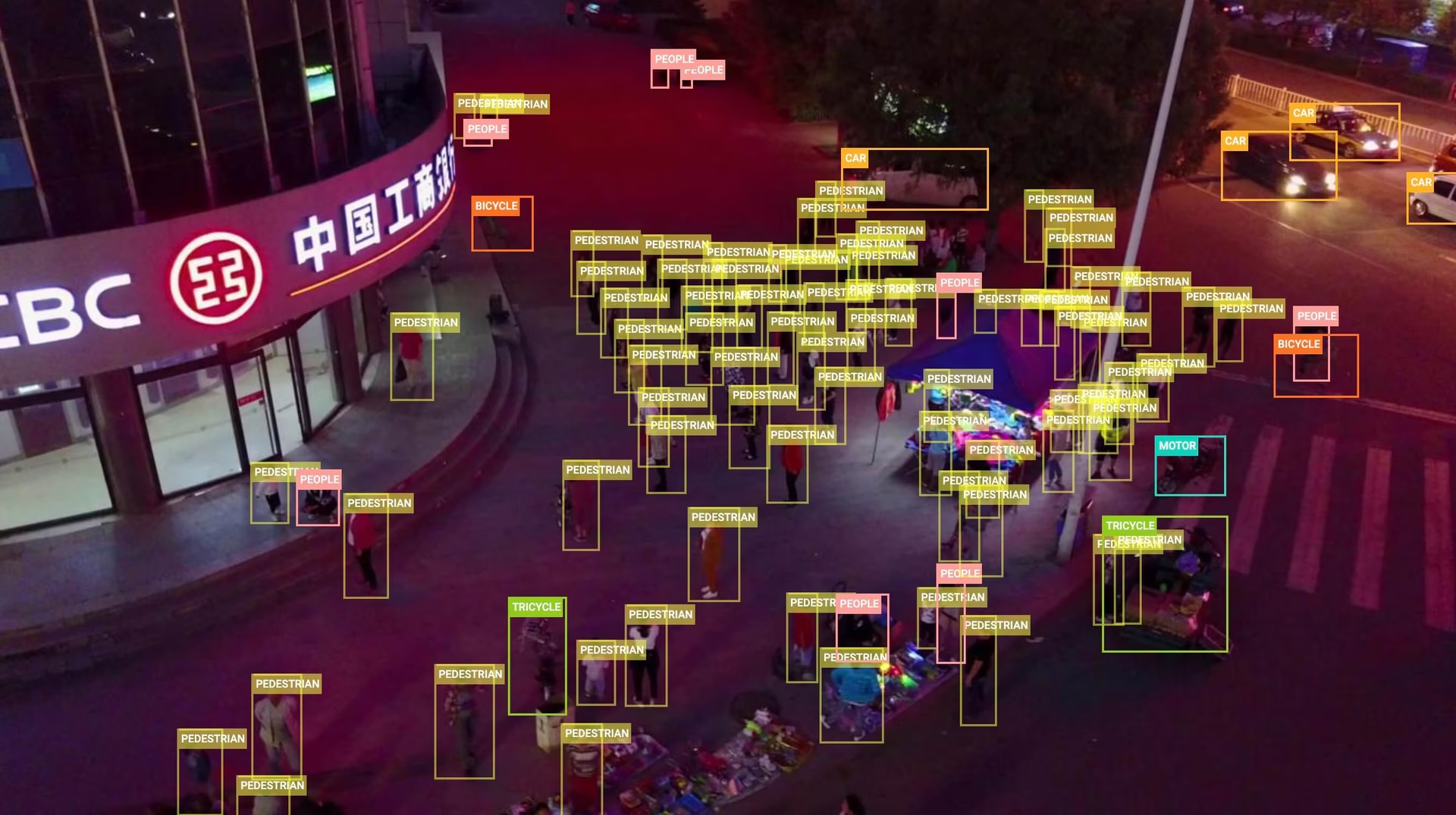
- 小而密集的目标:航拍视角使目标显得很小且十分密集——仅 548 张验证图像就包含 38,759 个标注框,平均每张图像约有 70 个目标。
- 场景多样性:图像来自中国 14 个城市,涵盖城市和乡村地区、白天和夜间,以及不同天气条件。
- 丰富的标注:整个基准包含超过 260 万个框,并带有遮挡和可见度属性。
- 预定义划分:固定的 train / val / test-dev 划分(6,471 / 548 / 1,610 张图像),便于进行一致的评估。
数据集结构#
Ultralytics VisDrone 配置涵盖 VisDrone2019-DET 图像子集,并将其分为三个部分:
| 划分 | 图像 | 说明 |
|---|---|---|
| 训练 | 6,471 | 用于训练检测器的已标注航拍图像 |
| 验证 | 548 | 开发期间用于评估的图像 |
| Test-dev | 1,610 | 留作最终评估训练后模型的图像 |
第四个划分 test-challenge(1,580 张图像)为 VisDrone 竞赛保留,不提供下载,因此完整的 DET 集合总计为 10,209 张图像。
该数据集标注了 10 个目标类别:pedestrian、people、bicycle、car、van、truck、tricycle、awning-tricycle、bus 和 motor。VisDrone 将 pedestrian(站立或行走的人)与 people(处于其他姿势的人)区分开来。
首次使用时,下载脚本会将原始 VisDrone 标注转换为 YOLO 格式,并跳过标记为忽略的区域(这也会排除未使用的“others”类别)。
应用场景#
VisDrone 的密集场景和微小目标使其成为航空视角下小目标检测的标准基准。常见的无人机计算机视觉应用包括:
- 使用 UAV 进行交通监控和车辆计数
- 人群分析和公共安全监控
- 基础设施和建筑工地检查
- 在杂乱场景中检测小目标的计算机视觉研究
其他航拍图像基准请参见以卫星图像为主的 xView 数据集或使用定向框的 DOTA-v2 数据集。
数据集 YAML#
VisDrone.yaml 文件定义了数据集配置,包括数据集路径、类别名称以及自动下载和转换脚本。该文件由 Ultralytics 仓库维护,地址为 https://github.com/ultralytics/ultralytics/blob/main/ultralytics/cfg/datasets/VisDrone.yaml。
# Ultralytics 🚀 AGPL-3.0 License - https://ultralytics.com/license

# VisDrone2019-DET dataset https://github.com/VisDrone/VisDrone-Dataset by Tianjin University
# Documentation: https://docs.ultralytics.com/datasets/detect/visdrone
# Example usage: yolo train data=VisDrone.yaml
# parent
# ├── ultralytics
# └── datasets
#     └── VisDrone ← downloads here (~2 GB)

# Train/val/test sets as 1) dir: path/to/imgs, 2) file: path/to/imgs.txt, or 3) list: [path/to/imgs1, path/to/imgs2, ..]
path: VisDrone # dataset root dir
train: images/train # train images (relative to 'path') 6471 images
val: images/val # val images (relative to 'path') 548 images
test: images/test # test-dev images (optional) 1610 images

# Classes
names:
  0: pedestrian
  1: people
  2: bicycle
  3: car
  4: van
  5: truck
  6: tricycle
  7: awning-tricycle
  8: bus
  9: motor

# Download script/URL (optional) ---------------------------------------------------------------------------------------
download: |
  import os
  from pathlib import Path
  import shutil

  from ultralytics.utils.downloads import download
  from ultralytics.utils import ASSETS_URL, TQDM

  def visdrone2yolo(dir, split, source_name=None):
      """Convert VisDrone annotations to YOLO format with images/{split} and labels/{split} structure."""
      from PIL import Image

      source_dir = dir / (source_name or f"VisDrone2019-DET-{split}")
      images_dir = dir / "images" / split
      labels_dir = dir / "labels" / split
      labels_dir.mkdir(parents=True, exist_ok=True)

      # Move images to new structure
      if (source_images_dir := source_dir / "images").exists():
          images_dir.mkdir(parents=True, exist_ok=True)
          for img in source_images_dir.glob("*.jpg"):
              img.rename(images_dir / img.name)

      for f in TQDM((source_dir / "annotations").glob("*.txt"), desc=f"Converting {split}"):
          img_size = Image.open(images_dir / f.with_suffix(".jpg").name).size
          dw, dh = 1.0 / img_size[0], 1.0 / img_size[1]
          lines = []

          with open(f, encoding="utf-8") as file:
              for row in [x.split(",") for x in file.read().strip().splitlines()]:
                  if row[4] != "0":  # Skip ignored regions
                      x, y, w, h = map(int, row[:4])
                      cls = int(row[5]) - 1
                      # Convert to YOLO format
                      x_center, y_center = (x + w / 2) * dw, (y + h / 2) * dh
                      w_norm, h_norm = w * dw, h * dh
                      lines.append(f"{cls} {x_center:.6f} {y_center:.6f} {w_norm:.6f} {h_norm:.6f}\n")

          (labels_dir / f.name).write_text("".join(lines), encoding="utf-8")

  # Download (ignores test-challenge split)
  dir = Path(yaml["path"])  # dataset root dir
  urls = [
      f"{ASSETS_URL}/VisDrone2019-DET-train.zip",
      f"{ASSETS_URL}/VisDrone2019-DET-val.zip",
      f"{ASSETS_URL}/VisDrone2019-DET-test-dev.zip",
      # f"{ASSETS_URL}/VisDrone2019-DET-test-challenge.zip",
  ]
  download(urls, dir=dir, threads=4)

  # Convert
  splits = {"VisDrone2019-DET-train": "train", "VisDrone2019-DET-val": "val", "VisDrone2019-DET-test-dev": "test"}
  for folder, split in splits.items():
      visdrone2yolo(dir, split, folder)  # convert VisDrone annotations to YOLO labels
shutil.rmtree(dir / folder) # cleanup original directory用法#
VisDrone 会在首次训练时自动下载——三个压缩包总计约 2 GB——解压和转换期间需要大约 4 GB 的可用磁盘空间。
如需在 VisDrone 数据集上以 640 的图像尺寸训练一个 YOLO26n 模型,训练 100 个周期,可以使用以下代码片段。
from ultralytics import YOLO

# 加载模型
model = YOLO("yolo26n.pt")  # 加载预训练模型(推荐用于训练)

# 训练模型 - 数据集会在首次运行时自动下载
results = model.train(data="VisDrone.yaml", epochs=100, imgsz=640)
要标注更多航拍图像并在浏览器中管理 VisDrone 训练任务,请使用 Ultralytics Platform。
示例数据和标注#
下面的示例展示了典型的 VisDrone 场景:从空中俯瞰繁忙道路,行人和车辆都是小而密集的目标,其中许多目标会被彼此部分遮挡。
引用与致谢#
如果你在研究或开发工作中使用 VisDrone 数据集,请引用以下论文:
@ARTICLE{9573394,
  author={Zhu, Pengfei and Wen, Longyin and Du, Dawei and Bian, Xiao and Fan, Heng and Hu, Qinghua and Ling, Haibin},
  journal={IEEE Transactions on Pattern Analysis and Machine Intelligence},
  title={Detection and Tracking Meet Drones Challenge},
  year={2022},
  volume={44},
  number={11},
  pages={7380-7399},
doi={10.1109/TPAMI.2021.3119563}}我们感谢中国天津大学机器学习与数据挖掘实验室的 AISKYEYE 团队创建并维护 VisDrone 数据集。更多信息请访问 VisDrone 数据集 GitHub 仓库。
常见问题#
VisDrone 用于在无人机拍摄的图像上训练检测器并评估其性能,这类图像中的目标通常较小、密集,而且是从上方拍摄的。航拍视角、拥挤场景和多变条件相结合,使该数据集成为 UAV 交通监控、人群分析和小目标检测研究的标准测试平台。
Ultralytics VisDrone 配置包含 8,629 张图像:6,471 张用于训练,548 张用于验证,1,610 张用于测试 (test-dev)。所有划分均使用相同的 10 个类别:pedestrian、people、bicycle、car、van、truck、tricycle、awning-tricycle、bus 和 motor。完整划分详情请参见数据集结构。
首次使用
data="VisDrone.yaml"训练时,VisDrone 会自动下载——无需手动操作。该脚本会从 Ultralytics GitHub 发布资源获取三个压缩包(约 2 GB),并将标注转换为 YOLO 格式。竞赛中保留的 test-challenge 划分不包含在内。VisDrone 中的目标相对于画面非常小——通常只有几十个像素——而且密集分布、严重遮挡,这给针对地面拍摄照片调优的检测器带来了挑战。以更高分辨率进行训练和预测(例如使用较小批次的
imgsz=1280)可以找回小目标;高分辨率切片则会将大图像切分成多个部分,让小目标在每个推理窗口中占据更大区域。完整的 VisDrone 基准涵盖五项任务——图像目标检测、视频目标检测、单目标跟踪、多目标跟踪和人群计数——包含 288 段视频片段和 10,209 张静态图像。Ultralytics 的
VisDrone.yaml配置仅涵盖图像检测任务 (VisDrone2019-DET),并下载其中的 6,471 张训练图像、548 张验证图像和 1,610 张 test-dev 图像。请引用论文“Detection and Tracking Meet Drones Challenge”(IEEE TPAMI,第 44 卷,第 11 期,2022 年,DOI 10.1109/TPAMI.2021.3119563);完整的 BibTeX 条目位于上方的引用与致谢部分。


评论24
提出问题、分享结果,或帮助其他人。
arpithavkhanapur1226-collab
Thank you for the suggestions. I’ve tried the recommended changes and checked the dataset, including removing the degenerate bounding box, but I’m still facing the NaN issue around epoch 30. The best mAP I’m getting is only around 33.2%, which is far below the expected performance. I’ve tried several approaches already, but I’m not able to figure out what is causing the instability. Could you please help me identify what might be going wrong or suggest what I should specifically check next? ,I have attached my code and result below ,I would really appreciate your guidance.
visdrone2.ipynb
 Paula DerrengerUltralytics
Please rerun a clean baseline with the official
VisDrone.yaml, pretrained weights, and defaults; after correcting annotations, delete all*.cachefiles in the dataset’slabelsdirectories, and restart the notebook kernel if Ultralytics was upgraded. If NaNs persist, share the complete text training log/traceback, exactmodel.train(...)arguments, Ultralytics version, and output fromyolo checks; also try a smaller learning rate and higherimgszsuch as1280, since VisDrone contains many tiny objects.
I’m training YOLOv12 on the VisDrone dataset, but I faced NaN losses after around epoch 29. I found a degenerate bounding box with zero height and removed it, but the NaN issue still occurred. I then tried DDPNet on VisDrone, but the validation performance started plateauing around epoch 14. Training is also very slow on a T4 (~4 hours for 12 epochs). Could you suggest what I should check or change to improve the training performance?
- Paula DerrengerUltralytics
After correcting every invalid/non-finite label and ensuring normalized boxes have positive width/height, delete all
*.cachefiles inside thelabelsdirectories before retraining. Establish a baseline with a pretrained Ultralytics model atimgsz=640; then inspectresults.png, per-class AP, and the confusion matrix before changing augmentation or resolution. VisDrone contains many tiny, dense objects, so higher resolution may improve accuracy but will substantially slow a T4; use ann/smodel and the largest stable batch first. If NaNs persist, please share the exact training command, complete text logs around the first NaN, Ultralytics version, andyolo checksoutput; see the VisDrone training guide and fine-tuning troubleshooting.
mslabdelhak29
Hello can you offre a pretrained model i need it and i dont have source to entrain for 100 epochs
 Glenn JocherUltralytics(已编辑)
Hi, we don’t currently provide an official YOLO model pretrained specifically on VisDrone, so the usual workflow is to start from a generic checkpoint like
yolo26n.ptand fine‑tune it on VisDrone; you can safely reduceepochs(e.g. 10–20) or train on a subset of the data in Colab to keep compute low, and the YOLO train mode docs show how to adjust these arguments.
ysharvit
I am looking for drone photos in desert area ( in order to develop rescue detection system (I volunteer in SAR unit)) Can I filter only desert BG pictures in your dataset?
- Glenn JocherUltralytics(已编辑)
VisDrone doesn’t include scene/terrain metadata like “desert” (it’s largely urban/traffic), so there’s no built‑in way to filter for desert backgrounds; for SAR you’ll want to gather desert drone imagery and fine‑tune a COCO‑pretrained YOLO26 using the dataset setup in the Datasets Overview or manage it end‑to‑end with Ultralytics Platform datasets.
fardinabbasi
It would be very useful if someone could provide a list of pretrained YOLO models for the VisDrone dataset that are compatible with Ultralytics.
- Glenn JocherUltralytics(已编辑)
Ultralytics doesn’t currently maintain an official list of VisDrone‑trained checkpoints; the recommended path is to fine‑tune a COCO‑pretrained YOLO26 variant (e.g.,
yolo26s.pt)—see the available base weights on the YOLO26 models page.
lawyeh
Hello, the example and the yaml file pull from the object detection in images dataset (task 1). How can I train the model for object detection in video (task )?
- Glenn JocherUltralytics
For video object detection (Task 2) with VisDrone, you'll use the same YOLO training process but process video frames as individual images. Ensure your dataset paths in VisDrone.yaml point to the video task's frame sequences (organized as images), then train normally. Video inference can be done with
model.predict(source='video.mp4')after training. For video-specific annotations, verify they're converted to YOLO format per frame.1
SudhanshuBlaze
I trained yolov10x on VisDrone dataset with the below parameters, but I got the final
box_lossof1.97. I feel that model performed very poorly, do you know what might be the issue? Or what hyperparameters should I use?from ultralytics import YOLO # Load a model model = YOLO("yolov10x.pt") # load a pretrained model (recommended for training) # Train the model results = model.train(data="VisDrone.yaml", epochs=1000, imgsz=640, patience=250, project='visdrone', name='train', batch=-1)- Glenn JocherUltralytics
@SudhanshuBlaze it sounds like your model might be struggling with the complexity of the VisDrone dataset. First, ensure you're using the latest version of the Ultralytics package. You might also want to experiment with different learning rates, batch sizes, and augmentation techniques. Sometimes, reducing the learning rate or increasing the batch size can help stabilize training. Additionally, consider using early stopping to prevent overfitting. If the issue persists, reviewing the dataset for any inconsistencies or mislabeled data could also be beneficial. For more detailed guidance, you can refer to the VisDrone documentation.
mariem158
quelles sont les étapes pour télécharger roboflow100 sur google colab. je veux utiliser ce dataset pour faire la détection précise des véhicules filmés par des caméras ?
- Paula DerrengerUltralytics(已编辑)
@mariem158 bonjour!
Pour télécharger et utiliser le dataset Roboflow100 sur Google Colab pour la détection précise des véhicules, vous pouvez suivre les étapes ci-dessous. Cependant, il semble que vous ayez mentionné le dataset VisDrone dans votre commentaire, donc je vais également inclure des informations sur ce dataset.
Étapes pour télécharger Roboflow100 sur Google Colab
-
Installer les dépendances nécessaires:
!pip install roboflow -
Importer et configurer Roboflow:
from roboflow import Roboflow rf = Roboflow(api_key="YOUR_API_KEY") project = rf.workspace().project("roboflow100") dataset = project.version("1").download("yolov8") -
Configurer le dataset pour l'entraînement:
from ultralytics import YOLO

# Charger un modèle pré-entraîné
model = YOLO("yolo26n.pt")

# Entraîner le modèle
results = model.train(data=dataset.location + "/data.yaml", epochs=100, imgsz=640)
Utilisation du dataset VisDrone
Le dataset VisDrone est une excellente ressource pour la détection d'objets, le suivi d'objets et le comptage de foules dans des images et vidéos capturées par des drones. Voici comment vous pouvez l'utiliser avec YOLO26:
-
Télécharger et configurer le dataset VisDrone:
from ultralytics import YOLO # Charger un modèle pré-entraîné model = YOLO("yolo26n.pt") # Entraîner le modèle results = model.train(data="VisDrone.yaml", epochs=100, imgsz=640) -
YAML de configuration pour VisDrone:
# Ultralytics YOLO 🚀, AGPL-3.0 license
# VisDrone2019-DET dataset https://github.com/VisDrone/VisDrone-Dataset by Tianjin University
path: ../datasets/VisDrone
train: VisDrone2019-DET-train/images
val: VisDrone2019-DET-val/images
test: VisDrone2019-DET-test-dev/images
names:
  0: pedestrian
  1: people
  2: bicycle
  3: car
  4: van
  5: truck
  6: tricycle
  7: awning-tricycle
  8: bus
  9: motor
Pour plus de détails sur l'utilisation du dataset VisDrone, vous pouvez consulter la documentation complète ici : VisDrone Dataset Documentation.
N'hésitez pas à revenir vers nous si vous avez d'autres questions! 😊
Cordialement, L'équipe Ultralytics
-
comment intégrer visdataset sur google colab et l'intégrer dans mon code qui détecte seulement des véhicules par des drones situé verticalement au dessus de la route.
- Paula DerrengerUltralytics(已编辑)
Bonjour,
Merci pour votre question ! Pour intégrer le dataset VisDrone dans Google Colab et l'utiliser pour détecter uniquement des véhicules capturés par des drones, voici les étapes à suivre :
-
Configurer Google Colab:
- Assurez-vous d'avoir accès à un GPU pour accélérer l'entraînement. Allez dans
Runtime>Change runtime typeet sélectionnezGPU.
- Assurez-vous d'avoir accès à un GPU pour accélérer l'entraînement. Allez dans
-
Installer les dépendances:
- Installez les bibliothèques nécessaires, notamment
ultralyticspour YOLO26.
- Installez les bibliothèques nécessaires, notamment
-
Télécharger et préparer le dataset VisDrone:
- Utilisez le script de téléchargement et de conversion fourni dans le fichier
VisDrone.yaml.
- Utilisez le script de téléchargement et de conversion fourni dans le fichier
-
Entraîner le modèle:
- Chargez un modèle pré-entraîné YOLO26 et entraînez-le sur le dataset VisDrone en filtrant uniquement les classes de véhicules.
Voici un exemple de code pour chaque étape :
# Installer les dépendances
!pip install ultralytics

# Importer les bibliothèques nécessaires
from ultralytics import YOLO
import os
from pathlib import Path

# Télécharger et préparer le dataset VisDrone
def download_visdrone():
    from ultralytics.utils.downloads import download

    def visdrone2yolo(dir):
        from PIL import Image
        from tqdm import tqdm

        def convert_box(size, box):
            dw = 1. / size[0]
            dh = 1. / size[1]
            return (box[0] + box[2] / 2) * dw, (box[1] + box[3] / 2) * dh, box[2] * dw, box[3] * dh

        (dir / 'labels').mkdir(parents=True, exist_ok=True)
        pbar = tqdm((dir / 'annotations').glob('*.txt'), desc=f'Converting {dir}')
        for f in pbar:
            img_size = Image.open((dir / 'images' / f.name).with_suffix('.jpg')).size
            lines = []
            with open(f, 'r') as file:
                for row in [x.split(',') for x in file.read().strip().splitlines()]:
                    if row[4] == '0':
                        continue
                    cls = int(row[5]) - 1
                    box = convert_box(img_size, tuple(map(int, row[:4])))
                    lines.append(f"{cls} {' '.join(f'{x:.6f}' for x in box)}\n")
                with open(str(f).replace(f'{os.sep}annotations{os.sep}', f'{os.sep}labels{os.sep}'), 'w') as fl:
                    fl.writelines(lines)

    dir = Path('../datasets/VisDrone')
    urls = [
        'https://github.com/ultralytics/yolov5/releases/download/v1.0/VisDrone2019-DET-train.zip',
        'https://github.com/ultralytics/yolov5/releases/download/v1.0/VisDrone2019-DET-val.zip',
        'https://github.com/ultralytics/yolov5/releases/download/v1.0/VisDrone2019-DET-test-dev.zip',
        'https://github.com/ultralytics/yolov5/releases/download/v1.0/VisDrone2019-DET-test-challenge.zip'
    ]
    download(urls, dir=dir, curl=True, threads=4)
    for d in ['VisDrone2019-DET-train', 'VisDrone2019-DET-val', 'VisDrone2019-DET-test-dev']:
        visdrone2yolo(dir / d)

download_visdrone()

# Entraîner le modèle YOLO26 sur le dataset VisDrone
model = YOLO("yolo26n.pt")  # Charger un modèle pré-entraîné
results = model.train(data="VisDrone.yaml", epochs=100, imgsz=640)
Pour plus de détails sur la configuration du dataset et les options d'entraînement, vous pouvez consulter la documentation complète ici.
N'hésitez pas à revenir vers nous si vous avez d'autres questions. Bonne chance avec votre projet ! 🚀
Cordialement, L'équipe Ultralytics
-
comment je peux utiliser les modèles de visdrone et faire l'appel à ce dataset dans mon code pour faire la détection des véhicules par mon drone?
- Paula DerrengerUltralytics(已编辑)
Bonjour,
Merci pour votre question ! Pour utiliser le dataset VisDrone et détecter uniquement les véhicules capturés par des drones, voici comment procéder sur Google Colab :
-
Configurer Google Colab:
- Assurez-vous d'avoir accès à un GPU pour accélérer l'entraînement. Allez dans
Runtime>Change runtime typeet sélectionnezGPU.
- Assurez-vous d'avoir accès à un GPU pour accélérer l'entraînement. Allez dans
-
Installer les dépendances:
- Installez les bibliothèques nécessaires, notamment
ultralyticspour YOLO26.
- Installez les bibliothèques nécessaires, notamment
-
Télécharger et préparer le dataset VisDrone:
- Utilisez le script de téléchargement et de conversion fourni dans le fichier
VisDrone.yaml.
- Utilisez le script de téléchargement et de conversion fourni dans le fichier
-
Entraîner le modèle:
- Chargez un modèle pré-entraîné YOLO26 et entraînez-le sur le dataset VisDrone en filtrant uniquement les classes de véhicules.
Voici un exemple de code pour chaque étape :
# Installer les dépendances
!pip install ultralytics

# Importer les bibliothèques nécessaires
from ultralytics import YOLO
import os
from pathlib import Path

# Télécharger et préparer le dataset VisDrone
def download_visdrone():
    from ultralytics.utils.downloads import download

    def visdrone2yolo(dir):
        from PIL import Image
        from tqdm import tqdm

        def convert_box(size, box):
            dw = 1. / size[0]
            dh = 1. / size[1]
            return (box[0] + box[2] / 2) * dw, (box[1] + box[3] / 2) * dh, box[2] * dw, box[3] * dh

        (dir / 'labels').mkdir(parents=True, exist_ok=True)
        pbar = tqdm((dir / 'annotations').glob('*.txt'), desc=f'Converting {dir}')
        for f in pbar:
            img_size = Image.open((dir / 'images' / f.name).with_suffix('.jpg')).size
            lines = []
            with open(f, 'r') as file:
                for row in [x.split(',') for x in file.read().strip().splitlines()]:
                    if row[4] == '0':
                        continue
                    cls = int(row[5]) - 1
                    box = convert_box(img_size, tuple(map(int, row[:4])))
                    lines.append(f"{cls} {' '.join(f'{x:.6f}' for x in box)}\n")
                with open(str(f).replace(f'{os.sep}annotations{os.sep}', f'{os.sep}labels{os.sep}'), 'w') as fl:
                    fl.writelines(lines)

    dir = Path('../datasets/VisDrone')
    urls = [
        'https://github.com/ultralytics/yolov5/releases/download/v1.0/VisDrone2019-DET-train.zip',
        'https://github.com/ultralytics/yolov5/releases/download/v1.0/VisDrone2019-DET-val.zip',
        'https://github.com/ultralytics/yolov5/releases/download/v1.0/VisDrone2019-DET-test-dev.zip',
        'https://github.com/ultralytics/yolov5/releases/download/v1.0/VisDrone2019-DET-test-challenge.zip'
    ]
    download(urls, dir=dir, curl=True, threads=4)
    for d in ['VisDrone2019-DET-train', 'VisDrone2019-DET-val', 'VisDrone2019-DET-test-dev']:
        visdrone2yolo(dir / d)

download_visdrone()

# Entraîner le modèle YOLO26 sur le dataset VisDrone
model = YOLO("yolo26n.pt")  # Charger un modèle pré-entraîné
results = model.train(data="VisDrone.yaml", epochs=100, imgsz=640)
Pour plus de détails sur la configuration du dataset et les options d'entraînement, vous pouvez consulter la documentation complète ici.
N'hésitez pas à revenir vers nous si vous avez d'autres questions. Bonne chance avec votre projet ! 🚀
Cordialement, L'équipe Ultralytics
-
Elvis-Kiilu2
This is nice, but what's next after the detection? How do we send/retrieve the data to a given database? What further insights can we draw from the detected data? What other technologies can we intergrate to this to draw meaningful inferences??
- Paula DerrengerUltralytics(已编辑)
After detection, you have a few options to extend the functionality:
-
Data Storage: To send and store detections on a database:
import sqlite3 from datetime import datetime from ultralytics import YOLO # Connect to SQLite database connection = sqlite3.connect('my_detections.db') cursor = connection.cursor() # Create table cursor.execute('''CREATE TABLE IF NOT EXISTS detections (timestamp DATETIME, class TEXT, confidence REAL, x REAL, y REAL, width REAL, height REAL)''') # Example insertion from detection results = YOLO("yolo26n.pt")("image.jpg")[0] names = results.names timestamp = datetime.now().isoformat() for det in results.boxes: cursor.execute('''INSERT INTO detections (timestamp, class, confidence, x, y, width, height) VALUES (?, ?, ?, ?, ?, ?, ?)''', (timestamp, names[int(det.cls)], float(det.conf), *det.xywh[0].tolist())) connection.commit() connection.close() -
Further Analysis: Analyze the time series of detections to observe trends, detect anomalies, or aggregate counts over time.
-
Integration with Other Technologies: Integrate with IoT platforms for real-time alerts or incorporate AI-based services for enhanced image analysis and decision-making processes.
These steps help bridge the gap between raw detection outputs and actionable insights or responses in real-world applications.
-
Thanks @pderrenger for the reply. I wanted to implement this for my next project. Your insights are a good starting point. My aim is to extract/read data from the detected class/boxes. Then compare and match the read data with with those in a database that in a cloud data warehouse, Bigquery to be specific.
- Paula DerrengerUltralytics
Hey there! It's great to hear you're planning to use YOLOv8 for your project. To extract and compare data from detected objects with your BigQuery database, you can follow these steps:
-
Extract Data: After detection, extract the necessary details from each detection (like class, confidence, and bounding box coordinates).
-
Format Data: Convert this data into a suitable format (like JSON or CSV) that can be easily ingested into BigQuery.
-
Upload to BigQuery: Use the BigQuery API to upload your formatted data. Here’s a small Python snippet using
google-cloud-bigquery:from google.cloud import bigquery # Construct a BigQuery client object. client = bigquery.Client() # Define your table ID (dataset.table) table_id = "your-project.your_dataset.your_table" # Define the data to be inserted rows_to_insert = [ {u"class": detected_class, u"confidence": confidence, u"x_min": x_min, u"y_min": y_min, u"width": width, u"height": height} ] # Insert data into BigQuery errors = client.insert_rows_json(table_id, rows_to_insert) if errors == []: print("New rows have been added.") -
Query and Analyze: Once your data is in BigQuery, you can use SQL queries to compare, analyze, and draw insights based on your specific needs.
This workflow will help you leverage the power of cloud computing to analyze large datasets efficiently. If you need further assistance or have more specific requirements, feel free to ask! 🚀
-