YOLO26 模型的 MNN 导出与部署#
MNN#
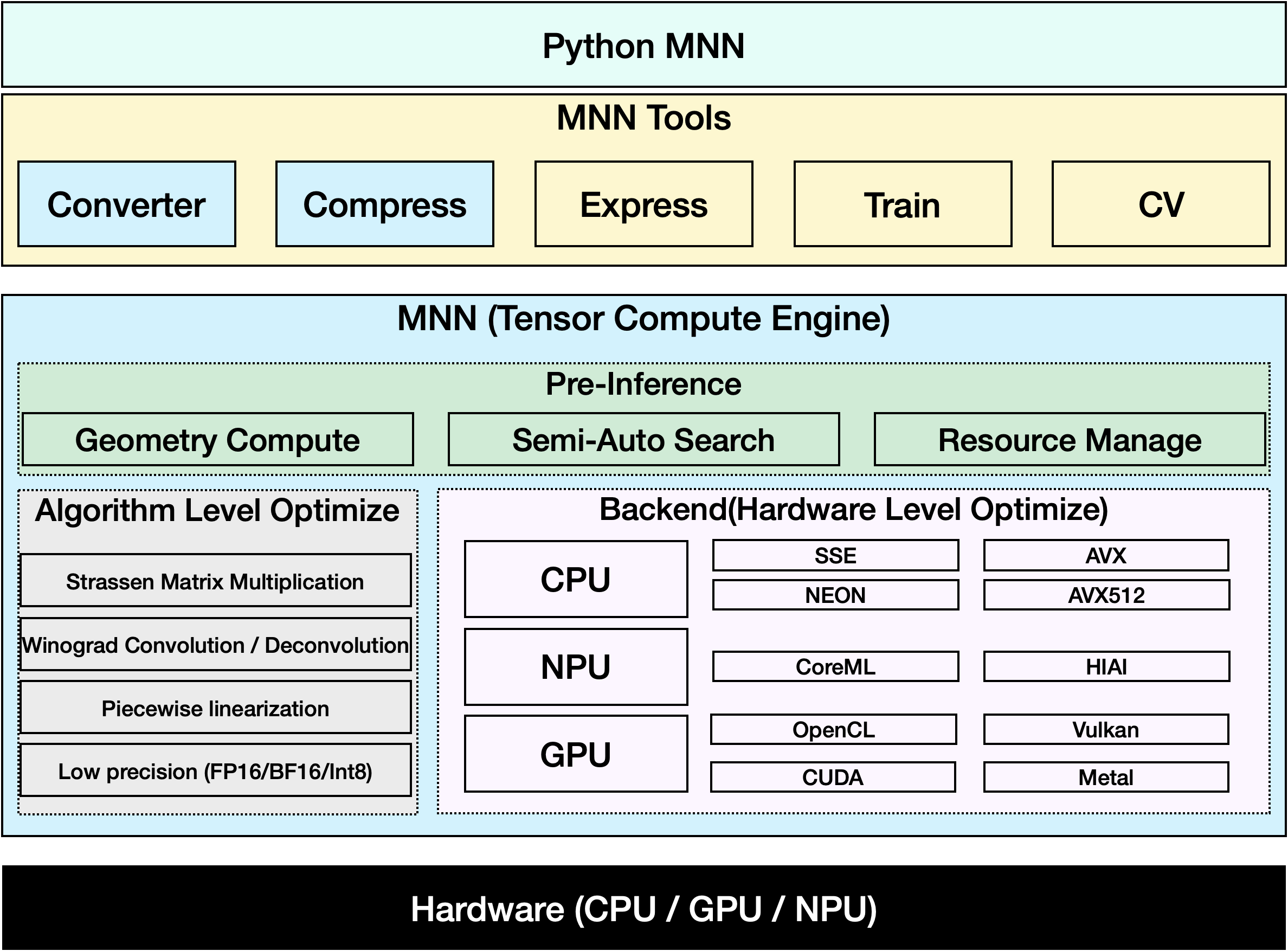
MNN 是一个高效且轻量级的深度学习框架。它支持深度学习模型的推理和训练,在设备端推理与训练方面拥有业界领先的性能。目前,MNN 已集成到阿里巴巴集团 30 多款应用中,例如淘宝、天猫、优酷、钉钉、闲鱼等,覆盖直播、短视频拍摄、搜索推荐、图像搜商品、互动营销、权益分发、安全风控等 70 多种使用场景。此外,MNN 还用于 IoT 等嵌入式设备。
观看: 如何将 Ultralytics YOLO26 导出为 MNN 格式 | 加快移动设备上的推理速度📱
支持的任务#
MNN 导出支持 Ultralytics 的全部七种任务。语义分割和深度估计仅适用于 YOLO26,因为只有 YOLO26 系列配备了这些输出头。
导出为 MNN:转换你的 YOLO26 模型#
将 Ultralytics YOLO 模型转换为 MNN 格式,可以扩展模型兼容性并提高部署灵活性。此转换可针对移动端和嵌入式环境优化模型,确保模型在资源受限设备上高效运行。
安装#
运行以下命令安装所需的软件包:
# Install the required package for YOLO26 and MNN
pip install ultralytics
pip install MNN用法#
所有 Ultralytics YOLO26 模型均支持开箱即用的导出,便于你将模型集成到首选的部署工作流中。你可以查看支持的导出格式和配置选项的完整列表,为你的应用选择最佳配置。
MNN 格式支持导出、预测和验证模式。导出模型后,加载导出的模型即可运行推理或验证其精度。
from ultralytics import YOLO

# 加载 YOLO26 模型
model = YOLO("yolo26n.pt")

# 将模型导出为 MNN 格式
model.export(format="mnn") # 创建 'yolo26n.mnn'from ultralytics import YOLO
# 加载导出的 MNN 模型
model = YOLO("yolo26n.mnn")
# 运行推理
results = model("https://ultralytics.com/images/bus.jpg")from ultralytics import YOLO
# 加载导出的 MNN 模型
model = YOLO("yolo26n.mnn")
# 在 COCO8 数据集上验证准确率
metrics = model.val(data="coco8.yaml")导出参数#
| 参数 | 类型 | 默认值 | 说明 |
|---|---|---|---|
format | str | 'mnn' | 导出模型的目标格式,用于定义与各种部署环境的兼容性。 |
imgsz | int 或 tuple | 640 | 模型输入所需的图像尺寸。正方形图像可使用整数;若要指定具体尺寸,则可使用元组 (height, width)。 |
quantize | int 或 str | None | 量化精度:16(FP16)或 8(INT8)会缩减导出权重;32/未设置时导出 FP32 权重,但 Ultralytics 的 MNNBackend 仍会以 low 精度运行,而不是 FP32。此选项取代已弃用的 half/int8 标志。 |
simplify | bool | True | 使用 onnxslim 简化中间 ONNX 图。 |
opset | int | None | 指定中间 ONNX 图的 ONNX opset 版本。若未设置,则使用最新的受支持版本。 |
batch | int | 1 | 指定导出模型的批量推理大小,或导出模型在 predict 模式下可同时处理的最大图像数。 |
dynamic | bool | False | 启用动态输入图像尺寸。不能与 nms=True 同时使用。 |
nms | bool,可选 | None | 选择原始输出(None,默认值)、嵌入式 NMS(True)或无 NMS 输出头(False)。嵌入式 NMS 支持检测和姿势任务,并使用 dynamic=False。 |
device | str | None | 指定导出设备:GPU(device=0)、CPU(device=cpu)、Apple 芯片的 MPS(device=mps)。 |
有关导出流程的更多详情,请访问 Ultralytics 导出文档页面。
仅使用 MNN 进行推理#
我们实现了一个仅依赖 MNN 执行 YOLO26 推理和预处理的函数,并提供 Python 和 C++ 版本,方便在任何场景中部署。
import argparse

import MNN
import MNN.cv as cv2
import MNN.numpy as np

def inference(model, img, precision, backend, thread):
    config = {}
    config["precision"] = precision
    config["backend"] = backend
    config["numThread"] = thread
    rt = MNN.nn.create_runtime_manager((config,))
    # net = MNN.nn.load_module_from_file(model, ['images'], ['output0'], runtime_manager=rt)
    net = MNN.nn.load_module_from_file(model, [], [], runtime_manager=rt)
    original_image = cv2.imread(img)
    ih, iw, _ = original_image.shape
    length = max((ih, iw))
    scale = length / 640
    image = np.pad(original_image, [[0, length - ih], [0, length - iw], [0, 0]], "constant")
    image = cv2.resize(
        image, (640, 640), 0.0, 0.0, cv2.INTER_LINEAR, -1, [0.0, 0.0, 0.0], [1.0 / 255.0, 1.0 / 255.0, 1.0 / 255.0]
    )
    image = image[..., ::-1]  # BGR 转 RGB
    input_var = image[None]
    input_var = MNN.expr.convert(input_var, MNN.expr.NC4HW4)
    output_var = net.forward(input_var)
    output_var = MNN.expr.convert(output_var, MNN.expr.NCHW)
    output_var = output_var.squeeze()
    # output_var 形状:[84, 8400];84 表示:[cx, cy, w, h, prob * 80]
    cx = output_var[0]
    cy = output_var[1]
    w = output_var[2]
    h = output_var[3]
    probs = output_var[4:]
    # [cx, cy, w, h] -> [x0, y0, x1, y1]
    x0 = cx - w * 0.5
    y0 = cy - h * 0.5
    x1 = cx + w * 0.5
    y1 = cy + h * 0.5
    boxes = np.stack([x0, y0, x1, y1], axis=1)
    # 获取最大 prob 和 idx
    scores = np.max(probs, 0)
    class_ids = np.argmax(probs, 0)
    result_ids = MNN.expr.nms(boxes, scores, 100, 0.45, 0.25)
    print(result_ids.shape)
    # nms 结果:box、score、ids
    result_boxes = boxes[result_ids]
    result_scores = scores[result_ids]
    result_class_ids = class_ids[result_ids]
    for i in range(len(result_boxes)):
        x0, y0, x1, y1 = result_boxes[i].read_as_tuple()
        y0 = int(y0 * scale)
        y1 = int(y1 * scale)
        x0 = int(x0 * scale)
        x1 = int(x1 * scale)
        # 裁剪到原始图像尺寸,以处理应用填充的情况
        x1 = min(iw, x1)
        y1 = min(ih, y1)
        print(result_class_ids[i])
        cv2.rectangle(original_image, (x0, y0), (x1, y1), (0, 0, 255), 2)
    cv2.imwrite("res.jpg", original_image)

if __name__ == "__main__":
    parser = argparse.ArgumentParser()
    parser.add_argument("--model", type=str, required=True, help="the yolo26 model path")
    parser.add_argument("--img", type=str, required=True, help="the input image path")
    parser.add_argument("--precision", type=str, default="normal", help="inference precision: normal, low, high, lowBF")
    parser.add_argument(
        "--backend",
        type=str,
        default="CPU",
        help="inference backend: CPU, OPENCL, OPENGL, NN, VULKAN, METAL, TRT, CUDA, HIAI",
    )
    parser.add_argument("--thread", type=int, default=4, help="inference using thread: int")
    args = parser.parse_args()
inference(args.model, args.img, args.precision, args.backend, args.thread)总结#
本指南介绍如何将 Ultralytics YOLO26 模型导出为 MNN 格式,以及如何使用 MNN 进行推理。MNN 格式在边缘 AI应用中性能出色,因此非常适合在资源受限设备上部署计算机视觉模型。
有关更多用法,请参阅 MNN 文档。
常见问题#
按照以下步骤将 Ultralytics YOLO26 模型导出为 MNN 格式:
导出from ultralytics import YOLO # 加载 YOLO26 模型 model = YOLO("yolo26n.pt") # 导出为 MNN 格式 model.export(format="mnn") # 创建带有 fp32 权重的 'yolo26n.mnn' model.export(format="mnn", quantize=16) # 创建带有 fp16 权重的 'yolo26n.mnn' model.export(format="mnn", quantize=8) # 创建带有 int8 权重的 'yolo26n.mnn'如需了解详细的导出选项,请查看文档中的导出页面。
若要使用导出的 YOLO26 MNN 模型进行预测,请使用 YOLO 类中的
predict函数。预测from ultralytics import YOLO # 加载 YOLO26 MNN 模型 model = YOLO("yolo26n.mnn") # 运行推理 results = model("https://ultralytics.com/images/bus.jpg") for result in results: result.show() # 显示到屏幕上 result.save(filename="result.jpg") # 保存到磁盘MNN 用途广泛,支持多种平台:
- 移动端:Android、iOS、Harmony。
- 嵌入式系统和 IoT 设备:Raspberry Pi 和 NVIDIA Jetson 等设备。
- 桌面端和服务器:Linux、Windows 和 macOS。
若要在移动设备上部署 YOLO26 模型:
- 为 Android 构建:按照 MNN Android 指南操作。
- 为 iOS 构建:按照 MNN iOS 指南操作。
- 为 Harmony 构建:按照 MNN Harmony 指南操作。