Ultralytics YOLO26を使用したStreamlitアプリケーションによるライブ推論
はじめに#
Streamlitを使うと、インタラクティブなWebアプリケーションを簡単に構築してデプロイできます。Ultralytics YOLO26と組み合わせることで、ブラウザー上で直接、リアルタイムの物体検出と分析を実行できます。YOLO26は速度と精度に優れており、セキュリティや小売などの用途におけるライブ動画ストリームに適しています。
視聴: Ultralytics YOLO26 と Streamlit でライブ推論アプリを構築する方法 | 検出とセグメンテーション 🚀
| 養殖 | 畜産 |
|---|---|
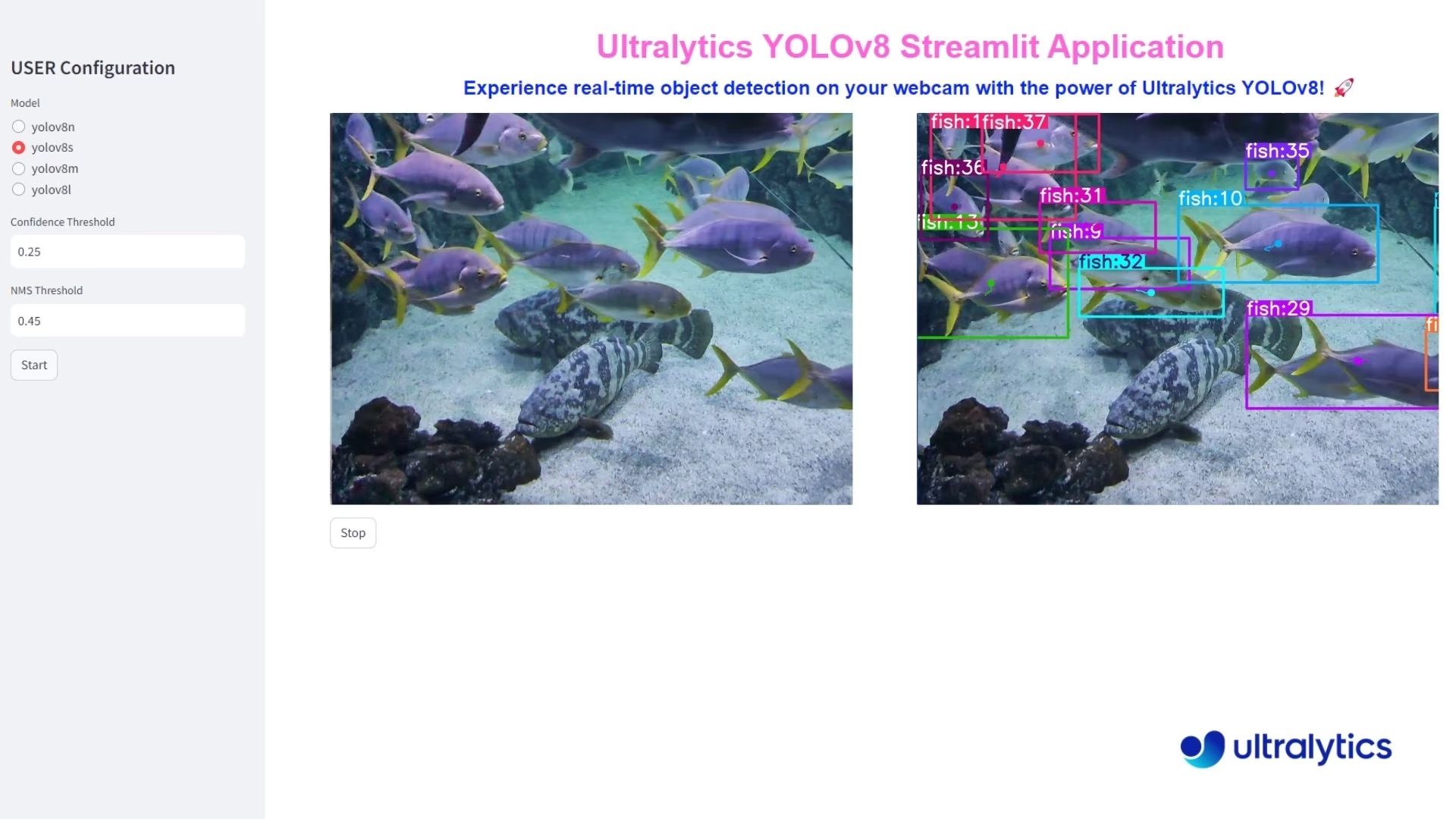 | 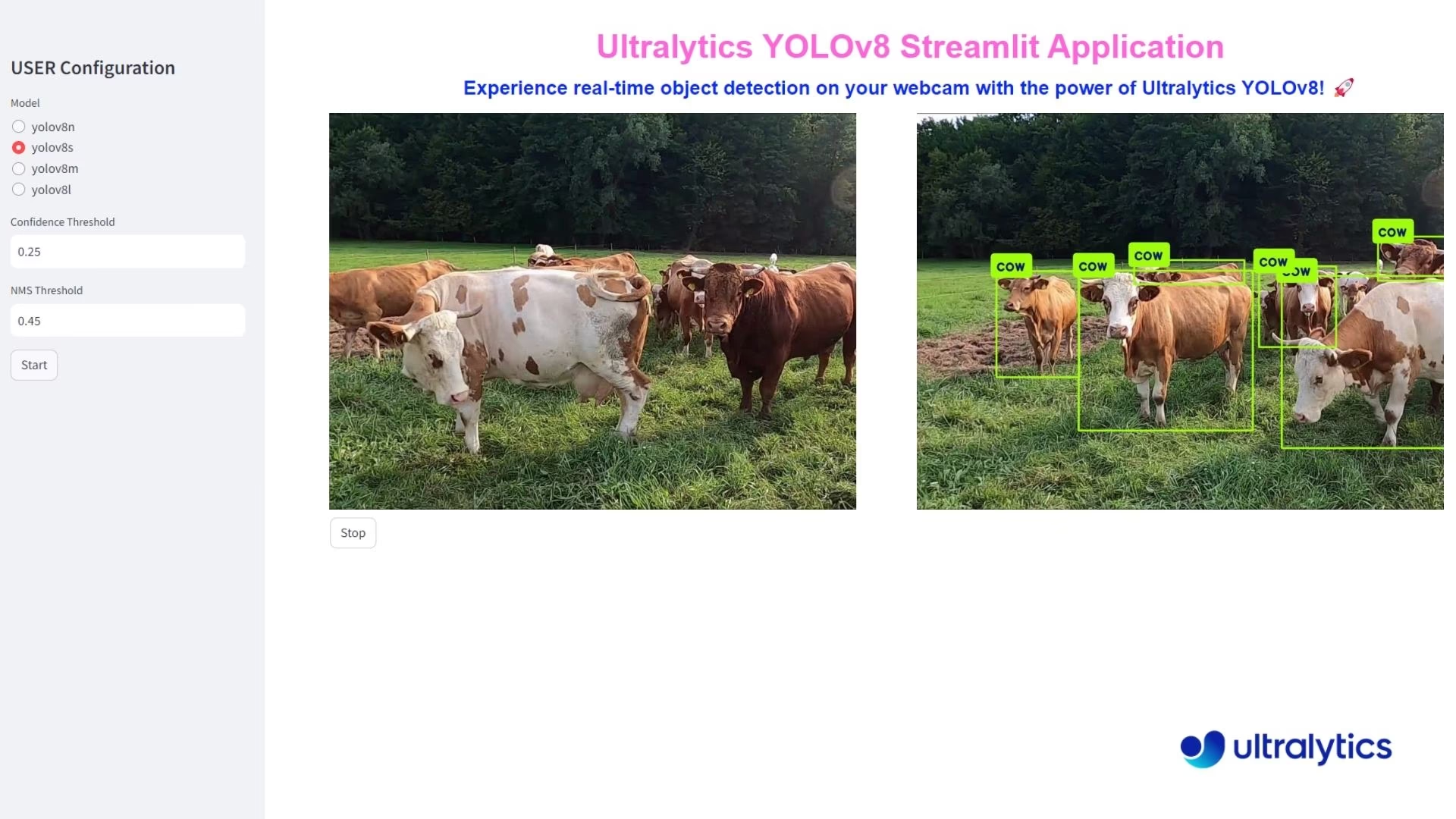 |
| Ultralytics YOLO26による魚の検出 | Ultralytics YOLO26による動物の検出 |
ライブ推論のメリット#
- リアルタイム物体検出: StreamlitとYOLO26を組み合わせると、Webカメラの映像から直接、リアルタイムで物体を検出できます。すぐに分析して情報を得られるため、即時のフィードバックが必要な用途に適しています。
- 使いやすいデプロイ:Streamlitのインタラクティブなインターフェースを使えば、高度な技術知識がなくてもアプリケーションを簡単にデプロイして利用できます。ユーザーは簡単なクリック操作でライブ推論を開始でき、利用しやすさが向上します。
- 効率的なリソース活用:YOLO26の最適化されたアルゴリズムにより、最小限の計算リソースで高速に処理できます。この効率性により、標準的なハードウェアでもWebカメラ推論をスムーズかつ安定して実行でき、高度なコンピュータービジョンをより多くの人が利用できるようになります。
Streamlitアプリケーションのコード#
アプリケーションの構築を始める前に、Ultralytics Pythonパッケージがインストールされていることを確認してください。
pip install ultralyticsyolo solutions inference
yolo solutions inference model="path/to/model.pt"
yolo solutions help # list the available solution commands and argumentsこれらのコマンドを実行すると、Ultralyticsに付属するデフォルトのStreamlitインターフェースが起動します。
これにより、デフォルトのWebブラウザーでStreamlitアプリケーションが起動します。メインタイトル、サブタイトル、設定オプションのあるサイドバーが表示されます。使用するYOLO26モデルを選択し、信頼度とNMSのしきい値を設定して、「Start」ボタンをクリックすると、リアルタイム物体検出が始まります。
仕組み#
内部では、StreamlitアプリケーションがUltralytics solutionsモジュールを使用して、インタラクティブなインターフェースを作成します。推論を開始すると、アプリケーションは次の処理を行います。
- Webカメラ、アップロードした動画ファイル、またはアップロードした画像からフレームを取得します
- 各フレームをYOLO26モデルで処理します
- 指定された信頼度とIoUのしきい値を使用して物体検出を行います
- 元のフレームと注釈付きフレームの両方をリアルタイムで表示します
- 選択した場合は、物体追跡を有効にします
アプリケーションは、モデルのパラメーターを調整したり、いつでも推論を開始・停止したりできる、すっきりとした使いやすいインターフェースを提供します。
結論#
このガイドに従って、StreamlitとUltralytics YOLO26を使用したリアルタイム物体検出アプリケーションを作成しました。このアプリケーションは、シンプルなインターフェースを通じてWebカメラ、動画、または画像の入力にYOLO26を実行し、いつでもストリームを停止できます。
さらに機能を拡張するには、動画ストリームの録画、注釈付きフレームの保存、その他のコンピュータービジョンライブラリとの統合などを検討できます。
よくある質問#
StreamlitとUltralytics YOLO26を使ったリアルタイム物体検出アプリケーションは、簡単に設定できます。まず、次のコマンドを使用してUltralytics Pythonパッケージがインストールされていることを確認してください。
pip install ultralytics次に、ライブ推論を実行する基本的なStreamlitアプリケーションを作成できます。
Streamlitアプリケーションfrom ultralytics import solutions inf = solutions.Inference( model="yolo26n.pt", # Ultralyticsがサポートする任意のモデル(YOLO26やカスタム学習済みモデルなど)を使用できます ) inf.inference() # `streamlit run path/to/file.py`コマンドを使ってファイルを実行してください実践的な設定の詳細については、ドキュメントのStreamlitアプリケーションのコードのセクションを参照してください。
リアルタイム物体検出にStreamlitとUltralytics YOLO26を使用すると、次のような利点があります。
- リアルタイム検出: Webカメラの映像から直接、高い精度でリアルタイムの物体検出を実行できます。
- 使いやすいインターフェース: Streamlitの直感的なインターフェースにより、高度な技術知識がなくても簡単に使用およびデプロイできます。
- リソース効率: YOLO26の最適化されたアルゴリズムにより、最小限の計算リソースで高速な処理を実現します。
これらの利点については、ライブ推論の利点のセクションで詳しく説明しています。
Ultralytics YOLO26を統合したStreamlitアプリケーションを作成したら、次のコマンドを実行してデプロイできます。
streamlit run path/to/file.pyこのコマンドを実行すると、デフォルトのWebブラウザーでアプリケーションが起動し、YOLO26モデルの選択、信頼度とIoUのしきい値の設定、クリック操作によるリアルタイム物体検出の開始が可能になります。
StreamlitとUltralytics YOLO26によるリアルタイム物体検出は、さまざまな分野で活用できます。
- セキュリティ: 不正アクセスのリアルタイム監視やセキュリティアラームシステムに活用できます。
- 小売: 顧客数のカウント、棚の管理、在庫追跡に活用できます。
- 野生生物と農業: 保全活動のために、動物や作物の状態を監視できます。
ユースケースや事例の詳細については、Ultralytics Solutionsをご覧ください。
Ultralytics YOLO26は、YOLOv5やR-CNN系検出器などの従来のモデルと比べて、いくつかの機能強化が施されています。
- 高速化と高精度化: リアルタイムアプリケーションでの性能が向上しています。
- 使いやすさ: インターフェースとデプロイが簡素化されています。
- リソース効率: 最小限の計算要件で、より高速に動作するよう最適化されています。


コメント26
質問したり、結果を共有したり、ほかの人をサポートしたりできます。
j3dd4h
the manual execution using rknn model (yolo predict model='./best_rknn_model' source='ppe.jpg') is working but got an error when running under Streamlit.
TypeError: model='best_rknn_model/best-rk3588.rknn' is not a supported model format. Ultralytics supports: ('PyTorch', 'TorchScript', 'ONNX', 'OpenVINO', 'TensorRT', 'CoreML', 'TensorFlow SavedModel', 'TensorFlow GraphDef', 'TensorFlow Lite', 'TensorFlow Edge TPU', 'TensorFlow.js', 'PaddlePaddle', 'MNN', 'NCNN', 'IMX', 'RKNN') See https://docs.ultralytics.com/modes/predict for help.
1RizwanMunawar
@j3dd4h Hi, thanks for sharing the details. We currently don't support the rknn model, but you can adjust this check in code to make the application work for rknn models. We will add support for this soon.
Ok, got it
@j3dd4h opened the Pull request here: https://github.com/ultralytics/ultralytics/pull/22212
NNQHuong
AttributeError: module 'torch' has no attribute '__version__' Traceback: File "C:\Users\myname\AppData\Local\Packages\PythonSoftwareFoundation.Python.3.11_qbz5n2kfra8p0\LocalCache\local-packages\Python311\site-packages\streamlit\runtime\scriptrunner\exec_code.py", line 88, in exec_func_with_error_handling result = func() ^^^^^^ File "C:\Users\myname\AppData\Local\Packages\PythonSoftwareFoundation.Python.3.11_qbz5n2kfra8p0\LocalCache\local-packages\Python311\site-packages\streamlit\runtime\scriptrunner\script_runner.py", line 579, in code_to_exec exec(code, module.__dict__) File "C:\WasteSegregation\app.py", line 1, in <module> from ultralytics import solutions File "C:\Users\myname\AppData\Local\Packages\PythonSoftwareFoundation.Python.3.11_qbz5n2kfra8p0\LocalCache\local-packages\Python311\site-packages\ultralytics\__init__.py", line 11, in <module> from ultralytics.models import NAS, RTDETR, SAM, YOLO, FastSAM, YOLOWorld File "C:\Users\myname\AppData\Local\Packages\PythonSoftwareFoundation.Python.3.11_qbz5n2kfra8p0\LocalCache\local-packages\Python311\site-packages\ultralytics\models\__init__.py", line 3, in <module> from .fastsam import FastSAM File "C:\Users\myname\AppData\Local\Packages\PythonSoftwareFoundation.Python.3.11_qbz5n2kfra8p0\LocalCache\local-packages\Python311\site-packages\ultralytics\models\fastsam\__init__.py", line 3, in <module> from .model import FastSAM File "C:\Users\myname\AppData\Local\Packages\PythonSoftwareFoundation.Python.3.11_qbz5n2kfra8p0\LocalCache\local-packages\Python311\site-packages\ultralytics\models\fastsam\model.py", line 5, in <module> from ultralytics.engine.model import Model File "C:\Users\myname\AppData\Local\Packages\PythonSoftwareFoundation.Python.3.11_qbz5n2kfra8p0\LocalCache\local-packages\Python311\site-packages\ultralytics\engine\model.py", line 11, in <module> from ultralytics.cfg import TASK2DATA, get_cfg, get_save_dir File "C:\Users\myname\AppData\Local\Packages\PythonSoftwareFoundation.Python.3.11_qbz5n2kfra8p0\LocalCache\local-packages\Python311\site-packages\ultralytics\cfg\__init__.py", line 12, in <module> from ultralytics.utils import ( File "C:\Users\myname\AppData\Local\Packages\PythonSoftwareFoundation.Python.3.11_qbz5n2kfra8p0\LocalCache\local-packages\Python311\site-packages\ultralytics\utils\__init__.py", line 51, in <module> TORCH_VERSION = torch.__version__ ^^^^^^^^^^^^^^^^^This is the error I encountered when usingfrom ultralytics import solutionssolutions.inference(model =r'C:path\to\my\model.pt')method (VSCode), can you please explain it to me? For further information, I've tried using the method for CLI and it works, but not with VSCode. I wonder if there's any method for CLI that allows me to use my custom trained model? It's YOLO11n-cls version. Thank you for reading this!1 Glenn JocherUltralytics
@NNQHuong the error you're encountering suggests a possible issue with your PyTorch installation. Please verify that PyTorch is properly installed and compatible with your Python version by running:
import torch
print(torch.__version__)
If the error persists, ensure you're using the latest version of PyTorch and Ultralytics with:
pip install --upgrade torch ultralyticsRegarding your CLI query, you can use your custom-trained YOLO11 model by specifying the model path directly, like so:
yolo predict model=path/to/your/model.pt source=your_inputFor detailed examples, check the documentation here. Let me know if additional assistance is required!
2Hi @NNQHuong, thank you for sharing the error log! It appears that the issue might be related to your PyTorch version. You may need to upgrade or downgrade it to ensure everything works correctly.
However, if this still doesn't resolve the issue, please share your code here for further testing.
Thanks, Ultralytics Team!
1Thanks for your infomative reply, it worked smoothly! I'm kind of new to this field anyway, about 6 months , I bet you can see it in my words haha, so thanks for your patience too!
1
Tech-Watt
Is it posible to use different camera index ?. It picks up the default computer webcam and there's no means of changing it.
- Glenn JocherUltralytics(編集済み)
The
Inferenceclass has nosourceargument: selecting "webcam" in the sidebar always opens camera index0(self.vid_file_name = 0inultralytics/solutions/streamlit_inference.py). To use a different camera, make it your system's default camera or change that index in the file:inf = solutions.Inference(model="yolo26n.pt") inf.inference()Run it with
streamlit run <file-name.py>.
Vectorvin
streamlit 这个解决方案可以使用tensorRT格式或者onnx格式吗?似乎程序被写死了
- Glenn JocherUltralytics(編集済み)
@Vectorvin 您好!Streamlit 方案现在也支持导出的模型格式:除了
.pt,还可以把.onnx、.torchscript、.mlpackage、.engine(TensorRT)、OpenVINO 或 RKNN 模型路径传给solutions.Inference(model="yolo26n.engine")。导出步骤请参考导出文档。需要企业级部署支持请访问ultralytics.com/license。
sathyanarayanaRP
how does the streamlit gets is input , is it possible to push frames or is it possible to integrate machine vision cameras that does not support RTSP protocals. i need comprehensive knowledge how does it work as a streaming device
- Glenn JocherUltralytics
@sathyanarayanaRP streamlit can receive input directly from a webcam or video file. For cameras that don't support RTSP, you can use USB or other compatible connections. The Streamlit app processes frames in real-time, allowing for seamless integration with various camera types. For more details, please refer to the Streamlit documentation.
Cheikh-Ahmedand
hey!
Once I run the app my Laptop camera turns on, instead of My webcam. How to use my external webcam instead of my LAPTOP camera?
Best Regards!
- Glenn JocherUltralytics(編集済み)
@Cheikh-Ahmedand the Streamlit app has no
sourceargument: choosing "webcam" in the sidebar always opens camera index0(self.vid_file_name = 0inultralytics/solutions/streamlit_inference.py). To use your external webcam, make it the system's default camera, or change that index to1(or the index of your webcam) in the file.Run the app with
yolo solutions inference, or withstreamlit run <file-name.py>for your own script. Hey ! Thanks lot for your response, but the code couldn't work with streamlit code. I pasted the following code on my Laptop anconda PowerShell Prompt:
yolo streamlit-predict solutions.inference(source=1)
Still, my Webcam can't run, but my Laptop 's Camera.
Also, I tried the below code in jupyter notebook, but the problem still persists.
from ultralytics import solutions
solutions.inference() solutions.inference(source=1)
Make sure to run the file using command
streamlit run <file-name.py>Any help either from the Respectful Staff or others would be appreciated!!!
- Glenn JocherUltralytics(編集済み)
@Cheikh-Ahmedand the Streamlit app has no
sourceargument: choosing "webcam" in the sidebar always opens camera index0(self.vid_file_name = 0inultralytics/solutions/streamlit_inference.py). To use an external webcam, set it as your system's default camera or change that index in the file. Run the app withyolo solutions inference, orstreamlit run <file-name.py>for your own script. If issues persist, please check your system's camera settings.
AdadAlShabab
Can you please provide the stramlit .py file that we need to run?
- Glenn JocherUltralytics(編集済み)
@AdadAlShabab you can use the following code to run the Streamlit application for live inference:
from ultralytics import solutions

inf = solutions.Inference(model="yolo26n.pt")
inf.inference()
Run the file with the command
streamlit run <file-name.py>. For more details, please refer to the Streamlit Live Inference Guide.
ghost
Thank you for your quick and kind response and the problem is sorted. But there is another issue while switching model to different task like pose,seg or cls and getting error of open cv not having func()
- Glenn JocherUltralytics
@Charan2128 i'm glad to hear the initial issue is resolved. Regarding the error with OpenCV when switching tasks (pose, seg, cls), please ensure you have the latest versions of both the Ultralytics package and OpenCV. You can update them using:
pip install --upgrade ultralytics opencv-pythonIf the issue persists, please provide more details about the error message and the specific function that is causing the problem. This will help us diagnose and address the issue more effectively. For further guidance, you can also refer to our Streamlit Live Inference Guide.
That was a Quick Replay and Quick fix ,Thanks for your kind support on my issues. The problem is fixed now.
- Glenn JocherUltralytics
@Charan2128 i'm glad to hear the initial issue is resolved. For the new issue with switching tasks and encountering OpenCV errors, please ensure you have the latest versions of both the Ultralytics package and OpenCV installed. You can update them using
pip install --upgrade ultralytics opencv-python. If the problem persists, please provide the specific error message and function causing the issue so we can assist you further. For more detailed guidance, you can refer to our Streamlit Live Inference Guide.
AttributeError: module 'ultralytics.solutions' has no attribute 'inference' Traceback: File "C:\Users\DELL\AppData\Local\Programs\Python\Python312\Lib\site-packages\streamlit\runtime\scriptrunner\exec_code.py", line 75, in exec_func_with_error_handling result = func() ^^^^^^ File "C:\Users\DELL\AppData\Local\Programs\Python\Python312\Lib\site-packages\streamlit\runtime\scriptrunner\script_runner.py", line 574, in code_to_exec exec(code, module.dict) File "D:\YOLO\infer.py", line 3, in solutions.inference() ^^^^^^^^^^^^^^^^^^^ This is the error im getting while running this and i have installed necessary packages.
 Paula DerrengerUltralytics(編集済み)
@Charan2128 it looks like you're encountering an
AttributeErrorbecausesolutions.inferenceis not an attribute of theultralytics.solutionsmodule. Please ensure you are using the latest version of the Ultralytics package by runningpip install --upgrade ultralytics. Then launch the Streamlit app directly from the CLI withyolo solutions inference, or from Python withsolutions.Inference(model="yolo26n.pt").inference()run viastreamlit run <file-name.py>. For more details, you can refer to our Streamlit Live Inference Guide.