Google Cloud Platform (GCP) Deep Learning VM で YOLOv5 を使いこなす#
人工知能 (AI)と機械学習 (ML)の活用は、特にクラウドコンピューティングプラットフォームの力と柔軟性を生かせば、刺激的な取り組みになります。Google Cloud Platform (GCP) は、ML に取り組む愛好家や専門家向けに強力なツールを提供しています。その一つが、データサイエンスと ML のタスク向けに事前設定された Deep Learning VM です。このチュートリアルでは、GCP Deep Learning VMでUltralytics YOLOv5をセットアップする手順を説明します。ML を始めたばかりの方にも、経験豊富な実践者にも、YOLOv5 を活用した物体検出モデルを実装するための明確な手順をご紹介します。
🆓 さらに、GCP を初めて利用する方には、プロジェクトを始めるために使える300 ドル分の無料クレジットが提供されます。
GCP に加え、YOLOv5 を始めるための便利な方法として、ブラウザー上で利用できるGoogle Colab ノートブック  や、スケーラビリティに優れたAmazon AWSもご検討ください。また、コンテナを活用する場合は、Docker Hub
ステップ 1:Deep Learning VM を作成して設定する#
まず、ディープラーニングに最適化された仮想マシンを作成します。
- GCP マーケットプレイスに移動し、Deep Learning VM を選択します。
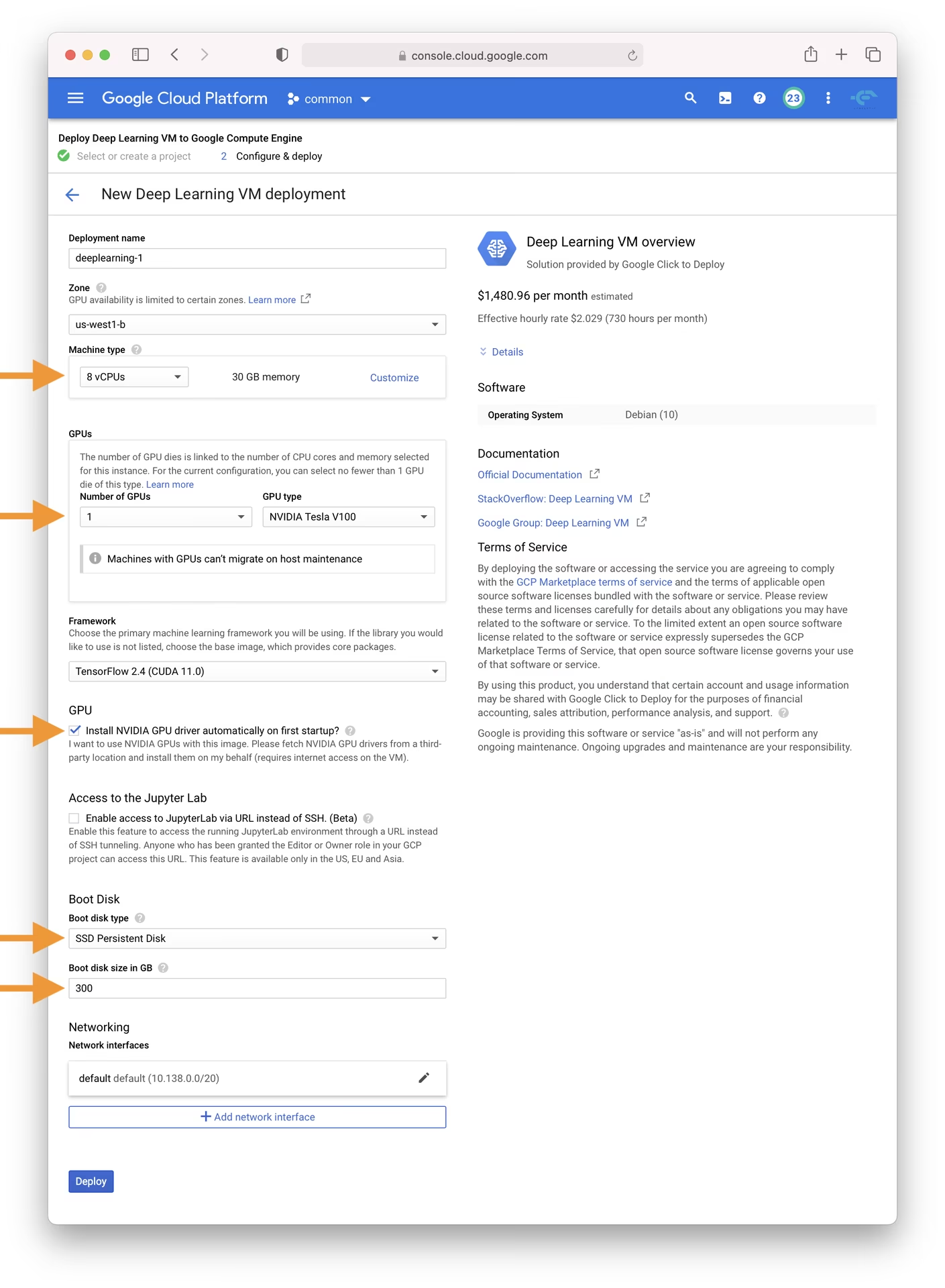
- n1-standard-8 インスタンスを選択します。vCPU 8 個とメモリ 30 GB のバランスが取れており、多くの ML タスクに適しています。
- GPUを選択します。選択肢はワークロードによって異なりますが、基本的な T4 GPU でもモデルのトレーニングを大幅に高速化できます。
- スムーズにセットアップするには、「初回起動時に NVIDIA GPU ドライバーを自動的にインストールしますか?」のチェックボックスをオンにします。
- I/O のボトルネックを防ぐため、300 GB の SSD 永続ディスクを割り当てます。
- 「Deploy」をクリックし、GCP がカスタム Deep Learning VM をプロビジョニングするまで待ちます。
この VM には、YOLOv5 に必要な多くの依存関係がまとめて含まれている Anaconda Python ディストリビューションをはじめ、必須のツールとフレームワークが事前にインストールされています。
ステップ 2:YOLOv5 用に VM を準備する#
環境をセットアップしたら、YOLOv5 をインストールして使用できる状態にします。
# Clone the YOLOv5 repository
git clone https://github.com/ultralytics/yolov5
cd yolov5

# Install dependencies
pip install -r requirements.txt
このセットアップでは、Python 3.8.0 以降の環境と PyTorch 1.8 以降が用意されます。スクリプトは最新の YOLOv5 リリースからモデルとデータセットを自動的にダウンロードするため、モデルのトレーニングを簡単に開始できます。
ステップ 3:YOLOv5 モデルをトレーニングしてデプロイする#
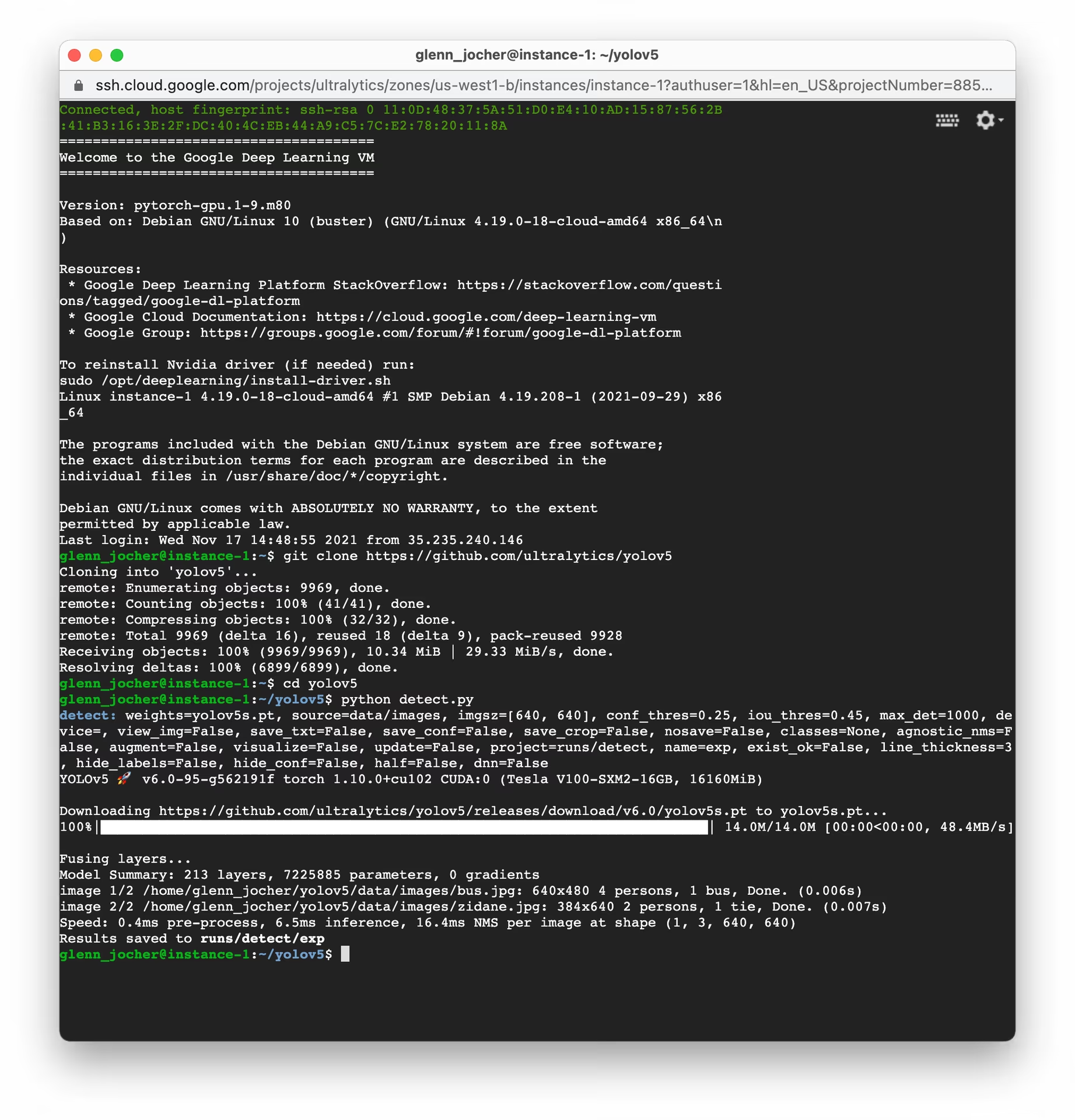
セットアップが完了すると、GCP VM 上で YOLOv5 によるトレーニング、検証、予測、エクスポートを実行できます。
# Train a YOLOv5 model on your dataset (e.g., yolov5s)
python train.py --data coco128.yaml --weights yolov5s.pt --img 640

# Validate the trained model to check Precision, Recall, and mAP
python val.py --weights yolov5s.pt --data coco128.yaml

# Run inference using the trained model on images or videos
python detect.py --weights yolov5s.pt --source path/to/your/images_or_videos

# Export the trained model to various formats like ONNX, CoreML, TFLite for deployment
python export.py --weights yolov5s.pt --include onnx coreml tflite
わずかなコマンドで、YOLOv5 を使用して特定のニーズに合わせたカスタム物体検出モデルをトレーニングしたり、事前学習済みの重みを利用してさまざまなタスクですばやく結果を得たりできます。エクスポート後は、さまざまなモデルのデプロイオプションをご確認ください。
スワップ領域を割り当てる(任意)#
VM の RAM を超える可能性のある非常に大きなデータセットを扱う場合は、メモリエラーを防ぐためにスワップ領域の追加をご検討ください。
# Allocate a 64GB swap file
sudo fallocate -l 64G /swapfile

# Set the correct permissions for the swap file
sudo chmod 600 /swapfile

# Set up the Linux swap area
sudo mkswap /swapfile

# Enable the swap file
sudo swapon /swapfile

# Verify the swap space allocation (should show increased swap memory)
free -hカスタムデータセットをトレーニングする#
GCP 上で独自のデータセットを使って YOLOv5 をトレーニングするには、次の基本手順に従います。
-
YOLOv5 形式(画像と対応するラベルファイル)に従ってデータセットを準備します。詳しくは、データセットの概要をご覧ください。
-
gcloud compute scpまたはウェブコンソールの SSH 機能を使って、データセットを GCP VM にアップロードします。 -
トレーニングデータと検証データのパス、クラス数、クラス名を指定するデータセット設定 YAML ファイル(
custom_dataset.yaml)を作成します。 -
独自のデータセット YAML を使ってトレーニングプロセスを開始します。必要に応じて事前学習済みの重みから開始できます。
# Example: Train YOLOv5s on a custom dataset for 100 epochs
python train.py --img 640 --batch 16 --epochs 100 --data custom_dataset.yaml --weights yolov5s.pt
データの準備とカスタムデータセットによるトレーニングの詳細な手順については、カスタムデータのトレーニングチュートリアルをご覧ください。
クラウドストレージを活用する#
特に大規模なデータセットや多数の実験を扱う場合は、効率的なデータ管理のために YOLOv5 ワークフローをGoogle Cloud Storageと統合します。
# Ensure Google Cloud SDK is installed and initialized
# If not installed: curl https://sdk.cloud.google.com/ | bash
# Then initialize: gcloud init

# Example: Copy your dataset from a GCS bucket to your VM
gsutil cp -r gs://your-data-bucket/my_dataset ./datasets/

# Example: Copy trained model weights from your VM to a GCS bucket
gsutil cp -r ./runs/train/exp/weights gs://your-models-bucket/yolov5_custom_weights/
この方法では、大規模なデータセットやトレーニング済みモデルをクラウド上に安全かつ低コストで保存できるため、VM インスタンスに必要なストレージ容量を抑えられます。
まとめ#
おめでとうございます!Ultralytics YOLOv5 と Google Cloud Platform の計算能力を組み合わせて活用する準備が整いました。この環境は、物体検出プロジェクトにスケーラビリティ、効率性、柔軟性をもたらします。個人での探究、学術研究、産業向けのソリューションの構築など、クラウド上の AI と ML の世界に向けて大きな一歩を踏み出しました。
モデルのトレーニングと管理を簡単に行えるノーコード環境として、Ultralytics Platformの利用をご検討ください。
進捗を記録し、活気ある Ultralytics コミュニティと知見を共有してください。また、共同作業やサポートには GitHub Discussionsなどのリソースをご活用ください。YOLOv5 と GCP で革新を始めましょう!
MLスキルをさらに高めたいですか?ドキュメントを読み、Ultralyticsブログでチュートリアルや知見をご覧ください。AIの冒険を続けましょう!
よくある質問#
単一のT4 GPUを搭載した
n1-standard-8マシンで、ほとんどのYOLOv5のトレーニングと推論に対応できます。大規模なデータセットや大きなモデルを使う場合はL4またはA100に切り替え、初回起動時にNVIDIAドライバーを自動インストールするオプションを必ず選択してください。アイドル状態のときは、Compute EngineコンソールからVMを停止してください。接続されたディスクには引き続き課金されるため、プロジェクトが完了し、重みをCloud Storageに安全にコピーしたら、VMとディスクを削除してください。
小規模なデータセットには
gcloud compute scpを使用してください。それより大きなデータセットはCloud Storageバケットにアップロードし、gsutil cp -r gs://your-bucket/dataset ./datasets/で取得してください。Googleのネットワーク内では、こちらのほうがはるかに高速です。はい。Deep Learning VMにはすでにPyTorchがインストールされているため、
pip install ultralyticsを追加すると、yoloCLIでYOLO26のトレーニングとエクスポートができるようになります。詳しくはクイックスタートをご覧ください。