PyTorch HubからYOLOv5を読み込む#
📚 このガイドでは、https://pytorch.org/hub/ultralytics_yolov5にあるPyTorch HubからYOLOv5 🚀を読み込む方法を説明します。
開始する前に#
requirements.txtを、Python>=3.8.0環境にインストールしてください。これにはPyTorch>=1.8も含まれます。モデルとデータセットは、最新のYOLOv5リリースから自動的にダウンロードされます。
pip install -r https://raw.githubusercontent.com/ultralytics/yolov5/master/requirements.txtultralytics/yolov5のクローンは不要です。PyTorch Hubがコードを自動的に取得します。
PyTorch HubでYOLOv5を読み込む#
簡単な例#
この例では、PyTorch Hubから事前学習済みのYOLOv5sモデルを model として読み込み、画像を推論に渡します。'yolov5s' は小型で高速なYOLOv5モデルです。利用可能なすべてのモデルについては、READMEを参照してください。
import torch

# Model
model = torch.hub.load("ultralytics/yolov5", "yolov5s")

# Image
im = "https://ultralytics.com/images/zidane.jpg"

# Inference
results = model(im)

results.pandas().xyxy[0]
# xmin    ymin    xmax   ymax  信頼度  クラス    名前
# 0  749.50   43.50  1148.0  704.5    0.874023      0  person
# 1  433.50  433.50   517.5  714.5    0.687988     27     tie
# 2  114.75  195.75  1095.0  708.0    0.624512      0  person
# 3 986.00 304.00 1028.0 420.0 0.286865 27 tie詳細な例#
この例では、画像ソースとしてPILとOpenCVを使用したバッチ推論を示します。results はコンソールに出力したり、runs/hub に保存したり、対応環境で画面に表示したりでき、テンソルまたはpandasのDataFrameとして返すこともできます。
import cv2
import torch
from PIL import Image

# Model
model = torch.hub.load("ultralytics/yolov5", "yolov5s")

# Images
for f in "zidane.jpg", "bus.jpg":
    torch.hub.download_url_to_file(f"https://ultralytics.com/images/{f}", f)  # download 2 images
im1 = Image.open("zidane.jpg")  # PIL image
im2 = cv2.imread("bus.jpg")[..., ::-1]  # OpenCV image (BGR to RGB)

# Inference
results = model([im1, im2], size=640)  # batch of images

# Results
results.print()
results.save()  # or .show()

results.xyxy[0]  # im1 predictions (tensor)
results.pandas().xyxy[0]  # im1 predictions (pandas)
#      xmin    ymin    xmax   ymax  confidence  class    name
# 0  749.50   43.50  1148.0  704.5    0.874023      0  person
# 1  433.50  433.50   517.5  714.5    0.687988     27     tie
# 2  114.75  195.75  1095.0  708.0    0.624512      0  person
# 3  986.00  304.00  1028.0  420.0    0.286865     27     tie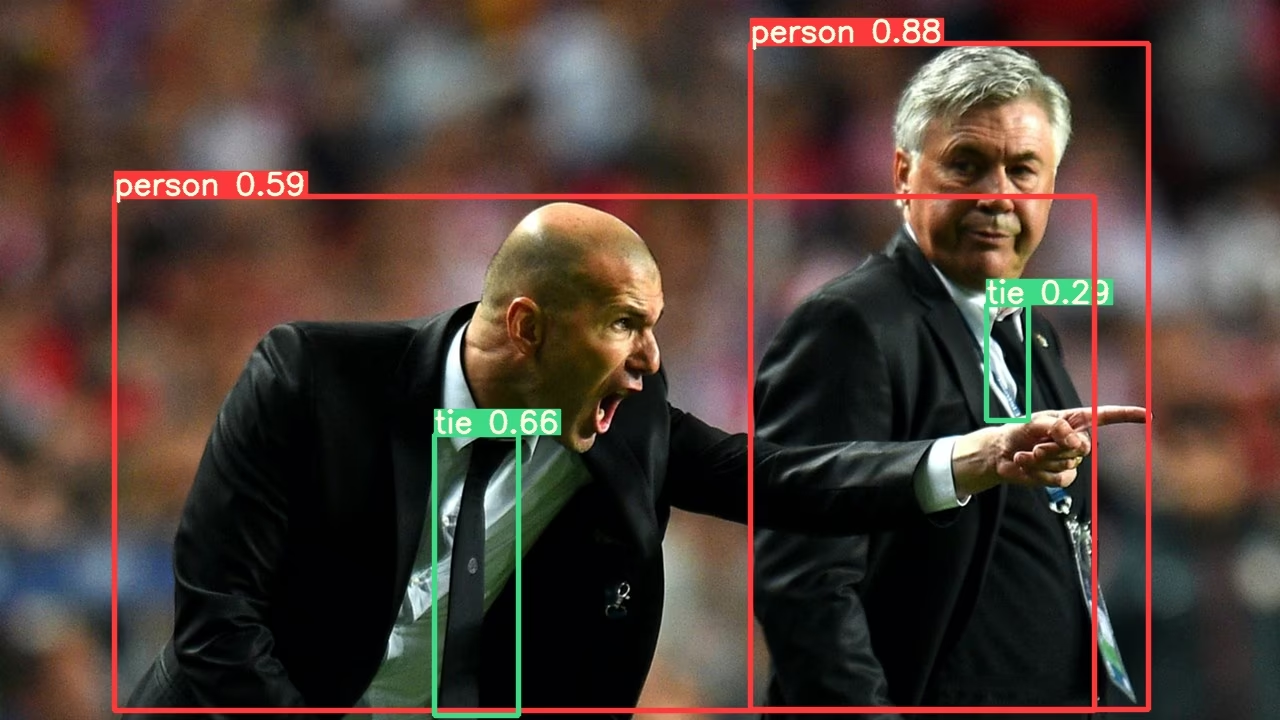
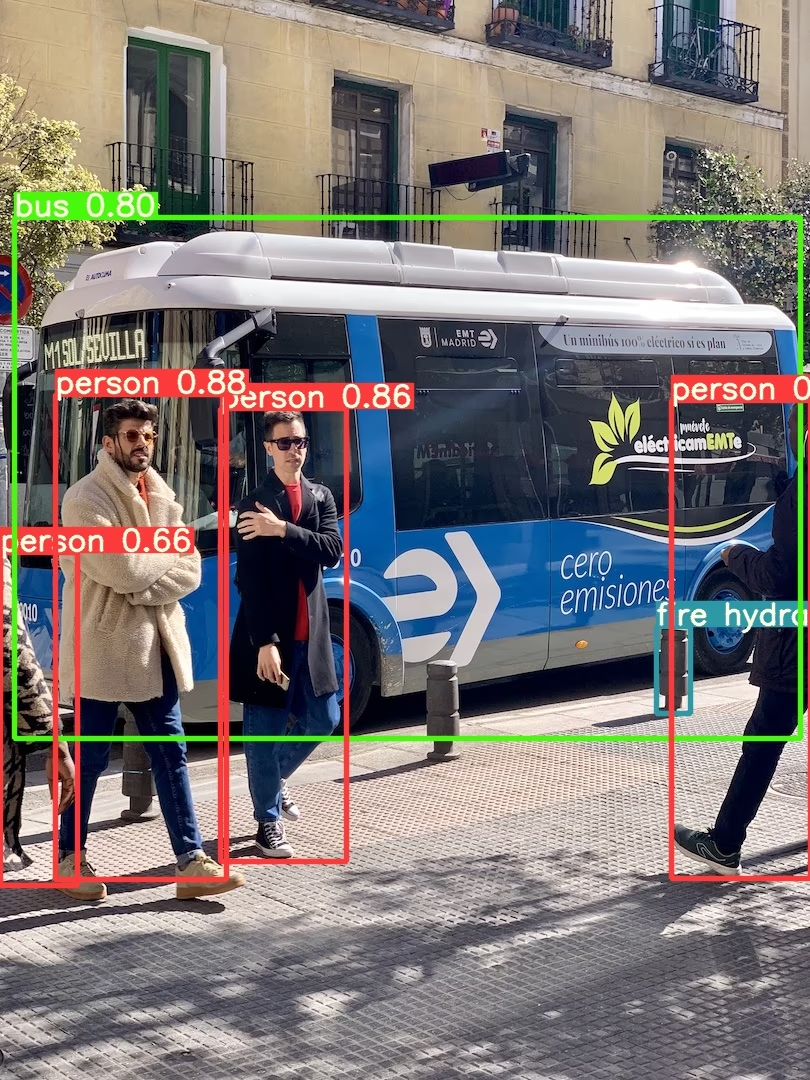
すべての推論オプションについては、YOLOv5の AutoShape() のforward メソッドを参照してください。
推論設定#
YOLOv5モデルには、信頼度しきい値やIoUしきい値など、さまざまな推論属性があり、次のように設定できます:
model.conf = 0.25  # NMSの信頼度しきい値
model.iou = 0.45  # NMSのIoUしきい値
model.agnostic = False  # NMSのクラス非依存設定
model.multi_label = False  # NMSで1つのボックスに複数のラベルを付与する設定
model.classes = None  # (省略可能なリスト)クラスでフィルタリングします。例:COCOの人物、猫、犬の場合は [0, 15, 16]
model.max_det = 1000  # 画像あたりの検出数の最大値
model.amp = False  # 自動混合精度(AMP)推論

results = model(im, size=320) # カスタム推論サイズデバイス#
モデルは作成後に任意のデバイスへ移動できます:
model.cpu()  # CPU
model.cuda()  # GPU
model.to(device)  # 例:device=torch.device(0)
モデルは任意の device 上に直接作成することもできます:
model = torch.hub.load("ultralytics/yolov5", "yolov5s", device="cpu") # CPU上で読み込む推論の前に、入力画像は適切なモデルデバイスへ自動的に転送されます。
出力を抑制する#
モデルは _verbose=False を指定して、出力を抑制しながら読み込めます:
model = torch.hub.load("ultralytics/yolov5", "yolov5s", _verbose=False) # 出力を抑制して読み込む入力チャンネル#
デフォルトの3チャンネルではなく、4つの入力チャンネルを持つ事前学習済みYOLOv5sモデルを読み込むには、次のようにします:
model = torch.hub.load("ultralytics/yolov5", "yolov5s", channels=4)この場合、モデルは事前学習済みの重みで構成されますが、最初の入力レイヤーだけは除きます。このレイヤーは事前学習済みの入力レイヤーと形状が異なるためです。入力レイヤーはランダムな重みで初期化された状態のままになります。
クラス数#
デフォルトの80クラスではなく、出力クラスが10個の事前学習済みYOLOv5sモデルを読み込むには、次のようにします:
model = torch.hub.load("ultralytics/yolov5", "yolov5s", classes=10)この場合、モデルは事前学習済みの重みで構成されますが、出力レイヤーは除きます。出力レイヤーは事前学習済みの出力レイヤーと形状が異なるためです。出力レイヤーはランダムな重みで初期化された状態のままになります。
強制再読み込み#
上記の手順で問題が発生した場合は、force_reload=True を設定すると、既存のキャッシュを破棄してPyTorch Hubから最新バージョンのYOLOv5を新たにダウンロードできます。キャッシュされたコピーは ~/.cache/torch/hub に保存されています。このフォルダーを削除しても同じ効果が得られます。
model = torch.hub.load("ultralytics/yolov5", "yolov5s", force_reload=True) # 強制再読み込みスクリーンショットで推論する#
デスクトップ画面で推論を実行するには、次のようにします:
import torch
from PIL import ImageGrab

# Model
model = torch.hub.load("ultralytics/yolov5", "yolov5s")

# Image
im = ImageGrab.grab()  # スクリーンショットを撮る

# Inference
results = model(im)マルチGPU推論#
YOLOv5モデルは、スレッド化された推論を使って複数のGPUに並列に読み込めます:
import threading

import torch

def run(model, im):
    """Performs inference on an image using a given model and saves the output; model must support `.save()` method."""
    results = model(im)
    results.save()

# Models
model0 = torch.hub.load("ultralytics/yolov5", "yolov5s", device=0)
model1 = torch.hub.load("ultralytics/yolov5", "yolov5s", device=1)

# Inference
threading.Thread(target=run, args=[model0, "https://ultralytics.com/images/zidane.jpg"], daemon=True).start()
threading.Thread(target=run, args=[model1, "https://ultralytics.com/images/bus.jpg"], daemon=True).start()トレーニング#
推論ではなくトレーニング用にYOLOv5モデルを読み込むには、autoshape=False を設定します。ランダムに初期化された重みを持つモデル(スクラッチからトレーニングする場合)を読み込むには、pretrained=False を使用します。この場合は、独自のトレーニングスクリプトを用意する必要があります。または、モデルのトレーニングについて、YOLOv5のカスタムデータのトレーニングチュートリアルを参照してください。
import torch

model = torch.hub.load("ultralytics/yolov5", "yolov5s", autoshape=False)  # 事前学習済みモデルを読み込む
model = torch.hub.load("ultralytics/yolov5", "yolov5s", autoshape=False, pretrained=False) # スクラッチから読み込むBase64形式の結果#
APIサービスで使用します。詳細はFlask REST APIの例を参照してください。
import base64
from io import BytesIO

from PIL import Image

results = model(im)  # inference

results.ims  # 推論のためにモデルへ渡された元画像の配列(np配列)
results.render()  # ボックスとラベルでresults.imsを更新する
for im in results.ims:
    buffered = BytesIO()
    im_base64 = Image.fromarray(im)
    im_base64.save(buffered, format="JPEG")
print(base64.b64encode(buffered.getvalue()).decode("utf-8")) # 結果を含むBase64エンコード済み画像切り抜き結果#
結果は、検出箇所を切り抜いた画像として返したり保存したりできます:
results = model(im)  # inference
crops = results.crop(save=True) # 切り抜かれた検出結果の辞書pandasの結果#
結果はPandas DataFrameとして返すことができます:
results = model(im)  # inference
results.pandas().xyxy[0]  # Pandas DataFrame
Pandasの出力(クリックして展開)
print(results.pandas().xyxy[0])
# xmin    ymin    xmax   ymax  信頼度  クラス    名前
# 0  749.50   43.50  1148.0  704.5    0.874023      0  person
# 1  433.50  433.50   517.5  714.5    0.687988     27     tie
# 2  114.75  195.75  1095.0  708.0    0.624512      0  person
# 3 986.00 304.00 1028.0 420.0 0.286865 27 tie結果の並べ替え#
結果は列で並べ替えることができます。たとえば、ナンバープレートの数字の検出結果を左から右(x軸)へ並べ替えられます:
results = model(im)  # inference
results.pandas().xyxy[0].sort_values("xmin") # 左から右へ並べ替えるJSON形式の結果#
結果は、.to_json() メソッドを使って .pandas() DataFrameに変換した後、JSON形式で返すことができます。orient 引数を使ってJSON形式を変更できます。詳細はpandasの .to_json() ドキュメントを参照してください。
results = model(im)  # inference
results.pandas().xyxy[0].to_json(orient="records")  # JSON形式のimg1予測結果
JSONの出力(クリックして展開)
[
    {
        "xmin": 749.5,
        "ymin": 43.5,
        "xmax": 1148.0,
        "ymax": 704.5,
        "confidence": 0.8740234375,
        "class": 0,
        "name": "person"
    },
    {
        "xmin": 433.5,
        "ymin": 433.5,
        "xmax": 517.5,
        "ymax": 714.5,
        "confidence": 0.6879882812,
        "class": 27,
        "name": "tie"
    },
    {
        "xmin": 115.25,
        "ymin": 195.75,
        "xmax": 1096.0,
        "ymax": 708.0,
        "confidence": 0.6254882812,
        "class": 0,
        "name": "person"
    },
    {
        "xmin": 986.0,
        "ymin": 304.0,
        "xmax": 1028.0,
        "ymax": 420.0,
        "confidence": 0.2873535156,
        "class": 27,
        "name": "tie"
    }
]カスタムモデル#
この例では、PyTorch Hubを使用して、カスタムの20クラスVOCで学習したYOLOv5sモデル'best.pt'を読み込みます。
import torch

model = torch.hub.load("ultralytics/yolov5", "custom", path="path/to/best.pt")  # ローカルモデル
model = torch.hub.load("path/to/yolov5", "custom", path="path/to/best.pt", source="local") # ローカルリポジトリTensorRT、ONNX、OpenVINOモデル#
PyTorch Hubは、カスタム学習済みモデルを含む、ほとんどのYOLOv5エクスポート形式での推論をサポートしています。モデルのエクスポートの詳細については、TFLite、ONNX、CoreML、TensorRTエクスポートチュートリアルをご覧ください。
import torch

model = torch.hub.load("ultralytics/yolov5", "custom", path="yolov5s.pt")  # PyTorch
model = torch.hub.load("ultralytics/yolov5", "custom", path="yolov5s.torchscript")  # TorchScript
model = torch.hub.load("ultralytics/yolov5", "custom", path="yolov5s.onnx")  # ONNX
model = torch.hub.load("ultralytics/yolov5", "custom", path="yolov5s_openvino_model/")  # OpenVINO
model = torch.hub.load("ultralytics/yolov5", "custom", path="yolov5s.engine")  # TensorRT
model = torch.hub.load("ultralytics/yolov5", "custom", path="yolov5s.mlpackage")  # CoreML(macOS専用)
model = torch.hub.load("ultralytics/yolov5", "custom", path="yolov5s.tflite")  # TFLite
model = torch.hub.load("ultralytics/yolov5", "custom", path="yolov5s_paddle_model/") # PaddlePaddleサポート対象の環境#
Ultralyticsでは、プロジェクトをすぐに開始できるよう、CUDA、CUDNN、Python、PyTorchなどの必須依存関係をあらかじめインストールした、すぐに使えるさまざまな環境を提供しています。
- 無料のGPUノートブック:



- Google Cloud: GCPクイックスタートガイド
- Amazon: AWSクイックスタートガイド
- Azure: AzureMLクイックスタートガイド
- Docker: Dockerクイックスタートガイド

プロジェクトのステータス#

このバッジは、すべてのYOLOv5 GitHub Actions継続的インテグレーション(CI)テストが正常に合格していることを示します。これらのCIテストでは、トレーニング、検証、推論、エクスポート、ベンチマークなど、さまざまな重要な側面におけるYOLOv5の機能とパフォーマンスを厳密に確認します。これにより、macOS、Windows、Ubuntuで一貫して信頼性の高い動作が保証されます。テストは24時間ごと、および新しいコミットごとに実施されます。
よくある質問#
いいえ。
torch.hub.load("ultralytics/yolov5", ...)は初回使用時に、コードを~/.cache/torch/hubに、重みをダウンロードします。インストールが必要なのはrequirements.txt内のパッケージのみです。チェックポイントのパス
torch.hub.load("ultralytics/yolov5", "custom", path="runs/train/exp/weights/best.pt")を指定して、customエントリーポイントを使用します。ネットワークに接続せずに読み込むには、source="local"とローカルリポジトリのパスを追加します。はい。エクスポートしたファイルを同じ
customローダーに渡すと、YOLOv5は拡張子に基づいて適切なバックエンドを選択します。たとえば、yolov5s.onnx、yolov5s.engine、またはyolov5s_openvino_model/を指定します。キャッシュされたリポジトリを破棄して最新のコードを取得するには、
force_reload=Trueを渡すか、~/.cache/torch/hubを手動で削除します。これにより、YOLOv5の新しいリリースも取得されます。results.xyxy[0]は[x1, y1, x2, y2, confidence, class]行のテンソルを返し、results.pandas().xyxy[0]はクラス名を含むDataFrameを返します。そのDataFrameに対して.to_json(orient="records")を実行すると、JSONが生成されます。