SKU-110K 数据集


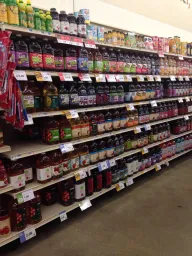

SKU-110K 数据集是一个单类别目标检测数据集,包含 11,743 张商品密集排列的零售货架图像,划分为 8,219 张训练图像、588 张验证图像和 2,936 张测试图像。每件商品都使用单一类别 object 标注一个边界框——名称中的 110K 指的是这些场景中出现的 110,000 多个独特库存单位 (SKUs),而不是 110,000 个检测类别。该数据集由 Eran Goldman 等人为 CVPR 2019 论文 Precise Detection in Densely Packed Scenes 创建,包含超过 170 万件已标注商品,平均每张图像约 147 件商品,因此是拥挤零售环境中计算机视觉模型的一项高难度基准测试。
观看: 如何训练 Ultralytics YOLO26 检测零售货架上的所有商品 | SKU-110K 🛒
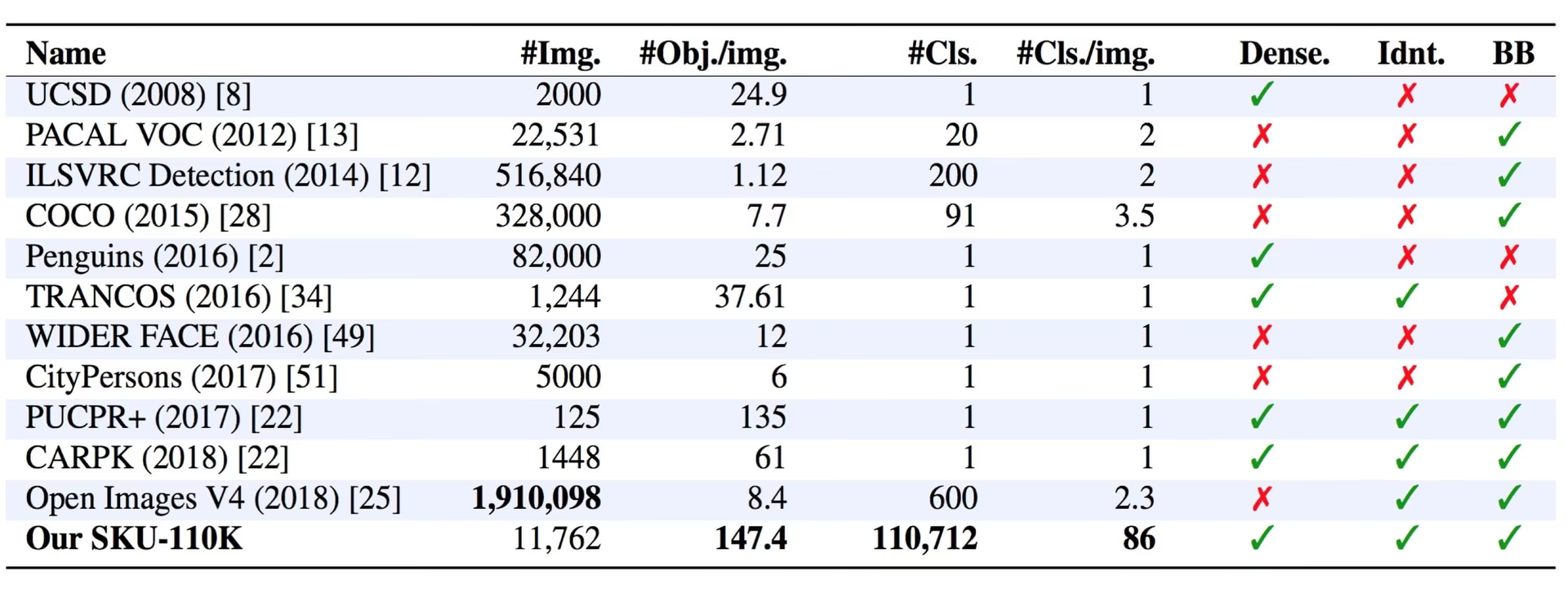
主要功能#
- 单类别检测:每件商品都使用单一类别
object(names: {0: object}) 标注一个边界框——标注中不包含 SKU 级别的类别标签。 - 极高的目标密度:来自世界各地的商店货架图像平均每张约有 147 件紧密排列的商品,这些商品往往外观相似甚至完全相同,并且彼此距离很近。
- 大规模数据集:11,743 张图像中包含 110,000 多个独特 SKU 和超过 170 万个已标注边界框,对最先进的目标检测器构成挑战。
数据集结构#
SKU-110K 数据集划分为三个子集,且都使用同一个类别 object:
| 划分 | 图像 | 说明 |
|---|---|---|
| 训练 | 8,219 | 用于模型训练的图像和标注 |
| 验证 | 588 | 训练期间留出的评估图像 |
| 测试 | 2,936 | 用于最终评估训练后模型的图像 |
应用场景#
SKU-110K 数据集广泛用于训练和评估目标检测任务中的深度学习模型,尤其适用于零售货架陈列等物体密集的场景。其应用包括:
如需标注自己的货架图像、训练和管理零售检测数据集,并在浏览器中运行完整工作流,请使用 Ultralytics Platform。
数据集 YAML#
SKU-110K.yaml 文件定义数据集配置,包括数据集路径、类别名称和其他元数据。该文件由 Ultralytics 仓库维护,地址为 https://github.com/ultralytics/ultralytics/blob/main/ultralytics/cfg/datasets/SKU-110K.yaml。
# Ultralytics 🚀 AGPL-3.0 License - https://ultralytics.com/license

# SKU-110K retail items dataset https://github.com/eg4000/SKU110K_CVPR19 by Trax Retail
# Documentation: https://docs.ultralytics.com/datasets/detect/sku-110k
# Example usage: yolo train data=SKU-110K.yaml
# parent
# ├── ultralytics
# └── datasets
#     └── SKU-110K ← downloads here (13.6 GB)

# Train/val/test sets as 1) dir: path/to/imgs, 2) file: path/to/imgs.txt, or 3) list: [path/to/imgs1, path/to/imgs2, ..]
path: SKU-110K # dataset root dir
train: train.txt # train images (relative to 'path') 8219 images
val: val.txt # val images (relative to 'path') 588 images
test: test.txt # test images (optional) 2936 images

# Classes
names:
  0: object

# Download script/URL (optional) ---------------------------------------------------------------------------------------
download: |
  import shutil
  from pathlib import Path

  import numpy as np
  import polars as pl

  from ultralytics.utils import TQDM
  from ultralytics.utils.downloads import download
  from ultralytics.utils.ops import xyxy2xywh

  # Download
  dir = Path(yaml["path"])  # dataset root dir
  parent = Path(dir.parent)  # download dir
  urls = ["http://trax-geometry.s3.amazonaws.com/cvpr_challenge/SKU110K_fixed.tar.gz"]
  download(urls, dir=parent)

  # Rename directories
  if dir.exists():
      shutil.rmtree(dir)
  (parent / "SKU110K_fixed").rename(dir)  # rename dir
  (dir / "labels").mkdir(parents=True, exist_ok=True)  # create labels dir

  # Convert labels
  names = "image", "x1", "y1", "x2", "y2", "class", "image_width", "image_height"  # column names
  for d in "annotations_train.csv", "annotations_val.csv", "annotations_test.csv":
      x = pl.read_csv(dir / "annotations" / d, has_header=False, new_columns=names, infer_schema_length=None).to_numpy()  # annotations
      images, unique_images = x[:, 0], np.unique(x[:, 0])
      with open((dir / d).with_suffix(".txt").__str__().replace("annotations_", ""), "w", encoding="utf-8") as f:
          f.writelines(f"./images/{s}\n" for s in unique_images)
      for im in TQDM(unique_images, desc=f"Converting {dir / d}"):
          cls = 0  # single-class dataset
          with open((dir / "labels" / im).with_suffix(".txt"), "a", encoding="utf-8") as f:
              for r in x[images == im]:
                  w, h = r[6], r[7]  # image width, height
                  xywh = xyxy2xywh(np.array([[r[1] / w, r[2] / h, r[3] / w, r[4] / h]]))[0]  # instance
f.write(f"{cls} {xywh[0]:.5f} {xywh[1]:.5f} {xywh[2]:.5f} {xywh[3]:.5f}\n") # write label用法#
SKU-110K 会在首次训练时自动下载;其 11,743 张图像需要约 13.6 GB 的可用磁盘空间。下载脚本还会获取原始标注并将其转换为 YOLO 格式,这可能需要几分钟。
如需在 SKU-110K 数据集上以 640 的图像尺寸训练一个 YOLO26n 模型,训练 100 个周期,可以使用以下代码片段。
from ultralytics import YOLO

# 加载模型
model = YOLO("yolo26n.pt")  # 加载预训练模型(推荐用于训练)

# 训练模型
results = model.train(data="SKU-110K.yaml", epochs=100, imgsz=640)示例数据和标注#
SKU-110K 图像记录了真实商店货架上密集排列的商品,其中数十件几乎相同的商品并排摆放。以下是带标注的示例图像:
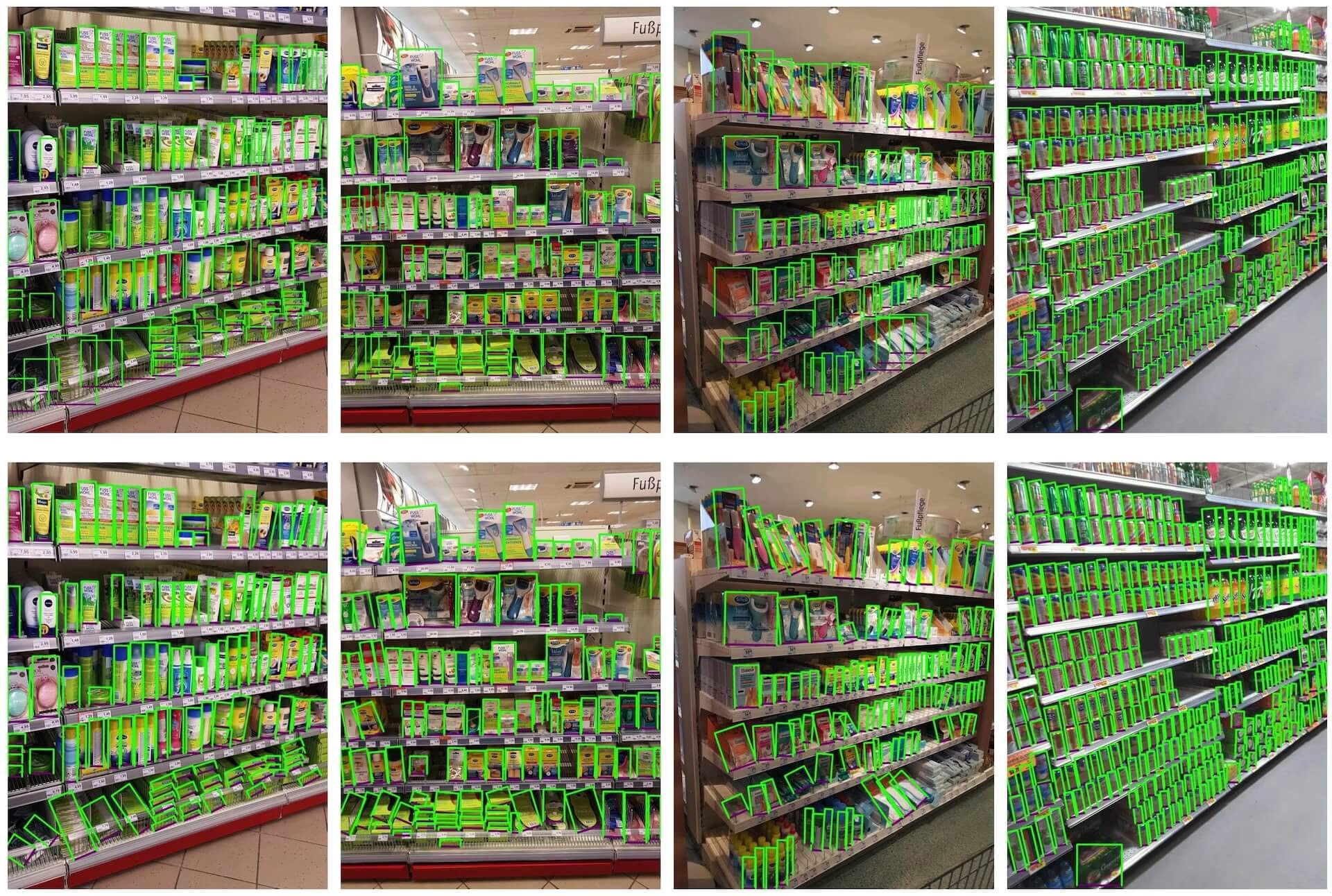
- 商品密集排列的零售货架图像:此图展示了零售货架场景中物体密集排列的示例。图中物体均使用单一类别
object的边界框进行标注。
商品的密集排列使 SKU-110K 对开发面向零售场景的稳健计算机视觉解决方案尤为有价值,因为每张图像中的高目标数量让检测器面临远超常见基准的挑战。
引用与致谢#
如果你在研究或开发工作中使用 SKU-110K 数据集,请引用以下论文:
@inproceedings{goldman2019dense,
  author    = {Eran Goldman and Roei Herzig and Aviv Eisenschtat and Jacob Goldberger and Tal Hassner},
  title     = {Precise Detection in Densely Packed Scenes},
  booktitle = {Proc. Conf. Comput. Vision Pattern Recognition (CVPR)},
  year      = {2019}
}
我们感谢 Eran Goldman 等人创建并维护 SKU-110K 数据集,为计算机视觉研究社区提供了宝贵资源。如需了解有关 SKU-110K 数据集及其创建者的更多信息,请访问 SKU-110K 数据集 GitHub 仓库。
常见问题#
SKU-110K 数据集是一个单类别目标检测数据集,包含 11,743 张商品密集陈列的零售货架图像,由 Eran Goldman 等人为其 CVPR 2019 论文创建。每件商品都使用一个
object边界框进行标注,图像涵盖超过 110,000 个独特的库存单位 (SKUs),因此它是拥挤场景目标检测和零售计算机视觉系统构建的有力基准。没有。SKU-110K 是单类别数据集:每件商品都使用类别
object(names: {0: object}) 标注一个边界框。名称中的“110K”指图像中出现的独特库存单位 (SKUs) 数量,而不是检测类别的数量。SKU-110K 数据集包含 11,743 张图像——8,219 张训练图像、588 张验证图像和 2,936 张测试图像——以及一个检测类别
object。详情请参阅数据集结构部分和SKU-110K.yaml配置。SKU-110K 大约为 13.6 GB,首次使用
data="SKU-110K.yaml"进行训练时会自动下载,无需手动下载。如需浏览较小的数据集选项,请参阅检测数据集概览。使用 SKU-110K 数据集训练 YOLO26 模型很简单。以下示例展示了如何以 640 的图像尺寸训练 YOLO26n 模型 100 个 epoch:
训练示例from ultralytics import YOLO # 加载模型 model = YOLO("yolo26n.pt") # 加载预训练模型(推荐用于训练) # 训练模型 results = model.train(data="SKU-110K.yaml", epochs=100, imgsz=640)


评论6
提出问题、分享结果,或帮助其他人。
syafiqmuda
Hi, newbie here, I try to use this dataset to compare and see the accuracy for this dataset with my own, but during training almost all the file were show
Corrupt JPEG data: 786 extraneous bytes before marker 0xd9and sometimesCorrupt JPEG data: premature end of data segment. can I know why? my code look like this:training.py
from ultralytics import YOLO, checks, hub checks() def main(): hub.login('something') model = YOLO('https://hub.ultralytics.com/models/ukr3hHHq88WJASNn3aUz') results = model.train(device=[0,1,2,3]) if __name__ == '__main__': main() Glenn JocherUltralytics
Those messages are PIL JPEG warnings from a handful of non-standard images in SKU-110K; Ultralytics usually auto-recovers/filters these during dataloading via
ultralytics.data.utils.verify_image()(see theverify_image()reference), so if training continues it’s safe to ignore—if it actually crashes, re-download/re-extract the dataset (or re-encode the specific bad JPGs), then delete any*.cacheunder yourlabels/folder and rerun; if you share the text output ofyolo checksplus the full traceback (not a screenshot) we can pinpoint whether it’s data corruption or an environment issue.
ApodiAlsurihi
Hi, thank you for this amazing and detailed explanation! Your work is incredibly helpful and inspiring. I would deeply appreciate it if you could share the trained model after the training process. It would make a significant difference in advancing my project and learning. Thank you so much for your generosity and support!
- Glenn JocherUltralytics
@ApodiAlsurihi thank you for your kind words! Unfortunately, we cannot share trained models directly. However, you can train your own model using the SKU-110K dataset by following the instructions provided in the documentation.
serna01
Are this warnings OK, when training? the batch=0.1 I used it to avoid a memory error. yolo detect train data=SKU-110K.yaml model=yolov8n.pt epochs=50 imgsz=640 batch=0.1
AutoBatch: Using batch-size 2 for CUDA:0 0.49G/3.81G (13%) ✅ train: Scanning /home/asm/cv_cornia/parking_mgmt/datasets/SKU-110K/labels... 8216 train: WARNING ⚠️ /home/asm/cv_cornia/parking_mgmt/datasets/SKU-110K/images/train_1797.jpg: 3 duplicate labels removed train: WARNING ⚠️ /home/asm/cv_cornia/parking_mgmt/datasets/SKU-110K/images/train_4222.jpg: ignoring corrupt image/label: image file is truncated (23 bytes not processed) train: WARNING ⚠️ /home/asm/cv_cornia/parking_mgmt/datasets/SKU-110K/images/train_882.jpg: ignoring corrupt image/label: image file is truncated (3 bytes not processed) train: WARNING ⚠️ /home/asm/cv_cornia/parking_mgmt/datasets/SKU-110K/images/train_924.jpg: ignoring corrupt image/label: image file is truncated (10 bytes not processed)
al: Scanning /home/asm/cv_cornia/parking_mgmt/datasets/SKU-110K/labels... 588 ima val: New cache created: /home/asm/cv_cornia/parking_mgmt/datasets/SKU-110K/labels.cache Corrupt JPEG data: 305 extraneous bytes before marker 0xd9 Corrupt JPEG data: 786 extraneous bytes before marker 0xd9 Plotting labels to runs/detect/train5/labels.jpg... optimizer: 'optimizer=auto' found, ignoring 'lr0=0.01' and 'momentum=0.937' and determining best 'optimizer', 'lr0' and 'momentum' automatically... optimizer: AdamW(lr=0.002, momentum=0.9) with parameter groups 57 weight(decay=0.0), 64 weight(decay=0.0005), 63 bias(decay=0.0) TensorBoard: model graph visualization added ✅ Image sizes 640 train, 640 val Using 8 dataloader workers Logging results to runs/detect/train5 Starting training for 50 epochs...
  Epoch    GPU_mem   box_loss   cls_loss   dfl_loss  Instances       Size
   1/50      1.14G      2.504      3.041       1.53        378        640:   5Corrupt JPEG data: premature end of data segment
   1/50      1.15G      2.382      2.658      1.454        331        640:   7Corrupt JPEG data: 562 extraneous bytes before marker 0xd9
   1/50      1.42G      2.273      2.314      1.382        314        640:  11Corrupt JPEG data: bad Huffman code
   1/50      1.42G      2.266      2.295      1.378        578        64       1/50      1.42G      2.266      2.293      1.377        678        64       1/50      1.42G      2.266      2.293      1.377        678        64       1/50      1.42G      2.265      2.292      1.377        723        64       1/50      1.42G      2.265      2.292      1.377        723        64       1/50      1.42G      2.266       2.29      1.377        695        64       1/50      1.42G      2.266          1/50      1.42G      2.255      2.2       1/50      1.42G      2.254      2.247       1.3       1/50      1       1/50              1/50                          1/50      1.42G      2.232      2.187      1.358        608        640:  13Corrupt JPEG data: bad Huffman code
   1/50      1.42G      2.216      2.138      1.347        437        640:  14Corrupt JPEG data: premature end of data segment
   1/50      1.42G      2.164      1.993      1.318        478        640:  17Corrupt JPEG data: 41 extraneous bytes before marker 0xd9
   1/50      1.42G      2.157      1.967      1.312        308        640:  17Corrupt JPEG data: premature end of data segment
   1/50      1.42G      2.011       1.61      1.239        173        640:  30Corrupt JPEG data: premature end of data segment
   1/50      1.42G      1.987      1.556      1.227        461        640:  33Corrupt JPEG data: 96 extraneous bytes before marker 0xd9
   1/50      1.42G      1.978      1.537      1.223        214        640:  34Corrupt JPEG data: bad Huffman code
   1/50      1.42G      1.959      1.497      1.215        250        640:  37Corrupt JPEG data: bad Huffman code
   1/50      1.42G      1.915      1.403      1.197        500        640:  46Corrupt JPEG data: premature end of data segment
   1/50      1.42G      1.888      1.345      1.185        616        640:  52Corrupt JPEG data: premature end of data segment
Thanks.
- Glenn JocherUltralytics
@serna01 the warnings you see are generally okay and indicate that the training process is handling issues like duplicate labels and corrupt images. Using
batch=0.1to avoid memory errors is fine, but consider adjusting your batch size to better utilize your GPU memory. If the warnings persist or cause issues, ensure you're using the latest version of the package. For more details on the SKU-110k dataset, visit SKU-110k Dataset Documentation.