تكامل Labelbox
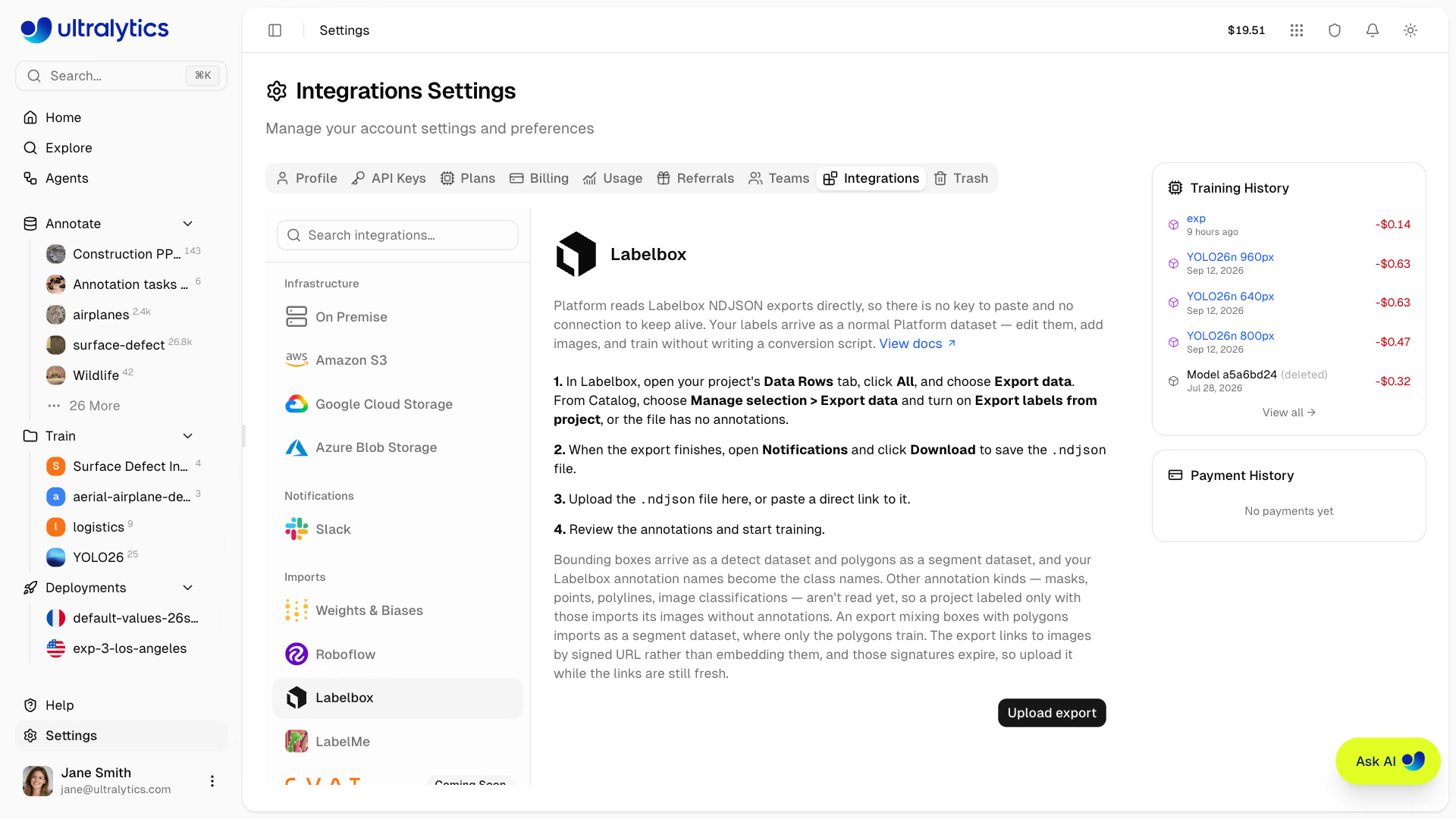
يقرأ Ultralytics Platform ملفات تصدير Labelbox بتنسيق NDJSON مباشرةً. فلا حاجة إلى لصق مفتاح أو إبقاء اتصال نشط أو صيانة برنامج نصي للتحويل — صدّر من Labelbox، وارفع الملف، وستصل تسمياتك كمجموعة بيانات عادية في Platform.
الاستيراد من Labelbox#
- التصدير من Labelbox. في مشروع وضع التسميات، افتح علامة التبويب Data Rows، وحدد All، وانقر على Export data، واختر الحقول المراد تضمينها، ثم أكّد. ومن Catalog، حدد صفوف البيانات واختر Manage selection > Export data، ثم فعّل Export labels from project واختر المشروع، وإلا فسيصل الملف بلا أي تعليقات توضيحية.
- نزّل الملف. ينفّذ Labelbox عملية التصدير كوظيفة تعمل في الخلفية. راقبها في Notifications، وانقر على Download عند اكتمالها لحفظ ملف
.ndjson. - ارفع الملف إلى Platform. أنشئ مجموعة بيانات جديدة وارفع ملف
.ndjson، أو ألصق رابطًا مباشرًا إليه. يمكنك أيضًا البدء من Settings > Integrations > Labelbox. - درّب النموذج. بعد اكتمال المعالجة، حرّر التعليقات التوضيحية ثم درّب النموذج تمامًا كما تفعل مع أي مجموعة بيانات أخرى في Platform.
على عكس CVAT وLabel Studio، لا يوجد تنسيق عليك اختياره — فتصدير Labelbox نفسه هو التنسيق المدعوم.
التصدير باستخدام SDK#
يوفر Labelbox أيضًا مهمة التصدير ضمن SDK الخاص بـ Python، وهي الطريقة الأسهل لإنشاء مسار عمل قابل للتكرار. بثّ المهمة واكتب كائن JSON واحدًا في كل سطر:
import json
import labelbox
client = labelbox.Client(api_key="YOUR_LABELBOX_API_KEY")
export_task = labelbox.ExportTask.get_task(client, "YOUR_EXPORT_TASK_ID")
export_task.wait_till_done() # يؤدي بث مهمة ليست COMPLETE إلى رفع استثناء
with open("dataset.ndjson", "w") as f:
f.writelines(json.dumps(data_row.json) + "\n" for data_row in export_task.get_buffered_stream())يتكون NDJSON من كائن JSON واحد في كل سطر. بينما يكتب json.dump(list_of_rows, f) مصفوفة واحدة بدلًا من ذلك، ويتخطى Platform أي سطر ليس كائن JSON — فلا يعثر الاستيراد على أي صفوف بيانات. استخدم الحلقة أعلاه أو "\n".join(json.dumps(r) for r in rows).
ما الذي يتم استيراده#
يتعرّف Platform تلقائيًا على تنسيق Labelbox ويحوّل مربعات الإحاطة والمضلعات إلى نوع مهمة YOLO المقابل:
| تعليق Labelbox التوضيحي | المستورد |
|---|---|
| مربع إحاطة | كشف |
| مضلع | تجزئة |
| قناع تجزئة، نقطة، خط متعدد، علاقة، تصنيف | غير مدعوم بعد |
تصبح قيمة name لكل كائن اسم الفئة — لذا يُستورد تعليق توضيحي من نوع "name": "Dog" باسم الفئة Dog، لا بصيغته الصغيرة value — وتُطبّع إحداثيات البكسل نسبةً إلى أبعاد media_attributes الواردة في التصدير، لذا احتفظ بسمات الوسائط في التصدير: فالصفوف التي لا تتضمن العرض والارتفاع تستورد صورها بلا تعليقات توضيحية. ولا تُسجّل فئة إلا للكائنات التي يستطيع Platform استيرادها، لذلك لا تضيف أدوات الأقنعة والنقاط والخطوط المتعددة فئات فارغة إلى مجموعة البيانات. تُسمّى كل صورة باسم data_row.external_id، ثم باسم global_key عند غيابه، ثم باسم الملف الوارد في عنوان URL الموقّع إذا لم يتضمن التصدير أيًا منهما. تُستورد صفوف بيانات الصور، بينما تُتخطى صفوف بيانات الفيديو والنص وسائر أنواع البيانات غير الصورية. ويُستورد تصدير الكتالوج الذي لا يحتوي على تعليقات توضيحية كمجموعة بيانات صور غير موسومة، جاهزة لوضع التسميات في محرر التعليقات التوضيحية في Platform.
يبدو صف بيانات واحد كما يلي، بعد اختصاره إلى الحقول التي يقرأها Platform:
{
    "data_row": {
        "external_id": "000000000307.jpg",
        "global_key": "000000000307.jpg",
        "row_data": "https://storage.labelbox.com/...?Expires=...&Signature=..."
    },
    "media_attributes": { "height": 480, "width": 640, "mime_type": "image/jpeg" },
    "projects": {
        "<project-id>": {
            "labels": [
                {
                    "annotations": {
                        "objects": [
                            {
                                "name": "Dog",
                                "annotation_kind": "ImageBoundingBox",
                                "bounding_box": { "top": 200.0, "left": 407.0, "height": 172.0, "width": 176.0 }
                            }
                        ]
                    }
                }
            ]
        }
    }
}
يتم تجاهل كل ما عدا ذلك في التصدير — embeddings وmetadata_fields وattachments وproject_details. ويُستحسن إلغاء تحديد التضمينات عند التصدير: فقد شكّلت نحو أربعة أخماس حجم ملف تصدير تجريبي، مقابل خُمس للحقول التي يقرأها Platform فعليًا.
لا تُقرأ حاليًا إلا مربعات الإحاطة والمضلعات، وفقط عندما تكون ضمن تعليق توضيحي لكائن — إذ توجد التصنيفات على مستوى الصورة في موضع آخر من التصدير ويتم تخطيها. ويُستورد المشروع الذي وُضعت تسمياته بالكامل باستخدام أداة قناع التجزئة (الفرشاة) أو النقاط أو الخطوط المتعددة أو التصنيفات بصوره دون تعليقات توضيحية، ولا يظهر أي خطأ. ويمكنك التحقق من ذلك في صفحة مجموعة البيانات: فمجموعة البيانات المستوردة التي احتفظت بتسمياتها تعرض عدد التسميات والتعليقات التوضيحية إلى جانب عدد الصور، أما التي فقدتها فلا تعرض أيًا منهما.
يشير تصدير Labelbox إلى كل صورة باستخدام عنوان URL موقّع بدلًا من تضمين وحدات البكسل، وتنتهي صلاحية هذه التوقيعات. ينزّل Platform الصور من تلك العناوين، ويفحص عينة قبل البدء؛ لذا يفشل فورًا ملف التصدير الذي انتهت صلاحية جميع روابطه، مع توضيح السبب — أعد التصدير من Labelbox وارفع الملف الجديد. أما إذا انتهت صلاحية بعض الروابط فقط، فيستورد Platform الصور التي لا يزال قادرًا على الوصول إليها ويتخطى البقية، لذا ارفع الملف بعد التصدير بوقت قصير.
يُستورد التصدير الذي يحتوي على مربعات إحاطة ومضلعات معًا كمجموعة بيانات تجزئة، ولا تتضمن مجموعة بيانات التجزئة إلا هندسة المضلعات — فلا تُستخدم تعليقات مربعات الإحاطة في التدريب أو في عمليات تصدير الإصدارات. صدّر مربعات الإحاطة والمضلعات كمشروعي Labelbox منفصلين إذا كنت تحتاج إليهما معًا. ويجب أن تتألف المضلعات أيضًا من ثلاث نقاط على الأقل كي تُقرأ.
الأسئلة الشائعة#
يقرأ Platform تنسيق NDJSON، أي كائن JSON واحدًا في كل سطر. ويتم تخطي التصدير المحفوظ كمصفوفة JSON واحدة بالكامل. استخدم حلقة SDK أعلاه أو تنزيل Export data الخاص بـ Labelbox، إذ يكون بتنسيق NDJSON بالفعل.
تشير ملفات تصدير Labelbox إلى الصور باستخدام عناوين URL موقّعة، وتنتهي صلاحية هذه التوقيعات. أعد التصدير من Labelbox وارفع الملف الجديد بعد اكتماله بوقت قصير.
لا. يُستورد التصدير المختلط كمجموعة بيانات تجزئة، ولا تُستخدم إلا المضلعات. صدّر مربعات الإحاطة والمضلعات كمشروعي Labelbox منفصلين إذا كنت تحتاج إليهما معًا.


التعليقات
اطرح سؤالًا، وشارك نتائجك، أو ساعد شخصًا آخر.