ROS(Robot Operating System)クイックスタートガイド#
このガイドでは、Ultralytics YOLOをROS1(rospy)またはROS2(rclpy)と統合し、RGB画像、深度画像、点群に対してリアルタイムの物体検出とセグメンテーションを実行する方法を説明します。
まずROSでのYOLOのセットアップに進み、次にRGB画像、深度画像、または点群を扱います。
ROSとは何ですか?#
ロボットオペレーティングシステム(ROS)は、ロボティクスの研究や産業分野で広く使われているオープンソースのフレームワークです。ROSは、開発者がロボットアプリケーションを作成するためのライブラリとツールを提供します。ROSはさまざまなロボットプラットフォームで動作するよう設計されており、ロボット開発者にとって柔軟で強力なツールです。概要については、Open Roboticsによる3分間の動画ROSの紹介をご覧ください。
ROSの主な機能#
-
モジュール型アーキテクチャ: ROSはモジュール型アーキテクチャを採用しており、開発者はノードと呼ばれる小規模で再利用可能なコンポーネントを組み合わせて、複雑なシステムを構築できます。各ノードは通常、特定の機能を実行し、トピックまたはサービスを介してメッセージをやり取りします。
-
通信ミドルウェア: ROSは、プロセス間通信と分散コンピューティングをサポートする堅牢な通信基盤を提供します。これは、データストリーム(トピック)向けのパブリッシュ・サブスクライブモデルと、サービス呼び出し向けのリクエスト・リプライモデルによって実現されます。
-
ハードウェア抽象化: ROSはハードウェアに対する抽象化レイヤーを提供し、開発者がデバイスに依存しないコードを作成できるようにします。そのため、同じコードを異なるハードウェア構成で使用でき、統合や実験が容易になります。
-
ツールとユーティリティ: ROSには、可視化、デバッグ、シミュレーションに使用できる豊富なツールとユーティリティが用意されています。たとえば、RVizはセンサーデータやロボットの状態情報の可視化に使用され、Gazeboはアルゴリズムやロボット設計のテストに適した強力なシミュレーション環境を提供します。
-
幅広いエコシステム: ROSのエコシステムは規模が大きく、継続的に拡大しています。ナビゲーション、操作、認識など、さまざまなロボットアプリケーション向けのパッケージが数多く利用できます。コミュニティは、これらのパッケージの開発と保守に積極的に貢献しています。
ROSのバージョンの変遷
2007年の開発開始以来、ROSは複数のバージョンを経て進化し、ROS 1とROS 2に分かれています。以下の既存の例ではROS1 Noeticを使用しています。ROS2の使用にある簡潔なアダプターでは、現在のROS2リリースに対応するrclpyインターフェースを紹介しています。
ROS 1とROS 2の比較#
ROS 1はロボット開発の強固な基盤を提供しましたが、ROS 2は次の機能を提供することで、その欠点に対処しています。
- リアルタイム性能: リアルタイムシステムと決定論的な動作のサポートが向上しています。
- セキュリティ: さまざまな環境で安全かつ信頼性の高い運用を実現するため、セキュリティ機能が強化されています。
- スケーラビリティ: マルチロボットシステムと大規模なデプロイのサポートが向上しています。
- クロスプラットフォーム対応: Linuxだけでなく、WindowsやmacOSを含むさまざまなオペレーティングシステムとの互換性が拡張されています。
- 柔軟な通信: DDSを使用することで、プロセス間通信の柔軟性と効率が向上します。
ROSのメッセージとトピック#
ROSでは、ノード間の通信にメッセージとトピックが使用されます。メッセージはノード間でやり取りされる情報を定義するデータ構造で、トピックはメッセージの送受信に使われる名前付きチャネルです。ノードはトピックにメッセージをパブリッシュしたり、トピックからメッセージをサブスクライブしたりして、相互に通信できます。このパブリッシュ・サブスクライブモデルにより、ノード間の非同期通信と疎結合が実現します。通常、ロボットシステムの各センサーまたはアクチュエーターはトピックにデータをパブリッシュし、他のノードはそのデータを処理や制御に利用できます。このガイドでは、Image、Depth、PointCloudのメッセージとカメラのトピックに焦点を当てます。
ROSでUltralytics YOLOをセットアップする#
ROS1のサンプルは、ROSbot ROSリポジトリのフォークであるこのROS環境を使用してテストしました。同じYOLOとNumPyの処理はROS2でも適用できます。異なるのは、ノードのライフサイクルとメッセージ変換のみです。
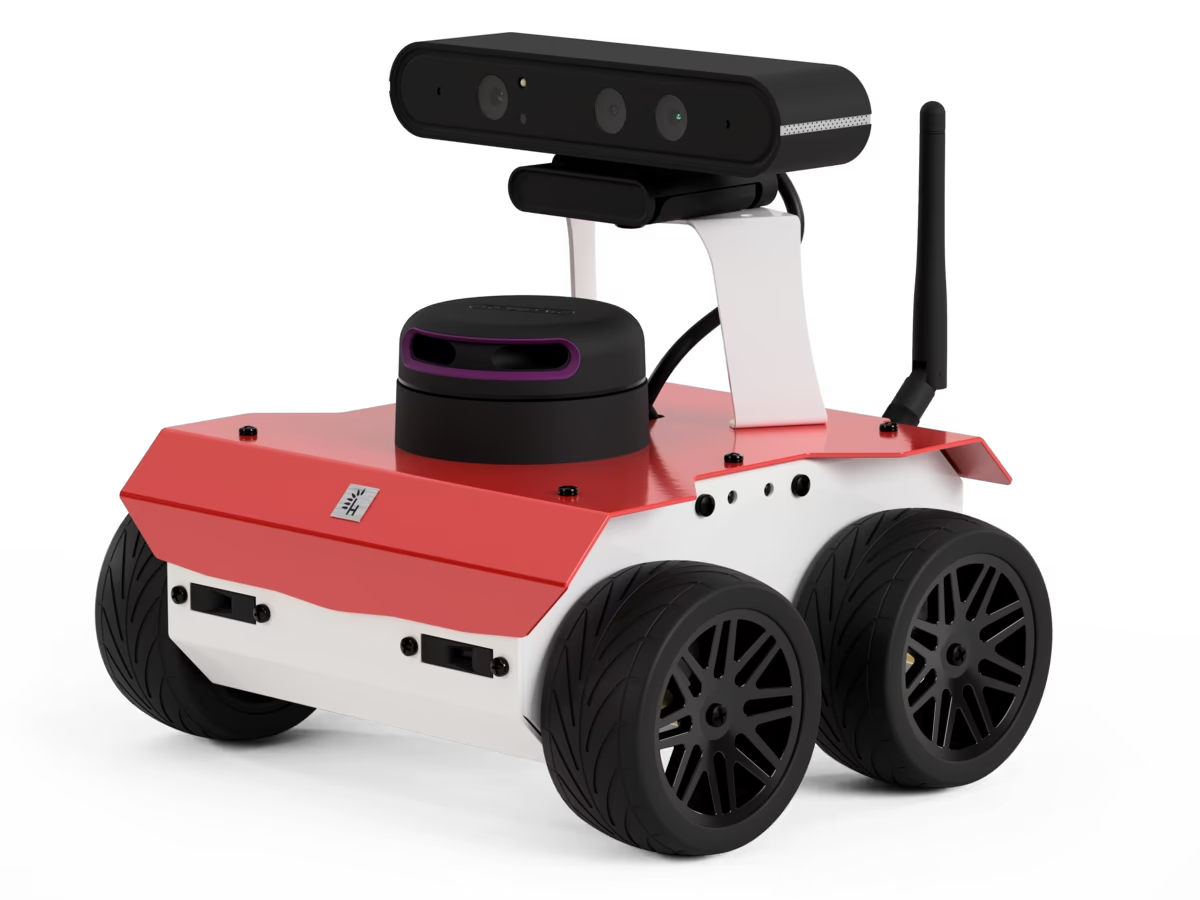
依存関係のインストール#
ROS環境に加えて、次の依存関係をインストールする必要があります。
-
ROS NumPyパッケージ: ROS ImageメッセージとNumPy配列を高速に変換するために必要です。
pip install ros_numpy -
Ultralyticsパッケージ:
pip install ultralytics
ROS2を使用する#
ROS2では、rospyをrclpyに置き換え、画像変換にはros_numpyではなくcv_bridgeを使用します。次のノードは、以下のRGB検出フローに対応するROS2の完全な実装です。モデルは一度だけインスタンス化し、コールバック間で再利用します。
import cv_bridge
import rclpy
from rclpy.node import Node
from rclpy.qos import qos_profile_sensor_data
from sensor_msgs.msg import Image

from ultralytics import YOLO

class UltralyticsNode(Node):
    """Run YOLO detection on ROS2 image messages."""

    def __init__(self):
        """Initialize the ROS2 node, model, and image interfaces."""
        super().__init__("ultralytics")
        self.bridge = cv_bridge.CvBridge()
        self.model = YOLO("yolo26m.pt")
        self.publisher = self.create_publisher(Image, "/ultralytics/detection/image", 5)
        self.create_subscription(Image, "/camera/color/image_raw", self.callback, qos_profile_sensor_data)

    def callback(self, message):
        """Publish the annotated camera frame."""
        image = self.bridge.imgmsg_to_cv2(message, desired_encoding="bgr8")
        annotated = self.model(image)[0].plot(show=False)
        self.publisher.publish(self.bridge.cv2_to_imgmsg(annotated, encoding="bgr8"))

def main(args=None):
    """Start the ROS2 node."""
    rclpy.init(args=args)
    node = UltralyticsNode()
    rclpy.spin(node)
    node.destroy_node()
    rclpy.shutdown()

if __name__ == "__main__":
    main()
Depth画像では、以下のDepth処理コードを再利用し、メッセージの取得と変換のみを置き換えます。
self.create_subscription(Image, "/camera/color/image_raw", self.rgb_callback, qos_profile_sensor_data)
self.create_subscription(Image, "/camera/depth/image_raw", self.depth_callback, qos_profile_sensor_data)

def rgb_callback(self, message):
    self.rgb_image = self.bridge.imgmsg_to_cv2(message, desired_encoding="bgr8")

def depth_callback(self, message):
    depth_image = self.bridge.imgmsg_to_cv2(message, desired_encoding="passthrough")
# 以下のDepthの例にあるNumPyマスクと距離計算を適用します。PointCloudには、ROS2がsensor_msgs_py.point_cloud2を提供しています。構造化点群を一度変換し、以下のNumPyによるセグメンテーションと3Dマッピングを再利用します。
from sensor_msgs_py import point_cloud2

points = point_cloud2.read_points_numpy(message, field_names=("x", "y", "z", "rgb"))
points = points.reshape(message.height, message.width, 4)ROSのsensor_msgs/ImageでUltralyticsを使用する#
sensor_msgs/Imageメッセージ型は、ROSで画像データを表す際によく使用されます。エンコーディング、高さ、幅、ピクセルデータのフィールドを含むため、カメラやその他のセンサーで取得した画像の送信に適しています。Imageメッセージは、視覚認識、物体検出、ナビゲーションなど、ロボット工学の幅広い用途で使用されています。
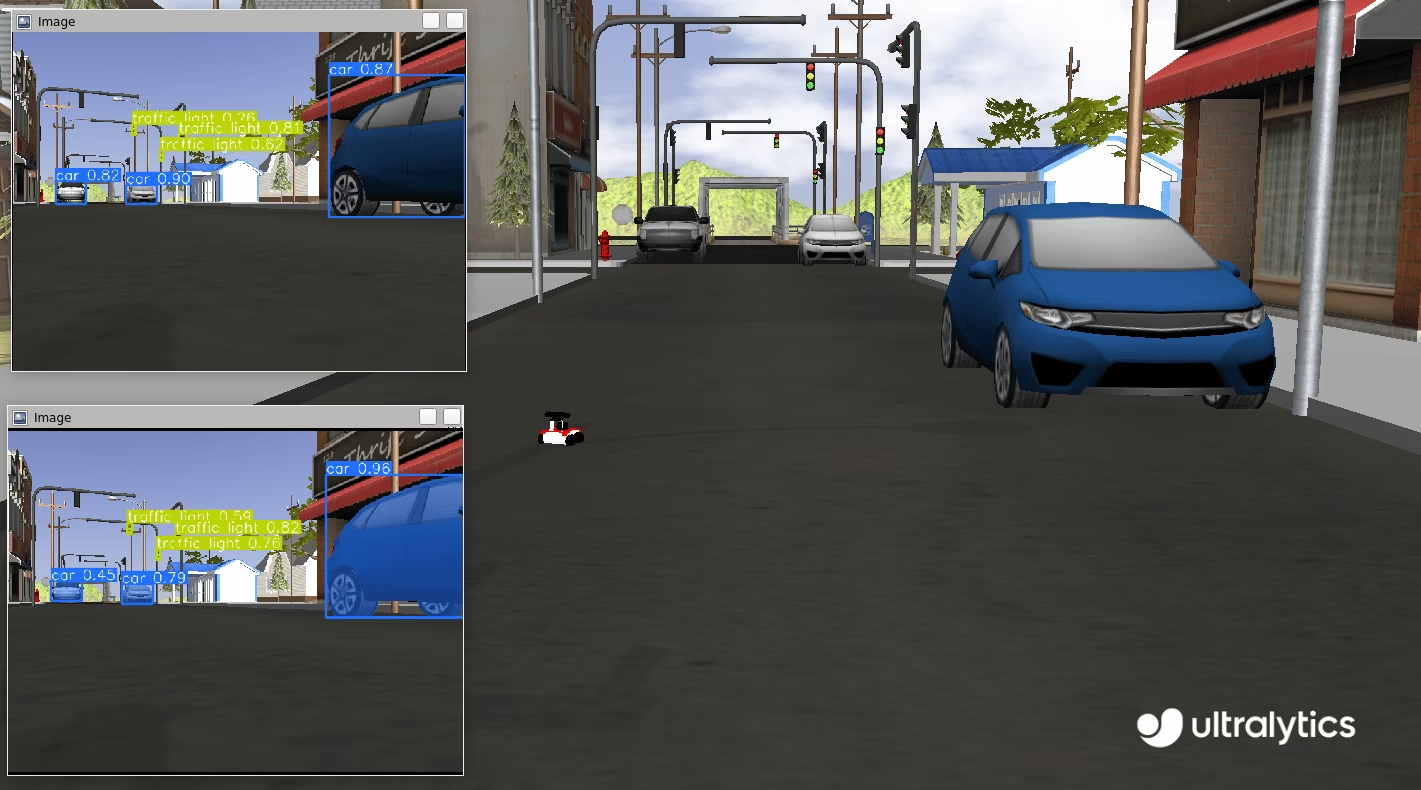
Imageのステップごとの使用方法#
次のコードスニペットでは、ROSでUltralytics YOLOパッケージを使用する方法を示します。この例では、カメラトピックをサブスクライブし、受信した画像をYOLOで処理して、検出したオブジェクトを検出用とセグメンテーション用の新しいトピックにパブリッシュします。
まず、必要なライブラリをインポートし、セグメンテーション用と検出用の2つのモデルをインスタンス化します。ROSマスターとの通信を可能にするため、ultralyticsという名前でROSノードを初期化します。安定した接続を確保するため、短い待機時間を設け、処理を続行する前にノードが接続を確立できるようにします。
import time

import rospy

from ultralytics import YOLO

detection_model = YOLO("yolo26m.pt")
segmentation_model = YOLO("yolo26m-seg.pt")
rospy.init_node("ultralytics")
time.sleep(1)検出用とセグメンテーション用の2つのROSトピックを初期化します。これらのトピックを使用してアノテーション済み画像をパブリッシュし、後続の処理で利用できるようにします。ノード間の通信にはsensor_msgs/Imageメッセージを使用します。
from sensor_msgs.msg import Image

det_image_pub = rospy.Publisher("/ultralytics/detection/image", Image, queue_size=5)
seg_image_pub = rospy.Publisher("/ultralytics/segmentation/image", Image, queue_size=5)最後に、/camera/color/image_rawトピックのメッセージをリッスンし、新しいメッセージごとにコールバック関数を呼び出すサブスクライバーを作成します。このコールバック関数はsensor_msgs/Image型のメッセージを受け取り、ros_numpyを使用してNumPy配列に変換します。その後、事前にインスタンス化したYOLOモデルで画像を処理してアノテーションを付け、検出用の/ultralytics/detection/imageとセグメンテーション用の/ultralytics/segmentation/imageという各トピックにパブリッシュします。
import ros_numpy

def callback(data):
    """Callback function to process image and publish annotated images."""
    array = ros_numpy.numpify(data)
    if det_image_pub.get_num_connections():
        det_result = detection_model(array)
        det_annotated = det_result[0].plot(show=False)
        det_image_pub.publish(ros_numpy.msgify(Image, det_annotated, encoding="rgb8"))

    if seg_image_pub.get_num_connections():
        seg_result = segmentation_model(array)
        seg_annotated = seg_result[0].plot(show=False)
        seg_image_pub.publish(ros_numpy.msgify(Image, seg_annotated, encoding="rgb8"))

rospy.Subscriber("/camera/color/image_raw", Image, callback)

while True:
    rospy.spin()
完全なコード
import time

import ros_numpy
import rospy
from sensor_msgs.msg import Image

from ultralytics import YOLO

detection_model = YOLO("yolo26m.pt")
segmentation_model = YOLO("yolo26m-seg.pt")
rospy.init_node("ultralytics")
time.sleep(1)

det_image_pub = rospy.Publisher("/ultralytics/detection/image", Image, queue_size=5)
seg_image_pub = rospy.Publisher("/ultralytics/segmentation/image", Image, queue_size=5)

def callback(data):
    """Callback function to process image and publish annotated images."""
    array = ros_numpy.numpify(data)
    if det_image_pub.get_num_connections():
        det_result = detection_model(array)
        det_annotated = det_result[0].plot(show=False)
        det_image_pub.publish(ros_numpy.msgify(Image, det_annotated, encoding="rgb8"))

    if seg_image_pub.get_num_connections():
        seg_result = segmentation_model(array)
        seg_annotated = seg_result[0].plot(show=False)
        seg_image_pub.publish(ros_numpy.msgify(Image, seg_annotated, encoding="rgb8"))

rospy.Subscriber("/camera/color/image_raw", Image, callback)

while True:
    rospy.spin()
デバッグ
ROS(ロボットオペレーティングシステム)ノードのデバッグは、システムが分散型であるため難しい場合があります。この作業には、いくつかのツールが役立ちます。
rostopic echo <TOPIC-NAME>: このコマンドを使うと、特定のトピックでパブリッシュされたメッセージを表示でき、データフローを確認できます。rostopic list: このコマンドを使うと、ROSシステムで利用可能なすべてのトピックを一覧表示し、アクティブなデータストリームの概要を確認できます。rqt_graph: この可視化ツールはノード間の通信グラフを表示し、ノード同士の接続方法や相互作用を把握できます。- 3D表現など、より複雑な可視化にはRVizを使用できます。RViz(ROS可視化)は、ROS向けの強力な3D可視化ツールです。ロボットとその環境の状態をリアルタイムで可視化できます。RVizでは、センサーデータ(例:
sensor_msgs/Image)、ロボットモデルの状態、その他さまざまな情報を表示できるため、ロボットシステムのデバッグや動作の理解が容易になります。
std_msgs/Stringで検出クラスをパブリッシュする#
標準のROSメッセージにはstd_msgs/Stringメッセージも含まれています。多くのアプリケーションでは、アノテーション済み画像全体を再パブリッシュする必要はありません。代わりに、ロボットの視野内に存在するクラスだけが必要です。次の例では、std_msgs/Stringメッセージを使用して、検出されたクラスを/ultralytics/detection/classesトピックに再パブリッシュする方法を示します。これらのメッセージはより軽量で、重要な情報を提供するため、さまざまな用途で役立ちます。
使用例#
カメラと物体検出モデルを搭載した倉庫ロボットを考えてみましょう。ネットワーク経由で大きなアノテーション済み画像を送信する代わりに、ロボットは検出したクラスのリストをstd_msgs/Stringメッセージとしてパブリッシュできます。たとえば、ロボットが「box」、「pallet」、「forklift」などのオブジェクトを検出すると、これらのクラスを/ultralytics/detection/classesトピックにパブリッシュします。この情報を中央監視システムで使用して在庫をリアルタイムに追跡したり、障害物を避けるようにロボットの経路計画を最適化したり、検出した箱を拾い上げるなどの特定の動作を開始したりできます。この方法により、通信に必要な帯域幅を削減し、重要なデータの送信に集中できます。
Stringのステップごとの使用方法#
この例では、ROSでUltralytics YOLOパッケージを使用する方法を示します。この例では、カメラトピックをサブスクライブし、受信した画像をYOLOで処理して、std_msgs/Stringメッセージを使用し、検出したオブジェクトを新しい/ultralytics/detection/classesトピックにパブリッシュします。ros_numpyパッケージを使ってROS ImageメッセージをNumPy配列に変換し、YOLOで処理します。
import time

import ros_numpy
import rospy
from sensor_msgs.msg import Image
from std_msgs.msg import String

from ultralytics import YOLO

detection_model = YOLO("yolo26m.pt")
rospy.init_node("ultralytics")
time.sleep(1)
classes_pub = rospy.Publisher("/ultralytics/detection/classes", String, queue_size=5)

def callback(data):
    """Callback function to process image and publish detected classes."""
    array = ros_numpy.numpify(data)
    if classes_pub.get_num_connections():
        det_result = detection_model(array)
        classes = det_result[0].boxes.cls.cpu().numpy().astype(int)
        names = [det_result[0].names[i] for i in classes]
        classes_pub.publish(String(data=str(names)))

rospy.Subscriber("/camera/color/image_raw", Image, callback)
while True:
rospy.spin()ROSのDepth画像でUltralyticsを使用する#
RGB画像に加えて、ROSはDepth画像にも対応しており、カメラからオブジェクトまでの距離に関する情報を提供します。Depth画像は、障害物回避、3Dマッピング、位置推定などのロボット用途で重要です。
Depth画像では、各ピクセルがカメラからオブジェクトまでの距離を表します。色を捉えるRGB画像とは異なり、Depth画像は空間情報を捉えるため、ロボットは環境の3D構造を認識できます。
Depth画像は、さまざまなセンサーを使って取得できます。
- ステレオカメラ: 2台のカメラを使用し、画像間の視差に基づいてDepthを計算します。
- ToF(Time-of-Flight)カメラ: 光がオブジェクトに当たって戻るまでの時間を測定します。
- 構造化光センサー: パターンを投影し、表面上での変形を測定します。
YOLOをDepth画像で使用する#
ROSでは、Depth画像はsensor_msgs/Imageメッセージ型で表されます。このメッセージ型には、エンコーディング、高さ、幅、ピクセルデータのフィールドが含まれます。Depth画像のエンコーディングには、「16UC1」のような形式がよく使用されます。これは、1ピクセルあたり16ビットの符号なし整数を示し、各値がオブジェクトまでの距離を表します。Depth画像は、環境をより包括的に把握するため、RGB画像と組み合わせて使用されることが一般的です。
YOLOを使用すると、RGB画像とDepth画像の両方から情報を抽出して組み合わせることができます。たとえば、YOLOでRGB画像内のオブジェクトを検出し、その検出結果を使ってDepth画像内の対応する領域を特定できます。これにより、検出したオブジェクトの正確なDepth情報を抽出でき、ロボットが環境を3次元で理解する能力が向上します。
Depth画像を扱う際は、RGB画像とDepth画像が正しく位置合わせされていることを確認する必要があります。Intel RealSenseシリーズなどのRGB-Dカメラは、同期されたRGB画像とDepth画像を提供するため、両方の情報を簡単に組み合わせられます。RGBカメラとDepthカメラを別々に使用する場合は、正確に位置合わせするためにキャリブレーションが重要です。
Depthのステップごとの使用方法#
この例では、YOLOで画像をセグメンテーションし、抽出したマスクをDepth画像に適用してオブジェクトをセグメンテーションします。これにより、対象オブジェクトの各ピクセルがカメラの焦点中心からどれだけ離れているかを特定できます。この距離情報を取得することで、カメラとシーン内の特定のオブジェクトとの距離を計算できます。まず、必要なライブラリをインポートし、ROSノードを作成して、セグメンテーションモデルとROSトピックをインスタンス化します。
import time

import rospy
from std_msgs.msg import String

from ultralytics import YOLO

rospy.init_node("ultralytics")
time.sleep(1)

segmentation_model = YOLO("yolo26m-seg.pt")

classes_pub = rospy.Publisher("/ultralytics/detection/distance", String, queue_size=5)次に、受信したDepth画像メッセージを処理するコールバック関数を定義します。この関数はDepth画像とRGB画像のメッセージを待ち受け、NumPy配列に変換してから、RGB画像にセグメンテーションモデルを適用します。次に、検出した各オブジェクトのセグメンテーションマスクを抽出し、Depth画像を使ってカメラからオブジェクトまでの平均距離を計算します。ほとんどのセンサーには最大距離(クリップ距離)があり、それを超える値はinf(np.inf)として表されます。処理前にこれらのnull値を除外し、0の値を割り当てることが重要です。最後に、検出したオブジェクトとその平均距離を/ultralytics/detection/distanceトピックにパブリッシュします。
import numpy as np
import ros_numpy
from sensor_msgs.msg import Image

def callback(data):
    """Callback function to process depth image and RGB image."""
    image = rospy.wait_for_message("/camera/color/image_raw", Image)
    image = ros_numpy.numpify(image)
    depth = ros_numpy.numpify(data)
    result = segmentation_model(image, retina_masks=True)  # masks at the original image resolution

    all_objects = []
    for index, cls in enumerate(result[0].boxes.cls):
        class_index = int(cls.cpu().numpy())
        name = result[0].names[class_index]
        mask = result[0].masks.data.cpu().numpy()[index, :, :].astype(int)
        obj = depth[mask == 1]
        obj = obj[~np.isnan(obj)]
        avg_distance = np.mean(obj) if len(obj) else np.inf
        all_objects.append(f"{name}: {avg_distance:.2f}m")

    classes_pub.publish(String(data=str(all_objects)))

rospy.Subscriber("/camera/depth/image_raw", Image, callback)

while True:
    rospy.spin()
完全なコード
import time

import numpy as np
import ros_numpy
import rospy
from sensor_msgs.msg import Image
from std_msgs.msg import String

from ultralytics import YOLO

rospy.init_node("ultralytics")
time.sleep(1)

segmentation_model = YOLO("yolo26m-seg.pt")

classes_pub = rospy.Publisher("/ultralytics/detection/distance", String, queue_size=5)

def callback(data):
    """Callback function to process depth image and RGB image."""
    image = rospy.wait_for_message("/camera/color/image_raw", Image)
    image = ros_numpy.numpify(image)
    depth = ros_numpy.numpify(data)
    result = segmentation_model(image, retina_masks=True)  # masks at the original image resolution

    all_objects = []
    for index, cls in enumerate(result[0].boxes.cls):
        class_index = int(cls.cpu().numpy())
        name = result[0].names[class_index]
        mask = result[0].masks.data.cpu().numpy()[index, :, :].astype(int)
        obj = depth[mask == 1]
        obj = obj[~np.isnan(obj)]
        avg_distance = np.mean(obj) if len(obj) else np.inf
        all_objects.append(f"{name}: {avg_distance:.2f}m")

    classes_pub.publish(String(data=str(all_objects)))

rospy.Subscriber("/camera/depth/image_raw", Image, callback)

while True:
rospy.spin()ROSのsensor_msgs/PointCloud2でUltralyticsを使用する#
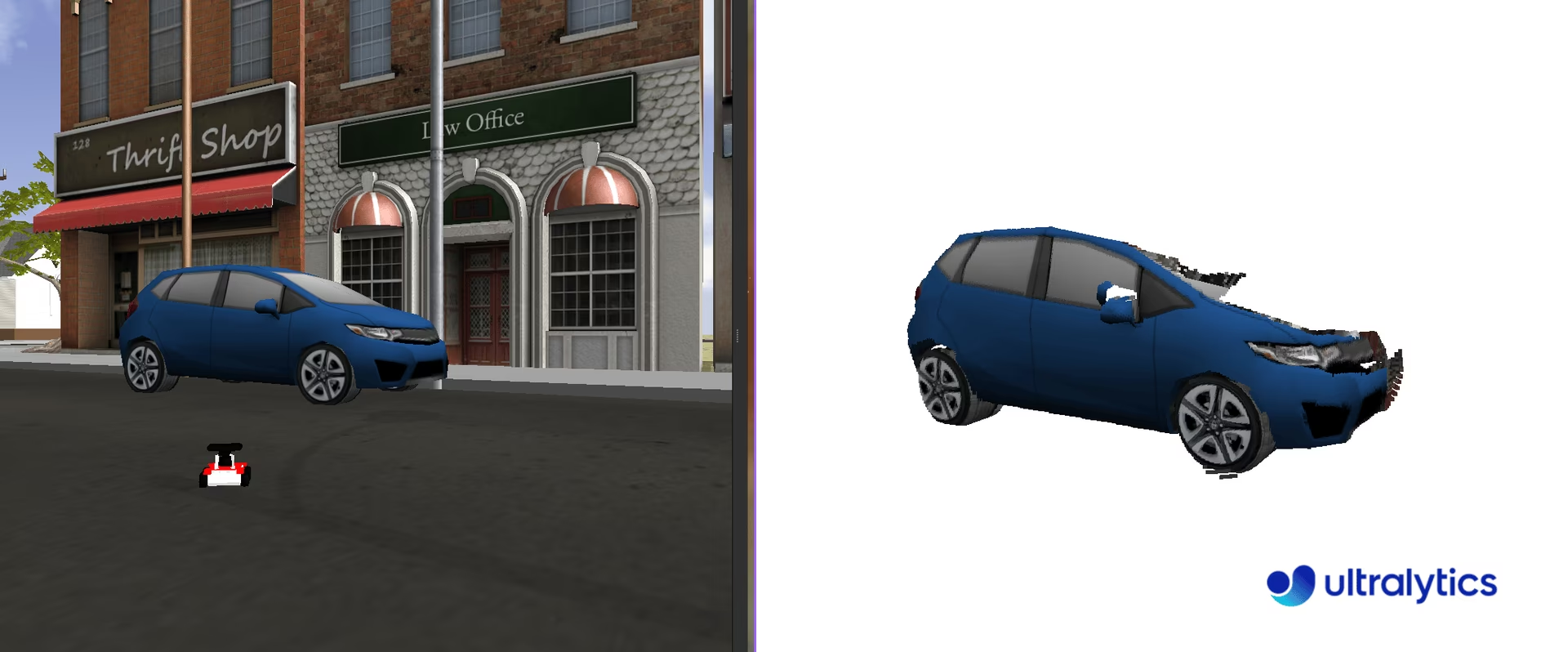
sensor_msgs/PointCloud2メッセージ型は、ROSで3D点群データを表すために使用されるデータ構造です。このメッセージ型はロボット用途に不可欠であり、3Dマッピング、物体認識、位置推定などのタスクを可能にします。
点群は、3次元座標系内で定義されるデータポイントの集合です。これらのデータポイントは、3Dスキャン技術で取得したオブジェクトまたはシーンの外表面を表します。点群内の各点はX、Y、Z座標を持ち、空間内の位置を示します。また、色や強度などの追加情報を含む場合もあります。
sensor_msgs/PointCloud2を扱う際は、点群データを取得したセンサーの参照フレームを考慮することが重要です。点群は最初にセンサーの参照フレームで取得されます。/tf_staticトピックをリッスンすると、この参照フレームを特定できます。ただし、アプリケーションの要件によっては、点群を別の参照フレームに変換する必要があります。この変換には、座標フレームを管理し、フレーム間でデータを変換するツールを提供するtf2_rosパッケージを使用できます。
点群は、さまざまなセンサーを使って取得できます。
- LIDAR(Light Detection and Ranging): レーザーパルスを使用してオブジェクトまでの距離を測定し、高精度の3Dマップを作成します。
- Depthカメラ: 各ピクセルのDepth情報を取得し、シーンの3D再構成を可能にします。
- ステレオカメラ: 2台以上のカメラを使用し、三角測量によってDepth情報を取得します。
- 構造化光スキャナー: 既知のパターンを表面に投影し、その変形を測定してDepthを計算します。
YOLOを点群で使用する#
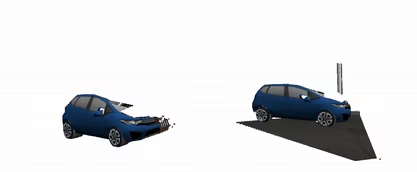
YOLOをsensor_msgs/PointCloud2型のメッセージと統合するには、Depthマップで使用する方法と同様の手法を利用できます。点群に含まれる色情報を活用して2D画像を抽出し、その画像をYOLOでセグメンテーションした後、得られたマスクを3次元の点に適用して、対象となる3Dオブジェクトを分離できます。
点群の処理には、使いやすいPythonライブラリであるOpen3D(pip install open3d)を推奨します。Open3Dは、点群データ構造の管理や可視化、複雑な処理の実行に役立つ堅牢なツールを提供します。このライブラリを使うことで、処理を大幅に簡略化し、YOLOベースのセグメンテーションと組み合わせて点群を操作・分析する能力を高められます。
点群のステップごとの使用方法#
必要なライブラリをインポートし、セグメンテーション用のYOLOモデルをインスタンス化します。
import time

import rospy

from ultralytics import YOLO

rospy.init_node("ultralytics")
time.sleep(1)
segmentation_model = YOLO("yolo26m-seg.pt")pointcloud2_to_array関数を作成し、sensor_msgs/PointCloud2メッセージを2つのNumPy配列に変換します。sensor_msgs/PointCloud2メッセージには、取得した画像のwidthとheightに基づくn点が含まれます。たとえば、480 x 640画像には307,200個の点があります。各点には3つの空間座標(xyz)と、対応するRGB形式の色が含まれます。これらは、2つの独立した情報チャネルとみなすことができます。
この関数は、元のカメラ解像度(width x height)の形式で、xyz座標とRGB値を返します。ほとんどのセンサーには最大距離(クリップ距離)があり、それを超える値はinf(np.inf)として表されます。処理前にこれらのnull値を除外し、0の値を割り当てることが重要です。
import numpy as np
import ros_numpy

def pointcloud2_to_array(pointcloud2: PointCloud2) -> tuple:
    """Convert a ROS PointCloud2 message to a numpy array.

    Args:
        pointcloud2 (PointCloud2): the PointCloud2 message

    Returns:
        (tuple): tuple containing (xyz, rgb)
    """
    pc_array = ros_numpy.point_cloud2.pointcloud2_to_array(pointcloud2)
    split = ros_numpy.point_cloud2.split_rgb_field(pc_array)
    rgb = np.stack([split["b"], split["g"], split["r"]], axis=2)
    xyz = ros_numpy.point_cloud2.get_xyz_points(pc_array, remove_nans=False)
    xyz = np.array(xyz).reshape((pointcloud2.height, pointcloud2.width, 3))
    nan_rows = np.isnan(xyz).all(axis=2)
    xyz[nan_rows] = [0, 0, 0]
    rgb[nan_rows] = [0, 0, 0]
return xyz, rgb次に、/camera/depth/pointsトピックをサブスクライブして点群メッセージを受信し、pointcloud2_to_array関数を使ってsensor_msgs/PointCloud2メッセージをXYZ座標とRGB値を含むNumPy配列に変換します。YOLOモデルでRGB画像を処理し、セグメンテーションされたオブジェクトを抽出します。検出されたオブジェクトごとにセグメンテーションマスクを抽出し、RGB画像とXYZ座標の両方に適用して、3D空間内のオブジェクトを分離します。
マスクはバイナリ値で構成され、1はオブジェクトの存在を、0は不在を示すため、処理は簡単です。マスクを適用するには、元の各チャネルにマスクを掛け合わせるだけです。この操作によって、画像内の対象オブジェクトを効果的に分離できます。最後に、Open3Dの点群オブジェクトを作成し、関連する色とともにセグメンテーションされたオブジェクトを3D空間で可視化します。
import sys

import open3d as o3d

ros_cloud = rospy.wait_for_message("/camera/depth/points", PointCloud2)
xyz, rgb = pointcloud2_to_array(ros_cloud)
result = segmentation_model(rgb, retina_masks=True)  # 元の画像解像度でのマスク

if not len(result[0].boxes.cls):
    print("No objects detected")
    sys.exit()

classes = result[0].boxes.cls.cpu().numpy().astype(int)
for index, class_id in enumerate(classes):
    mask = result[0].masks.data.cpu().numpy()[index, :, :].astype(int)
    mask_expanded = np.stack([mask, mask, mask], axis=2)

    obj_rgb = rgb * mask_expanded
    obj_xyz = xyz * mask_expanded

    pcd = o3d.geometry.PointCloud()
    pcd.points = o3d.utility.Vector3dVector(obj_xyz.reshape((ros_cloud.height * ros_cloud.width, 3)))
    pcd.colors = o3d.utility.Vector3dVector(obj_rgb.reshape((ros_cloud.height * ros_cloud.width, 3)) / 255)
    o3d.visualization.draw_geometries([pcd])
完全なコード
import sys
import time

import numpy as np
import open3d as o3d
import ros_numpy
import rospy
from sensor_msgs.msg import PointCloud2

from ultralytics import YOLO

rospy.init_node("ultralytics")
time.sleep(1)
segmentation_model = YOLO("yolo26m-seg.pt")

def pointcloud2_to_array(pointcloud2: PointCloud2) -> tuple:
    """Convert a ROS PointCloud2 message to a numpy array.

    Args:
        pointcloud2 (PointCloud2): the PointCloud2 message

    Returns:
        (tuple): tuple containing (xyz, rgb)
    """
    pc_array = ros_numpy.point_cloud2.pointcloud2_to_array(pointcloud2)
    split = ros_numpy.point_cloud2.split_rgb_field(pc_array)
    rgb = np.stack([split["b"], split["g"], split["r"]], axis=2)
    xyz = ros_numpy.point_cloud2.get_xyz_points(pc_array, remove_nans=False)
    xyz = np.array(xyz).reshape((pointcloud2.height, pointcloud2.width, 3))
    nan_rows = np.isnan(xyz).all(axis=2)
    xyz[nan_rows] = [0, 0, 0]
    rgb[nan_rows] = [0, 0, 0]
    return xyz, rgb

ros_cloud = rospy.wait_for_message("/camera/depth/points", PointCloud2)
xyz, rgb = pointcloud2_to_array(ros_cloud)
result = segmentation_model(rgb, retina_masks=True)  # 元の画像解像度でのマスク

if not len(result[0].boxes.cls):
    print("No objects detected")
    sys.exit()

classes = result[0].boxes.cls.cpu().numpy().astype(int)
for index, class_id in enumerate(classes):
    mask = result[0].masks.data.cpu().numpy()[index, :, :].astype(int)
    mask_expanded = np.stack([mask, mask, mask], axis=2)

    obj_rgb = rgb * mask_expanded
    obj_xyz = xyz * mask_expanded

    pcd = o3d.geometry.PointCloud()
    pcd.points = o3d.utility.Vector3dVector(obj_xyz.reshape((ros_cloud.height * ros_cloud.width, 3)))
    pcd.colors = o3d.utility.Vector3dVector(obj_rgb.reshape((ros_cloud.height * ros_cloud.width, 3)) / 255)
    o3d.visualization.draw_geometries([pcd])
結論#
Ultralytics YOLOをROSに統合すると、RGB画像、Depth画像、点群に対して物体検出とセグメンテーションを実行でき、生のセンサーストリームを実用的な認識情報に変換できます。さらに、推論方法の詳細についてはPredictモードを、ロボットアプリケーションをプロトタイプから本番環境へ進める方法についてはコンピュータービジョンプロジェクトの手順をご覧ください。
よくある質問#
ロボットオペレーティングシステム(ROS)は、開発者が堅牢なロボットアプリケーションを作成するために、ロボット工学で一般的に使用されるオープンソースのフレームワークです。ロボットシステムの構築や接続に使うライブラリとツールを提供し、複雑なアプリケーションの開発を容易にします。ROSは、トピックまたはサービスを介したメッセージで、ノード間の通信をサポートします。
Ultralytics YOLOをROSと統合するには、ROS環境をセットアップし、YOLOを使ってセンサーデータを処理します。まず、
ros_numpyやUltralytics YOLOなど、必要な依存関係をインストールします。pip install ros_numpy ultralytics次に、ROSノードを作成し、画像トピックをサブスクライブして、受信データを物体検出用に処理します。簡単な例を以下に示します。
import ros_numpy import rospy from sensor_msgs.msg import Image from ultralytics import YOLO detection_model = YOLO("yolo26m.pt") rospy.init_node("ultralytics") det_image_pub = rospy.Publisher("/ultralytics/detection/image", Image, queue_size=5) def callback(data): array = ros_numpy.numpify(data) det_result = detection_model(array) det_annotated = det_result[0].plot(show=False) det_image_pub.publish(ros_numpy.msgify(Image, det_annotated, encoding="rgb8")) rospy.Subscriber("/camera/color/image_raw", Image, callback) rospy.spin()ROSでは、
sensor_msgs/Imageで表されるDepth画像がカメラからオブジェクトまでの距離を示し、障害物回避、3Dマッピング、位置推定などのタスクに不可欠な情報を提供します。RGB画像とともにDepth情報を使用することで、ロボットは3D環境をより適切に理解できます。YOLOを使用すると、RGB画像からセグメンテーションマスクを抽出し、そのマスクをDepth画像に適用して、正確な3Dオブジェクト情報を取得できます。これにより、ロボットが周囲を移動し、環境とやり取りする能力が向上します。
ROSでYOLOを使って3D点群を可視化するには、次の手順を実行します。
sensor_msgs/PointCloud2メッセージをNumPy配列に変換します。- YOLOを使ってRGB画像をセグメンテーションします。
- セグメンテーションマスクを点群に適用します。
可視化にOpen3Dを使用する例を示します。
import sys import numpy as np import open3d as o3d import ros_numpy import rospy from sensor_msgs.msg import PointCloud2 from ultralytics import YOLO rospy.init_node("ultralytics") segmentation_model = YOLO("yolo26m-seg.pt") def pointcloud2_to_array(pointcloud2): pc_array = ros_numpy.point_cloud2.pointcloud2_to_array(pointcloud2) split = ros_numpy.point_cloud2.split_rgb_field(pc_array) rgb = np.stack([split["b"], split["g"], split["r"]], axis=2) xyz = ros_numpy.point_cloud2.get_xyz_points(pc_array, remove_nans=False) xyz = np.array(xyz).reshape((pointcloud2.height, pointcloud2.width, 3)) return xyz, rgb ros_cloud = rospy.wait_for_message("/camera/depth/points", PointCloud2) xyz, rgb = pointcloud2_to_array(ros_cloud) result = segmentation_model(rgb, retina_masks=True) # 元の画像解像度でのマスク if not len(result[0].boxes.cls): print("No objects detected") sys.exit() classes = result[0].boxes.cls.cpu().numpy().astype(int) for index, class_id in enumerate(classes): mask = result[0].masks.data.cpu().numpy()[index, :, :].astype(int) mask_expanded = np.stack([mask, mask, mask], axis=2) obj_rgb = rgb * mask_expanded obj_xyz = xyz * mask_expanded pcd = o3d.geometry.PointCloud() pcd.points = o3d.utility.Vector3dVector(obj_xyz.reshape((-1, 3))) pcd.colors = o3d.utility.Vector3dVector(obj_rgb.reshape((-1, 3)) / 255) o3d.visualization.draw_geometries([pcd])この方法では、セグメンテーションされたオブジェクトを3Dで可視化できます。ロボット工学アプリケーションにおけるナビゲーションやマニピュレーションなどのタスクに役立ちます。