Albumentationsでデータセットを強化し、YOLO26をトレーニングする
コンピュータービジョンモデルを構築する際、トレーニングデータの品質と多様性は、モデルの性能に大きく影響します。Albumentationsは、幅広い画像変換を高速かつ柔軟、効率的に適用できるため、モデルの現実世界の状況への適応力を高められます。Ultralytics YOLO26と統合でき、物体検出、インスタンスセグメンテーション、セマンティックセグメンテーション、深度推定、姿勢推定、方向付きバウンディングボックスのタスク向けに、堅牢なデータセットを作成するのに役立ちます。
Albumentationsは、幾何学的変換や色調整などの手法をYOLO26のトレーニングデータに追加します。このガイドでは、AlbumentationsがUltralyticsのデータ拡張パイプラインにどのように組み込まれるか、またプロジェクトに合わせてカスタマイズする方法を説明します。
画像拡張のためのAlbumentations#
Albumentationsは、2018年6月に作成されたオープンソースの画像拡張ライブラリです。コンピュータービジョンにおける画像拡張のプロセスを簡素化し、高速化するために設計されています。性能と柔軟性を重視して開発されており、回転や反転などの単純な変換から、明るさやコントラストの調整などの複雑な処理まで、多様な拡張手法に対応しています。Albumentationsは、画像分類、物体検出、セグメンテーションなどのタスク向けに、豊富で多様なデータセットを生成するのに役立ちます。
Albumentationsを使用すると、画像、セグメンテーションマスク、バウンディングボックス、キーポイントに簡単に拡張処理を適用でき、データセットのすべての要素をまとめて変換できます。PyTorchやTensorFlowなどの一般的なディープラーニングフレームワークにも対応しているため、幅広いプロジェクトで利用できます。
Albumentationsは、小規模なデータセットにも大規模なコンピュータービジョンタスクにも適しています。高速な処理によってデータ準備にかかる時間を短縮でき、より多様なトレーニングデータによって、現実世界のアプリケーションにおけるモデルの性能を向上させられます。
Albumentationsの主な機能#
Albumentationsには、幅広いコンピュータービジョンアプリケーション向けの複雑な画像拡張を簡素化する便利な機能が多数あります。主な機能は次のとおりです。
- 幅広い変換:Albumentationsは、幾何学的変換(回転、反転など)、色調整(明るさ、コントラストなど)、ノイズの追加(ガウシアンノイズなど)を含む70種類以上の変換を提供します。複数の選択肢を活用することで、多様で堅牢なトレーニングデータセットを作成できます。
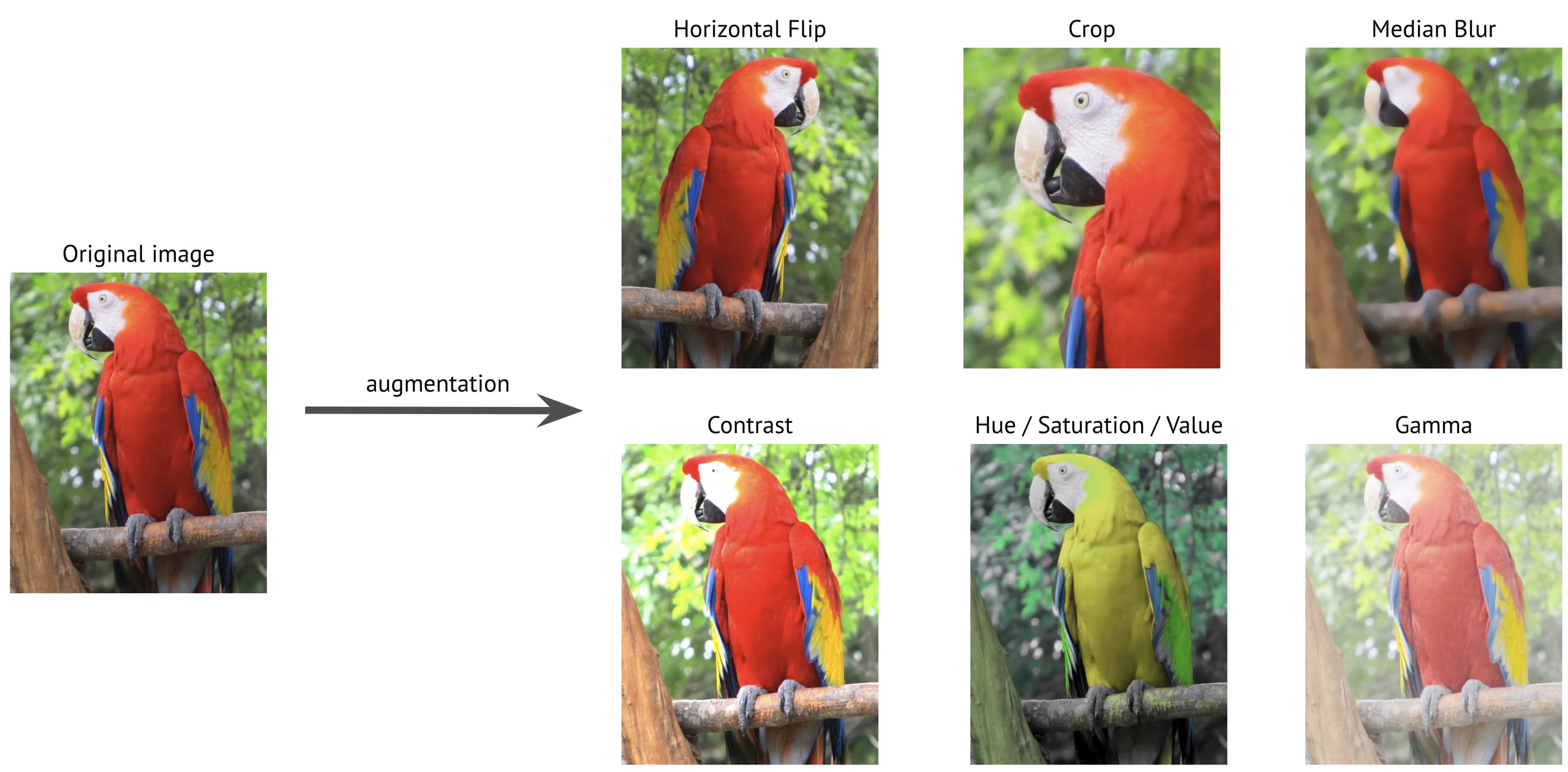
-
高性能な最適化:OpenCVとNumPyを基盤とするAlbumentationsは、SIMD(単一命令・複数データ)などの高度な最適化手法を利用します。SIMDは複数のデータポイントを同時に処理して、処理を高速化します。大規模なデータセットも迅速に処理できるため、画像拡張に利用できる最速の選択肢の1つです。
-
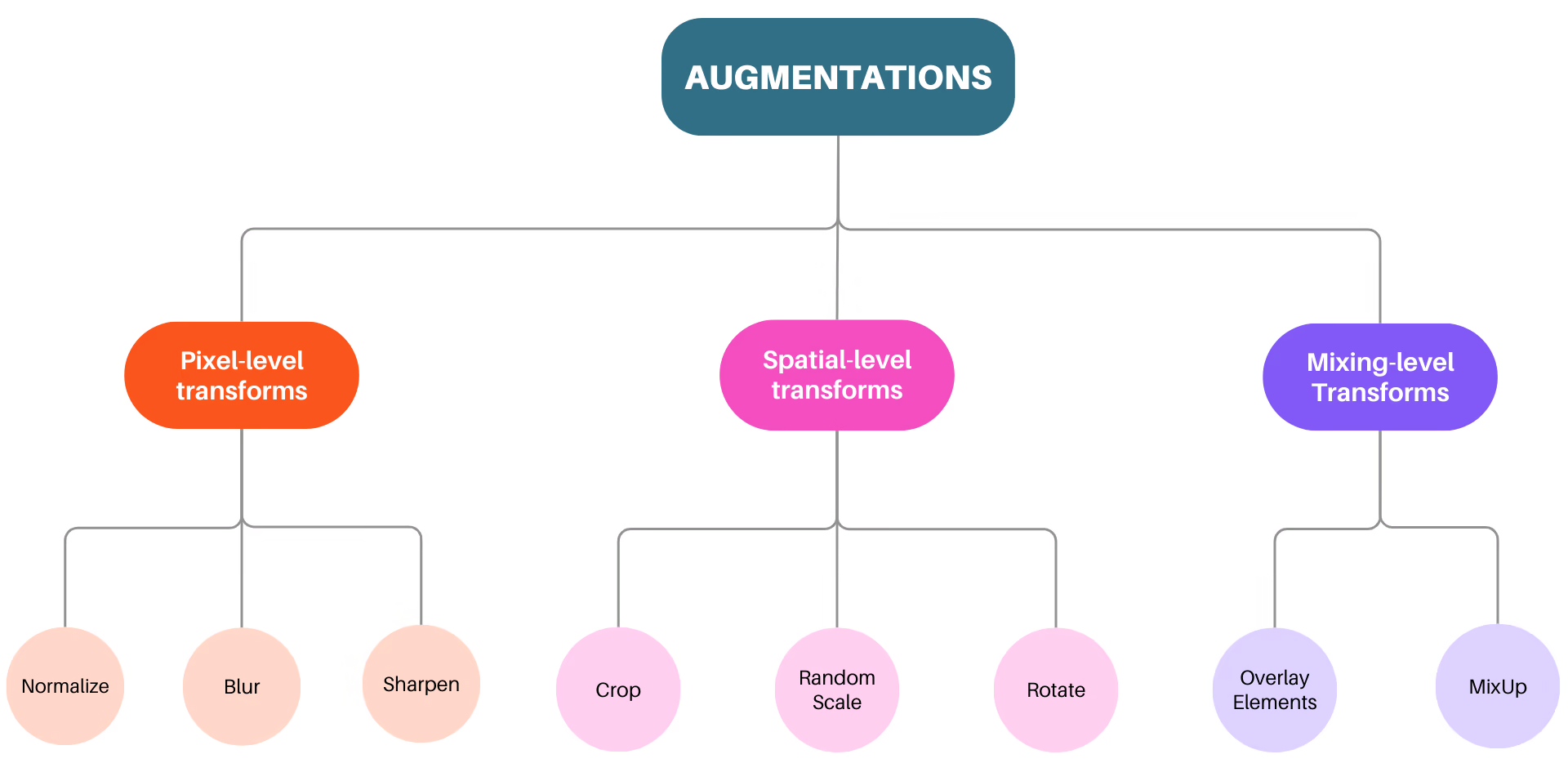
3段階の拡張:Albumentationsは、ピクセルレベル、空間レベル、ミキシングレベルの3段階の拡張に対応しています。ピクセルレベルの変換は入力画像のみに影響し、マスク、バウンディングボックス、キーポイントは変更しません。空間レベルの変換は画像と、マスクやバウンディングボックスなどの要素の両方を変更します。ミキシングレベルの変換は複数の画像を1つに合成します。
- ベンチマーク結果:Albumentationsが公開しているベンチマークでは、他の拡張ライブラリと比べて優れた速度を示しており、特に大規模なデータセットでその差が顕著です。
Vision AIプロジェクトでAlbumentationsを使う理由#
画像拡張に関して、Albumentationsはコンピュータービジョンタスク向けの信頼性の高いツールです。Vision AIプロジェクトでの利用を検討すべき主な理由をいくつか紹介します。
-
使いやすいAPI:Albumentationsは、画像、マスク、バウンディングボックス、キーポイントに幅広い拡張を適用するための、シンプルでわかりやすい単一のAPIを提供します。さまざまなデータセットに簡単に適応できるよう設計されており、データ準備をよりシンプルかつ効率的にします。
-
徹底したバグテスト:拡張パイプラインのバグは、入力データを気付かれないまま破損させ、最終的にモデルの性能を低下させることがあります。Albumentationsは、開発の早い段階でバグを検出できる、包括的なテストスイートでこの問題に対処します。
-
拡張性:Albumentationsでは、新しい拡張処理を簡単に追加でき、単一のインターフェースから組み込みの変換と併用できます。
AlbumentationsでYOLO26のトレーニングデータを拡張する方法#
AlbumentationsはUltralyticsのトレーニングモードに直接統合されており、Albumentationsパッケージがインストールされている場合は自動的に適用されます。
インストール#
YOLO26でAlbumentationsを使用するには、まず必要なパッケージがインストールされていることを確認してください。Albumentationsがインストールされていない場合、トレーニング中に拡張処理は適用されません。インストールすると、トレーニング画像に変換がオンザフライで適用されます。
# Install the required packages
pip install albumentations ultralyticsインストール手順の詳細とベストプラクティスについては、Ultralyticsのインストールガイドをご覧ください。YOLO26に必要なパッケージのインストールで問題が発生した場合は、解決策とヒントが記載されたよくある問題のガイドをご確認ください。
このページのカスタム変換の例にはAlbumentations 1.4.22以降が必要なため、Python 3.9以降が必要です。
使用方法#
必要なパッケージをインストールしたら、YOLO26でAlbumentationsを使用できます。Albumentationsがインストールされた状態でYOLO26をトレーニングすると、デフォルトのAlbumentations変換セットが自動的に適用されます。
from ultralytics import YOLO

# 事前トレーニング済みモデルを読み込む
model = YOLO("yolo26n.pt")

# デフォルトの拡張を使用してモデルをトレーニングする
results = model.train(data="coco8.yaml", epochs=100, imgsz=640)
以下のセクションでは、トレーニング中に適用されるデフォルトのAlbumentations変換について説明します。
ぼかし#
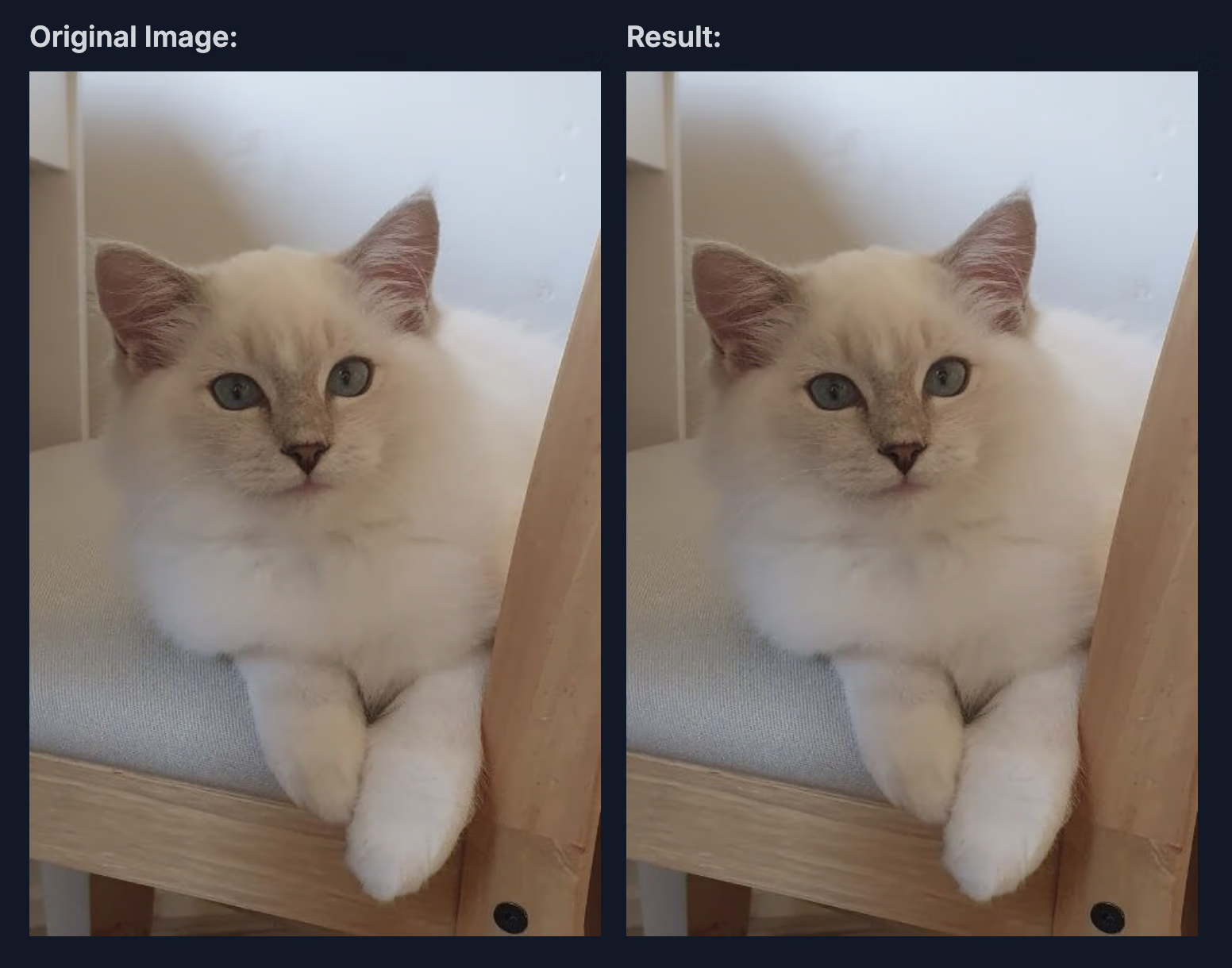
AlbumentationsのBlur変換は、小さな正方形領域(カーネル)内のピクセル値を平均化し、画像に単純なぼかし効果を適用します。OpenCVのcv2.blur関数を使用してノイズを低減しますが、画像の細部もわずかに失われます。
この統合で使用されるパラメーターと値は次のとおりです。
-
blur_limit:ぼかし効果のサイズ範囲を設定します。デフォルトの範囲は(3, 7)です。つまり、ぼかしのカーネルサイズは3~7ピクセルの間で変化し、ぼかしの中心を保つために奇数のみが使用されます。
-
p:ぼかしを適用する確率です。この統合ではp=0.01であるため、各画像にぼかしが適用される確率は1%です。確率を低くすることで、ときどきぼかし効果を加えて変化を与え、画像をぼかしすぎずにモデルの汎化性能を高めます。
メディアンブラー#
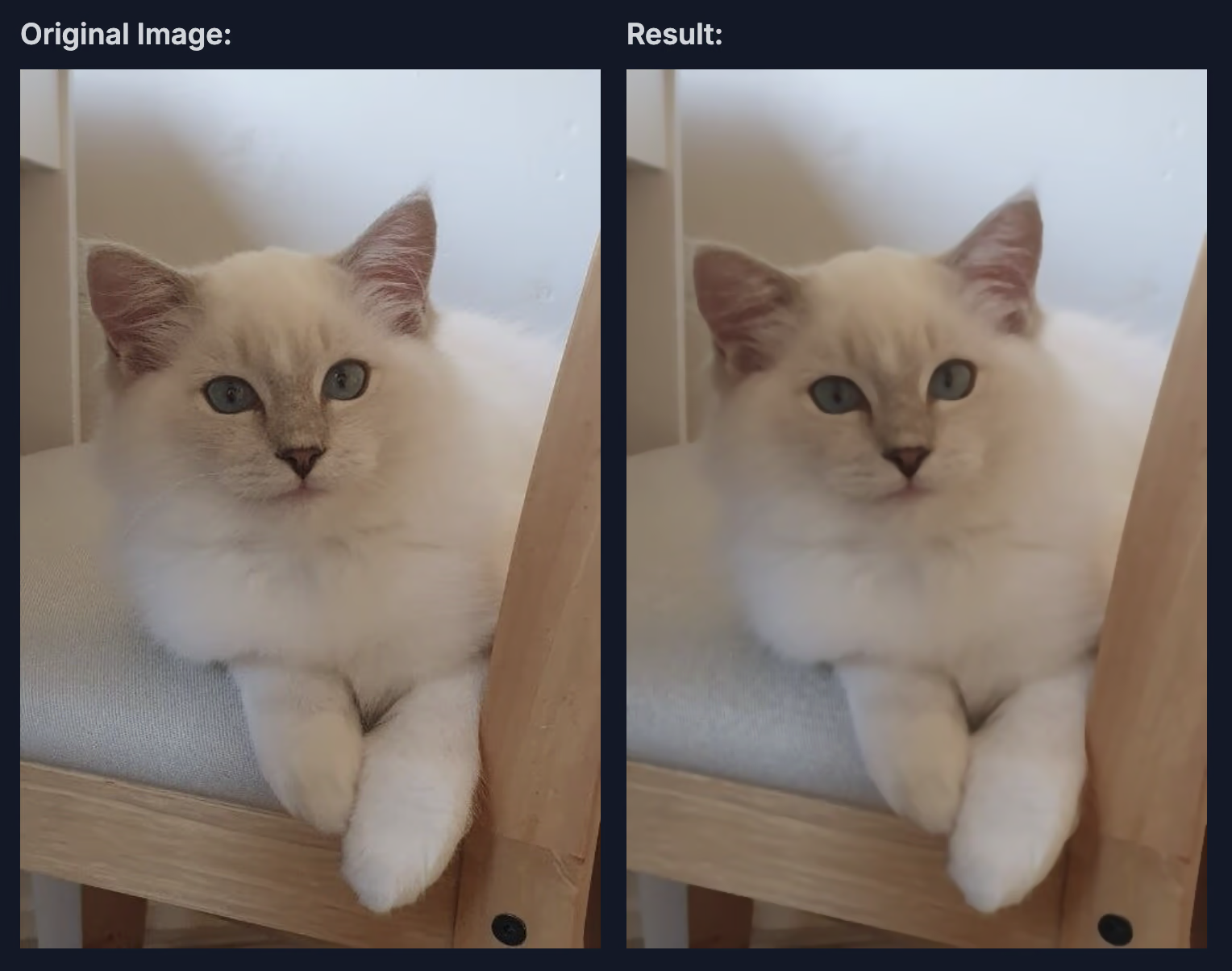
AlbumentationsのMedianBlur変換は、画像にメディアンブラー効果を適用します。エッジを保ちながらノイズを減らすのに特に有効です。一般的なぼかし手法とは異なり、MedianBlurはメディアンフィルターを使用します。このフィルターは、エッジの鮮明さを保ちながら、ごま塩ノイズを除去するのに特に効果的です。
この統合で使用されるパラメーターと値は次のとおりです。
-
blur_limit:ぼかしカーネルの最大サイズを設定します。この統合でのデフォルト範囲は(3, 7)です。適切な位置合わせを確保するため奇数のみを使用し、ぼかしのカーネルサイズは3~7ピクセルの間でランダムに選択されます。
-
p:メディアンブラーを適用する確率を設定します。ここではp=0.01のため、各画像にこの変換が適用される確率は1%です。この低い確率により、メディアンブラーの使用は控えめになります。ノイズを減らしながらエッジを保った画像をときどきモデルに見せることで、汎化性能の向上に役立ちます。
以下の画像は、この拡張を画像に適用した例です。
グレースケール#
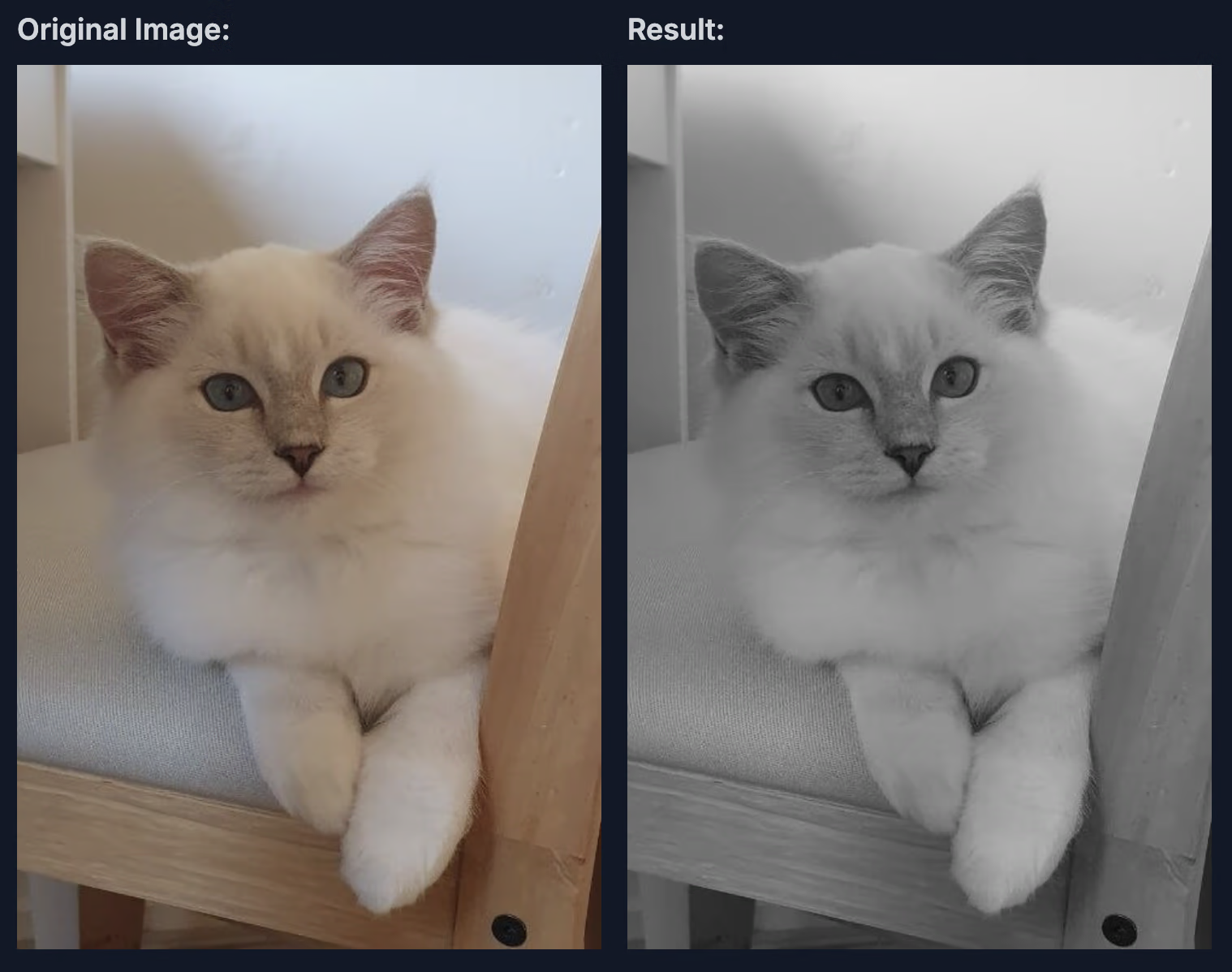
AlbumentationsのToGray変換は、画像をグレースケールに変換して単一チャンネル形式にし、必要に応じてこのチャンネルを複製して指定された出力チャンネル数に合わせます。グレースケールの明るさを調整する方法はいくつかあり、単純な平均から、コントラストや明るさをより自然に知覚できる高度な手法まで選択できます。
この統合で使用されるパラメーターと値は次のとおりです。
-
num_output_channels:出力画像のチャンネル数を設定します。この値が1より大きい場合、単一のグレースケールチャンネルが複製され、マルチチャンネルのグレースケール画像が作成されます。デフォルト値は3で、同一のチャンネルを3つ持つグレースケール画像になります。
-
method:グレースケールへの変換方法を指定します。デフォルトの方法である"weighted_average"は、人間の知覚に近い(0.299R + 0.587G + 0.114B)の式を適用し、自然な見た目のグレースケール効果をもたらします。"from_lab"、"desaturation"、"average"、"max"、"pca"などの他の選択肢では、処理速度、明るさの強調、細部の保持など、さまざまなニーズに応じた方法でグレースケール画像を作成できます。
-
p:グレースケール変換を適用する頻度を設定します。p=0.01の場合、各画像がグレースケールに変換される確率は1%です。カラー画像とグレースケール画像を混在させることで、モデルの汎化性能を高められます。
以下の画像は、このグレースケール変換を適用した例です。
コントラスト制限付き適応的ヒストグラム均等化(CLAHE)#
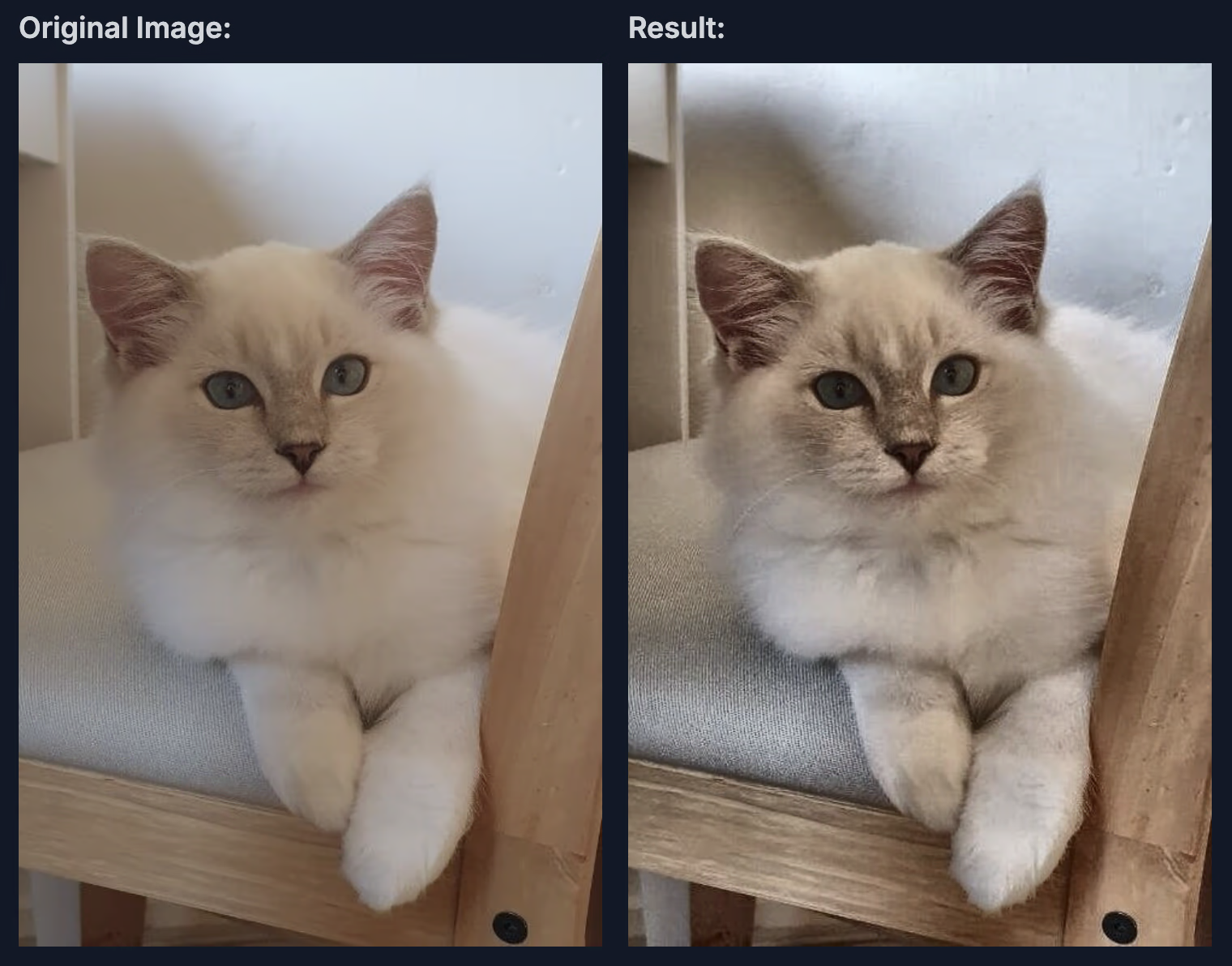
AlbumentationsのCLAHE変換は、コントラスト制限付き適応的ヒストグラム均等化(CLAHE)を適用します。画像全体ではなく局所領域(タイル)ごとにヒストグラムを均等化して、画像のコントラストを高める手法です。CLAHEはバランスの取れた強調効果を生み出し、特に元のコントラストが低い領域で、標準的なヒストグラム均等化によってコントラストが過度に強調されるのを防ぎます。
この統合で使用されるパラメーターと値は次のとおりです。
-
clip_limit:コントラスト強調の範囲を制御します。デフォルト範囲は(1, 4)で、各タイルで許容される最大コントラストを指定します。値を大きくするとコントラストが強くなりますが、ノイズが生じることもあります。
-
tile_grid_size:通常は(行, 列)で指定するタイルグリッドのサイズを定義します。デフォルト値は(8, 8)で、画像が8x8のグリッドに分割されます。タイルを小さくすると局所的な調整が可能になり、大きくすると全体的な均等化に近い効果が得られます。
-
p:CLAHEを適用する確率です。ここではp=0.01のため、強調効果は1%の確率でのみ適用されます。これにより、トレーニング画像にときどき変化を加えるためのコントラスト調整を控えめに行います。
以下の画像は、CLAHE変換を適用した例です。
カスタムAlbumentations変換の使用#
Albumentationsのデフォルト統合では充実した拡張処理が提供されますが、特定のユースケースに合わせて変換をカスタマイズしたい場合もあります。Ultralytics YOLO26では、Python APIを使用してaugmentationsパラメーター経由でカスタムAlbumentations変換を渡せます。このセクションの例には、Albumentations 1.4.22以降が必要です。
カスタム変換の定義方法#
独自のAlbumentations変換リストを定義し、トレーニング関数に渡すことができます。これにより、デフォルトのAlbumentations変換は置き換えられますが、他のYOLO拡張機能(hsv_h、degrees、mosaicなど)は引き続き有効です。
より高度な変換処理を使用した例を示します。
import albumentations as A

from ultralytics import YOLO

# モデルを読み込む
model = YOLO("yolo26n.pt")

# さまざまな拡張手法を使ってカスタム変換を定義する
custom_transforms = [
    # ぼかしのバリエーション
    A.OneOf(
        [
            A.MotionBlur(blur_limit=7, p=1.0),
            A.MedianBlur(blur_limit=7, p=1.0),
            A.GaussianBlur(blur_limit=7, p=1.0),
        ],
        p=0.3,
    ),
    # ノイズのバリエーション
    A.OneOf(
        [
            A.GaussNoise(std_range=(0.0124, 0.0277), p=1.0),
            A.ISONoise(color_shift=(0.01, 0.05), intensity=(0.1, 0.5), p=1.0),
        ],
        p=0.2,
    ),
    # 色とコントラストの調整
    A.CLAHE(clip_limit=4.0, tile_grid_size=(8, 8), p=0.5),
    A.RandomBrightnessContrast(brightness_limit=0.3, contrast_limit=0.3, p=0.5),
    A.HueSaturationValue(hue_shift_limit=20, sat_shift_limit=30, val_shift_limit=20, p=0.5),
    # 遮蔽をシミュレートする
    A.CoarseDropout(num_holes_range=(1, 8), hole_height_range=(8, 32), hole_width_range=(8, 32), fill=0, p=0.2),
]

# カスタム変換を使ってトレーニングする
results = model.train(
    data="coco8.yaml",
    epochs=100,
    imgsz=640,
    augmentations=custom_transforms,
)重要な考慮事項#
カスタムAlbumentations変換を使用する際は、次の点に注意してください。
- 設定: Python APIを使用してカスタム変換オブジェクトを構築します。シリアライズした変換は、トレーニング再開時も含め、CLIまたはYAML設定ファイル経由で渡すこともできます。
- デフォルト設定の置き換え: カスタム変換を使用すると、デフォルトのAlbumentations変換は完全に置き換えられます。他のYOLO拡張機能は引き続き有効です。
- ラベルの処理:
A.OneOfまたはA.Compose内にネストされたものを含む空間変換では、画像に合わせてバウンディングボックス、ポリゴン、キーポイント、深度マスクまたはセマンティックマスクが移動します。A.RandomGridShuffleではポリゴンやキーポイントのトポロジーを保持できないため、セグメンテーション、ポーズ、OBBのサンプルではエラーが発生します。 - パフォーマンス: 計算コストの高い変換もあります。トレーニング速度を監視し、それに応じて調整してください。
- タスクとの互換性: カスタムAlbumentations変換は、検出、セグメンテーション、セマンティックセグメンテーション、深度、ポーズ、OBBのトレーニングで使用できますが、異なる拡張パイプラインを使用する分類には対応していません。
カスタム変換のユースケース#
用途によって、効果的な拡張方法は異なります。
- 医用画像: 弾性変形、グリッド歪み、専用のノイズパターンを使用します
- 航空写真・衛星画像: 高度、気象条件、照明角度の違いをシミュレートする変換を適用します
- 低照度環境: ノイズの追加や明るさの調整を重視し、厳しい照明条件に強いモデルをトレーニングします
- 産業検査: 品質管理用途に向けて、テクスチャのバリエーションやシミュレーションした欠陥を追加します
利用可能な変換とそのパラメーターの一覧は、Albumentationsのドキュメントをご覧ください。
YOLO26でカスタムAlbumentations変換を使用する際の詳細な例とベストプラクティスについては、YOLOデータ拡張ガイドをご覧ください。
Albumentationsについてさらに学ぶ#
Albumentationsについて詳しく知りたい場合は、詳細な手順や例を紹介する次のリソースをご覧ください。
-
Albumentationsのドキュメント: 公式ドキュメントでは、サポートされる幅広い変換と高度な使用方法を紹介しています。
-
Ultralytics Albumentations APIリファレンス:この統合を実装するクラスの詳細をご覧ください。
-
AlbumentationsのGitHubリポジトリ: リポジトリには、拡張機能のカスタマイズを始める際に役立つ例、ベンチマーク、ディスカッションが含まれています。
主なポイント#
このガイドでは、画像拡張用PythonライブラリであるAlbumentationsの主な特徴を紹介しました。幅広い変換機能や最適化された性能、次のYOLO26プロジェクトでの活用方法について説明しました。
よくある質問#
AlbumentationsはYOLO26と統合されており、パッケージがインストールされていればトレーニング中に自動適用されます。使用を開始する手順は次のとおりです。
# 必要なパッケージをインストールする
# !pip install albumentations ultralytics
from ultralytics import YOLO

# モデルを読み込み、自動拡張を使ってトレーニングする
model = YOLO("yolo26n.pt")
model.train(data="coco8.yaml", epochs=100)
デフォルトの統合では、ぼかし、メディアンブラー、グレースケール変換、CLAHEがそれぞれ低い確率(1%)で適用されます。これにより、トレーニングを支配することなく、ときおり変化を加えられます。
Albumentationsには、次のような特長があります。
- 性能:OpenCVとNumPyをベースとし、SIMD最適化により高速に動作します
- 柔軟性: ピクセルレベル、空間レベル、ミキシングレベルの拡張にわたる70種類以上の変換をサポートします
- 互換性:PyTorchやTensorFlowなどの一般的なフレームワークに対応しています
- 信頼性: 充実したテストスイートにより、気付かないデータ破損を防ぎます
- 使いやすさ: あらゆる種類の拡張に対応する統一APIを提供します
Albumentationsは、次のようなさまざまなコンピュータービジョンタスクを強化します。
- 物体検出: 照明、スケール、向きの変化に対するモデルのロバスト性を高めます
- インスタンスセグメンテーション: 多様な変換によってマスク予測の精度を高めます
- ポーズ推定: さまざまな視点や照明条件にモデルが適応しやすくなります
- 方向付きバウンディングボックス検出: 航空写真や回転物体の画像に向けて、色やノイズに変化を加えます
多様な拡張オプションを備えたこのライブラリは、モデルのロバストなパフォーマンスが求められるビジョンタスクに役立ちます。Ultralytics YOLO26では、分類トレーニングに独自のtorchvisionベースの拡張パイプラインを使用するため、Albumentations変換は適用されません。


コメント19
質問したり、結果を共有したり、ほかの人をサポートしたりできます。
anushka-kore
Is there a way that we can define more custom albumentations transforms to be applied during model train? If yes, will they also change the bounding box coords accordingly if they are spatial transforms?
manuelescobar5036
The albumentations transforms are defined in the ultralytics/data/augment.py file. There you can find the following function that returns the transforms to be applied to the images, which includes the Albumentations transform.
Then, in the same file you can find the Albumentations class which defines the pipeline. In this pipeline you can add the new transforms that you want.
Bouding boxes are changed accordingly to their spatial transforms. This is done when you pass bbox_params to the Albumentations pipeline.
 Glenn JocherUltralytics(編集済み)
@anushka-kore Yes. Pass your own Albumentations transforms to training with the
augmentationsargument (Python only):import albumentations as A from ultralytics import YOLO model = YOLO("yolo26n.pt") model.train(data="coco8.yaml", augmentations=[A.Blur(p=0.01), A.CLAHE(p=0.01)])Spatial transforms (rotation, flips, perspective, etc.) are applied together with the bounding boxes, which are updated automatically through Albumentations' bbox handling in YOLO format. Non-spatial transforms like color adjustments only change the image. See the Albumentations integration guide for details.
Thanks a lot for the inputs @deox1994 and @glenn-jocher! I have made it work👍🏻
Hey @glenn-jocher and @deox1994, I later realised that simply defining my list of custom transform in the augment.py file is not working. This is the part I changed in the augment.py file (original ones are commented out)-
        T = [
            #A.Blur(p=0.01),
            #A.MedianBlur(p=0.01),
            #A.ToGray(p=0.01),
            #A.CLAHE(p=0.01),
            A.RandomBrightnessContrast(p=0.2),
            #A.RandomGamma(p=0.0),
            #A.ImageCompression(quality_range=(75, 100), p=0.0),
            A.HorizontalFlip(p=0.5),
            A.VerticalFlip(p=0.5),
            A.Rotate(limit=30, p=0.5),
            A.GaussianBlur(p=0.2),
            A.GaussNoise(p=0.2),
        ]
For your reference, this is the error I get, you could view the list of albumentation transforms I applied here as well- ..... Transferred 1009/1015 items from pretrained weights Freezing layer 'model.23.dfl.conv.weight' AMP: running Automatic Mixed Precision (AMP) checks... AMP: checks passed ✅ train: Scanning /home/xxx/dataset_MIP_clean/train/labels.cache... 831 images, 73 backgrounds, 0 corrupt: 100%|██████████| 831/831 [00:00<?, ?it/s] albumentations: RandomBrightnessContrast(p=0.2, brightness_by_max=True, brightness_limit=(-0.2, 0.2), contrast_limit=(-0.2, 0.2), ensure_safe_range=False), HorizontalFlip(p=0.5), VerticalFlip(p=0.5), Rotate(p=0.5, border_mode=0, crop_border=False, fill=0.0, fill_mask=0.0, interpolation=1, limit=(-30.0, 30.0), mask_interpolation=0, rotate_method='largest_box'), GaussianBlur(p=0.2, blur_limit=(0, 0), sigma_limit=(0.5, 3.0)), GaussNoise(p=0.2, mean_range=(0.0, 0.0), noise_scale_factor=1.0, per_channel=True, std_range=(0.2, 0.44)) val: Scanning /home/xxx/dataset_MIP_clean/val/labels.cache... 210 images, 13 backgrounds, 0 corrupt: 100%|██████████| 210/210 [00:00<?, ?it/s] Plotting labels to /home/xxx/yolov11_predictions/test4/labels.jpg... optimizer: 'optimizer=auto' found, ignoring 'lr0=0.01' and 'momentum=0.937' and determining best 'optimizer', 'lr0' and 'momentum' automatically... optimizer: AdamW(lr=0.000769, momentum=0.9) with parameter groups 167 weight(decay=0.0), 174 weight(decay=0.0005), 173 bias(decay=0.0) Image sizes 640 train, 640 val Using 8 dataloader workers Logging results to /home/xxx/yolov11_predictions/test4 Starting training for 200 epochs...
  Epoch    GPU_mem   box_loss   cls_loss   dfl_loss  Instances       Size
  1/200      15.4G      5.502      51.38      2.745         17        640:  10%|▉         | 5/52 [00:02<00:22,  2.07it/s]
Traceback (most recent call last): File "/home/xxx/yolo_train.py", line 149, in train_yolo(output_dir) File "/home/xxx/yolo_train.py", line 116, in train_yolo results = model.train( ^^^^^^^^^^^^ File "/home/xxx/env/lib/python3.12/site-packages/ultralytics/engine/model.py", line 791, in train self.trainer.train() File "/home/xxx/env/lib/python3.12/site-packages/ultralytics/engine/trainer.py", line 211, in train self._do_train(world_size) File "/home/xxx/env/lib/python3.12/site-packages/ultralytics/engine/trainer.py", line 366, in _do_train for i, batch in pbar: ^^^^ File "/home/xxx/env/lib/python3.12/site-packages/tqdm/std.py", line 1178, in iter for obj in iterable: ^^^^^^^^ File "/home/xxx/env/lib/python3.12/site-packages/ultralytics/data/build.py", line 59, in iter yield next(self.iterator) ^^^^^^^^^^^^^^^^^^^ File "/home/xxx/env/lib/python3.12/site-packages/torch/utils/data/dataloader.py", line 708, in next data = self._next_data() ^^^^^^^^^^^^^^^^^ File "/home/xxx/env/lib/python3.12/site-packages/torch/utils/data/dataloader.py", line 1455, in _next_data return self._process_data(data) ^^^^^^^^^^^^^^^^^^^^^^^^ File "/home/xxx/env/lib/python3.12/site-packages/torch/utils/data/dataloader.py", line 1505, in _process_data data.reraise() File "/home/xxx/env/lib/python3.12/site-packages/torch/_utils.py", line 733, in reraise raise exception RuntimeError: Caught RuntimeError in DataLoader worker process 5. Original Traceback (most recent call last): File "/home/xxx/env/lib/python3.12/site-packages/torch/utils/data/_utils/worker.py", line 349, in _worker_loop data = fetcher.fetch(index) # type: ignore[possibly-undefined] ^^^^^^^^^^^^^^^^^^^^ File "/home/xxx/env/lib/python3.12/site-packages/torch/utils/data/_utils/fetch.py", line 55, in fetch return self.collate_fn(data) ^^^^^^^^^^^^^^^^^^^^^ File "/home/xxx/env/lib/python3.12/site-packages/ultralytics/data/dataset.py", line 298, in collate_fn value = torch.cat(value, 0) ^^^^^^^^^^^^^^^^^^^ RuntimeError: Tensors must have same number of dimensions: got 1 and 2
All my transforms are correctly defined, and the spatial transforms (horizontalflip, verticalflip and rotate) exist in the spatial_transforms list. Could you please point where this is going wrong?
supriamir
Hi Glen,
I would like to optimize the hyperparameters using model.tune(). My goal is to identify the most important augmentations from Albumentations.
If I am not mistaken, the default hyperparameter optimization only includes a limited set of augmentation parameters, as described in the following link: https://docs.ultralytics.com/integrations/ray-tune/#tune-method-parameters
Could you advise how I can include and optimize additional Albumentations transforms beyond the default settings?
- Glenn JocherUltralytics
Yes, but not directly through the default
model.tune()search set: custom Albumentations are a Python-onlyaugmentationslist passed tomodel.train(), while the built-in tuner mutates the numericspace, so the usual workflow is to keep one fixedaugmentations=pipeline per tuning run and compare the best result across several candidate pipelines; if you want to search the pipeline itself, use a small custom Ray Tune wrapper aroundmodel.train()instead, and keep the standard YOLO augmentations fixed so you isolate the Albumentations effect—see the hyperparameter tuning guide and the Albumentations integration guide.
UltralyticsAssistantUltralytics
👋 Hello, thank you for your interest in Ultralytics 🚀! We recommend visiting the Docs for guidance—there you’ll find many Python and CLI usage examples, and answers to many common questions.
If this is a 🐛 Bug Report, please provide a minimum reproducible example to help us investigate.
If you have a custom training ❓ Question, please share as much relevant information as possible, including dataset image examples and training logs. Also, make sure to review our Tips for Best Training Results.
You’re welcome to join the Ultralytics community where it fits you best:
- For real-time chat, join us on Discord 🎧
- For in-depth discussions, visit Discourse
- For community sharing, check out our Subreddit
Upgrade
Upgrade to the latest
ultralyticspackage and all requirements in a Python>=3.8 environment with PyTorch>=1.8 to ensure you’re on the latest version:pip install -U ultralyticsEnvironments
YOLO can be run in any of the following up-to-date verified environments (with all dependencies like CUDA/CUDNN, Python, and PyTorch preinstalled):
- Notebooks with free GPU:


- Google Cloud Deep Learning VM. See GCP Quickstart Guide
- Amazon Deep Learning AMI. See AWS Quickstart Guide
- Docker Image. See Docker Quickstart Guide
Status

If this badge is green, all Ultralytics CI tests are currently passing. These tests confirm correct operation of all YOLO Modes and Tasks on macOS, Windows, and Ubuntu every 24 hours and on every commit.
This is an automated response 🤖. An Ultralytics engineer will assist you here soon!
- Glenn JocherUltralytics
欢迎来到 Ultralytics 中文文档的 Albumentations 集成讨论区!如果您对使用 Albumentations 来增强 YOLO11 训练数据有任何问题或想法,请在这里提出。
Albumentations 与 YOLO11 的集成非常简便,只需安装
albumentations包,就会在训练过程中自动应用多种图像增强技术,如模糊、中值模糊、灰度转换和 CLAHE,帮助您的模型更好地适应各种真实场景。您是否在特定项目中使用过 Albumentations?或者您对如何最佳配置这些增强技术有疑问?请随时在这里分享您的经验或提出问题,Ultralytics 团队将很乐意提供帮助!
👋 Hello, thank you for your interest in Ultralytics 🚀! We recommend visiting the Docs for guidance on integrations like Albumentations with YOLO11. You can also review many Python and CLI examples, and frequently asked questions may already be addressed there.
If this is a 🐛 Bug Report, please include a minimum reproducible example to help us investigate further.
If you have a custom training ❓ Question, please provide detailed info such as dataset image samples, training logs, and confirm you are following our Tips for Best Training Results.
Join the Ultralytics community wherever you prefer—real-time chat on Discord 🎧, in-depth discussions on Discourse, or knowledge-sharing on our Subreddit.
Upgrade
Upgrade to the latest
ultralyticspackage and all requirements in a Python>=3.8 environment with PyTorch>=1.8 to ensure your issue is not already fixed in the latest version:pip install -U ultralyticsEnvironments
YOLO may be run in any of the following verified and up-to-date environments (with all dependencies including CUDA/CUDNN, Python and PyTorch preinstalled):
- Notebooks with free GPU:
- Google Cloud Deep Learning VM. See GCP Quickstart Guide
- Amazon Deep Learning AMI. See AWS Quickstart Guide
- Docker Image. See Docker Quickstart Guide
Status
If this badge is green, all Ultralytics CI tests are currently passing. These tests verify correct operation of all YOLO Modes and Tasks on macOS, Windows, and Ubuntu every 24 hours and on every commit.
This is an automated response. An Ultralytics engineer will review and assist you soon!
- Glenn JocherUltralytics
Bonjour! N'hésitez pas à poser vos questions sur l'intégration d'Albumentations avec YOLO11 dans cette discussion. Cette intégration vous permet d'améliorer automatiquement votre jeu de données pendant l'entraînement avec diverses transformations comme le flou, le flou médian, la conversion en niveaux de gris et CLAHE.
L'avantage principal est sa simplicité d'utilisation - il suffit d'installer les packages requis et les augmentations sont appliquées automatiquement pendant l'entraînement:
pip install albumentations ultralyticsSi vous rencontrez des difficultés avec cette intégration ou si vous avez des questions sur l'augmentation de données pour améliorer les performances de vos modèles YOLO11, n'hésitez pas à les partager ici!
- Notebooks with free GPU:
Dear Ultralytics team,
I’m working on a project focused on detecting the behavior of workers in underground mines. The classes and the number of labels per class in the training set are as follows:
- Sitting → 2500
- Standing → 9000
- Operation → 700
- Lean Against → 4000
- Tumble → 400
Since the dataset is imbalanced, I would like to apply data augmentation to avoid overfitting and improve accuracy. While researching YOLO's data augmentation capabilities, a few questions came up:
- As far as I understand, YOLO currently supports two methods for performing data augmentation:
- Modifying individual hyperparameters such as hsv_h, hsv_s, hsv_v, degrees, translate, etc., in the ultralytics/cfg/default.yaml file (does not require the Albumentations Python Library).
- Using the Albumentations Python Library (previously installed).
Is this correct? If so, what are the differences between the two methods, and which one is currently recommended?
-
Considering both options from question 1, does YOLO apply data augmentation only to images from the classes with less labels, or to images from all classes? I ask because if I have an imbalanced dataset and YOLO applies data augmentation to images from all classes, the imbalance would remain, wouldn’t it?
-
If I choose to use an older YOLO model, such as yolov8n.yaml, and I have Albumentations installed, will Albumentations-based data augmentation be applied during training?
-
What other suggestions would you recommend for dealing with imbalanced classes?
safwene-bahroun
Hello @glenn-jocher , Do you can , please , answer to these questions , because the same questions and problem.
THANKS
- Glenn JocherUltralytics
@deox1994 Thanks for your detailed questions about data augmentation in YOLO for handling your imbalanced mining worker dataset. Let me address each point:
- Yes, you're correct about the two augmentation approaches:
- Built-in YOLO augmentations (hsv_h, translate, scale, etc.) which are always available
- Albumentations integration which activates automatically when the library is installed
The key difference is that built-in augmentations focus primarily on geometric and color transformations, while Albumentations adds more specialized transformations like blur, grayscale, and CLAHE with carefully tuned probabilities (typically 0.01 as shown in the reference code). Both work together complementarily rather than being exclusive options.
-
Both augmentation methods apply to all images regardless of class. To address your imbalance specifically, consider:
- Using a weighted loss function
- Implementing class-aware sampling during training
- Creating custom data pipeline that applies additional augmentations to underrepresented classes
-
Yes, if Albumentations is installed, it will be automatically applied when training YOLOv8 models too. The integration is part of the Ultralytics framework, not specific to YOLO11.
-
For handling imbalanced classes beyond augmentation:
- Apply weighted loss based on inverse class frequency
- Use focal loss which naturally handles class imbalance better
- Consider different evaluation metrics (precision/recall per class rather than just mAP)
- Experiment with undersampling majority classes or oversampling minority classes
You can find implementation details for these approaches in the data augment reference documentation.
- Yes, you're correct about the two augmentation approaches:
Good morning ,@glenn-jocher, do you can help me ?
{ "total_images": 39152, "total_detections": 70910, "instances_per_class": { "Dress": 52999, "Skirt": 1259, "Handbag": 2495, "High heels": 3124, "Swimwear": 10079, "Miniskirt": 954 } } i will train this with yolo11n.pt and with albumentation the code : from ultralytics import YOLO import torch
def main(): # Load a pretrained YOLO model model = YOLO("yolo11n.pt") # Set device device = "cuda" if torch.cuda.is_available() else "cpu" print(f"Using device: {device}")
if device == "cuda":
    print(f"GPU name: {torch.cuda.get_device_name(0)}")

# Debug: Print dataset configuration
print("Training with dataset: OpenImagesV7-women.yaml")

# Train the model with enhanced hyperparameters
results = model.train(
data="OpenImagesV7-woman.yaml",
epochs=150,
imgsz=640,
device=device,
batch=16,
optimizer ="auto"
)
Dataset configuration
path: ../datasets/open-images-v7 train: c:\Users\GIGABYTE\datasets\open-images-v7\train val: C:/Users/GIGABYTE/datasets/open-images-v7/val
nc: 6 names: 0: Dress 1: High heels 2: Miniskirt 3: Skirt 4: Swimwear 5: Handbag
Hyperparameters for extreme imbalance
loss: cls_weight: [0.3, 0.5, 7.0, 5.0, 0.4, 0.6] # Calculated weights below box: 0.05 obj: 1.0 label_smoothing: 0.1
Strategic augmentation
augment:
For rare classes (Miniskirt, Skirt)
copy_paste: 0.7 # High frequency for rare classes paste_classes: [2, 3] # Only Miniskirt(class2)/Skirt(class3) paste_scale: [0.3, 0.7] # Realistic resizing of pasted objects
General augmentations (applied to all)
mosaic: 1.0 # Helps context learning mixup: 0.05 # Reduced to avoid label confusion fliplr: 0.5 hsv_h: 0.015 # Mild color variation degrees: 5.0 # Small rotation for fashion items
Training parameters
batch: 16 # Match GPU capacity accumulate: 4 # Simulates batch=64 epochs: 150 # Longer training for rare classes patience: 50 # Early stopping if no improveme
but i trained untill now :
Epoch GPU_mem box_loss cls_loss dfl_loss Instances Size 104/150 2.92G 1.026 0.9478 1.206 55 640: 100%|██████████| 2447/2447 [07:51<00:00, Class Images Instances Box(P R mAP50 mAP50-95): 100%|██████████| 32/32 [00:06 all 1016 1987 0.581 0.525 0.536 0.423Can you help me please to reach all metrics above 0.8
THANKS
hillsonghimire
Even when I turned off augment=False, albumentation-related operations were still performed in yolo11. How to completely turn it off/disable?
- Glenn JocherUltralytics
@hillsonghimire to completely disable Albumentations augmentations in YOLO11, uninstall the Albumentations package since its presence automatically enables the integration. Run
pip uninstall albumentationsand verify it's removed from your environment. This will prevent any Albumentations transformations from being applied regardless of other settings. For more details, see the Albumentations integration guide.
DP1701
Thanks for this explanation. But if I understand correctly, not all functions of Albuminations are directly supported, or am I misunderstanding?
The explanation says: The integration includes optimized augmentations like blur, median blur, grayscale conversion, and CLAHE with carefully tuned probabilities to enhance model performance.
So only blur, median blur, grayscale conversion and CLAHE are applied and the others cannot be individually selected and adjusted?
- Glenn JocherUltralytics(編集済み)
The integration with Albumentations in YOLO11 automatically applies specific augmentations like blur, median blur, grayscale conversion, and CLAHE. While these are the default transformations used to enhance model performance, you can pass your own Albumentations transforms to
model.train()with theaugmentationsargument (Python only).
