테스트 시 증강(TTA)
이 가이드에서는 YOLOv5를 사용해 테스트 및 추론 중 테스트 시점 증강(TTA)을 적용하여 mAP와 재현율을 높이는 방법을 설명합니다.
시작하기 전에#
저장소를 클론하고 PyTorch>=1.8을 포함한 Python>=3.8.0 환경에 requirements.txt를 설치하세요. 모델과 데이터셋은 최신 YOLOv5 릴리스에서 자동으로 다운로드됩니다.
git clone https://github.com/ultralytics/yolov5 # clone
cd yolov5
pip install -r requirements.txt # install
일반 테스트#
TTA를 시도하기 전에 비교 기준이 될 성능 기준선을 설정하세요. 이 명령은 이미지 크기 640픽셀로 COCO val2017에서 YOLOv5x를 테스트합니다. yolov5x.pt은 가장 크고 정확한 P5 모델입니다. 그 밖의 옵션으로는 더 작은 사전 훈련 체크포인트 yolov5n.pt, yolov5s.pt, yolov5m.pt, yolov5l.pt 또는 사용자 지정 데이터셋 훈련에 사용한 자체 체크포인트(예: runs/train/exp/weights/best.pt)가 있습니다.
python val.py --weights yolov5x.pt --data coco.yaml --img 640 --half출력:
val: data=./data/coco.yaml, weights=['yolov5x.pt'], batch_size=32, imgsz=640, conf_thres=0.001, iou_thres=0.65, task=val, device=, single_cls=False, augment=False, verbose=False, save_txt=False, save_conf=False, save_json=True, project=runs/val, name=exp, exist_ok=False, half=True
YOLOv5 🚀 v5.0-267-g6a3ee7c torch 1.9.0+cu102 CUDA:0 (Tesla P100-PCIE-16GB, 16280.875MB)

Fusing layers...
Model Summary: 476 layers, 87730285 parameters, 0 gradients

val: Scanning '../datasets/coco/val2017' images and labels...4952 found, 48 missing, 0 empty, 0 corrupted: 100% 5000/5000 [00:01<00:00, 2846.03it/s]
val: New cache created: ../datasets/coco/val2017.cache
               Class     Images  Instances          P          R      mAP50   mAP50-95: 100% 157/157 [02:30<00:00,  1.05it/s]
                 all       5000      36335      0.746      0.626       0.68       0.49
Speed: 0.1ms pre-process, 22.4ms inference, 1.4ms NMS per image at shape (32, 3, 640, 640)  # <--- baseline speed

Evaluating pycocotools mAP... saving runs/val/exp/yolov5x_predictions.json...
...
 Average Precision  (AP) @[ IoU=0.50:0.95 | area=   all | maxDets=100 ] = 0.504  # <--- baseline mAP
 Average Precision  (AP) @[ IoU=0.50      | area=   all | maxDets=100 ] = 0.688
 Average Precision  (AP) @[ IoU=0.75      | area=   all | maxDets=100 ] = 0.546
 Average Precision  (AP) @[ IoU=0.50:0.95 | area= small | maxDets=100 ] = 0.351
 Average Precision  (AP) @[ IoU=0.50:0.95 | area=medium | maxDets=100 ] = 0.551
 Average Precision  (AP) @[ IoU=0.50:0.95 | area= large | maxDets=100 ] = 0.644
 Average Recall     (AR) @[ IoU=0.50:0.95 | area=   all | maxDets=  1 ] = 0.382
 Average Recall     (AR) @[ IoU=0.50:0.95 | area=   all | maxDets= 10 ] = 0.628
 Average Recall     (AR) @[ IoU=0.50:0.95 | area=   all | maxDets=100 ] = 0.681  # <--- baseline mAR
 Average Recall     (AR) @[ IoU=0.50:0.95 | area= small | maxDets=100 ] = 0.524
 Average Recall     (AR) @[ IoU=0.50:0.95 | area=medium | maxDets=100 ] = 0.735
 Average Recall     (AR) @[ IoU=0.50:0.95 | area= large | maxDets=100 ] = 0.826
TTA를 사용한 테스트#
TTA를 활성화하려면 기존 val.py 명령에 --augment을 추가하고, 더 나은 결과를 위해 이미지 크기를 약 30% 늘리세요. TTA가 활성화된 추론에서는 이미지를 좌우 반전하고 3가지 해상도에서 처리한 뒤 출력을 병합하므로, 일반 추론보다 보통 2~3배 더 오래 걸립니다. NMS 이전에 출력이 병합됩니다. 속도 저하의 일부는 이미지 크기 증가(832 대 640) 때문이고, 일부는 실제 TTA 연산 때문입니다. 따라서 --img을 늘리기 전에 GPU에 충분한 메모리 여유가 있는지 확인하세요.
python val.py --weights yolov5x.pt --data coco.yaml --img 832 --augment --half출력:
val: data=./data/coco.yaml, weights=['yolov5x.pt'], batch_size=32, imgsz=832, conf_thres=0.001, iou_thres=0.6, task=val, device=, single_cls=False, augment=True, verbose=False, save_txt=False, save_conf=False, save_json=True, project=runs/val, name=exp, exist_ok=False, half=True
YOLOv5 🚀 v5.0-267-g6a3ee7c torch 1.9.0+cu102 CUDA:0 (Tesla P100-PCIE-16GB, 16280.875MB)

Fusing layers...
/usr/local/lib/python3.7/dist-packages/torch/nn/functional.py:718: UserWarning: Named tensors and all their associated APIs are an experimental feature and subject to change. Please do not use them for anything important until they are released as stable. (Triggered internally at  /pytorch/c10/core/TensorImpl.h:1156.)
  return torch.max_pool2d(input, kernel_size, stride, padding, dilation, ceil_mode)
Model Summary: 476 layers, 87730285 parameters, 0 gradients
val: Scanning '../datasets/coco/val2017' images and labels...4952 found, 48 missing, 0 empty, 0 corrupted: 100% 5000/5000 [00:01<00:00, 2885.61it/s]
val: New cache created: ../datasets/coco/val2017.cache
               Class     Images  Instances          P          R      mAP50   mAP50-95: 100% 157/157 [07:29<00:00,  2.86s/it]
                 all       5000      36335      0.718      0.656      0.695      0.503
Speed: 0.2ms pre-process, 80.6ms inference, 2.7ms NMS per image at shape (32, 3, 832, 832)  # <--- TTA speed

Evaluating pycocotools mAP... saving runs/val/exp2/yolov5x_predictions.json...
...
 Average Precision  (AP) @[ IoU=0.50:0.95 | area=   all | maxDets=100 ] = 0.516  # <--- TTA mAP
 Average Precision  (AP) @[ IoU=0.50      | area=   all | maxDets=100 ] = 0.701
 Average Precision  (AP) @[ IoU=0.75      | area=   all | maxDets=100 ] = 0.562
 Average Precision  (AP) @[ IoU=0.50:0.95 | area= small | maxDets=100 ] = 0.361
 Average Precision  (AP) @[ IoU=0.50:0.95 | area=medium | maxDets=100 ] = 0.564
 Average Precision  (AP) @[ IoU=0.50:0.95 | area= large | maxDets=100 ] = 0.656
 Average Recall     (AR) @[ IoU=0.50:0.95 | area=   all | maxDets=  1 ] = 0.388
 Average Recall     (AR) @[ IoU=0.50:0.95 | area=   all | maxDets= 10 ] = 0.640
 Average Recall     (AR) @[ IoU=0.50:0.95 | area=   all | maxDets=100 ] = 0.696  # <--- TTA mAR
 Average Recall     (AR) @[ IoU=0.50:0.95 | area= small | maxDets=100 ] = 0.553
 Average Recall     (AR) @[ IoU=0.50:0.95 | area=medium | maxDets=100 ] = 0.744
 Average Recall     (AR) @[ IoU=0.50:0.95 | area= large | maxDets=100 ] = 0.833
TTA를 사용한 추론#
detect.py TTA 추론은 val.py TTA와 동일하게 작동합니다. 기존 detect.py 명령에 --augment를 추가하세요:
python detect.py --weights yolov5s.pt --img 832 --source data/images --augment출력:
YOLOv5 🚀 v5.0-267-g6a3ee7c torch 1.9.0+cu102 CUDA:0 (Tesla P100-PCIE-16GB, 16280.875MB)

Downloading https://github.com/ultralytics/yolov5/releases/download/v5.0/yolov5s.pt to yolov5s.pt...
100% 14.1M/14.1M [00:00<00:00, 81.9MB/s]

Fusing layers...
Model Summary: 224 layers, 7266973 parameters, 0 gradients
image 1/2 /content/yolov5/data/images/bus.jpg: 832x640 4 persons, 1 bus, 1 fire hydrant, Done. (0.029s)
image 2/2 /content/yolov5/data/images/zidane.jpg: 480x832 3 persons, 3 ties, Done. (0.024s)
Results saved to runs/detect/exp
Done. (0.156s)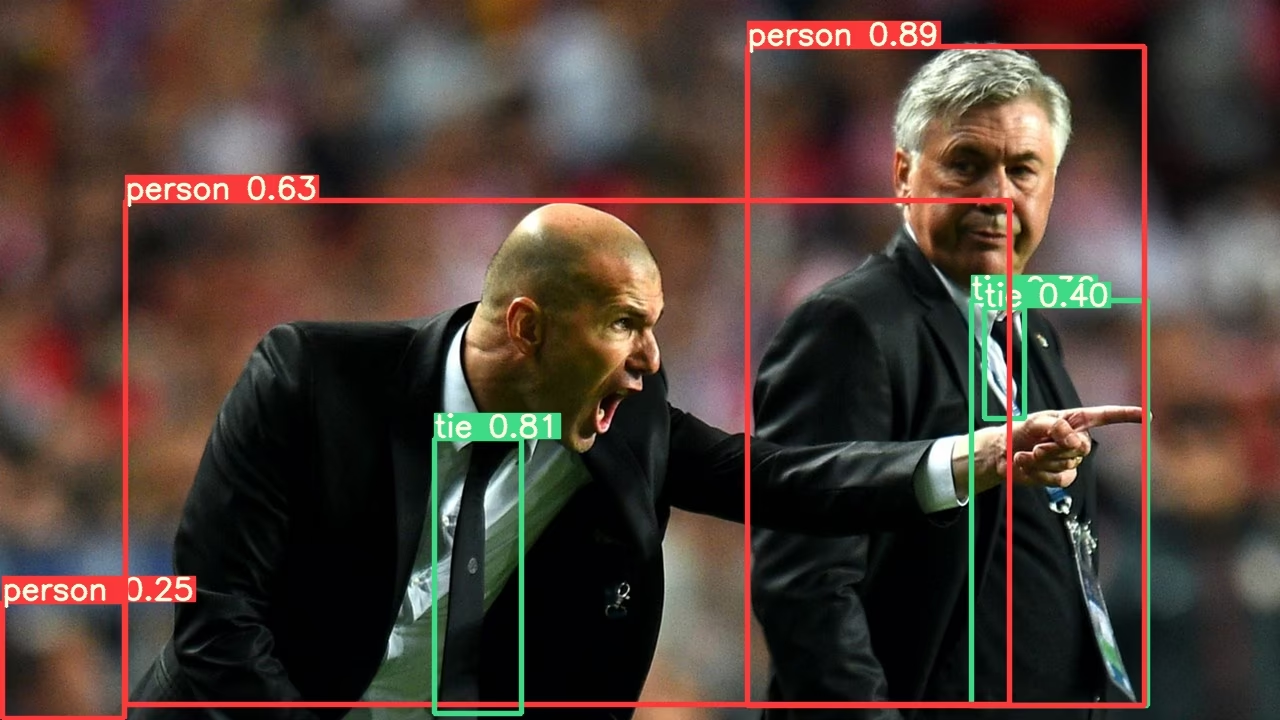
PyTorch Hub TTA#
TTA는 모든 YOLOv5 PyTorch Hub 모델에 자동으로 통합되어 있으며, 추론 시 augment=True을 전달해 사용할 수 있습니다.
import torch

# Model
model = torch.hub.load("ultralytics/yolov5", "yolov5s")  # 또는 yolov5m, yolov5x, custom

# Images
img = "https://ultralytics.com/images/zidane.jpg"  # 또는 file, PIL, OpenCV, numpy, multiple

# Inference
results = model(img, augment=True)  # <--- TTA 추론

# Results
results.print()  # 또는 .show(), .save(), .crop(), .pandas() 등입니다.
사용자 지정#
YOLOv5 forward_augment() 메서드에서 적용할 TTA 연산을 사용자 지정할 수 있습니다.
테스트 시 증강의 장점#
테스트 시 증강은 객체 탐지 작업에 다음과 같은 주요 이점을 제공합니다:
- 정확도 향상: 위 결과에서 보듯이 TTA를 사용하면 mAP가 0.504에서 0.516으로, mAR이 0.681에서 0.696으로 증가합니다.
- 소형 객체 탐지 개선: TTA는 특히 소형 객체 탐지 성능을 높이며, 작은 영역의 AP가 0.351에서 0.361로 향상됩니다.
- 강건성 향상: 각 이미지의 여러 변형을 테스트하면 시야각, 조명 및 기타 환경 요인의 영향을 줄일 수 있습니다.
- 간단한 구현: 기존 명령에
--augment플래그를 추가하기만 하면 됩니다.
이 방법은 추론 시간이 늘어난다는 단점이 있으므로, 속도보다 정확도를 우선시하는 애플리케이션에 TTA가 더 적합합니다.
지원 환경#
Ultralytics는 프로젝트를 시작할 수 있도록 CUDA, cuDNN, Python, PyTorch와 같은 필수 종속성이 사전 설치된 다양한 즉시 사용 가능한 환경을 제공합니다.
- 무료 GPU 노트북:



- Google Cloud: GCP 빠른 시작 가이드
- Amazon: AWS 빠른 시작 가이드
- Azure: AzureML 빠른 시작 가이드
- Docker: Docker 빠른 시작 가이드

프로젝트 상태#

이 배지는 모든 YOLOv5 GitHub Actions 지속적 통합(CI) 테스트가 성공적으로 통과했음을 나타냅니다. 이 CI 테스트는 학습, 검증, 추론, 내보내기, 벤치마크 등 여러 주요 측면에서 YOLOv5의 기능과 성능을 철저히 확인합니다. 테스트는 24시간마다 그리고 새 커밋이 있을 때마다 실행되어 macOS, Windows, Ubuntu에서 일관되고 안정적으로 작동하는지 확인합니다.
자주 묻는 질문#
각 이미지를 세 가지 크기와 좌우 반전으로 처리하고, NMS 전에 예측 결과를 병합합니다. 추가 시점은 연산량을 늘리는 대신 재현율을 높이며, 특히 소형 객체에서 효과적입니다.
일반 추론보다 약 2~3배 더 오래 걸립니다. 비용의 일부는 더 큰
--img크기에서 발생하므로, 크기를 늘리기 전에 GPU 메모리가 충분한지 확인하세요.640 대신 832처럼 해상도를 약 30% 높이면 다중 스케일 처리에서 활용할 수 있는 세부 정보가 늘어나며, 위 벤치마크에서 가장 좋은 결과를 얻었습니다.
증강된 순방향 패스는 PyTorch
DetectionModel에 포함되어 있으므로,--augment은.pt체크포인트에만 영향을 줍니다. 내보낸 ONNX, TensorRT 및 기타 형식에서는 이를 무시합니다.


댓글
질문을 하거나 결과를 공유하거나 다른 사람을 도와주세요.