Meituan YOLOv6
Overview#
Meituan YOLOv6, released in 2022, is an object detection model that offers a strong balance between speed and accuracy, making it a popular choice for real-time applications. This model introduces several notable enhancements on its architecture and training scheme, including the implementation of a Bi-directional Concatenation (BiC) module, an anchor-aided training (AAT) strategy, and an improved backbone and neck design for high accuracy on the COCO dataset.
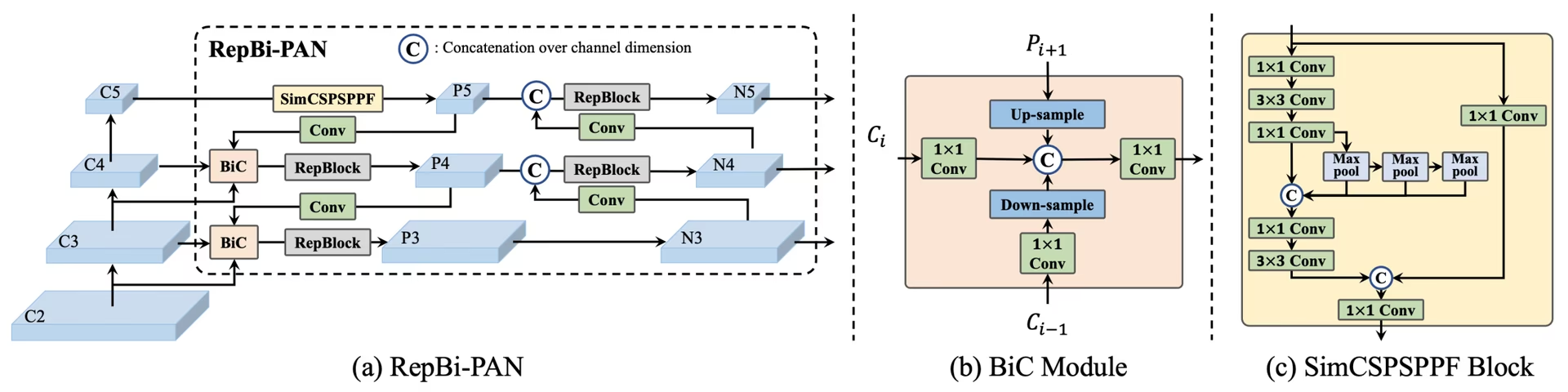 Overview of YOLOv6. Model architecture diagram showing the redesigned network components and training strategies that have led to significant performance improvements. (a) The neck of YOLOv6 (N and S are shown). Note for M/L, RepBlocks is replaced with CSPStackRep. (b) The structure of a BiC module. (c) A SimCSPSPPF block. (source).
Key Features#
- Bidirectional Concatenation (BiC) Module: YOLOv6 introduces a BiC module in the neck of the detector, enhancing localization signals and delivering performance gains with negligible speed degradation.
- Anchor-Aided Training (AAT) Strategy: AAT combines the benefits of both anchor-based and anchor-free paradigms without compromising inference efficiency.
- Enhanced Backbone and Neck Design: By deepening YOLOv6 to include another stage in the backbone and neck, this model achieved strong performance on the COCO dataset at high-resolution input when released.
- Self-Distillation Strategy: A new self-distillation strategy is implemented to boost the performance of smaller models of YOLOv6, enhancing the auxiliary regression branch during training and removing it at inference to avoid a marked speed decline.
Performance Metrics#
YOLOv6 provides various pretrained models with different scales:
- YOLOv6-N: 37.5% AP on COCO val2017 at 1187 FPS with NVIDIA T4 GPU.
- YOLOv6-S: 45.0% AP at 484 FPS.
- YOLOv6-M: 50.0% AP at 226 FPS.
- YOLOv6-L: 52.8% AP at 116 FPS.
- YOLOv6-L6: State-of-the-art accuracy in real-time.
YOLOv6 also provides quantized models at different numerical precisions and models optimized for mobile platforms.
Usage Examples#
This example provides simple YOLOv6 training and inference examples.
YOLOv6 *.yaml files can be passed to the YOLO() class to build the corresponding model in Python:
from ultralytics import YOLO

# Build a YOLOv6n model from scratch
model = YOLO("yolov6n.yaml")

# Display model information (optional)
model.info()

# Train the model on the COCO8 example dataset for 100 epochs
results = model.train(data="coco8.yaml", epochs=100, imgsz=640)

# Run inference with the YOLOv6n model on the 'bus.jpg' image
results = model("path/to/bus.jpg")
Supported Tasks and Modes#
The YOLOv6 series offers a range of models, each optimized for object detection, covering a range of computational budgets and accuracy requirements.
| Model | Filenames | Tasks | Training | Validation | Inference | Export |
|---|---|---|---|---|---|---|
| YOLOv6-N | yolov6n.yaml | Object Detection | ✅ | ✅ | ✅ | ✅ |
| YOLOv6-S | yolov6s.yaml | Object Detection | ✅ | ✅ | ✅ | ✅ |
| YOLOv6-M | yolov6m.yaml | Object Detection | ✅ | ✅ | ✅ | ✅ |
| YOLOv6-L | yolov6l.yaml | Object Detection | ✅ | ✅ | ✅ | ✅ |
| YOLOv6-X | yolov6x.yaml | Object Detection | ✅ | ✅ | ✅ | ✅ |
This table summarizes the YOLOv6 model variants and their support for the Training, Validation, Inference, and Export modes. Ultralytics provides YOLOv6 model YAMLs only, so models are trained from scratch.
Citations and Acknowledgments#
We would like to acknowledge the authors for their significant contributions in the field of real-time object detection:
@misc{li2023yolov6,
      title={YOLOv6 v3.0: A Full-Scale Reloading},
      author={Chuyi Li and Lulu Li and Yifei Geng and Hongliang Jiang and Meng Cheng and Bo Zhang and Zaidan Ke and Xiaoming Xu and Xiangxiang Chu},
      year={2023},
      eprint={2301.05586},
      archivePrefix={arXiv},
      primaryClass={cs.CV}
}
The original YOLOv6 paper can be found on arXiv. The authors have made their work publicly available, and the codebase can be accessed on GitHub. We appreciate their efforts in advancing the field and making their work accessible to the broader community.
FAQ#
Meituan YOLOv6, released in 2022, is an object detector that balances speed and accuracy, designed for real-time applications. It features notable architectural enhancements like the Bi-directional Concatenation (BiC) module and an Anchor-Aided Training (AAT) strategy. These innovations provide substantial performance gains with minimal speed degradation, making YOLOv6 a competitive choice for object detection tasks.
The Bi-directional Concatenation (BiC) module in YOLOv6 enhances localization signals in the detector's neck, delivering performance improvements with negligible speed impact. This module effectively combines different feature maps, increasing the model's ability to detect objects accurately. For more details on YOLOv6's features, refer to the Key Features section.
You can train a YOLOv6 model using Ultralytics with simple Python or CLI commands. For instance:
Examplefrom ultralytics import YOLO # Build a YOLOv6n model from scratch model = YOLO("yolov6n.yaml") # Train the model on the COCO8 example dataset for 100 epochs results = model.train(data="coco8.yaml", epochs=100, imgsz=640)For more information, visit the Train page.
YOLOv6 offers multiple versions, each optimized for different performance requirements:
- YOLOv6-N: 37.5% AP at 1187 FPS
- YOLOv6-S: 45.0% AP at 484 FPS
- YOLOv6-M: 50.0% AP at 226 FPS
- YOLOv6-L: 52.8% AP at 116 FPS
- YOLOv6-L6: State-of-the-art accuracy in real-time scenarios
These models are evaluated on the COCO dataset using an NVIDIA T4 GPU. For more on performance metrics, see the Performance Metrics section.
Anchor-Aided Training (AAT) in YOLOv6 combines elements of anchor-based and anchor-free approaches, enhancing the model's detection capabilities without compromising inference efficiency. This strategy leverages anchors during training to improve bounding box predictions, making YOLOv6 effective in diverse object detection tasks.
YOLOv6 supports the Training, Validation, Inference, and Export modes.


Comments14
Ask a question, share your results, or help someone else.
AkaashSamson
Hey, So I have actually trained my YOLOv6 model with the original repo, now I have a .pt file. using this file is there any way of getting my model in ultralytics format. mainly I want to run the ultralytics validation on my model as the original repo eval.py doesn't provide sufficient metrics.
 Glenn JocherUltralytics
Direct conversion of Meituan YOLOv6 .pt checkpoints to Ultralytics format isn’t supported; to use Ultralytics metrics, either train/fine-tune the matching yolov6*.yaml in Ultralytics and run validation, or export your Meituan model’s detections to COCO JSON and compute P/R via the COCO API; the metrics Ultralytics reports are outlined in the Val mode docs at Ultralytics validation.
tino926(edited)
I want to replicate your training accuracy of the YOLOv6-N model. Is this the correct command:
yolo train model=yolov6n.yaml data=coco.yaml epochs=400 optimizer=SGD cos_lr=True lr0=0.02? According to YOLOv6's repo https://github.com/meituan/YOLOv6/blob/main/docs/Train_coco_data.md, they have to use anchor-aid and distilling techniques to achieve this accuracy. But I can't find the corresponding parameters in ultralytics'.- Glenn JocherUltralytics
@tino926 to achieve the training accuracy of the YOLOv6-N model as described in the YOLOv6 repository, you would indeed use the anchor-aided training (AAT) and self-distillation strategies, which are not explicitly parameterized in the Ultralytics YOLO interface. Ensure you are using the latest version and check the YOLOv6 documentation for any updates on incorporating these strategies. For precise replication, consider following the original YOLOv6 GitHub instructions alongside Ultralytics for any additional settings or configurations.
@glenn-jocher, thanks for your response.
I apologize if I misunderstood your explanation, as I am not a native English speaker. Could you please clarify if the phrase "which are not explicitly parameterized in the Ultralytics YOLO interface" means that AAT and self-distillation cannot currently be implemented solely through the Ultralytics YOLO interface? Therefore I should manually add anchor branches and implement distillation with additional code?
- Glenn JocherUltralytics
Thank you for your question. Yes, that's correct. The current Ultralytics YOLO interface does not explicitly support anchor-aided training (AAT) and self-distillation, so you would need to implement these strategies manually by modifying the code to include anchor branches and self-distillation techniques. If you need further guidance on implementing these, referring to the original YOLOv6 repository might be helpful.
kadirnar
Does ultralytics library support yolov6 model?
ModuleNotFoundError: No module named 'yolov6'
 Paula DerrengerUltralytics(edited)
@kadirnar hi there!
Yes, the Ultralytics library does support YOLOv6 models. It seems like you might be encountering a
ModuleNotFoundErrorbecause the YOLOv6 model isn't being recognized. Let's ensure you're using the latest versions oftorchandultralytics. Please update your packages and try again:pip install --upgrade torch ultralyticsHere's a quick example to get you started with YOLOv6 using the Ultralytics library:
Python
from ultralytics import YOLO

# Load a YOLOv6n model
model = YOLO("yolov6n.yaml")

# Train the model on the COCO8 example dataset for 100 epochs
results = model.train(data="coco8.yaml", epochs=100, imgsz=640)

# Run inference with the trained model on an image
results = model("path/to/bus.jpg")
CLI
# Train YOLOv6n model
yolo train model=yolov6n.yaml data=coco8.yaml epochs=100 imgsz=640

# Run inference with your trained weights
yolo predict model=path/to/best.pt source=path/to/bus.jpg
If you continue to face issues, please provide a minimum reproducible example so we can better assist you. You can refer to our guide on creating a minimum reproducible example here: Minimum Reproducible Example.
Feel free to reach out if you have any more questions! 😊
akhilesh99sharma
There are AP and AR values for results but not precision and recall. I need to compare precision and recall values for different YOLO versions (v5,v6,v7 etc.) on my custom dataset. How to get precision and recall values for YOLOv6 evaluation?
- Paula DerrengerUltralytics(edited)
Hey there! 👋
You don't need to compute precision and recall by hand: validation already reports them. After
model.val(), the results object holds them directly:from ultralytics import YOLO # Load your trained model model = YOLO("path/to/your/custom-yolov6-model.pt") # Run validation results = model.val(data="path/to/your/dataset.yaml") print(f"Precision: {results.box.mp}, Recall: {results.box.mr}") # mean over all classes print(results.box.p, results.box.r) # per-class precision and recallHope this helps, and happy comparing across YOLO versions! 🚀
Hello , I tried but was still not able to get these values, could you please help me with that?
- Paula DerrengerUltralytics(edited)
Hey there! 😊
Precision and recall are reported by Ultralytics validation, so you don't need to count TP/FP/FN yourself. After
results = model.val(data="path/to/dataset.yaml"), useresults.box.mp(mean precision),results.box.mr(mean recall), andresults.box.p/results.box.rfor per-class values.If you need them computed from raw counts, precision = TP / (TP + FP) and recall = TP / (TP + FN), where the counts come from matching predictions to ground-truth boxes at an IoU threshold.
Hope this helps! Let me know if there's anything else I can do for you. Happy modeling! 🚀
Hello, I tried doing it but was not able to do so. I get the predictions json file in the val folder but don't know how to compare it with the labels to get TP, FP etc. Can you please help me with that? I need to compare results of YOLOv6 with v8, v9 but I am not getting precision and recall values in v6 , I get average precision and average recall
- Paula DerrengerUltralytics(edited)
@akhilesh99sharma hey there! 🌞
You can get precision and recall directly from validation without processing the predictions JSON yourself. After
results = model.val(data="path/to/dataset.yaml"), useresults.box.mp(mean precision),results.box.mr(mean recall), andresults.box.p/results.box.rfor per-class values.If you still need TP, FP and FN counts from the saved predictions JSON, you will have to match predicted boxes to ground-truth boxes per image using an IoU threshold. The confusion matrix saved in the run folder (
confusion_matrix.png, ormodel.val(plots=True)) also shows these counts per class.For comparing across YOLO versions, run each model with consistent settings on your custom dataset and read the same metrics from each.
I hope this simplifies the process for you! 🚀 Let me know if you need further assistance.